

A researcher opens a literature search and finds four thousand papers that might matter, and that flood is the problem the best ai research tools for academics are built to solve. A literature review is not a pile of PDFs. It is a defensible account of what is known, what is contested and what is missing, and a tool that only returns more papers has made the problem worse. The right tool narrows the field to the papers worth reading, and it shows its work so every claim can be checked.
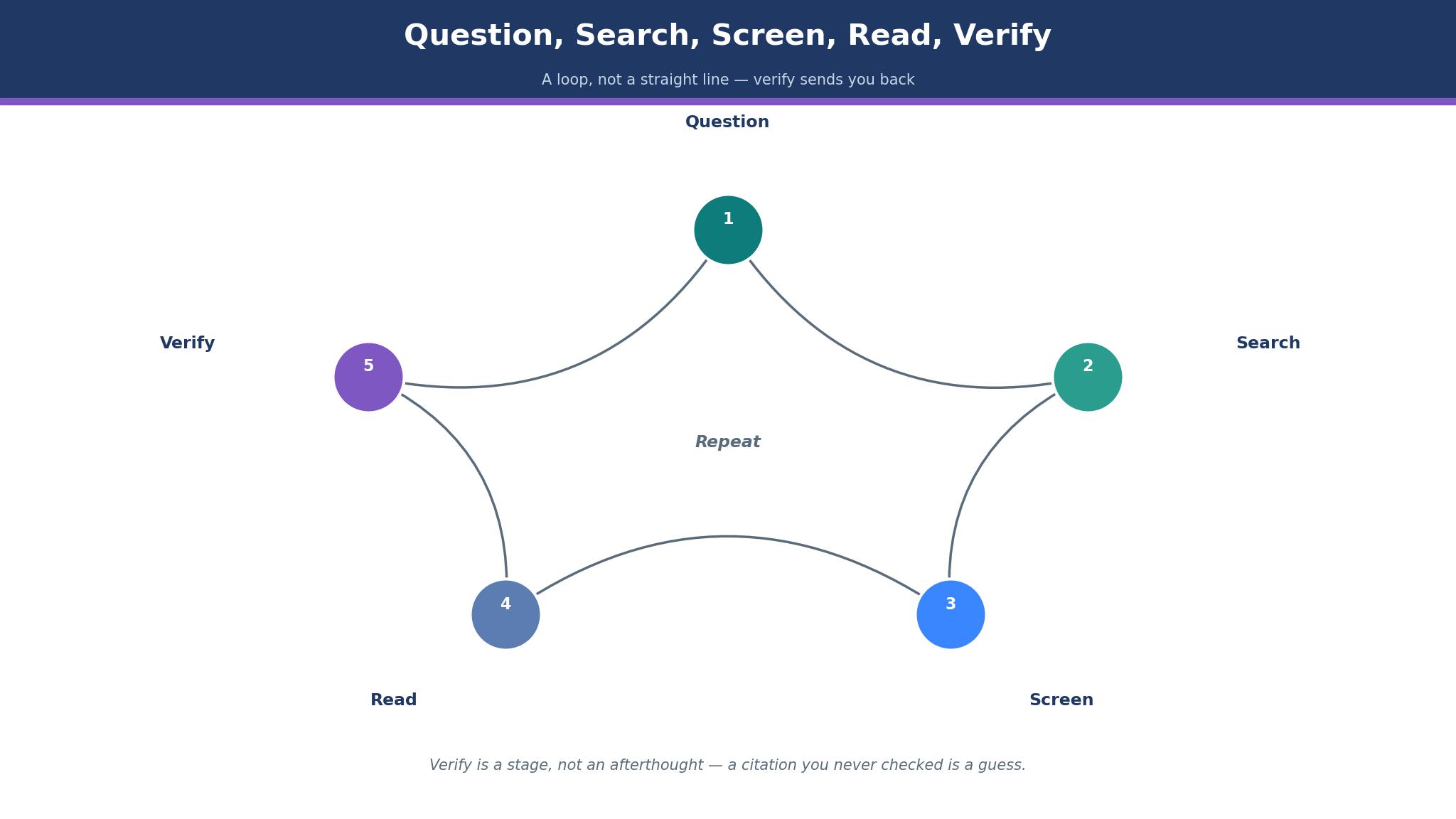
The workflow runs in five steps. The researcher states a question, the tool searches the literature and returns candidate papers, the researcher screens them against clear criteria, the shortlist is read and its evidence extracted, and the citations are checked against the original sources before writing begins. When any step is skipped, the review rests on papers nobody verified, and a single invented citation can damage a paper that took months to write.
Elicit leads this guide because it carries a question through screening and extraction in one place, with tables that pull the same data point from dozens of papers. Consensus follows for researchers who want a direct answer to a focused question with cited papers behind it, and the other eight cover citation checking, mapping, reading and reference management. Every tool in this guide was checked live in November 2026, the prices shown are the vendor list prices or figures the text calls reported, and the checkout page is the final authority.
The Literature Search Has a Bottleneck
The bottleneck in a literature review is not finding papers, because a keyword search returns thousands in seconds, and the bottleneck is deciding which ones deserve an hour of reading. A researcher who reads in publication order wastes weeks on papers that add nothing, while a researcher who screens well can cut four thousand candidates to forty worth reading. The best ai research tools for academics earn their place by making screening fast and honest, with relevance ranking, filters and summaries that let a researcher reject a paper in seconds.
Extraction is the second bottleneck. A systematic review needs the same fields pulled from every paper, such as sample size, method and main finding, and copying those fields by hand across fifty papers takes days. The tools in this guide were judged on whether they pull structured data into a table the researcher can check, because a table that must be rebuilt by hand is not a shortcut.
How to Tell a Real Citation From a Guess
A citation is only as good as the paper behind it, and an AI tool that invents references is worse than a tool that returns nothing. The test is simple, and every claim the tool makes should link to a real paper with a DOI or a PDF the researcher can open. A tool that grounds its answers in an indexed database of real papers carries low fabrication risk, while a tool that writes freely from its own training data can produce references that look real and do not exist.
Citation context is the second test. A paper that cites a finding is not the same as a paper that supports it, and a citation can mention, support or contradict the claim it sits beside. The tools in this guide were judged on whether they show the citing sentence and classify its stance, because a review that counts citations without reading them will overstate what the literature actually says.
The 10 Tools at a Glance
| Tool | Main job | Best for | Starting price |
|---|---|---|---|
| Elicit | Search, screen and extract | Systematic reviews | Free, Pro from 49 dollars a month |
| Consensus | Cited answers to questions | Focused questions | Free, Pro from 10 dollars a month |
| Scite | Citation context checks | Verifying claims | From 12 dollars a month |
| Semantic Scholar | Free scholarly search | Free discovery | Free |
| Research Rabbit | Citation network maps | Mapping a field | Free, RR+ from 10 dollars a month |
| Connected Papers | Visual paper graphs | Finding related work | Free, paid from 6 dollars a month |
| Litmaps | Living citation maps | Tracking new citations | Free, Pro from 10 dollars a month |
| SciSpace | Reading and PDF chat | Reading dense papers | Free, Premium from 12 dollars a month |
| Zotero | Reference management | Organising a library | Free |
| Undermind | Deep literature search | Hard discovery questions | Pricing on the vendor site |
Best Pick by Job
| Job type | First pick | Second tool | Why this pair works |
|---|---|---|---|
| Systematic review | Elicit | Scite | Elicit extracts the table and Scite checks every citation |
| Quick question | Consensus | Semantic Scholar | Consensus answers with citations and Semantic Scholar adds free depth |
| Mapping a field | Research Rabbit | Connected Papers | Research Rabbit expands the network and Connected Papers adds the graph |
| Reading papers | SciSpace | Zotero | SciSpace explains the dense parts and Zotero keeps the library |
| Free start | Semantic Scholar | Zotero | Semantic Scholar searches free and Zotero organises free |
The right research tool depends on the stage of the work, so two researchers can buy the same product and reach opposite verdicts. A systematic review needs extraction tables, while a quick question needs a cited answer and nothing more. A product that handles the secondary need competently still lets the researcher down when it fumbles the papers that fill the review. Choose the first tool for the stage of the work that hurts most, and keep the second ready for the papers the first cannot organise.
The same logic governs spending. A graduate student can run a full review on free tools, since Semantic Scholar, Research Rabbit and Zotero cost nothing, and one paid tool matched to the painful stage is enough. A research group with a grant can afford Elicit Pro and Scite together, and the cost is small beside the weeks saved. The best ai research tools for academics are judged on the time they save at real review size, not on the entry price.
How to Judge the best ai research tools for academics
Start with one real literature question, because that is where a tool either earns its fee or wastes it. Run the same question through each tool, take the first twenty papers returned, and count how many are genuinely relevant, how many are duplicates, and how many link to a real paper that can be opened. A good tool returns a shortlist that survives opening, while a weak one returns a list that falls apart on the second click. Check whether the tool explains why each paper was chosen, since a ranking without a reason cannot be trusted.
Next, test the citation check on a claim the review depends on. Take one finding, ask the tool whether later papers support or contradict it, and read the citing sentences yourself. The best ai research tools for academics show the sentence and its stance, because a count of citations without context tells a researcher nothing about what the field actually believes. Look for tools that classify citations as supporting, mentioning or contrasting.
Then check the export path into the reference manager. A shortlist that cannot move into Zotero without retyping is a shortlist that will be rebuilt by hand, and a review that lives in a tool the researcher cannot leave is a review at risk. Ask whether the tool exports RIS or BibTeX, since a clean export is the difference between a workflow and a trap.
The 10 Tools in Detail
Screening, extraction and verifiable citations set the order below, so the tool that carries a review furthest leads the list.
1. Elicit
Elicit is the strongest pick for a systematic review because it carries a question from search through screening to extraction in one workspace. The researcher states a question, Elicit searches across more than 130 million papers, and the extraction tables pull the same fields from dozens of studies at once, which is the work that takes days by hand. The Basic plan is free, Pro costs 49 dollars a user a month on annual billing, and Scale sits above it for teams.
The drawback is the price and the summary risk. Pro at 49 dollars a month is far above the older 10 and 12 dollar figures that still appear in many price lists, so a buyer should confirm the current plan on the vendor site before budgeting. The paper list itself is grounded in real records, but the AI-written summaries need checking, because a summary can overstate what a paper actually found.
Elicit suits a researcher running a review with dozens of papers. It fits a PhD student building a literature chapter, a team running a systematic review, and anyone who needs the same data point pulled from every study. The extraction table is the feature that matters, because a review that needs structured data from fifty papers cannot be built by hand in a week.
Run one real review question through Elicit and check the extraction table against five papers read in full. If the table matches the papers, Elicit will carry the review.
2. Consensus
Consensus is the pick for a researcher who wants a direct answer to a focused question, with cited papers behind every claim. The tool searches more than 200 million scholarly articles, and its answers synthesise findings across papers while linking each claim to its source, so a researcher can verify the answer in minutes. The free plan covers unlimited paper searches with a monthly allowance of Pro messages, and Pro starts from 10 dollars a month, though older listings show 20 dollars, so the current figure should be confirmed on the vendor site.
The drawback is the answer risk and the depth. The sources are real, but the synthesised answer can smooth over disagreement between papers, and a researcher who takes the answer without reading the underlying studies will miss the nuance. The tool is best for a focused question, and a broad literature search needs a mapping tool beside it.
Consensus suits a researcher starting a new topic. It fits a student who needs to know what the evidence says, a clinician checking a treatment question, and anyone who wants a fast answer with citations to check. The cited answer is the feature that matters, because an answer with sources can be verified and an answer without them cannot.
Ask one real question from the current project and open three of the papers behind the answer. If the papers support what the answer claims, Consensus fits the workflow.
3. Scite
Scite is the pick for verifying a claim, because it classifies citation statements as supporting, mentioning or contrasting, and it shows the citing sentence in context. A researcher can take one finding and see whether later papers built on it, ignored it or argued against it, which is the check that separates a solid claim from a shaky one. Basic costs 12 dollars a month on annual billing, with Pro above it, though some listings show 20 dollars for an individual plan, so the figure should be confirmed on the vendor site.
The drawback is the scope and the library question. Scite is a verification tool rather than a discovery tool, so a researcher still needs a search tool to find papers in the first place, and the individual price is worth checking against the university library, because many institutions already license Scite centrally. A researcher who pays for Scite personally may be duplicating a subscription the library already holds.
Scite suits a researcher who must defend a claim. It fits a scholar writing a review, a team checking a controversial finding, and anyone whose paper depends on a citation holding up. The citation classification is the feature that matters, because a claim that later papers contradict should not sit in a review unchallenged.
Take one central claim from the current paper and check its citation record in Scite. If the supporting and contrasting papers are both visible, Scite has done the job it was built for.
4. Semantic Scholar
Semantic Scholar is the free foundation every researcher should use, because it is a non-profit service from the Allen Institute for AI that indexes more than 200 million papers and charges nothing. The search returns one-line TLDR summaries on results pages, highlights influential citations that actually built on a paper rather than ceremonial mentions, and offers a free public API that half the other tools in this guide quietly use. There is no paid tier, and no account is needed to search.
The drawback is the depth of the AI layer. Semantic Scholar is a discovery service rather than a review workspace, so it offers no extraction tables, no PDF chat and no project organisation beyond saved papers. A researcher who needs to pull data across fifty papers will need Elicit beside it, and the summaries, while useful, are short by design.
Semantic Scholar suits every researcher as the first stop. It fits a student with no budget, a scholar checking a citation quickly, and any team that wants a free baseline before paying for anything. The free API is the feature that matters, because a search service that costs nothing and powers half the field is one every researcher should know.
Run the current literature question through Semantic Scholar and save the ten most relevant papers. If the shortlist holds up against the paid tools, the free foundation is enough for discovery.
5. Research Rabbit
Research Rabbit turns a seed set of papers into expanding collections of related work, and it is the most enjoyable mapping tool in this guide. A researcher starts with a few key papers, and the tool finds similar work, builds visual networks and sends alerts when new papers cite the collection. The free plan covers unlimited searches with up to 50 seed articles, and RR+ starts from 10 dollars a month billed annually for 300 seeds, though some listings show 12.50 dollars a month, so the figure should be confirmed on the vendor site.
The drawback is the freemium change and the ownership. Research Rabbit moved from fully free to freemium in 2026, so the free plan now caps seeds, and Litmaps acquired the tool in May 2025, which means the roadmap now sits with another company. A researcher who relied on the old unlimited free tier should check the current limits before planning a large review.
Research Rabbit suits a researcher mapping a new field. It fits a PhD student who needs to know the landscape, a scholar following a fast-moving topic, and anyone who thinks in networks rather than lists. The expanding collection is the feature that matters, because a field mapped from seed papers grows in the right direction.
Seed the tool with five key papers from the current project and watch the collection grow. If the new papers are relevant and the alerts keep coming, Research Rabbit fits the workflow.
6. Connected Papers
Connected Papers builds a visual graph of related work from a single seed paper, and one graph is often enough to sell a researcher on the tool. The graph shows similar papers, their connections and the most influential work in the area, which helps a researcher see the structure of a field at a glance. The free tier covers limited graphs, and paid plans start from 6 dollars a month on annual billing, which makes it one of the cheapest paid tools in this guide.
The drawback is the single-paper view and the limits. Connected Papers works from one seed paper at a time, so a broad topic needs several graphs, and the free tier runs out quickly for a researcher mapping a large field. The tool is a discovery aid rather than a review workspace, and it offers no extraction or citation checking.
Connected Papers suits a researcher who wants to see a field at a glance. It fits a student starting a new topic, a scholar checking what surrounds a key paper, and anyone who thinks visually. The similarity graph is the feature that matters, because a field seen as a map is easier to navigate than a field seen as a list.
Build a graph from the most important paper in the current project and read the three papers closest to the centre. If they belong in the review, Connected Papers has done its job.
7. Litmaps
Litmaps builds living citation maps that update when new papers cite the seed articles, so a researcher can watch a field grow rather than re-running a search every month. The free plan covers up to 20 inputs and two maps, and Pro costs 10 dollars a month, adding unlimited inputs, articles, maps and alerts. The tool also acquired Research Rabbit in 2025, and the two products now share infrastructure.
The drawback is the map limit and the overlap. The free plan’s two maps run out fast for a researcher tracking several topics, and a user who already runs Research Rabbit may find the two tools cover similar ground. The maps are excellent for tracking, but a researcher who needs extraction tables will still need Elicit.
Litmaps suits a researcher tracking a field over time. It fits a scholar with a long-running project, a team that needs alerts when new work appears, and anyone who wants the literature to come to them. The living map is the feature that matters, because a review that updates itself stays current without a monthly search.
Build a map from the seed papers of the current project and check the alerts after a month. If new papers arrive that belong in the review, Litmaps fits the workflow.
8. SciSpace
SciSpace is the pick for reading dense papers, because it explains highlighted passages, chats with multiple PDFs at once, and helps a researcher draft scholarly work from the literature. The free tier covers basic use, and Premium costs 12 dollars a month on annual billing, with Teams at 20 dollars a user. A researcher who struggles with a methods section can highlight it and get a plain explanation in seconds.
The drawback is the chat risk and the credit limits. The literature search is grounded in real papers, but the open chat can still produce unverified text, so every claim needs checking against its linked source. The Premium plan runs on credits that expire, and a heavy reader can hit the fair-use limits faster than expected.
SciSpace suits a researcher who reads a lot of dense work. It fits a student facing a stack of methods-heavy papers, a scholar drafting a review from many sources, and anyone who wants a reading companion beside the PDF. The highlight-to-explain feature is the feature that matters, because a methods section understood in minutes is a paper read rather than a paper skipped.
Upload three dense papers from the current project and ask SciSpace to explain their methods. If the explanations match the papers, SciSpace fits the reading workflow.
9. Zotero
Zotero is the reference manager every researcher should own, because it is free, open and built to organise a library for years. The tool saves papers from the browser, stores PDFs, generates citations in thousands of styles, and syncs across devices, so a library built in year one is still usable in year five. There is no paid tier for the core tool, and the data stays under the researcher’s control.
The drawback is the AI gap. Zotero is a manager rather than an AI research tool, so it offers no search, no extraction and no chat, and a researcher who wants AI features needs a plugin or a second tool. The interface is functional rather than beautiful, and a new user needs an hour to learn the workflow.
Zotero suits every researcher as the library. It fits a student building a first library, a scholar with a thousand papers to organise, and any team that wants its references in an open format. The free open library is the feature that matters, because a reference collection that cannot be exported is a collection at risk.
Save ten papers from the current project into Zotero and generate a bibliography in the target journal style. If the citations come out clean, Zotero can hold the library for the whole project.
10. Undermind
Undermind is the pick for a hard discovery question, because it runs deep searches that go beyond keyword matching and returns papers a normal search misses. The tool is built for researchers whose question does not fit a simple query, and it explains its reasoning so the search can be refined. The price depends on usage, and a free tier lets a researcher test the depth before paying.
The drawback is the visibility and the price. Undermind is less widely used than Elicit or Consensus, so a buyer has fewer independent reports to lean on, and the pricing is not published plainly, which makes a quick comparison harder. A researcher who needs a transparent price list will find the sales-led approach slow.
Undermind suits a researcher with a question that keyword search cannot answer. It fits a scholar in a niche field, a team hunting for a paper that should exist but does not surface, and anyone who values search depth over a familiar brand. The deep search is the feature that matters, because a paper found nowhere else can change a review.
Run the hardest question from the current project through Undermind and compare the papers with the results from Elicit. If Undermind surfaces a paper the others missed, it has earned a place in the workflow.
Review Habits That Protect a Paper
The most expensive habit is trusting a summary without opening the paper. An AI summary is a guide to what a paper might say, and a review built on summaries alone will carry errors that a single careful reading would have caught. Open every paper that supports a central claim, read the methods and the results, and cite only what was actually read. The best ai research tools for academics make verification fast, because a claim with a link to its source can be checked in seconds.
A second habit is keeping the search reproducible. A review should record the question, the tools, the date and the screening criteria, so another researcher can repeat the search and reach the same shortlist. A tool that hides its method makes that impossible, and a review that cannot be repeated is a review that cannot be defended. Save the search strings and the screening log beside the paper.

Frequently Asked Questions
Which AI research tool is best for a literature review?
Elicit is the best starting point for a literature review, because it covers search, screening and extraction in one workspace from 49 dollars a user a month on Pro. Consensus is the better pick when the researcher needs a quick cited answer, and Semantic Scholar is the best free discovery layer. A researcher should test the top two with a real question before paying.
How much do AI research tools cost per month?
A research tool costs between free and 49 dollars a month for an individual, with the median around 10 to 12 dollars on a paid plan. Semantic Scholar, Research Rabbit and Zotero are free, while Litmaps Pro costs 10 dollars, SciSpace Premium costs 12 dollars, and Elicit Pro costs 49 dollars. Check the university library first, since many tools are already licensed centrally.
Can AI tools invent citations?
Yes, a tool that writes freely can invent references that look real and do not exist, which is why every citation must be checked against the original paper. Tools grounded in an indexed database, such as Semantic Scholar, Elicit and Consensus, carry lower fabrication risk, because they return real records. Open the paper through its DOI or PDF link before citing it, and never trust a reference that cannot be opened.
Is Elicit or Consensus better?
Elicit is better for a systematic review, because its extraction tables pull structured data from dozens of papers at once. Consensus is better for a focused question, because it answers directly with cited papers behind the answer. A researcher running a review should test Elicit first, while a researcher checking a single question should test Consensus first.
What is the cheapest good research tool?
Semantic Scholar is the cheapest good tool, because it is free and indexes more than 200 million papers with useful summaries. Research Rabbit is the next best free pick for mapping a field, and Zotero is the best free reference manager. A graduate student can run a full review on free tools and add one paid tool only when a specific stage hurts.
Do universities provide these tools?
Many universities license Scite, Elicit, SciSpace and similar tools centrally, and the library subscriptions page may already hold access to half this guide. A researcher should check the library before paying personally, since a personal subscription can duplicate an institutional one. A student discount also applies on several tools, including Consensus, which offers a 40 percent student discount.
The Verdict on AI Research Tools for Academics
Elicit takes the top spot because it carries a review furthest. The search finds the papers, the screening narrows them, and the extraction table pulls the data that takes days by hand, which is the work a researcher actually wants to skip. The price is the highest in this guide, but the time saved on a real review justifies it, and the best ai research tools for academics are the ones that shorten the review without weakening it.
Consensus is the pick for a focused question, Semantic Scholar is the pick for free discovery, and Scite is the pick for verifying claims. The best ai research tools for academics are not the ones with the longest feature list, they are the ones that return papers a researcher can open, check and cite with confidence.
Choose by the stage of the work first, by verification second and by price third. Run one real literature question through the top two choices, check every citation against its source, and set a review date. A researcher that picks this way will spend less time searching and more time reading the papers that actually matter.