
A small fashion brand has eight weeks to take a collection from sketch to sample, and the fabric, the fit and the photos all have to be right the first time, and that short clock is the problem the best ai fashion design tools for small fashion brands are built to solve.
A big brand can afford three rounds of physical samples and a team of pattern makers, while a small brand pays for every sample out of a thin margin and cannot afford to remake a garment that does not fit. The tool is not there to replace the designer. It is there to test the fit on screen, grade the pattern, and produce the photos before a single piece of fabric is cut.
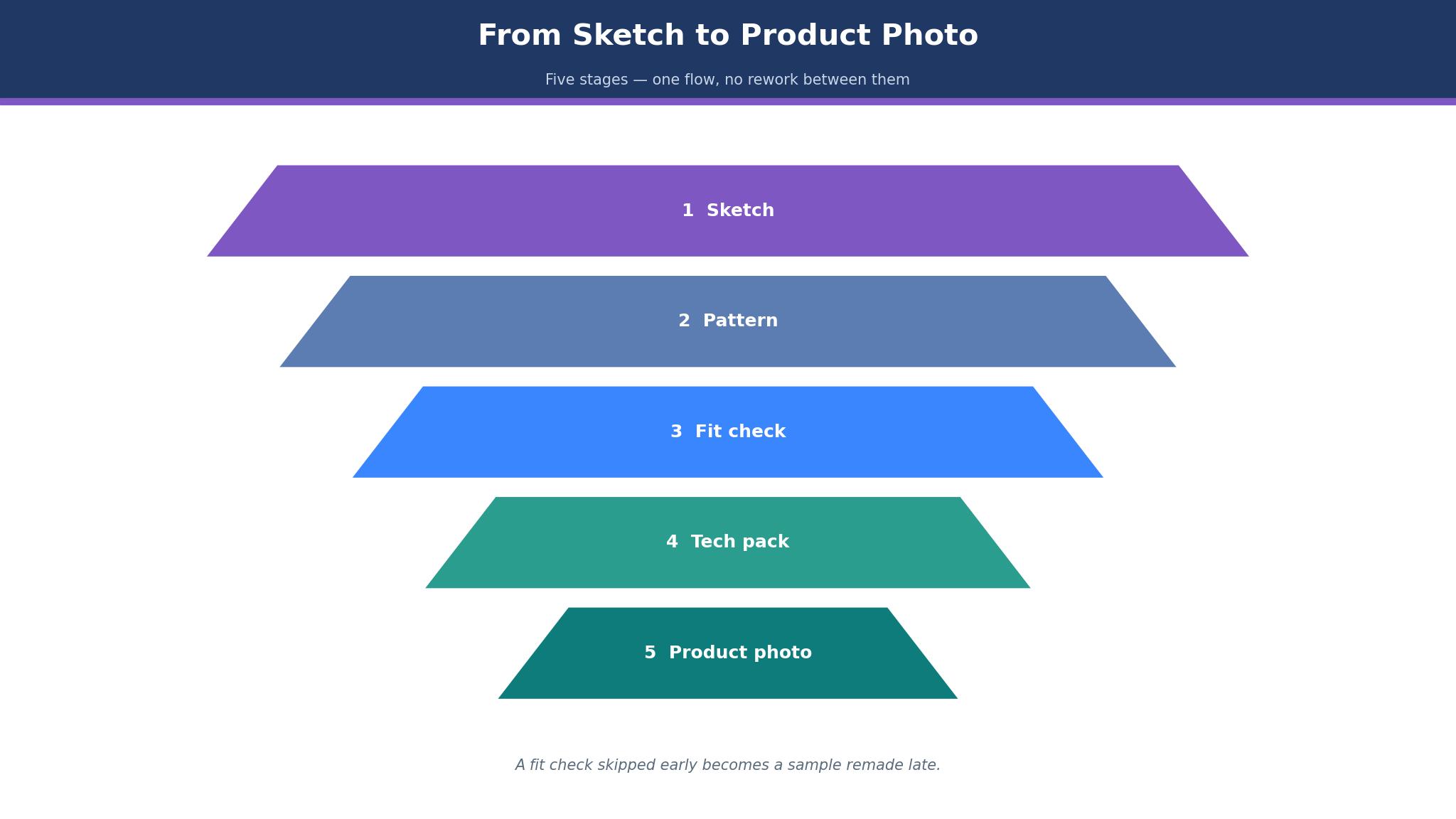
The workflow runs in five steps. The designer sketches or describes the garment, the tool drafts the pattern or the 3D sample, the fit is checked on a virtual model, the tech pack goes to the factory, and the product photos are made from the same digital garment. When any step is weak, the brand falls back to physical samples, and each round costs weeks the season does not have.
CLO 3D leads this guide because it is the standard for 3D garment design and fit, with pattern drafting, cloth simulation and an AI studio in one window. Browzwear follows for teams that need production-scale 3D development, and the other eight cover patterns, sketches, AI imagery and factory-ready CAD. The ten tools were all live in November 2026, the prices are the vendor list prices unless the text flags a figure as reported, and the vendor site is the place to confirm the current number.
A Small Brand Designs on a Short Clock
A small brand runs on a calendar that a large brand would call impossible, because the same two or three people design, source, sample and sell, and a delay in one step pushes the whole season. A physical sample takes weeks to make and ship, and a fit problem found at the sample stage costs another round. The best ai fashion design tools for small fashion brands earn their place by moving the fit check onto the screen, because a garment that fits digitally needs one sample rather than three.
Cost decides most of the result. A single physical sample can cost hundreds of dollars, and a collection of twenty styles needs twenty samples before the first sale. The tools in this guide were judged on whether they cut the sample count, because a brand that samples digitally keeps the margin it would have spent on remakes.
Samples, Patterns and Photos in One Flow
A collection lives or dies on whether the sketch, the pattern and the photo agree, and a brand that runs three separate tools will find the three versions drift apart. A sketch that promises a drape the pattern cannot cut will fail at the factory, and a photo that shows a fit the sample never had will bring returns. The tools in this guide were judged on whether they carry one garment from sketch to pattern to photo without rework, because a flow that breaks between steps costs the season.
Tech packs are the second test. A factory needs measurements, construction details and grading, and a tech pack that is incomplete will come back with questions that cost days. The tools below were judged on whether they produce a tech pack the factory can actually use, because a beautiful 3D render that cannot be made is a picture rather than a product.
The 10 Tools at a Glance
| Tool | Main job | Best for | Starting price |
|---|---|---|---|
| CLO 3D | 3D garment design and fit | Most small brands | From 50 dollars a month |
| Browzwear | Production 3D development | Technical design teams | From 75 dollars a month |
| Style3D | AI-led 3D design | Design plus AI renders | Reported from 99 dollars a month |
| Optitex | Pattern CAD and manufacturing | Production teams | Pricing on the vendor site |
| TUKAcad | Pattern making and grading | Small brands wanting pro CAD | From 19 dollars a month |
| Tailornova | Online pattern and 3D design | Beginners | From 29 dollars a month |
| Adobe Illustrator | Sketches and flats | Every designer | From 22.99 dollars a month |
| The New Black | Sketch to image and tech pack | Small brands without 3D skills | From 15 dollars a month |
| Marvelous Designer | Cloth simulation | Digital fashion and games | From 23.30 dollars a month |
| Gerber AccuMark | Pattern CAD for factories | Factory-ready patterns | Pricing on the vendor site |
Best Pick by Job
| Job type | First pick | Second tool | Why this pair works |
|---|---|---|---|
| 3D samples and fit | CLO 3D | Browzwear | CLO covers the full 3D flow and Browzwear adds production depth |
| No 3D skills | The New Black | Tailornova | The New Black turns sketches into images and Tailornova adds patterns |
| Pattern CAD on a budget | TUKAcad | Optitex | TUKAcad publishes a low price and Optitex adds factory depth |
| Sketches and flats | Adobe Illustrator | CLO 3D | Illustrator draws the flats and CLO adds the 3D fit |
| AI imagery fast | Style3D | The New Black | Style3D renders AI garments and The New Black adds the tech pack |
Look at the step that eats the most hours. A brand that must test fit in 3D wants CLO, while a brand that wants images and a tech pack without learning 3D wants The New Black, and a package that covers both halves halfway still wastes the week on the task the brand does most. Lead with the tool built for the slowest step in the workflow, and keep the other one handy for the jobs the first cannot finish.
Let the samples set the spend. A brand can start with The New Black at 15 dollars a month or TUKAcad at 19 dollars, while CLO at 50 dollars and Browzwear at 75 dollars are the professional tier. A brand should price the tool against the samples it replaces, because one avoided sample round pays for months of software. The best ai fashion design tools for small fashion brands are judged on the samples they save, not on the entry price.
How to Judge the best ai fashion design tools for small fashion brands
Start with one real garment, because that is where a design tool either earns its fee or wastes it. Take a style the brand already sells, rebuild it in the tool, and compare the digital fit with the physical sample. A good tool shows the same drape, the same tension and the same fit problems the sample showed, and a tool that makes every garment look perfect is hiding the truth. Check whether the pattern exports cleanly, since a pattern that cannot leave the tool is a pattern the factory cannot use.
Next, test the tech pack on a real factory. Send the pack the tool produces and count the questions that come back. The best ai fashion design tools for small fashion brands produce a pack a factory can cut from, because a tech pack that needs three rounds of clarification has not saved any time. Look for grading and markers, since a pattern that cannot be graded to other sizes is a pattern for one sample only.
Then check the learning curve honestly. A 3D tool that needs months of training is a tool a small brand cannot afford, and a brand with two designers should measure the time to the first usable garment rather than the feature list. Ask what the training costs and whether the vendor offers it, since a tool the team cannot learn is a tool the brand will abandon.
The 10 Tools in Detail
3D fit, pattern quality and a usable tech pack set the order below, so the tool that carries a garment furthest leads the list.
1. CLO 3D
CLO 3D is the standard for 3D garment design, because it drafts 2D patterns and sews them onto a virtual model with real fabric physics in one window. A designer can check fit, grading and drape before a single physical sample is made, and the bundled AI Studio creates textures, graphics and renders from the same garment. The Individual plan costs 50 dollars a month, with a Student plan at 25 dollars, and Enterprise is quoted by sales.
The drawback is the licence rule and the learning curve. CLO’s pricing page states that any company with two or more employees may not use the Individual plan and must take an Enterprise plan, which means a two-person brand cannot simply buy two individual seats. The tool also needs a powerful computer and weeks of training before a designer works fluently, and the ramp is the steepest in this guide.
CLO 3D suits a brand that designs in 3D every week. It fits an independent designer working alone, a small brand with a dedicated pattern maker, and anyone who needs fit, grading and digital samples in one tool. The real-time simulation is the feature that matters, because a garment that drapes correctly on screen needs fewer physical samples.
Design one real garment from the current collection in CLO and compare the digital fit with the physical sample. If the fit problems match, CLO will carry the season.
2. Browzwear
Browzwear is the enterprise counterweight to CLO, built for teams that standardise digital product creation across many styles. Its VStitcher software drafts 2D patterns and drapes them in 3D, with avatars, grading, tension maps and tech packs, and the platform adds cloud rendering and AI capabilities on the higher tiers. The Freelancer plan costs 75 dollars a month or 750 dollars a year, with Freelancer Plus at 150 dollars a month and Teams at 3,950 dollars a year.
The drawback is the price and the weight. Browzwear costs more than CLO for a single seat, and the Teams tier at 3,950 dollars a year is priced for a company rather than for a small brand. The tool is built for technical design teams, so a brand without a pattern maker will find the workflow heavy, and the learning curve is steep.
Browzwear suits a technical design team. It fits a brand with many styles per season, a team that needs accurate virtual samples for buyers, and anyone who wants the closest like-for-like alternative to CLO. The virtual twin is the feature that matters, because a sample that matches the physical garment lets a buyer approve without waiting for shipping.
Design one real garment in Browzwear and send the virtual sample to a buyer. If the buyer approves without asking for a physical sample, Browzwear fits the brand.
3. Style3D
Style3D is the AI-native option, wrapping a physics simulation engine in AI tools that automate patterns, trims and marketing renders. The platform covers 3D garment design with drape and patterns, plus AI rendering that turns a digital garment into product photos without a shoot. Pricing is reported from 99 dollars a month for basic 3D visuals, though the vendor does not publish a simple price list, so the figure should be confirmed with the vendor before budgeting.
The drawback is the price transparency and the fit. Style3D’s own materials quote conflicting figures, and the lack of a public price list makes a quick comparison hard. The platform is strong on AI rendering and automation, but a brand that needs deep pattern CAD may find CLO or Browzwear more precise.
Style3D suits a brand that wants AI renders beside 3D design. It fits a team that needs product photos fast, a brand that wants automation across patterns and trims, and anyone who values AI on top of simulation. The AI rendering is the feature that matters, because a product photo made from the digital garment saves a shoot.
Design one real garment in Style3D and compare the AI render with a real product photo. If the render is close enough to publish, Style3D fits the brand.
4. Optitex
Optitex is the production CAD pick, built for 2D and 3D pattern design, grading, automatic nesting and marker making in a manufacturing environment. The platform suits a team that works close to the factory floor, with fabric management, print and cut tools beside the pattern work. Pricing is quoted by sales, with no public list price, and a demo is needed before a quote.
The drawback is the price opacity and the audience. Optitex is built for production teams and factories, so a small brand that only needs design will find the platform heavy and the sales process slow. The lack of a published price means a buyer cannot compare quickly, and the tool needs training before it is useful.
Optitex suits a production team. It fits a brand that manufactures its own garments, a factory that needs pattern CAD with markers, and anyone who works with grading and nesting daily. The automatic nesting is the feature that matters, because a marker that wastes less fabric saves money on every cut.
Design one real garment in Optitex and send the marker to the factory. If the factory cuts from it without questions, Optitex fits the production team.
5. TUKAcad
TUKAcad is the transparent-price pattern CAD pick, with pattern making, grading and automated marker making from 19 dollars a month for learning, or 99 dollars a month for the professional tier. The platform suits a small brand that wants professional pattern CAD without an enterprise quote, and the pricing is published plainly, which makes it the easiest production tool to budget for in this guide.
The drawback is the scope and the polish. TUKAcad is a pattern CAD tool rather than a full 3D design platform, so a brand that needs cloth simulation and AI renders will need a second tool. The interface is functional rather than beautiful, and the 3D preview is thinner than CLO or Browzwear.
TUKAcad suits a small brand that needs pro patterns. It fits a pattern maker working alone, a brand that grades its own styles, and anyone who wants a published price before talking to sales. The published price is the feature that matters, because a tool a buyer can budget for is a tool a small brand can actually buy.
Design one real pattern in TUKAcad and grade it to three sizes. If the grading is clean and the marker is usable, TUKAcad fits the brand.
6. Tailornova
Tailornova is the beginner pick, offering online pattern and 3D design from templates for a small label that is starting out. The Personal plan costs 29 dollars a month, with 3D preview and grading from 49 dollars a month, and the tool runs in the browser, so a designer needs no powerful computer and no installation. A beginner can draft a pattern from a template and see it in 3D within an hour.
The drawback is the depth and the ceiling. Tailornova is built for beginners, so a professional pattern maker will find the tools limited, and the template-based approach suits simple garments better than complex ones. A brand that grows will outgrow Tailornova and need CLO or TUKAcad for serious work.
Tailornova suits a beginner and a small label. It fits a founder learning pattern making, a brand with simple styles, and anyone who wants to start in the browser without buying hardware. The browser access is the feature that matters, because a tool that runs anywhere is a tool a beginner will actually open.
Design one simple garment from a template in Tailornova and check the 3D preview. If the fit reads clearly and the pattern exports, Tailornova fits the brand.
7. Adobe Illustrator
Adobe Illustrator is the sketch and flats standard, and every fashion designer already knows it. The tool draws technical flats, sketches and prints with precision, and the fashion workflow of flats, colourways and spec sheets runs on Illustrator in most studios. The single-app plan costs 22.99 dollars a month, and the tool integrates with the rest of the Adobe suite for photos and layouts.
The drawback is the 3D gap. Illustrator draws in 2D, so a brand that needs fit testing and cloth simulation must add CLO or Browzwear, and the tool offers no pattern grading or tech pack automation on its own. A designer who only uses Illustrator will still need physical samples for every fit check.
Adobe Illustrator suits every designer as the drawing tool. It fits a brand that needs flats and sketches, a designer who prepares tech packs by hand, and anyone whose workflow starts on paper. The precision drawing is the feature that matters, because a flat that is exact is a flat the factory can follow.
Draw one technical flat for a real garment in Illustrator and send it to the factory. If the factory follows it without questions, Illustrator is doing the job it was built for.
8. The New Black
The New Black is the pick for a small brand without 3D skills, because it turns a sketch into a realistic garment image, a tech pack and product photos without simulation or pattern work. A designer uploads a sketch, and the tool returns a photorealistic image, a tech pack for the factory and photos to sell, all from 15 dollars a month on the Starter plan, with free credits at signup. The tool needs no 3D training and no powerful computer.
The drawback is the simulation gap. The New Black does not draft patterns or simulate cloth, so a brand that needs fit testing must add CLO or Browzwear, and the 3D model it builds from one photo is a visual aid rather than a production pattern. A team that needs real pattern CAD will find the tool incomplete on its own.
The New Black suits a small brand that needs images fast. It fits a founder with sketches and no 3D skills, a brand that sells online and needs product photos, and anyone who wants a tech pack without learning simulation. The sketch-to-image flow is the feature that matters, because a sketch that becomes a sellable photo in an afternoon is a sketch that earns its keep.
Upload one real sketch to The New Black and check the image, the tech pack and the product photo. If all three are usable, the tool fits the brand.
9. Marvelous Designer
Marvelous Designer is the cloth simulation pick, built for games, film and digital fashion, with realistic drape and fabric behaviour that designers love. The tool simulates cloth with a depth that production tools rarely match, and it suits a brand that needs beautiful digital garments for marketing, lookbooks and virtual fashion. Pricing runs from 23.30 dollars a month billed yearly, with a two-week free trial.
The drawback is the pattern gap. Marvelous Designer simulates cloth brilliantly but does not produce production patterns, so a brand that needs grading, markers and factory-ready patterns must add another tool. The platform is built for visual work rather than for manufacturing, and a small brand that needs a tech pack will find it incomplete.
Marvelous Designer suits a brand that needs beautiful digital garments. It fits a designer making a lookbook, a brand selling digital fashion, and anyone who values drape and movement over pattern precision. The cloth simulation is the feature that matters, because a garment that moves like real fabric sells the design.
Simulate one real garment in Marvelous Designer and use the render in a lookbook. If the drape reads true and the image sells the style, the tool fits the brand.
10. Gerber AccuMark
Gerber AccuMark is the factory pattern CAD standard, used by factories and larger brands for pattern design, grading and marker making. The platform is built for production, with precision tools that a factory trusts, and it suits a brand whose patterns must be factory-ready from the first cut. Pricing is quoted by sales, with no public list price.
The drawback is the price opacity and the audience. AccuMark is built for factories and larger brands, so a small brand will find the sales process slow and the price enterprise-shaped. The tool needs training and a powerful setup, and a designer without pattern CAD experience will need time to learn it.
Gerber AccuMark suits a brand that works with factories directly. It fits a production team, a brand that grades many sizes, and anyone whose patterns must be trusted by a factory without question. The factory trust is the feature that matters, because a pattern a factory accepts without changes saves a round of corrections.
Design one real pattern in AccuMark and send it to the factory. If the factory cuts from it without a single question, AccuMark fits the brand.
Design Decisions That Save a Season
The most expensive decision is sampling everything physically. A brand that makes three physical samples of every style will spend the season’s margin before the first sale, while a brand that checks fit digitally and samples once keeps the money for marketing. Sample the hero styles physically and check the rest on screen, and the season will cost less and arrive faster. The best ai fashion design tools for small fashion brands make the digital check trustworthy, because a fit check the designer believes is a fit check that replaces a sample.
A second decision is buying a tool the team cannot learn. A 3D platform that needs months of training is a tool a two-person brand cannot afford, and the subscription will run while the team watches tutorials. Match the tool to the team’s skill, start with the simplest tool that does the job, and upgrade when the work demands it. A tool the team uses daily beats a tool the team admires from a distance.
Frequently Asked Questions
Which fashion design tool is best for a small brand?
CLO 3D is the best starting point for a small brand that designs in 3D, because it covers patterns, fit and digital samples from 50 dollars a month. The New Black is the better pick when the brand has no 3D skills, at 15 dollars a month, and TUKAcad is the better pick when the brand needs professional patterns on a budget. A brand should test the top two with one real garment before paying.
How much does fashion design software cost per month?
Fashion design software costs between 15 and 99 dollars a month for a small brand, with the median around 30 to 50 dollars on a paid plan. The New Black starts at 15 dollars, TUKAcad starts at 19 dollars, and CLO 3D starts at 50 dollars. Enterprise tools such as Browzwear Teams and Gerber AccuMark are priced by sales and cost far more.
Can AI design a garment on its own?
No, AI can draft variations, render images and automate parts of the pattern, but it cannot replace the designer’s eye for fit, proportion and taste. Most brands land in the middle, using AI to speed the routine work and a human for the creative decisions. The tools in this guide are built for that middle, with AI that prepares the garment rather than designing it alone.
Is CLO 3D or Browzwear better?
CLO 3D is better for a small brand and an independent designer, because it is cheaper per seat, easier to start, and covers fit, grading and digital samples in one window. Browzwear is better for a technical design team with many styles, because its virtual samples and production workflows go deeper. A brand with one designer should test CLO first, while a team with many styles should test Browzwear first.
What is the cheapest good fashion design tool?
The New Black is the cheapest good tool at 15 dollars a month on Starter, with free credits at signup for a first test. TUKAcad at 19 dollars a month is the next best value for a brand that needs professional patterns. A brand on a tight budget should start with The New Black, then add CLO when 3D fit testing becomes necessary.
Do these tools replace physical samples?
No, they reduce the number of samples rather than removing them, because a physical sample is still needed to check fabric, construction and hand feel. A brand that checks fit digitally can cut three sample rounds to one, which saves weeks and thousands of dollars. The final sample before production should always be physical, because a screen cannot show how a fabric feels.
The Verdict on AI Fashion Design Tools for Small Fashion Brands
CLO 3D takes the top spot because it is the tool a small brand is least likely to regret. The 3D fit is real, the patterns grade, and the digital samples replace rounds of physical sampling that a small brand cannot afford. The licence rule for companies with two or more employees is a real catch, and a brand should confirm the Enterprise price before committing, but the tool itself is the standard for a reason, and the best ai fashion design tools for small fashion brands are the ones that make a season possible on a small budget.
The New Black is the pick for a brand without 3D skills, TUKAcad is the pick for patterns on a budget, and Browzwear is the pick for a technical team. The best ai fashion design tools for small fashion brands are not the ones with the longest feature list, they are the ones that cut the sample count, produce a tech pack the factory can use, and make photos the brand can sell.
Choose by the step that costs the most time first, by the team’s skill second and by price third. Design one real garment in the top two choices, compare the digital fit with the physical sample, and set a review date. A brand that picks this way will spend less time remaking samples and more time selling the collection.