
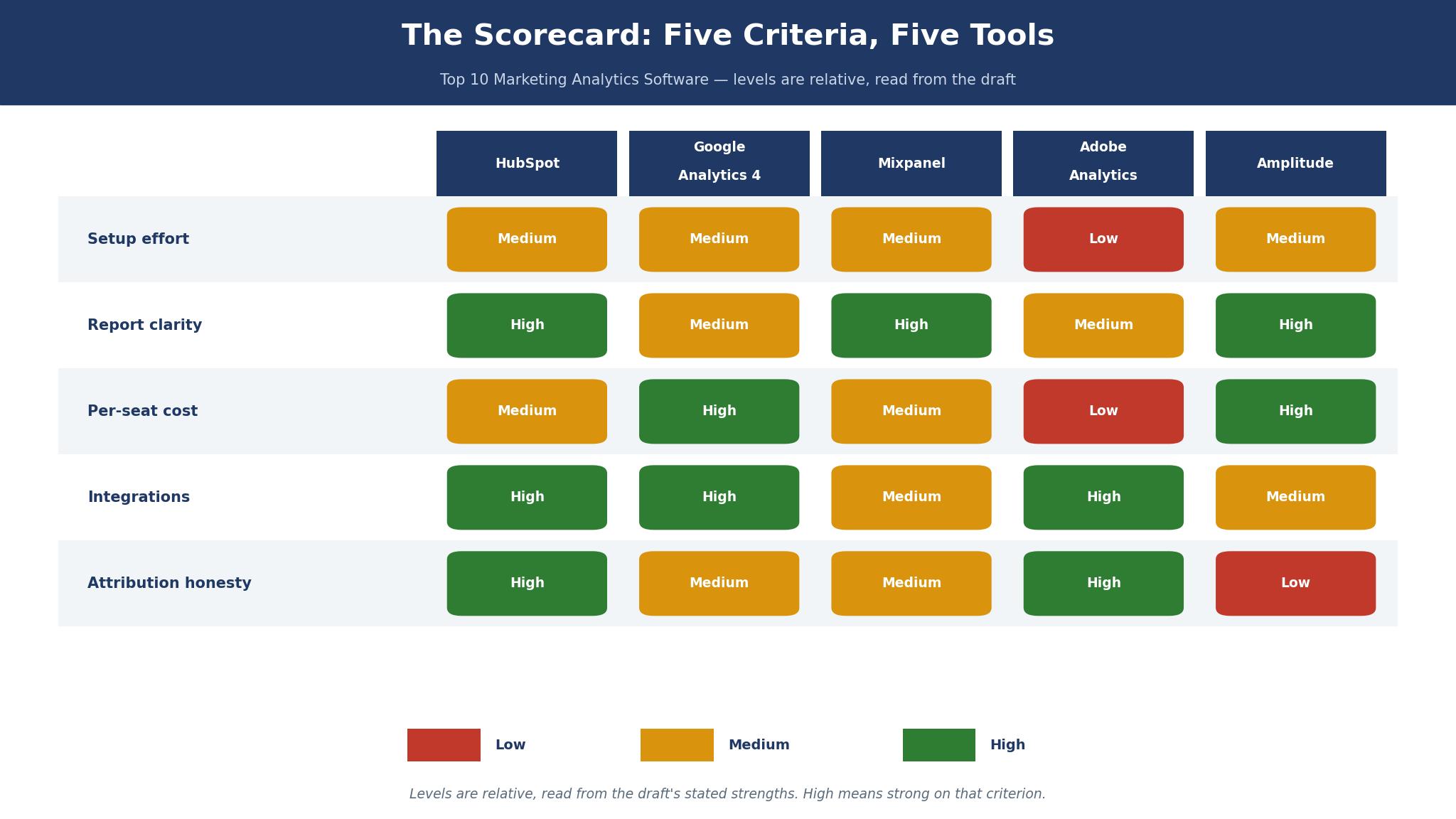
The scorecard for the top 10 marketing analytics software market is blunt about one thing. Most teams do not have a data problem. They have a reading problem, and the tool they pay for decides which problem they solve first. HubSpot Marketing Hub wins this roundup because it ties the numbers to named contacts, campaigns and revenue in one place, without a separate analytics hire.
The 8 Tools at a Glance
| Tool | Best for | Starting price | Score out of 25 |
|---|---|---|---|
| HubSpot Marketing Hub | Teams that want CRM, email and attribution together | Free; Starter from $20 per seat a month | 22 |
| Google Analytics 4 | Free traffic and funnel reporting | Free; GA360 quoted separately | 20 |
| Mixpanel | Product teams tracking events | Free to 1 million events a month; Growth from $120 a month billed annually | 19 |
| Adobe Analytics | Large companies with heavy data needs | Quote only | 18 |
| Amplitude | Product teams that want a generous free tier | Free to 2 million events a month; Plus from $75 a month billed annually at 3 million events | 18 |
| Semrush | Search and content teams | Pro from $139.95 a month | 17 |
| Matomo | Teams that want data on their own servers | Free self-hosted; Cloud from $23 a month | 16 |
| Plausible Analytics | Small sites that want a light, private dashboard | From $9 a month | 15 |
The scores come from five criteria, each marked from 1 to 5. Setup effort asks how fast a small team gets a first true report. Report clarity asks whether a manager can read the dashboard without a guide. Per-seat cost asks what three people pay in year one. Integrations ask how cleanly the tool joins the CRM, the ad accounts and the email tool. Attribution honesty asks whether the tool admits what it cannot prove.
No tool scored a perfect 25, and that is the honest result. A tool that is cheap to start can be expensive to trust, and a tool that is powerful can be slow to set up. That tension runs through every entry in this top 10 marketing analytics software roundup, and the scorecard is built to show it rather than hide it.
What Does the Top 10 Marketing Analytics Software List Miss About Attribution?
Every vendor in this list talks about attribution as if it were a solved problem. It is not solved. A visitor reads a blog post on Monday, clicks a paid ad on Wednesday, opens an email on Friday and buys on Sunday, and four tools will give that sale four different owners. The buyer who does not know this ends up paying for the channel that happened to be last, not the channel that did the work.
The fix is boring and it works. Decide before you buy which model you will use, write it down, and judge every tool against that model. First-touch credit rewards the channel that introduced the buyer. Last-touch credit rewards the channel that closed the sale. Multi-touch spreads the credit and invites arguments about the split. HubSpot lets a team see all three views side by side, which is why it scores highest on this criterion. Google Analytics 4 defaults to a data-driven model that is clever and hard to explain in a meeting. Mixpanel and Amplitude track events well but need care when the question is about marketing channels rather than product use.
A second trap sits inside the free tier. Google Analytics 4 costs nothing, so teams treat its numbers as free truth. The cost arrives later, in the hours spent building reports that answer the wrong question, and in the decisions made on sampled or thresholded data. Paid tools cost money up front and save that time, which is the trade most growing teams should make. The question is never whether the tool is free. The question is what the team pays in time to get a number it can act on.
Why Did Nobody Read the Report?
A marketing manager I know, in a team of nine, built a dashboard with 42 charts. It took three weeks. Nobody opened it after the first month. The charts were correct and the report was useless, because the first screen answered no question anyone in the room had asked. That is the failure this section is about, and it happens in companies of every size. It is also the failure most entries in this top 10 marketing analytics software guide are built to prevent, though only a few of them succeed.
The first screen of a report has one job. It must tell the reader whether the month worked, in numbers a non-specialist can repeat. Revenue from marketing, cost per qualified lead, and the three channels that moved the most. Everything else belongs in an appendix, one click away, for the person who wants to dig. A tool earns its place here by making that first screen easy to build and hard to clutter. HubSpot does this well because its reports start from contacts and deals. Google Analytics 4 does it badly at first, because its home screen is built for analysts, not for managers.
There is a practical test worth running before you sign anything. Ask each vendor to build your first screen live, using your own numbers, in thirty minutes. If the vendor needs a week and a specialist, that is your answer about the next year. The tools that pass this test are the ones a team actually uses on a Tuesday morning, when nobody has time to admire a dashboard.

The 8 Tools in Detail
HubSpot leads the ranking, and the seven tools behind it each win a narrower job. What follows is the evidence behind the scorecard, with a year-one price at a stated size and an honest weakness for every tool in this top 10 marketing analytics software list. Give the first three sections a full read, since they answer the questions most teams actually ask, and dip into the rest for the job that matches yours.
1. HubSpot Marketing Hub
HubSpot Marketing Hub takes first place because it answers the question a marketing team actually asks, which is not how many people visited, but which of them became customers and what that cost. The CRM sits underneath everything, so a contact’s first visit, email opens and deal value live in one record. That single record is the reason its attribution score is the highest here.
The price is the honest problem. Starter lists from $20 per seat a month, and Professional lists at $800 a month billed annually, or $890 month to month, with a required one-time onboarding fee of $3,000. Sources conflict on the Starter promo price, with some listing $7 to $10 a seat for new customers, so treat the $20 figure as the list price and the lower figure as reported.
A three-person team on Professional pays $9,600 in year one at the annual rate, plus $3,000 onboarding, which is $12,600 before any extra contacts. That is a serious bill, and it is the reason small teams should start on Starter and prove the workflow first.
Setup is fast for a CRM-first team and slow for a team that only wants analytics. If the CRM is already HubSpot, reports appear in days. If the CRM lives elsewhere, the integration work eats the first month. The email, landing page and social tools are genuinely included, not bolted on, which means a team of three can run campaigns without a second subscription.
The worked example matters here. A team spending $4,000 a month on ads, with 2,000 marketing contacts, pays $12,600 in year one on Professional. If the tool’s reporting stops one bad channel worth $800 a month, it saves $9,600 a year, which covers most of the bill. If the team never acts on the reports, the same bill buys nothing but prettier charts. HubSpot is the best pick for teams that will act.
2. Google Analytics 4
Google Analytics 4 is the free baseline every other tool in this list is measured against, and it deserves second place on reach alone. It is installed on more sites than any rival, it costs nothing for the core product, and its funnel and traffic reports answer the basic questions well. A team with no budget can start here today and learn a great deal.
The weakness is attribution and clarity. The data-driven model is powerful, but few managers can explain it to a director, and the interface still rewards people who already know analytics. Thresholding and sampling can hide small but real segments, which matters for a niche business with low traffic. GA360, the paid tier, is quoted separately and is priced for large companies, not for a team of five.
The worked example is simple. A site with 40,000 visits a month pays $0 for the tool and roughly 6 hours a month of analyst time to keep the reports honest, which at a $45 hourly rate is $3,240 a year in time. That is the real price of free. Teams that accept that trade get a strong tool. Teams that want answers without an analyst should look at the tool above it.
Google Analytics 4 pairs well with a CRM, and badly with nothing. On its own it tells you what happened on the site. It does not tell you who those visitors were, or what they were worth. Buyers who need that second half should budget for a CRM alongside it, and count that cost in the comparison.
3. Mixpanel
Mixpanel is the clearest event analytics tool here for a product-led team. It tracks what users do inside a product, in funnels, retention curves and cohorts, with a clarity that marketing-only tools cannot match. The free plan covers 1 million events a month, which is enough for a young product to learn its real usage patterns before paying.
Pricing is event-based, and that is both the strength and the trap. Growth starts from $120 a month billed annually at 1.5 million events, and the monthly-billed figure is $140 at the same volume. At 5 million events the annual figure rises to $438 a month. A product that grows fast watches its bill grow with it, so the worked example is worth doing before signing. A product sending 2 million events a month pays $185 a month billed annually, which is $2,220 a year, and at 5 million events that becomes $5,256 a year.
Mixpanel’s marketing weakness is honest. It knows what users did after they arrived, and it is weaker on which campaign brought them. Teams that buy it for marketing attribution alone will be disappointed. Teams that buy it to understand product behaviour, and pair it with a marketing tool, get the best of both.
Setup takes a day for a developer who knows event naming, and a month for a team that does not. The difference is naming discipline, not the tool. Decide the event names before the first install, write them down, and the reports stay clean for a year.
4. Adobe Analytics
Adobe Analytics is the most powerful tool in this list and the hardest to justify for a team under fifty people. Its segmentation, calculated metrics and data warehouse options handle volumes and questions that would break the cheaper tools. A large company with a dedicated analytics team gets depth here that nothing else in this list offers.
The price is quote only, which tells you most of what you need to know. Public reports put enterprise deployments well into five figures a year before implementation, and implementation itself is a project, not a setup wizard. A team that needs a quote before it can budget should treat that as a signal about the size of customer Adobe expects.
Adobe’s trade-off is plain. Depth costs speed. A simple question can take a trained analyst half a day, where HubSpot or Mixpanel answers it in minutes. Large teams accept that because their questions are complex. Small teams should not, because their questions are usually simple and their time is short.
There is one more cost that rarely appears in a sales call. Adobe Analytics works best inside the wider Adobe stack, and the value grows when the company already uses Adobe Experience Manager or Target. A company that buys Analytics alone, without the rest of the stack, pays the enterprise price and gets only part of the value. That is why the shortlist question matters more than the feature list.
5. Amplitude
Amplitude is the generous free tier in this list, and that generosity is real. The free plan covers 2 million events a month with unlimited seats, which beats Mixpanel’s 1 million. For a startup watching every dollar, that extra million events is the difference between paying and not paying for a year.
Paid pricing is also kind at low volumes. Plus starts at $0 with the first 2 million events free, and the calculator shows about $75 a month billed annually at 3 million events, rising to about $225 a month at 5 million. At 10 million events the annual figure is about $576 a month. Compare that with Mixpanel’s $438 a month at 5 million events billed annually, and Amplitude is cheaper at the same volume, which is a genuine finding, not a guess.
The trade-off is marketing fit. Like Mixpanel, Amplitude is built for product behaviour first. Its marketing attribution needs care and extra setup. Teams that want a marketing scorecard should not buy Amplitude alone. Teams that want to understand why users stay or leave will find it excellent.
6. Semrush
Semrush earns its place for one job, and it does that job better than any tool above it. It shows what search brings to a site, which keywords pay, and where rivals win. A content or search team that lives in Google needs this view, and no general analytics tool gives it.
- Starting price: Pro from $139.95 a month, which is $1,679.40 a year.
- Best use: keyword research, position tracking, content audits and rival analysis.
- Weakness: it is not a full analytics tool. It will not tell you what visitors do after they arrive.
- Worked cost: a team on Pro plus one extra user pays roughly $1,900 a year, and the time saved on manual rank checks is about 4 hours a month, or $2,160 a year at $45 an hour.
- Verdict: buy it as a second tool, never as the only one.
Semrush pairs naturally with Google Analytics 4. One shows where the visits come from, the other shows what they do. Together they cost little and cover the two questions a search-led team asks every week.
7. Matomo
Matomo is the privacy-first choice, and for some buyers that settles the question on its own. The self-hosted version is free, the data sits on your own servers, and no third party builds profiles from your visitors. European teams and health or finance sites value that more than any feature list.
Q: Who should pick Matomo over Google Analytics 4? A: A team that must own its data, or that serves visitors who distrust tracking, should pick Matomo. The reports cover the essentials well, and the hosted Cloud plan starts from $23 a month, which is $276 a year for a small site.
Q: What does it give up? A: It gives up the deep product analytics of Mixpanel and the CRM depth of HubSpot. It is a web analytics tool, not a marketing suite, and buyers should not expect it to be one.
Q: Is the free version really free? A: The software is free, but hosting, updates and backups are your job, and that time is the cost. A team without a developer should take the Cloud plan and pay the $23 a month.
8. Plausible Analytics
Plausible Analytics is the lightest tool here, and its lightness is the point. The dashboard fits on one screen, the script is tiny, and there are no cookies to manage. A small site that wants to know its top pages, top sources and top countries gets the answer in seconds.
The price starts from $9 a month, which is $108 a year, and rises with page views. That is the cheapest paid tool in this list, and for a blog or a small shop it is enough. The trade-off is depth. There are no funnels worth the name, no cohorts, and no CRM. A team that outgrows Plausible will know it quickly, because the questions it cannot answer will start to pile up.
Plausible is the right buy for a site under 10,000 visits a month that values privacy and speed over depth. It is the wrong buy for a team that needs to prove which campaign made money.
The dashboard is the product here, in a way that is rare in this list. Everything fits on one screen, the numbers are large, and there is nothing to configure before the first visit. A blogger can check it in ten seconds a morning and move on. That is a real feature, not a lack of features, and it is why the tool keeps its users even though cheaper and deeper options exist.
Google Analytics vs HubSpot
The head-to-head that matters most is the free baseline against the paid winner. Google Analytics 4 costs $0 and tells you what happened on the site. HubSpot Marketing Hub costs $12,600 in year one for a three-person team on Professional and tells you who it happened to and what they were worth. That gap is the whole decision, and it is the comparison most buyers in the top 10 marketing analytics software market should make first.
On setup, Google Analytics wins. A tag, a day of checks, and the reports flow. HubSpot needs CRM setup, contact imports and workflow building before the reports mean anything. On report clarity for a manager, HubSpot wins. Its reports start from people and money. Google Analytics starts from sessions and pages, and the manager must translate.
On attribution honesty, HubSpot wins again, because it shows first-touch, last-touch and multi-touch views together. Google Analytics gives a strong model that is hard to explain. On price at a small size, Google Analytics wins without a contest. A team with no budget and time to learn should start there and add HubSpot later, when the revenue question becomes urgent.
There is also a middle path that many teams take and few admit. Run Google Analytics 4 for traffic, keep the CRM as the record of revenue, and join the two in a monthly spreadsheet. It costs nothing extra and it works, as long as one person owns the spreadsheet and updates it on the same day each month. The moment that person leaves, or the month gets busy, the join breaks, and that is when a paid tool earns its fee.
How to Choose Marketing Analytics Software Without Buying Twice?
Start with the question, not the tool. Write down the three decisions the tool must support in the next six months. If those decisions are about product use, buy Mixpanel or Amplitude. If they are about search, buy Semrush alongside Google Analytics 4. If they are about revenue and campaigns, buy HubSpot. If they are about privacy, buy Matomo or Plausible. That short list covers nearly every buyer in the top 10 marketing analytics software market, and it keeps the decision small enough to finish in a week.
Then price the team, not the tool. Count the hours a person will spend building and reading reports, at a real hourly rate, and add that to the subscription. A free tool that eats 6 hours a month costs $3,240 a year in time. A $1,680 tool that eats 2 hours a month costs less in total. Buyers who skip this step buy twice, once cheaply and once properly.
Finally, run a two-week trial on real data. Import last month’s numbers, build the first screen, and ask the manager to use it for a week. If the manager stops opening it, the tool has failed, whatever the scorecard said. The trial is the only test that matters, because it measures use, not features.
One last check belongs on the list. Ask who owns the tool after the person who chose it leaves. A tool that only one person understands becomes a risk the day that person is away. The best choice is the one two people on the team can read, explain and fix, even if it is not the most powerful option on the page.
Best Pick by Job
| Job | Best pick | Why it wins for this job |
|---|---|---|
| Small team, first analytics tool | Google Analytics 4 | Free, and the reports cover the basics well |
| Growing team that must prove revenue | HubSpot Marketing Hub | CRM plus attribution in one place |
| Product team tracking user behaviour | Amplitude | Generous free tier and lower cost at 5 million events |
| Search-led content team | Semrush plus Google Analytics 4 | Search view plus site behaviour, for about $1,680 a year |
| Privacy-first site | Matomo | Data on your own servers, Cloud from $23 a month |
| Tiny site that wants a simple dashboard | Plausible Analytics | One screen, $9 a month, no cookies to manage |
The table above is the short version of the whole guide. Start with the row that fits your team, and give that tool’s section a full read before you spend anything. The picks below are the same ones the scorecard produced, so the top 10 marketing analytics software ranking and the job table agree with each other, which is how it should be.
Frequently Asked Questions
Can I run marketing analytics without a data team?
Yes, and most small teams do. Google Analytics 4, Plausible and HubSpot Starter are all built for a marketer to run alone. The work that needs a specialist is not the tool, it is the questions. Write the three questions down first, and the tool choice becomes obvious. A data team helps when the questions get complex, not before.
How much does marketing analytics software cost a small team in year one?
A team of three pays $0 on Google Analytics 4, about $108 on Plausible, about $720 on HubSpot Starter at $20 a seat, and about $2,220 on Mixpanel Growth at 2 million events a month. The range is wide because the jobs are different, and any top 10 marketing analytics software comparison that gives one price for every team is hiding the real cost. Add the time cost, at roughly $45 an hour, and the cheapest tool is often the one that takes the least time to read.
Is Google Analytics 4 enough on its own?
For traffic and funnel questions, yes. For revenue and contact questions, no. It tells you what happened on the site, not who it happened to. Pair it with a CRM or a tool like HubSpot when the business starts asking which campaigns made money, and keep it as the free baseline either way.
Which tool is best for attribution?
HubSpot Marketing Hub, because it shows first-touch, last-touch and multi-touch views together and ties them to deals. Google Analytics 4 has a strong data-driven model, but it is harder to explain in a meeting. No tool in this list proves attribution perfectly, so pick the one whose model your team can defend.
Should I pay for Mixpanel or Amplitude?
Pay for Amplitude if your event volume sits between 2 and 5 million a month, because its calculator price is lower there. Pay for Mixpanel if your team already knows its interface, or if your product needs its specific funnel and retention views. Both have free tiers, so run both for two weeks on the same events and let the reports decide.
When should a team move to Adobe Analytics?
Move when a dedicated analyst is asking questions the cheaper tools cannot answer, and when the budget covers both the licence and the implementation. For most teams that day never comes. Adobe is a tool for large companies with complex data, not a next step every growing team must take.
The Verdict I Would Stand Behind
If I were choosing for a team of three with a real marketing budget, I would buy HubSpot Marketing Hub on Starter first, prove the reporting habit for two months, and move to Professional only when the attribution reports start changing spending decisions. I would keep Google Analytics 4 running beside it, because free traffic data is worth having, and I would add Semrush when search becomes a serious channel.
That stack costs about $720 in year one on Starter, plus $1,680 if Semrush joins, and it answers the questions that decide budgets. The tools in this top 10 marketing analytics software guide are all honest products. The mistake is buying the powerful one before the team is ready to use it, or buying the free one and never learning what it cannot tell you.