
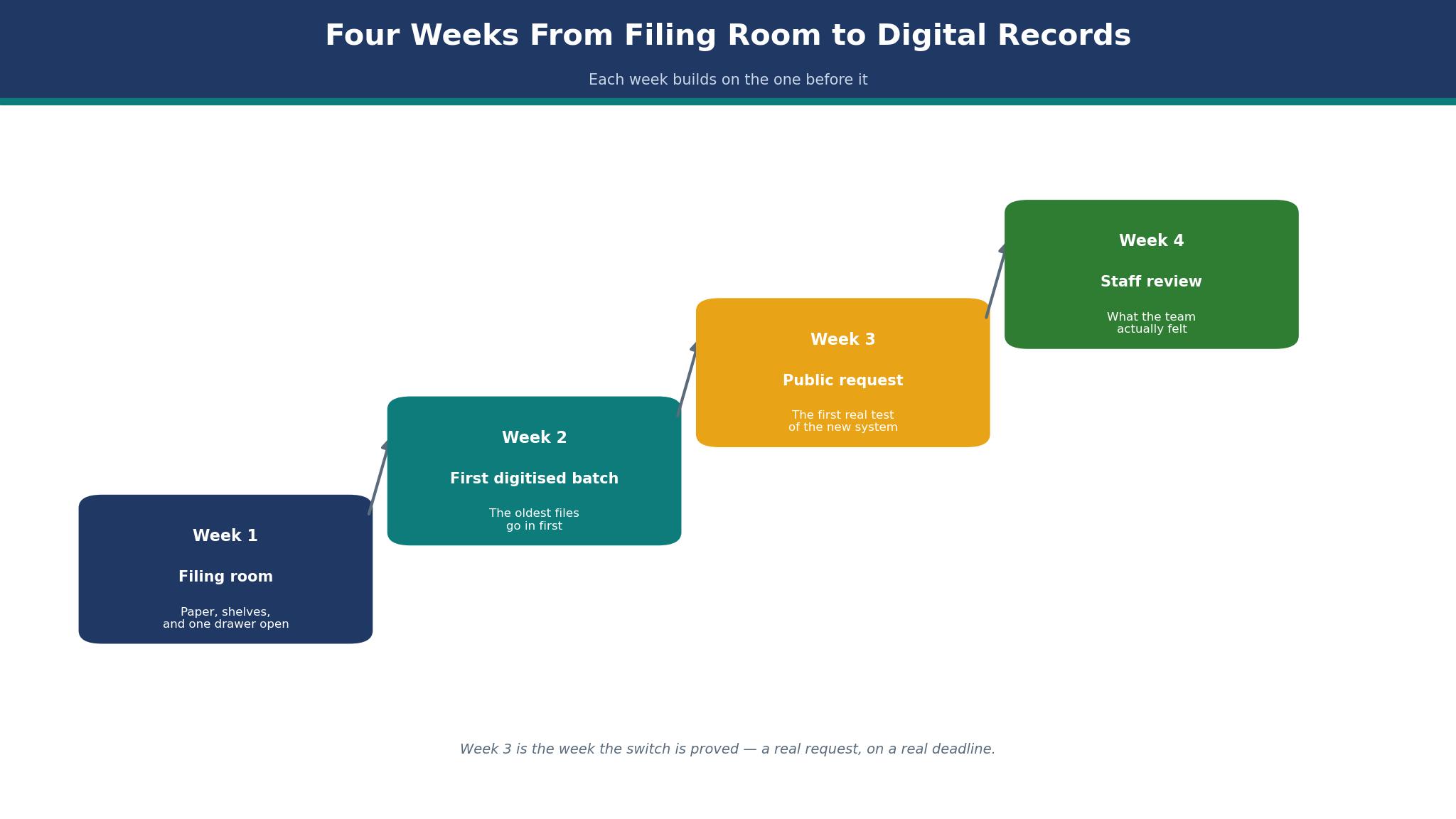
Week 1: the clerk opens the filing room door, and the smell of old paper comes out with it. Four walls of binders, a cabinet of microfilm, and a spreadsheet that lists 3,400 requests nobody has counted twice. The best public records management software is the tool that turns that room into a portal a resident can use at midnight, and Granicus is the one that does it for more American councils than any other. This guide follows one council’s switch, week by week, from the filing room to the first request answered online.
Week 1: The Filing Room
The council in this diary serves a town of 18,000 people, and its clerk handles about twelve public records requests a week. Before the switch, every request arrived by email, by phone, or on paper, and every one of them was logged in a spreadsheet that only the clerk understood. The filing room held the records, and the records were organised by the person who filed them, which meant they were organised by nobody in particular.
Week 1 is spent counting. The clerk and one assistant open every binder, list every box, and count the requests from the last year. The total is 612 requests, and the average time to answer one is eleven days, which is inside the ten-day legal deadline in some states and outside it in others. The worst case is a request for one email thread that took eight hours of staff time and produced a cost estimate of $405.76, at a labour rate the council set just above $50 an hour, for a pull that takes minutes once the file is found. The file was the problem, not the request.
The decision the council makes in Week 1 is the one every council makes. It needs a public portal where residents can file a request, track it, and download the answer. It needs a deadline clock that counts the days and warns the clerk before the deadline passes. And it needs redaction tools, because the records contain names, addresses, and personal details that the law says must stay private. The budget is under $25,000 a year, and the system must be live before the next election cycle.
The 10 Systems Side by Side
The table below lines up all ten of the best public records management software options on the facts a council needs first. Price is quote only for almost every vendor in this category, so the table states the pricing model and the one published figure that exists for each system.
| System | Best for | Pricing | Public portal |
|---|---|---|---|
| Granicus | State and local governments | Quote only, from about $2,000 a year reported | Yes |
| Tyler Technologies | Federal agencies, DOJ reporting | Quote only | Yes |
| NextRequest | Small to mid-size cities | Quote only | Yes |
| JustFOIA | Small agencies, low cost | Quote only | Yes |
| FOIAXpress | Federal FOIA, complex cases | Quote only | Yes |
| Casepoint | Litigation, e-discovery | Quote only | Yes |
| CivicPlus | Councils already on CivicPlus | Quote only | Yes |
| Laserfiche | Document management plus records | Quote only | Yes |
| Hyland OnBase | Enterprise content, large agencies | Quote only | Yes |
| M-Files | Metadata-led document management | Quote only | Yes |
The price column in that table tells a story of its own. Almost every vendor in this category prices by quote, typically as an annual subscription scaled to request volume, user count, or agency size, plus implementation. The one published figure is GovQA, the Granicus product, listed at $2,000 a year on a software directory, though that figure is profile information rather than a vendor price, and it is reported here as such. The real number that matters is the one from a council’s own books, and this guide has one, from Scio Township in Michigan, where the Granicus FOIA module cost $8,882.50 in year one.
Best Pick by Job
The right system changes with the size of the agency and the law it answers to. A federal agency needs DOJ reporting. A small town needs a portal that works and a price it can defend at a public meeting. The rows below match each agency to its system.
| Job | Best pick | Why it wins for this job |
|---|---|---|
| Small council, first portal | Granicus | Most state and local governments use it, portal first |
| Federal agency, DOJ reporting | Tyler Technologies | Entellitrak, 200 plus federal deployments |
| Small city, easy to use | NextRequest | Built for the public portal, simple for residents |
| Smallest budget, simple needs | JustFOIA | Low entry cost, fast to launch |
| Complex federal FOIA cases | FOIAXpress | Built for federal case management |
| A council that needs document management too | Laserfiche | Records plus workflow in one system |
The pick that needs explaining is Granicus at the top, because it is not the cheapest tool here and its pricing is quote only. It wins because more state and local governments use it than any competitor, which means the portal is the one residents have seen before, the workflows match the way councils actually work, and the vendor has answered the awkward questions already. A council that buys the most-used system buys the fewest surprises, and surprises are what a public meeting punishes.
The 10 Tools in Detail
The ten tools below are covered in ranking order. The best public records management software for a small council is not the same as the best for a federal agency, so each section states who the tool suits, what it costs, and where it falls short.
1. Granicus
Granicus is the pick for state and local government, and its records product, formerly called GovQA, is the most widely used public records platform in the United States. The system gives residents a public portal to file a request, track its progress, and download the response, and it gives the clerk a workflow that calculates due dates, routes the request to the right department, and generates invoices. It also includes a feature Granicus calls request deflection, designed to redirect requesters to records that are already public, so they never have to file at all.
The price is quote only, and the real numbers come from council records. Scio Township in Michigan approved a Granicus subscription costing $22,671.61 in year one for two modules, a public records platform and a communications cloud, with the FOIA module alone costing $8,882.50, plus $1,400 for maintenance and $4,086.25 for setup and training. The annual cost after year one was roughly $19,000. At twelve requests a week, the FOIA module alone costs roughly $14 per request in software fees, before a single staff hour is counted. That is the arithmetic a council takes to a public meeting, and it is the arithmetic that decides whether the purchase survives one.
The strength is the depth of the workflow. The system tracks requests, calculates due dates, automates the routine steps, and produces the reports a council needs for its own oversight. The weakness is the price and the bundle. A small council that wants only the FOIA module may find itself quoted for a bundle, and the subscription recurs indefinitely, which is a commitment a council should understand before signing. The platform is also the most configurable in this guide, which is a strength for a large government and a burden for a small one, because configuration takes time and the clerk’s time is the scarcest resource in the building.
A worked example shows the value. The council in this diary handles 612 requests a year. At $8,882.50 a year for the FOIA module, the software costs $14.51 per request.
The staff time to answer a request averages two hours, at a loaded cost of $50 an hour, or $100 per request, so the software is 13 percent of the total cost of answering. A system that cuts the staff time by half, by finding the file in minutes instead of hours, saves $30,600 a year, which is more than three times the subscription.
2. Tyler Technologies
Tyler Technologies is the federal pick, and its FOIA solution runs on Entellitrak, a low-code platform with more than 200 federal deployments. The system pulls requests directly from FOIA.gov, manages adjudications and appeals, and generates the DOJ annual report, which is the document a federal agency is judged by. For a federal agency with heavy reporting needs, that capability is the product, and no other tool in this guide does it as thoroughly.
Pricing is quote only, as an annual subscription scaled to request volume or user count, plus implementation. Tyler is also an enterprise software provider to cities, and its contracts run for years, with one city council approving its continued use through 2031. The strength is the federal depth and the scale of the company behind it. The weakness is the fit for a small council, because a platform built for federal reporting is more than a town of 18,000 needs, and the implementation will feel like a federal project even when the council is not one. Buy Tyler when the agency is federal. Buy Granicus when it is not.
3. NextRequest
NextRequest is the small-city pick, built for the public portal first and the back office second. It is now part of CivicPlus, which gives it the backing of a large government software company, and it is designed for cities that want residents to file a request, track it, and get an answer without phoning the clerk. Pricing is quote only, as an annual subscription, and the platform is known for ease of use on both sides of the portal.
The strength is the resident experience. A resident who can file a request in two minutes and track it online does not phone the clerk, and every phone call avoided is staff time saved. The weakness is depth. NextRequest does less on the back office than Granicus or Tyler, and a large agency with complex workflows will outgrow it. Buy NextRequest when the portal is the problem. Buy Granicus when the workflow is the problem.
4. JustFOIA
JustFOIA is the small-agency pick, built for agencies that need a records portal without an enterprise budget or an enterprise implementation. Pricing is quote only, but the entry point is lower than Granicus or Tyler, and the platform launches faster, because it asks less of the agency before it goes live. The strength is simplicity. A small agency can be live in weeks, with a portal, a deadline clock, and a workflow that the clerk can learn in a day. The weakness is scale. A large agency with hundreds of requests a week will need more, and JustFOIA is not built for that volume.
5. FOIAXpress
FOIAXpress is the federal case pick, built for agencies that handle complex FOIA cases with multiple exemptions, appeals, and litigation holds. It manages the case from intake to response, tracks the exemptions applied to each document, and produces the reports a federal FOIA office needs. Pricing is quote only, and the platform is sold to federal agencies, not to small towns. The strength is the case management depth, which is the best in this guide for a federal caseload. The weakness is the fit anywhere else, because a small council does not have cases, it has requests, and the difference matters.
6. Casepoint
Casepoint is the litigation pick, built for e-discovery and for agencies whose records requests turn into lawsuits. It handles large document sets, applies technology-assisted review, and manages the legal hold process that keeps records from being deleted while a case is open. No list price is published, and the buyer here is an enterprise legal team rather than a town clerk. The strength is the e-discovery capability, which no other tool in this guide matches. The weakness is the price and the complexity, which put it out of reach for a council that needs a portal and a deadline clock, not a litigation platform.
7. CivicPlus
CivicPlus is the pick for councils that already run CivicPlus for their website, because the records portal sits inside a system the staff already know. NextRequest is part of CivicPlus now, and a council that buys both gets one vendor, one contract, and one support line. Pricing is quote only. The strength is the integration with the council’s existing website and meeting tools. The weakness is that a council that does not run CivicPlus has no reason to start, and the records product on its own is not the strongest in this guide.
8. Laserfiche
Laserfiche is the document management pick, and the tool for a council that needs records management plus workflow in one system. It stores documents, routes them for approval, applies retention rules, and publishes the records a resident asks for, all from the same platform. Pricing is quote only, and the system is sold by subscription. The strength is the breadth, because a council that buys Laserfiche gets a document system as well as a records portal. The weakness is that the records workflow is one module among many, and a council that wants the deepest FOIA workflow will find Granicus stronger.
9. Hyland OnBase
Hyland OnBase is the enterprise content pick, built for large agencies that manage millions of documents across many departments. It offers content management, workflow, case management, and records, with the scale to serve a state government. Pricing is quote only, and the implementation is a project, not a purchase. The strength is the scale and the depth of the content platform. The weakness is the fit for a small council, because a town of 18,000 does not have millions of documents, and the platform will cost more to run than the records it holds are worth.
10. M-Files
M-Files closes this list as the metadata pick, built around the idea that a document should be found by what it is, not by where it is filed. It organises records by metadata, so a clerk can find a document by its date, its author, or its subject, without knowing which folder it sits in. Pricing is quote only. The strength is the search, which is the best in this guide for a council whose filing system has grown by accident over decades. The weakness is that it is a document platform first and a records portal second, and a council that needs the portal will find Granicus more direct.
How to Choose the Best Public Records Management Software?
Start with the law, not the software. The deadline in Michigan is five business days to respond, and the deadline in other states runs from ten days to thirty, so the first question is what the council’s own law requires, and whether the current system meets it. A system that calculates due dates and warns the clerk before the deadline passes is worth more than a system with a prettier portal, because the deadline is the thing the council gets sued over.
Next, count the requests, because the volume decides the price. A council handling 612 requests a year pays $14.51 per request for a Granicus FOIA module at $8,882.50 a year, and a council handling 6,000 requests a year pays $1.48 per request for the same module, which is a different purchase entirely. Ask every vendor how the price scales with volume, and get the answer in writing, because a subscription that looks cheap at 600 requests looks expensive at 60, and the council’s volume will change.
Then test the portal as a resident would. File a request, track it, and download the answer, using only a phone, because that is how most residents will use it. A portal that needs a desktop computer and a PDF reader is a portal that excludes the residents who need it most. Granicus and NextRequest both pass that test, because their portals were built for residents first. A system that was built for the back office and given a portal afterwards will fail it, and the failure shows up as phone calls to the clerk, which is the cost the portal was supposed to remove.
Finally, ask about redaction, because the records contain personal details that the law says must stay private. The system must let the clerk redact a name, an address, and a social security number quickly, and it must keep a record of what was redacted and why, because the redaction itself can be challenged. A tool that makes redaction slow will make the clerk avoid it, and a tool that makes it invisible will make the council liable. Ask the vendor to redact a ten-page document in front of you, and time it.
Tyler Technologies vs Granicus
The head-to-head is a contest between federal depth and local breadth, and the agency decides the winner. Tyler Technologies runs on Entellitrak, with more than 200 federal deployments, and it pulls requests from FOIA.gov, manages adjudications and appeals, and generates the DOJ annual report. Granicus runs the GovQA platform, used by more state and local governments than any competitor, with a public portal, deadline tracking, and a workflow built for councils.
Tyler wins on federal reporting. No other tool in this guide produces the DOJ annual report as thoroughly, and a federal agency that buys Granicus will build that report by hand. Granicus wins on local government, because its portal is the one residents have seen before, its workflows match the way councils work, and its price is a number a small council can defend. The best public records management software for a federal agency is Tyler, and for a state or local government it is Granicus.
The best public records management software for a federal agency is Tyler, and for a state or local government it is Granicus, and the council in this diary is a local government, so the answer is Granicus. The choice is not about which tool is better in the abstract. It is about which law the agency answers to, and the law decides the tool, because the law decides the report, the deadline, and the portal the resident sees.
The Request That Had to Be Answered in Ten Days
Week 3 brings the request that tests the whole system. A resident asks for every email between the council and a developer about a planning application, covering six months, and the law gives the council ten days to respond. Under the old system, that request would have taken a week to gather, because the emails sit in four inboxes, the planning file sits in the filing room, and the clerk would have had to ask each person to search their own mail.
Under the new system, the request arrives through the portal, the deadline clock starts, and the workflow routes it to the planning department, the clerk, and the solicitor, each of whom sees only the part that belongs to them. The system searches the email archive, finds 214 messages, and the clerk redacts the personal details in an afternoon. The response goes out on day eight, with two days to spare, and the resident downloads it from the portal without phoning anyone.
The lesson is that the deadline is not the hard part. The hard part is finding the records, and a system that can search across inboxes and files is the system that meets the deadline. The council that cannot find its records cannot answer in ten days, whatever software it buys, and the system that finds them is the one that earns its subscription. The ten-day request is the test that matters, and the council in this diary passed it in Week 3, which is why the switch survived the next public meeting.

Week 4: Did the Staff Actually Like It?
Week 4 is the week the staff are asked, and the answer is mixed, which is honest. The clerk likes the deadline clock, because it tells her what is due before it is overdue, and she likes the portal, because the phone rings less. The planning officer likes the search, because he no longer has to open four inboxes to find one email. The assistant dislikes the redaction tool, because it is slower than she expected, and she says so, and the vendor is asked to train her again.
That mixed answer is the sign the switch worked. A system that everyone loves in Week 4 is a system nobody has used properly, and a system that everyone hates is a system that should be returned. The council in this diary keeps the system, because the deadline is met, the phone rings less, and the resident who filed the ten-day request downloaded the answer without calling. The staff’s complaints are about the tool’s rough edges, and rough edges can be trained away. A missed deadline cannot.
What Does the Public Actually See?
The public sees a portal, and the portal is the whole system as far as they are concerned. A resident who files a request sees a form, a tracking number, and a status that changes from received to in progress to complete. A resident who downloads an answer sees a PDF, and the PDF is either readable or it is not. The back office, the workflow, and the deadline clock are invisible, and they should stay invisible, because the resident does not care how the sausage is made, only whether it arrives.
The test for any system in this guide is the resident’s test. File a request on a phone, track it on a phone, and download the answer on a phone, and time how long each step takes. Granicus and NextRequest pass that test, because their portals were built for residents. The best public records management software is the one a resident can use without phoning the clerk, and a system that fails that test will generate phone calls, which is the cost the portal was supposed to remove.
Frequently Asked Questions
How much does public records software cost a small council?
A small council should budget from about $2,000 a year for the most basic published figure, which is the GovQA listing on a software directory, though that figure is profile information rather than a vendor price and is reported here as such.
The real number from a council’s own books is higher. Scio Township paid $8,882.50 in year one for the Granicus FOIA module alone, plus $1,400 for maintenance and $4,086.25 for setup and training, with roughly $19,000 a year after that for two modules.
How long does it take to switch to a records portal?
A small system like JustFOIA or NextRequest takes weeks, because it asks less of the agency before it goes live. A full platform like Granicus or Tyler takes months, because the records must be organised, the workflows configured, and the staff trained. The council in this diary was live in Week 3 for its first request, and fully live by Week 4, because the records were counted in Week 1 and the portal was configured in Week 2. A council that skips the counting will take longer, because the system cannot find records that were never organised.
Can residents track their own requests?
Yes, on every tool in this guide, through a public portal that shows the request’s status from received to complete. The resident files the request, receives a tracking number, and downloads the answer when it is ready, without phoning the clerk. The best public records management software makes that tracking visible on a phone, because that is how most residents will use it, and a portal that needs a desktop computer excludes the residents who need it most.
What happens when a request cannot be answered in time?
The law in most states allows an extension, but the extension must be claimed before the deadline passes, and the system should warn the clerk before that point. Granicus and Tyler both calculate due dates and warn the clerk, which is the feature that prevents a missed deadline from becoming a lawsuit. A council that misses a deadline without claiming an extension is liable, and the system that warned it is the system that did its job.
Does records software handle redactions?
Yes, and the redaction tool is one of the most important features in this guide, because the records contain names, addresses, and personal details that the law says must stay private. The system must let the clerk redact quickly, and it must keep a record of what was redacted and why, because the redaction itself can be challenged. Ask the vendor to redact a ten-page document in front of you, and time it, because a slow redaction tool is a tool the clerk will avoid.
Can a small council use the same software as a large city?
Yes, but it will pay for capability it cannot use, and the implementation will feel like a large-city project. A town of 18,000 needs a portal, a deadline clock, and a redaction tool, and Granicus or NextRequest gives it those at a price it can defend. A large city needs the same tools plus complex workflows, multiple departments, and reporting at scale, and Tyler or Hyland OnBase gives it those. The right system is the one that fits the council that buys it, not the council it hopes to become.
The Verdict: My Pick for a Small Council
Granicus is my pick for a small council, because it is used by more state and local governments than any competitor, its portal is the one residents have seen before, and its FOIA module costs $8,882.50 a year in a real council’s books, which is a number a clerk can defend at a public meeting. Tyler Technologies is my pick for a federal agency, NextRequest is my pick for a small city that wants the simplest portal, and JustFOIA is my pick for the smallest budget. The Best Pick table above carries the same picks, so the two can be read against each other.
What I would do, if I were the clerk in this diary, is count the records in Week 1, launch the portal in Week 2, and answer the first ten-day request in Week 3, because the deadline is the test that matters and the portal is the proof. I would train the assistant on the redaction tool twice, because a slow redaction is the complaint that survives the switch, and I would keep the filing room door open, because the paper is not going away, and the system that pretends it is will be the system that fails first.