
If you want to learn how to create a digital product with AI, start with one honest fact: AI makes production faster, but it does not make demand appear. A digital product sells when it solves a specific problem for a specific group of people, and when the buyer can see the result before they pay. Everything in this guide is built around that test. You will pick an idea, prove that someone wants it, build it with AI tools doing the heavy lifting, price it in a way buyers accept, and launch it to an audience you can actually reach.
A digital product is any file, template, course, or membership that a buyer can download or access online, with no shipping and no inventory. Common examples include ebooks, Notion templates, design presets, spreadsheets, video courses, printable planners, and stock asset packs. The attraction is clear. Once the product exists, each extra sale costs almost nothing to fulfil. The risk is equally clear. Because the barrier to making one is now so low, buyers are flooded with generic products, and the ones that look rushed or copied do not sell twice.
AI changes the economics of the first version. Drafting, design, editing, and formatting that once took weeks can now take days. That speed only helps if you spend the saved time on the parts AI cannot do: choosing the right problem, talking to real buyers, and checking every claim in the finished product. Treat AI as a fast junior assistant, not as the author. Your experience and judgement are what the buyer pays for.
The quick answer
For most first time creators, a realistic first product takes two to six weeks of part time work and costs very little beyond the tools you already use. A simple template or guide can be ready in a week. A short video course usually takes four to six weeks, because recording, editing, and testing take longer than writing. A realistic first launch goal is 10 to 50 sales, not thousands. That range is where you learn what buyers actually value, and it is the foundation for a second product that sells better.
Budget in three parts. First, tool costs: many AI and design tools offer free tiers, and a first product can often be built for under 50 dollars a month. Second, your time: expect 20 to 40 hours for a solid first product, including validation and launch. Third, a launch budget is optional. An email list, a social account, or a community you already belong to will beat paid ads for a first launch, because trust matters more than reach when nobody knows your product yet.
Before you build anything, answer these four questions in writing. Who is the buyer, in one sentence? What problem does the product remove from their week? What will they be able to do after using it that they cannot do now? Where will you find the first 100 people who have that problem? If any answer is vague, the product idea is not ready yet. Vague answers produce vague products, and vague products do not sell.
How to create a digital product with AI: the full process
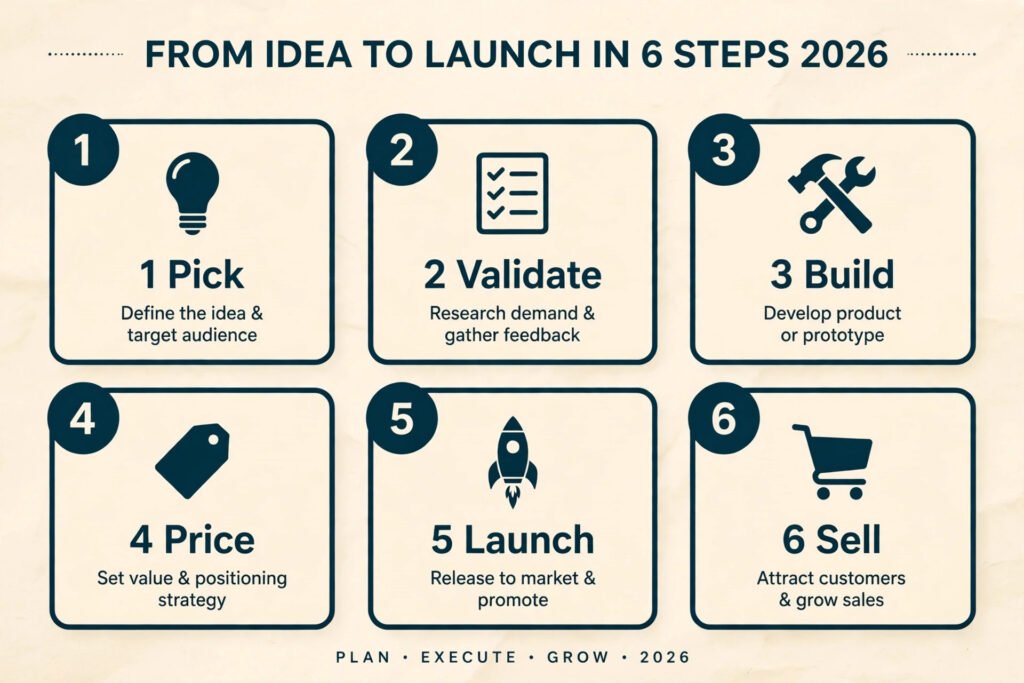
The process below has six steps. Each step ends with a decision, not just more work. If a step fails, stop and fix it before moving on. Building a full product around an unvalidated idea is the most expensive mistake in this guide, and it is also the most common.
Step 1: Pick a problem, not a product type
Most beginners start by choosing a format, such as “I will make an ebook” or “I will make a course.” That is backwards. Format is a delivery choice. The buyer cares about the outcome. Start instead from a problem you understand well enough to explain in plain language, ideally one you have solved for yourself or for other people.
Good sources of ideas are questions people already ask you, tasks you repeat at work, and complaints you see in communities you belong to. A fitness coach hears the same meal planning questions every week; a designer gets asked how to price projects. Each repeated conversation hides a product idea.
Narrow the audience until the product writes itself. “A productivity guide for everyone” is not an audience. “A weekly planning template for freelance writers juggling three clients” is an audience, and you can picture that buyer. Narrow feels risky because it seems to shrink the market. In practice, a narrow product is easier to describe, easier to find buyers for, and easier to improve, because feedback comes from people with the same problem.
Write down three candidate ideas. For each one, note the buyer, the problem, the result, and one place you could reach 100 such people. Then rank them by two tests: how well do you understand the problem, and how reachable is the audience? Pick the idea that scores highest on both, not the one that sounds most exciting. Excitement fades in week three. Understanding and reach carry a product to launch.

Step 2: Validate before you build
Validation means getting evidence that strangers will pay, before you spend weeks building. It does not require a finished product. It requires a clear offer and a way for people to say yes with something real, such as an email address, a preorder, or a paid waitlist spot.
The simplest validation test is a one page description of the product: who it is for, what it includes, what result it promises, and the price. Share it where your audience already gathers, and watch what happens. Ten polite comments are not validation. Ten email signups from people you do not know are a start. Three preorders are stronger evidence than a hundred likes, because a preorder costs the buyer something.
Talk to at least ten people who have the problem. Ask what they have already tried, what frustrated them, and what a good solution would have to include. Listen for the words they use, because those words belong in your sales page later. If several people describe the same frustration, you have found the core of the product. If everyone describes a different problem, the audience is too broad.
A second useful test is a tiny paid pilot: offer the product to five people at a reduced price in exchange for detailed feedback and a clear delivery date. A pilot gives you testimonials, reveals gaps, and tells you whether people actually finish what you made. Products nobody finishes rarely get recommended.
Set a clear pass mark before you start validating, for example 50 waitlist signups or 5 preorders within two weeks. If you miss the mark, change the offer, the audience, or the price, and test again. Do not skip this step because building feels more productive. Building an unwanted product feels productive too, right up until launch day.
Step 3: Build it with AI, then check everything
This is where AI earns its place. Used well, it compresses the slowest parts of production: first drafts, outlines, design variations, transcripts, and formatting. Used badly, it produces confident, generic content that buyers recognise and refund. The difference is how you direct it and how carefully you check the output.
Start with a detailed outline written by you. List every chapter, lesson, or template section, and write one sentence for each explaining what the buyer will be able to do after it. Then use AI to draft within that structure, one section at a time. Give it context: who the buyer is, what they already know, and what examples to use. Generic prompts produce generic products. Specific prompts, grounded in your outline and your experience, produce drafts worth editing.
For written products, AI can draft chapters, rewrite awkward passages, and turn a long draft into summaries, checklists, and worksheets. For templates, it can suggest fields, categories, and example entries, which you then correct from real experience. For video courses, it can turn your script into captions, generate lesson summaries, and draft the workbook that accompanies each lesson. For design products, AI image and layout tools can produce cover options, mockups, and social graphics in minutes, which you then refine so the final product has a consistent look.
Then comes the part that protects your reputation: checking. Read every page or watch every lesson as a buyer would. Verify every fact, statistic, link, and step. Replace any example you cannot stand behind with one from your own work. Remove filler and claims the product cannot deliver. If a section reads like it could belong to any product on the same topic, rewrite it with a specific example or a decision the buyer must make. Specificity is what separates a product worth paying for from a free blog post with a price tag.
A practical quality rule helps here. Before launch, ask one honest reviewer who matches your buyer to use the product start to finish and tell you three things: what confused them, what felt missing, and whether they would recommend it. Fix the confusion and the gaps before launch, not after the first refunds arrive.
Step 4: Price it so buyers can say yes
Pricing a digital product is a positioning decision, not a maths problem. Buyers judge price against the result and against alternatives, including free content. A product that saves ten hours, wins a client, or removes a weekly frustration can command a higher price than a product that merely informs. Price the result, and make the result concrete on the sales page.
For a first product, three price bands cover most cases. Simple templates, guides, and asset packs usually sell between 9 and 29 dollars. Deeper toolkits, workbooks, and short courses usually sell between 29 and 99 dollars. Full courses, cohort style programs, and products with personal feedback usually sell above 99 dollars, and they need stronger proof, such as testimonials and a clear curriculum, to justify the price. These are starting ranges, not rules. Check what comparable products charge, and check their checkout pages for what is included, because a higher price with a clear outcome often outsells a cheaper product with a vague promise.
Offer no more than three tiers: a single product, a bundle that adds templates or worksheets, and a premium tier that adds a review, a call, or lifetime updates. Too many options slow buyers down. Each tier should add a clear, named benefit, not just “more content.” Buyers pay for outcomes and saved time, not page counts.
Test price with the pilot group before launch. Ask what they would have paid if the pilot had been full price, and watch where they hesitate. A small discount for early buyers is a fair reward for feedback, but avoid permanent deep discounts. A product that is always on sale trains buyers to wait, and it makes the full price look like a trick rather than a value.
Step 5: Launch to people who already trust you
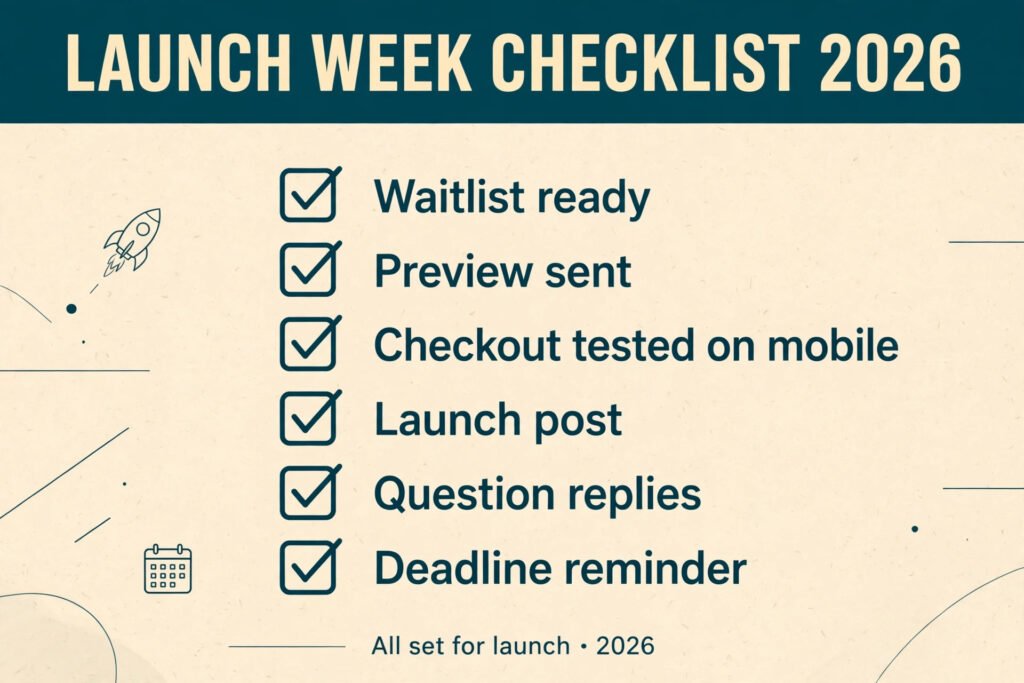
A launch is a short, focused period of attention, not a single post. Plan a simple launch week. Before launch, build a waitlist with the validation page, and send waitlist subscribers a short preview, such as one free chapter or one template page, so they can judge quality. On launch day, announce the product, explain who it is for, and share the result it delivers. During the week, answer questions publicly, share early buyer feedback, and remind the waitlist once near the end. Then close the launch window, even if sales are still trickling in, because a deadline is what turns interest into a decision.
Choose two channels you can sustain, not five you will abandon. For many creators, those are email and one social platform where their audience already spends time. If you write about AI tools for freelancers, a guide to the best AI tools for freelance writers can bring steady search traffic to a product page long after launch week ends. Creators selling visual products often pair email with Instagram, and a roundup of the best AI tools for Instagram helps pick scheduling and design tools for that channel. The channel matters less than consistency: buyers need to see the product more than once, from a person they already trust, before they buy.
Social proof should be real and specific. “Great product” helps nobody; “I planned my client week in 40 minutes instead of two hours” tells the next buyer exactly what they are buying. Collect such quotes during the pilot, with permission, and place the strongest ones near the price.
Step 6: Sell, support, and improve after launch
Launch day is the start of the product’s life, not the end of the work. Set up a simple storefront, a delivery email that works on the first try, and a way for buyers to ask questions. Gumroad, for example, handles payments and delivery for many first time sellers, while a course platform handles lessons and student progress for video products. Pick the storefront that matches your format, and check the checkout yourself on a phone before launch. A broken checkout loses more sales than a weak headline.
Support is part of the product. Answer buyer questions quickly, fix errors publicly, and ship small updates when buyers point out gaps. Each update is a reason to email past buyers. A short changelog signals that the product is alive, which matters for templates buyers expect to stay current.
Watch three numbers after launch: conversion rate, refund rate, and completion rate for courses. A low conversion rate usually means the offer or price is unclear. A high refund rate usually means the product overpromised. A low completion rate usually means the product is too long or too hard to start. Fix the weakest number first, because it points at the real problem.
Plan the second version before you need it. Note every question buyers ask, every section they skip, and every request for a missing feature. That list is the outline for version two, and the source of ideas for your next product. Creators who improve one product steadily usually earn more, with less stress, than creators who launch a new product every month and abandon each one.

AI tools compared for each stage
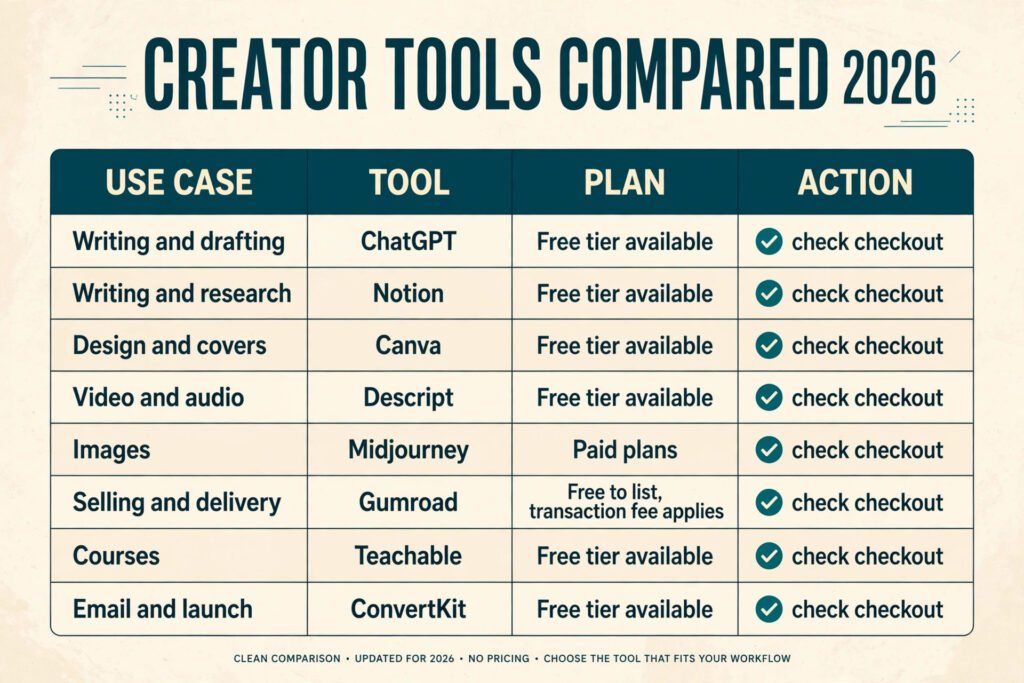
The table below covers tools creators commonly use at each stage. Prices change often, so treat the pricing column as a starting guide and check checkout before you commit. Free tiers are useful for a first product, but check their limits, such as export quality or monthly credits, before you rely on them for launch week.
| Stage | Tool | What it does | Pricing guide |
|---|---|---|---|
| Writing and drafting | ChatGPT | Drafts, rewrites, summaries, worksheets | Free tier available, paid plans, check checkout |
| Writing and research | Notion | Outlines, course hubs, template delivery | Free tier available, paid plans, check checkout |
| Design and covers | Canva | Covers, mockups, social graphics, layouts | Free tier available, paid plans, check checkout |
| Video and audio | Descript | Transcripts, captions, audio and video editing | Free tier available, paid plans, check checkout |
| Images | Midjourney | Product art, mockup scenes, illustrations | Paid plans, check checkout |
| Selling and delivery | Gumroad | Payments, delivery, discount codes, affiliates | Free to list, transaction fee applies, check checkout |
| Courses | Teachable | Lessons, student progress, course checkout | Free tier available, paid plans, check checkout |
| Email and launch | ConvertKit | Waitlists, launch sequences, buyer emails | Free tier available, paid plans, check checkout |
You do not need all eight. A typical first product uses three: one writing tool, one design tool, and one storefront. Add a course platform only for video products, and an email tool only when your list outgrows a simple signup form. Every extra tool adds a subscription and a learning curve, eating into time better spent talking to buyers.
When you compare tools, test the export, not just the editor. A design tool that cannot export a clean PDF, a video tool that cannot export captions, or a template tool that breaks on mobile will cost you more in support messages than it saved in production. Build one sample in each candidate tool, and judge the finished file as a buyer would.
How to choose the right product type
The right product type depends on your skills, your available time, and what your audience already buys. Use the table below as a starting filter, then confirm with the validation step.
| If this is true | Start with | Why it fits |
|---|---|---|
| You write well and have little spare time | A guide or template pack | Fast to build, easy to update, simple to deliver |
| You teach in person or on video already | A short video course | Your existing skill transfers directly, and buyers pay more for video |
| You design or organise systems for clients | A Notion template or spreadsheet kit | Buyers pay for a finished system, not for theory |
| You have an audience but little time to teach | A resource pack or preset bundle | Low support load, and bundles are easy to discount |
| You want recurring income from the start | A membership or update based product | Recurring revenue, but needs regular new content to retain members |
Avoid starting with the hardest format. A full cohort course, a large membership, or a complex software style tool all demand audience size, support systems, and content volume that a first product rarely has. Start small, learn how your buyers behave, and let the second product be bigger. A small product that sells teaches you more than a large product that stalls.
Mistakes to avoid
Building before validating. This is the mistake that wastes the most time. A month of building feels like progress, but if nobody wants the result, it is a month spent polishing the wrong thing. Validate first, even when it feels slow.
Copying a bestseller’s outline. AI makes it easy to reproduce the structure of a popular product. Buyers notice, and so do refund requests. Borrow the format if it works, but fill it with your own examples, decisions, and numbers.
Promising a result the product cannot deliver. Claims such as doubling income or guaranteed clients create refunds and complaints, even when the content is good. Promise a skill, a system, or a time saving you can demonstrate, and let testimonials carry the bigger claims.
Pricing from effort instead of value. Buyers do not pay for your hours. They pay for their result. A template that took you an afternoon but saves a buyer five hours a week is worth more than a 200 page guide nobody finishes.
Launching to nobody. A product page without an audience is a shop on an empty street. Build the waitlist during validation, so launch day has buyers waiting, not strangers discovering you for the first time.
Ignoring mobile buyers. Many buyers first see a product on a phone. Check the sales page, the checkout, and the product file itself on a phone before launch. A PDF that is unreadable on mobile, or a checkout that fails on mobile, loses sales silently.
Never updating the product. Digital products age. Links break, tools change, and screenshots go stale. Schedule a review every three to six months, fix what broke, and tell past buyers about the update. An updated product keeps selling; an abandoned one slowly stops.
Frequently asked questions
How long does it take to create a digital product with AI?
A simple template or guide takes one to two weeks part time. A short course takes four to six weeks, because recording and testing take longer than drafting. Add two weeks for validation if you have no audience yet. Rushing the timeline usually costs more time later, in refunds and rewrites, than it saves now.
Do I need an audience before I start?
You need access to an audience, not ownership of one. A community you participate in, a newsletter you can guest in, or a social account with a few hundred engaged followers is enough for a first launch. If you have no access at all, spend the validation period joining and helping in one community before you build.
Can AI write the whole product for me?
AI can draft it, but a product published without your checking, examples, and judgement will read as generic, and buyers will notice. Use AI for speed, then add your experience, correct every fact, and remove anything you cannot defend. The checking stage is where the product becomes yours.
What is the cheapest way to start?
Start with free tiers of a writing tool, a design tool, and a storefront that charges per sale rather than monthly. Many first products are built for under 50 dollars a month. Spend money only when a limit blocks you, not before.
How do I protect my product from being copied?
Use a storefront with licensed delivery, add a clear licence note inside the product, and watermark preview images. Total prevention is not possible, and chasing copiers costs more than it recovers. A regularly updated product, with a creator who answers buyers, is harder to replace with a copy.
Should I sell on my own site or a marketplace?
Your own site or a simple storefront gives you the buyer list and full control of price and presentation. A marketplace gives you built in traffic but takes a larger cut and controls the customer relationship. For a first product, a simple storefront plus your own email list is usually the better balance.
Conclusion
Learning how to create a digital product with AI is less about the tools and more about the order of operations. Pick a problem you understand, prove that people will pay to solve it, build with AI doing the fast work and you doing the checking, price for the result, and launch to people who already trust you. Then support the product, watch the numbers, and improve the weakest part first.
Start this week with the smallest version of the idea: one page describing the buyer, the problem, the result, and the price. Share it, talk to ten people, and set a pass mark. If it passes, you have a product worth building. If it fails, you have saved weeks of work and gained a better idea for the next test. That discipline, repeated across two or three products, is what turns AI speed into real income.