

If you are wondering how to use AI to renovate your home, the honest answer is that AI is now genuinely useful for the planning half of a renovation and still limited for the building half. It can turn a photo of your kitchen into a dozen design directions in an afternoon, compare material options, draft a budget, and keep a messy project on schedule. It cannot measure your walls for you, guarantee a quote, or swing a hammer. Used with that boundary in mind, it saves real money, mostly by helping you decide before you pay anyone to start work. The most expensive renovation mistakes are decisions made too late: a layout you dislike once the cabinets are in, a material that blows the budget, a contractor booked before the scope was clear. AI helps you make those decisions earlier, when changing your mind is still free.
This guide walks through the full process in order, from defining the scope to the final furnishing, and names the tools that fit each stage. Prices quoted are typical ranges for 2026, not quotes for your home. Labour and material costs vary sharply by city and property age, so treat every figure here as a planning range and confirm it with local quotes.
How to Use AI to Renovate Your Home: The Short Answer
Start with a written scope and a budget ceiling before you open any design tool. Then use an AI room visualiser to test styles on photos of your actual rooms, a floor plan tool to check that a new layout works at real dimensions, and a budgeting spreadsheet or app to price the shortlist. Get three contractor quotes for the same written scope, compare them line by line, and use a simple project tracker to log decisions, payments, and delays. That sequence, scope first, pictures second, prices third, is what separates a renovation that finishes on budget from one that drifts.
The reason order matters is that design tools are built to excite you. They will happily show you a marble kitchen, a walnut library, and a spa bathroom in the same afternoon, and each one quietly implies a different budget. Without a scope and a ceiling agreed in advance, you will fall in love with a design you cannot afford and then either overspend or cut corners to fit it. Decide the ceiling first, then let the tools work inside it.

What AI Can and Cannot Do for a Renovation
AI is strongest at visualisation, comparison, and organisation. It is weakest at anything that depends on the physical facts of your house: wall conditions, wiring, plumbing, damp, and load bearing structure.
| Task | AI handles it well | AI needs a human check |
|---|---|---|
| Generate style ideas from a room photo | Yes, in minutes | Check that finishes suit the room’s light |
| Test furniture layouts at real dimensions | Yes, with a measured plan | Verify measurements on site |
| Estimate material quantities | Roughly, from a plan | Confirm with a contractor or supplier |
| Price a full renovation | Only as a rough range | Get itemised local quotes |
| Check structural safety | No | Always use a structural engineer |
| Vet a contractor’s licence and references | Partly, by gathering public records | Call references yourself |
| Track progress, payments, and decisions | Yes, very well | Keep your own photo record too |
The pattern is simple. AI is a planning assistant, not a surveyor. Every number it gives you is a starting point for a conversation with a professional, not a substitute for one.
Realistic Budget Ranges for 2026
Budget ranges below are planning figures for a mid range finish in a typical home. A luxury finish can double them, and structural work, rewiring, or replumbing adds further cost.
| Project | Typical range | Where the money goes |
|---|---|---|
| Single room repaint and refresh | $1,500 to $5,000 | Paint, lighting, soft furnishings |
| Bathroom refresh, no layout change | $6,000 to $18,000 | Fixtures, tiling, labour |
| Full bathroom remodel | $15,000 to $35,000 | Moving plumbing, waterproofing, finishes |
| Kitchen refresh, same layout | $8,000 to $20,000 | Cabinet fronts, worktops, appliances |
| Full kitchen remodel | $25,000 to $60,000 | Cabinets, worktops, electrics, plumbing |
| Open plan living change | $20,000 to $50,000 | Structural work, steel, flooring, finishes |
| Whole home cosmetic renovation | $30,000 to $80,000 | Paint, floors, kitchens, bathrooms |
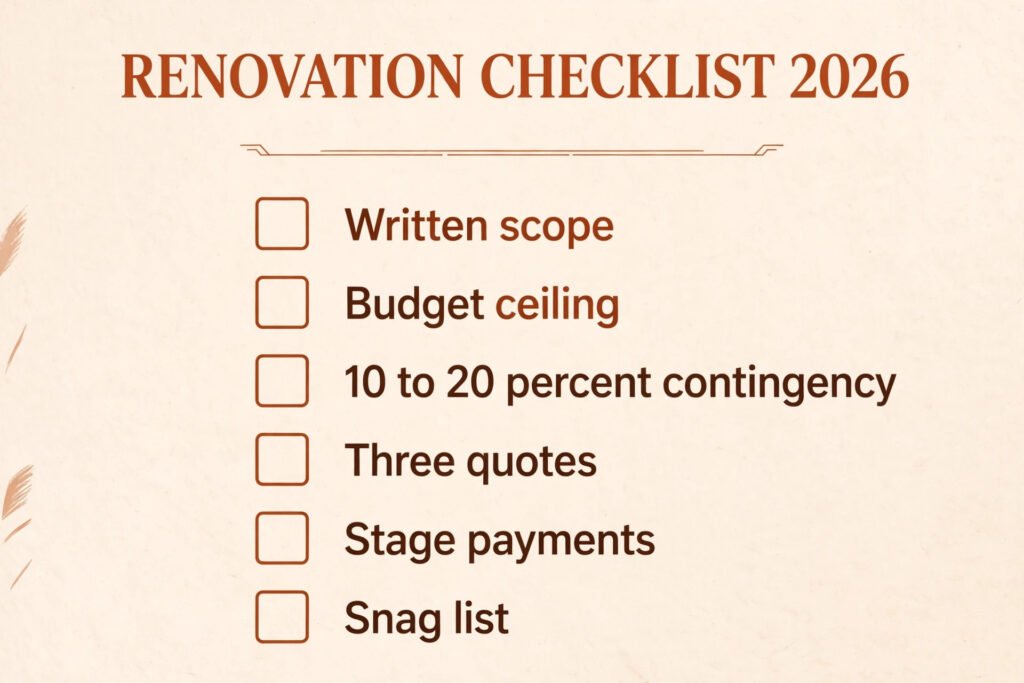
Two costs surprise first time renovators. The first is the contingency: hold back 10 to 20 percent for discoveries behind walls, which older homes almost always produce. The second is the finish gap: the difference between a basic and a premium worktop, tap, or tile is often larger than the difference between two contractors. Decide your finish level early, because it drives the whole budget.
Step 1: Define the Scope and the Budget Ceiling
Write the scope down before you look at a single design. A scope is a short document that lists every room, what changes in each one, what stays, and what quality level you want. “Renovate the kitchen” is not a scope. “Replace kitchen cabinets and worktops, keep the layout and appliances, repaint, replace flooring, mid range finish” is a scope, and it is the document your contractors will price.
Start by listing the problems you actually want solved. A dark kitchen, a bathroom with no storage, a living room that never gets used: these are problems, and each one points at a different fix. A dark kitchen might need a layout change, a lighting change, or simply lighter finishes, and those three fixes cost very different amounts. AI chat tools are useful at this stage for turning a problem list into options. Describe the room, its size, its light, and the problem, and ask for three fixes at three price levels. You will get a usable shortlist, but check every suggestion against your ceiling, because chat tools do not know your budget unless you state it.
Set two numbers: a target budget and a ceiling you will not cross. The ceiling is the number that matters. When a design or a quote pushes past it, something else has to give, and deciding that in advance stops the slow creep that ruins renovation budgets. Write both numbers into the scope document and share the scope, not the ceiling, with contractors. Contractors price the work, not your wallet.
Step 2: Visualise Designs With AI on Photos of Your Rooms
This is the stage where AI earns its place. Room visualisation tools take a photo of your actual room and restyle it: new colours, new furniture, new flooring, new lighting. Because the photo is your room, with your windows and proportions, the result is far more useful than a catalogue picture. You can see whether a dark green kitchen works with your north facing window, or whether a large sofa actually fits the wall.
Work in rounds. Round one is broad: generate six to ten styles for the room and delete the ones you dislike. Round two is narrow: take the two styles you like and vary one element at a time, wall colour, flooring, cabinet style, until you have a direction. Round three is practical: check the direction against your budget and your room’s real constraints. A style that needs new flooring throughout the ground floor is a different project from one that only needs paint and furniture.
Keep a simple rule for this stage: if a design changes the room’s structure, wiring, or plumbing, it moves from the design round into a professional conversation. An AI image will not tell you whether a wall is load bearing, and removing one without an engineer’s advice is dangerous and expensive to undo. Visualisation is for finishes, furniture, colour, and layout ideas. Structure is for engineers.
Save every version you like with a note about what you liked. A folder of images with notes is far more useful to a designer or contractor than a vague description.

Step 3: Test the Layout at Real Dimensions
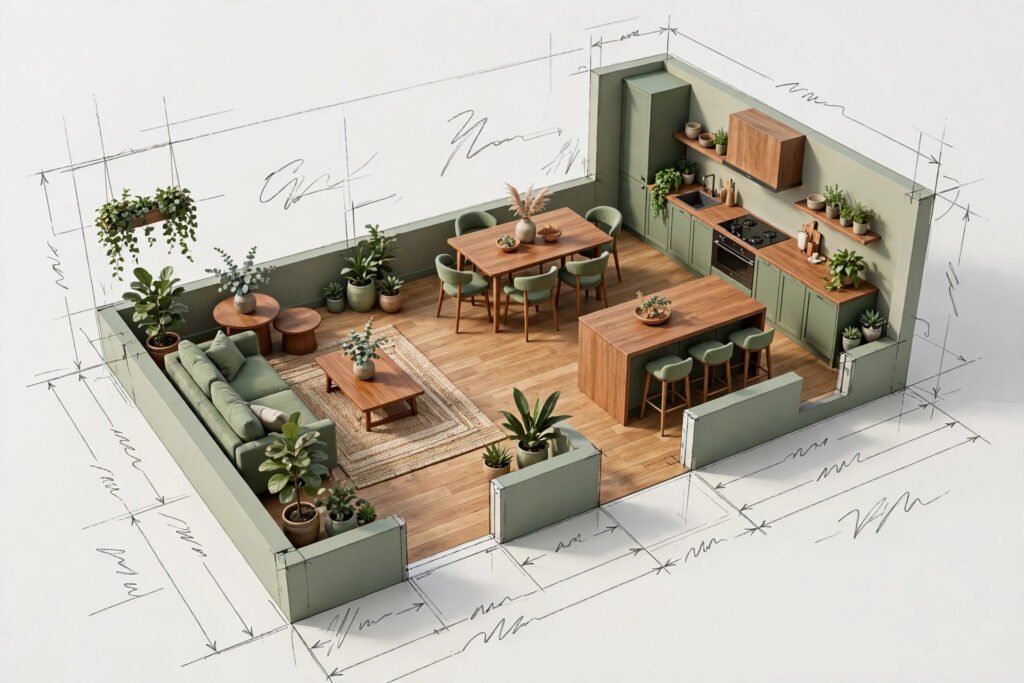
A beautiful image can hide a bad layout. The sofa that looks perfect in a render may block a door, and the kitchen island that looks generous may leave no room to open the oven. Before you commit, build the layout in a floor plan tool at real dimensions, measured from your rooms with a tape measure, not estimated from the photo.
Measure twice: wall lengths, door positions and swing directions, window positions, ceiling height, and the location of radiators, sockets, and plumbing points. Enter those into the plan, then place furniture and fittings at their real sizes. Walk the plan mentally: can two people pass in the kitchen, does the bathroom door clear the vanity, is there a sensible route from the front door to the kitchen with shopping bags? These are the tests that decide whether a layout works, and they are free to run at this stage and costly to fix later.
This is also the stage to test storage honestly. Renovations often add beautiful open space and remove the cupboards that held everyday life. Count what you need to store in each room, from cleaning supplies to board games, and make sure the plan has a home for all of it. A room that looks clean in a render and chaotic in real life has a storage problem, not a style problem.
If the plan tool offers an AI layout suggestion, use it as a starting point and then adjust it yourself. Automated layouts optimise for symmetry and open floor, not for how your household actually moves through the day.
Step 4: Get Material and Cost Estimates
With a direction and a layout, you can price the project properly. Start with materials, because they are the easiest part to compare. List every material the design needs: flooring by square metre, paint by wall area, tiles by bathroom area, cabinets by unit, worktop by length. Ask an AI tool or a supplier calculator for quantities from your measurements, then check the totals against your plan. Quantity errors are the most common cause of budget overruns on materials, and they are easy to catch if you compare two independent estimates.
For costs, use three sources and compare them. First, online cost guides and AI estimates for a rough range. Second, supplier prices for the specific products you have chosen. Third, contractor quotes, which are the only figures that count as real prices. If the three sources disagree sharply, the scope is probably different between them: one may include labour and disposal while another does not. Align the scope first, then compare the numbers.
Watch for the hidden cost lines in quotes: waste disposal, delivery, protection of existing floors, making good after other trades,
and VAT or sales tax treatment. A quote that omits these is not cheaper, it is incomplete. Ask every contractor to price the same
written scope with the same inclusions, so the comparison is fair.

Step 5: Find and Vet Contractors
AI can shorten the search, but it cannot replace the vetting. Use it to gather a long list: search for contractors in your area, read review patterns rather than single reviews, and check for licence and insurance information in public records where available. Then do the human work yourself.
Get three quotes for the same written scope, and insist that each one is itemised: labour, materials, and any subcontracted work listed separately. An itemised quote lets you compare like with like and lets you spot where one contractor has allowed for something another has missed. A single lump sum figure tells you nothing about what is included.
Call at least two references per contractor, and ask the same questions each time: did the work finish on time, did the price change, how were problems handled, would you hire them again? Then visit a finished job if you can. Photographs hide finish quality; a ten minute visit does not. Check communication as well: a contractor who answers slowly and vaguely before the job will not improve once it starts.
Agree the contract terms in writing before work begins: scope, itemised price, payment schedule tied to completed stages rather than dates, start and finish dates, how changes are priced, and what happens if defects appear. Never pay the full amount up front. A stage payment structure protects both sides and keeps the project moving.
Step 6: Manage the Build With a Simple Tracker
Once work starts, your job changes from designer to project manager, and a simple tracker is the tool that matters most. It does not need to be sophisticated. A shared document or a basic project app with four lists is enough: decisions made, decisions pending, payments made, and issues raised. Update it weekly, and photograph every stage before it gets covered up: wiring before plaster, plumbing before tiling, insulation before boarding. Those photos are your evidence if a defect appears later, and they are invaluable if you ever sell the house.
Use AI at this stage for the administrative load: summarising a contractor’s email into action points, drafting a clear change request, or turning a messy site note into a checklist. Keep a written record of every change to the scope, with its price agreed before the work is done, not after. Verbal changes are the single biggest source of renovation disputes, and a short confirming email prevents most of them.
Expect delays. Materials go out of stock, trades run late, and hidden problems appear behind walls. A contingency of 10 to 20 percent and a flexible finish date are the normal shape of a renovation, not pessimism.
Step 7: Finish, Furnish, and Snag
The last ten percent of a renovation takes a disproportionate amount of attention, and it is where quality is decided. Before final payment, walk every room with a snag list: paint finish, door alignment, tile grout, socket plates, tap function, drawer runners, and any damage to existing surfaces. Note every defect in writing with a photo, agree a fix date for each one, and hold back a small retention payment until the list is cleared. This is standard practice, not confrontation, and good contractors expect it.
Furnishing is where AI visualisation earns its fee a second time. Place your existing furniture into the finished room’s plan before you buy anything new, and use a room visualiser to test new pieces against the actual wall colours and light. Buy the large pieces first, sofa, bed, dining table, and let the smaller pieces follow, because a room furnished around one wrong large piece is hard to fix cheaply. If you plan to share the finished result online, documenting the before and after is also genuinely useful to other renovators, and it is one place where a tool roundup can help: the best AI tools for Instagram cover photo planning and captions for exactly that kind of progress post, at /best-ai-tools-for-instagram/.
Live in the room for two weeks before you declare it finished. Small annoyances, a socket in the wrong place, a light switch behind a door, a shelf at the wrong height, only show up in daily use, and most are cheap to fix while the contractor is still engaged. After two weeks, close the snag list, file your warranties and manuals, and keep the photo record with the house documents.

AI Tools Compared for Renovation Work
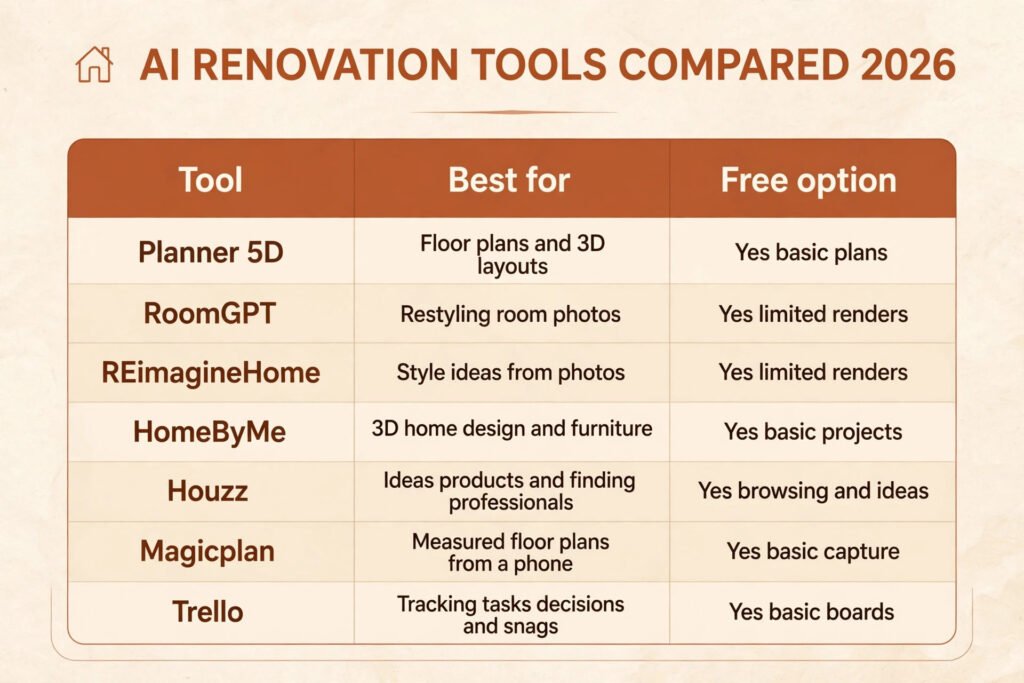
The tools below cover different stages. No single tool does the whole renovation, and buying an all in one subscription before you know which stage you need help with is a common waste of money. Start free where possible, and pay only for the stage you are actually in.
| Tool | Best for | Free option | Paid model |
|---|---|---|---|
| Planner 5D | Floor plans and 3D layouts | Yes, basic plans | Subscription, check checkout |
| RoomGPT | Restyling room photos | Yes, limited renders | Credit packs, check checkout |
| REimagineHome | Style ideas from photos | Yes, limited renders | Subscription, check checkout |
| HomeByMe | 3D home design and furniture | Yes, basic projects | Subscription, check checkout |
| Houzz | Ideas, products, and finding professionals | Yes, browsing and ideas | Pro tools for professionals, check checkout |
| Magicplan | Measured floor plans from a phone | Yes, basic capture | Subscription, check checkout |
| Trello | Tracking tasks, decisions, and snags | Yes, basic boards | Subscription, check checkout |
Planner 5D is the strongest starting point for layout work, because it forces you to work at real dimensions and produces a plan a contractor can read. RoomGPT and REimagineHome are the fastest for style exploration: you can reject ten directions in an evening instead of paying a designer for three. Magicplan builds a plan from phone scans, but verify its measurements with a tape before you order anything. Houzz combines ideas, product listings, and professional directories in one place. Trello, or any simple board tool, is the unglamorous pick that keeps the project on track once work starts.
Try the tools at Planner 5D, RoomGPT, REimagineHome, HomeByMe, Houzz, and Magicplan. Start with free tiers and upgrade only when a limit actually blocks you.
How to Choose Tools for Your Project Size
A single room refresh needs almost nothing: a room visualiser and a budget note. Spending money on a full design suite for a repaint is overkill, and the time you spend learning it is better spent choosing paint. A kitchen or bathroom remodel needs the full set: visualiser, floor plan tool, material list, and tracker, because the number of decisions and the cost of a wrong one both jump. A whole home renovation needs all of that plus a proper project structure, with a single scope document, a single tracker, and a single decision log shared with everyone involved.
Match the tool to the decision, not to the marketing. If your hardest decision is style, pay for renders. If it is layout, pay for a plan tool. If it is cost, spend the effort on itemised quotes instead of any software. And set a deadline for the planning phase. Renovation planning expands to fill the time available, and a project that spends six months in design tools is a project that never starts. Four to six weeks of planning is plenty for a kitchen or bathroom, and two weeks is enough for a single room.
Mistakes to Avoid
Starting without a written scope is the root mistake, and almost every other mistake grows from it. Contractors cannot price a vague brief accurately, so they either pad the price or leave things out, and both outcomes cost you.
Skipping the contingency is the second mistake. A budget with no slack is a promise the house will keep breaking, usually behind a wall you cannot see. Hold back 10 to 20 percent and treat it as spent until the project is finished.
Trusting a render over a measurement is the third. Renders flatter rooms: they widen angles, brighten light, and omit clutter. A layout that works only in a render does not work. Measure, plan at real dimensions, and walk the plan before you buy.
Ordering finishes before the layout is fixed is the fourth. Tiles, worktops, and flooring ordered for a layout that later changes are expensive to return and often cannot be returned at all. Fix the layout, then order.
Paying in full up front is the fifth, and the most avoidable. Stage payments tied to completed work protect you and keep the contractor motivated. Any contractor who insists on full payment before starting is telling you something important about how they run their business.
Finally, forgetting permits and regulations is a mistake that can stop a project entirely. Structural changes, electrical work, plumbing moves, and changes to a listed or historic property may need approval, and that approval takes time. Check before you start, not after the wall comes down.
Frequently Asked Questions
Can AI design my whole renovation for me?
It can generate ideas, layouts, and cost ranges, but it cannot replace a measured survey, structural advice, or a contractor’s quote. Treat it as a fast planning assistant and keep professionals in charge of safety, structure, and pricing.
How accurate are AI cost estimates?
They are useful as ranges and unreliable as quotes. Material prices, labour rates, and hidden conditions vary by location and property, so use AI estimates for planning and itemised local quotes for decisions.
Do I need a designer if I use AI tools?
For a single room or a cosmetic refresh, usually not. For a kitchen remodel, a layout change, or a whole home project, a few hours of a designer’s time still pays for itself, because they catch the practical problems that renders hide.
Which AI tool should I try first?
Start with a room visualiser such as RoomGPT or REimagineHome for style ideas, then move to Planner 5D for a measured layout. That order, style first, dimensions second, matches how most successful renovations are planned.
Will AI tools replace my contractor?
No. AI helps you plan, compare, and track, but the building work, the problem solving on site, and the finish quality all depend on skilled tradespeople. The best result comes from a well prepared homeowner and a good contractor working together.
Is it worth using AI for a small renovation?
Yes, for the planning stages, because even a small project benefits from seeing finishes in your actual room and from a written scope and budget. The tools are mostly free at this level, so the cost is an evening of your time.
Conclusion
Learning how to use AI to renovate your home comes down to using it where it is strong and refusing to lean on it where it is weak. Let it show you styles on photos of your rooms, test layouts at real dimensions, compare materials, and track decisions and payments. Do not let it measure your house, price your project, judge structure, or replace a contractor’s quote. Write the scope first, set a ceiling, keep a contingency, get three itemised quotes, and manage the build with a simple tracker and a photo record. Renovations reward preparation more than inspiration. Start with one room, one photo, and one written scope, and let the tools earn their place from there.