Compare two creators posting the same Reel on the same day. One copies thirty popular hashtags from a viral post, including broad tags with millions of posts, and watches the Reel disappear into a feed where it competes with everyone. The other uses ten targeted tags: three that describe the exact topic, three that describe the audience, two location or niche tags, and two smaller community tags where the post can rank. The second creator usually wins, not because hashtags are magic, but because the best AI hashtag generators help you match tags to content, audience, and competition, instead of chasing popularity alone. Popularity without relevance brings views from people who will not follow, buy, or return.
That distinction shapes this whole guide. Hashtags still matter in 2026, but they matter differently than they did five years ago. Platforms now read captions, audio, images, and viewer behaviour to understand content, so hashtags are one signal among many, not a ranking cheat. Their real jobs are narrower and more useful: help the platform categorise a post correctly, help interested viewers find it through search and tag pages, and help you reach a smaller community where your post can stand out. A generator that only returns the biggest tags fails all three jobs. A good generator returns a mix, explains why each tag fits, warns you about banned or broken tags, and helps you build reusable sets for repeat content types, so you are not starting from scratch for every post.
This guide compares fifteen tools for Instagram, TikTok, Reels, and short form video in 2026. It judges them on relevance to your actual caption or image, mix of tag sizes, banned tag warnings, saved sets, platform differences, and ease of use for daily posting. Prices change often, so check the vendor checkout page before you buy any paid plan, and test free tools with your real posts before committing. A generator that looks clever on a demo caption may return generic tags for your niche, and only a real test reveals that.

Why hashtag size mix beats hashtag popularity
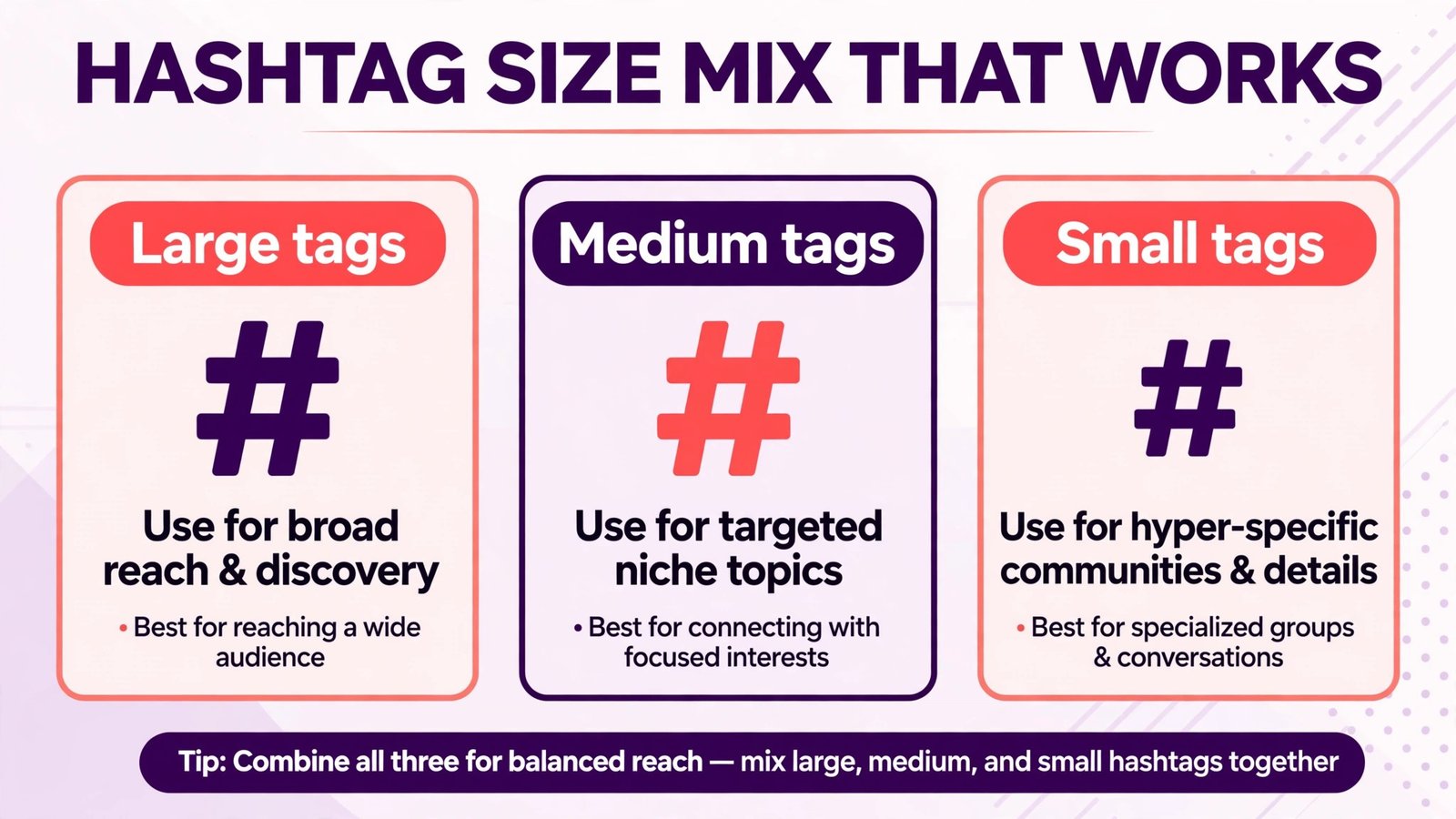
Think of tag size as competition. A tag with ten million posts is a stadium. Your post appears there for seconds, among thousands of new posts an hour, and only a huge account is likely to stay visible. A tag with ten thousand posts is a room. Your post can stay near the top for hours or days, and the people browsing that room are already interested in the topic. A tag with a few hundred posts is a small group. Reach is low, but relevance is high, and a few engaged viewers from that group are worth more than a thousand passing views from a broad tag.
A strong hashtag set therefore mixes sizes. Use a few larger tags for category, several medium tags for your niche, and several smaller tags for your specific community, location, or content style. The exact mix depends on account size. A new account should lean smaller, because it cannot compete in large tags yet. A large account can include larger tags, because its existing engagement helps it rank there. AI generators help by suggesting that mix, rather than returning thirty versions of the same popular tag. When you test a tool, check whether its suggestions actually vary in size and meaning, or whether they repeat the same root word with small changes. Repetition is a sign the tool is guessing from one keyword, not understanding your post.
Relevance beats volume too. A wrong audience tag brings short watches and weak engagement, while a right audience tag brings saves, comments, and follows. Always read suggested tags before posting, and cut any tag that does not describe your post, audience, or location.
At a glance
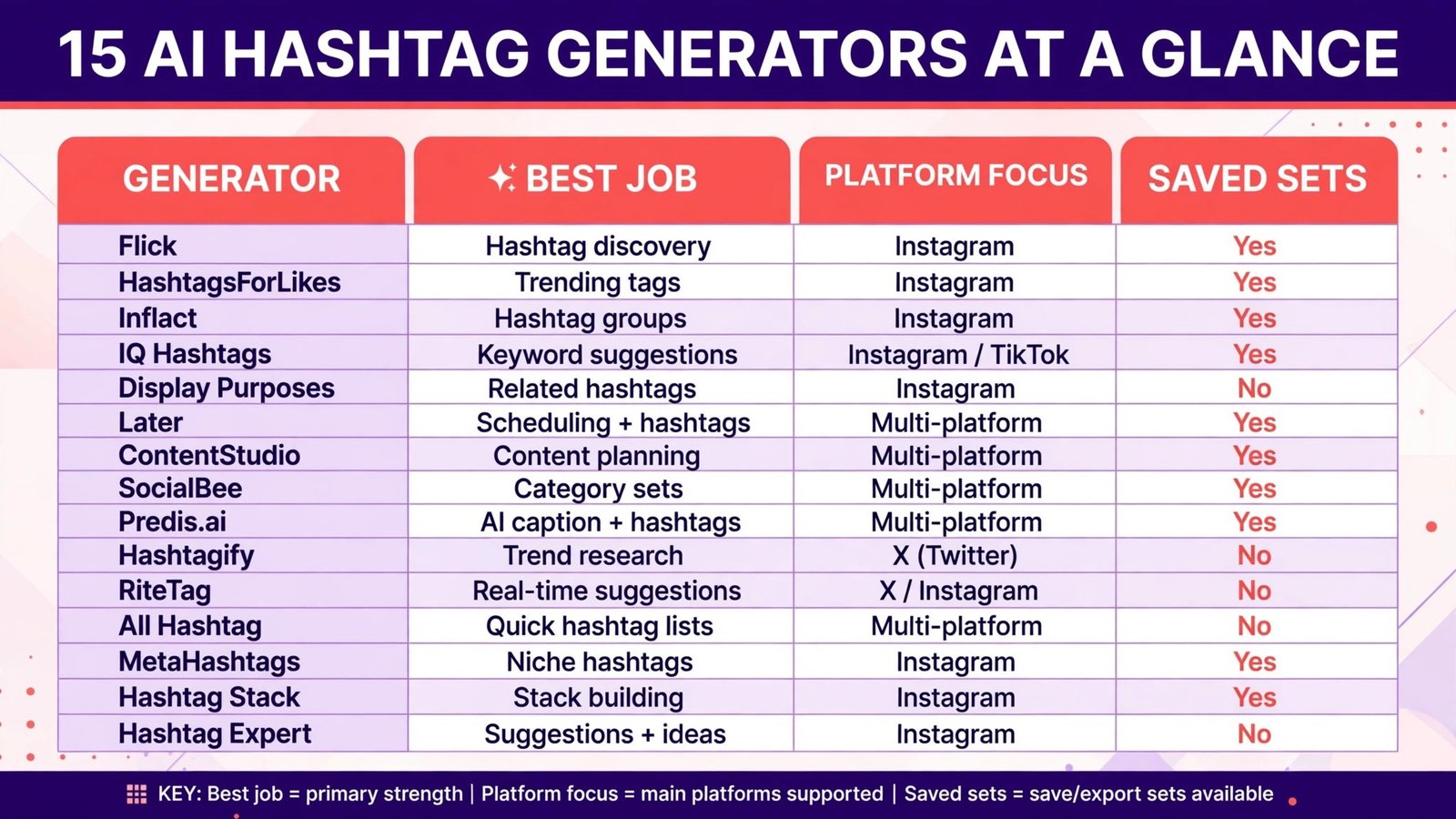
| Tool | Best for | Platform focus | Saved sets | Check before buying |
|---|---|---|---|---|
| Flick | Instagram creators, data led sets | Yes | Plan limits for tracking and sets | |
| Later | Scheduling plus hashtag sets | Instagram, TikTok | Yes | Hashtag features in the chosen plan |
| Hashtagify | Research, popularity and trends | Instagram, Twitter style | Basic | Data depth for your niche |
| RiteTag | Quick tag checks, real time data | Instagram, Twitter style | Basic | Real time data on the plan you use |
| All Hashtag | Free, quick generation | Instagram, TikTok | No | Free tool limits and tag quality |
| HashtagsForLikes | Instagram growth, banned checks | Yes | Plan limits and banned tag data | |
| Inflact | Instagram tools, hashtag plus analytics | Yes | Which tools are in the paid plan | |
| Display Purposes | Clean, relevance focused sets | No | No saved sets, copy and reuse manually | |
| MetaHashtags | Free, fast generation | Instagram, TikTok | No | Tag relevance for your niche |
| Hashtag Stack | Stack building, niche tags | Yes | Stack quality for your topic | |
| IQ Hashtags | Analytics plus banned checks | Yes | Analytics depth on the plan | |
| Hashtag Expert | iOS users, on the go generation | Yes | App only workflow limits | |
| Predis.ai | AI captions plus hashtags | Instagram, TikTok | Yes | Caption and hashtag plan limits |
| ContentStudio | Teams, scheduling plus hashtags | Instagram, TikTok | Yes | Hashtag depth versus scheduling strength |
| SocialBee | Teams, content categories plus tags | Instagram, TikTok | Yes | Category and tag workflow on the plan |
Best pick by job
| Job | First pick | Why it fits | Second option to test |
|---|---|---|---|
| Instagram creator, daily Reels | Flick | Data led sets, tracking, and saved sets for repeat formats | HashtagsForLikes |
| Creator who schedules everything | Later | Hashtag sets inside a scheduling workflow | ContentStudio |
| Quick research before posting | Hashtagify | Popularity, trends, and related tags in one view | RiteTag |
| Free start, test before paying | All Hashtag | No cost, fast generation for a first test | MetaHashtags |
| Avoiding banned or broken tags | HashtagsForLikes | Banned tag checks plus Instagram focus | IQ Hashtags |
| Instagram growth toolkit | Inflact | Hashtag tools plus analytics in one place | Flick |
| Clean, relevant sets without clutter | Display Purposes | Relevance focused suggestions, no filler tags | Hashtag Stack |
| AI captions and tags together | Predis.ai | Caption, hashtag, and content ideas in one tool | SocialBee |
| Team posting across clients | ContentStudio | Scheduling, categories, and tags for teams | Later |
| On the go posting from a phone | Hashtag Expert | Mobile first generation and saved sets | Flick |
For Instagram creators who post daily
1. Flick
Flick is the strongest all round choice for Instagram creators who post Reels and carousels regularly. It generates hashtag sets from a caption or keyword, shows data on tag performance, and lets you save sets for repeat content types, such as tutorials, behind the scenes posts, or product launches.For Instagram creators, that testing loop matters more than any single set.
Flick also helps you avoid a common trap: using the same thirty tags for every post. Its tracking shows which tags actually appear in posts that perform well for you, so you can cut tags that never help and keep tags tied to your best content. Check plan limits for tracked tags and saved sets, because a creator posting daily across several formats will use those limits quickly. Visit Flick and check the current checkout page for plan limits.
Watch out for: reusing one winning set for unrelated content, and trusting a tag score without checking whether the viewers it brings actually engage.
HashtagsForLikes focuses on Instagram growth with an emphasis on banned and broken tag checks. A banned tag is a tag that a platform restricts because of spam or inappropriate content, and using it can limit a post reach or hide it from tag pages entirely. Many creators use a banned tag for months without realising, because the post still appears on their own profile, just not in tag search. A tool that flags those tags before you post saves you from that silent penalty.
Beyond banned checks, HashtagsForLikes generates sets by keyword and niche, and lets you save sets for repeat use. It suits creators who want a focused Instagram tool without a full scheduling suite. Test it with your actual niche keywords, because banned data and tag quality vary by topic, and a tool that is strong for fitness tags may be weaker for a very small niche. Visit HashtagsForLikes and check plan limits on the checkout page.
Watch out for: assuming a tag is safe because it worked last month, and copying a competitor set without checking each tag for your own content.
3. Inflact
Inflact offers a broader Instagram toolkit, with hashtag generation plus analytics, scheduling, and other growth tools in one place. For creators who want one subscription for several jobs, that bundle can be convenient, and its hashtag tools benefit from the analytics side, because you can see which tags correlate with better performance for your account, not just for Instagram in general.The check is whether you will use the bundle, or whether you are paying for tools you never open. If you only need hashtags, a focused tool such as Flick may be simpler and cheaper overall. If you already use Inflact for other Instagram jobs, adding its hashtag tools to your workflow makes sense. Visit Inflact and check which tools are included in the paid plan you choose.
Watch out for: paying for a bundle you barely use, and confusing account level analytics with tag level proof.
IQ Hashtags combines hashtag generation with analytics and banned tag checks, aimed at creators who want to understand why a set worked. It shows tag data, helps you build sets, and flags problems before posting, which suits creators who post in competitive niches where a single bad tag can limit reach.IQ Hashtags is less useful if you want a one click set and never look back, because its value comes from review and adjustment. If that review habit fits you, it is strong. If it does not, a simpler generator plus a saved set habit may serve you better. Visit IQ Hashtags and check analytics depth on the plan you choose.
Watch out for: changing a whole set at once after one weak post, which makes it impossible to learn which tags helped.
5. Display Purposes
Display Purposes takes a minimalist approach: enter a topic, get a clean set of relevant tags, without filler, repetition, or overlong lists. For creators tired of generators that return thirty near identical tags, that cleanliness is refreshing, and it forces a useful discipline, because you must choose tags that truly fit, rather than filling a quota. Display Purposes suits creators who post thoughtfully, who write specific captions, and who prefer a smaller, relevant set over a large, generic one.
The limit is workflow. Display Purposes does not offer saved sets in the same way as Flick, so you need your own system for storing winning sets, such as a notes document organised by content type. That is a small cost for a free tool, but it matters for daily posting. If you post several times a day, pair Display Purposes with a saved set system, or choose a tool with built in sets. Visit Display Purposes and test it with your real captions.
Watch out for: using a clean set once and then losing it, because there is no built in set library to return to.

For research, scheduling, and team posting
6. Later
Later is best for creators who schedule content in advance and want hashtag sets inside that workflow. You can build sets for each content type, attach them to scheduled posts, and reuse them without switching tools.For TikTok and Instagram creators who plan a week ahead, Later is practical.
Hashtag depth in Later is good but not as research heavy as Hashtagify or Flick. It suits creators who already know their core tags and need a reliable place to store and apply them. If you are still discovering your niche tags, pair Later with a research tool for a month, build your sets, then store the winners in Later. Visit Later and check hashtag features in the chosen plan.
Watch out for: scheduling a post with a stale set that no longer fits the content, and never reviewing set performance.
7. ContentStudio
ContentStudio suits teams and agencies that schedule across clients and need hashtag sets as part of a shared workflow. It combines scheduling, content categories, and hashtag suggestions, so a team can maintain sets per client, per content type, and per campaign, without each team member inventing tags on the fly. That consistency helps agencies, because clients get coherent tagging, and new team members can use approved sets instead of guessing.
For a solo creator, ContentStudio may be more tool than needed, and its hashtag research is less deep than a dedicated generator. Choose it when team workflow and scheduling matter as much as tag quality. Visit ContentStudio and check hashtag depth on the current plan page.
Watch out for: team members using a client set for the wrong client, and sets that nobody reviews after a platform change.
SocialBee organises content by category, such as tips, stories, promotions, and questions, and lets you attach hashtag sets to each category. For creators and teams who post by category, that structure is efficient, because a tip post automatically gets tip tags, and a story post gets story tags, without manual selection each time.SocialBee hashtag generation itself is solid but not its main selling point. Its strength is the category workflow around hashtags. If you post one type of content repeatedly, a dedicated generator may serve you better. If you post varied content on a schedule, SocialBee structure helps. Visit SocialBee and check the category and tag workflow on the plan you choose.
Watch out for: category tags that drift from the actual post, because the category, not the content, chose the tags.
9. Predis.ai
Predis.ai generates captions, content ideas, and hashtags together, which suits creators who struggle with the whole post, not only tags. You enter a topic or product, get caption options, and get hashtag suggestions matched to that caption, which helps when you are posting daily and idea fatigue sets in. For small businesses and creators who need volume, that combined workflow can be faster than using separate tools for captions and tags.
Check the output carefully, because AI captions and tags can be generic, especially for niche topics. Edit the caption to sound like you, cut tags that do not fit, and keep the ones tied to your audience and location. Predis.ai is a starting point, not a publish button. Visit Predis.ai and check caption and hashtag limits on the current plan page.
Watch out for: publishing generic AI captions and tags without editing, which makes different creators look identical.

For quick research and free starts
10. Hashtagify
Hashtagify is a research tool first, and a generator second. It shows popularity, trends, related tags, and top influencers for a tag, which helps you understand a niche before you build a set. If you are entering a new topic, Hashtagify answers useful questions: is this tag growing or fading, what related tags do people actually use, and who are the accounts that drive this conversation.Hashtagify is less suited to daily posting workflow, because it does not offer the saved sets and tracking depth of Flick. Visit Hashtagify and check data depth for your niche.
Watch out for: choosing a tag on popularity alone, without checking related tags and current trends.
11. RiteTag
RiteTag gives quick, real time tag data, including instant feedback on whether a tag is strong, weak, or overused for immediate posting. It suits creators who want a fast check before they post, especially on platforms where timing matters. RiteTag also helps with the habit of checking tags in the moment, rather than relying on a set built months ago that may have changed in popularity or status.
RiteTag workflow is quick and light, which is both its strength and its limit. It does not replace a saved set system or deep research, so pair it with a tool that stores your winning sets. Use RiteTag to check a new tag before you add it to a set, and to spot a tag that has become overused. Visit RiteTag and check real time data on the plan you use.
Watch out for: checking tags only once, and never rechecking a set that you reuse for months.
12. All Hashtag
All Hashtag is a free, quick generator that suits a first test. Enter a keyword, get a set, copy it, and post.It also offers related tag generation and top tag lists, which help you learn the vocabulary of a niche quickly.
Free tools have limits. All Hashtag does not offer saved sets, tracking, or banned tag depth comparable to paid tools, so it is a starting point, not a long term system. Use it to test, learn your niche tags, and decide whether a paid tool with sets and tracking is worth it for your posting volume. Visit All Hashtag and test it with your real captions.
Watch out for: copying a free set without reading each tag, and using the same free set for every post.
MetaHashtags is another free, fast generator, with a simple interface that returns tags by keyword for Instagram and TikTok style posting. It suits creators who want a quick set on a phone, without signing up for a full platform. For occasional posting, that speed is enough, and the tool helps you avoid the blank page problem that leads many creators to post with no tags at all.
As with All Hashtag, MetaHashtags is best as a test or occasional tool, not as a tracking system. It does not replace saved sets, banned checks, or performance review for daily creators. If you post daily, use MetaHashtags to discover new tags, then store winners in a dedicated tool. Visit MetaHashtags and test relevance for your niche.
Watch out for: treating a free set as a strategy, and never building saved sets for your repeat content types.
14. Hashtag Stack
Hashtag Stack focuses on building stacks, which are organised sets of tags for a topic, with a mix of sizes and related terms. For creators who like to think in stacks, such as a stack for tutorials, a stack for product posts, and a stack for community posts, Hashtag Stack gives a clear structure. It helps you avoid the random tag list problem, where tags are individually relevant but together tell the platform nothing coherent about the post.Edit stacks for your content, location, and audience, and test them before adopting them as defaults. Visit Hashtag Stack and test stacks with your real posts.
Watch out for: adopting a stack wholesale without editing for your post, and using the same stack for unrelated content.
15. Hashtag Expert
Hashtag Expert is a mobile app for iOS users who generate and manage tags on the go. It suits creators who shoot, edit, and post from a phone, and who want to generate tags, save sets, and check tag data without opening a desktop tool. For creators who post from events, shoots, or travel, that mobile workflow removes friction, and friction is often the reason tags get skipped entirely.
The limit is platform. Hashtag Expert is app based, so a team workflow on desktop may need a different tool, or a combination where the app generates tags and a scheduling tool stores them. Check app plan limits and whether export to your scheduling tool is smooth. Visit the app store page for Hashtag Expert and check current plan details before buying, or search the official app listing for the latest version.
Watch out for: generating tags on a phone and posting without a final read, and sets that live only on one phone, not in a shared team system.
How the best AI hashtag generators build a set
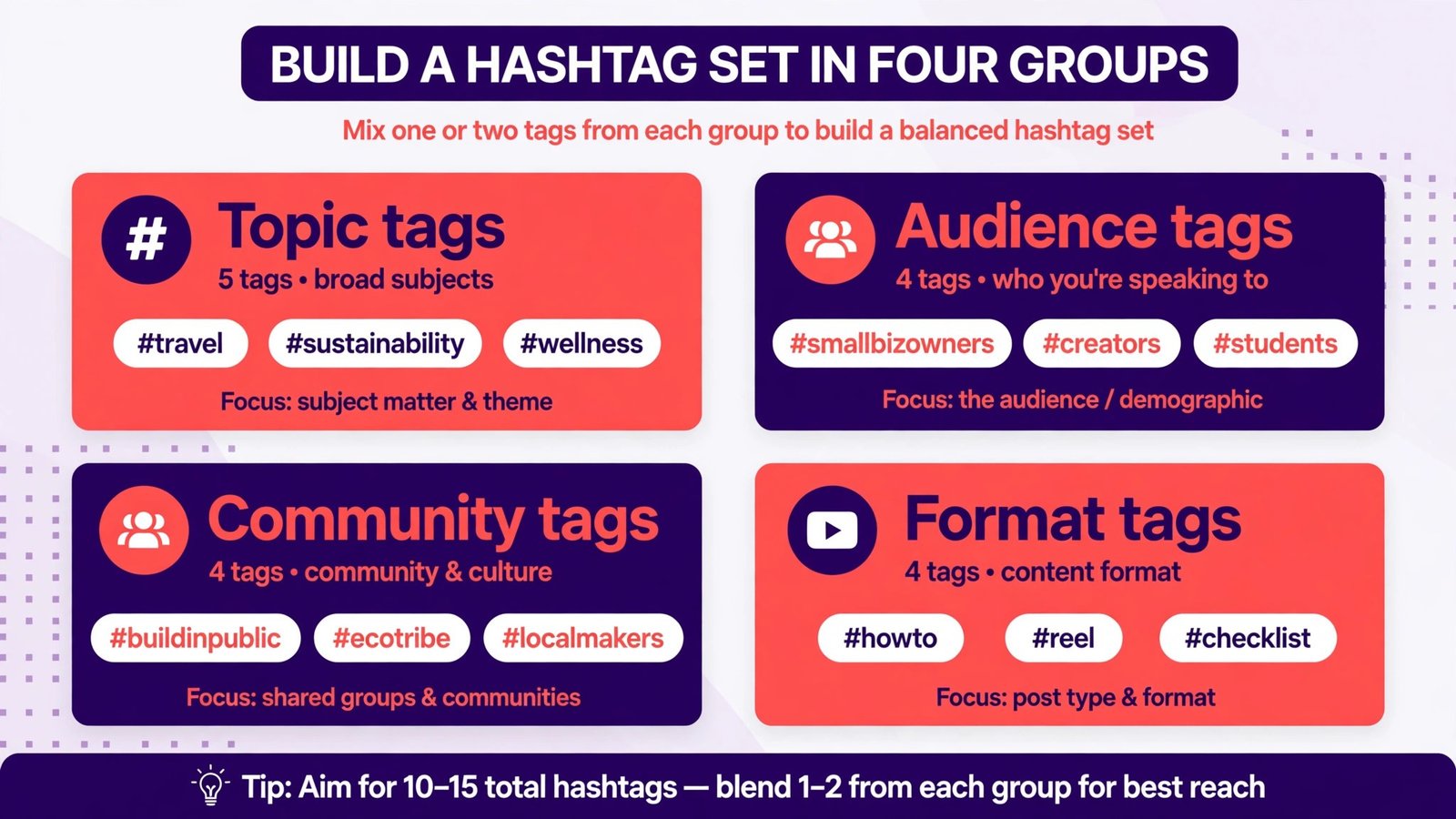
Build a set in four groups. First, topic tags: two or three tags that describe exactly what the post is about, such as the skill, product, or subject. Second, audience tags: two or three tags that describe who the post is for, such as beginners, parents, runners, or small business owners, depending on your niche. Third, community or location tags: two or three smaller tags for a community, city, or sub niche where your post can rank and where viewers are likely to engage. Fourth, format or intent tags: one or two tags for the format, such as tutorial, review, or behind the scenes, if they genuinely fit.
Keep the total to a manageable number, usually between eight and fifteen tags for Instagram, and fewer for TikTok, where caption space and platform behaviour differ. More tags do not mean more reach, and a long list of weak tags dilutes the signal from your strong tags. Write the caption first, then choose tags that match the caption, not the other way round. If a tag does not match the caption, the audience, or the location, cut it. Save the set by content type, not by post, so a tutorial set, a product set, and a story set each evolve separately. Review sets monthly, cut tags that never bring engaged viewers, and test one or two new tags at a time, so you learn what works.
Test sets properly. Compare saves, comments from new viewers, follows, and profile visits, not only reach, and track at least five posts per set before judging, because timing and hooks also affect single posts.
The biggest mistake is copying a competitor set or a viral set without checking each tag. A set that works for a large account in a broad niche will not work for a small account in a narrow niche, and a set that worked last year may include a tag that is now banned, overused, or associated with unrelated content. Read every tag, check its tag page, and look at the top posts there. If those posts do not look like your content, the tag is wrong for you, even if a tool scored it highly.
Other mistakes are easy to fix: only broad tags, the same set for every post, irrelevant trending tags, ignored banned tags, and judging by reach alone. Avoid them by building sets by content type, reviewing monthly, and checking banned status before posting.
Frequently asked questions
For Instagram, eight to fifteen relevant tags usually work better than thirty generic ones, because relevance and mix matter more than count. For TikTok, fewer tags, often three to five well chosen ones, plus a strong caption and hook, tend to work better, because the platform relies heavily on viewer behaviour and content signals. Test for your account, and judge by follows and saves from new viewers, not only by reach.
Hashtags still matter, but as one signal among many, not as a ranking cheat. They help categorise content, help viewers find posts through tag search, and help you reach smaller communities where a post can rank. Caption, hook, watch time, saves, and viewer history matter more for overall distribution. Use hashtags well, but do not expect them to save weak content.
What is a banned hashtag, and how do I avoid one?
A banned hashtag is a tag a platform restricts because of spam, misuse, or inappropriate content. Posts using it may not appear in tag search, even though they appear on your profile. Avoid banned tags by checking tags in a tool that flags them, by viewing the tag page before posting, and by rechecking sets monthly, because tag status can change. If a tag page shows few posts or a warning, drop the tag.
No. Use saved sets by content type, and adjust tags to match each specific post, audience, and location. Reusing the exact same set for unrelated content reduces relevance and can look spammy. Keep core tags for your niche, and vary the rest to match the post. That balance gives you consistency without repetition.
Are AI hashtag generators better than manual research?
They are faster, and good ones suggest a better size mix and related tags than manual guessing. They are not a replacement for judgement. Always read suggested tags, check tag pages for relevance, cut tags that do not fit, and test sets over several posts. The best workflow is AI generation plus human editing plus performance review, not AI generation alone.
Yes, especially smaller community and niche tags, where a post can rank and reach interested viewers without competing with huge accounts. Small accounts should lean toward medium and small tags, post consistently in one niche, and use sets built for specific content types. Growth will still be slow without strong hooks and consistent posting, but relevant tags help the right viewers find you sooner.
Should TikTok and Instagram use the same hashtag set?
No. TikTok favours fewer, highly relevant tags plus strong caption and audio signals, while Instagram benefits from a broader set with a size mix. Build separate sets for each platform, even for the same content, and test performance separately. A set that works on Instagram may be too long or too broad for TikTok, and vice versa.
Conclusion: relevance, mix, and saved sets win
The best AI hashtag generators in 2026 do not win by returning the biggest tags. They win by returning relevant tags in a sensible size mix, warning you about banned tags, and helping you build saved sets you can test and refine. For daily Instagram creators, Flick is the strongest starting point, with HashtagsForLikes as a focused alternative for banned checks. For scheduling teams, Later or ContentStudio keep sets inside the workflow. For a free start, All Hashtag or MetaHashtags let you test before paying. Whichever tool you choose, build sets by content type, read every tag, and update sets monthly. Hashtags will not save weak content, but a relevant set helps the right viewers find strong content sooner.