
A store on Shopify Basic paying 39 dollars a month does not pay 39 dollars a month. On 10,000 dollars of monthly sales at a 50 dollar average order, card fees at 2.9 percent plus 30 cents an order add about 350 dollars, bringing the platform bill to roughly 389 dollars before a single app is counted. That gap between the advertised plan price and the real monthly bill is why many owners start to move Shopify to WooCommerce. They are not chasing a free plugin. They are chasing control over the parts of the bill that grow with sales.
This guide gives you both halves of that decision. First, the real costs, with hosting, plugin and payment fee figures you can check at checkout, and worked examples at three sales levels. Second, a step workflow for moving products, customers, orders, redirects and payments without a week of downtime or a ranking collapse. Prices change often, so check the official pricing page and checkout before you pay for anything named here.
Should You Move at All
A move makes sense for a specific kind of store. You sell enough volume that Shopify plan plus app fees now exceed managed WordPress hosting plus a plugin stack. You want checkout, product page or subscription logic that Shopify only unlocks on a higher plan or through a paid app. You want full ownership of your data, code and URL structure, and you have, or will pay for, someone who can run updates and fix a plugin conflict. Any two of those reasons together make a strong case.
A move makes less sense for other stores. If your store is new and still finding product fit, Shopify hosting, security, updates and support bundled into one bill is worth more than the saving. If nobody will own WordPress updates, and you will not pay a developer or a care plan, WooCommerce will cost you in time and emergency fixes what it saved in fees. If your store depends on a Shopify app with no good WooCommerce equal, price the replacement before you move, not after.
There is also a middle option many stores skip. Stay on Shopify for one more quarter, cancel the apps you do not use, and move to annual billing if you are staying. That cleanup often cuts 100 to 300 dollars a month. Before you move Shopify to WooCommerce, run the numbers with your own app list and order data, and only move when the new total is clearly lower after maintenance time.
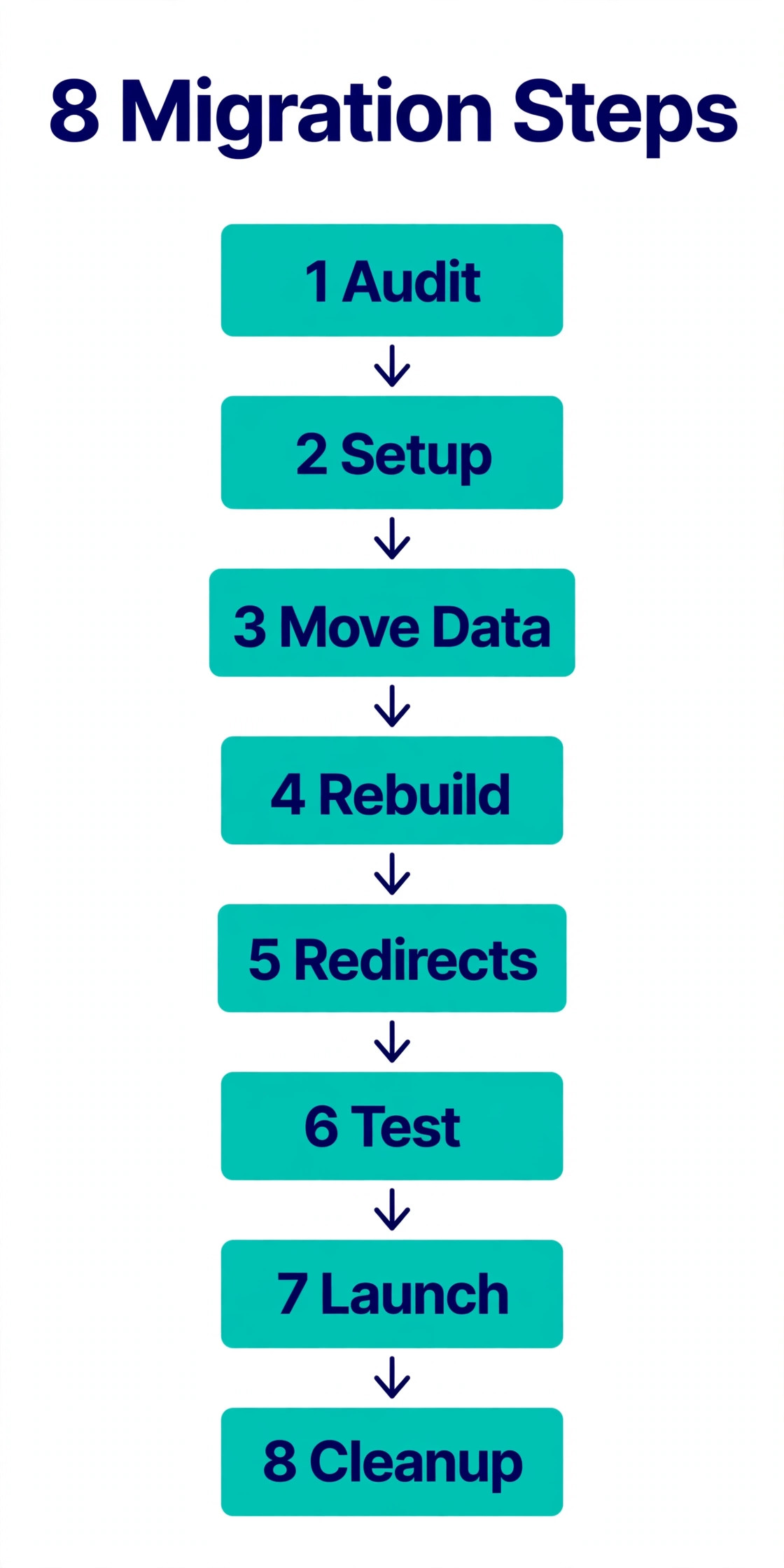
How to move Shopify to WooCommerce in 8 Steps
The workflow below is built around one rule. The new store is built and tested in parallel while the old store keeps selling, and the switch happens only after test orders, redirects and payment checks pass.
Step 1. Audit the store you have
Export a full inventory of what must move. That means product count, variant count, collections, customers, orders, discount codes, gift cards, blog posts, pages, redirects and every app you rely on. Note which apps handle reviews, subscriptions, bundles, loyalty, shipping and email capture, because each one needs a named WooCommerce replacement or a decision to drop it. Pull your top 100 pages by search traffic and your top 50 products by revenue. Those lists drive the redirect map and the testing order.
Step 2. Set up WordPress, hosting and staging
Choose managed WordPress hosting sized for a store, not the cheapest shared plan on offer. Install WordPress on a staging address, add WooCommerce, and match the currency, tax settings, shipping zones and units to the old store. Install an SSL certificate, which most decent hosts include free, and confirm the staging site loads fast on a phone before you import anything.
Pick a theme built for WooCommerce that your team can edit, and keep plugins low at this stage. You need WooCommerce, a backup plugin, a security plugin and an SEO plugin. Everything else gets added after the data lands.
Step 3. Move products, customers and orders
For a small catalog, the built in WooCommerce product importer and Shopify CSV exports can work. For a larger store, or one that needs customers and order history moved intact, a paid migration tool does the heavy lifting. Run the import on staging first, never on the live domain, and check variants, prices, sale prices, stock, SKUs, weights, images, descriptions and categories across the whole catalog. One wrong mapping can silently misprice hundreds of products.
Customer accounts transfer without passwords in almost every case, because Shopify does not hand over password hashes. Plan the password reset email now. Confirm order numbers, dates, line items, fulfilment status and notes survive the import, and brief support on any order number changes before launch.
Step 4. Rebuild pages, checkout and payments
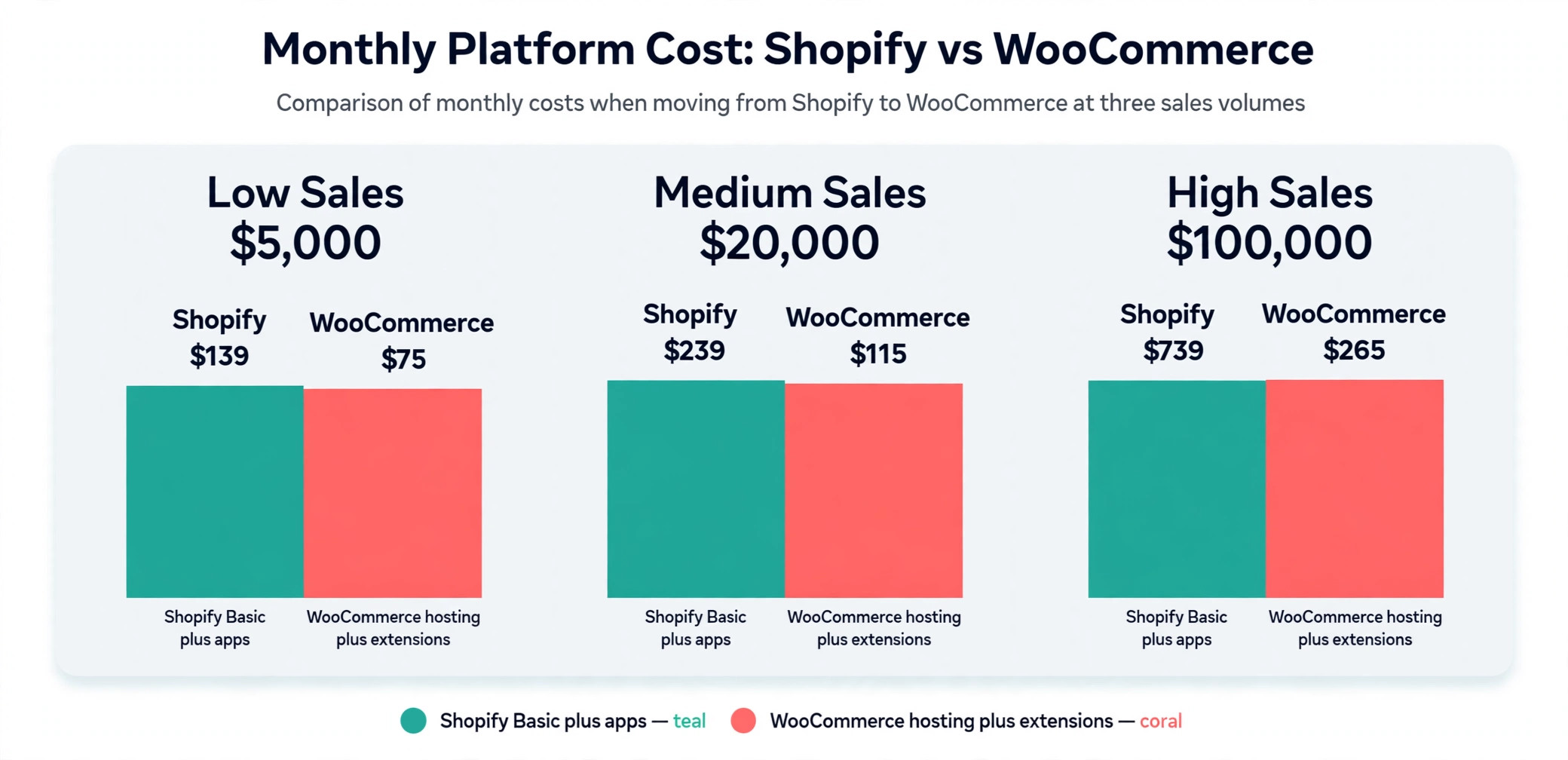
Themes do not transfer, and neither does app logic. Rebuild the homepage, product pages, collection pages, cart and checkout to match your brand, then wire up payments. Most stores run Stripe for cards and PayPal as a second option. Test every payment method, including refunds and failed payments, and confirm order emails arrive with the right branding and details.
Give shipping its own test pass. Recreate zones, rates, free shipping thresholds and live carrier logic, then place test orders to every zone you serve. Confirm tax rates for each region and check that discount codes work, including stacked codes if your old store allowed them.
Step 5. Map every old URL to a new URL
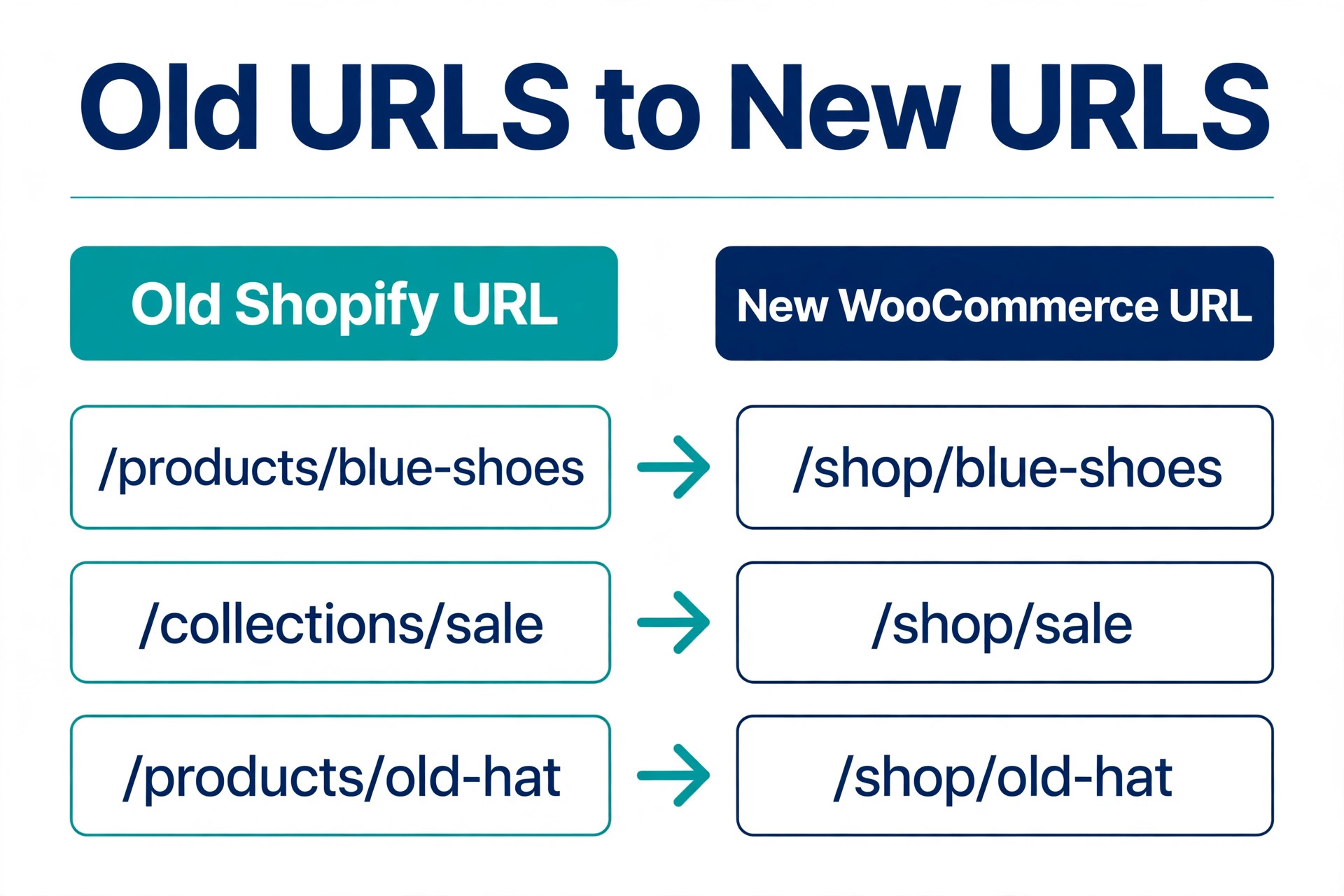
Shopify product URLs use a products path and WooCommerce uses a product path by default, so most URLs will change even if the product name stays identical. Build a redirect map from every old URL to its new match, and implement 301 redirects for all of them, not just the bestsellers. A plugin such as Redirection handles this without server access. Test the map on staging with your top 100 search pages and a random sample of the rest.
Carry over SEO titles and descriptions where your tool supports it, and check them on the new pages. Keep blog posts and pages that earn links or traffic, and redirect or retire the thin ones deliberately, not by accident.
Step 6. Test like a customer, not like a developer
Run a full test pass with fresh eyes. Place orders as a guest and as a logged in customer, on a phone and on a desktop, with and without a discount code, and with an international address if you ship abroad. Check account creation, password reset, order history, email delivery, forms and search, plus load speed under a realistic product count.
Invite two or three real customers or colleagues to try the staging store. They find the paths nobody built, such as a gift card page that no longer exists, so fix what they find before launch.
Step 7. Launch at a quiet hour and watch closely
Point the domain to the new host at a low traffic time, confirm SSL serves correctly, and rerun redirect and checkout tests on the live domain. Keep the Shopify store on its temporary address for at least 30 days, and do not cancel on launch day. Cancel only after two full order cycles pass without a data gap.
Submit the new sitemap in Search Console on launch day, and monitor crawl errors, 404s and rankings daily for two weeks, then weekly for two months. A dip that deepens in week three is a signal to check the redirect map, not to wait it out.
Step 8. Clean up, cancel and maintain
Once the new store is stable, cancel the Shopify apps you no longer need, then the plan itself, and confirm no app keeps billing. Set up weekly updates on staging first, daily backups stored off the server, uptime monitoring and a monthly plugin review. Stores that regret this move usually skipped updates for six months and then paid emergency rates to fix a conflict.
The Real Cost Table
This is the overview proof of the guide, and the table to build your budget from. Figures are US dollars, checked against vendor pages in October 2026. Check checkout before you commit, because hosting renewals and extension prices move.
| Cost line | Shopify today | WooCommerce after the move | Notes |
|---|---|---|---|
| Platform fee | 39 to 399 per month by plan | 0 for the plugin itself | WooCommerce charges no platform fee or revenue share |
| Hosting | Included in the plan | 25 to 350 per month for most stores | Managed WordPress hosting, sized by traffic |
| Domain | About 10 to 20 per year if bought elsewhere | About 10 to 20 per year | Renewal price often exceeds the first year deal |
| SSL certificate | Included | Usually 0 with decent hosting | Confirm it is included before you buy |
| Theme | Free, or roughly 100 to 400 one time for premium | Free, or roughly 60 to 129 one time for premium | A new theme is required, old theme does not transfer |
| Apps and extensions | Often 50 to 300 per month for a working stack | About 29 to 299 per year per paid extension | Official WooCommerce extensions sit in this band |
| Payment processing | 2.9 percent plus 30 cents per online order on Basic with Shopify Payments | 2.9 percent plus 30 cents per online card order with Stripe | No extra platform fee on WooCommerce |
| Third party gateway surcharge | 2 percent on Basic, 1 percent on Grow, 0.6 percent on Advanced | 0 | This surcharge disappears on WooCommerce |
| Migration tool or help | Not applicable | 0 to about 500 for a tool, more for an agency | Depends on catalog size and complexity |
| Maintenance | Included, plus your time | Your time, or 50 to 150 per hour for a developer | Budget this line honestly or the saving is fiction |
Read the table as a system, not as a single line. WooCommerce wins on platform fees and the gateway surcharge. Shopify wins on bundled hosting, security, updates and support. The deciding line is usually maintenance. Price your time or a developer retainer honestly, and for a small store the gap can disappear.
Worked Examples at Three Sales Levels
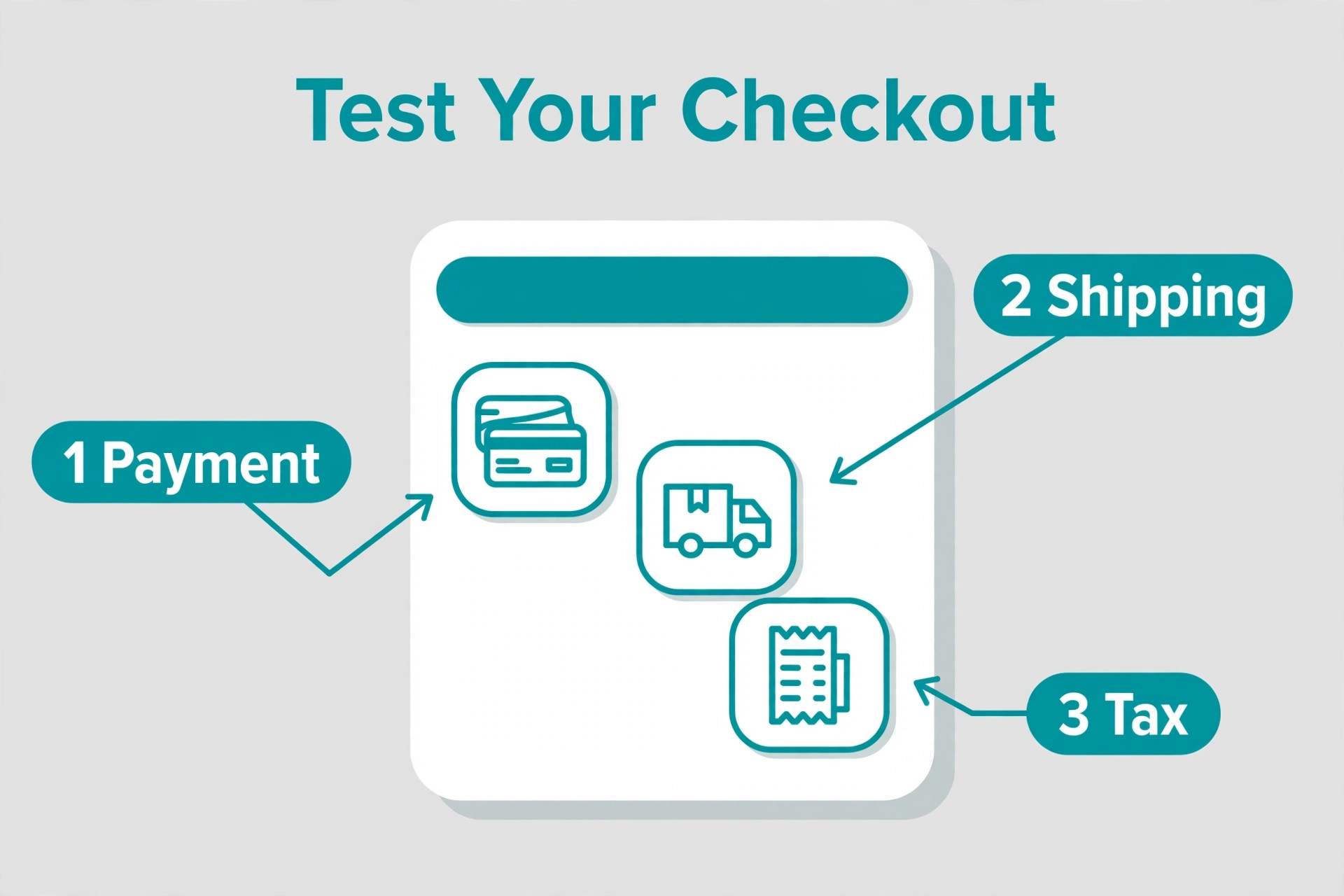
Here are three stores with the same 50 dollar average order and the same Stripe card rate, compared on platform and hosting costs only. Payment fees are identical in both columns, which is the point. The saving comes from subscription and app lines, not from a cheaper card rate, and it is worth modelling before you move Shopify to WooCommerce.
| Monthly sales | Shopify Basic plus apps | WooCommerce managed hosting plus extensions | Monthly gap |
|---|---|---|---|
| 5,000 dollars, 100 orders | About 139 dollars, 39 plan plus about 100 apps | About 75 dollars, 40 hosting plus about 35 extension share | About 64 dollars to WooCommerce |
| 20,000 dollars, 400 orders | About 239 dollars, 39 plan plus about 200 apps | About 115 dollars, 60 hosting plus about 55 extension share | About 124 dollars to WooCommerce |
| 100,000 dollars, 2,000 orders | About 739 dollars, 105 Grow plan plus about 400 apps, plus 200 app growth | About 265 dollars, 150 hosting plus about 115 extension share | About 474 dollars to WooCommerce, before developer time |
Those gaps look decisive until you add maintenance. A developer at 50 to 150 dollars an hour for three hours a month adds 150 to 450 dollars, which wipes out the small store saving and halves the large store saving. An owner who does updates personally pays in evenings instead of dollars. If you already have technical help, the saving is real. If you will pay retail rates for every fix, stay until volume makes the math undeniable.
A second example shows where the gateway surcharge matters. A store on Basic that takes PayPal instead of Shopify Payments pays its gateway rate plus an extra 2 percent to Shopify. On 20,000 dollars of monthly sales through that gateway, the surcharge alone is 400 dollars a month. That store saves by switching platforms, or by switching to Shopify Payments, and the second option costs nothing to test. Check this line on your own bill first.
Hosting, Plugins and Themes in Detail
Hosting is the load bearing decision on WooCommerce, and it is the line most guides understate. Budget shared hosting at 3 to 10 dollars a month can run a brochure site, but it will struggle under a real store during a sale, and a slow checkout costs more in lost orders than the hosting saved. Official WooCommerce guidance puts hosting for most stores at 25 to 350 dollars a month. A small store with steady traffic fits the lower end. A store with thousands of products or sharp traffic peaks needs the middle or upper end, with caching and a content delivery network.
Choose a host that offers staging, daily backups, free SSL and WooCommerce aware support. Staging lets you test updates before they touch the live store, and a backup only counts if it has been tested. Read the renewal price, not the introductory price, and budget the renewal from year two onward.
Plugins and extensions are the second variable. Official WooCommerce extensions cost 29 to 299 dollars a year each, and a working store typically needs several. Subscriptions is the big one for recurring revenue, and published listings put it near 259 to 279 dollars a year, so verify at checkout. Table rate shipping and live carrier rates add roughly 79 to 99 dollars a year per carrier or feature. A sensible mid sized stack commonly lands at 500 to 1,500 dollars a year in licences. The surprise comes when every licence renews in the same month, so stagger purchases or set a renewal reminder.
Themes are a one time cost with a yearly renewal for updates on many premium themes, usually 60 to 129 dollars. Buy for speed, WooCommerce compatibility and support that answers within a day, not for demo images. Remove anything you test and reject, because every inactive plugin is still a file that can carry a vulnerability.
Email, security and backups are separate lines that Shopify bundles invisibly. Transactional email needs a proper sending service once volume grows, and security needs a firewall and malware scanning, either from the host or from a plugin in the 99 to 199 dollar a year band. Together these lines add 20 to 60 dollars a month, and they belong in the comparison.
Payment Fees After the Move
WooCommerce charges no platform fee on top of your payment processor, which is the cleanest part of the comparison. Your cost is whatever Stripe, PayPal or WooPayments charges. That is a genuine saving against Shopify gateway surcharges, and it is why the processor choice matters more after the move.
| Processor | Standard US online card rate | Notes |
|---|---|---|
| Stripe | 2.9 percent plus 30 cents | No monthly fee on the standard plan, plus 1.5 percent for international cards and 1 percent for currency conversion |
| PayPal Checkout | 3.49 percent plus 49 cents | Buyer pays through the PayPal button, plus 1.5 percent for international transactions |
| PayPal standard cards | 2.99 percent plus 49 cents | Plain card payments through PayPal checkout |
| WooPayments | Varies by country and method | Pay as you go with no setup or monthly fee, check the rate for your country at checkout |
On a 50 dollar order, Stripe takes 1.75 dollars and PayPal Checkout takes about 2.24 dollars. Across 1,000 orders a month that is about 490 dollars, which is why many stores make Stripe the default and keep PayPal as a second button. Small orders suffer most from fixed fees. On a 10 dollar order, Stripe takes 59 cents and PayPal Checkout takes 84 cents. If your average order is under 15 dollars, raising it with bundles or free shipping thresholds will save more than any processor switch.
Watch the extras that do not appear in the headline rate. International cards add about 1.5 percent on both Stripe and PayPal. Currency conversion adds about 1 percent on Stripe and a wider spread on PayPal. Dispute fees run about 15 dollars on Stripe and about 15 to 20 dollars on PayPal, and the processing fee on a refunded order is generally not returned. Price international shipping and low margin products with the real fee in mind.
One more payment trap deserves attention. Subscriptions do not move by copying a customer list. Payment tokens usually need customers to re authorise payment on the new platform, or a careful token migration with help from both processors. Tell subscribers early, and never promise uninterrupted billing until the processor confirms it in writing.
Migration Helper Tools Compared, 3 Tools
Three routes cover nearly every store, and the right one depends on catalog size and on whether customers and orders must move intact when you move Shopify to WooCommerce.
| Tool | Cost | What it moves | Best for |
|---|---|---|---|
| WooCommerce built in importer plus Shopify CSV exports | 0 | Products only, with manual mapping | Small simple catalogs under about 500 products |
| Cart2Cart | From about 69 dollars for a small store, priced by record count | Products, categories, customers, orders, coupons, reviews, pages and blogs, with paid options for redirects and SEO URLs | Larger stores that need full history moved |
| LitExtension | From about 69 dollars for a basic migration, with higher service tiers | Products, customers, orders and related data, with a managed service option | Stores that want support to run the migration |
The free route costs nothing except your time, and it has a hard limit. The built in importer handles products only. Customers, orders, blog posts, pages, reviews and redirects all need separate handling, which suits a new store with a small catalog and is a poor fit for an established store. Budget a full weekend for mapping and fixing image links, because Shopify CSV columns do not match WooCommerce fields without work.
Cart2Cart and LitExtension both start with a free demo on a limited set of records, which you should run on staging before paying. Price the full migration with the options you need, including redirects and SEO URLs, because the base price without them is not the price of a safe migration. For a store with thousands of products or heavy SEO traffic, a managed service tier in the 500 to 2,000 dollar band can be cheaper than a failed self run migration. Confirm password handling in writing before you buy.
For complex integrations, a freelancer or agency migration typically runs 75 to 200 dollars an hour or a project fee in the low thousands. It makes sense when warehouse sync, ERP links or multi currency logic must be rebuilt, not just copied.
What Does Not Transfer, and What to Do About It
The parts that do not move cause the support tickets. Your theme does not transfer. Your Shopify apps do not transfer, and each one needs a WooCommerce equal or a decision to drop it. Your URL structure changes, which is why redirects matter. Customer passwords do not transfer, so plan a reset email. Gift card balances and store credit need a manual plan, because a balance that vanishes at launch is a trust problem. Discount logic from a Shopify app may need rebuilding as WooCommerce coupons. Analytics, pixels and email flows do not move themselves, so reconnect and test them before launch.
SEO, Redirects and Traffic Protection
Search traffic is the asset most at risk in a platform move, and the asset most owners check last. Keep the old store live during the build. Build the redirect map from a full URL export, not from memory. Implement 301 redirects for every product, collection, page and blog URL, with category redirects pointing to the new category, not to the homepage. Redirecting hundreds of old URLs to the homepage looks like a soft 404 and frustrates visitors.
After launch, watch Search Console daily for two weeks. Fix 404s in batches, starting with URLs that have clicks, then impressions. Resubmit the sitemap and confirm new pages are indexed. Expect a short dip while redirects are processed, and treat a dip that grows in week three as a defect to fix.
Content deserves the same care as products. Blog posts that earn links or traffic should move with titles, descriptions and internal links updated to the new URLs, and thin posts should be retired deliberately with a redirect to a relevant page. Run a link check after launch and fix internal links pointing at old Shopify URLs in bulk. Search traffic is fragile during a move Shopify to WooCommerce, and a thousand stale internal links undo careful redirect work.
Timeline, Launch Checklist and the Decision
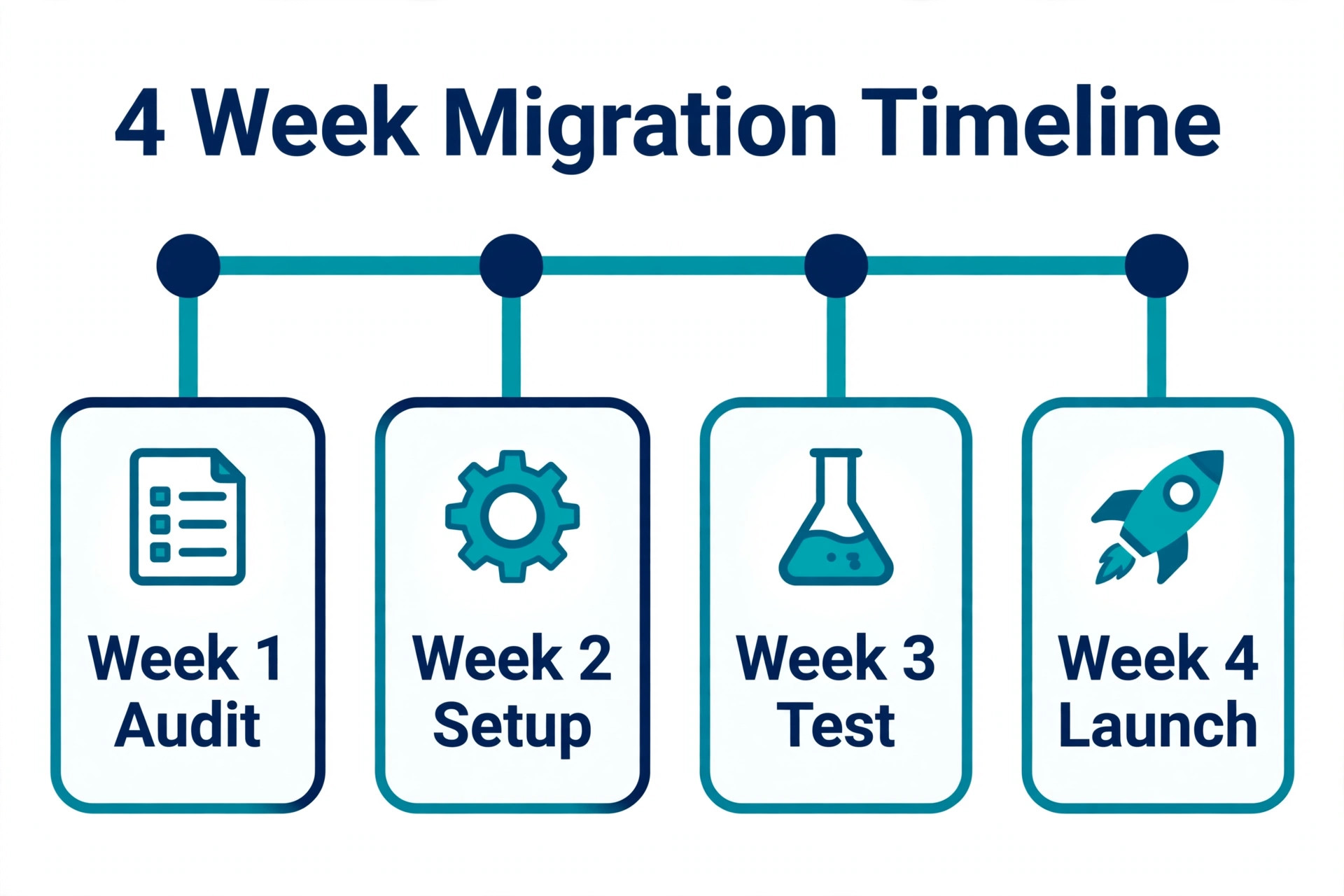
A small store with under 500 products and simple shipping can move in one to two weeks, with most time spent on theme setup and testing. A medium store with 500 to 5,000 products, subscriptions or multi zone shipping needs two to four weeks. A large store with over 5,000 products or custom integrations needs four to twelve weeks. Build the timeline backwards from a quiet sales period, not from a sale or holiday peak.
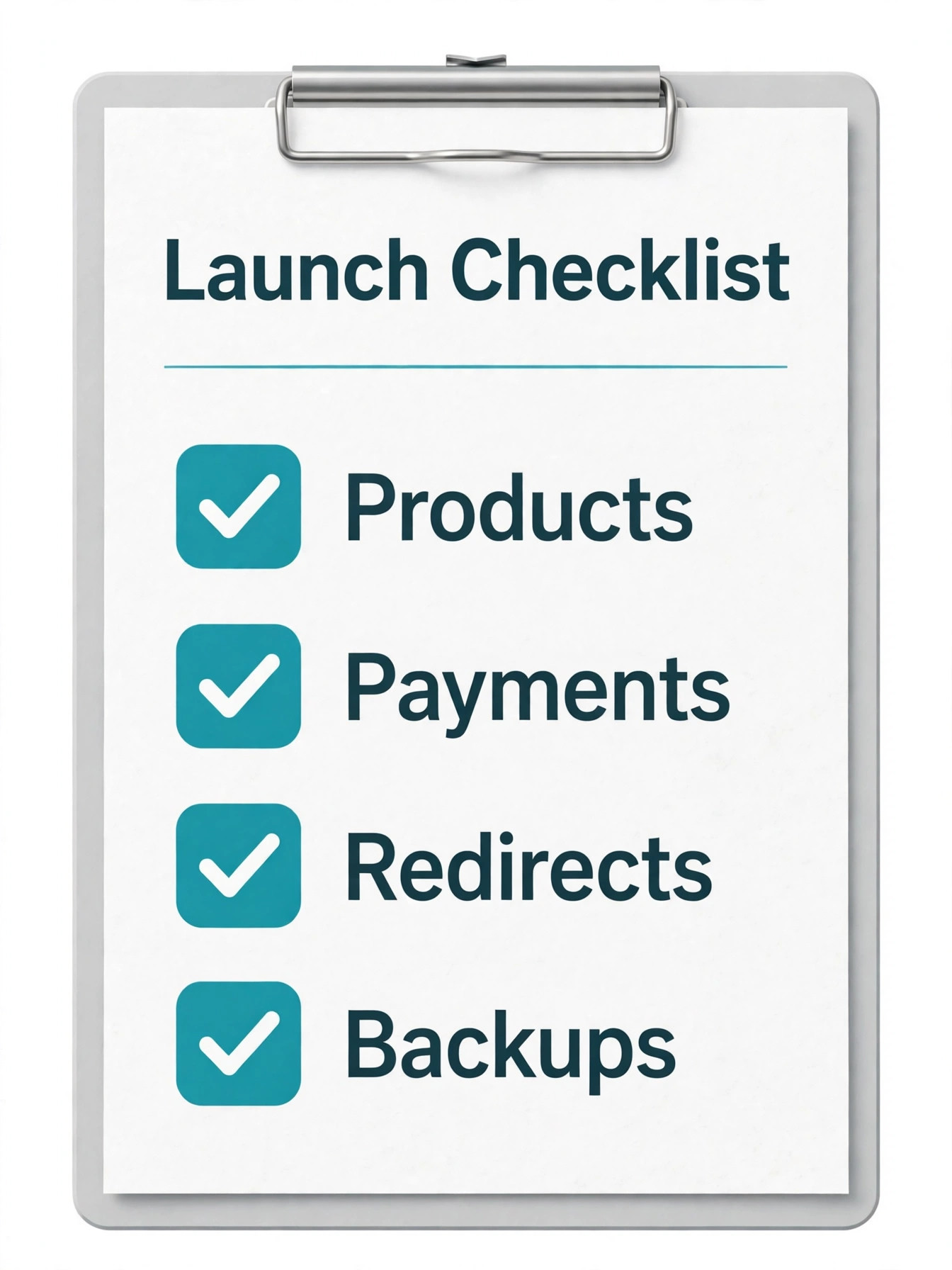
Use this launch checklist as a gate, not as a wish list. Products, variants, prices, stock and images verified on bestsellers. Customers and orders verified, with a password reset email drafted. Payments tested for every method, including refunds. Shipping and tax tested for every zone. Redirect map tested for the top 100 search pages. Email flows, analytics and pixels reconnected. Backups tested with a real restore on staging. Support briefed on password resets and gift cards. If any item is untested, the store is not ready.
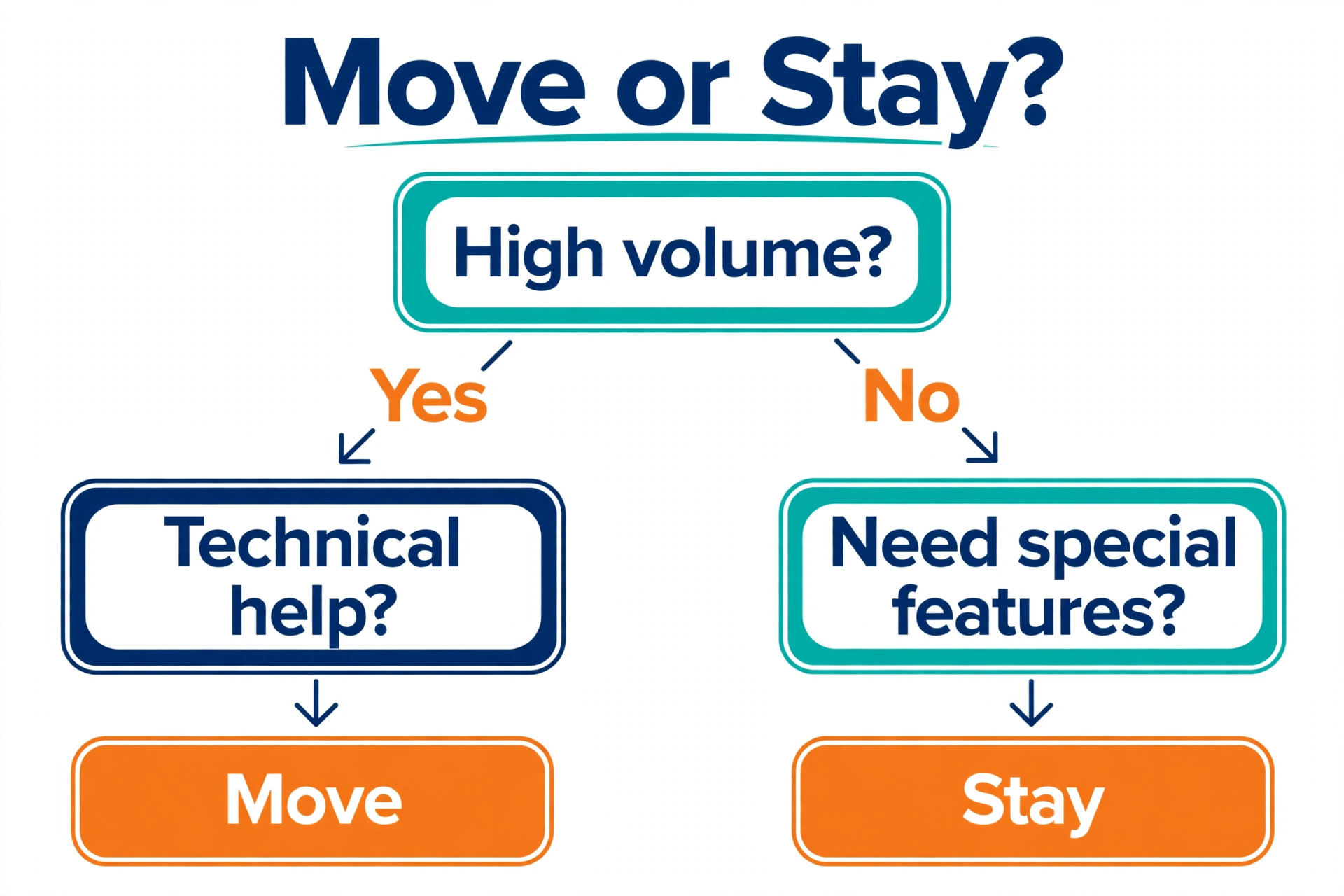
How to choose comes down to three questions. First, does the new total, including hosting, extensions, email, security, backups and maintenance time, beat the old total by enough to justify the risk? A saving of 30 dollars a month does not. A saving of 300 dollars a month, sustained over a year, does. Second, do you have the people or the budget to run WordPress for the next two years, not just launch week? Third, does WooCommerce unlock a feature you actually need that Shopify only offers at a price you refuse to pay? Two yes answers make a move sensible. One yes answer means you should probably stay and revisit the question when volume changes.
Mistakes That Cost Money and Traffic
The most expensive mistake is migrating during peak season to save a month of Shopify fees, then losing a week of peak sales to a checkout bug. The second is choosing the cheapest hosting and discovering the saving during a traffic spike, when the store slows and carts abandon. The third is skipping the redirect map for long tail product URLs, which together carry a large share of search traffic. The fourth is forgetting subscriptions, gift cards and loyalty balances until customers complain. The fifth is cancelling Shopify on launch day, which removes your reference data and fallback at the exact moment you most need both.
A quieter mistake is rebuilding everything at once. A migration plus a redesign plus a new subscription model is three projects wearing one deadline. Move like for like, launch, stabilise for a month, then improve.
For related reading, Shopify vs WooCommerce sets out the wider platform trade offs, and Shopify alternatives is useful if you want to check other platforms before committing. If payment fees drive your decision, Stripe vs PayPal breaks down processor rates, and best AI tools for ecommerce covers tools for product content after the move. For a small team, best software for small business puts the store decision in context.
Frequently Asked Questions
How much does it cost to move Shopify to WooCommerce in total?
A small DIY move typically costs 300 to 800 dollars in the first year for hosting, a theme and a migration tool, plus your time. A medium store with paid extensions and a migration service lands closer to 1,000 to 3,000 dollars. An agency led move for a large store can run several thousand dollars. The recurring saving comes after launch, from removed Shopify fees minus new hosting, extension and maintenance costs.
Do I lose my search rankings when I switch platforms?
Not if redirects are done properly. Map every old URL to its new match with a 301 redirect, carry over titles and descriptions, submit the new sitemap, and monitor Search Console for 404s. Expect a short dip while search engines process the change. A lasting drop usually means missing redirects or a broken sitemap, both fixable if caught early.
Can customers keep their old passwords after the move?
In almost every case, no. Shopify does not hand over password hashes, so customers need to reset passwords on the new store. Send a clear email before launch, and make the reset flow easy to find on the login page. Guest orders are unaffected, and order history can still transfer.
How long does a Shopify to WooCommerce migration take?
A small store takes one to two weeks, a medium store two to four weeks, and a large store four to twelve weeks. Data transfer is often the fastest part. Theme setup, payment and shipping testing, redirect mapping and launch checks take most of the time. Avoid launching during a sale or holiday peak.
Is WooCommerce really cheaper than Shopify?
It can be, but only after maintenance is counted. WooCommerce has no platform fee and no gateway surcharge, and hosting plus extensions often undercut a Shopify plan plus apps at medium and high volume. For a small store paying retail developer rates for every fix, the saving can disappear. Run the comparison with your own app list and order volume.
What happens to my Shopify apps and subscriptions?
Shopify apps do not transfer, so each one needs a WooCommerce replacement or a decision to drop it. Subscription billing is hardest, because payment tokens usually need customers to re authorise payment. Audit every app before you move, and tell subscribers early if billing will need updating.
When the Saving Is Worth the Switch
A platform move pays for itself when the saving is counted honestly, the redirect map is complete, and payments are tested before launch. It fails when the budget counts only the subscription, the launch happens during peak season, and nobody owns updates in month three. The difference is rarely the tool. It is preparation, testing and keeping the old store live until the new one has proved itself over real orders.
If your numbers show a clear saving after maintenance, and WooCommerce gives you checkout, subscription or content control you actually need, start with an audit and a staging build, run a demo migration, and test like a customer before you switch the domain. If the saving is marginal, or nobody will own WordPress, stay on Shopify, cut unused apps, and revisit the move when volume makes the case undeniable. A rushed move Shopify to WooCommerce based on a headline price, with no redirect map and no maintenance plan, costs more than the platform it replaced.