
Shopify alternatives are worth a serious look when Shopify no longer fits the way you sell. Shopify is a strong hosted platform, but its monthly fee, transaction fees on outside payment providers, and app costs add up fast for a small store. A creator selling five digital products does not need the same system as a brand with 5,000 stock keeping units, a warehouse team, and sales in several countries. The right alternative depends on three things: how much control you want, how much technical work you can handle, and where your sales actually come from.
This guide compares 12 platforms grouped by the job each one does best: hosted platforms, open source and self hosted platforms, creator and small store platforms, and enterprise and headless platforms. Prices are October 2026 figures in US dollars. Where a vendor does not publish pricing, or where plans have changed, the guide says check checkout rather than guessing a precise figure. Judge a platform by total cost and by the work it saves, not by the headline monthly price alone.
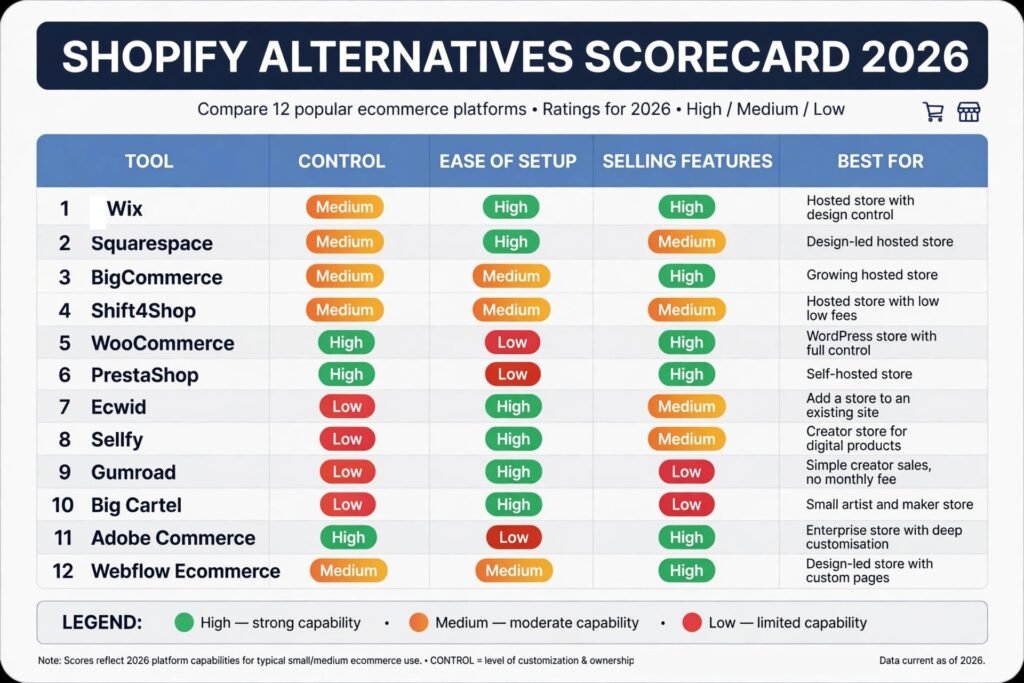
The 12 Shopify alternatives at a glance
| Tool | Best job | Free option | Paid from |
|---|---|---|---|
| Wix | Hosted store with design control | Free trial | About $17 per month |
| Squarespace | Design led hosted store | Free trial | About $28 per month |
| BigCommerce | Growing hosted store | Free trial | About $29 per month |
| Shift4Shop | Hosted store with low fees | Free plan with Shift4 | About $29 per month |
| WooCommerce | WordPress store with full control | Free core plugin | Hosting paid, check checkout |
| PrestaShop | Self hosted store in Europe and beyond | Free download | Hosting paid, check checkout |
| Ecwid | Add a store to an existing site | Free up to 5 products | About $15 per month |
| Sellfy | Creator store for digital products | Free trial | About $29 per month |
| Gumroad | Simple creator sales with no monthly fee | Free to start | 10 percent fee on sales |
| Big Cartel | Small artist and maker store | Free up to 5 products | About $10 per month |
| Adobe Commerce | Enterprise store with deep customisation | No free plan | Custom quote, check checkout |
| Webflow Ecommerce | Design led store with custom pages | Free trial | About $29 per month |
Best pick by job
| Your job | Start with | If that fails, try |
|---|---|---|
| Simple hosted store with good design | Wix | Squarespace |
| Design first brand store | Squarespace | Webflow Ecommerce |
| Store that will grow past 100 products | BigCommerce | WooCommerce |
| Lowest monthly cost on a hosted plan | Shift4Shop | Ecwid |
| Full control on WordPress | WooCommerce | PrestaShop |
| Self hosted store outside the US | PrestaShop | WooCommerce |
| Add selling to a site you already have | Ecwid | Big Cartel |
| Sell ebooks, templates and courses | Sellfy | Gumroad |
| Sell with no monthly fee | Gumroad | Big Cartel |
| Small artist shop with few products | Big Cartel | Ecwid |
| Large enterprise store | Adobe Commerce | BigCommerce |
| Custom design with headless options | Webflow Ecommerce | Adobe Commerce |
Hosted platforms: set up fast, pay monthly, let the vendor run the system
Hosted platforms handle hosting, security updates, and checkout. You trade some control for speed and less maintenance. They suit owners who want to sell this week, not manage servers.

1. Wix
Wix is a hosted builder with strong design control and a large app market. You can start from a template, change layouts with drag and drop, and add bookings, subscriptions, and digital downloads as your store grows. Its ecommerce tools cover discounts, abandoned cart recovery, and several payment providers, and the editor is easier to learn than most enterprise systems.
Pricing: October 2026, paid business plans start at about $17 per month billed annually. Check checkout for the current plan, since Wix separates website plans from business and ecommerce plans.
Best for: Small and mid sized stores that want design freedom without hiring a developer.
Watch out for: Costs rise as you add apps and higher plans, and moving a Wix store to another platform later takes real work.
Try it at: wix.com
2. Squarespace
Squarespace is best known for clean templates, and that strength carries into its stores. Product pages, lookbooks, and content pages look consistent with little design work. It supports physical products, digital products, subscriptions, and scheduling.
Pricing: October 2026, Commerce Basic starts at about $28 per month billed annually. Check checkout, since Squarespace prices differ by billing period and by whether you need advanced shipping and discounts.
Best for: Design led brands, photographers, studios, and small stores where presentation matters as much as checkout.
Watch out for: The app ecosystem is smaller than Wix or WooCommerce, and advanced shipping rules, multi currency selling, and large catalogue tools are less flexible. Transaction fees apply on lower plans.
Try it at: squarespace.com
3. BigCommerce
BigCommerce is a hosted platform built for growth. It handles large catalogues, product variants, customer groups, and multi channel selling to marketplaces and social channels without forcing you into as many paid apps as some rivals. Its checkout is strong.
Pricing: October 2026, Standard starts at about $29 per month billed annually. Check checkout for Plus and Pro pricing, which rise with annual online sales volume.
Best for: Growing stores with many products, wholesale pricing, or sales across several channels.
Watch out for: Design customisation needs more technical skill than Wix or Squarespace, and the sales based plan limits can push a fast growing store to a higher tier sooner than expected.
Try it at: bigcommerce.com
4. Shift4Shop
Shift4Shop, formerly 3dcart, is a hosted platform with a useful free route. If you process payments through Shift4, the standard plan can be free, which makes it one of the lowest cost hosted options for a new store. It includes product options, discounts, email marketing tools, and built in search optimisation settings, so a small store can launch without buying many extras.
Pricing: October 2026, the free plan applies when you use Shift4 payments. Paid plans start at about $29 per month if you use another payment provider. Check checkout for the current terms.
Best for: US based small stores that want a full hosted store and are happy to use Shift4 for payments.
Watch out for: The design and admin interface feels older than Wix or Squarespace, and the free plan depends on payment
provider choice. International sellers should check payment and tax support before committing.Try it at: shift4shop.com
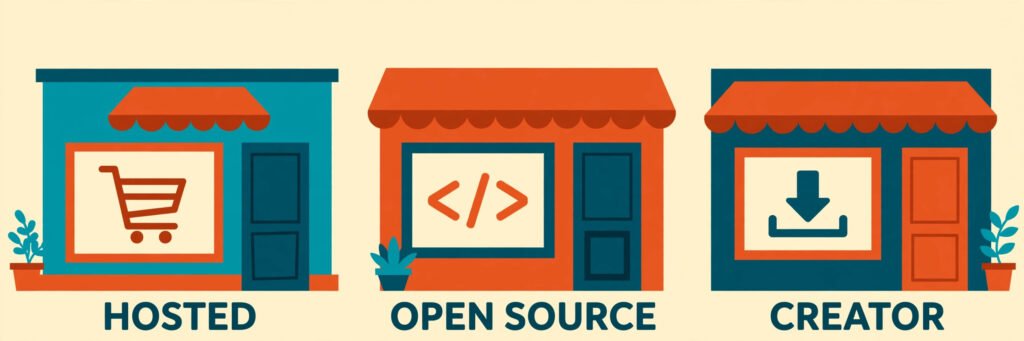
Open source and self hosted platforms: full control, more responsibility
Open source platforms give you the code, the data, and the choice of hosting. That control is valuable, but you own updates, security, backups, and performance. They suit teams with technical help or a developer on call.
5. WooCommerce
WooCommerce turns WordPress into a store. It is the most flexible option on this list for content plus commerce, because blog posts, landing pages, and product pages live in one system. Thousands of plugins add bookings, subscriptions, memberships, and wholesale pricing, and you can choose any host, payment provider, and theme.
Pricing: October 2026, the core WooCommerce plugin is free. Hosting, a domain, a theme, and paid extensions cost extra, so total cost depends on your setup. Check checkout for each extension before you budget.
Best for: WordPress sites, content led stores, and owners who want full control over data, design, and checkout.
Watch out for: Plugin conflicts, update testing, and site speed are your job, not a vendor’s job. A badly chosen set of plugins can slow a store and create support work every month.
Try it at: woocommerce.com
6. PrestaShop
PrestaShop is a free open source ecommerce system with a strong base in Europe and a large module market. It covers catalogues, discounts, shipping rules, and multi language stores well, and its admin area is clear for a small team managing products and orders daily.
Pricing: October 2026, PrestaShop software is free to download. Hosting, themes, and paid modules cost extra. Check checkout for module prices, since many useful features are paid add ons.
Best for: European stores, multi language stores, and owners who want an open source system without WordPress.
Watch out for: Support depends on your host, developer, or the PrestaShop community, and module quality varies. Budget time for updates and testing, especially after adding new modules.
Try it at: prestashop.com
Creator and small store platforms: sell a few products well
Creator platforms strip away catalogue complexity. They focus on a product page, a checkout link, and delivery of digital files. They are the right choice when you sell knowledge, art, or a small range, not when you run a warehouse.

7. Ecwid
Ecwid adds a store to a website you already have, whether it is WordPress, Wix, Squarespace, or a plain HTML site. You manage products in one dashboard and the store appears on your site, on social pages, and in a standalone storefront. It is a practical way to test selling without rebuilding a site or moving content.
Pricing: October 2026, the free plan covers up to 5 products. Paid plans start at about $15 per month billed annually. Check checkout for the product and feature limits on each plan.
Best for: Site owners, bloggers, and small businesses that want to add selling to an existing site.
Watch out for: Deep design customisation is limited compared with a full store builder, and larger catalogues are better served by BigCommerce or WooCommerce. Check transaction and payment fees for your region.
Try it at: ecwid.com
8. Sellfy
Sellfy is built for creators selling digital products, print on demand, and subscriptions from one storefront. You can sell ebooks, video, music, presets, and courses, offer discounts and upsells, and embed buy buttons on other sites.
Pricing: October 2026, paid plans start at about $29 per month billed annually. Check checkout, since Sellfy has changed plan names and limits over time.
Best for: Creators selling digital products and print on demand who want a store in an afternoon.
Watch out for: Physical inventory, complex shipping, and wholesale tools are thinner than on BigCommerce or WooCommerce. If you later add many physical products, you may outgrow Sellfy. Freelance writers selling templates and guides will find a useful comparison in our AI tools for freelance writers guide, which covers the writing tools behind those products.
Try it at: sellfy.com
9. Gumroad
Gumroad is the simplest way to sell a digital product with no monthly fee. You upload a file, set a price, share a link, and Gumroad handles checkout and delivery.
Pricing: October 2026, there is no monthly fee to start. Gumroad charges 10 percent on each sale, plus payment processing fees. Check checkout for the current fee structure before you set prices.
Best for: Creators testing a first product, selling to a small audience, or avoiding a monthly subscription.
Watch out for: The 10 percent fee adds up as sales grow, and store design, discounting, and customer management are basic compared with Sellfy or BigCommerce. High volume sellers usually save money by moving to a monthly plan elsewhere.
Try it at: gumroad.com
10. Big Cartel
Big Cartel is made for artists, makers, and small brands with a focused range. Its stores are clean, its setup is fast, and its free plan covers up to five products, which is enough for a new artist shop.
Pricing: October 2026, the free plan covers up to 5 products. Paid plans start at about $10 per month. Check checkout for the product limits on each paid plan.
Best for: Artists, bands, illustrators, and makers selling a small range of products.
Watch out for: Discount codes, shipping rules, and inventory tools are basic, and the platform is not built for a large catalogue or complex wholesale selling. It is a small store tool, and it is honest about that limit.
Try it at: bigcartel.com
Enterprise and headless platforms: scale, custom design, and complex selling
Enterprise platforms handle high volume, custom checkout flows, and selling across many channels and regions. They cost more in money or development time, and they pay off only when volume or complexity justifies that cost.
11. Adobe Commerce
Adobe Commerce, formerly Magento Commerce, is an enterprise ecommerce platform for large and complex stores. It supports large catalogues, customer segments, business to business pricing, multiple storefronts, and deep integrations with warehouse, customer service, and marketing systems.
Pricing: October 2026, Adobe Commerce does not publish a standard monthly price. Pricing is custom and based on sales volume and requirements. Request a quote and check checkout terms with Adobe or an Adobe partner before budgeting.
Best for: Large brands, business to business sellers, and companies with a development team or agency.
Watch out for: Hosting, development, and maintenance costs are substantial, and a small store will pay for power it never uses. Do not choose Adobe Commerce for a first store unless complexity truly demands it. Stores that sell mainly to other businesses should also weigh outreach, and our AI tools for sales prospecting guide covers that side of business to business selling.
Try it at: business.adobe.com
12. Webflow Ecommerce
Webflow Ecommerce suits design led brands that want custom pages without a separate front end team. You design product pages, landing pages, and content in one visual editor, and the store handles checkout, discounts, and order emails. It is stronger on design than most hosted platforms.
Pricing: October 2026, Ecommerce Standard starts at about $29 per month billed annually. Check checkout for Plus and Advanced pricing, which add higher sales limits and lower transaction fees.
Best for: Design agencies, studios, and brands where custom landing pages and brand presentation drive sales.
Watch out for: Product variants, inventory, and multi currency tools are less mature than BigCommerce or WooCommerce, and transaction fees apply on lower plans. A store with complex shipping or wholesale rules should test those flows before launch.
Try it at: webflow.com
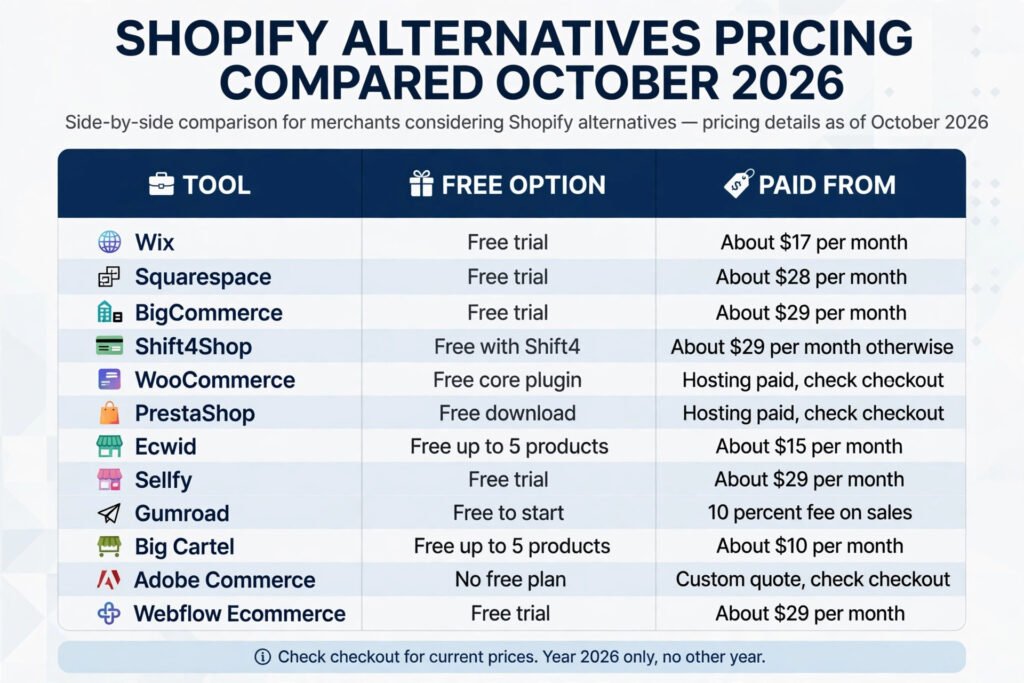
Pricing compared
| Tool | Free option | Paid from, October 2026 | Transaction note |
|---|---|---|---|
| Wix | Free trial | About $17 per month | Check checkout for payment fees |
| Squarespace | Free trial | About $28 per month | Fees on lower plans, check checkout |
| BigCommerce | Free trial | About $29 per month | No added platform fee on standard plans |
| Shift4Shop | Free with Shift4 | About $29 per month otherwise | Depends on payment provider |
| WooCommerce | Free core plugin | Hosting paid, check checkout | Payment provider fees only |
| PrestaShop | Free download | Hosting paid, check checkout | Payment provider fees only |
| Ecwid | Free up to 5 products | About $15 per month | Check checkout for payment fees |
| Sellfy | Free trial | About $29 per month | Check checkout for payment fees |
| Gumroad | Free to start | 10 percent fee on sales | Plus payment processing fees |
| Big Cartel | Free up to 5 products | About $10 per month | Payment provider fees only |
| Adobe Commerce | No free plan | Custom quote, check checkout | Agreed in contract |
| Webflow Ecommerce | Free trial | About $29 per month | Fees on lower plans, check checkout |
The table shows headline prices only. Add payment processing, app, theme, email, and shipping costs, and rebuild the total for your own order volume before you choose.

How to Choose
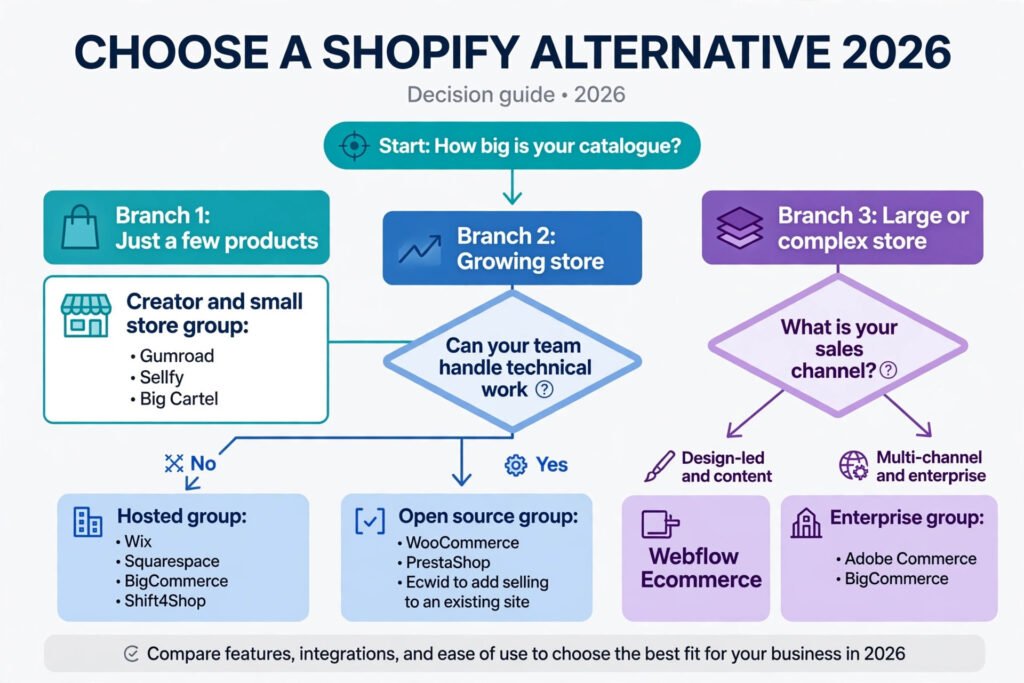
Start with your catalogue and your team, not with a feature list. Count your products, your variants, and your monthly orders. A store with 20 products and 50 orders per month needs a different system from a store with 2,000 products and 2,000 orders per month. Write those numbers down, then shortlist two platforms that fit them, not ten.
Next, test checkout as a customer. Buy a test product, try a discount code, check delivery options on mobile, and read the order email. Most abandoned carts come from checkout friction, shipping surprises, and unclear delivery times, not from a missing feature on a marketing page. If checkout feels slow or confusing, customers will feel the same.
Then check the work you will do every week. Who adds products, answers order questions, and fixes a broken page? A self hosted platform saves money only if someone on your team can do that work. A hosted platform costs more per month but saves hours of maintenance, and for many small owners that trade is worth it.
Finally, check migration and exit costs. Can you export products, customers, and order history? Can you keep your domain and search rankings? Choose a platform you can leave, and you will usually choose more wisely.
If your store supports a service business rather than pure product sales, the buying journey is different. Enquiry, booking, and follow up matter more than a large catalogue, and a different toolset may fit that job better, for example the tools in our AI tools for real estate agents guide, where lead handling sits beside selling.
Mistakes to avoid
First, do not choose on monthly price alone. Add payment fees, apps, themes, email tools, and shipping software. Many owners discover that a $29 plan plus five apps costs more than a $79 plan with those features included. Build a one year total, not a one month total.
Second, do not copy a competitor’s platform without checking your own traffic source. A brand that sells mainly through Instagram needs strong social selling and mobile checkout. A brand that sells through search needs strong content, category pages, and site speed. The best platform for a rival is not automatically the best platform for you.
Third, do not launch with a huge catalogue and no shipping plan. Test shipping rates, packaging costs, and delivery times for your top ten products before you list 500 items. Shipping surprises after launch cause refunds, bad reviews, and support tickets that a better plan would have prevented.
Fourth, do not ignore taxes and payment rules for each country you sell to. Value added tax, sales tax, and payment provider support differ by region, and fixing them after launch is harder than setting them up at the start. Check each platform’s tax tools for your main markets before you commit.
Fifth, do not treat design as a one time job. Product photos, page speed, mobile layout, and clear delivery and returns information affect conversion every day. A clean store with ten strong products will usually outsell a cluttered store with 200 weak listings. Keep improving the top pages first, and measure the result.
Frequently asked questions
Is Shopify still the best ecommerce platform in 2026?
Shopify remains a strong choice for many stores, especially for owners who want a hosted system with a large app market. The alternatives in this guide win in specific cases: lower cost for small stores, more control for WordPress users, simpler selling for creators, or deeper customisation for enterprises. There is no single best platform for every store.
What is the cheapest Shopify alternative?
For a very small store, Big Cartel, Ecwid, and Gumroad offer free starting points, and Shift4Shop can be free with Shift4 payments. The cheapest option depends on order volume, because a percentage fee on Gumroad can cost more than a monthly plan once sales grow. Compare total cost at your expected volume, not just the starting price.
Can I move my store from Shopify to WooCommerce or BigCommerce?
Yes, in most cases. Products, customers, and order history can usually be exported and imported, but themes, apps, and some custom features do not transfer directly. Plan time to rebuild design, test checkout, set up redirects for old product links, and check search rankings after launch.
Which Shopify alternative is best for digital products?
Sellfy and Gumroad are the simplest choices for digital products, because they handle file delivery and checkout links well. WooCommerce also works for digital sales when you need memberships, licensing, or a content site beside the store. Choose Sellfy or Gumroad for speed, and WooCommerce for control.
Do I need a developer for WooCommerce or Adobe Commerce?
WooCommerce can be run without a developer if you use a good host, a proven theme, and a small set of trusted plugins. Adobe Commerce almost always needs a developer or agency, because hosting, customisation, and updates are enterprise work.
Is a free ecommerce platform really free?
A free plan or free plugin is rarely free in total. You still pay for hosting, a domain, payment processing, and often for themes or extensions. Judge long term cost by hosting, fees, apps, and maintenance time.
Conclusion
The best Shopify alternative is the platform that fits your catalogue, your team, and your sales channel, not the platform with the longest feature list. Wix and Squarespace suit design led small stores. BigCommerce and Shift4Shop suit growing hosted stores. WooCommerce and PrestaShop suit owners who want control and can handle maintenance. Ecwid, Sellfy, Gumroad, and Big Cartel suit creators and small ranges. Adobe Commerce and Webflow Ecommerce suit large or design driven stores with complex needs.
Shortlist two platforms, test checkout on mobile, build a one year total cost, and check that you can export your data.