
Most creators and small teams do not fail on social media because they lack ideas. They fail because posting is daily, unplanned, and reactive, and a single busy week can wipe out a month of consistency. Research on posting consistency repeatedly shows the same pattern. Accounts that publish on a predictable rhythm, with a clear mix of formats, retain and grow an audience faster than accounts that post in bursts and then go silent.
Learning how to plan social media content with AI helps you protect that rhythm, because a month planned in one focused session is far easier to sustain than 30 separate daily decisions about what to post.
This guide shows a complete monthly system. You will set a goal and themes for the month, generate and select ideas with AI help, turn ideas into varied formats, write captions that sound human, schedule and approve content in batches, and review results to improve next month. It covers the tools that help at each stage, the risks of over automation, and the mistakes that make AI planned content look generic. Tool prices change often, so check the official pricing page and checkout before paying for any tool mentioned here.
Set the Month’s Goal Before You Generate a Single Idea
A content plan without a goal is just a calendar full of posts. Start the month by choosing one primary goal, such as growing email subscribers, booking more calls, selling a product, building authority in a niche, or driving traffic to a new guide. Every other goal becomes secondary for that month. How to plan social media content with AI well starts with that single goal, because every idea after it should serve the same target.
If you try to grow followers, sell a course, launch a product, and build a community in the same month, your posts will pull in different directions and none will get enough focus to work.
Translate the goal into a measurable target and a content mix that supports it. For email growth, your mix should lean toward useful, saveable posts with a clear lead magnet call to action. For sales, your mix should include proof posts, product explanations, and customer questions answered honestly. For authority, your mix should include opinion posts, breakdowns, and original data or examples from your work.
Write the goal and the target at the top of your planning document, and check every idea against it. If an idea does not serve the goal, save it for a later month instead of forcing it in.
Next, choose three or four monthly themes that reflect your goal and your audience’s interests. A theme is a broad topic you return to each week, such as pricing, workflow, customer stories, or behind the scenes work. Themes prevent repetition and make idea generation easier, because AI can generate ideas within a theme rather than from a blank page.
For example, a fitness coach might choose themes of training, nutrition, mindset, and client results. A software company might choose product tips, customer stories, industry explainers, and team culture. Each theme should be broad enough for four to eight posts, but specific enough that a follower can tell what your account is about from a quick scroll.
Finally, decide your posting rhythm honestly. A rhythm you can sustain for a month matters more than an ambitious rhythm you abandon in week two. Three high quality posts per week, published consistently, beats seven rushed posts that stop after ten days. Count your available time for writing, design, filming, and engagement, then set a weekly count that fits that time with a buffer for busy days. AI batching helps, but it does not create extra hours for filming or community replies, so plan for the human parts too.

Build a Content Pillars and Formats Map
Once themes are set, map them to formats. A theme can become a short video, a carousel, a text post, a story series, a live session, or a link post, and each format reaches a different part of your audience. Planning formats in advance stops the common trap where every post becomes the same type of graphic with a caption, which followers quickly learn to scroll past. This mapping step is the part of how to plan social media content with AI that most creators skip, and skipping it is why feeds start looking repetitive.

Create a simple weekly template. For example, Monday could be a teaching post, Wednesday a proof or story post, and Friday a conversation post that asks a question or runs a poll. Rotate formats within those slots, a teaching post might be a carousel one week, a short video the next, and a text thread the following week.
That rotation keeps the feed varied without requiring a new idea for every slot. AI can help you turn one core idea into three formats, such as a script for a video, a carousel outline, and a caption, but you should adapt each format to the platform, not copy the same text everywhere.

Platform differences matter. A long caption that works on Instagram or LinkedIn may fail on TikTok, where the hook is in the first two seconds of video. A detailed thread that works on X may need to become a single visual on Facebook. Plan the core idea once, then adapt the hook, length, and visual for each platform you actually use. Do not try to be on every platform at once. Choose two platforms where your buyers already spend time, master those, and add a third only when the first two run smoothly.
Keep a bank of evergreen ideas alongside your monthly plan. Evergreen posts answer questions that stay relevant, such as how to choose a tool, common mistakes, or a step by step process. When a planned post falls through, or a news event makes a planned post inappropriate, pull an evergreen post from the bank instead of skipping a day. AI can help you build that bank by listing frequent audience questions from comments, messages, and search data, but you should prioritise questions you can answer from experience, not just questions with high volume.
Generate Ideas With AI, Then Select Like an Editor
Idea generation is where AI saves the most time, and where it causes the most generic content if used without editing. Start with a strong brief covering your audience, your goal, your themes, your formats, and examples of posts that performed well for you. Ask AI for 50 ideas across your themes, then select 15 to 20 for the month using three filters.
Does it serve the monthly goal, can you add a specific example or opinion, and would your audience save, share, or reply to it? Ideas that fail all three filters should be discarded, no matter how clever they sound.
Use AI for angles, not just topics. A topic such as “email marketing” can become ten different angles, a mistake to avoid, a before and after, a tool comparison, a customer story, a checklist, a myth to correct, a behind the scenes look, a question to the audience, a data point from your work, and a prediction with reasoning.
Angle variety is what makes a month of content feel fresh even when themes repeat. Ask AI to generate angles for each theme, then pick the angles that let you show proof or personality, because those are the posts that stand out in a feed full of generic tips.
Check ideas against your past performance. Look at your last 30 posts and note which formats, topics, and hooks got saves, shares, comments, and profile visits, not just likes. Likes are a weak signal. Saves and shares show that a post was useful enough to keep or pass on. Use AI to summarise that performance data if you export it, but verify the top posts yourself, because a tool can misread a viral outlier as a repeatable pattern. Build next month’s plan around the patterns that repeat, not around a single viral post that may never repeat.
Avoid the trap of publishing every AI idea. A month with 30 posts, where 25 are generic tips, will perform worse than a month with 12 posts, where each one has a clear example, a clear opinion, or a clear story. Selection is the editorial skill AI cannot replace. Keep a rejected ideas list too, because an idea that does not fit this month’s goal may fit perfectly next month, when your goal or audience has shifted.
Turn Ideas Into Posts in Batches, Not One by One
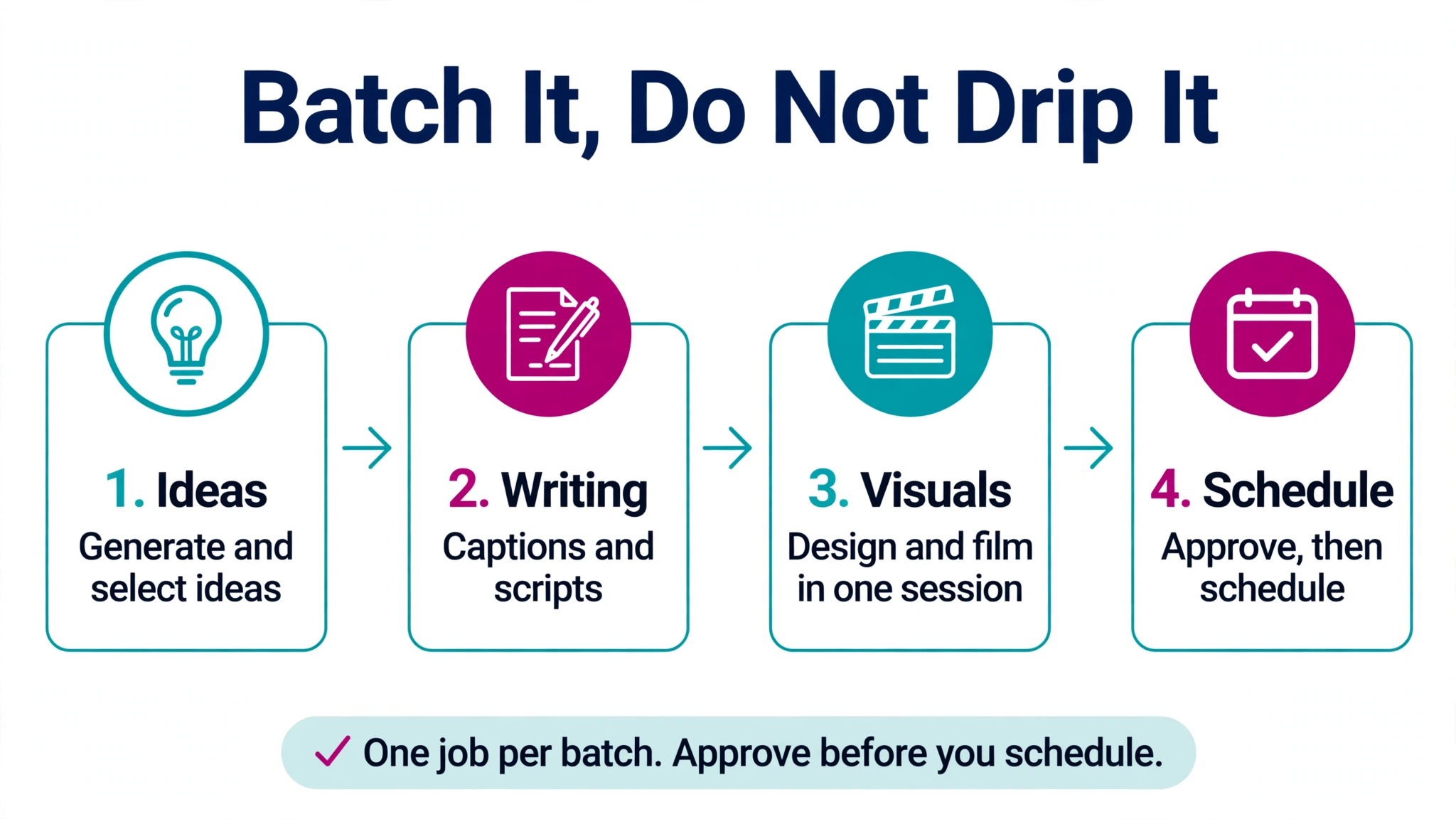
Batching is the core efficiency gain in monthly planning. Instead of writing, designing, and scheduling one post per day, do each job in a batch, one session for ideas and selection, one session for writing captions and scripts, one session for visuals or filming, and one session for scheduling and approval. Each batch has a different mental mode, and switching modes daily wastes time and produces weaker posts.
Start the writing batch with a template for each format, but vary the opening line, the structure, and the call to action so posts do not read as a template. For a carousel, write the hook slide first, then one idea per slide, then a closing slide with a clear next step. For a short video, write the hook in the first line, the main point in three beats, and the ending with a question or action.
For a text post, write the first two lines as the hook, because most platforms truncate longer posts, then develop the point in short paragraphs. AI can draft each format from your brief, but you must rewrite the hook and the closing in your own voice, add a real example, and check every claim.

Visuals deserve the same batching. Create a small set of templates for your brand, with consistent colours and fonts, but vary layouts, images, and chart styles from post to post so the feed does not look repetitive. Use AI image tools for backgrounds, illustrations, and infographic drafts, but check every image for spelling, readability at small size, and accuracy before scheduling. An infographic with a misspelled word or a wrong number will be screenshotted and shared for the wrong reasons.
When you learn how to plan social media content with AI in batches, the visual batch is where consistency comes from, because one session sets the look for the whole month. For video, film several short videos in one session, in the same location and lighting, then edit them over the following days. That single filming session can produce a week’s worth of videos.
Scheduling should happen only after approval. If you work alone, approve your own work the next day with fresh eyes, checking hooks, captions, links, and visuals. If you work with a team or a client, build approval into the calendar, with a deadline that leaves time for revisions before the publish date. Schedule posts with a tool such as Buffer, Later, Hootsuite, or the platform’s native scheduler, and check the scheduled preview on mobile, because most followers will see the post on a phone, not on a desktop dashboard.
Check tool pricing at checkout, because scheduling tools charge by channels and users, and a small team may need only a basic plan.
For creators comparing planning and design tools, this site’s guides to best AI tools for Instagram and best AI tools for TikTok help you match tools to the platforms you actually use.
Write Captions That Sound Human, Not Generated
Captions are where AI planned content most often fails. A caption that lists five generic tips, ends with a generic question, and uses the same structure every day will be ignored, even if the idea is good. Human captions have specificity, opinion, and a voice that followers recognise.
Add at least one specific detail to every caption, a number from your work, a named tool you actually use, a mistake you made, a customer question you heard this week, or a decision you changed your mind about. Knowing how to plan social media content with AI does not remove this rule.
Specificity is the fastest way to sound human, because AI without your details can only produce general advice. If you cannot add a specific detail to a caption, the idea may not be ready to publish, or it may need a different angle that lets you add that detail.
Vary your caption structures across the month. Some posts should open with a result, some with a question, some with a mistake, and some with a direct statement. Some should be short, under 50 words, with the value in the visual or video. Others should be longer, with a story or a step by step breakdown in the caption itself. When every caption follows the same pattern, followers learn to skip them. When structures vary, followers stay curious about what the next post will say.
Calls to action should match the post and the monthly goal. A teaching post might ask followers to save it for later. A proof post might invite a direct message for details. A conversation post might ask a genuine question you actually want answered, and you should reply to the answers. A sales post should have one clear action, not three competing links. Avoid engagement bait that asks for likes or comments without giving value first. Platforms and followers both penalise posts that beg for engagement, and the replies you get will be shallow.
Hashtags and keywords still help discovery on some platforms, but they should be relevant and limited. Use a small set of hashtags that match the topic and audience, not 30 generic tags copied from another account. On platforms driven by search and recommendation, the words in your hook, caption, and on screen text matter more than hashtags. Write those words for a human reader first, and let discovery follow from relevance, not from tag stuffing.
A plan becomes real when you can see it week by week. Here is a practical four week structure you can adapt to your goal and platforms. Week one focuses on teaching and trust. Publish your strongest teaching posts, a proof post, and a conversation post that asks your audience about their biggest challenge. Week two focuses on depth. Publish a breakdown, a tool comparison or process post, and a behind the scenes post that shows how you work.
Week three focuses on proof and offer. Publish customer results, a product or service explanation, and a question post that surfaces objections you can answer. Week four focuses on reflection and next steps. Publish a summary of the month’s lessons, a popular post repurposed in a new format, and a preview of next month’s theme.
That structure gives each week a job, so you are not deciding the purpose of every post from scratch. Within each week, keep one slot flexible for timely content, such as a news reaction, a trending question, or a customer story that arrives mid month. A fully rigid calendar breaks when real life happens. A calendar with three planned posts and one flexible slot per week stays consistent without feeling forced.
Repurpose intentionally, not lazily. A long teaching post can become a short video, a carousel, and a text post over the month, but each version should be adapted, not copied. The video version needs a visual hook and spoken examples. The carousel version needs one idea per slide and a readable design. The text version needs a strong opening and short paragraphs. Repurposing saves time, but only if each version works on its own platform. Publishing the same text and image everywhere, without adaptation, looks like automation and performs like it.
Keep a content calendar that a teammate or a future you can understand. For each post, record the date, platform, theme, format, hook, caption status, visual status, link, and call to action. That record lets you spot gaps, such as three teaching posts in a row with no proof post, and it makes next month’s planning faster, because you can see what you already covered. AI scheduling tools can display that calendar, but a simple spreadsheet works just as well for a solo creator, and it is easier to review at a glance.
Measure, Review, and Improve Next Month
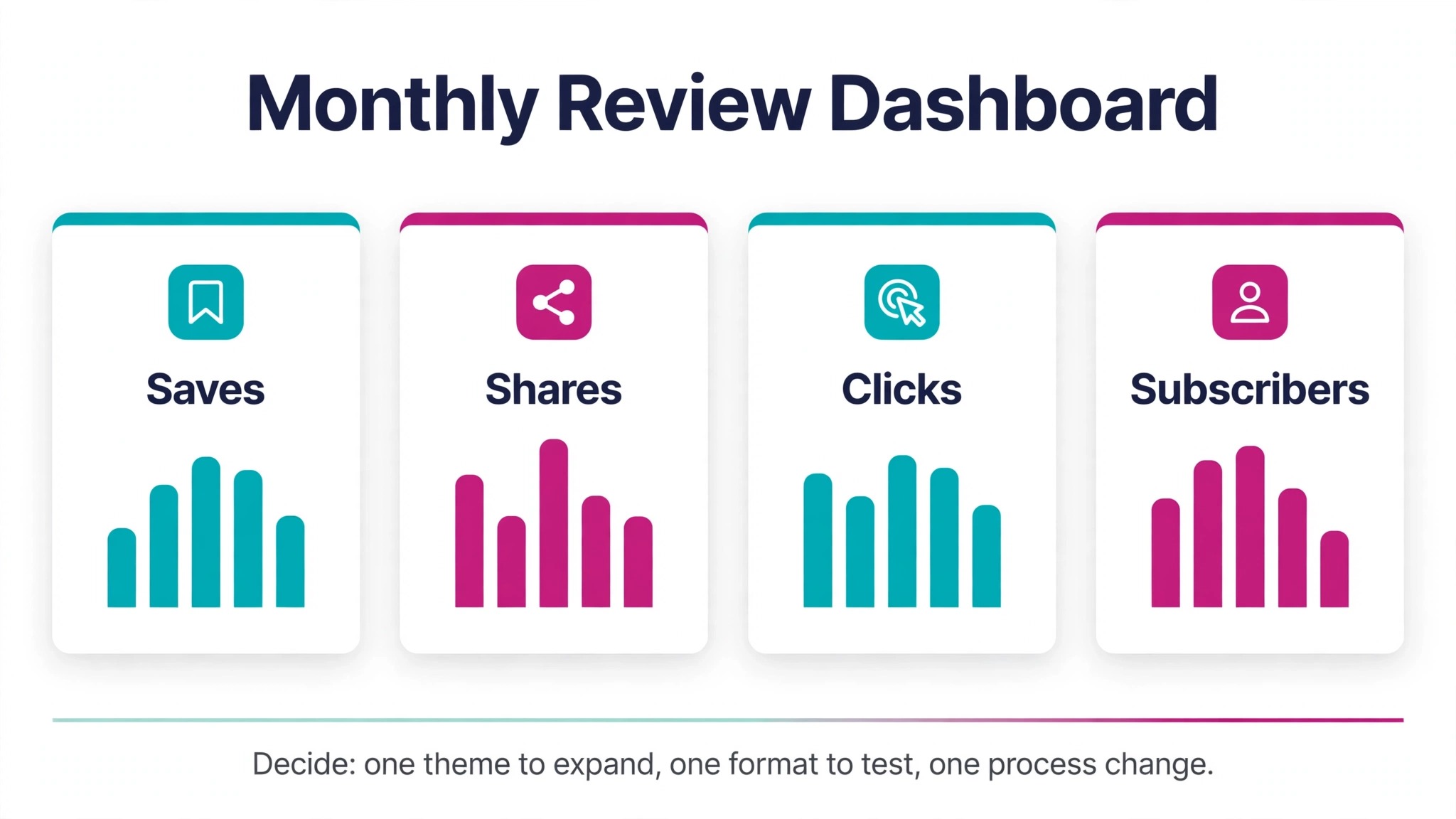
Planning does not end at scheduling, and knowing how to plan social media content with AI means reviewing what worked before planning the next month. The review at the end of the month is what makes next month better. Export your platform analytics for the month and look at saves, shares, comments, profile visits, link clicks, and follower growth, not just likes or views.
Group results by theme, format, and hook type. Which theme drove the most saves? Which format drove the most profile visits? Which hook style drove the most comments? Those answers should shape next month’s mix, even if they contradict your preferences.
Also review the process itself. How long did planning, writing, design, and scheduling actually take? Where did delays happen? Did approval hold up posts? Did filming take longer than expected? Did engagement replies pile up? Use those answers to adjust next month’s rhythm, batch sizes, and approval deadlines. A plan that looks good on paper but takes twice the available time will not survive a second month. Adjust the plan to your real capacity, not to an ideal capacity.
Use AI to help with the review, by summarising analytics exports, grouping comments by theme, and suggesting next month’s ideas based on top posts. Verify those suggestions against your own reading of the data, because AI can overemphasise a single viral post or miss a qualitative signal, such as a thoughtful comment from a potential client. The review should produce three concrete decisions for next month, one theme to expand, one format to test or drop, and one process change to save time. Write those decisions at the top of next month’s plan, so they are not forgotten.
Do not chase every metric at once. If your goal was email growth, judge the month mainly by subscribers gained from social content, not by follower count alone. If your goal was sales, judge it by enquiries and sales attributed to social posts, even if views were lower than a viral entertainment post. A month that hits its goal with modest reach is a success. A month with huge reach but no progress toward the goal is a distraction, no matter how good the analytics look in a screenshot.
Mistakes That Make AI Planned Content Look Generic
The first mistake is planning topics without angles. A calendar full of topics such as “tips,” “motivation,” and “updates” will produce generic posts, because the topic alone does not tell you what to say. Plan angles for every post, such as a mistake, a comparison, a story, or a data point, and the content will feel specific even when themes repeat.
The second mistake is over automating engagement. Scheduling posts is smart. Auto replying to every comment with a generic AI message is not. Followers can tell when replies are automated, and they stop commenting. Reply personally to thoughtful comments, especially in the first hour after posting, because early replies signal to platforms and to followers that the account is active and human.
The third mistake is ignoring platform norms. A post designed for LinkedIn will look out of place on TikTok, and a TikTok style video will underperform on LinkedIn. Plan adaptations for each platform from the start, rather than copying the same post everywhere and hoping it works. That adaptation takes extra time, but it is the difference between a plan that fills a calendar and a plan that grows an audience.
The fourth mistake is planning a month and then never adjusting. News, customer feedback, and performance data will change what your audience needs mid month. Keep a flexible slot, swap a weak planned post for a timely one when needed, and do not treat the calendar as a contract. A plan is a guide, not a prison.
The fifth mistake is measuring only vanity metrics. Likes and views feel good, but saves, shares, comments, clicks, and conversions tell you whether content helps your goal. Review those deeper metrics monthly, and let them, not likes, decide what to repeat next month.
The sixth mistake is letting AI write everything without your voice. If you remove your examples, opinions, and stories, the content could have come from any account. Keep at least one human element in every post, a real example, a clear opinion, a personal lesson, or a customer story with permission. That element is what followers follow you for, and it cannot be generated from a generic prompt.
For social creators who also run a business page, related reading includes best AI tools for Facebook for page planning and scheduling options.
Frequently Asked Questions
Plan one month in advance for themes, ideas, and formats, and batch write and schedule one to two weeks ahead. That balance gives you consistency without locking you into posts that become outdated. Keep one flexible slot per week for timely content, so the plan stays responsive.
Can AI plan a whole month of content by itself?
AI can generate ideas, outlines, captions, and a calendar draft, but a good month still needs human decisions, the goal, the themes, the selection of ideas, the examples, the voice, and the review. A fully AI generated month without editing usually looks generic and performs worse than a smaller, human edited month.
How many posts per week should I plan?
Plan a rhythm you can sustain, such as three to five posts per week on your main platform, with fewer on secondary platforms. Consistency and quality matter more than daily posting, especially if daily posting forces you to publish weak content or skip engagement replies.
Should I post the same content on every platform?
Post the same core idea, adapted for each platform. Change the hook, format, length, and visual to fit the platform, rather than copying identical text and images everywhere. Adaptation takes more time, but it respects how each audience actually consumes content.
You need a planning document or calendar, a general AI assistant for ideas and drafts, a design or video tool for visuals, and a scheduling tool if you publish on multiple platforms. Start with free tiers and tools you already use, and add paid tools only when a specific bottleneck, such as scheduling or design, costs you significant time each week. Check pricing at checkout before upgrading.
How do I know if my monthly plan worked?
Judge the month against the goal you set at the start, using saves, shares, comments, clicks, subscribers, or sales, not just likes. Then make three decisions for next month, one theme to expand, one format to test or drop, and one process change. That review turns a calendar into a system that improves every month.
A Month Planned Once, Posted With Confidence
A month of social media content does not need to be a daily scramble. Set one goal, choose three or four themes, generate ideas with AI and select them like an editor, batch your writing and visuals, schedule after approval, and review with real metrics at month end. That system protects consistency, keeps your voice human, and leaves room for timely posts and real engagement.
Start with next month, not with a perfect system. The fastest way to learn how to plan social media content with AI is to run this cycle once, review it honestly, and repeat it. Spend one focused session this week on goal, themes, and ideas, then batch the first week’s posts and schedule them. At the end of the month, review what saved, shared, and converted, and adjust.
Repeat that cycle for three months, and you will have more than a content calendar. You will have a repeatable process that grows with your audience, without burning you out or making your feed look like everyone else’s. That is the real benefit of planning with AI, not more posts, but better posts, published on time, with a clear purpose behind each one.
Keep the System Alive When Life Gets Busy
Even a good monthly plan will face a busy week, a sick day, or a client deadline that eats your content time. Prepare for that in advance, not in the moment. Keep three evergreen posts fully ready, with captions and visuals approved, as a buffer you can publish on a busy day without scrambling. Keep your flexible slot truly flexible, so you can skip a non essential post without breaking the rhythm, and keep a simple rule for engagement, reply to comments and messages once a day, even on busy days, because a post without replies loses momentum fast.
If you fall behind by more than a week, do not try to catch up by publishing everything at once. That burst will overwhelm followers and exhaust you. Instead, reset the calendar, publish the strongest missed posts over the next two weeks, and drop the weakest ones. A sustainable system that survives a busy month is worth more than a perfect month that collapses under pressure.
Review your buffer and your capacity at the end of each month, and adjust next month’s count before you plan new ideas. That small habit is what turns monthly planning from a one time effort into a lasting routine.