
A ten-person firm shopping for the best accounting software for construction companies will pay anywhere from nothing to $340 a month for the software alone, and the real bill lands somewhere between $200 and $250 a month once payroll is counted. That spread is the whole story of this guide. The pages below price every tool at the size of firm that actually buys it, so you can see what the ledger costs before the sales call starts.
One Job, Four Numbers: Labour, Materials, Equipment, Retainage
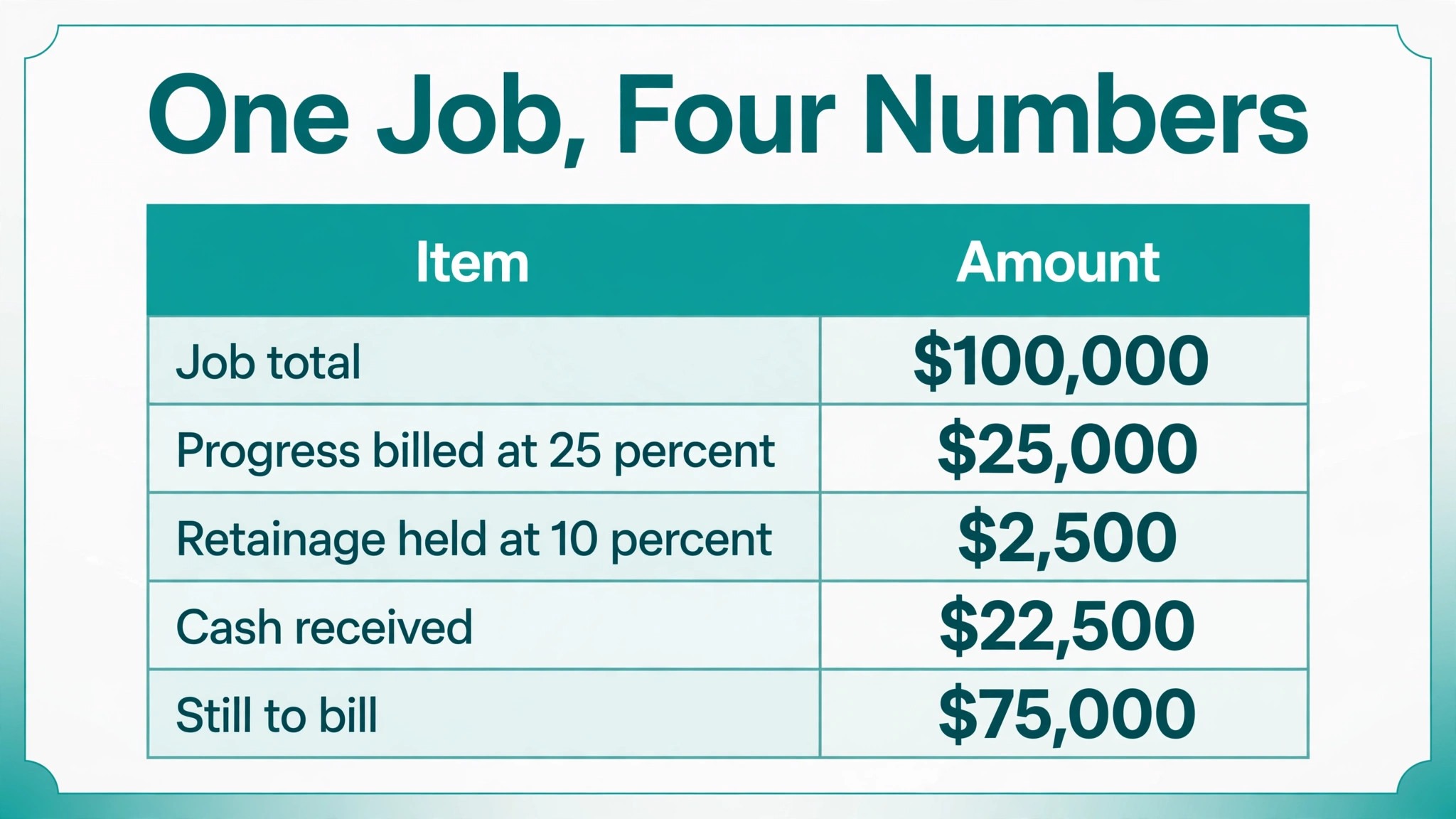
Take one job worth $100,000. That is the only number a contractor needs to start with, because every accounting tool in this guide is judged on what it does with the four numbers inside that job. Labour is what the crew costs. Materials is what the supplier charges. Equipment is what the machines cost to run. Retainage is the slice the client holds back until the job is finished, and it is the number that quietly decides whether the firm has cash in the bank.
Here is the job worked through, so the four numbers are visible. The firm bills 25 percent on progress, which is $25,000. The client holds back 10 percent retainage on that bill, which is $2,500, so $22,500 actually lands in the bank. The remaining $75,000 is still to bill, and the $2,500 stays held until the job is complete. A tool that cannot show all four figures on one screen, the billed amount, the retained amount, the cash received and the balance left, is a tool that will force the firm to track the job on a spreadsheet.
| Tool | Main job | Best for | Starting price |
|---|---|---|---|
| QuickBooks Online | General accounting | Most construction firms | $38 per month |
| Xero | General accounting | Simple books | From $25 per month |
| Sage 100 Contractor | Construction accounting | Mid-size contractors | Quote-based |
| Foundation Software | Construction accounting | Job cost control | Quote-based |
| Jonas Construction | Construction accounting | Larger contractors | Quote-based |
| Acumatica Construction | Cloud ERP | Growing firms | Quote-based |
| FreshBooks | Invoicing and accounting | Small contractors | From $23 per month |
| Zoho Books | General accounting | Budget firms | Free plan |
| Wave | Free accounting | Solo contractors | Free |
| Sage 300 Construction | Construction ERP | Large firms | Quote-based |
The best accounting software for construction companies is the one that keeps those four numbers honest on every job at once, because a firm running five jobs is really running five sets of four numbers, and the moment one set goes wrong the profit on the whole month goes with it. That is the test this guide applies to every tool below.
What Does Retainage Do to Your Cash?
Retainage is the percentage of each progress payment that the client holds back until the job is complete, usually 10 percent, and it is the single most misunderstood number in construction accounting. It is not a fee. It is not lost money. It is money the firm has earned and cannot touch yet, and that gap between earning and receiving is where small firms run out of cash.
Work it through on a smaller job. A $50,000 job with 10 percent retainage holds back $5,000 until completion. A firm running five such jobs at once has $25,000 sitting in clients’ hands, earned but unpaid, and that is before the next round of material bills arrives. A firm that does not track retainage job by job will look profitable on paper and feel broke in the bank, and will not know why.
This is why the retainage feature matters more than the monthly price. QuickBooks Online Plus handles retainage natively, with a progress invoicing feature that bills a percentage of the job and holds back the retainage until completion. Sage 100 Contractor, Foundation Software, Jonas Construction, Acumatica Construction and Sage 300 Construction all handle it as a core feature, with change orders and work in progress reporting built in. Xero, FreshBooks, Zoho Books and Wave handle it through workarounds or integrations, which means the firm tracks the retainage on a spreadsheet or buys an add-on.
The test is simple, and it takes ten minutes. Create a job worth $100,000, bill 25 percent on progress, hold back 10 percent retainage, and check whether the tool shows the billed amount, the retained amount and the remaining balance in one place. The tool that passes that test is the tool that fits a construction firm that bills on progress. The tool that fails it will cost the firm more in spreadsheet hours than the software ever saved.
QuickBooks Online vs Xero: Jobs Against Simplicity
QuickBooks Online and Xero are the two most common general accounting picks in this guide, and they solve the same problem in opposite ways. QuickBooks Online Plus costs $140 a month and handles job costing through project tracking, progress billing, retainage and inventory in the same system. Xero costs from $25 a month and handles job costing through tracking categories and integrations, which is simpler but less detailed.
The cost comparison favours Xero at the start and QuickBooks at scale. A small firm that needs simple books will pay $25 a month on Xero against $38 on QuickBooks Simple Start, a gap of $13 a month or $156 a year. A firm that needs job costing will pay $140 on QuickBooks Plus against a similar total on Xero once the integrations are counted, because Xero needs a job costing add-on at $20 to $50 a month plus payroll on top.
The reporting is also different. QuickBooks Online Plus has the better job profitability report for a construction firm, while Xero has the faster bank reconciliation and the cleaner interface. When you compare the best accounting software for construction companies on the reporting, the answer is the tool whose reports the owner actually reads, because a report that is never opened is a report that never helps.
The 10 Tools in Detail
The ten profiles below are priced like job costs, not like brochures, because the best accounting software for construction companies is bought by the job, not by the feature list. Each one starts with what it costs, then what it does to the four numbers from the first section, then what it costs to live with.
1. QuickBooks Online
QuickBooks Online is the general accounting platform most construction companies should start with, because it combines invoicing, expenses, payroll, job costing and tax reporting in one monthly fee. Simple Start costs $38 a month, Essentials $85, Plus $140 and Advanced $340, according to an October 2026 Intuit page, though other sources list Simple Start at $35, so confirm the rate at checkout.
Plus is the tier a construction firm needs, because it adds project tracking, inventory and class tracking. The construction features are solid for a small to mid-size firm. Plus handles job costing through projects, progress invoicing, retainage and billable expenses, and the payroll add-on runs in the same system, so wages land on the job without retyping.
Here is the worked example. Simple Start at $38 a month costs $456 a year, and Plus at $140 a month costs $1,680 a year. The $1,224 gap buys project tracking, inventory and the retainage flow. A firm with one crew and one job at a time should take Simple Start and keep the money. A firm running five jobs at once should take Plus, because the day the firm starts tracking retainage on a spreadsheet, the saving is gone.
What I would do, if this were my firm, is start on Simple Start the month the first crew is hired, and move to Plus the month the second job starts. The $140 tier is the cheapest honest price for a firm that bills on progress, and buying it a month early beats discovering the retainage gap a month late.
2. Xero
Xero is the general accounting platform for a construction firm that wants clean books and simple pricing. Early costs between $20 and $27 a month across sources, so this guide uses $25 and the buyer should confirm the current rate at checkout. Growing and Established cost more and add multi-currency, expense claims and project tracking.
The interface is the cleanest in this guide, and the bank reconciliation is the fastest. The construction features come through integrations, because Xero handles job costing through tracking categories and third-party apps rather than a built-in job cost module. The trade is the stack. A small firm that needs simple job tracking will be happy, while a firm that needs detailed cost codes should take Sage 100 Contractor, because Xero plus a job costing add-on at $20 to $50 a month plus payroll soon costs as much as QuickBooks Plus with less depth.
3. Sage 100 Contractor
Sage 100 Contractor is the construction accounting platform for a mid-size contractor that runs many jobs at once. Pricing is quote-based, and the buyer should expect a setup cost plus a monthly or annual fee that depends on the number of users and modules. The platform handles job costing, payroll, equipment, service management and estimating in one system, so the whole firm runs on one ledger.
The strength is the depth, and the depth is the point. Every cost is coded to a job, a phase and a cost code, the work in progress report is the best in this guide, and the payroll handles certified payroll, union reporting and prevailing wage. A mid-size contractor that runs twenty jobs at once will find the job cost reports more accurate and more detailed than any general accounting tool can offer.
Here is the honest trade. The interface is older and the setup takes weeks rather than days, and the firm should budget for training as well, because the system takes weeks to learn. The quote-based price is higher than QuickBooks or Xero, though the exact number depends on the users and modules, and the buyer should expect a setup cost on top.
The test that settles it is the work in progress report. Enter a cost for labour, materials and equipment against a job, run the report, and check whether it shows the cost, the billing and the profit for that job in one place. Sage 100 Contractor passes that test better than any other tool in this guide, and that is why it is the pick for a mid-size contractor that runs many jobs.
4. Foundation Software
Foundation Software is the construction accounting platform built by contractors, and it is the best pick for a firm that wants job cost control above all else. Pricing is quote-based, and the buyer should expect a setup cost plus a monthly fee that depends on the number of users. The platform handles job costing, payroll, equipment tracking and project management in one system, with all costs feeding the same job ledger.
The strength is the job cost focus. The reporting shows exactly where each job stands, the payroll integrates with the job cost, and the equipment tracking shows what each machine costs the firm. A contractor who lives on the job cost report will feel at home here, because the report is the product, not an afterthought.
The trade is the interface, which is older than QuickBooks or Xero, and the setup takes time. Foundation suits a contractor who wants the tightest job cost control in this guide and is willing to learn a deeper system. It is cheaper to run than Jonas or Sage 300, and deeper on job cost than anything in the general accounting group.
5. Jonas Construction
Jonas Construction is the construction accounting platform for a larger contractor that runs complex projects across multiple entities. Pricing is quote-based, and the buyer should expect a higher setup cost than Sage 100 Contractor, with a monthly or annual fee that scales with users and modules.
The strength is the scale. A firm that runs dozens of jobs, multiple companies and a service division will find Jonas handles the complexity without workarounds, and the reporting is strong enough for an executive team. The trade is the price and the setup time, because Jonas is the most expensive tool in this guide to buy and to implement, and it suits a larger contractor that has outgrown Sage 100 Contractor and needs an enterprise-grade system.
6. Acumatica Construction
Acumatica Construction is the cloud ERP for a growing construction firm that wants a modern system without an on-premise server. Pricing is quote-based, and Acumatica charges by the resources used rather than by the number of users, which suits a firm with many field staff who log in occasionally.
The strength is the cloud model. A firm that works from multiple offices and jobsites can access the same system from anywhere, and the resource-based pricing means the firm does not pay per user for field staff. The trade is the implementation, because an ERP rollout takes months and needs a partner to configure, so Acumatica suits a growing firm that wants a cloud ERP and is ready to invest in an implementation.
7. FreshBooks
FreshBooks is the invoicing and accounting platform for a small contractor who bills by the hour or by the project. Lite costs $19 a month in older sources and $23 a month in October 2026 sources, so confirm the rate at checkout. At $23 a month, Lite costs $276 a year, which is the cheapest paid start in this guide after Wave and Zoho Books.
The invoicing is the best in this guide, with professional templates, time tracking and online payments. The trade is the construction depth. FreshBooks handles project tracking and time billing, but it does not handle job costing, retainage or progress billing at the depth a mid-size firm needs, so a firm that needs job cost control should take QuickBooks Online Plus instead.
8. Zoho Books
Zoho Books is the general accounting platform for a construction firm on a budget, because the free plan covers businesses with annual revenue under $50,000. Standard costs $20 a month and adds more users, workflows and advanced features, while Professional and Premium cost more.
- Free under $50,000 of annual revenue, Standard at $20 a month, which is $240 a year.
- Invoicing, expenses, bank reconciliation and tax reporting are covered, and it integrates with the rest of the Zoho suite.
- Project tracking and time billing are included, but job costing, retainage and progress billing need integrations.
- A small firm that needs clean books at a low price will be happy, while a firm that needs job cost control should take QuickBooks Online Plus.
9. Wave
Wave is the free accounting platform for a solo contractor who needs invoicing and expense tracking without a monthly fee. The accounting is free, and the firm pays only for payroll at $20 a month plus $6 per employee, and for payment processing at 2.9 percent plus 60 cents per transaction.
Is free really free for a contractor?
The accounting is, and the payroll is not. A solo contractor with no staff pays nothing, and a ten-person firm would pay $80 a month for payroll alone, which is $20 plus $6 times ten. Payment processing adds up too, because a $5,000 invoice costs $145.60 in processing fees, which is 2.9 percent plus 60 cents, and that is the number to watch when clients pay by card.
What does Wave not do?
It does not handle job costing, retainage, progress billing or payroll reporting at the depth a firm needs. A solo contractor who bills a few clients a month will be happy, while a firm with staff and multiple jobs should take QuickBooks Online, and track jobs on a spreadsheet only until the firm can afford better.
10. Sage 300 Construction
Sage 300 Construction is the construction ERP for a large firm that runs complex projects, multiple companies and a service division. Pricing is quote-based, and the buyer should expect the highest setup cost in this guide, with a monthly or annual fee that scales with users and modules.
The strength is the depth and the scale. A large firm that runs hundreds of jobs, multiple entities and a service arm will find Sage 300 handles the complexity, and the reporting is strong enough for a board. The trade is the cost and the implementation time, because a Sage 300 rollout takes months and needs a specialist partner, so it suits a large construction firm that has outgrown Sage 100 Contractor and needs an enterprise ERP.
Best Pick by Job
The pick changes with the size of the firm, so this table is organised by firm size, not by feature count. Find your firm, then read the row.
| Firm size | First pick | Second tool | Why this pair works |
|---|---|---|---|
| Solo contractor, no staff | Wave | Zoho Books | Both start free, Wave is simpler, Zoho grows further |
| Small contractor, one crew | QuickBooks Online Simple Start | FreshBooks Lite | Both are cheap and easy at 38 dollars and 23 dollars a month |
| Growing firm with job costing | QuickBooks Online Plus | Xero | Both track jobs, Plus does it natively at 140 dollars a month |
| Mid-size contractor, many jobs | Sage 100 Contractor | Foundation Software | Both are built for construction, Sage has the deeper reporting |
| Large firm, multiple entities | Sage 300 Construction | Acumatica Construction | Both handle complex firms, Sage is the deeper ERP |
A solo contractor should start free on Wave, because the invoicing and expense tracking cover the basics and the cost is zero. A small contractor with one crew should take QuickBooks Online Simple Start at $38 a month and upgrade to Plus at $140 a month when job costing matters. A mid-size contractor that runs many jobs should take Sage 100 Contractor, because the job cost control is the best in this guide.
Can Construction Accounting Handle Progress Billing?
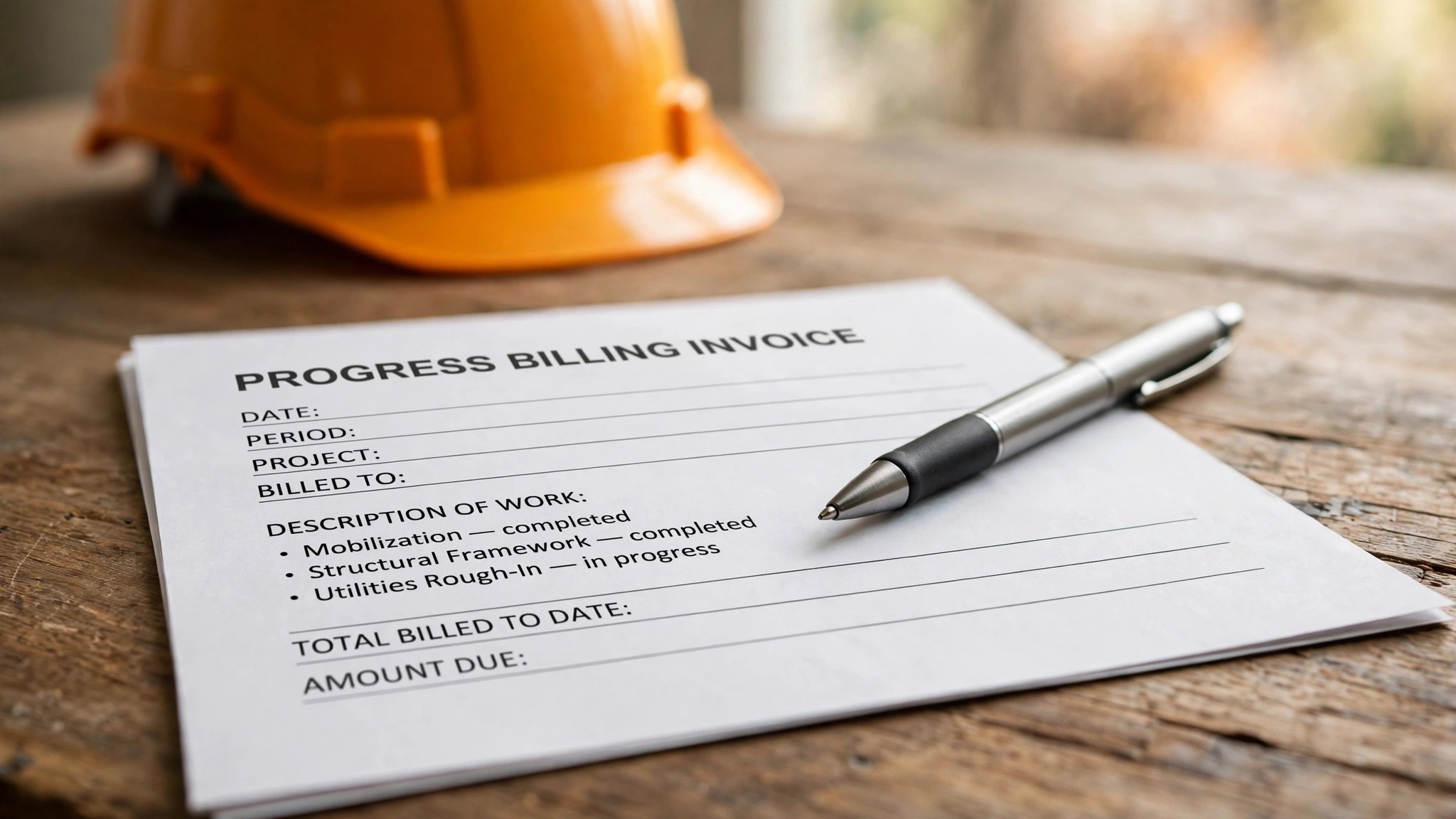
Yes, though the depth varies a lot from one product to the next, as the examples below show. QuickBooks Online Plus handles retainage and progress billing natively, with a progress invoicing feature that bills a percentage of the job and holds back the retainage until completion. Sage 100 Contractor, Foundation Software, Jonas Construction, Acumatica Construction and Sage 300 Construction all handle retainage and progress billing as core features, with change orders and work in progress reporting built in.
The difference shows up in the change order, which is where most progress billing goes wrong. A client asks for an extra wall, the crew builds it, and nobody updates the bill. A construction-specific tool folds the change order into the job, updates the budget and the billing in one move, and the work in progress report stays true. A general tool leaves the change order on a spreadsheet, and the report quietly goes stale.
Xero, FreshBooks, Zoho Books and Wave handle retainage and progress billing through workarounds or integrations. A firm that bills on progress every month should test the retainage flow before committing, because a tool that cannot hold back 10 percent will force the firm to track it by hand, which is where errors start. Run the $100,000 test from the first section on any tool before you pay for it.
How to Choose the Best Accounting Software for Construction Companies
Start with the job costing, not the price. Ask whether the tool tracks costs by job, phase and cost code, whether it handles change orders, and whether the work in progress report shows cost, billing and profit for each job. Sage 100 Contractor, Foundation Software and Jonas Construction do all of this natively, while QuickBooks Online Plus does it through project tracking, and Xero does it through tracking categories and integrations.
Next, count the real monthly cost. QuickBooks Online Simple Start costs $38 a month, Essentials $85, Plus $140 and Advanced $340, according to an October 2026 Intuit page, though other sources still list Simple Start at $35 a month after the May 2026 price change, so confirm the rate at checkout. Xero Early costs between $20 and $27 a month across sources, so this guide uses $25 and the buyer should confirm the current rate. FreshBooks Lite costs $19 a month in older sources and $23 a month in October 2026 sources, so confirm that rate too.
Finally, test the reporting. A construction firm lives on the work in progress report, the job profitability report and the cash flow forecast, so run all three on a test job before committing. Sage 100 Contractor and Foundation Software have the strongest construction reports in this guide, while QuickBooks Online Plus has the best general reports for a small firm. A tool whose reports do not answer the owner’s questions is a tool that will be replaced within a year.
What Does a 10-Person Firm Pay in Year One?
A ten-person construction firm that runs five jobs at once will pay about $140 a month on QuickBooks Online Plus, plus payroll at extra per month, which brings the total to roughly $200 to $250 a month depending on the payroll tier. Over a year, that is $2,400 to $3,000, and it is the number to budget, not the $140 on the pricing page.
The same firm on Xero will pay about $25 to $40 a month for the plan, plus a job costing integration at $20 to $50 a month, plus payroll at extra, which totals roughly $100 to $150 a month, or $1,200 to $1,800 a year. The Xero route is cheaper, though the job costing is less detailed, and the firm pays the difference in spreadsheet hours. A ten-person firm on Sage 100 Contractor will pay a quote-based fee that is higher than either, though the exact number depends on the users and modules, and the buyer should expect a setup cost on top.
The hidden cost is the bookkeeper, and it is the biggest number in this section. A firm that buys a deep system and has no one to run it will pay a bookkeeper $500 to $1,000 a month to keep the books clean, which is $6,000 to $12,000 a year. A firm that buys a simple system and runs it in-house will pay nothing extra. A small firm should buy the system it can run itself, because the bookkeeper’s fee will exceed the software fee within a month, and the best accounting software for construction companies at your size is the one your own team can keep clean.
Job Costing Setup Checklist
The checklist below covers the steps that set up job costing for a construction firm, and it should be run on every one of the best accounting software for construction companies before the first job is entered. A firm that skips a step will find the reports wrong at month end, so work through the list in order.
| Step | What to do | Done when |
|---|---|---|
| 1 | List the jobs in progress | Every active job has a number |
| 2 | Set up cost codes | Labour, materials and equipment coded |
| 3 | Set the budget per job | Each job has a budget by cost code |
| 4 | Enter the opening balances | Bank, payables and receivables correct |
| 5 | Set up payroll items | Wages coded to jobs |
| 6 | Set the retainage rate | 10 percent held back on progress bills |
| 7 | Set up change orders | Change order process agreed |
| 8 | Enter a test cost | Cost appears on the job report |
| 9 | Run a work in progress report | Report shows cost, billing and profit |
| 10 | Train the team | Everyone codes costs to jobs |
Frequently Asked Questions
How much does construction accounting software cost a 10-person firm?
A ten-person firm running five jobs pays roughly $200 to $250 a month on QuickBooks Online Plus with payroll, which is $2,400 to $3,000 a year. The same firm on Xero with a job costing integration pays roughly $100 to $150 a month, or $1,200 to $1,800 a year. A firm on Sage 100 Contractor pays a quote-based fee above both, plus a setup cost and training.
Which accounting software is best for a small construction company?
QuickBooks Online Plus at $140 a month is the pick for a small construction company that runs five or more jobs, because the job costing, progress billing and payroll are built in. A smaller firm with one crew should start with Simple Start at $38 a month and upgrade to Plus when job costing matters.
Can QuickBooks Online handle construction job costing?
Yes. QuickBooks Online Plus handles job costing through project tracking, which codes costs to a job and shows the profitability per job. The reporting is simpler than Sage 100 Contractor, so a firm that runs twenty jobs at once should take Sage 100 Contractor instead, because the work in progress report is more detailed.
What is retainage in construction accounting?
Retainage is the percentage of each progress payment that the client holds back until the job is complete, usually 10 percent. The accounting tool must track the retained amount separately from the billed amount, so the firm knows how much is owed and how much is held. On a $50,000 job, 10 percent retainage holds back $5,000 until completion.
Do I need payroll in my accounting software?
Yes, when the firm has staff. Construction payroll needs to code wages to jobs, handle certified payroll and union reporting, and track prevailing wage, which is why QuickBooks Online Plus and Sage 100 Contractor run payroll in the same system.
Can I use free accounting software for construction?
Yes, for a solo contractor. Wave is free and handles invoicing and expenses, and Zoho Books is free for businesses with annual revenue under $50,000. Both lack job costing, retainage and progress billing, so a firm that grows past a few jobs should move to QuickBooks Online Plus or Sage 100 Contractor.
The Ledger for a 10-Person Firm
Here is the whole guide as a ledger for a ten-person firm running five jobs, so the decision fits on one page. Find your row, check the year-one figure, and buy the system that matches the firm you actually run.
| Firm | What you pay in year one | What you get |
|---|---|---|
| Solo contractor | Nothing, Wave | Free invoicing and expenses, jobs tracked by hand |
| One crew, simple books | 456 dollars, QuickBooks Simple Start | Invoicing, expenses and tax reports for 38 dollars a month |
| Five jobs, progress billing | 2,400 to 3,000 dollars, QuickBooks Plus with payroll | Job costing, retainage and payroll in one place |
| Many jobs, deep job costing | Quote-based, Sage 100 Contractor | The best work in progress report in this guide |
| Large firm, many entities | Quote-based, Sage 300 Construction | Enterprise depth for hundreds of jobs |
The best accounting software for construction companies is the one that matches the firm’s size, the number of jobs and the reporting the owner actually reads, so count the payroll and the training before you pick, and test the work in progress report on a real job before you commit. Buy the system your own team can run, because the cheapest software in this guide is the one nobody has to fix on a Sunday.