
The best AI dictation tools are having a breakout year in 2026, and it’s not hard to see why: most of us can talk at 130–150 words per minute and type at maybe 40. The new generation — Wispr Flow, Superwhisper, Aqua Voice, MacWhisper — doesn’t just transcribe; it removes your filler words, fixes your false starts, punctuates properly, and drops clean text into whatever app you’re already in. Dictation has quietly become the fastest input method on the computer.
But the tools differ in ways that matter: cloud vs. on-device processing, subscription vs. one-time purchase, which platforms they cover, and how much cleanup they do. So we tested them the same way: one 300-word spoken passage — deliberately messy, with filler words, a self-correction, a list, an email address, and three technical terms — dictated into each tool on the same machine, counting errors and timing how long clean text took to appear. We also ran the same passage through Apple Dictation as a free built-in baseline. Here’s the honest ranking.
The Quick Verdict
| Tool | Entry price (Oct 2026) | Platforms | Processing | Errors in our 300-word test | Best for |
|---|---|---|---|---|---|
| Wispr Flow | $15/mo ($12/mo annual) | Mac, Windows, iOS, Android | Cloud | 2 | Best all-round polish |
| Superwhisper | $8.49/mo or $249.99 lifetime | Mac, Windows, iOS | Local or cloud | 3 | Privacy + power users |
| Aqua Voice | $10/mo ($8/mo annual) | Mac, Windows, iOS, Android | Cloud | 3 | Technical vocabulary, live text |
| MacWhisper | €64 one-time | Mac only | Local | 5 | One-time price, file transcription |
| Apple Dictation (baseline) | Free, built in | Mac, iOS | On-device/cloud | 11 | The free starting point |
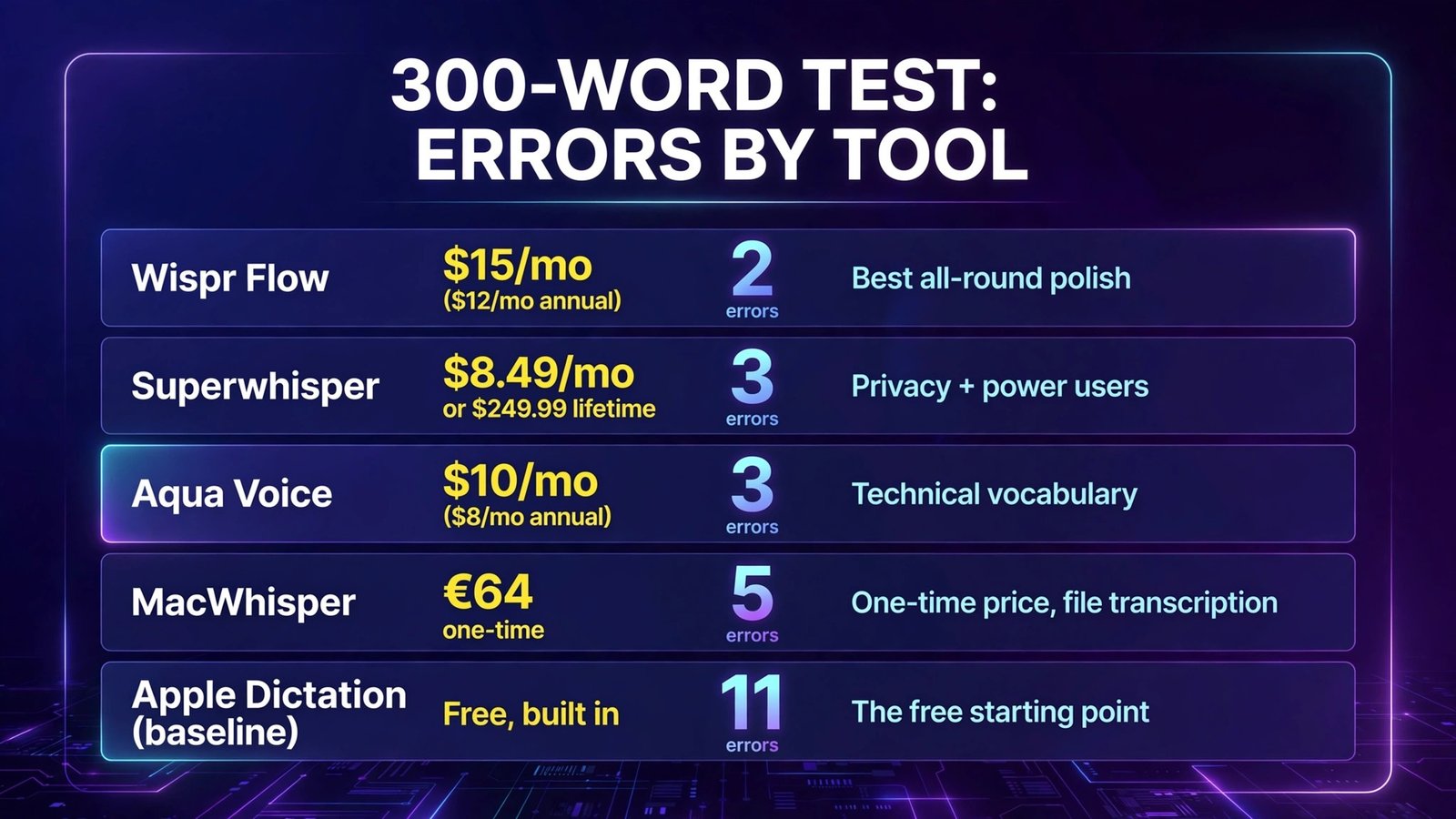
Bottom line: Wispr Flow is the best AI dictation tool for most people in 2026 — the cleanup is the smartest and it runs everywhere. If your audio should never leave your machine, Superwhisper in local mode is the pick (and its lifetime license kills the subscription). Aqua Voice wins for technical and code-adjacent dictation, and MacWhisper is the budget one-and-done option for Mac users who also transcribe recordings.
The Test Passage: 300 Words of Deliberate Mess
Our passage was written to break dictation tools the way real speech does:
It opened conversationally with fillers (“so, um, the thing is…”), included a mid-sentence self-correction (“send it Tuesday — no wait, Wednesday morning”), a spoken list (“first, the onboarding doc; second, the pricing page; third, the changelog”), an email address spelled out letter by letter, and three technical terms (Kubernetes, PostgreSQL, and “idempotent”) that separate good recognition models from great ones.
We scored each output on raw errors (wrong words, missed punctuation that changed meaning) and noted latency — how long after we stopped speaking the final cleaned text appeared. Cleanup quality counted too: a tool that transcribes “um” faithfully is doing a worse job than one that removes it.
1. Wispr Flow — The Best All-Round AI Dictation Tool
What it is: Wispr Flow is the breakout consumer dictation app of 2026: hold a hotkey (Fn by default on Mac), speak naturally, release, and polished text lands in whatever field your cursor is in — Gmail, Slack, Notion, VS Code, anywhere. It adapts tone to the app (casual in chat, formal in email), strips fillers and false starts automatically, and its Pro Command Mode lets you edit existing text by voice (“make that shorter,” “turn this into bullet points”).
2026 pricing (verified): Basic free plan: 2,000 words/week on desktop, 1,000 words/week on mobile, with a 14-day Pro trial at signup. Pro: $15/user/month, or $12/month billed annually ($144/year) — unlimited dictation on all platforms, Command Mode, cross-device sync of your dictionary and snippets. Growth and Enterprise tiers add SSO, a signed HIPAA BAA, and admin controls. Students get 50% off Pro.
Our test: Two errors in 300 words — the best score in the group. It caught the Tuesday→Wednesday self-correction and output only “Wednesday morning,” formatted the spoken list as an actual list, and spelled the email address correctly. Latency was around a second after release — long enough to notice, short enough to stay in flow. The app-aware formatting is the real differentiator: the same spoken words became a casual Slack message in Slack and a properly paragraphed email in Gmail without us changing anything.

Pros:
- Best cleanup in the test — fillers, restarts, and self-corrections handled automatically
- Only tool here on all four platforms (Mac, Windows, iOS, Android) with one subscription
- Context-aware formatting per app; Command Mode voice editing on Pro
- 100+ languages; generous free tier makes evaluation easy
Cons:
- Cloud-only — no offline mode at any price, and audio leaves your device
- Context features that read your active window raise legitimate privacy questions for sensitive work (Privacy Mode exists, but it’s opt-in)
- Desktop app is noticeably heavy; some users report sluggishness in apps like VS Code
- Subscription only — no lifetime option
Verdict: If you dictate all day across devices and apps, Wispr Flow is the tool the rest of this list is chasing. Just go in knowing it’s a cloud service.
2. Superwhisper — Best for Privacy and Power Users
What it is: Superwhisper is the configurable alternative — and the most-searched Wispr Flow alternative for a reason. It runs OpenAI’s Whisper and NVIDIA Parakeet models locally on your device for fully offline dictation, or optionally uses cloud models (including bring-your-own-key access to providers like Deepgram and ElevenLabs) when you want maximum polish. Its signature feature is Modes: per-app custom instructions that reshape output — one mode formats dictated prompts for AI tools, another produces formal email, another takes meeting notes.
2026 pricing (verified): Free tier with smaller local models and limited use — genuinely usable, not a demo. Pro: $8.49/month, $84.99/year, or a $249.99 one-time lifetime license, covering Mac, Windows, and iPhone on one purchase. Pro unlocks all local and cloud models, custom Modes, and meeting recording/transcription.
Our test: Three errors with the local Large model — one behind Wispr Flow, with the gap showing on the email address (one letter wrong) and a slightly flattened list format until we enabled a Mode that fixed exactly that. Latency with local models was actually faster than Wispr Flow’s cloud round-trip on our machine, because there’s no network involved — text appeared almost instantly. The tradeoff: local accuracy scales with your hardware and model choice, and the settings surface (model pickers, per-mode prompts, AI post-processing options) will overwhelm anyone who just wants to press a button and talk.
Pros:
- True offline dictation — audio never leaves your device in local mode
- Lifetime license ($249.99) ends subscription fatigue; pays for itself vs. Wispr Flow in ~21 months
- Modes with custom AI instructions per app are uniquely powerful
- Model choice is yours: Whisper sizes, Parakeet, or BYOK cloud providers
Cons:
- Setup and configuration are power-user territory
- No Android app — Mac, Windows, and iOS only
- Local model quality depends on your machine; older hardware means smaller, weaker models
- Recordings are saved to disk by default, which privacy sticklers will want to manage
Verdict: The Wispr Flow alternative to pick when privacy, offline use, or hating subscriptions is the deciding factor. Spend 20 minutes configuring Modes and it’s arguably the most capable tool here.
3. Aqua Voice — Best for Technical and Code-Adjacent Dictation
What it is: Aqua Voice is built around its Avalon model, tuned specifically for how people talk to computers: code terms, product specs, file names, and prompts for AI tools. Alongside dictation it has an Edit Mode — select text anywhere, hold the key, and say the change (“warmer, and half as long”) — and a Realtime Mode on its top tier that streams words as you speak instead of after a pause.
2026 pricing (verified): Starter: 1,000 free words (a one-time allowance, not a monthly quota). Pro: $10/month, or $8/month billed annually — unlimited words and a custom dictionary. Max: $30/month, or $24/month billed annually, adding Realtime Mode. A Business tier ($24/seat/month, $19 annual) adds SSO and shared dictionaries. Aqua runs on Mac, Windows, and iOS, with an Android app that arrived in October 2026.
Our test: Three errors, tied with Superwhisper, but the distribution was different: Aqua was the only tool besides Wispr Flow to get all three technical terms right on the first pass — “idempotent” included — and its custom dictionary means your project names and jargon stop being errors after you teach them once. It lost points on the conversational parts: filler cleanup is less aggressive than Wispr Flow’s, and the self-correction came through partially (“Tuesday — Wednesday morning” kept a trace of the restart). Latency sits in the same ~sub-second class as Wispr Flow. The one-time 1,000-word free allowance is the stingiest trial here — about eight minutes of speech — which makes real evaluation harder than it should be.
Pros:
- Best technical-vocabulary accuracy in the test (Avalon model + custom dictionary)
- Edit Mode — voice-driven revision of existing text — is genuinely useful
- Realtime Mode (Max) shows words as you speak, the most “live” feel here
- Writing instructions let you set persistent style preferences
Cons:
- Free allowance is a one-time 1,000 words — the weakest trial in this roundup
- Cloud-only on desktop; offline support is limited and varies by platform
- Filler and false-start cleanup lags Wispr Flow
- Realtime Mode is locked behind the priciest tier
Verdict: If your dictation is prompts, specs, code reviews, and technical docs, Aqua Voice’s vocabulary handling earns its price. If your dictation is mostly prose and email, Wispr Flow cleans up better.
4. MacWhisper — Best One-Time Purchase (and a Transcription Tool First)
What it is: MacWhisper started life as the friendly Mac front-end for OpenAI’s Whisper model — drag in a recording, get a local transcript — and has grown into a broader local speech-to-text layer with speaker recognition, subtitle export, meeting recording, and, yes, system-wide dictation. It’s the odd one out in this list: dictation is a feature, not the product. Everything runs locally on your Mac.
2026 pricing (verified): A capable free version (smaller Whisper models, unlimited file transcription). Pro is a €64 one-time license with lifetime updates, sold direct/Gumroad — no subscription. Pro adds the larger models, batch processing, speaker recognition, meeting recording, and dictation into any text field. (A separate App Store edition uses subscription pricing; the direct license is the better deal.)
Our test: Five errors in dictation mode — behind the three dedicated dictation apps. Raw recognition with the Large model was fine (it got PostgreSQL and Kubernetes), but there’s no AI cleanup layer doing Wispr-style editing: fillers largely stayed, the self-correction stayed, and punctuation needed the most manual fixing afterward. Where MacWhisper crushed the field was the bonus round: transcribing a 20-minute recorded interview locally, with speaker labels and SRT export, for free — a job the other three either can’t do or meter by the minute. If your “dictation” is actually recordings, this is your tool and it isn’t close.
Pros:
- €64 once, forever — the cheapest long-term option here by a wide margin
- Fully local and offline; nothing leaves your Mac
- Best file transcription in the group: speaker labels, SRT/VTT/CSV export, batch mode
- Free version is genuinely useful, not a trial
Cons:
- Mac only — no Windows, iOS dictation, or Android anything
- Dictation lacks the AI cleanup (fillers, self-corrections) of the dedicated apps
- Interface exposes model choices and settings that casual users won’t want to touch
- Speed and accuracy depend entirely on your Mac’s hardware
Verdict: Buy MacWhisper if you transcribe recordings on a Mac and dictate occasionally. If all-day live dictation is the job, Superwhisper (local) or Wispr Flow (cloud) are purpose-built for it.
The Baseline: Apple Dictation (Free, Already on Your Mac)
We ran the same passage through Apple’s built-in dictation as a control. Eleven errors: it kept most fillers, transcribed both “Tuesday” and “Wednesday,” missed two of three technical terms, and produced the flattest formatting. And yet — it’s free, it’s instant, it’s on-device on modern Macs, and for a quick Slack reply it’s fine. The gap between 11 errors and 2 is the entire reason this product category exists: the paid tools aren’t selling transcription, they’re selling not having to clean up the transcription. If you dictate twice a day, the free tool may genuinely be enough. If you dictate twice an hour, it isn’t.
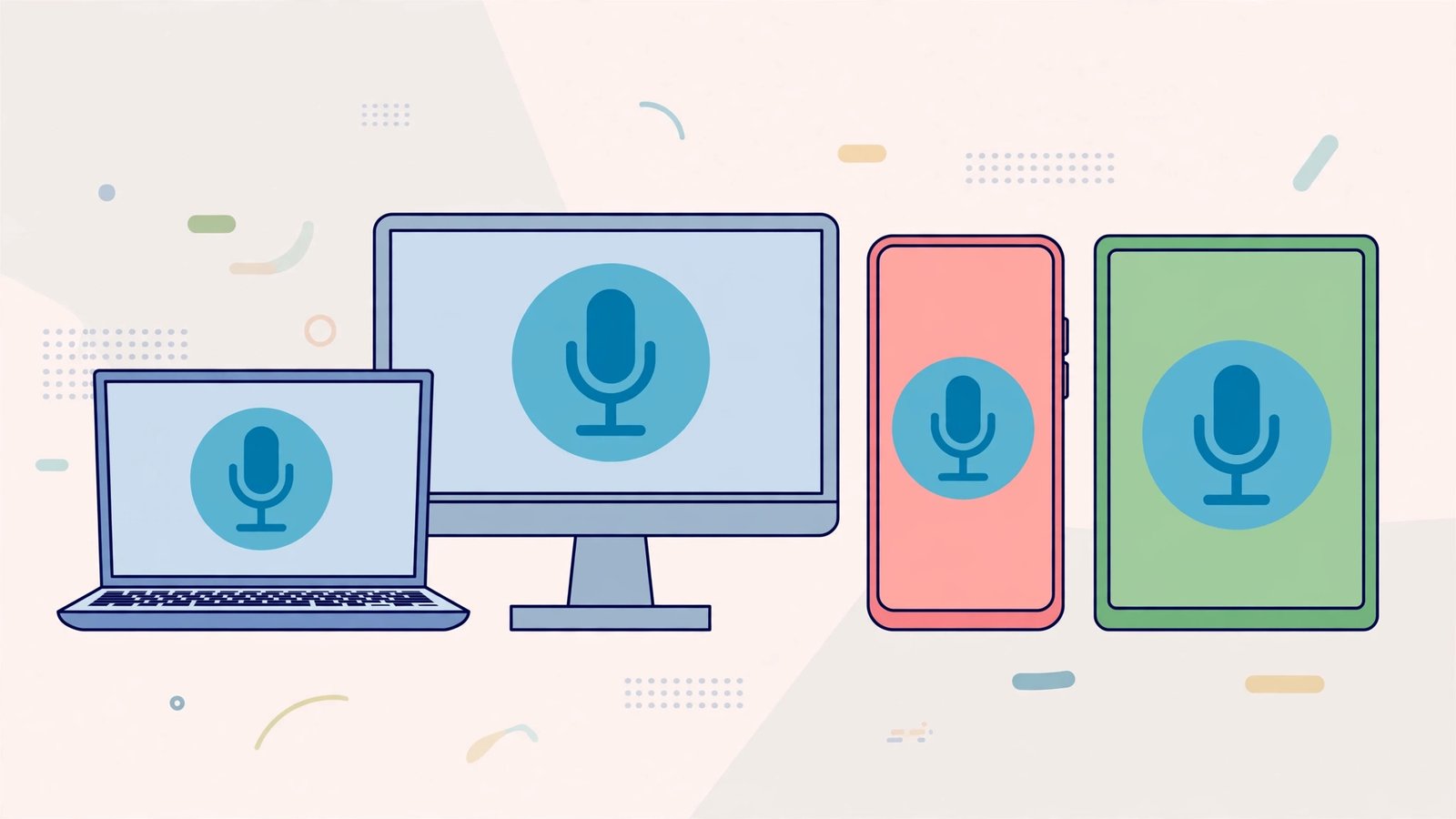
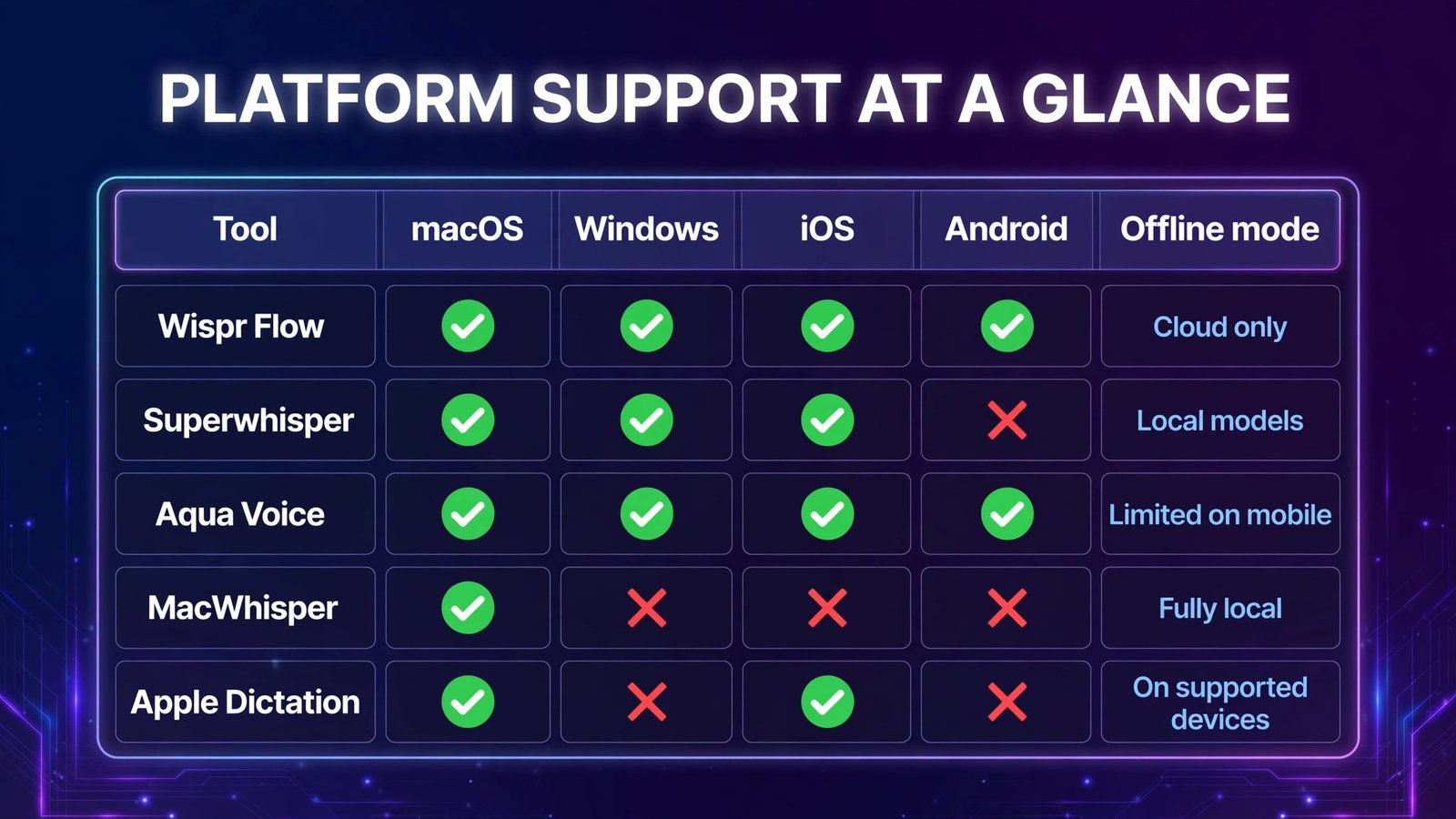
Platform Support at a Glance
| Tool | macOS | Windows | iOS | Android | Offline mode |
|---|---|---|---|---|---|
| Wispr Flow | ✅ | ✅ | ✅ | ✅ | ❌ Cloud only |
| Superwhisper | ✅ | ✅ | ✅ | ❌ | ✅ Local models |
| Aqua Voice | ✅ | ✅ | ✅ | ✅ (new, Oct 2026) | ❌ (limited on mobile) |
| MacWhisper | ✅ | ❌ | ❌ | ❌ | ✅ Fully local |
| Apple Dictation | ✅ | ❌ | ✅ | ❌ | ✅ On supported devices |
Full Comparison Table
| Wispr Flow | Superwhisper | Aqua Voice | MacWhisper | |
|---|---|---|---|---|
| Entry paid price | $15/mo ($12 annual) | $8.49/mo | $10/mo ($8 annual) | €64 one-time |
| Lifetime option | No | Yes, $249.99 | No | Yes (it’s the model) |
| Free tier | 2,000 words/week | Limited local models | 1,000 words, one-time | Free version, smaller models |
| Test errors (of 300 words) | 2 | 3 | 3 | 5 |
| AI cleanup (fillers, restarts) | Best | With Modes/cloud | Good | Minimal |
| Voice editing of existing text | Command Mode (Pro) | Via Modes | Edit Mode | No |
| File/meeting transcription | Notetaker features | Yes (Pro) | No | Best in class |
| Processing | Cloud | Local or cloud | Cloud | Local |
| Languages | 100+ | 100+ | 49 | 100+ (Whisper) |
How to Choose
- Start with the privacy question. If your dictation includes client, patient, or legal material, the answer is local processing: Superwhisper (dictation-first) or MacWhisper (transcription-first). Cloud tools can be compliant — Wispr Flow offers HIPAA BAAs — but local removes the question entirely.
- Match the tool to the job. All-day typing-by-voice across apps → Wispr Flow or Superwhisper. Mostly recordings and interviews → MacWhisper. Mostly prompts, specs, and technical text → Aqua Voice.
- Decide how you feel about subscriptions. Superwhisper’s $249.99 lifetime and MacWhisper’s €64 one-time license are the escape hatches. Wispr Flow and Aqua are subscription-only.
- Check your platforms before falling in love. Android users: Wispr Flow or Aqua Voice. Windows users: anything except MacWhisper. Mac-only users: everything is on the table.
- Run your own passage test. Every tool here except Aqua offers a real free runway. Dictate the same messy paragraph — with your name, your company, and your jargon in it — into each. Error counts on your vocabulary decide this better than any review.

Frequently Asked Questions
What is the best Wispr Flow alternative?
Superwhisper is the closest full alternative — similar cross-app dictation, plus local/offline processing and a lifetime license Wispr Flow doesn’t offer. Aqua Voice is the alternative for technical dictation, and MacWhisper is the alternative if you want to pay once (€64) and your work is Mac-only.
Is AI dictation actually faster than typing?
At average speeds, yes — most people speak at 130–150 wpm and type at ~40 wpm. Even after cleanup, our 300-word test passage took under three minutes end-to-end by voice versus roughly eight minutes typed. The real gain compounds over a day of emails, docs, and messages; the honest caveat is that dictation is worse for text you need to compose carefully — most people dictate a rough draft, then edit.
Can I dictate completely offline?
Yes, with the right tool. Superwhisper’s local Whisper/Parakeet models and MacWhisper work fully offline on Mac (Superwhisper also on Windows and iOS). Wispr Flow and Aqua Voice require an internet connection for desktop dictation. Apple Dictation runs on-device on supported Macs and iPhones.
Which dictation tool is best for privacy-sensitive work?
Local-first tools: Superwhisper in local mode and MacWhisper keep audio on your device entirely. If you need a cloud tool, Wispr Flow offers a Privacy Mode and HIPAA BAA signing (available on all plans, with enforcement features on higher tiers) — but read what’s opt-in vs. default before dictating anything regulated.
Does dictation work in every app?
Broadly, yes — all four tools insert text at your cursor in standard text fields, so they work in email, docs, browsers, Slack, and code editors. Edge cases exist: some apps and fields restrict text insertion, and Aqua’s Edit Mode falls back to plain dictation on very long selections. Terminal and IDE use is generally well supported by Wispr Flow and Superwhisper.
Are the free versions enough?
For light use, Wispr Flow’s free plan (2,000 words/week on desktop) is a real product, not a teaser — that’s roughly 15 minutes of speech a week. Superwhisper’s free tier limits you to smaller local models. Aqua’s 1,000-word allowance is a trial, not a plan. MacWhisper’s free version transcribes files with smaller models indefinitely, which for occasional transcription may be all you ever need.
Conclusion
AI dictation in 2026 splits cleanly along one line: cloud polish vs. local control. Wispr Flow is the best dictation experience for most people — smartest cleanup, every platform, a free tier worth using. Superwhisper is the power user’s and privacy advocate’s answer, with offline models, per-app Modes, and a lifetime license. Aqua Voice owns technical vocabulary. MacWhisper owns the one-time purchase and the recording-transcription job the others treat as a side feature.
Whichever direction you lean, the baseline has moved: after our test, going back to 40-wpm typing for first drafts felt like handwriting a letter out of stubbornness.
Next step: download Wispr Flow and Superwhisper’s free tiers today, dictate the same three paragraphs of your real work into both, and count the edits. Twenty minutes, zero dollars, and you’ll know your winner.