
The best AI tools for WhatsApp Business in 2026 solve a problem that email and social posts no longer solve well: reaching a customer where they already reply. WhatsApp is used by more than two billion people, and a message there is usually read within minutes, not buried under a pile of promotions. That speed is also the risk. A business that sends too much, replies too slowly, or hands every conversation to a chatbot that cannot answer a real question will lose trust faster than it gains sales. The tools in this guide sit on the official WhatsApp Business Platform or the WhatsApp Business app, and they differ mainly in which job they do best. Some answer common questions automatically. Some turn a chat into an order. Some run broadcasts that stay inside WhatsApp rules. Others give a whole team one shared inbox with a record of every conversation. This guide tests each tool against that job, not against a generic feature list, and it is written for owners who want fewer missed chats, not more software.
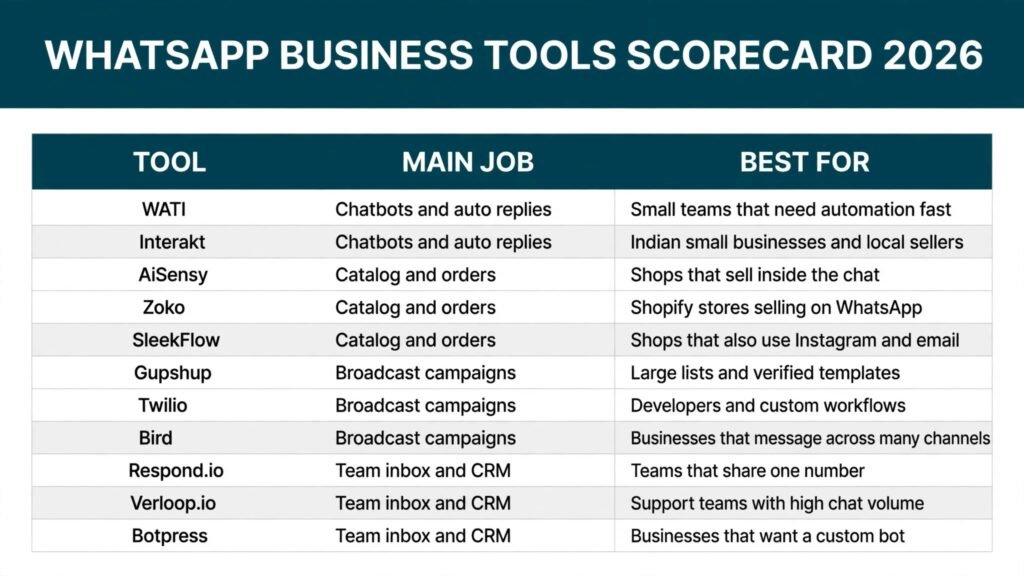
The best AI tools for WhatsApp Business at a glance
| Tool | Main job | Best for |
|---|---|---|
| WATI | Chatbots and auto replies | Small teams that need automation fast |
| Interakt | Chatbots and auto replies | Indian small businesses and local sellers |
| AiSensy | Catalog and orders | Shops that sell inside the chat |
| Zoko | Catalog and orders | Shopify stores selling on WhatsApp |
| SleekFlow | Catalog and orders | Shops that also use Instagram and email |
| Gupshup | Broadcast campaigns | Large lists and verified templates |
| Twilio | Broadcast campaigns | Developers and custom workflows |
| Bird (MessageBird) | Broadcast campaigns | Businesses that message across many channels |
| Respond.io | Team inbox and CRM | Teams that share one number |
| Verloop.io | Team inbox and CRM | Support teams with high chat volume |
| Botpress | Team inbox and CRM | Businesses that want a custom bot |
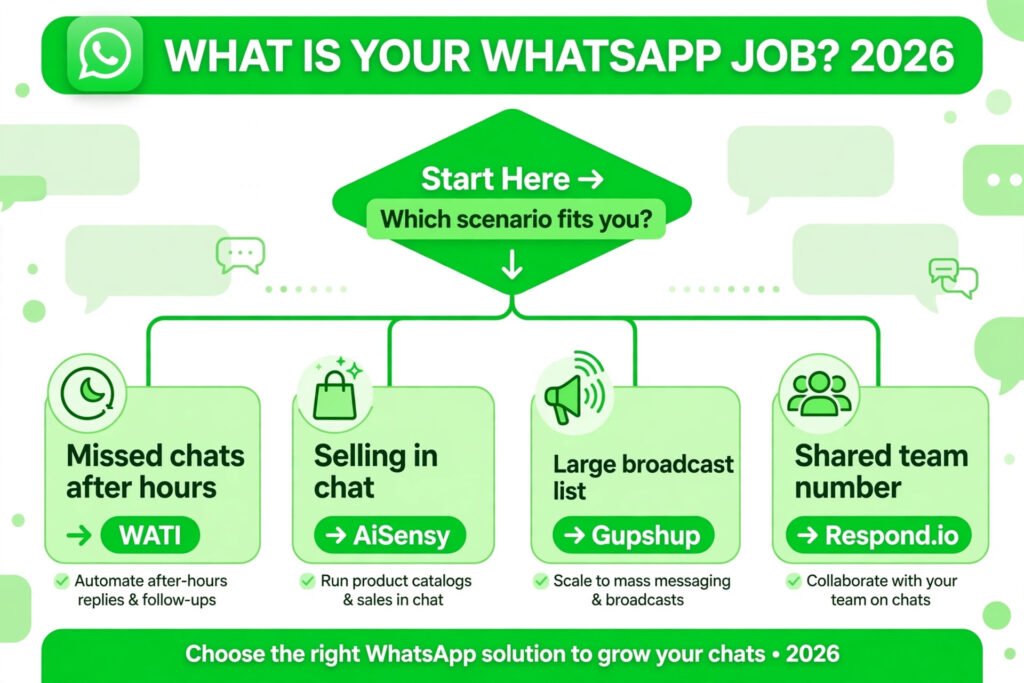
Start here: the right tool for your job
| Your situation | Start with | Why |
|---|---|---|
| You miss chats after hours | WATI | Quick setup, reliable auto replies and routing |
| You sell products in chat | AiSensy | Catalog, cart and payment links in one flow |
| You run offers to a large list | Gupshup | Template management and delivery at scale |
| Several people answer one number | Respond.io | Shared inbox, assignment and conversation history |
| You want a bot built to your rules | Botpress | Open building blocks and full control |
Chatbots and auto replies
A chatbot should answer the questions you already answer ten times a day: opening hours, delivery time, price, and order status. It should hand over to a person the moment a question turns into a complaint, a refund, or a large order. The three tools below do that job in different ways, and the difference matters more than the size of their feature lists.
1. WATI
WATI is built on the WhatsApp Business Platform and is designed for teams that want automation without hiring a developer. You can build a no code chatbot with a visual flow, set keyword replies, and route chats to team members when the bot reaches its limit. It also supports broadcast messages, templates, and a shared team inbox, which means a small business can start with automation and grow into team handling without changing tools. The dashboard is clear, and most teams can launch a first bot in a day.
Pricing: Subscription plans, check checkout. A free trial is usually available.
Best for: Small teams that want a chatbot, broadcasts, and a shared inbox in one place.
Watch out for: Costs rise with the number of conversations and team seats, so check the plan against your real monthly message volume before committing.
Try it at: https://www.wati.io/

2. Interakt
Interakt is popular with small businesses that sell through WhatsApp, especially in India, because it combines automation with commerce features. You can set up auto replies, order notifications, and abandoned cart reminders, and you can run campaigns to customers who have opted in. The interface is built for owners rather than developers, and the onboarding walks you through connecting a number, importing contacts, and approving message templates. For a shop that already takes orders on WhatsApp, Interakt reduces the manual work of chasing every order update.
Pricing: Subscription plans, check checkout.
Best for: Small sellers and local businesses that need automation plus order messages.
Watch out for: Some advanced automation and analytics sit on higher plans, so confirm which features your plan includes before you build flows around them.
Try it at: https://www.interakt.ai/
Catalog and orders
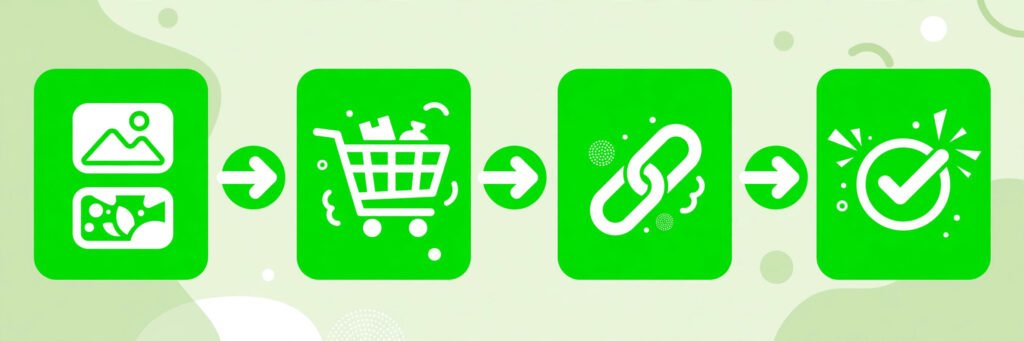
Selling inside WhatsApp only works if the customer can see products, ask a question, and pay without leaving the chat or losing the thread. A catalog that is hard to browse, a cart that resets, or a payment link that arrives late will cost sales. These three tools are built around that buying flow.
3. AiSensy
AiSensy is a WhatsApp engagement platform with a strong commerce focus. You can create a product catalog, send catalog messages, build a chatbot that recommends products, and run retargeting campaigns for abandoned carts. It also supports click to WhatsApp ads and integrations with Shopify and other store tools. For a shop that already sells on WhatsApp, AiSensy keeps the whole journey, from first message to payment reminder, inside one conversation.
Pricing: Subscription plans, check checkout.
Best for: Shops that sell directly inside WhatsApp chats.
Watch out for: Campaign and automation limits vary by plan, so map your monthly broadcast and cart recovery volume to the plan before you launch.
Try it at: https://www.aisensy.com/
4. Zoko
Zoko is built for Shopify stores that want WhatsApp to act as a storefront. It syncs products from Shopify, lets customers browse and buy in chat, and sends order updates and abandoned cart messages automatically. The team inbox means support staff can answer product questions in the same thread where the order lives, which reduces the back and forth of asking for order numbers. For a store already on Shopify, Zoko removes the need to rebuild a catalog in a second system.
Pricing: Subscription plans, check checkout.
Best for: Shopify stores that want WhatsApp commerce with synced products.
Watch out for: The value depends on the Shopify sync, so stores on other platforms should check integration options first.
Try it at: https://www.zoko.io/
5. SleekFlow
SleekFlow is an omnichannel platform that includes WhatsApp alongside Instagram, live chat, and email. For catalog and orders, its strength is that a customer who asks on Instagram and buys on WhatsApp stays visible as one person, not two separate contacts. You can automate replies, send product messages, and route conversations to the right team member. Shops that sell across several channels will get more from SleekFlow than a WhatsApp only tool, because the customer record is not split across tools.
Pricing: Subscription plans, check checkout.
Best for: Shops that sell on WhatsApp and at least one other channel.
Watch out for: The broader feature set takes longer to set up well, so start with one channel and one flow before adding more.
Try it at: https://sleekflow.io/
Broadcast campaigns
Broadcasts are the feature most likely to get a business blocked. WhatsApp only allows marketing messages to customers who have opted in, and every marketing message must use an approved template. The tools below help with templates, lists, and delivery, but none of them can make an unconsented list safe. Used properly, broadcasts are useful for restocks, offers to past buyers, and appointment reminders.
6. Gupshup
Gupshup is a large messaging platform with deep WhatsApp support, including template creation and approval, campaign scheduling, and chatbot building. It suits businesses with large lists because it handles high volumes and offers analytics on delivery and replies. Gupshup also supports other channels, which helps businesses that already message customers on more than one app. The trade off is complexity: setup and template management take more time than on a small business tool.
Pricing: Usage based pricing, check checkout.
Best for: Large lists, verified businesses, and high volume campaigns.
Watch out for: The platform is built for scale, so very small teams may find the setup heavier than they need.
Try it at: https://www.gupshup.io/

7. Twilio
Twilio provides the building blocks for WhatsApp messaging through its API, which developers use to send templates, build bots, and connect WhatsApp to existing systems. It is not a ready made dashboard for owners, and that is the point: a business with developers can shape exactly how messages, routing, and records work. Twilio also offers strong delivery reporting and a global infrastructure, which matters for businesses that send across countries.
Pricing: Pay as you go usage pricing, check checkout.
Best for: Businesses with developers that want custom WhatsApp workflows.
Watch out for: You will need development time to build and maintain the experience, so it is a poor pick for a team that wants a finished dashboard.
Try it at: https://www.twilio.com/
8. Bird (MessageBird)
Bird, formerly MessageBird, is an omnichannel communications platform that includes WhatsApp Business messaging, templates, and automation. Its appeal is a single place to manage WhatsApp, SMS, email, and other channels, with one customer view across them. For a business that already messages customers in several places, Bird reduces the risk of sending the same offer twice or missing a reply that arrived on another channel. Automation flows can route, tag, and follow up without manual sorting.
Pricing: Usage based pricing, check checkout.
Best for: Businesses that message customers across several channels.
Watch out for: Pricing depends on channels and volume, so model your real monthly usage before choosing a plan.
Try it at: https://bird.com/
Team inbox and CRM
When more than one person answers the same WhatsApp number, the inbox becomes the product. Customers should not have to repeat themselves, managers should see waiting chats, and no conversation should sit unassigned. These three tools are built for that shared work.
9. Respond.io
Respond.io gives a whole team one inbox for WhatsApp and other channels, with assignment rules, internal notes, and a contact record that shows past conversations. You can build automation that routes chats by topic or language, and you can connect a CRM so sales staff see order history next to the chat. The platform is practical rather than flashy, and it suits teams that already handle a steady daily volume of messages and need order in the queue.
Pricing: Subscription plans, check checkout.
Best for: Teams that share one WhatsApp number across staff.
Watch out for: The full value appears once routing and CRM connections are set up, so allow time for configuration.
Try it at: https://respond.io/

10. Verloop.io
Verloop.io combines a chatbot with a team inbox, and it is aimed at support teams that handle a high volume of repetitive questions. The bot answers common queries, collects details, and passes the conversation to an agent with context, so the customer does not start again. Managers get reports on response time, resolution, and bot performance, which helps a support lead see where the bot helps and where it gets in the way. It also supports voice and other channels for teams that do not live on WhatsApp alone.
Pricing: Subscription plans, check checkout.
Best for: Support teams with high chat volume and many repeat questions.
Watch out for: Bot quality depends on training and testing, so budget time to review real conversations in the first month.
Try it at: https://www.verloop.io/
11. Botpress
Botpress is an open source platform for building chatbots that can run on WhatsApp and other channels. It gives builders full control over flows, integrations, and logic, which suits businesses with unusual processes or strict data requirements. You can host it yourself or use the cloud version, connect it to internal systems, and shape the bot around your own rules rather than a fixed template. The cost is effort: Botpress rewards teams that can build and maintain a bot, and it punishes teams that want a finished product out of the box.
Pricing: Free open source option plus paid cloud plans, check checkout.
Best for: Businesses that want a custom bot built to their own rules.
Watch out for: Building and maintaining a good bot takes real time, so do not choose Botpress only because the starting price looks low.
Try it at: https://botpress.com/
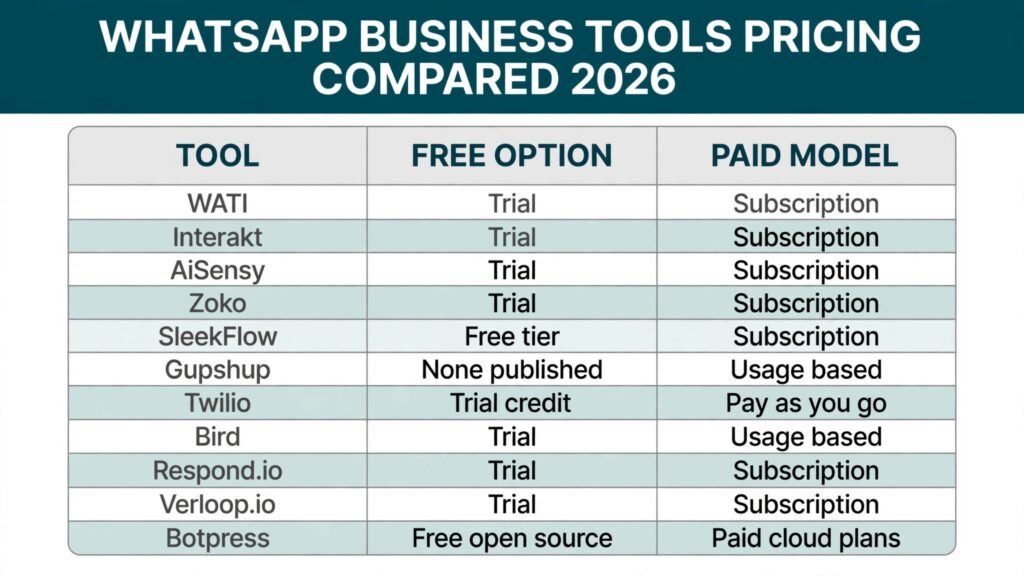
Pricing compared
| Tool | Free option | Paid model |
|---|---|---|
| WATI | Trial | Subscription, check checkout |
| Interakt | Trial | Subscription, check checkout |
| AiSensy | Trial | Subscription, check checkout |
| Zoko | Trial | Subscription, check checkout |
| SleekFlow | Free tier | Subscription, check checkout |
| Gupshup | None published | Usage based, check checkout |
| Twilio | Trial credit | Pay as you go, check checkout |
| Bird (MessageBird) | Trial | Usage based, check checkout |
| Respond.io | Trial | Subscription, check checkout |
| Verloop.io | Trial | Subscription, check checkout |
| Botpress | Free open source | Paid cloud plans, check checkout |
The cheapest honest starting point depends on your volume, not the headline plan. A team that sends a few hundred messages a month will pay far less than a store that broadcasts to ten thousand opted in customers, even on the same tool. Before you commit, count your monthly conversations, your broadcast list size, and your team seats, then compare that total across two tools. Also check renewal and overage rules, because WhatsApp costs include both the platform fee and Meta conversation charges, and both can surprise a first time buyer.
How to choose the right tool
Start with the job, not the tool. Write down the one outcome you want in the next ninety days: fewer missed chats, more orders from chat, faster support replies, or cleaner campaign lists. Then test each shortlisted tool against that outcome, not against its longest feature page.
First, confirm the number setup. A business using the WhatsApp Business app cannot simply move the same number to the platform without following the migration steps, and a new platform number means telling customers where to reach you. Check this before you pay for anything.
Second, test the bot with real questions. Send it your ten most common questions, including one awkward one, and see where it hands over. A bot that answers nine questions well and traps the tenth in a loop is worse than a bot that answers five and hands over cleanly.
Third, check templates early. Marketing messages need approved templates, and approval takes time. Draft your three most used templates, submit them, and see how the tool handles edits and rejections.
Fourth, measure the handover. A shared inbox should show who owns each chat, how long it has waited, and what the customer already said. If your team cannot see that in one glance, the tool will create more work than it removes.
Fifth, run a small paid pilot. Pick one flow, one list, and one team for two weeks. Measure reply time, missed chats, and orders or resolutions from chat, then decide with numbers instead of demos.
Mistakes to avoid
Buying a bot before you have traffic is the most common waste. A business with twenty chats a week does not need complex automation; it needs fast human replies and a few saved answers. Automation earns its cost when volume makes manual replies slow.
Broadcasting to a bought or scraped list is the fastest way to lose a number. Only message people who opted in, keep the list clean, and give every campaign a clear reason to exist. A restock notice to past buyers is welcome. A daily generic offer is not.
Letting the bot handle complaints is a trust mistake. Refunds, damaged orders, and angry customers need a person quickly, even if the bot collects the order number first. Set a clear rule for which topics always go to a human.
Forgetting templates will stall a campaign. Teams often build a flow, plan a launch date, and only then discover that templates need approval. Submit templates at the start of the project, not at the end.
Ignoring the total cost is easy because platform fees and Meta charges appear separately. Add both, plus seats and overages, and compare the monthly total, not the advertised starting price.
Finally, do not split the customer record. If sales talks on WhatsApp, support talks on email, and nobody sees both, the customer repeats everything twice. Pick a tool that keeps one record, or connect the tools you already use.
Frequently asked questions
Do I need the WhatsApp Business Platform to use these tools?
Most tools in this guide run on the WhatsApp Business Platform, which is the official route for automation, broadcasts, and team inboxes. The free WhatsApp Business app suits a single owner with a small number of chats, but it does not support the automation and shared inbox features these tools provide. If you already use the app, check the migration steps for your number before switching.
Can a chatbot replace my support team?
No, and it should not try. A chatbot handles repeat questions, collects details, and routes conversations. It works best when a person takes over complaints, refunds, and complex orders. The strongest setups in this guide use the bot to remove routine work so humans can spend time on the conversations that need judgement.
Are WhatsApp broadcasts allowed for marketing?
Yes, but only to customers who have opted in, and only with approved message templates. WhatsApp limits marketing messages to protect users, and businesses that ignore opt in rules risk template rejections and account restrictions. Build your list from real customers and past buyers, and keep every campaign relevant to that list.
What does WhatsApp messaging actually cost?
You pay two parts: the platform fee charged by the tool, and Meta conversation charges based on message type and volume. Marketing conversations usually cost more than service or utility conversations. Because rates vary by country and volume, this guide says check checkout rather than quoting a figure that would be wrong for most readers.
Which tool is best for a small shop?
For a small shop selling in chat, AiSensy or Interakt are practical starting points because catalog, cart reminders, and broadcasts sit in one place. For a small team that mainly answers questions, WATI is simpler to launch. Choose by the job you do most, then test one flow before adding more features.
Can I use one WhatsApp number with a whole team?
Yes, on the platform, through a shared inbox tool such as Respond.io or Verloop.io. Staff answer from their own logins, chats are assigned, and the customer sees one business number. This avoids the common problem of a single phone passed between staff or a personal number used for business messages.
Conclusion
The best tool here is the one that matches the job you actually do on WhatsApp. WATI and Interakt suit teams that need fast replies and lead capture. AiSensy, Zoko, and SleekFlow suit shops that sell inside the chat. Gupshup, Twilio, and Bird suit large or developer led broadcast work. Respond.io, Verloop.io, and Botpress suit teams that share one number or need a custom bot. Start with one outcome, test one flow with real questions and real customers, and check the total monthly cost including Meta charges before you scale. WhatsApp rewards businesses that reply fast, respect opt in rules, and hand over to a person when it matters. Pick the tool that helps you do those three things, and ignore the rest until you need it.