

The procurement test every enterprise tool has to pass
The best AI tools for enterprises in 2026 are not the ones with the longest feature lists. They are the ones that survive a real procurement review: a security team that asks where data goes, a legal team that asks who owns the output, an IT team that asks how it connects to existing systems, and a finance team that asks what the second year costs. Most enterprise AI purchases fail on one of those four questions, not on the quality of the demo.
That is why this guide is organised by job, not by vendor size. A security tool that stops phishing is judged differently from a search tool that finds internal documents, and both are judged differently from an automation tool that moves work between systems. Each tool below is assessed on the same practical test: what it does in a large organisation, what it costs in October 2026 terms, where it works best, and where it falls short.
The 10 tools fall into four groups. Security and compliance tools protect data and prove controls. Enterprise search and knowledge tools help staff find trusted answers inside the company. Workflow automation tools connect systems and remove manual handoffs. Analytics and governance tools turn company data into decisions that can be audited. Buy one group at a time, pilot it in one business unit, and expand only after the pilot passes the four questions above.
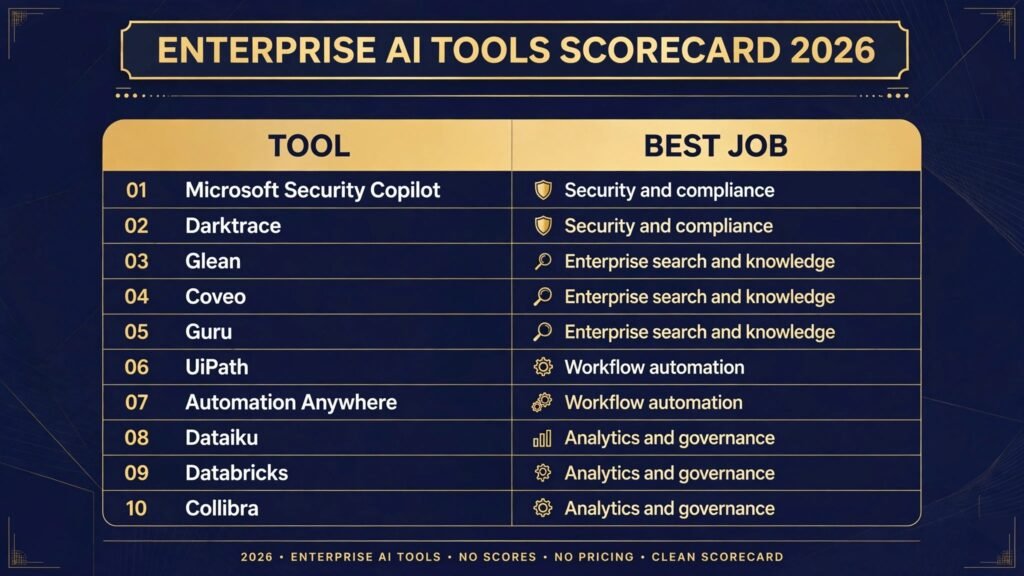
The 10 best AI tools for enterprises at a glance
| Tool | Best job | Starting point |
|---|---|---|
| Microsoft Security Copilot | Security and compliance | Trial through Microsoft security licensing |
| Darktrace | Security and compliance | Enterprise quote |
| Glean | Enterprise search and knowledge | Enterprise quote |
| Coveo | Enterprise search and knowledge | Enterprise quote |
| Guru | Enterprise search and knowledge | Free trial, then subscription |
| UiPath | Workflow automation | Free trial, then subscription |
| Automation Anywhere | Workflow automation | Free trial, then subscription |
| Dataiku | Analytics and governance | Free trial, then subscription |
| Databricks | Analytics and governance | Usage based pricing |
| Collibra | Analytics and governance | Enterprise quote |
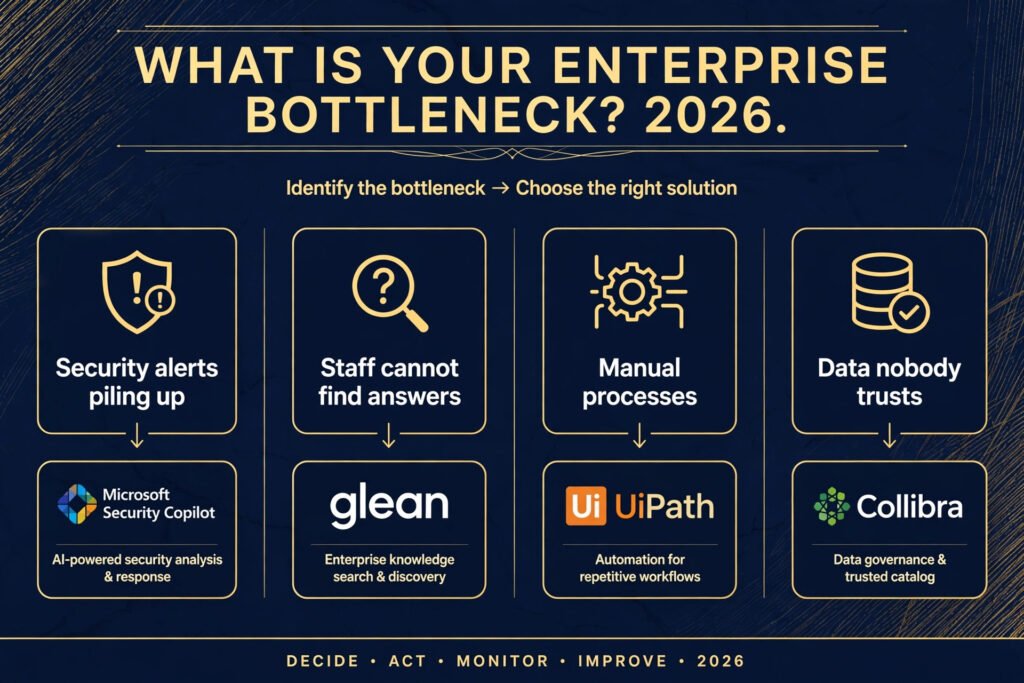
Start here: the right tool for each enterprise job
| Your problem | Start with | Why |
|---|---|---|
| Security alerts outnumber analysts | Microsoft Security Copilot | It summarises incidents inside tools security teams already use |
| Unknown behaviour on the network | Darktrace | It learns normal patterns and flags what changes |
| Audit preparation eats quarters | Staff cannot find internal answers | Glean |
| Customers cannot find help content | Coveo | It tunes search and recommendations for external sites |
| Answers live in chat threads | Guru | It verifies answers and pushes them where staff work |
| Repetitive back office work | UiPath | It automates desktop and system tasks at scale |
| Document heavy processes | Automation Anywhere | It combines document processing with automation |
| Systems that do not talk to each other | Teams building their own models | Dataiku |
| Large scale data and AI workloads | Databricks | It unifies data engineering and model work |
| Nobody trusts the data catalogue | Collibra | It governs definitions, lineage and access in one place |
Security and compliance
1. Microsoft Security Copilot
Microsoft Security Copilot is an AI assistant for security operations, built into Microsoft Defender, Sentinel, Intune and Entra. Analysts ask questions in plain language, get incident summaries, and receive guided next steps. It can draft investigation notes and explain why an alert fired, which shortens triage for teams facing hundreds of alerts a day.
Pricing: Enterprise licensing through Microsoft security products, check checkout for the current Security Copilot unit price in your region.

Best for: Organisations already running Microsoft Defender and Sentinel that need faster triage without replacing their security stack.
Watch out for: Value depends on how much security data already flows into Microsoft tools. Companies on mixed stacks will see thinner answers until connectors are in place.
Try it at: https://www.microsoft.com/en-us/security/business/ai-machine-learning/microsoft-security-copilot
2. Darktrace
Darktrace uses self learning AI to model normal behaviour across networks, cloud workloads, email and endpoints. When behaviour changes, for example a device contacting an unusual server at an unusual hour, it raises the anomaly and can respond autonomously by slowing or blocking the connection. The appeal for enterprises is detection that does not depend only on known attack signatures.
Pricing: Enterprise quote based on coverage, check checkout for a scoped price.
Best for: Large networks and hybrid cloud estates where signature based tools miss novel attacks and insider style movement.
Watch out for: Autonomous response needs careful tuning at the start. Set it to observe first, review its decisions for two to four weeks, and only then allow blocking actions.
Try it at: https://www.darktrace.com
Enterprise search and knowledge
3. Glean
Glean is an enterprise search tool that indexes documents, tickets, messages and wikis across company apps, then answers questions with citations to the source. Staff can ask where a policy lives, what a product decision was, or who owns a system, and get an answer tied to a document rather than a guess. Permissions are respected, so staff only see results they are allowed to open.
Pricing: Enterprise quote, check checkout for a scoped price based on headcount and connectors.

Best for: Companies above a few hundred staff where knowledge is scattered across Google Workspace, Microsoft 365, Slack, Jira and Confluence.
Watch out for: Search quality follows content quality. If internal documents are outdated or duplicated, Glean will surface those problems clearly, which is useful but requires a cleanup plan.
Try it at: https://www.glean.com
4. Coveo
Coveo provides AI search and recommendations for customer facing sites, support portals and commerce. It learns from clicks, purchases and support outcomes to rank results and suggest relevant content. Enterprises use it where the search box is a revenue or support cost lever, not just a convenience.
Pricing: Enterprise quote, check checkout for a scoped price based on traffic and use case.
Best for: Large support portals, documentation sites and online stores where poor search drives tickets and lost sales.
Watch out for: Coveo needs usage data to tune well. Expect a tuning period of several weeks, and assign an owner for relevance rather than treating launch as the finish line.
Try it at: https://www.coveo.com
5. Guru
Guru is a verified knowledge base that delivers answers inside Slack, Teams, Salesforce and browsers. Subject experts verify cards, set expiry dates, and receive prompts to recheck content. That verification loop is the point: answers stay current because someone owns them, and staff see who verified an answer and when.
Pricing: Free trial, then subscription by user, check checkout for the current plan price.
Best for: Support, sales and operations teams that answer the same questions repeatedly and need one trusted answer, especially where HR teams and people teams field repeated policy questions.
Watch out for: Guru works when experts maintain it. Without named owners per topic, cards go stale and staff stop trusting the answers.
Try it at: https://www.getguru.com
Workflow automation
6. UiPath
UiPath is an automation platform that combines robotic process automation, document understanding and AI agents. Bots handle invoice entry, data transfer between systems, report generation and other repetitive tasks. Its orchestrator manages schedules, queues and access, which matters when hundreds of automations run across departments.
Pricing: Free trial, then subscription by licence type, check checkout for the current plan price.

Best for: Finance, operations and shared service centres with high volume, rule based work across legacy and modern systems.
Watch out for: Automation at enterprise scale needs governance. Without a centre of excellence reviewing bots, teams build overlapping automations that break when a system changes.
Try it at: https://www.uipath.com
7. Automation Anywhere
Automation Anywhere offers automation with document processing and AI agents for business processes. It reads invoices, forms and emails, extracts structured data, and moves it into systems of record. Its cloud native platform suits companies that want automation without managing desktop bot infrastructure.
Pricing: Free trial, then subscription, check checkout for the current plan price.
Best for: Document heavy processes such as accounts payable, claims handling and onboarding paperwork.
Watch out for: Document accuracy depends on document variety. Test with real samples from every supplier or region before committing to straight through processing.
Try it at: https://www.automationanywhere.com
Analytics and governance
8. Dataiku
Dataiku gives data scientists, analysts and engineers shared workspaces for data preparation, machine learning and AI applications. Projects carry lineage, versioning and access controls, so a model built by one team can be reviewed, tested and deployed by another. That shared governance is what separates enterprise data work from scattered notebooks.
Pricing: Free trial, then subscription, check checkout for the current plan price.
Best for: Organisations with several data teams that need one governed place to build, test and deploy models.
Watch out for: Dataiku is a platform, not a finished model. Budget for data engineering time and for cleaning source data, or projects will stall at the preparation stage.
Try it at: https://www.dataiku.com
9. Databricks
Databricks unifies data engineering, analytics and AI on a lakehouse platform. Teams process large data volumes, train models and serve predictions from the same data foundation. Its scale suits enterprises with heavy data workloads, streaming data and multiple AI use cases running in parallel.
Pricing: Usage based, by compute and platform tier, check checkout for current rates in your cloud region.
Best for: Large data estates, real time analytics and companies building custom models rather than buying single purpose tools.
Watch out for: Usage based pricing rewards good cost management. Set budgets, monitor compute by team, and review idle clusters, or costs grow faster than value.
Try it at: https://www.databricks.com
10. Collibra
Collibra governs data definitions, lineage, quality rules and access policies. When a report shows a revenue figure, staff can trace it back to source systems, see who defined the metric, and check quality scores. That traceability is the foundation for AI governance too, since models trained on poorly defined data produce confident but wrong answers.
Pricing: Enterprise quote, check checkout for a scoped price based on users and data sources.

Best for: Regulated industries and large companies where data definitions differ between teams and audit trails matter.
Watch out for: Collibra needs business owners for each data domain. If definitions are owned by nobody, the catalogue becomes a polished list of guesses.
Try it at: https://www.collibra.com
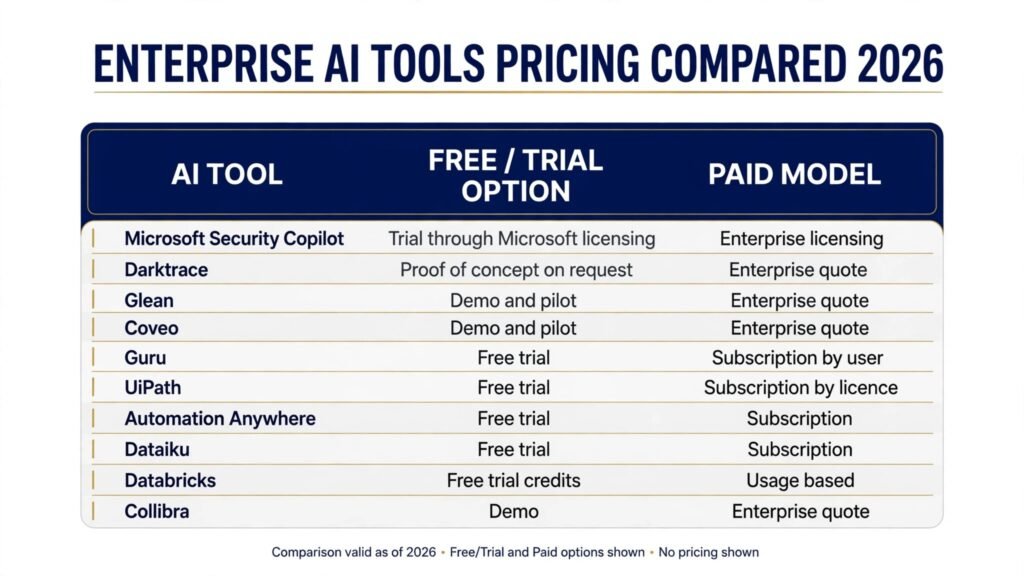
Pricing compared
| Tool | Free or trial option | Paid model |
|---|---|---|
| Microsoft Security Copilot | Trial through Microsoft licensing | Enterprise licensing, check checkout |
| Darktrace | Proof of concept on request | Enterprise quote, check checkout |
| Glean | Demo and pilot | Enterprise quote, check checkout |
| Coveo | Demo and pilot | Enterprise quote, check checkout |
| Guru | Free trial | Subscription by user, check checkout |
| UiPath | Free trial | Subscription by licence, check checkout |
| Automation Anywhere | Free trial | Subscription, check checkout |
| Dataiku | Free trial | Subscription, check checkout |
| Databricks | Free trial credits | Usage based, check checkout |
| Collibra | Demo | Enterprise quote, check checkout |
The pattern is consistent: enterprise tools rarely publish a single price because cost depends on headcount, data volume, connectors and support level. Treat the first quote as a starting point. Ask for second year pricing, implementation cost, and what happens to data and automations if you leave. Those three answers change the total cost more than the headline rate.
How to choose: the four question pilot
Run a four week pilot in one business unit before a company wide rollout. Score each tool on the same four questions.
First, security and data handling. Where does company data go during processing? Is it used to train vendor models? Can you set data residency and retention? Get answers in writing, not just in a sales call.
Second, integration effort. Count the connectors you actually need, not the ones on a marketing page. A tool that needs three months of custom integration is a different purchase from one that connects in a week.
Third, ownership. Name the internal owner for each tool before purchase. Security tools need a security owner, knowledge tools need content owners, automation needs process owners, and governance tools need data domain owners. Tools without owners decay.
Fourth, measurable outcome. Set one metric per pilot: triage time, audit preparation hours, search success rate, hours saved per process, model deployment time, or data quality score. If the metric does not move in four weeks, do not expand.
A common enterprise mistake is piloting everything at once. Pilot one tool per group, compare results, and sequence the rollout by the metric that matters most to the business this year.
A note on vendor lock in deserves a place in every pilot review. Ask whether automations, knowledge cards, search indexes and data definitions can be exported in a usable format, and test the export with a small sample before signing. Also check contract terms for price changes at renewal, minimum seat counts, and support response times for major incidents. These terms rarely appear in a demo, yet they decide whether a successful pilot stays successful when it grows from one team to the whole company.
Mistakes to avoid
Buying before the data is ready. Search, analytics and AI tools amplify whatever data quality you already have. Clean the most used sources first, or the new tool will surface old problems at larger scale.
Letting every team buy its own tool. Shadow AI purchases create duplicate costs, inconsistent security review and data scattered across vendors. Require a short central review for any tool that touches company or customer data.
Skipping the exit plan. Ask how to export automations, knowledge cards, models and definitions before signing. A tool that locks your work inside its format is expensive to leave, even if the first year price looks low.
Judging by the demo data. Vendor demos use clean, well labelled data. Test with your own messy documents, tickets and spreadsheets, including edge cases from your largest market or oldest system.
Ignoring change management. Staff will not use a search tool they do not trust or an automation they did not help design. Involve the teams who will live with the tool in the pilot, and publish the pilot results internally.
Forgetting second year costs. Implementation, training, connectors and support often cost more in year two than the licence. Build the full three year cost into the business case, not just the first invoice.
Frequently asked questions
What is the best AI tool for enterprises overall?
There is no single winner, because enterprises buy by job. Start with the group that solves your largest current cost: security triage, audit preparation, knowledge search, manual processes, or data trust. The Start here table above maps each problem to a first tool to pilot.
How much do enterprise AI tools cost?
Most tools in this guide price by headcount, usage, data volume or enterprise agreement, so vendors quote rather than publish a fixed price. Expect trials for Guru, UiPath, Automation Anywhere and Dataiku, usage based pricing for Databricks, and enterprise quotes for Glean, Coveo, Collibra and Darktrace. Always ask for second and third year pricing before signing.
Do these tools train on company data?
Policies differ by vendor and by contract tier. Some vendors exclude customer data from training by default on enterprise plans, while others require an explicit agreement. Get the data handling terms in writing during procurement, and confirm retention, residency and deletion options.
Can small teams inside a large company use these tools?
Yes, but through the enterprise agreement, not through separate purchases. A single team pilot under central security review gives you real results without creating a shadow tool that later needs to be migrated or shut down.
How long does enterprise rollout take?
A single business unit pilot takes about four weeks. Company wide rollout takes one to two quarters for search and knowledge tools, and longer for automation and governance, because those need process redesign and data ownership work alongside the software.
Should enterprises build AI tools instead of buying them?
Buy for common problems such as search, compliance evidence and standard automation, where vendors already handle scale and security. Build only where the problem is specific to your business and gives a lasting advantage, and even then build on a platform such as Databricks or Dataiku rather than from scratch.
Conclusion
Enterprise AI buying rewards discipline more than enthusiasm. The tools in this guide cover the four jobs that matter most in a large organisation: protecting data, finding trusted answers, connecting systems, and governing data for decisions. Pick the job with the clearest cost or risk, run a four week pilot with one metric, and require written answers on security, integration, ownership and exit before expanding.
The cheapest enterprise tool is the one that survives procurement, gets used daily, and still makes sense in year three. Measure that, not the demo, and the shortlist above gives you a credible starting point for each job.