Eye care practices lose hours every week to work that has nothing to do with examining eyes. Missed calls become missed bookings. Recall lists sit untouched. Chart notes get finished after hours. Insurance checks and frame orders add another layer of admin on top of a full clinic day. The best AI tools for optometrists do not replace clinical judgment. They take the repeatable work around the exam, imaging, scheduling, follow up and billing, and they do it consistently, so the practice runs on time and patients get faster answers.
That distinction matters in 2026 because eye care software now falls into two very different groups. One group reads images, flags possible pathology and helps with triage. The other group handles the business of the practice: booking, reminders, notes, claims and patient messages. A strong practice usually needs one tool from each group, plus a reliable way to keep patients coming back for annual exams and contact lens checks. Buying two tools that both do scheduling, or an imaging add on that your EHR cannot receive, wastes money and creates duplicate work.
This guide sorts 9 tools by the job they actually do. It covers clinical imaging and screening support, eye care EHR and AI notes, scheduling and recall, and patient communication and billing. For each tool you will find what it does well, who it suits, what to watch out for, and a pricing note. Prices change often, so check the vendor checkout page before you commit, and treat any price quoted in a review as a starting point, not a promise.
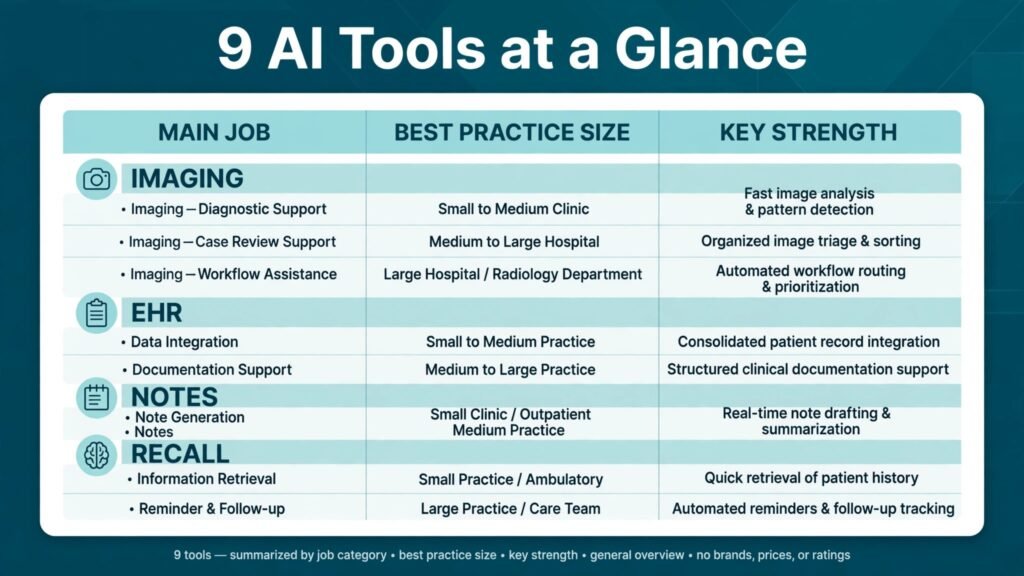
At a Glance: The 9 Tools in This Guide
| Tool | Main job | Best for |
|---|---|---|
| Topcon Harmony | Imaging and referral data in one view | Multi doctor practices with several imaging devices |
| ZEISS FORUM | Imaging management and screening support | Practices that already use ZEISS devices |
| RevolutionEHR | Eye care EHR, scheduling and billing | Independent practices that want one core system |
| Eyefinity EHR | Cloud EHR and practice management | Practices that want VSP connected workflows |
| Heidi Health | AI clinical notes from the visit | Doctors who spend evenings finishing notes |
| Weave | Phones, messages and recall | Front desk teams drowning in calls |
| Solutionreach | Recall, reminders and reviews | Practices focused on annual exam recall |
| Nextech | EHR, imaging and revenue tools | Larger practices and multi location groups |
| Doctible | Patient communication and online booking | Small practices that need a lighter front desk layer |
If you only have time for one decision, start with your EHR. It holds the patient record, the schedule and the claim, so every other tool must work with it or around it. Imaging tools come next for practices with high diabetic, glaucoma or macular degeneration volume. Communication tools come third, because they pay for themselves quickly when recall and no shows improve, but only if the schedule and record behind them are clean.
Imaging and Screening Support
1. Topcon Harmony
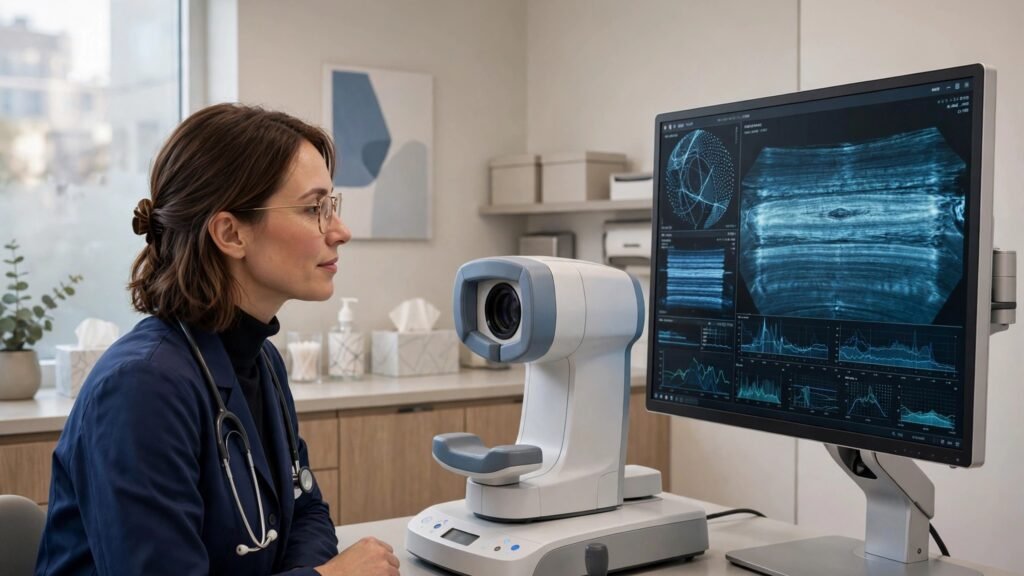
Topcon Harmony pulls images and data from different devices into one referral ready view, so a doctor is not opening four programs to compare an OCT scan, a fundus photo and a visual field result. For a practice that runs OCT, retinal imaging and perimetry from more than one maker, that single view saves real time in the exam room and makes referrals easier to prepare. The system is built for eye care workflows rather than general radiology, which shows in how it groups exams by patient and by visit.
It suits multi doctor practices, practices with a strong medical eye care caseload, and clinics that send many referrals to ophthalmology. Smaller practices with one imaging device may not need this level of integration, and should weigh the setup work against the daily time saved.
Watch out for: device compatibility and IT setup. Confirm in writing that each device in your office connects cleanly, and ask who handles the install, the data migration and the staff training. A powerful imaging hub that staff avoid because the workflow is clumsy will not improve care.
Pricing note: enterprise style pricing quoted by the vendor. Check the checkout and contract terms, including any per device or per site fees, before signing.
2. ZEISS FORUM
ZEISS FORUM is the imaging management platform for practices in the ZEISS ecosystem. It stores, displays and compares images over time, which matters most for progressive conditions where a small change between visits changes the plan. Glaucoma suspects, diabetic eye disease and macular degeneration follow up all benefit from clean side by side comparison rather than notes that say “stable” from memory.
It suits practices that already own ZEISS OCT or fundus cameras, and practices that want structured progression analysis without building a custom image archive. Practices with a mixed device fleet should compare it directly with Harmony, because the best imaging platform is usually the one that covers the devices you already own.
Watch out for: ecosystem lock in. If you plan to buy a non ZEISS device next year, ask how that device will connect and whether extra integration fees apply. Also confirm how images export if you ever change systems, because patient images are a long term record, not a disposable file.
Pricing note: vendor quoted pricing based on practice size and modules. Check the checkout page and ask for the full module list, so a feature you assumed was included is not billed later.
Eye Care EHR, Notes and Billing

3. RevolutionEHR
RevolutionEHR is a cloud based EHR built specifically for eye care, covering scheduling, charting, optical orders, claims and reporting in one system. Its strength is fit: exam templates, contact lens workflows and optical inventory reflect how an eye clinic actually works, rather than forcing a general medical template onto an eye exam. For an independent practice that wants one core system instead of five disconnected apps, that fit reduces training time and double entry.
It suits solo and small group practices, practices that dispense in house, and owners who want reporting on exam volume, optical sales and recall in one place. Larger groups may need to test its multi location reporting and permissions carefully before committing.
Watch out for: migration time and template setup. Moving charts, setting up exam templates and training the front desk takes weeks, not days. Plan the switch for a quieter period, keep a parallel check on claims for the first month, and do not judge the system on week one alone.
Pricing note: subscription pricing listed by the vendor, with tiers by features. Check the checkout page for what each tier includes, especially e-prescribing, patient portal and clearinghouse fees.
4. Eyefinity EHR
Eyefinity EHR, from the VSP Vision family, gives practices a cloud EHR with scheduling, charting, claims and patient engagement tools. Its practical advantage is connection to vision plan workflows, which can reduce eligibility and claim friction for practices with a large VSP patient base. The patient portal and online scheduling also help front desk teams handle routine requests without a phone call for every task.
It suits practices with heavy vision plan volume, practices that want a single vendor for EHR and practice management, and teams that prefer a guided, template driven chart. Practices that rarely take vision plans should compare it on charting speed and reporting alone, without giving extra weight to plan connections they will not use.
Watch out for: plan dependence and workflow fit. Test the full exam flow, from check in to claim, with your own most common visit types. A system that handles routine comprehensive exams well but slows down medical visits or contact lens fittings will cost time every day.
Pricing note: vendor listed subscription pricing. Check the checkout page and confirm whether clearinghouse, e-prescribing and patient messaging are included or added separately.
5. Heidi Health
Heidi Health is an AI medical scribe that listens to the visit, with consent, and drafts a structured clinical note. For optometrists, the value is not fancy technology. It is finishing notes in the room instead of at home. A doctor who sees 20 patients a day and spends two minutes per note after hours saves more than half an hour a day, and the note is written while the findings are fresh rather than reconstructed from memory at night.
It suits doctors with heavy note loads, practices adding medical eye care visits, and locum or part time doctors who want consistent note structure across sites. It also helps practices where the doctor is the bottleneck: faster notes mean the next patient starts on time.
Watch out for: accuracy checks and consent. Every AI draft needs a doctor review before signing, especially for diagnosis codes, medication lists and referral wording. Get clear patient consent for recording, follow your local rules on audio storage, and test it on your noisiest exam room, not just a quiet demo room.
Pricing note: free and paid tiers are listed on the vendor site, with paid plans adding team features. Check the checkout page for per clinician pricing and data retention terms.
Scheduling, Recall and Patient Communication

6. Weave
Weave combines phones, texting, online scheduling, payments and review requests in one front desk platform. For eye clinics, the phone system matters as much as the texting: missed calls during busy clinic hours are lost bookings, and Weave routes, records and follows up those calls in a way a basic phone line cannot. Two way texting also fits how patients actually respond, with appointment confirmations, recall messages and frame ready notices answered far faster than voicemail.
It suits practices with high call volume, practices with frequent no shows, and front desk teams of two or more people who need shared call and message history. Solo practices with low call volume may get similar value from a simpler recall tool at lower cost.
Watch out for: phone number porting and staff habits. Moving your main number takes planning, and the system only helps if staff answer texts promptly and log call outcomes. Test the phone app on your actual internet connection, and agree on who owns the message inbox each day.
Pricing note: subscription pricing quoted by the vendor, often by location and features. Check the checkout page for phone, payments and review features, which may sit in different tiers.
7. Solutionreach
Solutionreach focuses on the long game of eye care: recall. Annual exams, contact lens evaluations and diabetic eye exams only happen if patients are reminded at the right time, in the right channel, with a booking link that works. Solutionreach automates recall campaigns, reminders, surveys and review requests, and it segments patients by last visit date and visit type, so a contact lens wearer does not get the same message as a glaucoma follow up patient.
It suits established practices with a large inactive patient base, practices trying to grow medical eye care recall, and owners who can measure success by reactivated patients per month rather than by messages sent. New practices with a small patient list will get less value until the base grows.
Watch out for: message fatigue and data quality. Recall only works if patient phone numbers, emails and last visit dates are clean. Run a data clean up before launch, cap message frequency, and track opt outs. A patient who gets five reminders in a week is less likely to book, not more.
Pricing note: vendor quoted subscription pricing by practice size. Check the checkout page for campaign limits and whether two way messaging is included.
8. Nextech
Nextech offers an EHR and practice management platform for ophthalmology, optometry and related specialties, with imaging, scheduling, billing and patient engagement in one system. Its strength is scale: multi location practices get shared reporting, central scheduling views and consistent chart templates across sites, which matters when doctors work at more than one office. Revenue tools and analytics also help owners see which services, locations and payers actually drive profit.
It suits larger optometry groups, practices combined with ophthalmology, and owners planning to add locations. A solo practice may find it more system than it needs, and should compare its daily charting speed against a smaller eye care EHR before choosing scale over simplicity.
Watch out for: implementation scope. A full platform switch touches scheduling, charting, billing and imaging at once. Ask for a phased plan, a named implementation contact, and a clear answer on how historical images and notes migrate. Do not sign until you have seen your own workflow, not a generic demo, running end to end.
Pricing note: vendor quoted pricing by modules and locations. Check the checkout page and contract for implementation fees, which can be separate from the monthly subscription.
9. Doctible
Doctible is a lighter patient communication layer for small practices: online booking, reminders, review management and a simple website presence, without replacing the EHR. For a small optometry office that already likes its EHR but loses patients to slow phone booking, Doctible adds the missing front door. Patients can book online, get reminders, and leave reviews, while the front desk keeps working in the system it already knows.
It suits solo practices, new practices building reviews, and practices that want a quick win without a full system migration. It suits owners who want to test online booking demand before committing to a larger platform change.
Watch out for: overlap and sync. If your EHR already sends reminders or offers online booking, Doctible may duplicate that work. Confirm two way sync with your schedule, so an online booking cannot double book a slot that the front desk just filled by phone.
Pricing note: subscription pricing listed on the vendor site. Check the checkout page for which features are included at the base tier, especially review management and online booking.
Best Pick by Job
| Job | Best pick | Why it wins for that job |
|---|---|---|
| Imaging across many device brands | Topcon Harmony | One view across devices, referral ready |
| Imaging inside the ZEISS system | ZEISS FORUM | Progression comparison built for ZEISS devices |
| One core eye care system | RevolutionEHR | Eye specific templates, optical and claims in one place |
| Vision plan heavy practice | Eyefinity EHR | Plan connected workflows and cloud access |
| Finish notes on time | Heidi Health | AI drafts cut after hours charting |
| Fix the phones and recall together | Weave | Calls, texts, scheduling and payments in one inbox |
| Reactivate lapsed patients | Solutionreach | Segmented recall campaigns by visit type |
| Run several locations | Nextech | Shared reporting and consistent templates |
| Add online booking fast | Doctible | Light layer over an EHR you already use |
A useful rule: buy the system that fixes your biggest bottleneck first. If notes run late every night, an AI scribe beats a new recall tool. If the phones ring unanswered, a communication platform beats a new imaging hub. If referrals take hours to assemble, imaging integration beats both.
How to Choose the Right Tools for Your Practice
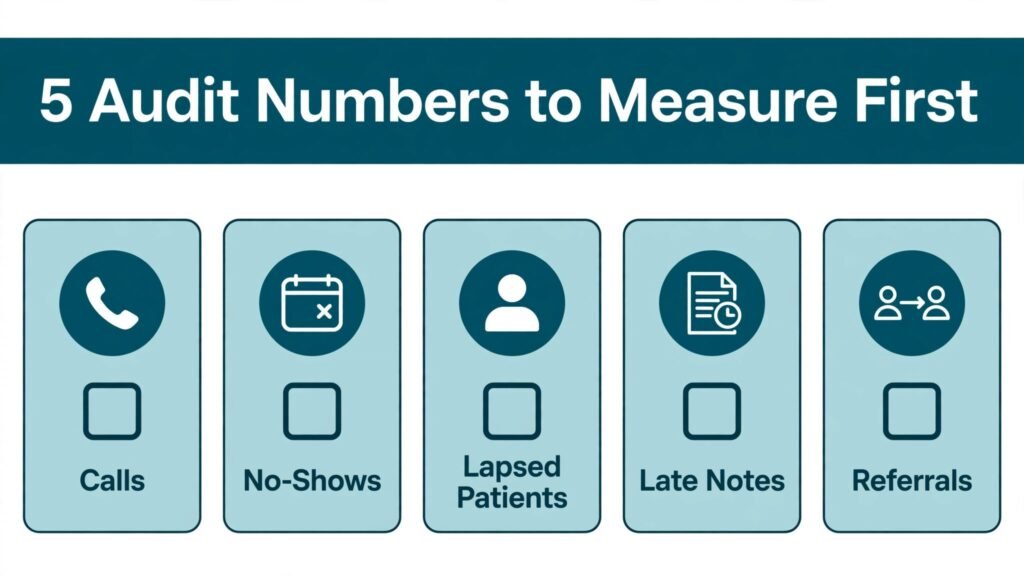
Start with a one week audit before you buy anything. Count missed calls, no shows, lapsed patients who have not returned in 14 months, notes finished after hours, and referrals that needed manual image gathering. Those five numbers tell you where the money and time are going. A practice with 15 missed calls a day needs a phone and booking fix first. A practice with 400 lapsed patients needs recall first. A practice where notes finish at 9 pm needs a scribe first.
Next, check integration before features. Ask each vendor for a written answer to three questions: does it sync two ways with my EHR and schedule, does it work with my imaging devices, and what happens to my data if I leave? A feature list means little if the tool creates a second schedule or a second patient list. Pilot with one doctor and one front desk workflow for 30 days, and measure the same five numbers again. If the numbers do not move, the tool is not working for your practice, whatever the demo promised.
Budget with total cost, not headline price. Add implementation, training, clearinghouse, e-prescribing, texting and per location fees. A low monthly price with high per message or per claim fees can cost more than a higher flat price. Also check contract length and exit terms. A 12 month contract is reasonable for an EHR. A three year lock in for a recall tool, with no performance clause, is not.
Finally, protect clinical quality. AI imaging support and AI notes are aids, not decisions. Keep a doctor review step for every AI output that touches diagnosis, referral or billing codes. Document consent for recording, store audio and images under your existing privacy rules, and train staff to spot an AI error rather than copy it forward. The practices that benefit most from AI in 2026 are the ones that keep a human check in the loop and use the saved time for longer patient conversations, not just more patients per hour.
Related reading on Stratilyze covers similar decisions for nearby professions, including the best AI tools for dentists and the best AI tools for veterinarians, which face the same EHR, recall and notes trade offs in a different clinical setting.
A 30 Day Rollout Plan for an Eye Care Practice
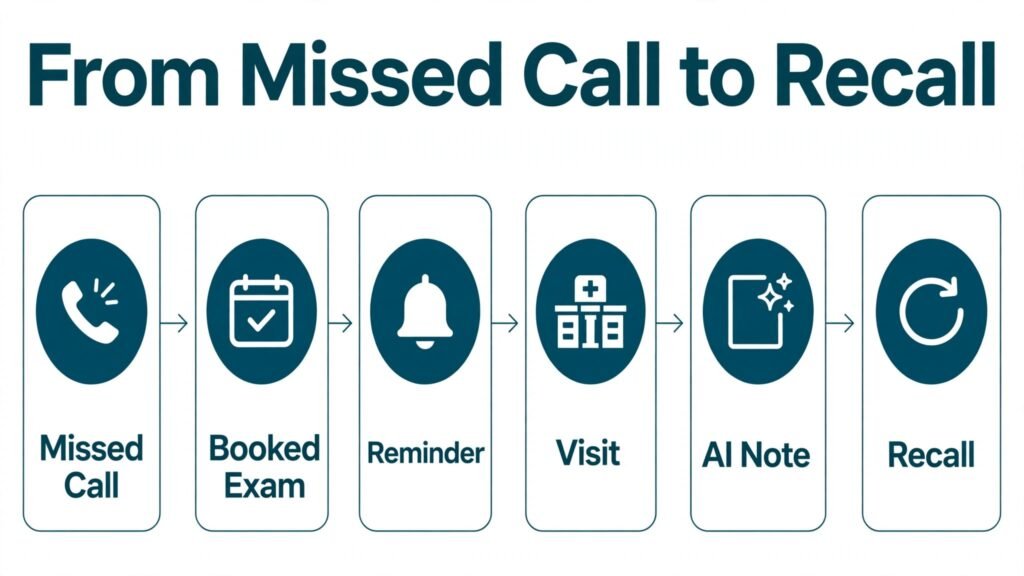
Week one is for measurement, not buying. Record missed calls, no shows, lapsed patients, notes finished after hours, and referrals that needed manual image gathering, using the same definitions every day. Share the numbers with the front desk and the doctors, so the choice of tool is a team decision rather than an owner impulse. At the end of week one, pick one bottleneck and one tool that addresses it directly. If two problems tie, pick the one that affects patients most visibly, because a visible win builds staff confidence for the next change.
Week two is for a controlled pilot. Set up the tool for one doctor and one front desk workflow, with real patients and real data, and keep the old method running in parallel for safety. Train two people, not one, so leave or illness does not stall the pilot. Write a one page workflow that covers the normal case, the cancellation case and the error case, and put it where staff actually work, not in a shared drive folder nobody opens. At the end of week two, review the same five numbers and ask staff what slowed them down. Fix the workflow before you blame the software.
Week three is for expansion and cleanup. Roll the tool out to the rest of the practice only if the pilot numbers improved and staff can explain the workflow without help. Clean duplicate patient records, update phone numbers and email addresses, and confirm that reminders, recall messages and online booking all use the same schedule. This is also the week to check claims and payments carefully if the new tool touches billing, because a small claim error repeated across a month becomes a large revenue problem.
Week four is for a decision. Keep the tool if the numbers moved, staff use it daily without reminders, and patients report an easier booking or follow up experience. Cancel or replace it if usage fell after the pilot, if it created duplicate work, or if the total cost including fees is higher than the value it returns. Record the decision and the reasons in a short note, so the next tool purchase starts from evidence rather than from a fresh round of demos. A practice that follows this cycle for each new tool will end the year with fewer, better used systems, and that is a stronger position than owning every new product on the market.
Mistakes to Avoid
The most common mistake is buying a tool for a problem you do not have. A practice with a full schedule does not need aggressive recall software. A practice with one imaging device does not need a multi vendor imaging hub. Match the purchase to the audit numbers, not to a conference demo.
The second mistake is running two systems for the same job. Two reminder tools, two online booking pages or two patient message inboxes guarantee confusion, double bookings and missed replies. Pick one owner for each job, turn the old tool off, and tell patients clearly which channel to use.
The third mistake is skipping staff training and then blaming the software. Most failed rollouts fail in week two, when the champion user is on leave and nobody else knows the workflow. Train at least two people per job, write a one page workflow for each tool, and review usage after 30 days. If a feature is unused, find out why before paying for another year.
The fourth mistake is ignoring data quality. Recall, reminders and AI notes all depend on clean records. Wrong phone numbers, duplicate patient files and vague visit types turn good software into bad messages. Clean the data before launch, and assign one person to own duplicates and returned messages each week.
The fifth mistake is letting AI output go unchecked into the record or the claim. An AI note that invents a finding, or an imaging flag that is copied into a referral without review, creates clinical and legal risk. Keep the review step, audit a sample of AI notes each month, and treat any repeated error as a reason to retrain staff or change the tool.
Frequently Asked Questions
Do AI tools replace the optometrist in screening or diagnosis?
No. Imaging support tools flag patterns and organise images, and AI scribes draft notes, but diagnosis, treatment planning and referral decisions stay with the licensed doctor. Use AI to gather and organise information faster, then apply clinical judgment to the result.
What is the first AI tool an independent optometry practice should buy?
Fix the biggest bottleneck first. For most independent practices that is either the EHR, if the current system is slow or unsupported, or a communication and recall tool, if missed calls and lapsed patients are the main loss. Imaging integration comes first only when referral and progression work already consume hours each week.
Can AI notes work for eye exams with drawings and measurements?
Yes, with review. Modern scribes handle spoken findings, measurements and plans well, but drawings, slit lamp sketches and device numbers still need a doctor check. Dictate numbers clearly, review the draft before signing, and keep your device printouts in the record as the source of truth.
Is patient data safe in cloud EHR and AI scribe tools?
Cloud tools can be safe when they meet health privacy rules, encrypt data in transit and at rest, and limit retention. Ask for the vendor privacy and security documentation, confirm where data is stored, and check how long audio and images are kept. Do not use a consumer chatbot for patient notes, because consumer tools may not offer the same protections.
How long does it take to switch EHR systems?
Plan for 6 to 12 weeks from contract to full use, including data migration, template setup and training. Smaller practices with clean data move faster. Keep the old system readable during the switch, run claims in parallel for the first month, and avoid switching during your busiest season.
Will online booking increase no shows?
Online booking alone can increase no shows if reminders are weak. Pair it with automated reminders, a clear cancellation policy, and a waitlist that fills gaps quickly. Practices that combine online booking with two way text reminders usually see no shows fall, because patients can confirm, reschedule or cancel in seconds instead of ignoring a phone call.
Conclusion: Best AI Tools for Optometrists in 2026
The best AI tools for optometrists in 2026 are the ones that give time back to the exam room. Topcon Harmony and ZEISS FORUM organise imaging so progression and referrals are faster. RevolutionEHR, Eyefinity EHR and Nextech give the practice a solid core system at different scales. Heidi Health cuts after hours notes. Weave, Solutionreach and Doctible fix the front desk, recall and booking problems that quietly cost a practice patients every month.
Start with your audit, choose one bottleneck, pilot for 30 days and measure the result. A practice that books more reliably, finishes notes on time and follows up lapsed patients will grow steadily, without needing every new tool on the market. Buy for the job, keep a human check on every AI output, and let the technology serve the exam, not the other way around.