
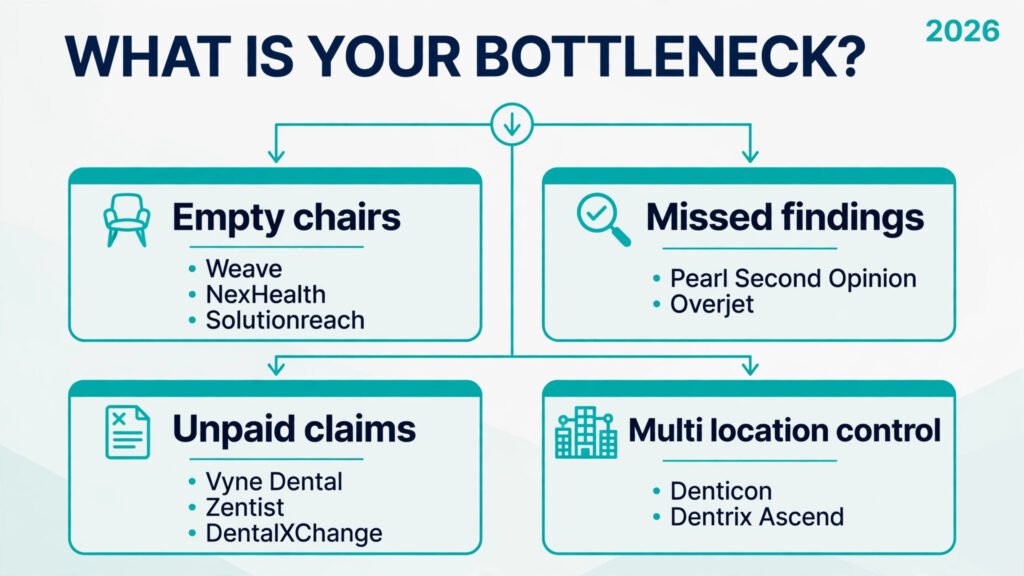
A dental practice loses money in three quiet places: a lesion spotted late on an X-ray, an empty chair after a missed appointment, and a claim that bounces back unpaid. The best AI tools for dentists do not fix all three with one product. They fix one workflow well, and practices benefit most when they buy for a named problem, not a bundle they will never open. A two chair practice needs different software from a five location group.
This guide tests that idea against 12 tools, grouped by the job they actually do in a dental office. Diagnostics and imaging tools read radiographs and flag what a busy clinician might miss on a second look. Scheduling and patient communication tools fill chairs and cut phone traffic. Billing and insurance tools chase eligibility, claims and unpaid balances. Practice management tools hold the schedule, the chart and the ledger together. Prices are October 2026 figures in US dollars. Dental software pricing is often custom, based on chairs, locations and claim volume, so where a vendor does not publish a price, this guide says check checkout instead of guessing.
The 12 best AI tools for dentists at a glance
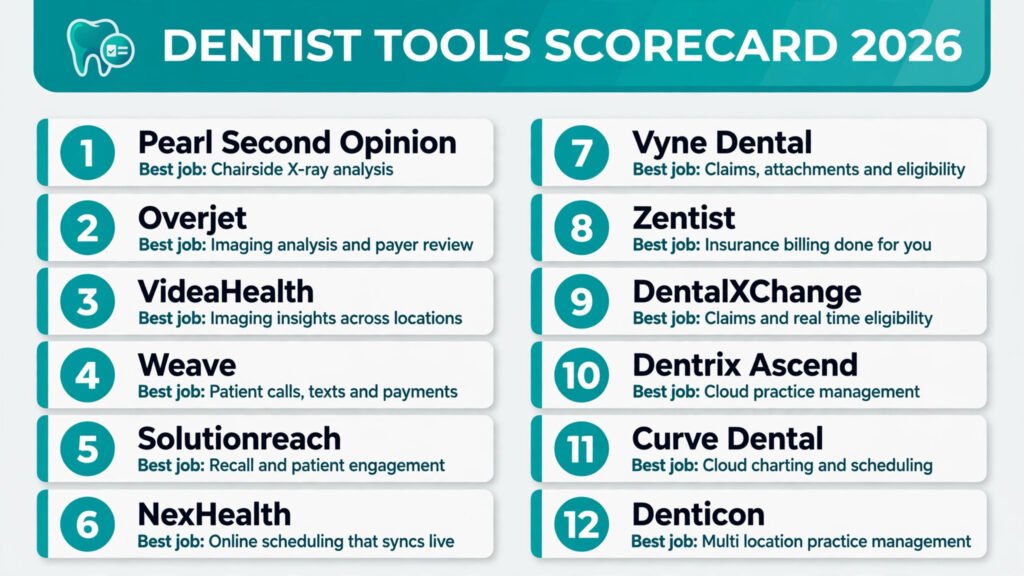
| Tool | Best job | Free option | Paid from |
|---|---|---|---|
| Pearl Second Opinion | Chairside X-ray analysis | No free tier | Custom, check checkout |
| Overjet | Imaging analysis and payer review | No free tier | Custom, check checkout |
| VideaHealth | Imaging insights across locations | No free tier | Custom, check checkout |
| Weave | Patient calls, texts and payments | No free tier | Custom, check checkout |
| Solutionreach | Recall and patient engagement | No free tier | Custom, check checkout |
| NexHealth | Online scheduling that syncs live | No free tier | Custom, check checkout |
| Vyne Dental | Claims, attachments and eligibility | No free tier | Custom, check checkout |
| Zentist | Insurance billing done for you | No free tier | Custom, check checkout |
| DentalXChange | Claims and real time eligibility | No free tier | Custom, check checkout |
| Dentrix Ascend | Cloud practice management | No free tier | Custom, check checkout |
| Curve Dental | Cloud charting and scheduling | No free tier | Custom, check checkout |
| Denticon | Multi location practice management | No free tier | Custom, check checkout |
Pick by the problem, not by the product
| Your problem | Start with | If that fails, try |
|---|---|---|
| Missed findings on radiographs | Pearl Second Opinion | Overjet |
| Consistent imaging review across sites | Overjet | VideaHealth |
| Phones ringing while chairs sit empty | Weave | NexHealth |
| Patients who never return for recall | Solutionreach | Weave |
| Online booking that double books | NexHealth | Curve Dental |
| Claims rejected for missing attachments | Vyne Dental | DentalXChange |
| Insurance work eating staff hours | Zentist | Vyne Dental |
| Eligibility checked too late | DentalXChange | Vyne Dental |
| A practice system that works anywhere | Dentrix Ascend | Curve Dental |
| One view across several locations | Denticon | Dentrix Ascend |
| Front desk work that never ends | Weave | Solutionreach |
| Treatment plans patients do not accept | Pearl Second Opinion | VideaHealth |
See more in the X-ray: diagnostics and imaging
An imaging tool earns its place when it changes a conversation in the operatory. A flagged area on screen, shown to the patient, is easier to explain than a verbal note about bone loss. The risk is the opposite: a tool that flags everything, so clinicians learn to ignore it. Judge these three on false positives, on how cleanly they sit inside your existing imaging software, and on whether findings flow into the chart without retyping.
1. Pearl Second Opinion
Pearl Second Opinion analyses dental radiographs in real time and highlights caries, bone loss, calculus and other findings on the image itself. It is built for chairside use, so the dentist can walk a patient through the finding while still in the chair, which helps case acceptance.
Pricing: Custom pricing based on practice size and locations. Check checkout for a quote, since Pearl does not publish a flat monthly price.
Best for: Single and multi chair practices that want a visual aid for diagnosis and for explaining treatment plans to patients.
Watch out for: The tool assists diagnosis, it does not replace it. A practice that treats every flag as a finding will overtreat, and a practice that never reviews flags will waste the subscription. Set a rule for who reviews AI findings before they reach the patient.
Try it at: pearl.ai
2. Overjet
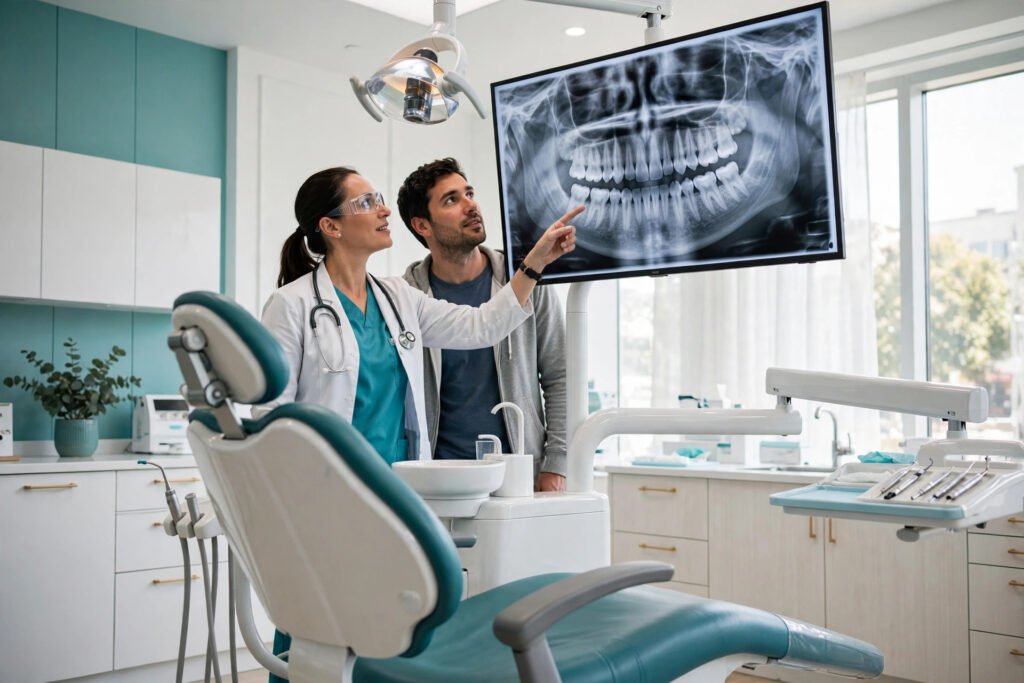
Overjet analyses X-rays and quantifies findings such as decay, bone levels and existing restorations, with a focus on consistency across clinicians and locations. It is also used on the payer side, so a practice using Overjet can check its own documentation against the standard a payer is likely to use.
Pricing: Custom pricing based on locations and volume. Check checkout for a quote.
Best for: Group practices and DSOs that need the same diagnostic standard in every operatory, and practices that submit a high volume of insurance claims.
Watch out for: Overjet is strongest as a system, not as a single chair add on. Small practices should check integration with their current imaging and practice management software before signing, because a tool that sits outside the daily workflow gets opened less and less.
Try it at: overjet.com
3. VideaHealth
VideaHealth analyses radiographs and surfaces insights for clinicians, with reporting that lets a practice compare findings across providers and locations. That reporting angle is its real difference: a practice owner can see where diagnosis varies between associates, where follow up treatment is agreed, and where cases stall after a finding is made.
Pricing: Custom pricing based on practice size. Check checkout for a quote.
Best for: Multi provider practices that want diagnostic consistency plus management reporting, rather than chairside visuals alone.
Watch out for: Reporting only helps if someone acts on it. Without a weekly review of flagged but untreated cases, VideaHealth becomes an expensive dashboard. Assign one clinician to own the follow up list.
Try it at: videahealth.com
Fill the chair without filling the phone queue: scheduling and patient messages
Front desk time is the hidden cost in most dental practices. Every call to confirm, reschedule or answer an insurance question is time not spent on check in or treatment coordination. The right tool depends on whether your bottleneck is phones, recall or online booking.
4. Weave
Weave combines phone, text, email, online scheduling and payments in one system built for dental and other appointment based practices. Patients can text the practice, confirm by text, pay a balance by text, and leave a review from the same thread. For a busy front desk, that single thread matters, because staff stop hunting across a phone system, email inbox and payment tool.
Pricing: Custom pricing based on locations and features. Check checkout for a quote.
Best for: Practices drowning in phone calls, especially practices that want text based scheduling, reminders and payments in one place.
Watch out for: Weave works best when the practice commits to text as the main channel. If staff keep answering every request by phone anyway, the practice pays for a system it only half uses. Agree on response times for texts before launch.
Try it at: getweave.com
5. Solutionreach
Solutionreach focuses on patient engagement: automated recall, reminders, reactivation campaigns and two way messaging. Its strength is the long tail of patients who have not been seen in 12 or 18 months. A reactivation campaign that brings back even a small share of lapsed patients can fill hygiene chairs without new advertising spend.
Pricing: Custom pricing based on practice size and features. Check checkout for a quote.
Best for: Established practices with a large inactive patient list, and practices where hygiene recall is the main source of empty chairs.
Watch out for: Automated messages need a human filter. Recall texts sent to patients who have moved, changed insurer or already booked elsewhere create confusion and extra calls. Clean the patient list before the first campaign, and check opt out handling carefully.
Try it at: solutionreach.com
6. NexHealth
NexHealth offers real time online scheduling that syncs with the practice management system, so a patient booking online sees actual availability, not a request form that staff must confirm later. It also handles digital forms, reminders and patient messaging, which cuts the paperwork that usually piles up before a first visit.
Pricing: Custom pricing based on locations and features. Check checkout for a quote.
Best for: Practices that get booking requests outside office hours, and practices where double bookings or phone tag waste front desk time every day.
Watch out for: Real time booking only works if the schedule in the practice system is accurate. Blocked time, provider holidays and hygiene versus restorative slots must be set correctly first, or patients will book into slots the practice cannot honour.
Try it at: nexhealth.com
Get paid without chasing the claim: billing and insurance
Insurance is where dental revenue leaks. A denied claim, an eligibility check done after treatment, or an unpaid balance nobody follows up can cost more in a month than a subscription. Start with your worst leak, not the broadest product.
7. Vyne Dental
Vyne Dental handles claims submission, attachments, eligibility verification and payment tracking, with tools that let staff attach X-rays and narratives to a claim in the same workflow. That attachment step is where many dental claims fail, so a system that makes it routine, rather than a separate upload after the fact, reduces rework.
Pricing: Custom pricing based on claim volume and features. Check checkout for a quote.
Best for: Practices with a high claim volume, frequent attachment requests, or a recurring list of denied claims that staff rework by hand.
Watch out for: Vyne Dental improves the claim workflow, it does not fix coding errors or missing clinical notes. If claims are denied for documentation, fix the note template first, or the same denials will arrive faster.
Try it at: vynedental.com

8. Zentist
Zentist takes over insurance billing as a managed service, combining software with a billing team that works claims, follows up on unpaid amounts and handles payer communication. For a practice that cannot hire or retain a billing specialist, that combination is the point: the practice buys outcomes, not just another dashboard to check.
Pricing: Custom pricing, usually based on collections or claim volume. Check checkout for a quote, and check exactly what is included, since managed billing pricing varies widely.
Best for: Practices where insurance billing is a full time job nobody wants, and practices with a growing backlog of unpaid claims.
Watch out for: Outsourcing billing means giving up day to day control. A practice should still review aging reports weekly and keep a named contact at Zentist, or small payer issues will sit unnoticed until they become large ones.
Try it at: zentist.io
9. DentalXChange
DentalXChange focuses on electronic claims and real time eligibility, letting staff check a patient’s benefits before treatment starts rather than after. That timing change is the whole value: a patient who knows their coverage before a crown is planned is less likely to dispute the bill, and the practice is less likely to write off a balance.
Pricing: Custom pricing based on transaction volume and features. Check checkout for a quote.
Best for: Practices that discover coverage problems at checkout, and practices that want eligibility built into check in rather than handled as a separate task.
Watch out for: Eligibility data is only as good as the payer feed behind it. Staff should still confirm complex cases, such as frequency limits and waiting periods, by phone when the amount at stake is high.
Try it at: dentalxchange.com
Run the whole practice from one screen: practice management
Practice management software is hardest to switch, because it holds the schedule, chart, ledger and patient record. Migrate for workflow, cloud access or multi location control, and treat AI as a bonus that must prove itself after the move.
10. Dentrix Ascend
Dentrix Ascend is the cloud version of the long established Dentrix system, with scheduling, charting, treatment planning, imaging integration and reporting, accessible from any location with an internet connection. Practices already familiar with Dentrix will recognise the workflow, while gaining cloud access and automatic updates.
Pricing: Custom pricing based on users and locations. Check checkout for a quote.
Best for: Practices that want a proven system in the cloud, especially practices moving from server based Dentrix or opening a second location.
Watch out for: Migration from another system still takes planning. Chart data, images, fee schedules and insurance plans must be mapped before go live, and staff training should be scheduled in a quiet week, not during a full hygiene schedule.
Try it at: dentrixascend.com
11. Curve Dental
Curve Dental is a cloud based practice management system with scheduling, charting, imaging, billing and patient communication in one place. Its pitch is simplicity for smaller practices: one login, one vendor, and less time spent keeping separate systems in sync.
Pricing: Custom pricing based on users and features. Check checkout for a quote.
Best for: Small to mid sized practices that want a single cloud system and do not need the depth of an enterprise platform.
Watch out for: A single system means a single point of failure. Check Curve Dental’s support hours, data export options and offline options before committing, because a practice that cannot access its schedule cannot function.
Try it at: curvedental.com

12. Denticon
Denticon, from Planet DDS, is built for groups and DSOs, with centralised scheduling, reporting, billing and charting across locations. A group owner can compare production, collections and schedule fill across sites, and standardise fee schedules instead of letting each location drift.
Pricing: Custom pricing based on locations and users. Check checkout for a quote.
Best for: Multi location groups and DSOs that need central control, consistent reporting and standard workflows across sites.
Watch out for: Denticon is more system than a solo practice needs, and its setup rewards a practice that already has standard processes. A group with very different workflows at each site should standardise first, or the software will simply record the mess more accurately.
Try it at: planetdds.com
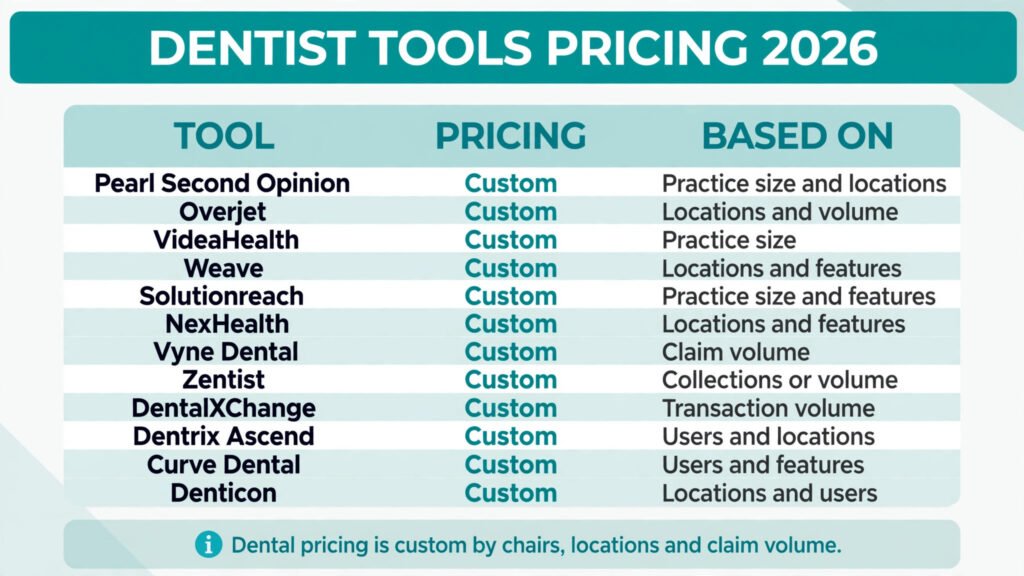
Pricing compared: what each job actually costs
| Tool | Free option | Paid from | Pricing note |
|---|---|---|---|
| Pearl Second Opinion | No free tier | Custom | Priced by practice size and locations |
| Overjet | No free tier | Custom | Priced by locations and volume |
| VideaHealth | No free tier | Custom | Priced by practice size |
| Weave | No free tier | Custom | Priced by locations and features |
| Solutionreach | No free tier | Custom | Priced by practice size and features |
| NexHealth | No free tier | Custom | Priced by locations and features |
| Vyne Dental | No free tier | Custom | Priced by claim volume |
| Zentist | No free tier | Custom | Usually tied to collections or volume |
| DentalXChange | No free tier | Custom | Priced by transaction volume |
| Dentrix Ascend | No free tier | Custom | Priced by users and locations |
| Curve Dental | No free tier | Custom | Priced by users and features |
| Denticon | No free tier | Custom | Priced by locations and users |
The honest pricing story in dental software is that there is almost no flat price to compare. Two practices using the same tool can pay very different amounts, because chairs, locations, claim volume and add on modules change the quote. That makes a request for proposal more useful than a price table: send every vendor the same facts, chairs, providers, monthly claims, current systems, and ask for a total that includes setup, training, imaging integration and support. A low headline quote that excludes imaging integration or charges per location for a feature you assumed was included is not a low quote.
Also budget staff time during migration, and the cost of running two systems in parallel during a switch.
How to Choose: match the tool to the chair, not the brochure
Start with one number from your own practice, not from a vendor demo. If hygiene chairs sit empty, measure recall and no show rates for the last three months. If claims bounce, count denials by reason for the last three months. If diagnosis varies, ask two clinicians to review the same set of radiographs and compare notes. The tool that moves your worst number is the tool to trial first, even if another product looks more impressive in a demo.
Next, test integration before price, with a live demo using your imaging software, practice system and actual fee schedule, not sample data. A tool that cannot display inside your viewer, write to your live schedule, or attach to your claim flow will fail in daily use.
Then run a short trial with real patients and real staff, and set the success measure in advance. For imaging, that might be the share of flagged findings that lead to a documented treatment discussion. For scheduling, it might be phone calls per day or online bookings per week. For billing, it might be days in accounts receivable or denial rate. A trial without a measure ends with opinions, not a decision.
Staffing matters as much as software. A team trained to run recall, eligibility and billing workflows will get more from any tool than a team left to hope software runs itself. See also our guides on AI scribe tools for clinics, AI tools for HR teams and AI tools for freelance writers.
Finally, check data and exit terms before signing. Ask how patient data is stored, who can access imaging analysis, how long data is kept, and how you export charts, images and billing history if you leave. A tool that holds your patient record hostage is a risk no monthly saving justifies.
Mistakes to avoid in a dental practice
Buying imaging AI before fixing the imaging workflow is the most common mistake. If radiographs are inconsistent, poorly positioned or stored in two systems, AI analysis will be inconsistent too. Fix capture and storage first, then add analysis.
A second mistake is launching recall campaigns on a dirty patient list. Messages to patients who have moved, changed dentist or opted out create complaints and extra calls, and they poison staff opinion of a tool that might otherwise have worked. Clean the list, segment by last visit date, and start with a small test group.
A third mistake is migrating practice management software during a busy period. A go live week with a full hygiene schedule, a new associate starting, and a fee schedule change all at once guarantees errors. Pick a quiet week, run parallel systems for billing if needed, and keep the old system readable for at least a month.
A fourth mistake is treating AI findings as a diagnosis in patient conversations. Show the image, explain what the flag means, and explain what you as the clinician conclude. Patients trust a dentist who uses a tool and explains it more than a dentist who points at a screen and stops talking.
A fifth mistake is ignoring claim denial reasons. Review denials weekly and fix the top reason before judging a billing tool.
Frequently Asked Questions
Is AI allowed to diagnose dental problems?
AI tools in this guide assist diagnosis, they do not replace the dentist. The clinician reviews the image, considers the patient history and examination, and makes the diagnosis. A practice should keep that responsibility clear in patient conversations and in its own protocols.
Which AI tool should a solo dental practice start with?
Start with the worst bottleneck. If chairs are empty, start with scheduling or recall. If claims are denied, start with billing or eligibility. If case acceptance is low, start with a chairside imaging tool that helps patients see what you see.
Do these tools work with my existing practice management software?
It depends on the pairing, and this is the question to test before buying. Ask each vendor for a live integration demo with your exact systems, including imaging, and get the answer in writing. Do not rely on a general claim that a tool integrates with most systems.
How much do AI tools for dentists cost?
Most dental tools in this guide use custom pricing based on chairs, locations, users or claim volume, and vendors do not publish a flat monthly price. Request quotes with the same practice facts from each vendor, and ask what setup, training, integration and support are included.
Will patients trust AI analysis of their X-rays?
Most patients respond well when the dentist shows the image and explains the finding in plain language. Trust falls when the tool is presented as the decision maker, or when every flag is treated as urgent. Use AI as a visual aid, and keep the clinical judgement visibly with the dentist.
Can AI tools replace front desk staff in a dental practice?
No. They reduce phone calls, automate reminders and speed up eligibility and claims, but they do not replace check in, treatment coordination, insurance questions and the human handling of nervous or confused patients. The saving is staff time redeployed to work that needs a person, not a headcount cut on day one.
Conclusion
The best AI tools for dentists are the ones that solve a named, measured problem in a real practice. Pearl Second Opinion and Overjet help a dentist show and standardise what an X-ray reveals. Weave, Solutionreach and NexHealth fill chairs and cut phone work. Vyne Dental, Zentist and DentalXChange attack the claim and eligibility chain where revenue leaks. Dentrix Ascend, Curve Dental and Denticon hold the practice together, with Denticon built for groups that need one view across locations.
Do not buy all 12, and do not buy the most impressive demo. Measure your worst number, trial one tool against it, check integration, and only then expand.