
Compare two speech therapists with the same caseload. One spends Sunday evening writing session notes, building picture cards and chasing school paperwork. The other finishes notes during the session, pulls ready made articulation activities in minutes, and tracks progress with data the next IEP meeting can actually use. The difference is rarely talent or effort. It is the toolset. The best AI tools for speech therapists close the gap between clinical skill and the paperwork, planning and data work that surrounds every session.
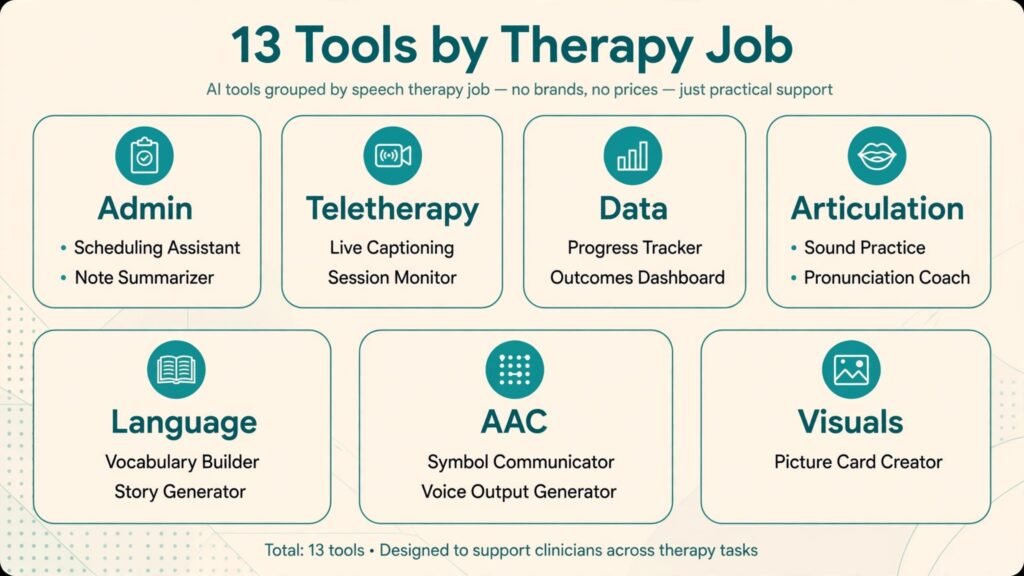
Speech language pathology covers a wide range: articulation, language, fluency, voice, swallowing, AAC and cognitive communication, across schools, clinics, hospitals and teletherapy. No single app covers all of it well, so this guide is grouped by job: practice management and teletherapy, assessment and data tracking, articulation and language therapy, and AAC and visual supports. It includes established platforms and smaller, specialist tools, because a small articulation app that a child loves can matter more than a large platform feature that nobody opens.
A careful note on evidence and pricing. Therapy apps and platforms update often, and claims about outcomes should be checked against published evidence and your own clinical judgment, not taken from a marketing page. Prices also change, so check the vendor checkout page before buying, and trial tools with real clients where possible. Never let an app decide a diagnosis, a goal or a discharge. Tools support clinical decisions. They do not make them.
The Shortlist at a Glance
| Tool | Main job | Best for |
|---|---|---|
| SimplePractice | Practice management and billing | Private practices that need one admin system |
| TheraPlatform | Teletherapy and practice management | Therapists who work mostly online |
| Presence | School based teletherapy platform | School districts and school SLPs |
| SLP Toolkit | Assessment, data and caseload management | School SLPs with large caseloads |
| Articulation Station | Articulation practice with pictures and audio | Children working on speech sounds |
| Speech Blubs | Early speech and language video modelling | Young children and early intervention |
| Constant Therapy | Cognitive and language exercises for adults | Adults after stroke or brain injury |
| Tactus Therapy | Adult language and cognitive apps | Adults with aphasia and cognitive needs |
| Boom Learning | Interactive digital task cards | School and clinic sessions with quick activities |
| LessonPix | Custom visual materials and picture cards | Therapists who make their own visuals |
| Boardmaker | Symbol based communication boards | AAC and classroom visual supports |
| Proloquo2Go | AAC app for non speaking communicators | Children and adults who need a voice output device |
| Ultimate SLP | Ready made therapy materials library | Busy therapists who need activities fast |
If you work in a school, start with SLP Toolkit, Presence or Boom Learning. If you run a private practice, start with SimplePractice or TheraPlatform. If your main pain is session planning, start with the therapy activity section and pick one tool per need, not one tool for everything.
Practice Management and Teletherapy

1. SimplePractice
SimplePractice is a practice management platform for therapists and health professionals, covering scheduling, intake, notes, billing, insurance claims and a client portal. For a private speech therapy practice, its value is consolidation: one system for the calendar, the note, the invoice and the secure message, instead of separate tools that each hold part of the client story. Templates for notes and intake forms can be adapted to speech therapy, and the portal lets families complete paperwork before the first session.
It suits solo and small group private practices, including practices that mix in person and teletherapy sessions. Watch out for: speech specific features. SimplePractice is a general therapy platform, not a speech therapy data system, so progress tracking, goal data and articulation homework still need another tool or a careful template. Test the note workflow with a real session type before committing, and check whether its teletherapy video meets your privacy and recording needs.
Pricing note: subscription pricing listed on the vendor site, by features and clinician count. Check the checkout page for teletherapy, billing and insurance claim features, which may sit in different tiers.
2. TheraPlatform
TheraPlatform combines teletherapy video, scheduling, notes, billing and client management in a system built for speech, occupational and physical therapy. Its teletherapy room includes interactive tools, document sharing and session resources designed for therapy, not just a general video call. That matters for speech therapy, where a session often needs shared pictures, games and worksheets on screen while the therapist watches and listens closely.
It suits private practices and small clinics that work mostly online, and therapists who want practice management and teletherapy in one place. Watch out for: video and audio quality on real home connections. Test sessions with a family on a typical home network, not just on office wifi, and have a backup plan for audio problems, because a speech session fails fast when sound drops.
Pricing note: subscription pricing on the vendor site, by clinician and features. Check the checkout page for video, billing and document storage limits.
3. Presence
Presence is a teletherapy platform built for schools, connecting districts with speech therapists, occupational therapists and other providers, and giving them tools for live sessions, scheduling, documentation and IEP related workflows. For school SLPs, the platform fits the school model: assigned caseloads, session logs, progress reporting and coordination with school teams, rather than a private practice billing model forced onto a school job.
It suits school districts with staffing gaps, school SLPs working remotely, and therapists who want a school focused teletherapy career. Watch out for: district fit and caseload mix. A platform is only as good as its scheduling, supervision and school communication processes. If you join as a provider, ask about caseload size, assessment duties, IEP meeting expectations and tech support hours before accepting.
Pricing note: pricing is arranged with schools and districts rather than listed as a simple consumer price. Check the vendor site and any district agreement for terms that apply to your role.
Assessment, Data and Caseload Management

4. SLP Toolkit
SLP Toolkit helps school SLPs manage large caseloads with present level assessments, goal tracking, data collection and progress reporting. Its core idea is practical: instead of separate spreadsheets for each student, the SLP tracks goals, collects session data quickly, and generates reports that an IEP team can read without decoding therapist shorthand. For an SLP with 50 or more students, that structure can save hours each week and make progress meetings far less stressful.
It suits school SLPs, especially those with large, mixed caseloads across grades and goals. Watch out for: learning time and district rules. Set up your caseload, goals and data forms carefully at the start of the year, and confirm that its reports match your district IEP format. A data system that produces reports your district cannot use will create double work, not less.
Pricing note: subscription pricing listed on the vendor site, with school and district plans. Check the checkout page for student limits and district reporting features.
Articulation and Language Therapy

5. Articulation Station
Articulation Station, from Little Bee Speech, gives children structured articulation practice with clear pictures, audio models and sentence level activities for each speech sound. The app lets a therapist or parent target a specific sound, at word, phrase or sentence level, and track which words were practised. For children, the game like structure and immediate audio feedback keep drill work engaging longer than flashcards alone, and for therapists, the sound by sound organisation makes session planning fast.
It suits clinic and school SLPs working with children on articulation, and families who need structured home practice. Watch out for: sound coverage and age fit. Check that the sounds, word lists and sentence levels match your clients, and use the app as guided practice, not as a replacement for therapist modelling, cueing and feedback on error patterns.
Pricing note: app pricing listed on the vendor site and app stores, often by sound or as a bundle. Check the checkout page for the full bundle versus single sound pricing.
6. Speech Blubs
Speech Blubs uses video modelling to help young children imitate sounds, words and early phrases, with peer models on screen and interactive activities that encourage imitation. It is designed for early intervention and for children who respond well to watching another child speak, rather than to adult instruction alone. Parents can use it at home between sessions, which gives a child more models and more practice opportunities in a week.
It suits early intervention SLPs, preschool therapists and families with toddlers and young children building first words. Watch out for: evidence expectations and screen time balance. Video modelling helps many young children, but it works best alongside therapist guided play and parent coaching, not as a standalone screen activity. Set a short daily practice time and coach parents on how to follow up the app activity in real play.
Pricing note: subscription pricing on the vendor site. Check the checkout page for family versus professional plan terms.
7. Constant Therapy
Constant Therapy provides personalised cognitive and language exercises for adults, including people recovering from stroke, brain injury or living with aphasia, with tasks that adapt in difficulty as the user progresses. Clinicians can assign homework, monitor performance and adjust tasks, while patients practise between sessions at home. For adult neurogenic caseloads, that home practice volume matters, because therapy gains often depend on repetition that a weekly session alone cannot provide.
It suits adult clinics, hospital outpatient teams and private practices with stroke and brain injury caseloads. Watch out for: patient tech support and goal fit. Older adults or patients with cognitive difficulties may need family help to set up and use the app, and tasks must match the patient’s actual goals, not just the app’s available exercises. Review progress data in session and adjust, rather than letting the app run on autopilot.
Pricing note: subscription pricing for patients and clinicians on the vendor site. Check the checkout page for clinician dashboard and assignment features.
8. Tactus Therapy
Tactus Therapy makes a suite of apps for adults with aphasia, apraxia, dysarthria and cognitive communication difficulties, covering naming, comprehension, reading, writing and conversation practice. Each app focuses on a specific skill area, so a therapist can pick the apps that match a client’s goals rather than buying a single large program that covers everything thinly. The apps are designed for independent practice as well as guided therapy, with clear visuals and adjustable difficulty.
It suits adult SLPs, rehabilitation teams and families supporting home practice. Watch out for: app selection and device fit. With several apps available, it is easy to overload a client with too many programs. Pick one or two apps per goal, test them with the client in session, and check that the device, font size and audio work for that person’s vision, hearing and motor needs.
Pricing note: individual app pricing listed on the vendor site and app stores. Check the checkout page for bundle options and professional use terms.
9. Boom Learning
Boom Learning, known for Boom Cards, offers interactive digital task cards for speech, language, articulation, phonology and classroom skills, created by SLPs and teachers. A therapist can assign a deck, a student completes it on a tablet or computer, and the therapist sees responses and progress. The strength is speed: a ready made deck for a specific goal can be found in minutes, which helps a busy SLP who needs varied activities across a large caseload without making every material from scratch.
It suits school and clinic SLPs who need quick, varied session activities, and teletherapists who need screen share friendly tasks. Watch out for: quality variation and screen dependence. Decks are made by many creators, so quality, accuracy and age fit vary. Preview every deck before assigning it, and balance digital cards with real conversation, play and functional communication practice, which cards alone cannot teach.
Pricing note: free and paid accounts on the vendor site, with deck purchases separate. Check the checkout page for student account and assignment limits.
Visual Supports, AAC and Ready Made Materials

10. LessonPix
LessonPix lets therapists create custom visual materials quickly: picture cards, schedules, worksheets, games and communication boards, using a large symbol and picture library. For SLPs, custom visuals matter because generic materials rarely match a specific child’s vocabulary, interests or classroom routine. LessonPix turns a 30 minute drawing and cutting job into a few minutes of selecting pictures, adding words and printing a clean, consistent set.
It suits school SLPs, clinic therapists and teachers who make visuals weekly. Watch out for: printing and organisation time. Custom materials still need printing, laminating and storage, and a large library can become a cluttered folder if decks are not named and filed by goal. Set a simple filing rule from day one, such as goal plus student group, and reuse sets across similar clients where appropriate.
Pricing note: subscription pricing on the vendor site. Check the checkout page for school and clinic licence terms.
11. Boardmaker
Boardmaker is a long established symbol based tool for creating communication boards, visual schedules, classroom supports and AAC pages. Its symbol library is widely recognised in schools, which helps when a child moves between classrooms or schools and needs consistent symbols. Therapists can build boards for a specific routine, such as snack time or a classroom job, and print or use them digitally, giving a child a reliable way to communicate choices and needs.
It suits school teams, AAC therapists and classrooms with several symbol users. Watch out for: cost and learning curve for new teams. Boardmaker is a full authoring system, not a quick card maker, so teams need training and a shared symbol style. Agree on symbol size, layout and vocabulary before building a large board set, or boards will vary too much to be useful across settings.
Pricing note: subscription pricing listed on the vendor site, with school and individual plans. Check the checkout page for symbol library and sharing terms.
12. Proloquo2Go
Proloquo2Go is a widely used AAC app that gives non speaking children and adults a voice through symbols and text, with customisable vocabulary, voices and layouts. For a communicator who needs a full, portable voice output system, it offers a full vocabulary that grows from basic requests to full conversation, and it works on a tablet the user can carry everywhere. That portability changes daily life, from ordering food to joining a classroom discussion.
It suits AAC users, their families, schools and clinics, especially where a dedicated device is not practical. Watch out for: assessment and training. An AAC app is not a plug and play solution. It needs a proper AAC assessment, vocabulary customisation, partner training for family and school staff, and ongoing programming as language grows. Budget time for training, not just for the app purchase.
Pricing note: one time app purchase pricing listed on the vendor site and app store. Check the checkout page for regional pricing and any in app purchases.
13. Ultimate SLP
Ultimate SLP is a membership library of ready made speech therapy materials, covering articulation, language, phonology, fluency and social skills, with new materials added regularly. For a therapist with a full caseload, the value is time: instead of creating a worksheet for every goal, you search, print or assign a ready activity and spend the saved time on therapy planning and data. The library format also helps new SLPs build a material bank quickly in their first years.
It suits busy school and clinic SLPs, new graduates building resources, and teletherapists who need printable and digital activities. Watch out for: fit and over reliance. No library fits every client perfectly, so adapt activities to the child’s goals, interests and level, and do not let a ready worksheet replace individualised planning. Check that materials match your state or district terminology and goal wording where that matters.
Pricing note: membership subscription pricing on the vendor site. Check the checkout page for school and individual membership terms.
Best Pick by Job
| Job | Best pick | Why it wins for that job |
|---|---|---|
| Run a private practice | SimplePractice | Scheduling, notes, billing and portal in one system |
| Work mostly by teletherapy | TheraPlatform | Therapy focused video plus practice management |
| Serve school caseloads online | Presence | School model, logs and IEP coordination |
| Track school data and goals | SLP Toolkit | Caseload, goal and progress reporting built for schools |
| Practise speech sounds with children | Articulation Station | Sound by sound pictures, audio and levels |
| Support early words at home | Speech Blubs | Peer video modelling for young children |
| Give adults home practice | Constant Therapy | Adaptive tasks with clinician monitoring |
| Target adult aphasia skills | Tactus Therapy | Focused apps per skill area |
| Find a quick session activity | Boom Learning | Ready decks, assigned and tracked digitally |
| Make custom visuals fast | LessonPix | Large library, clean cards and schedules |
| Build symbol boards | Boardmaker | Recognised symbols, consistent across classrooms |
| Give a communicator a voice | Proloquo2Go | Full, portable AAC vocabulary on a tablet |
| Fill a material bank fast | Ultimate SLP | Ready library across many goal areas |
How to Choose the Right Tools for Your Caseload
Start with your caseload, not with an app store search. List your client groups by age and need, your setting, and the task that takes the most time each week. A school SLP with 60 students needs data and ready materials first. A private adult practice needs teletherapy and home practice first. An early intervention therapist needs parent friendly tools first. That list will rule out half the tools in this guide immediately, which is a good thing.
Next, trial with real clients for at least three weeks. A tool that looks good in a demo may fail with a shy child, a noisy home, a slow tablet or a client with motor difficulties. Watch engagement, accuracy of data, and the time you spend setting up versus the time you save in session. Ask clients and families what they liked, and watch whether home practice actually happens, not just whether the app was opened once.
Check privacy, consent and school rules before any rollout. Therapy data, recordings and student information need proper protection, especially for children. Confirm where data is stored, who can access it, how long it is kept, and whether the tool meets your school, clinic or health privacy requirements. Get parent consent for recordings, video modelling and any public sharing, and use professional or school accounts for client work, not personal accounts.
Finally, keep the therapy relationship at the centre. Apps can drill, track and organise, but they cannot read a child’s frustration, adjust a cue in the moment, or build trust with a family. Use tools for the repeatable work, and keep session time for assessment, feedback, conversation and the clinical reasoning that only you provide. The best toolset is the one that gives you more time and better data for that human work, not the one with the longest feature list.
For a related practice management view, see the Stratilyze guide to the best AI tools for therapists, which covers scheduling, notes and client portals for general therapy practices.
A Three Week Trial Plan for a Therapy Caseload
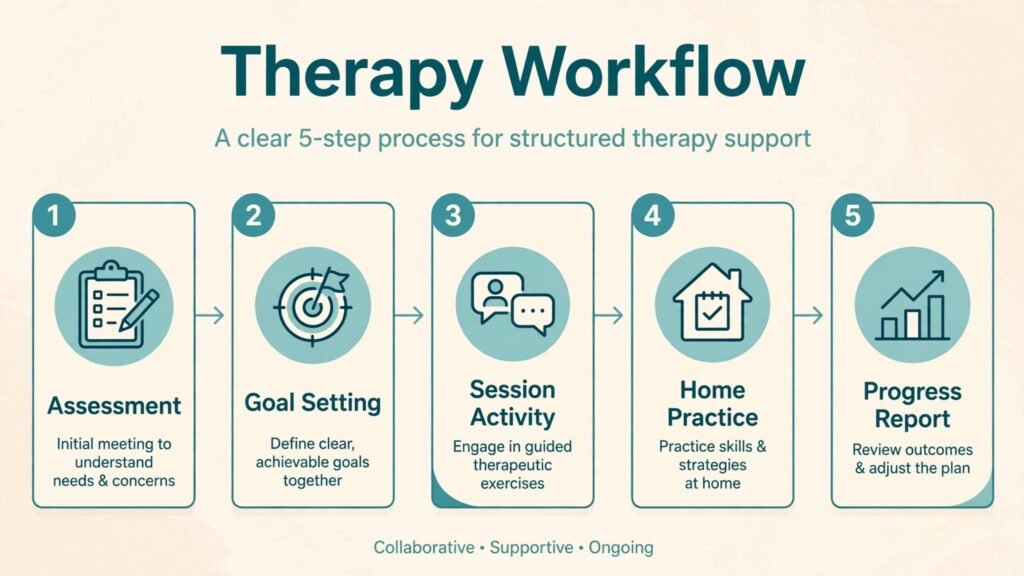
Week one is for selection. Pick one client group, such as school articulation clients or adult language clients, and choose one tool that serves that group well. Set up goals, materials and data forms for three clients, and run the tool in real sessions. Note setup time per client and any access problems, such as a tablet that cannot run the app or a school network that blocks a site, because those problems decide whether a tool survives contact with a real caseload.
Week two is for home practice and data. Assign home practice through the tool, coach the family or client on how to use it, and review the practice data at the next session. Check whether the data matches what you observed in session, and whether the client actually completed the assigned work. A tool whose data you trust will change your next session plan. A tool whose data you ignore is just extra screen time.
Week three is for a keep or cancel decision. Keep the tool if session planning got faster, home practice increased, or progress data became clearer for a report or meeting. Cancel it if setup took longer than the time saved, if clients needed constant tech help, or if the tool only worked for one client type while your caseload needs broader coverage. Write the decision down with the reason, so a future purchase does not repeat a trial that already failed.
Mistakes to Avoid
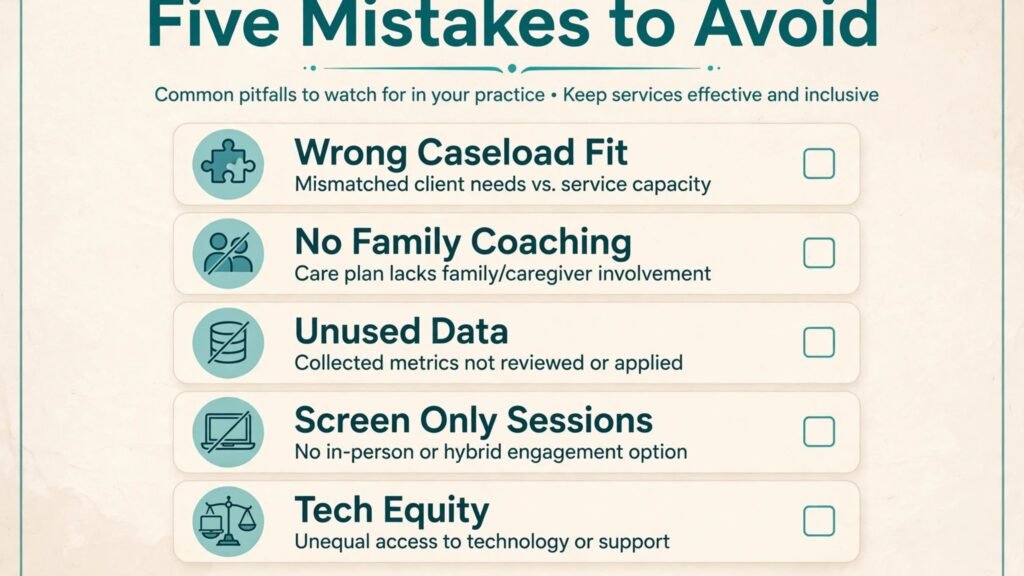
The first mistake is buying a tool for a single client and then expecting it to serve the whole caseload. A great articulation app does not help an adult aphasia caseload, and a great adult program does not help a preschool group. Match each purchase to a client group, and accept that a good SLP toolset has several specialist tools, not one universal app.
The second mistake is assigning home practice without coaching the family. An app left on a tablet, with no explanation of the goal, the time and the follow up, rarely gets used well. Show the family the app in session, practise together once, set a short daily routine, and review the practice at the next session. Family coaching is what turns an app into progress.
The third mistake is collecting data you never use. If you track every trial but never look at the trend before an IEP meeting or a progress review, the data is just extra work. Choose three measures per goal, track them consistently, and review them on a fixed schedule. Good data, reviewed regularly, beats perfect data that nobody reads.
The fourth mistake is using digital activities for the whole session. Children and adults both need real conversation, play, functional tasks and social interaction, not just screen tasks. Balance digital decks and apps with face to face activities, real objects and community practice, and judge progress by real communication, not just by app scores.
The fifth mistake is ignoring accessibility and equity. Not every family has a recent tablet, reliable internet or a quiet room for teletherapy. Offer paper alternatives, lend devices where your setting allows, and never penalise a client for a technology gap. A therapy plan that only works for well equipped families is not a fair plan.
Frequently Asked Questions
Can AI tools diagnose a speech or language disorder?
No. Screening apps and assessment tools can gather information and flag areas to explore, but diagnosis requires a qualified SLP assessment, case history, observation and, where relevant, standardised testing. Use tools to support assessment, not to replace it, and be cautious about any app that claims a diagnosis from a short test.
What is the first tool a new private practice SLP should buy?
Start with practice management, because scheduling, notes, billing and secure messaging affect every client. SimplePractice or TheraPlatform cover that base, depending on how much teletherapy you do. Add therapy activity tools next, one per client group, as your caseload grows.
Do therapy apps work for teletherapy sessions?
Many do, especially tools built for screen sharing, such as Boom Learning, LessonPix materials and TheraPlatform activities. Test the app in a real video session before using it with a client, check audio and screen sharing, and keep a paper or offline backup for sessions where technology fails.
How do I choose an AAC app for a child?
Start with an AAC assessment by a qualified team, considering the child’s motor skills, vision, language level, vocabulary needs and daily environments. Trial the app with the child, family and school team, customise vocabulary to the child’s real life, and plan partner training. The best AAC system is the one the child can use every day, in every setting, with support from trained partners.
How much home practice should I assign through an app?
Keep it short and specific. For young children, five to ten minutes of guided practice most days beats a long weekly session that never happens. For adults, a clear daily routine with a set number of tasks works better than an open ended “practise when you can”. Review home practice at each session and adjust the load to what the client can actually sustain.
Are free therapy materials as good as paid libraries?
Free materials can be excellent, especially from experienced SLP creators, but quality varies and searching takes time. A paid library saves search time and gives consistent formatting, which matters for a large caseload. Use free materials for specific needs, and a library for the bulk of routine planning, then adapt both to the individual client.
Conclusion: Best AI Tools for Speech Therapists in 2026
The best AI tools for speech therapists in 2026 give you time back for therapy itself. SimplePractice, TheraPlatform and Presence handle the business and teletherapy side. SLP Toolkit turns caseload data into usable reports. Articulation Station, Speech Blubs, Constant Therapy, Tactus Therapy and Boom Learning give you activities that clients actually engage with. LessonPix, Boardmaker, Proloquo2Go and Ultimate SLP cover visuals, AAC and ready materials.
Choose by caseload and by your biggest weekly time cost, trial with real clients for three weeks, and keep clinical judgment in charge of every goal, diagnosis and discharge decision. A toolset built that way will make sessions better, paperwork lighter and progress clearer, for the therapist and for every client on the caseload.