
A cleaning company with 10 cleaners and 200 recurring clients handles roughly 800 appointments in a normal month. Each of those appointments carries an address, a lockbox code, a cleaner assignment, a payment and a follow up message. When that work lives in text messages and a spreadsheet, the owner becomes the bottleneck, and every sick day or double booking costs real money. This guide to best CRM for cleaning companies starts from that arithmetic and works out which tool actually removes the bottleneck at each size of business.
The tools below were compared on the same questions. Does the tool handle recurring cleans without manual rebooking. Does it give cleaners a mobile schedule they can actually follow. Does it take payment without chasing invoices. And what does the bill become when the team grows from one cleaner to ten. A tool that wins on price but fails on the daily job is not a bargain, and a tool that wins on features but costs more than the problem it solves is not a good investment.
Why the best CRM for Cleaning Companies Is Not a General CRM
Cleaning work repeats on a cycle, and that cycle is what breaks general scheduling tools. A weekly house clean, a fortnightly deep clean and a monthly office contract each need their own rhythm, their own price and their own cleaner notes. A general CRM treats each visit as a one off event, so the office ends up rebuilding the same appointment by hand every week. Cleaning software keeps the series alive, moves one visit without breaking the rest, and keeps the client history attached to the property rather than to a single booking.
The second difference is the field team. Cleaners work alone in client homes, often without a desk or a laptop. They need a phone app that shows the day, the access notes and the checklist, and that lets them clock in, flag a problem and move on. A tool designed for office staff will look fine in a demo and fail at 7am on a rainy Tuesday, when a cleaner cannot find the gate code and the office phone is busy.
The third difference is money. Cleaning businesses live on small, frequent payments, and late payment is a constant drag. A CRM that pairs scheduling with invoicing and card payment closes that gap, because the client can pay from the same message that confirms the clean. Treat every price in this guide as a starting point checked at writing time, and confirm the current price on the vendor page before you buy.
How to Judge a Cleaning CRM
Start with the job, not the tool. Write down the three tasks the software must complete every day, the number of cleaners who will use it, and the systems it must connect to. A tool that covers those three tasks well beats a tool that covers twenty tasks badly, because daily work is what the team will judge it on, week after week.
Then price the tool at your real size. A per user price looks cheap for one cleaner and expensive for ten, while a flat price looks expensive for one cleaner and cheap for ten. Count every seat, including part time cleaners and office staff who need access, and add any messaging charges on top. The honest total is the only number worth comparing, and this best CRM for cleaning companies comparison prices each tool at a realistic team size for exactly that reason.
Finally, run a real trial. Use the tool for a genuine week of work, with real clients, real properties and real payment deadlines, instead of clicking through a demo with test data. A trial that mirrors real work reveals the missing feature, the slow step and the confusing screen before the business pays for a year of it. That discipline is what turns a best CRM for cleaning companies shortlist into a decision you can defend.
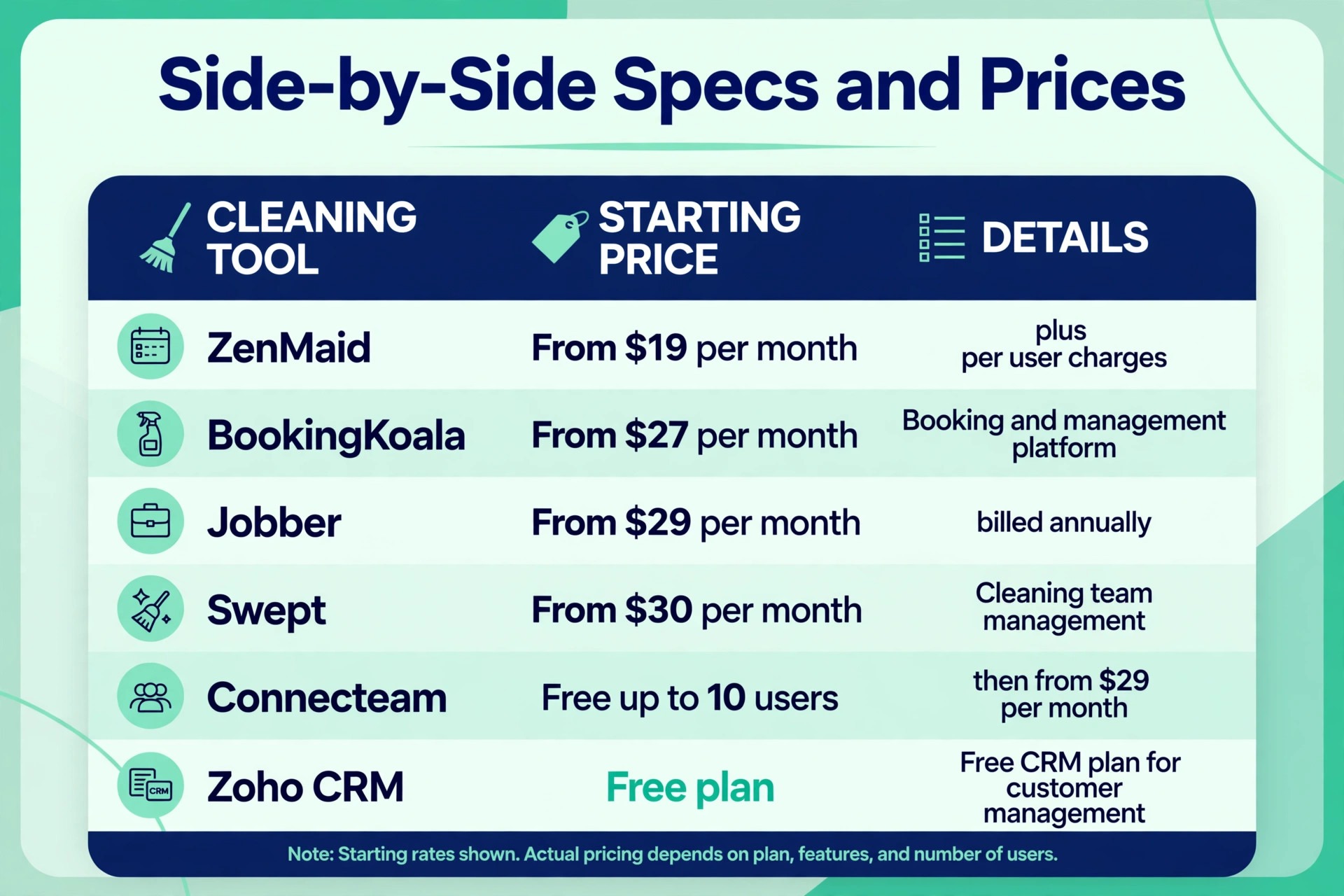
Specs and Prices on One Page
| Tool | Starting price | Best for |
|---|---|---|
| ZenMaid | from $19 a month plus per user charges | residential maid services |
| BookingKoala | from $27 a month | booking led cleaning companies |
| Jobber | from $29 a month billed annually | cleaning plus other home services |
| Housecall Pro | tiered monthly plans | home service operators wanting one system |
| Swept | from $30 a month | commercial janitorial teams |
| MaidCentral | priced by quote | established residential companies |
| Launch27 | priced by quote | booking led companies that want custom forms |
| Connecteam | free up to 10 users, paid plans from $29 a month | workforce control on a budget |
| Zoho CRM | free plan, paid plans per user | owners who want deep customisation |
| CleanGuru | priced by quote | cleaning companies wanting quotes and job tracking |
Read the table as a shortlist, not as a ranking. The cheapest tool may suit a solo cleaner perfectly, while the most expensive tool may be the only one that handles a specific workflow. Use the table to pick three finalists, then read their full sections below before deciding.
Ten Tools Under the Microscope
ZenMaid
ZenMaid is the pick for residential maid services that live on recurring cleans. It was built for maid services from day one, so recurring appointments, cleaner assignment, automated reminders and payroll style reports all work the way a maid service actually runs. The Starter plan costs $19 a month but caps appointments at 40 a month, which a working service outgrows fast. Pro costs $39 a month with unlimited appointments, and Pro Max costs $49 a month with time off tracking, service ratings and data export.
The pricing detail that matters is the per user charge. Additional users cost $4 a month on Starter, $14 on Pro and $24 on Pro Max, and only the owner profile is included in the base price. An owner plus five cleaners on Pro therefore pays $109 a month, not $39. SMS bundles are charged separately, starting at $14 for 125 messages, so budget messaging on top of the subscription.
Choose ZenMaid if recurring residential work is the core of the business and the team needs a focused tool rather than a general platform. Skip it if the business also does commercial work or other trades, because its cleaning specific design becomes a limit once the work mix widens.
BookingKoala
BookingKoala is the pick for cleaning companies whose website should do the selling. Its booking forms let clients pick services, extras and frequency, see a price, and book without calling the office, and the system handles smart scheduling behind the form. Starter costs $27 a month for up to 5 providers or 5 GB of storage. Growing costs $57 a month for 15 providers and adds advanced reports, SMS notifications and GPS clock in. Premium starts at $197 a month for 50 providers and adds campaigns, multi step forms and hiring tools.
The strength here is conversion. A company running paid ads to a booking page will feel the difference between a generic contact form and a form that prices a three bedroom clean with two bathrooms and a pet surcharge in one pass. The weakness is depth on the operations side. Reporting, payroll and commercial workflows are lighter than on the bigger field service platforms, so a company whose main problem is managing forty cleaners across sites should look elsewhere.
Choose BookingKoala if most new clients should book online without a phone call. Skip it if the booking form is already working and the real pain is dispatch, payroll or multi site control.
Jobber
Jobber is the pick for cleaning companies that also do other home services, or plan to. It covers quoting, scheduling, invoicing, payments and client management in one system, with a mobile app for field staff and integrations with accounting tools. Core costs $49 a month month to month, or $29 a month billed annually, for one user. Connect costs $139 a month month to month, or $99 billed annually, and Grow costs $199 a month month to month, or $149 billed annually. Extra users cost $29 a month each.
The trade off is that cleaning specific workflows are adapted rather than native. Recurring cleans work, but the setup takes more shaping than on ZenMaid, and the price climbs with headcount because every cleaner who views the schedule counts as a user. A ten person team on Grow can land near $400 a month before add ons, which is fair for a business running several service lines and steep for a pure maid service.
Choose Jobber if cleaning sits alongside other trades, or if quoting and invoicing matter as much as scheduling. Skip it if the business is purely residential cleaning and a specialist tool covers the same jobs for less.
Housecall Pro
Housecall Pro is the pick for home service operators who want one system from booking to payment. It pairs online booking with dispatch, estimates, invoicing, payments and automated follow ups, and it leans hard on consumer facing features such as Google booking integration. Its tiered plans scale from a solo operator to a multi crew business, with automation and marketing tools unlocking at higher tiers.
The honest test is the bill at real headcount. Housecall Pro prices by plan and by team size band, so a quote that looks reasonable for one user can grow quickly once office staff and crew leads need access. Check which tier includes the dispatch board, the price book and the automation you actually need, because the entry tier leaves several of those behind a paywall.
Choose Housecall Pro if the business wants a single polished system and already wins work through search and reviews. Skip it if the budget is tight and the team only needs scheduling plus payment, because cheaper specialists cover that pair.
Swept
Swept is the pick for commercial janitorial companies running multi location contracts. It is built around janitorial operations, with scheduling, time tracking with GPS verification, geofencing, messaging in multiple languages and quality inspections. Launch starts at $30 a month, and higher tiers add geofenced clock in, inspections and deeper reporting for larger portfolios.
The strength is proof of presence. Commercial clients want to know a cleaner arrived, stayed and completed the checklist, and Swept records exactly that. The weakness is that it is operations focused rather than a full sales and billing CRM, so quoting and invoicing may need a companion tool. A residential maid service will also find its commercial workflow heavier than necessary.
Choose Swept if the business cleans offices, schools or retail sites under contract and needs location level proof of work. Skip it if the business is residential only, where a maid specific tool fits better.
MaidCentral
MaidCentral is the pick for established residential cleaning companies with real office staff. It combines scheduling, client management, employee tracking, payroll reporting and quality control in a system shaped around maid service operations. Pricing is by quote, which reflects its target customer, a company large enough to need a tailored package rather than a self serve plan.
The strength is depth on the people side. MaidCentral tracks cleaner performance, client feedback and payroll data in one place, which matters once the team passes fifteen cleaners and the owner can no longer hold every detail in mind. The weakness is access. A small or new company will find the sales led pricing and heavier setup a barrier, and a solo cleaner will find it far more than needed.
Choose MaidCentral if the company is established, growing and ready to run its office on one system. Skip it if the business is still small, because the price and setup only make sense at scale.
Launch27
Launch27 is the pick for booking led cleaning companies that want full control of the booking form. It offers a website builder, customisable booking forms with service pricing rules, scheduling, payments and customer accounts, and it suits companies that sell cleaning online rather than over the phone. Pricing is by quote, so the final number depends on the package and team size.
The strength is form flexibility. A company with unusual pricing, such as per room rates, add on services and frequency discounts, can build that logic into the booking flow instead of handling it by phone. The weakness is that operations features are lighter than on the field service platforms, and quote based pricing makes comparison shopping slower.
Choose Launch27 if the booking page is the main sales channel and pricing logic is complex. Skip it if the team mostly needs dispatch and payroll, where a specialist operations tool fits better.
Connecteam
Connecteam is the pick for cleaning teams that need workforce control on a tight budget. It is not a full cleaning CRM, but it handles scheduling, time clock with GPS, checklists, forms and team chat in one app, and it is free for up to 10 users. Paid Operations plans start at $29 a month billed annually, which keeps the cost low even for a growing crew.
The strength is the price and the mobile experience for cleaners. A team that already books work through another channel, or through a simple booking form, can run its whole field operation here for very little. The weakness is billing. Connecteam does not replace invoicing and payment tools, so the business still needs a second system for money, and client records are thinner than on a true CRM.
Choose Connecteam if the main problem is managing cleaners, shifts and checklists rather than winning bookings. Skip it if the business needs quoting, invoicing and client history in the same place.
Zoho CRM
Zoho CRM is the pick for owners who want deep customisation at a low entry price. It offers a free plan and paid plans priced per user, with custom fields, pipelines, automation and a wide integration library. A cleaning company can shape it around its own process, from lead capture to recurring service tracking, instead of accepting a fixed template.
The trade off is setup time. Zoho CRM is a general CRM, so recurring cleaning workflows, cleaner scheduling and job checklists must be built by hand or added through integrations. An owner comfortable with software will get a powerful system cheaply. An owner who wants cleaning logic ready on day one will find the setup a chore.
Choose Zoho CRM if the business already uses Zoho apps or wants a system it can shape freely. Skip it if the team needs cleaning specific scheduling out of the box.
CleanGuru
CleanGuru is the pick for cleaning companies that want quoting and job tracking in a cleaning shaped system. It covers estimates, scheduling, invoicing and client records with workflows built for cleaning work, and it suits companies that win jobs on quotes rather than fixed online prices. Pricing is by quote.
The strength is the quote to job path. A company that prices deep cleans, move out cleans and commercial work by site visit needs estimates that turn into scheduled work without retyping, and CleanGuru is built for that flow. The weakness is scale of information. It is less widely reviewed than the bigger names, so a buyer should run a full trial and check integrations with accounting and payment tools before committing.
Choose CleanGuru if quoting drives the business and the team wants a cleaning focused system. Skip it if online booking is the priority, where BookingKoala or ZenMaid fit better.
Matching Each Tool to the Job It Does Best
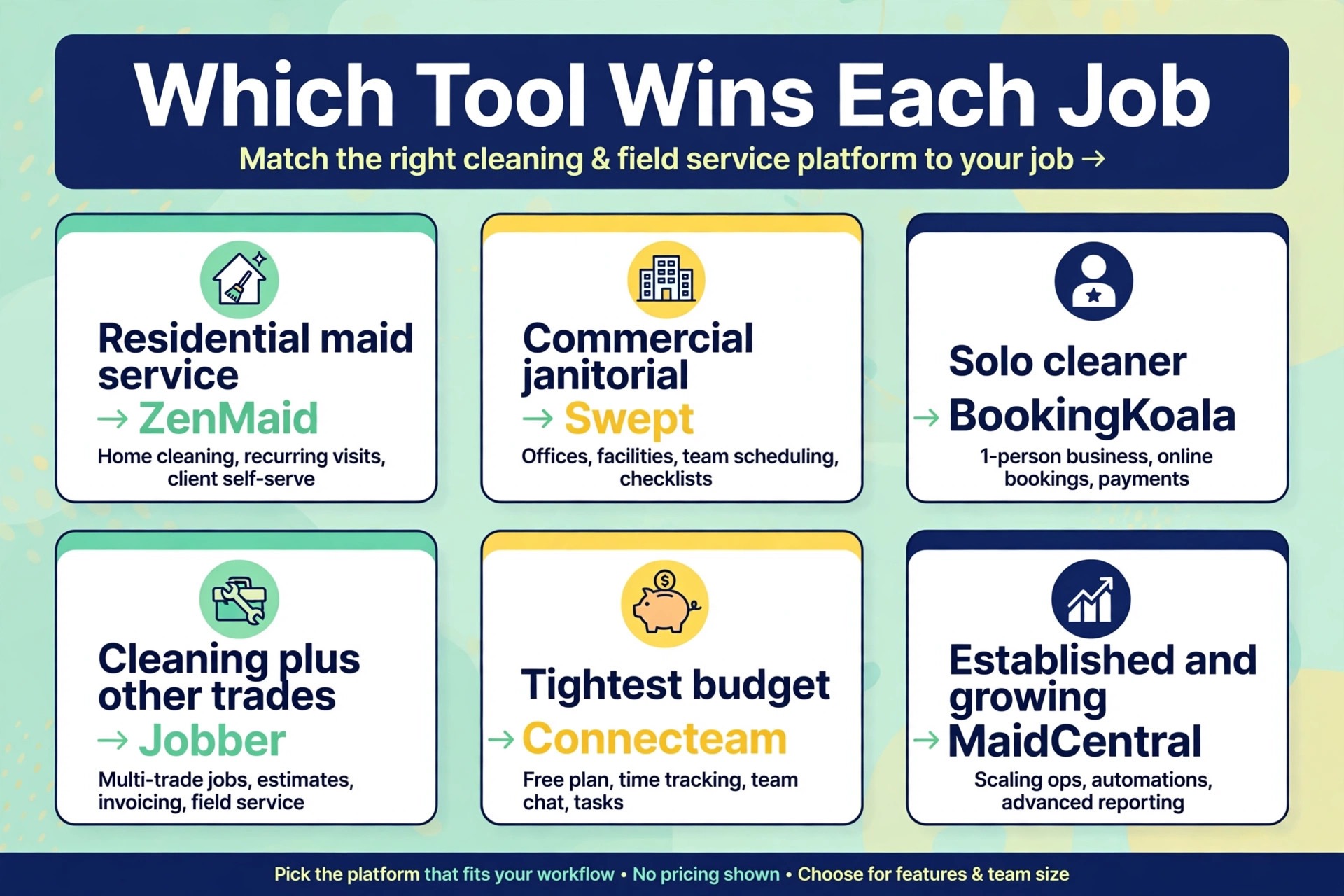
Use this table to match the tool to the job, because the best overall tool is not always the best tool for a specific business. The choice should follow the job that matters most, whether that job is saving money, saving time, handling growth, or covering a specialised workflow.
| Job | Best pick | Why it wins for that job |
|---|---|---|
| Residential maid service | ZenMaid | Built for recurring home cleans, with cleaner scheduling and reminders |
| Commercial janitorial | Swept | Location level proof of presence, inspections and multi site control |
| Solo cleaner | BookingKoala | Cheapest booking led start, with a form that sells while the owner cleans |
| Cleaning plus other trades | Jobber | One system for quoting, scheduling and invoicing across service lines |
| Tightest budget | Connecteam | Free up to 10 users, with scheduling and time clock included |
| Established and growing | MaidCentral | People, payroll and quality control in one office system |
The Real Monthly Bill
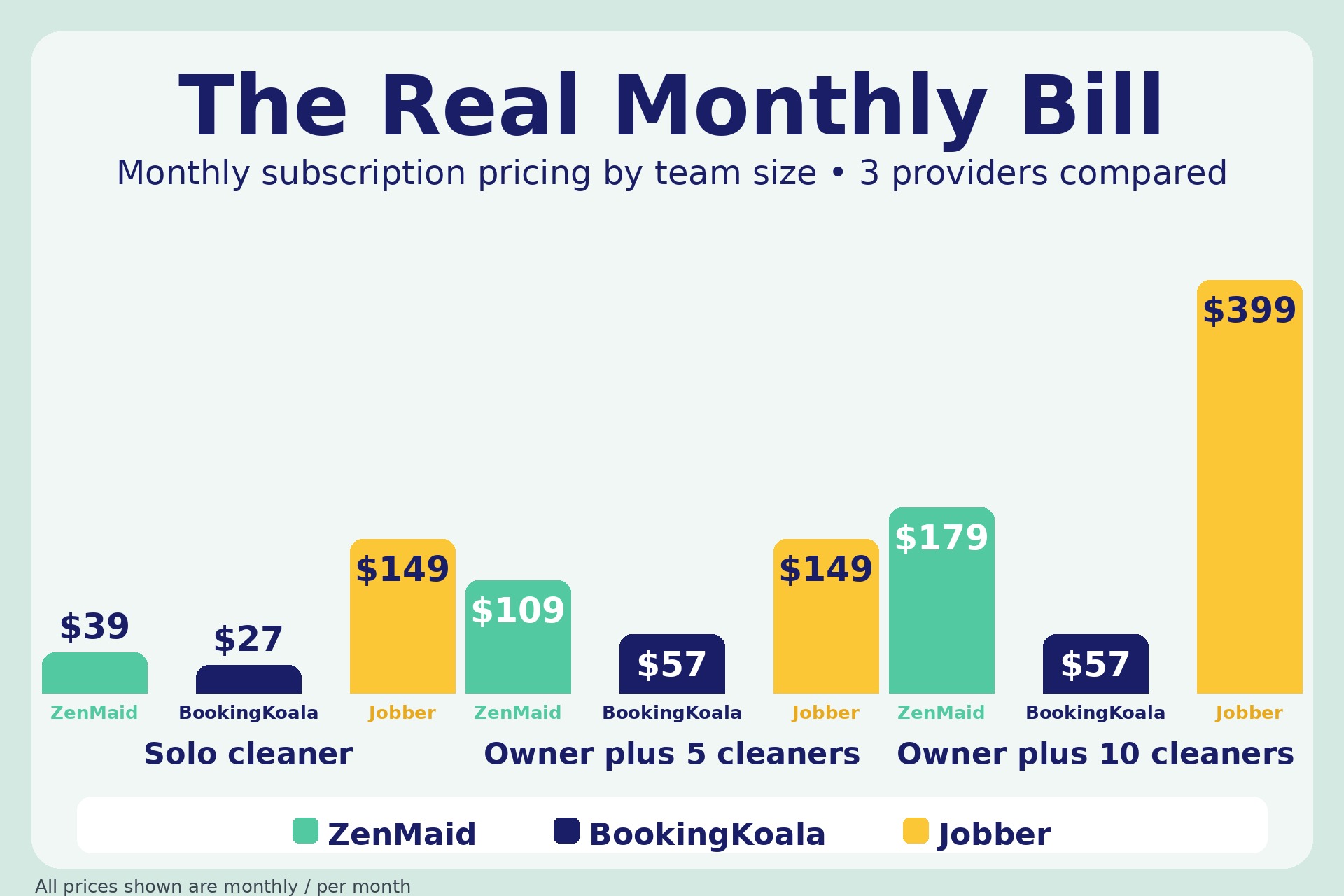
The headline price is only the first line of the bill. Seats, messaging charges and processing fees all sit on top of it, and the total at a realistic size is what a cleaning business actually pays. For best CRM for cleaning companies buyers, that total can triple between a solo cleaner and a team of ten, even on the same plan, because per user pricing multiplies with every hire.
| Team size | ZenMaid Pro | BookingKoala Growing | Jobber Grow billed annually |
|---|---|---|---|
| Solo cleaner | $39 a month | $27 a month | $149 a month |
| Owner plus 2 cleaners | $67 a month | $27 a month | $149 a month |
| Owner plus 5 cleaners | $109 a month | $57 a month | $149 a month |
| Owner plus 10 cleaners | $179 a month | $57 a month | $399 a month |
The table shows why the pricing unit matters more than the headline. ZenMaid charges per user, so its bill climbs with every cleaner. BookingKoala charges by provider band, so its bill stays flat until the team crosses a band edge. Jobber charges by plan and user band, so its bill jumps when the team outgrows a band. Model the cost at the size you expect in twelve months, not at the size you are today, because growth is the point and the bill should not punish it.
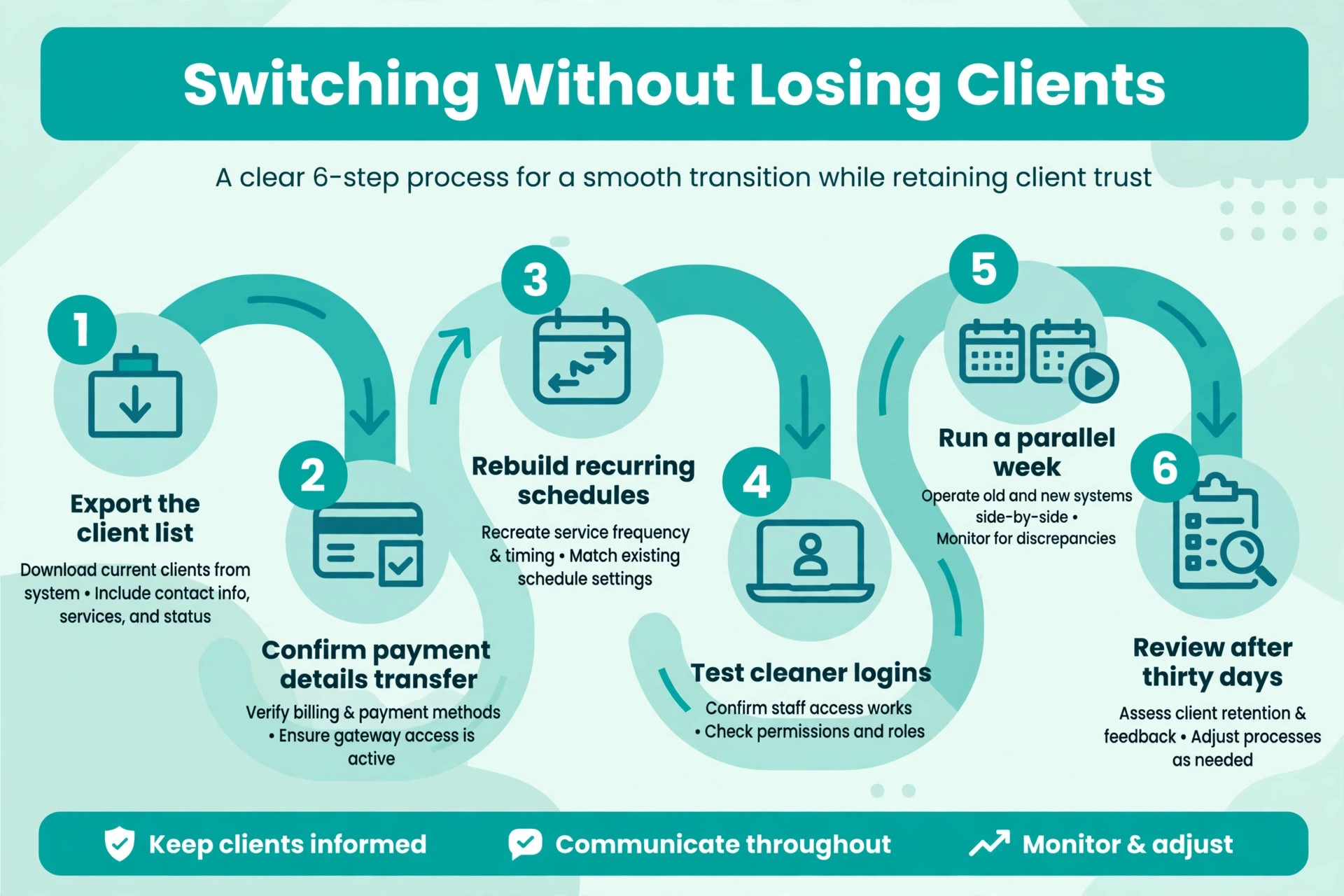
Switching Without Losing Clients
Switching tools fails most often from rushing, not from choosing badly. A short, careful workflow protects the client list, the schedule and the payments that depend on the system every day. Follow these steps in order, and do not skip the trial, because the trial is where most problems reveal themselves cheaply.
1. List the three daily jobs the new tool must handle, and write down how each job works today. 2. Pick three finalists from this guide, and run each one through a real week of work with real clients. 3. Price each finalist at your team size in twelve months, including seats and messaging charges. 4. Import only live clients for the pilot, and check that recurring series, prices and access notes match the old system. 5. Train cleaners on three tasks only, then expand training once those three habits feel automatic. 6. Review the bill, the usage and cleaner feedback after thirty days, and fix the setup before blaming the tool.
Money Traps Hiding in the Contract
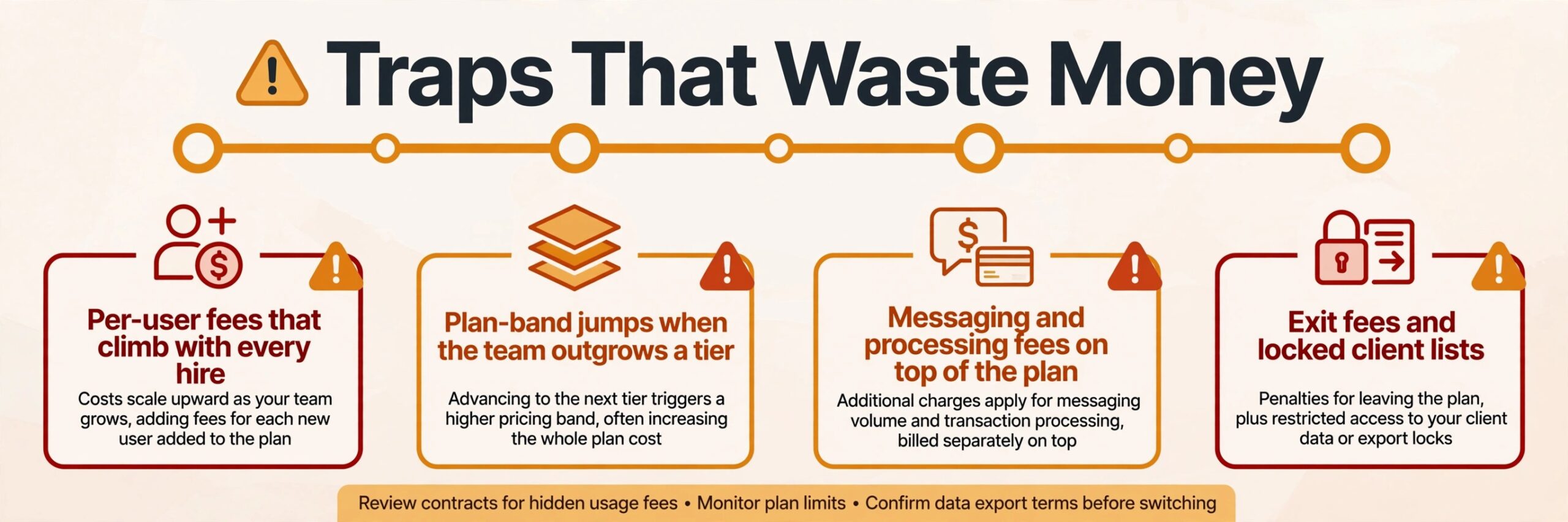
The most common mistake is buying for the business you wish you had, instead of the business you actually run. A team of five does not need enterprise reporting, and a solo cleaner does not need a multi location dashboard. Buy for the next twelve months, not for a future that may never arrive, and upgrade when growth demands it.
The second mistake is ignoring the exit. A tool that holds client data hostage, charges heavily to export, or breaks every integration on cancellation will cost far more at exit than it saved at entry. Export client data monthly, keep a copy outside the system, and know the cancellation terms before you sign.
The third mistake is letting seats pile up. Cleaners leave, contractors finish and seasonal workers move on, yet their paid seats often stay active for months. A quarterly seat check takes half an hour and routinely cuts a noticeable share off the annual bill, because unused seats are the quietest waste in any subscription budget.
Making It Stick After Launch
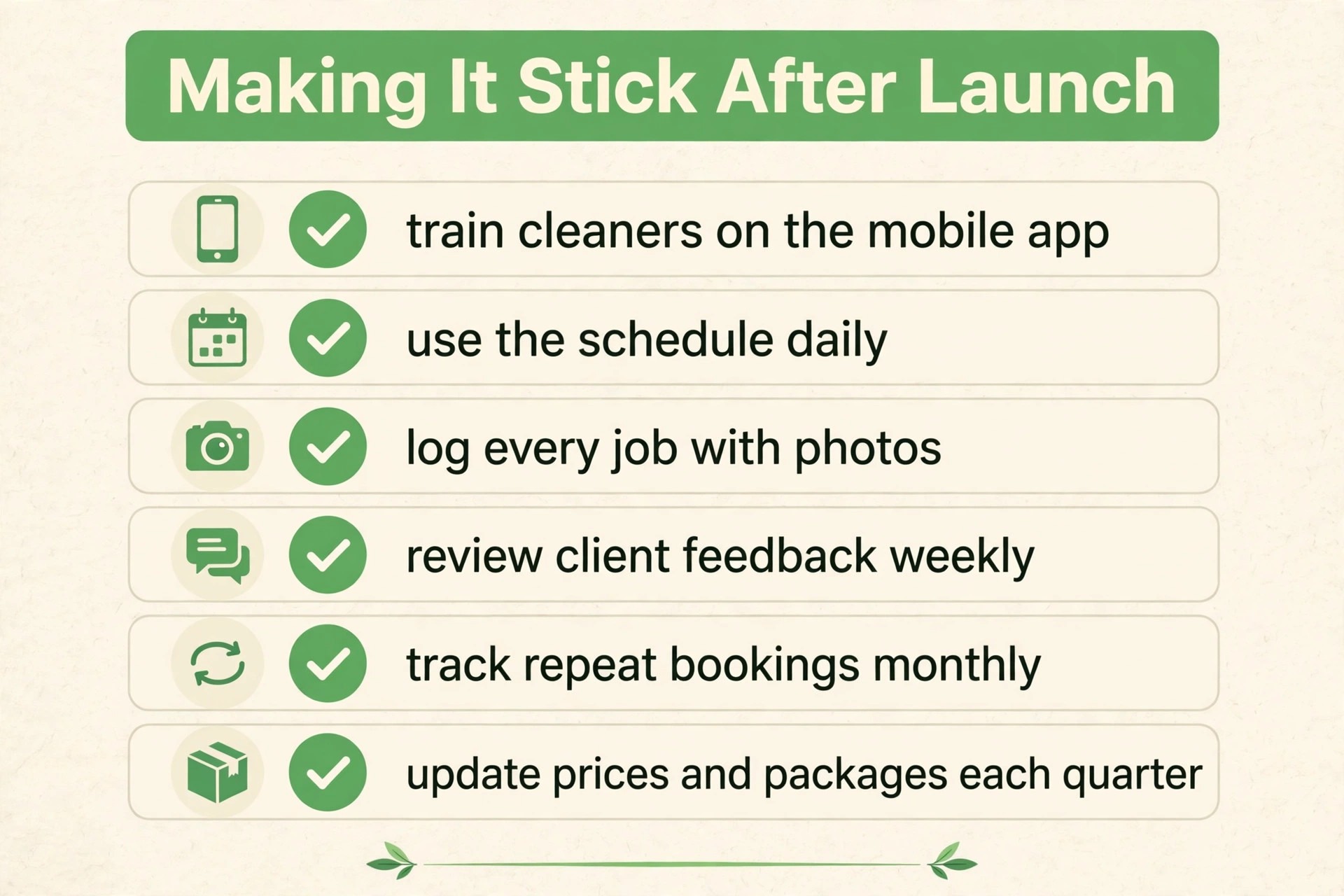
Start with one team or one route before you roll a new tool out everywhere. A small pilot shows whether the setup matches real work, whether cleaners actually open the app each day, and whether the office can see the day clearly. Fix the pilot first, then copy the working setup to the rest of the business, because a flawless pilot beats a rushed company wide launch that nobody trusts.
Write down who owns the tool on day one. That person approves new users, checks the billing page each month, answers basic questions from the team, and talks to support when something breaks. Without a named owner, passwords pile up, old staff keep access after they leave, and small problems sit unanswered until they become urgent. Ownership takes ten minutes to assign and saves hours later.
Move only the data you will actually use in the first month. Old records, duplicate clients and test entries from a trial can clutter a new system and make early reports look wrong. Import the live clients, the open series and the current price list, then archive the rest somewhere safe. A clean start makes the first reports believable, and believable reports are what keep a team using a new tool.
The Verdict for Cleaning Companies
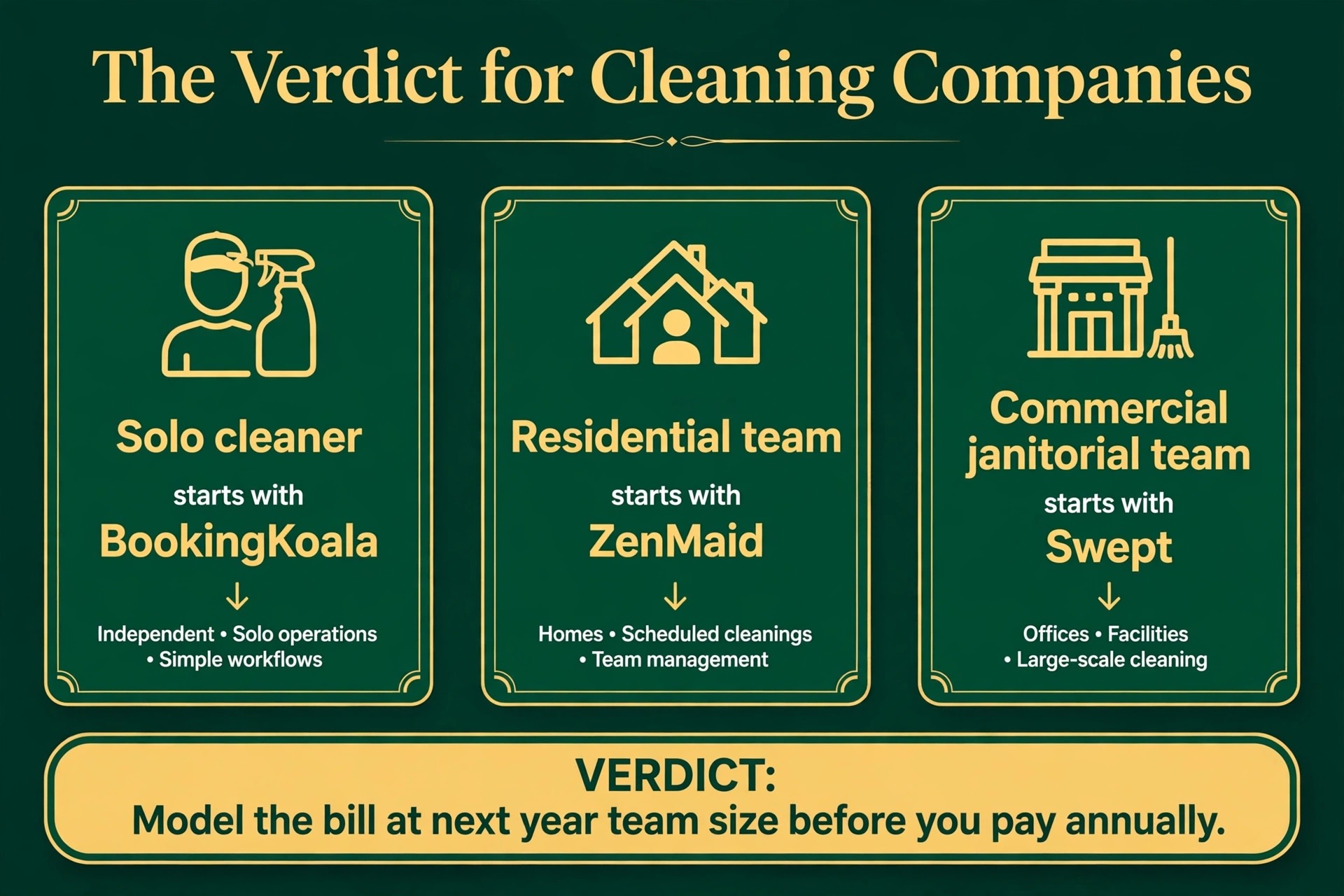
Start with the job, then the budget, then the trial. For most residential maid services, ZenMaid is the safest first trial, because it balances price, cleaning specific features and ease of use better than the extremes. A commercial janitorial firm should start with Swept instead, and a booking led company should start with BookingKoala, because the best pick by job table above points to the tool built for that exact situation.
The best CRM for cleaning companies decision does not need to be perfect, it needs to be tested. Run a real trial week, price the tool at next year’s team size, and judge it on whether daily work feels faster and cleaner. A tool that passes that test is worth keeping, even if a rival looks better on a pricing page, because daily work is the test that actually matters.
For a final check, compare the shortlist on price at your real team size before you pay for a year. A shortlist built around best CRM for cleaning companies should still be tested in a real trial week, because a pricing page cannot show how a tool feels in daily work. When the trial ends, judge the choice by time saved and errors avoided, not by the length of the feature list.
More Reading on Stratilyze
Readers comparing tools usually check the neighbouring guides next. The guide to CRM software for small firms covers a closely related decision, the guide to starting a cleaning business with AI help explains the setup around it, and the guide to cleaning business startup costs helps with the wider budget around it.
Frequently Asked Questions
Do I need a cleaning specific CRM or will a general scheduler work
A general scheduler handles appointments, but cleaning specific tools add the workflows you will otherwise build by hand. Recurring cleans, room based pricing, cleaner checklists and tip or quality tracking are the difference. If cleaning is the whole business, the specialist tools pay back fast. If cleaning is one service line among several, a general field service tool may fit better.
How much should a small cleaning company pay for software
A solo cleaner can start near $19 to $27 a month. A team of five on a per user plan should expect roughly $60 to $150 a month before messaging and processing fees. A team of ten on a mid tier field service plan can reach $200 to $400 a month. Price the tool at next year’s team size, not today’s, and include messaging charges in the total.
Can clients book and pay online without calling the office
Yes, on most tools in this guide. BookingKoala, Launch27 and ZenMaid all offer customer facing online booking, and Jobber and Housecall Pro include it too. Room based pricing forms are the cleaning specific touch, so confirm the booking form matches how you actually quote before you commit.
What happens to my client list if I cancel
That depends on the tool, which is why the exit terms matter before you sign. Most tools allow a client export, but the format and completeness vary. Export the client list monthly, keep a copy outside the system, and test the export during the trial rather than discovering a problem on cancellation day.
Is GPS tracking worth paying extra for
It is worth it when contracts or clients require proof of presence, which is common in commercial janitorial work. Swept and ZenMaid Pro both include GPS features at higher tiers. For residential work built on trust and repeat visits, GPS is a nice extra rather than a need, and the money may be better spent on reminders and quality checks.
Should a solo cleaner pay for software at all
Yes, once the client list passes about twenty recurring clients, because missed appointments and manual reminders start costing more than the subscription. A solo cleaner should start on the cheapest plan that covers recurring scheduling and online payment, then upgrade only when appointment volume or team size forces it.