
A general field service app and a fire protection platform look similar on a demo screen. Both schedule jobs, assign technicians, and send invoices. The difference shows up on the first failed inspection, when the customer asks for the deficiency report, the code reference, the photos, and the quote for the repair, all before the technician has left the building. That moment separates the best field service software for fire protection companies from a generic tool that was never built for compliance work.
Fire protection work is inspection work first and repair work second. Sprinklers, alarms, extinguishers, and suppression systems each carry their own inspection cycle, their own report format, and their own list of deficiencies that must be tracked until they are fixed. A missed inspection is not only a lost job. It can leave a building out of compliance and a customer exposed, which is why scheduling, reporting, and follow-up must live in one system.
This guide compares eight tools used by fire protection companies, from general field service platforms that firms adapt to specialist systems built around inspections and deficiencies. Prices vary by technician count and feature tier, so every price entry here says to check the vendor pricing page. Request a written quote for your real technician count, and confirm whether inspection forms, customer portals, and deficiency tracking are included or charged separately.
Why Fire Protection Breaks a General Job App
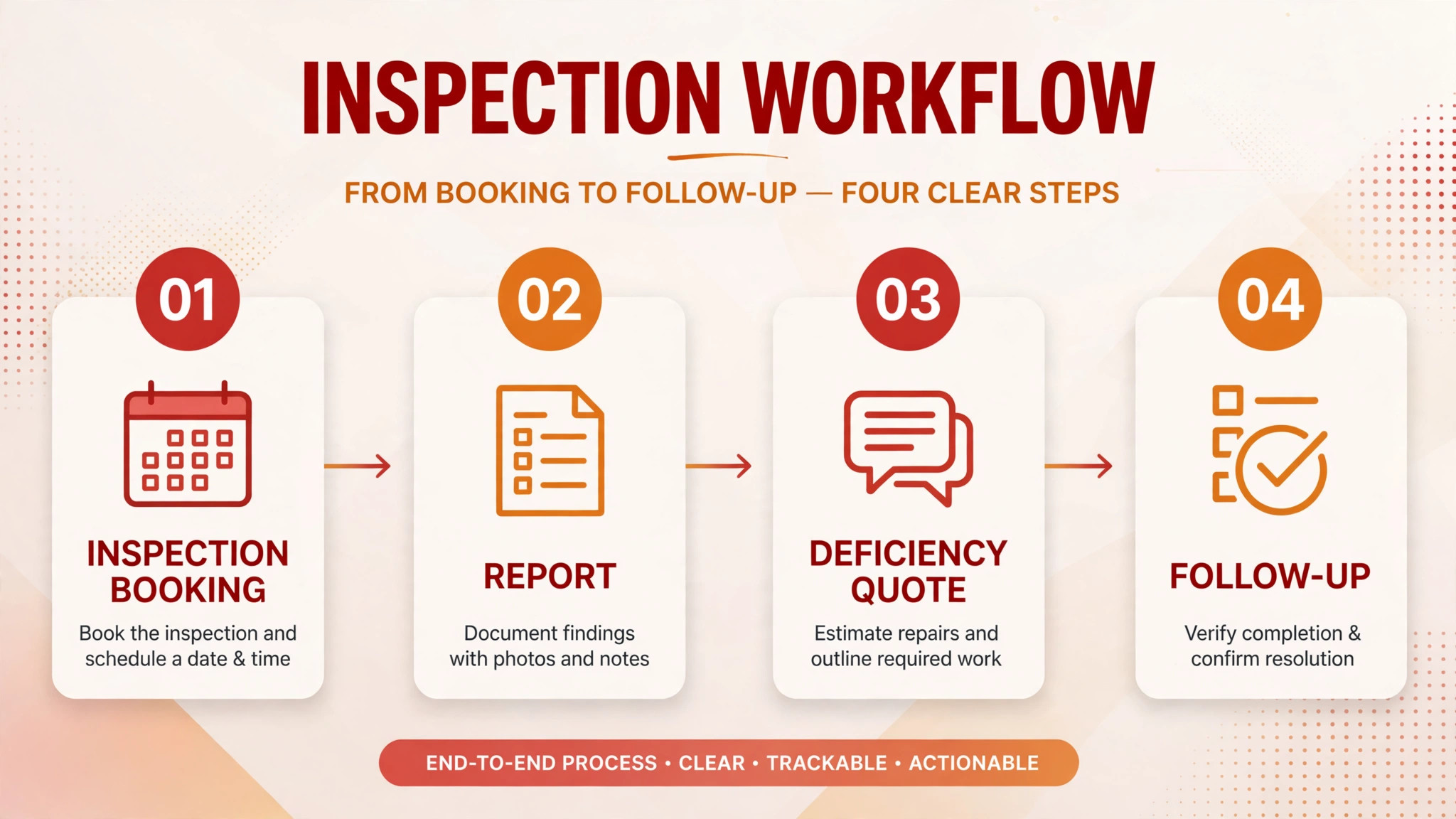
A normal service job ends when the work is done and the invoice is sent. A fire protection inspection ends when the report is delivered, the deficiencies are listed, the customer approves the repairs, and the follow-up inspection is booked. That longer tail is where general apps struggle, because they treat the inspection as a single appointment rather than a chain of events that must be closed out.
Inspection cycles add a second problem. Different systems in the same building fall due at different times, and a customer with several sites will have inspections scattered across the year. A platform that cannot show what is due, what is overdue, and what is waiting on a repair quote will leave the office chasing dates by spreadsheet. A specialist system turns those dates into a forward schedule, so the office books next quarter work before this quarter ends.
Reporting is the third problem. Fire protection reports must be clear enough for a building owner, a facility manager, and sometimes an authority having jurisdiction to read without a follow-up call. That audience range is why report design deserves a proper trial, not a glance at a sample. A report that buries a failed device on page six will be missed, while a report that puts deficiencies on the first page with photos and prices will be acted on.
A fourth problem is version control. When a report is edited after it leaves the office, the customer, the technician, and the office can end up holding different versions of the same inspection. A platform that keeps one shared record, with changes tracked in the same place, prevents that confusion and gives the firm a defensible history if a deficiency is ever disputed. Photos, device lists, test results, and deficiency notes must sit in one report that the customer can share. A tool that produces a tidy generic job summary but a weak inspection report will create extra work for every single inspection.
The 8 Tools at a Glance
| Tool | Starting price | Best for | Fire protection depth |
|---|---|---|---|
| ServiceTitan | Check the vendor pricing page | Larger firms with high job volume | Good |
| ServiceTrade | Check the vendor pricing page | Inspection and deficiency workflows | Strong |
| Housecall Pro | Check the vendor pricing page | Smaller firms wanting fast setup | Good |
| Jobber | Check the vendor pricing page | Growing firms with quoting and invoicing | Good |
| FieldEdge | Check the vendor pricing page | Trade firms with dispatch needs | Good |
| simPRO | Check the vendor pricing page | Job costing and larger operations | Good |
| BuildOps | Check the vendor pricing page | Commercial service contractors | Strong |
| Service Fusion | Check the vendor pricing page | Dispatch plus inventory control | Good |
Pricing transparency is weaker here than in general scheduling software, because inspection forms, portals, and multi-site reporting often sit on higher tiers. That is why a comparison of the best field service software for fire protection companies should start with a written quote for your real inspection volume and site count, not with a headline price alone.

Best Pick by Job
| Job type | First pick | Why it fits | Watch out for |
|---|---|---|---|
| Inspection-only firm | ServiceTrade | Inspection forms, deficiencies, and customer portals built in | Confirm pricing for your inspection volume |
| Install-and-inspect firm | BuildOps | Project and service work in one commercial platform | Setup effort for full use |
| Multi-state firm | ServiceTitan | Scale, dispatch, and reporting across many teams | Higher cost and implementation effort |
The job type that fills most of your calendar should decide the shortlist for the best field service software for fire protection companies. An inspection-only firm that buys a general dispatch platform will spend its time building inspection forms that a specialist already provides. A multi-state firm that buys a small inspection tool may find that reporting and dispatch do not scale across teams.
Inspection Compliance Checklist
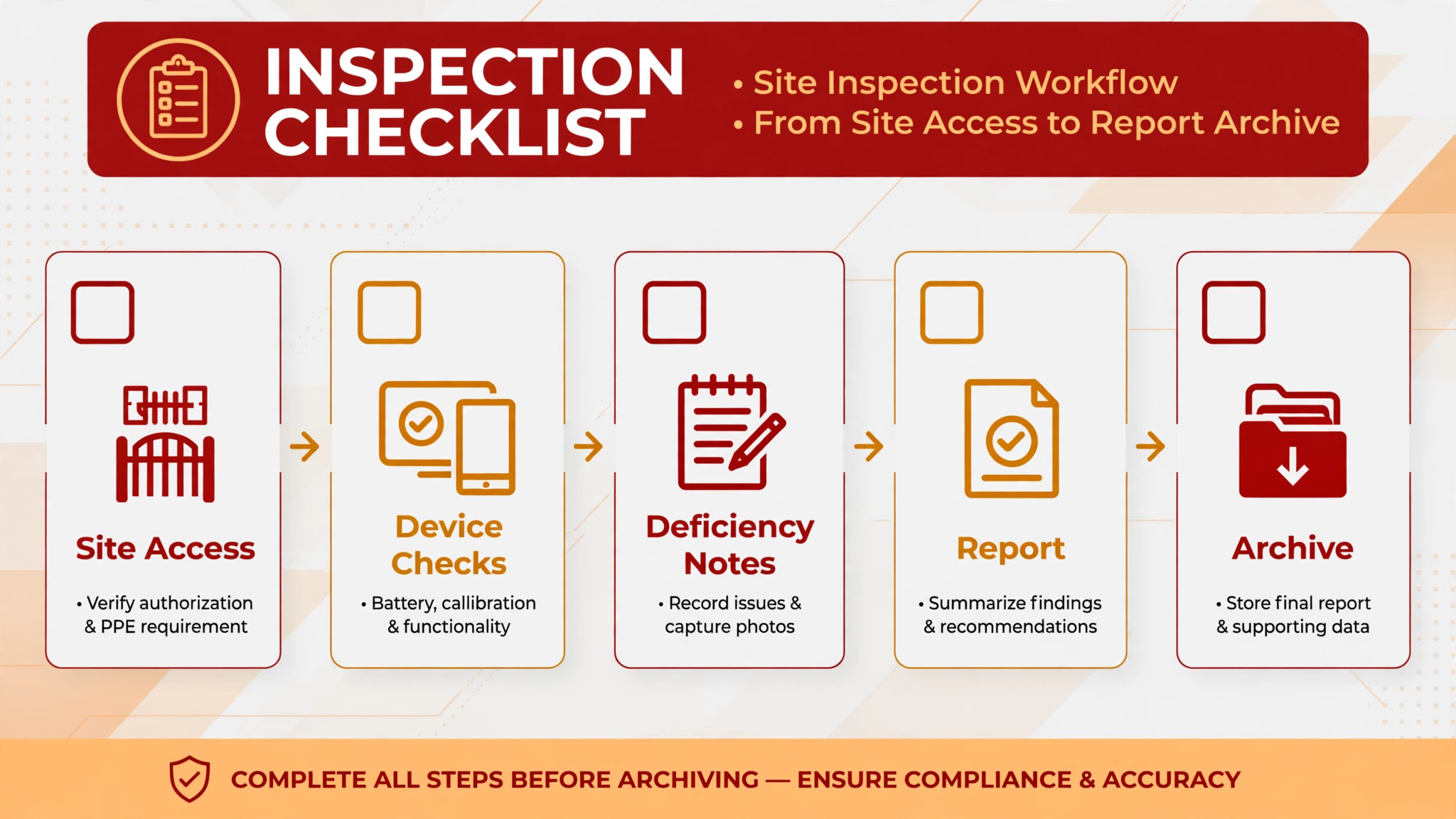
Use this checklist on every inspection, so the report, the deficiencies, and the follow-up are handled the same way by every technician.
– Confirm the site, the systems due for inspection, and the access details before the technician travels, including any locked rooms or escort requirements. – Check the previous report for open deficiencies, so the technician knows what was left unresolved and can verify whether it has been fixed. – Record each device, test result, and photo in the inspection form on site, rather than reconstructing the visit from notes later. – List every deficiency clearly, with its location, its severity, and the repair needed, so the customer can approve work without a second visit to explain it. – Send the completed report to the customer the same day, with deficiencies and quoted repairs easy to find and approve. – Book the follow-up inspection or repair visit before leaving site where possible, and confirm the date with the customer in writing. – Track every open deficiency until it is repaired and re-inspected, and review the open list weekly so nothing drifts past its due date. – Archive the report where the customer and the office can find it later, including the photos and test results that support it.
Software helps this checklist only if the inspection form, the deficiency list, the quote, and the follow-up booking all update from the same job record. If those four live in separate places, the checklist becomes extra admin work on top of an already long inspection day.
The 8 Tools in Detail
1. ServiceTitan
ServiceTitan is a full field service platform for larger home and commercial service companies, covering scheduling, dispatch, customer records, estimates, invoicing, payments, and marketing. For a fire protection firm, its value lies in handling high job volume cleanly, with a dispatch board, call booking, and job history that keep a busy office organised across many technicians and sites.

The limit for fire protection is specificity. ServiceTitan is a general platform, so inspection forms, deficiency workflows, and compliance reporting need careful setup rather than arriving ready made. A firm that chooses it should test a full inspection cycle in the trial, from booking to report to deficiency quote to follow-up, and confirm that the reporting output is clear enough to send to a customer without extra editing.

2. ServiceTrade
ServiceTrade is a field service platform built for commercial service contractors, with a strong focus on inspections, asset tracking, and customer communication. Technicians complete inspection forms on site, deficiencies are captured with photos and notes, and customers receive reports through a portal where they can approve quoted repairs.

The strength is the inspection chain. Because deficiencies, quotes, and follow-up work are linked to the same asset and site record, open items are far less likely to be forgotten. A facility manager can see what failed, what it will cost to fix, and what happens next without a chain of emails. The limit is price and fit for very small firms. Check the vendor pricing page and confirm the cost at your inspection volume before assuming the specialist depth is worth it for a small team.
3. Housecall Pro
Housecall Pro is a field service platform built around online booking, scheduling, dispatch, estimates, invoicing, and payments. It is widely used by smaller service companies that want a fast move from phone and paper to a live schedule, with customer messaging and review requests built into the same workflow.
The strength is speed and simplicity for a smaller fire protection firm. A team can schedule inspections, message customers, quote repairs, and invoice from one system without a long implementation. The limit is inspection depth. A firm that lives on complex multi-system inspections with long deficiency lists should test whether its forms and reports hold up on a large site, or whether a specialist platform will save more office time.
4. Jobber
Jobber combines quoting, scheduling, dispatch, invoicing, and customer messaging for service companies, and it suits a growing fire protection firm that wants the full job cycle in one place. Jobs can be scheduled and assigned from the office, while technicians update status, capture photos, and record notes on site.
The strength is balance between simplicity and coverage. It handles the commercial rhythm of booking, quoting, invoicing, and repeat scheduling without enterprise complexity. The limit is the same as other general platforms. Inspection-specific reporting and deficiency tracking need to be built from general features, so test a complete inspection, including a failed device and a repair quote, before choosing it for inspection-heavy work.
5. FieldEdge
FieldEdge is a field service platform for trade companies, with dispatch, scheduling, quoting, invoicing, and customer records. It is built for firms that run technicians across many sites each day and need a clear board, fast quoting on site, and a customer history that follows the property as well as the contact.
The strength is trade fit for daily dispatch. A fire protection office can see the day, move jobs when an inspection overruns, and keep quoting close to the job record. The limit is inspection reporting depth compared with a specialist. A firm should compare the report output from FieldEdge with a specialist report on the same inspection, and judge which one it would be happy to send to a facility manager unchanged.
6. simPRO
simPRO is a job management platform for trade and field service companies, with scheduling, dispatch, quoting, invoicing, inventory, and job costing. For a fire protection firm that also installs systems, the link between project work, service work, and job cost matters, because install margins and service margins behave very differently.
The strength is cost control across job types. A firm can track labour, materials, and return visits per job, and can see which inspection routes and install projects actually make money. The limit is setup effort. Job costing, inventory, and templates need clean data from the start, so allow time for training and for building accurate inspection and install templates before go-live.
7. BuildOps
BuildOps is a field service platform for commercial contractors, covering service, project work, dispatch, quoting, invoicing, and customer records. It suits a fire protection firm that does both installation projects and ongoing inspection service, because both kinds of work can live in one system instead of two.
The strength is the blend of project and service. An install project, its inspections, and its later service calls can share a customer and site history, which helps when a customer asks what was installed, when it was last inspected, and what is still outstanding. The limit is implementation scope. A firm that only does inspections may find the project depth heavier than needed, so confirm which modules the inspection team will actually use each week.
8. Service Fusion
Service Fusion offers dispatch, scheduling, estimates, invoicing, inventory, and customer management for field service companies. For a fire protection firm, the inventory side helps when a repair needs a specific valve, head, or panel part, and the office needs to know whether the technician carries it or a return visit is required.
The strength is the link between dispatch, stock, and invoicing. Jobs, parts, and customer history sit together, which reduces wasted trips and speeds up repair quoting. The limit is inspection specificity. Like other general platforms, it needs careful form setup for fire protection reporting, so test the full deficiency workflow on a real inspection before committing.
How an Inspection Becomes Repeat Revenue
An inspection is often treated as a one-off job, but for a fire protection firm it is the start of a relationship. The inspection reveals what needs repair, what will need replacement soon, and which other systems in the building fall due next. A platform that captures those three facts turns a single visit into a forward schedule, while a platform that only records the completed job leaves that revenue to chance.
The first step is the deficiency quote. When deficiencies are listed clearly with photos and prices, a facility manager can approve repairs quickly, often from the report itself. When deficiencies arrive as a vague note days later, approval slows, and the repair may be quoted by a competitor in the meantime. Speed and clarity in the report are therefore sales tools, not only compliance tools.
The second step is the forward calendar. A building with sprinklers, alarms, and extinguishers will have inspections falling due at different times through the year. A system that shows those dates by site lets the office book the next visit before the customer starts shopping around. Over a year, that forward booking habit is what separates a firm with a stable route from a firm that constantly chases new inspections to replace lost ones.
A third step is the customer portal. Facility managers who can find past reports, open deficiencies, and upcoming dates without calling the office will trust the firm more and call it first when a new site needs cover. That trust is hard to win back once it is lost, because a manager who has chased a report twice will remember the chase longer than the inspection itself.
A fourth step is internal review. Each week, someone senior should open the deficiency list, check which quotes are unanswered, and decide what needs a call, a revised quote, or a site visit. Without that review, even a good platform will accumulate open items that nobody owns. With it, the firm keeps a clean compliance record and a steady flow of approved repair work from inspections it has already paid to perform. Judged on that full cycle, the best field service software for fire protection companies is the tool that converts inspections into approved repairs and booked repeat work, not only the tool that schedules the inspection day.
Selling the Next Inspection Before the Current One Ends
The best time to book the next inspection is during the current one, while the customer is thinking about compliance and the technician is standing in the plant room. A platform that shows the next due date on the report makes that conversation easy. The technician can point to the date, explain what will be checked next time, and book it before leaving site. A platform that hides the next date in a separate schedule makes the same conversation unlikely to happen at all.
That habit compounds across a customer base. A firm that books forward consistently will have a full calendar three months ahead, with less time spent chasing renewals and less pressure to discount to fill gaps. A firm that waits until inspections fall due will spend the same office hours on chasing calls, and will still lose some customers to competitors who booked earlier. The difference is not sales skill. It is whether the system puts the next date in front of the right person at the right moment.
Forward booking also helps with staffing. When the office can see next quarter inspections by area and system type, it can plan technician routes, holiday cover, and training around real demand rather than guesswork. That planning view is one of the quieter reasons to judge the best field service software for fire protection companies on its forward schedule, not only on its inspection form. A good form wins one inspection. A good forward schedule wins the year.
How to Choose the Best Field Service Software for Fire Protection Companies
Start with a real inspection, not a demo. Take a multi-system site with at least one failed device, and run the full cycle in the trial. Book the inspection, complete the form on site, send the report, quote the repair, and book the follow-up. If any step needs a spreadsheet, a separate document, or a manual retype, that gap will repeat on every inspection.
Next, test the deficiency list as a manager would. Open the list a week later and ask whether you can see what is open, what is quoted, what is approved, and what is overdue, without digging through individual jobs. A list that only the technician can understand is not a management tool, and open deficiencies will drift.
Then price the full stack for the best field service software for fire protection companies in your firm. Add inspection forms, portals, messaging, payment fees, and extra users to the subscription, and model the total at your current inspection volume and at the volume you expect next year. A platform that is cheap for one team and expensive for three will punish growth.

Common Mistakes When Buying Fire Protection Software
One mistake is buying a scheduling tool and calling it an inspection platform. Scheduling gets the technician to the site. Inspection software also produces the report, tracks the deficiencies, and books the follow-up. Test the report and the follow-up, not only the calendar.
Another mistake is ignoring the customer view. A report that is clear to a technician but confusing to a facility manager will generate calls, delays, and lost repair approvals. Send a trial report to a friendly customer and ask whether they could approve the repairs from it alone.
A third mistake is forgetting multi-site customers. A customer with ten sites needs one view of what is due, what is open, and what is overdue across all sites. A tool that only shows one site at a time will force the office to build that view by hand every month.
A fourth mistake is skipping the open deficiency review. Deficiencies that are quoted but never followed up are lost revenue and a compliance risk. Make sure the platform surfaces open items weekly, and assign someone to work that list as a fixed weekly job.
A fifth mistake is buying for inspections alone when the firm also installs. An install-and-inspect firm that runs two systems will duplicate customer records and lose the shared history that helps win repeat work. Choose a platform that can handle both, or be honest about the cost of keeping them separate.
Frequently Asked Questions
What makes fire protection software different from general field service software?
The difference is the inspection chain. General software schedules a job and invoices it. Fire protection software also manages inspection forms, device records, deficiency lists, repair quotes, and follow-up inspections from the same site record. That chain is what keeps a building compliant and what turns an inspection into approved repair work.
Can a small inspection firm use a general platform?
Yes, a small firm with simple inspections and a short deficiency list can work well on a general platform, especially if setup is fast and the price fits. The risk grows with site complexity and deficiency volume. Test a large multi-system inspection in the trial, and check whether the report is good enough to send unchanged.
How should deficiencies be tracked after an inspection?
Each deficiency should carry its location, severity, photos, quoted repair, approval status, and follow-up date, all linked to the site and system it belongs to. The office should review the open list weekly, chase unapproved quotes, and book follow-up inspections as soon as repairs are approved. A deficiency without a next date is a job waiting to be forgotten.
Do customers really use portals for inspection reports?
Facility managers with several sites use portals heavily when reports, deficiencies, and upcoming dates are easy to find in one place. A portal that only holds PDFs with no deficiency status is less useful. Test the portal as a customer would, and check whether a manager could approve a repair and find the next due date without calling the office.
How long does it take to switch fire protection software?
A small firm can switch in three to four weeks if inspection forms, device lists, and customer records are prepared in advance. A mid-sized firm should allow six to eight weeks, including form building, technician training, and parallel running on live inspections. A multi-state firm should allow longer, including reporting checks across teams and states.
Should inspection forms be standardised across technicians?
Yes, standard forms protect report quality and make deficiencies comparable across sites and technicians. When every technician records devices, results, and photos the same way, the office can trust the report, the customer can read it easily, and the follow-up list stays accurate. Allow site-specific notes, but keep the core form consistent.
What happens if an inspection report is delayed?
A delayed report delays repair approvals, leaves deficiencies open longer, and can put the customer at risk if a failed device stays unrepaired. It also damages trust, because the customer paid for a professional inspection and expects a prompt record. Choose a platform that lets technicians complete and send reports on site, and set a same-day report rule for the whole team.
A Trial That Tests the Whole Inspection Cycle
Do not choose from a feature list or a single demo inspection. Run a two week trial on your two finalists, using a real site with a real deficiency. In week one, run the inspection, send the report, and quote the repair. In week two, chase the approval, complete the repair, and book the follow-up inspection.
The tool that keeps that cycle clear, keeps the customer informed, and keeps the open list honest through both weeks is the right choice for your firm. Pay attention during the trial to how technicians feel about the forms, because a form that technicians dislike will be filled in late, filled in briefly, or filled in from memory at the end of the day. That behaviour will undo the reporting quality the firm bought the platform for in the first place.
Also check what happens when a customer has a question about a report six months later. Can the office find the report, the photos, and the deficiency history in a minute, or does it require searching through old jobs and emails.
A platform that answers that question fast protects the firm in disputes, in audits, and in renewal conversations, and that protection is worth weighing alongside the monthly price. Price matters, but a cheap tool that loses deficiencies will cost more in lost repairs and compliance risk than a specialist platform that closes the loop every time. Choose the system that makes inspections easier to sell, easier to report, and easier to follow through. When the trial ends, the answer should be obvious from the open deficiency list alone, because the right tool will show fewer loose ends and more booked follow-up work than the tool it replaces, week after week, for good.
More Reading on Stratilyze
– Best Booking Software for Music Schools – Best Booking Software for Escape Rooms – Best Booking Software for Boat Rentals – Best Membership Software for Dance Studios – Best Membership Software for Gyms