
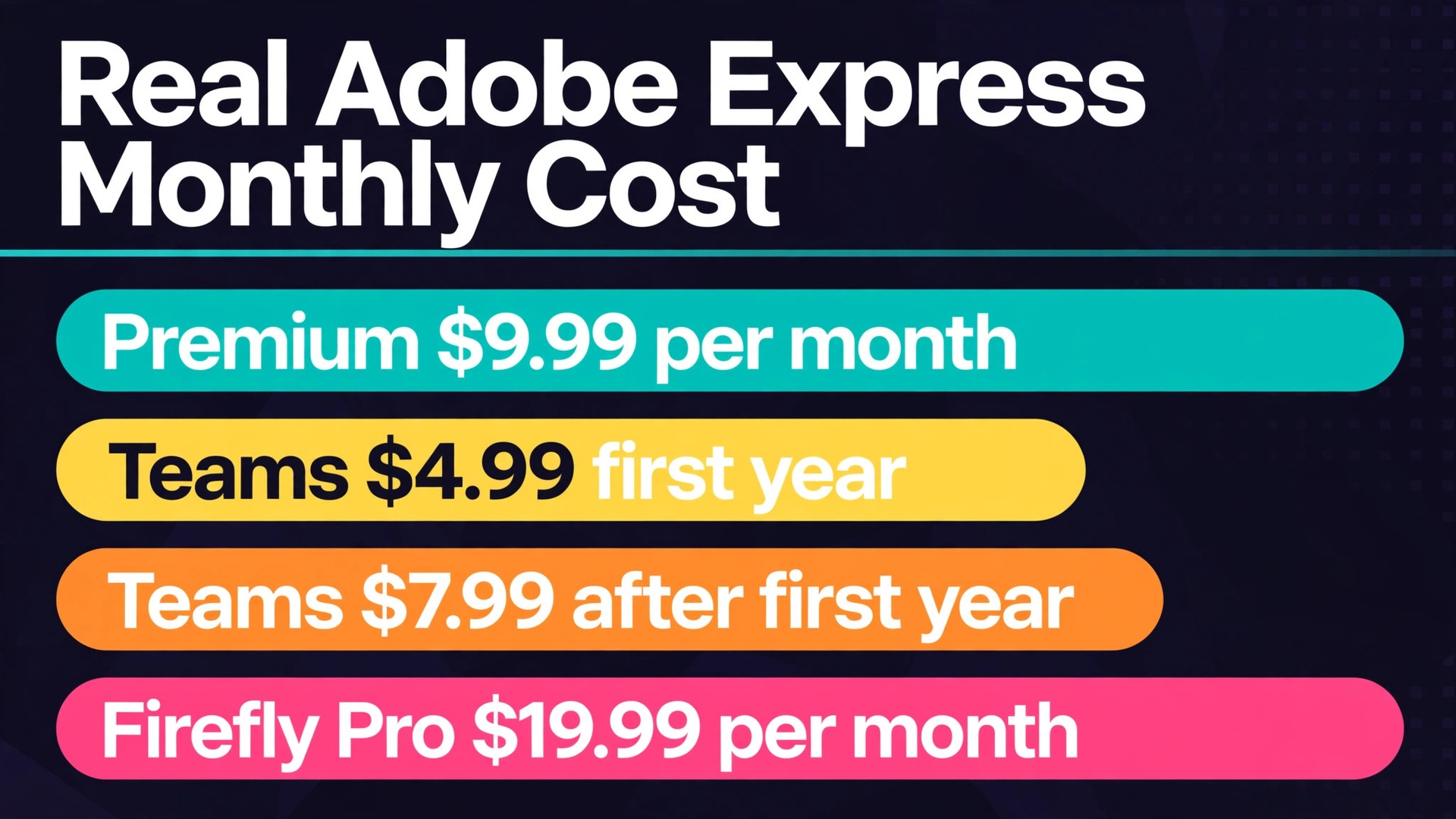
Nine dollars and 99 cents a month buys a single Premium seat, while a five person team on Adobe Express Teams pays 24 dollars and 95 cents a month in its first year. That gap shows why a single headline price misleads a small business. One figure describes an individual subscription with no annual discount, while the other describes a team plan with a first year rate, a higher renewal rate, and a two seat minimum. The cost of Adobe Express for small business monthly therefore depends on which plan the team buys, how many licences it needs, and whether it is still inside that first year.
Adobe Express is Adobe design software for social posts, flyers, short videos, logos, and PDFs, built for people who are not professional designers. A small business uses it to make consistent posts, menus, offers, and announcements without hiring a designer for every piece. The price model is per user per month, which makes licence count the main lever, followed by the choice between individual Premium, Teams, and the larger Firefly Pro bundle.
All figures in this guide are in United States dollars before tax, from Adobe pricing pages as reported in pricing coverage checked in October 2026. Adobe pricing pages are partly region and login gated, so a buyer should confirm the checkout figure before approving a budget. Where listings disagree, this guide says so plainly instead of picking the tidier number.
Plans behind the cost of Adobe Express for small business monthly
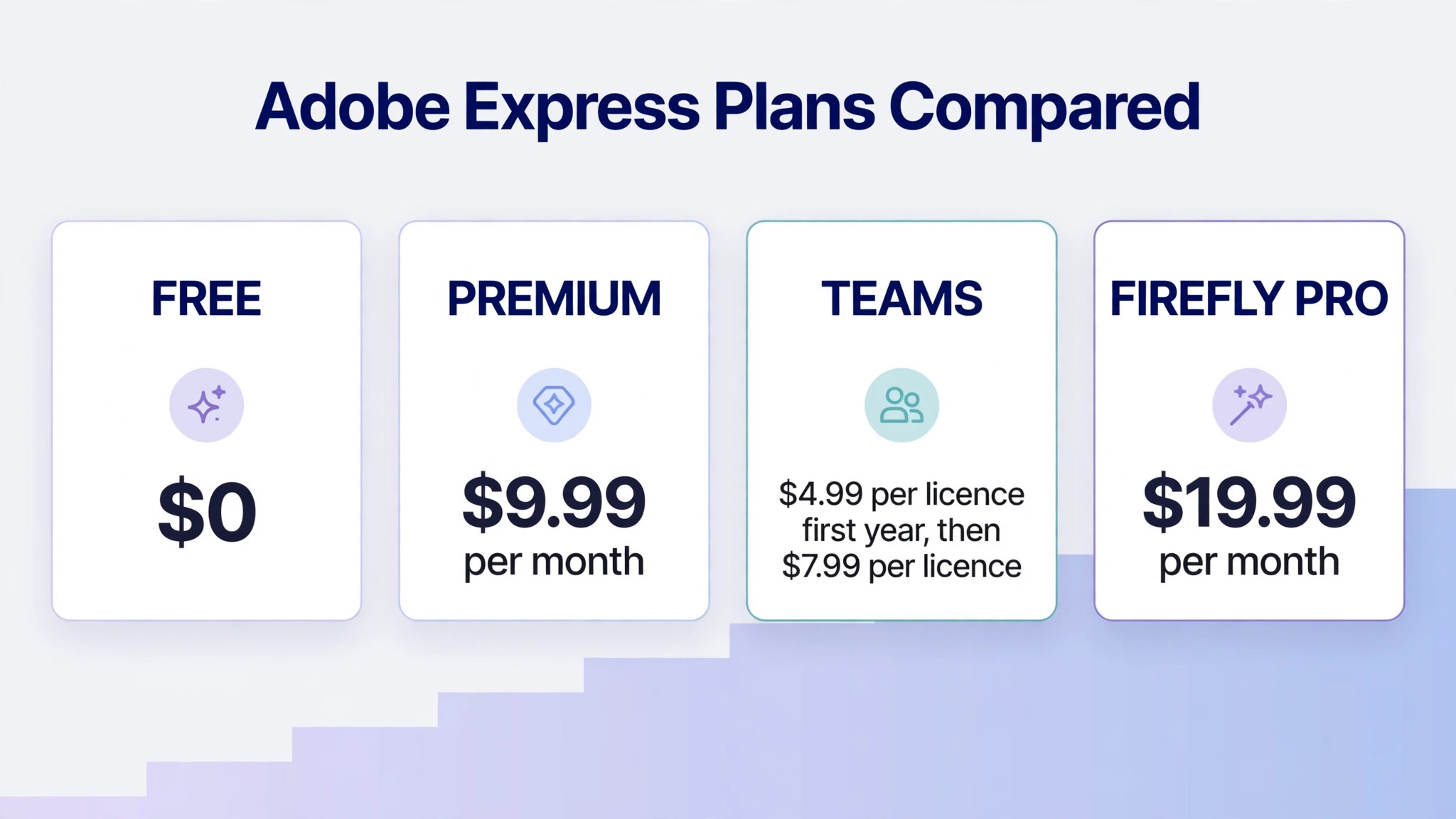
The table below sets out the plans a small business will actually consider. Individual Premium is sold month to month with no annual commitment, according to Adobe pricing coverage, and it carries a 30 day free trial. Teams is an annual plan billed monthly, with a first year rate that rises afterwards. Firefly Pro bundles Express Premium with far more generative credits and Photoshop on web and mobile.
| Plan | Price | Billing shape | Best for |
|---|---|---|---|
| Free | 0 dollars | Free, no card required on the free tier | Trying the tool and making basic posts |
| Premium, individual | 9 dollars and 99 cents per month | Billed monthly, no annual commitment published | Solo owners and single designers |
| Teams | 4 dollars and 99 cents per licence per month in the first year, then 7 dollars and 99 cents | Annual plan, minimum two seats | Small teams that share brand assets |
| Firefly Pro | 19 dollars and 99 cents per month | Billed monthly | Heavy AI image and video makers who also want Photoshop |
| Enterprise | Check the vendor pricing page | Check the vendor pricing page | Larger organisations with central admin needs |
Premium includes premium templates and assets, brand kits, one-click resize, background removal for video, and 250 generative credits a month per user, according to pricing coverage. The free tier includes a large template set and basic creation tools, but it lacks premium templates, brand kits, video background removal, and the 250 monthly generative credits. That split decides the free versus paid question for most businesses. If the team needs brand kits and premium assets every week, free will frustrate it quickly.
One listing discrepancy deserves a plain warning. Pricing coverage notes that the Premium plan card describes 100GB of storage while a comparison table further down the same pricing page describes 10GB. This guide does not resolve that conflict, because only Adobe checkout can confirm which figure applies to a given account. A team that stores large video files should confirm storage at signup rather than budgeting around either figure.
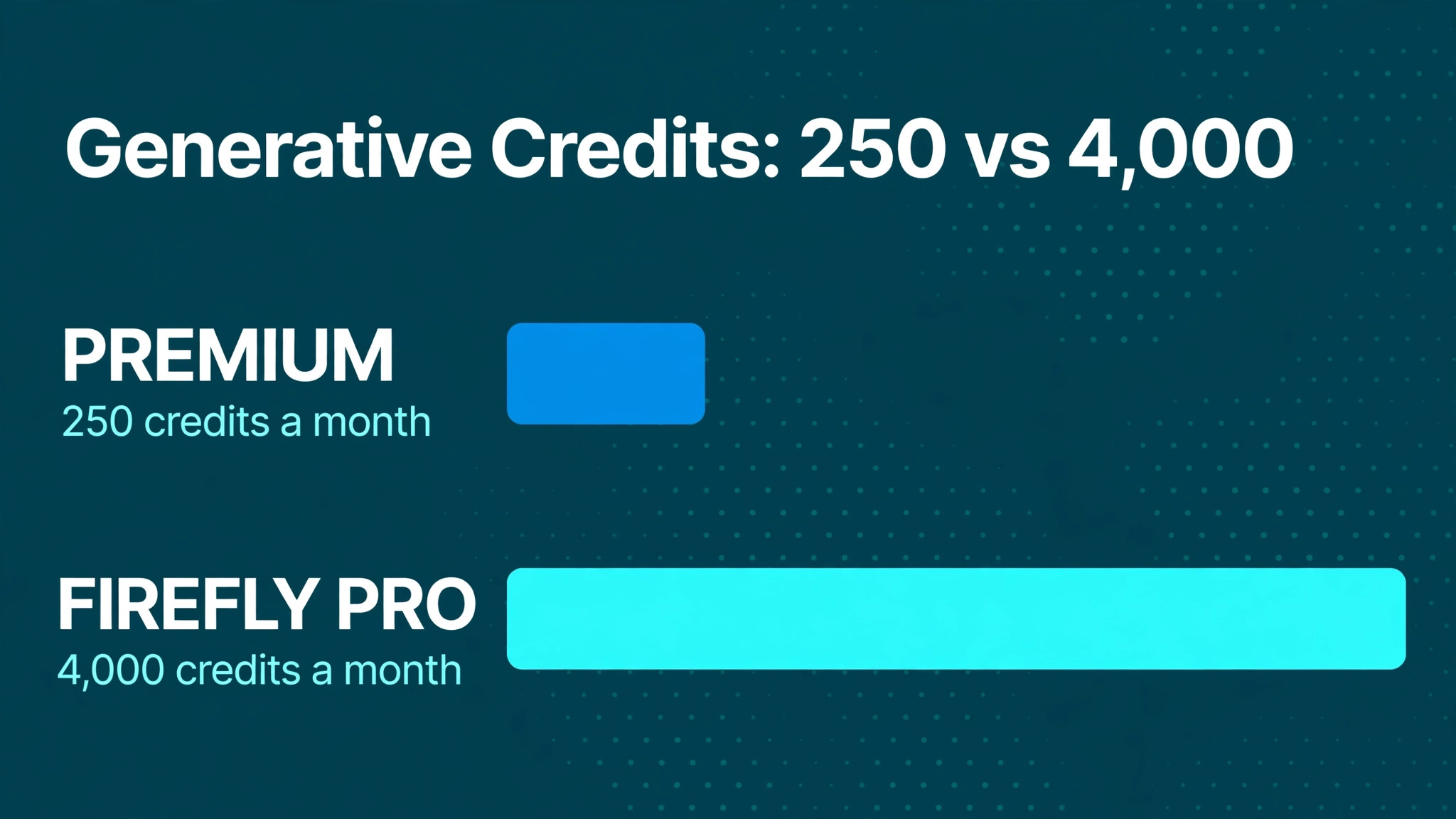
Firefly Pro is the plan for teams that burn through generative credits. It includes Express Premium plus 4,000 generative credits a month, compared with 250 credits on Premium, plus Photoshop on web and mobile. At 19 dollars and 99 cents a month, it costs roughly double Premium for sixteen times the credits, which makes it the better buy only for heavy AI makers. A team that makes a few AI images a week will not use 4,000 credits, and should stay on Premium or Teams.
Generative credits, the limit that decides the plan
Generative credits are the meter inside Adobe Express pricing, and they deserve attention before any plan is chosen. Premium gives 250 generative credits a month per user, while Firefly Pro gives 4,000 credits a month. Each AI generation consumes credits, so a team that generates many images, videos, or audio pieces can run through 250 credits faster than it expects. A team that mainly edits templates, resizes posts, and uses stock assets will barely touch its credits at all.
That difference explains why two businesses on the same Premium plan can report very different experiences. The template editor who resizes last month post for a new offer uses almost no credits and finds Premium generous. The social manager who generates ten image options for every post, tests several video variations, and regenerates anything that looks off can exhaust 250 credits in a busy week. Credit use should be tracked in the first month, because it is the clearest signal for whether Firefly Pro is needed or whether Premium is enough.
Teams licences also carry 250 credits per user according to pricing coverage, so a five person team on Teams has 1,250 credits a month across its licences, provided each person actually uses their own licence. Sharing one licence among several people breaks that maths and also breaks the brand asset sharing that Teams is bought for. Give each regular maker their own licence, and share finished designs rather than logins.
When credits run out, the team faces a choice between waiting for the next month, upgrading the heavy user to Firefly Pro, or reducing AI generation in favour of templates and stock assets. Upgrading one heavy user to Firefly Pro at 19 dollars and 99 cents while keeping everyone else on Teams is often cheaper than upgrading the whole team. That mixed approach keeps the monthly total close to the team table below, with one clear exception for the heaviest maker.
Real monthly totals by team size
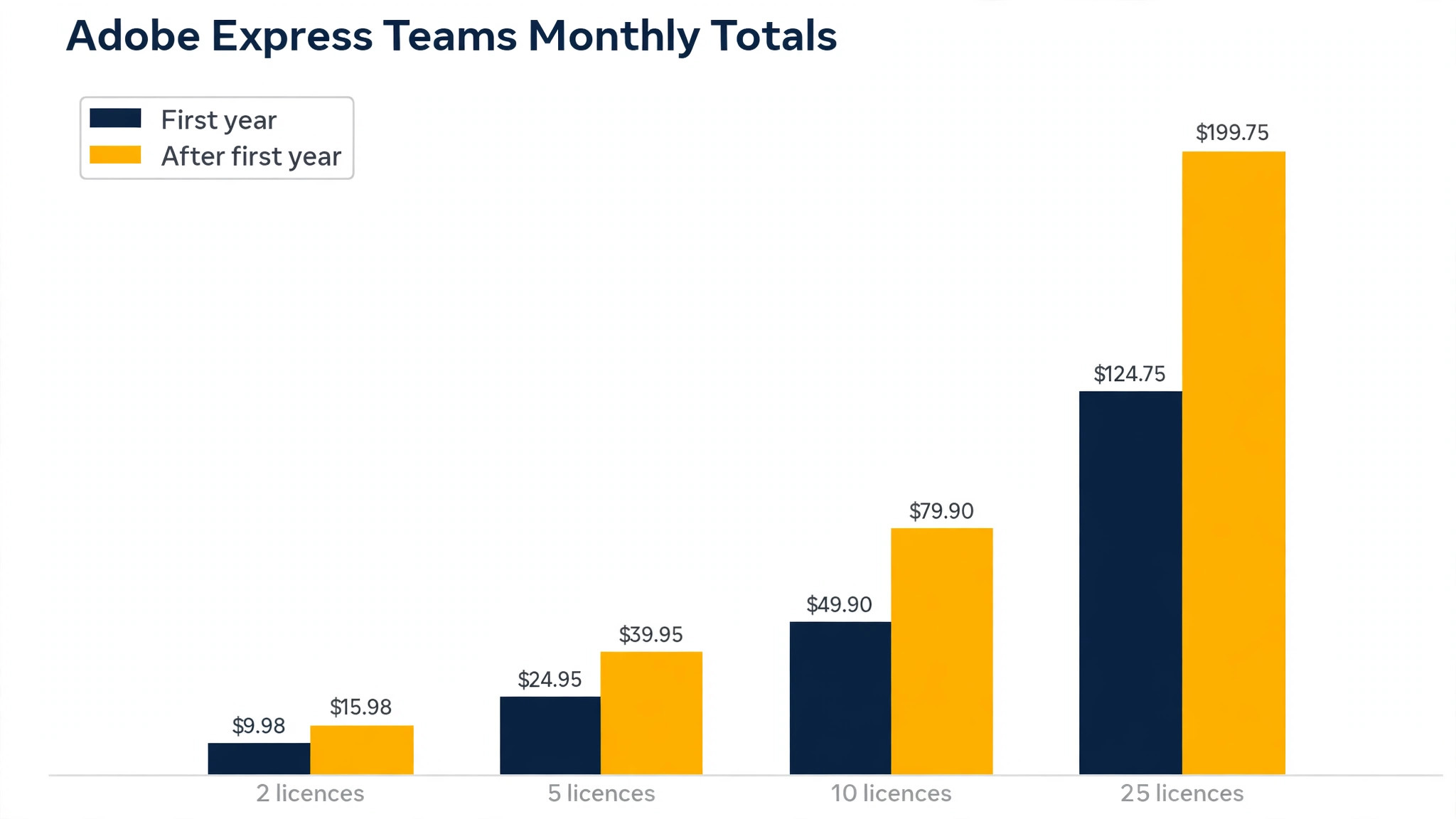
The table below prices Teams, which is the plan most small teams should use, in its first year and after its first year. It also shows individual Premium for the same headcount, so a team can see what it saves by choosing Teams over separate individual subscriptions. The cost of Adobe Express for small business monthly for a team is the Teams column, not the individual column, once headcount reaches two.
| Licences | Teams, first year monthly total | Teams, after first year monthly total | Individual Premium monthly total |
|---|---|---|---|
| 2 | 9 dollars and 98 cents | 15 dollars and 98 cents | 19 dollars and 98 cents |
| 5 | 24 dollars and 95 cents | 39 dollars and 95 cents | 49 dollars and 95 cents |
| 10 | 49 dollars and 90 cents | 79 dollars and 90 cents | 99 dollars and 90 cents |
| 25 | 124 dollars and 75 cents | 199 dollars and 75 cents | 249 dollars and 75 cents |
A two licence team saves 10 dollars a month against individual Premium in the first year, and 4 dollars a month after the first year. That saving looks small, but Teams also adds shared brand assets and team management that individual seats do not offer, so the comparison is not price alone. A five licence team saves 25 dollars a month in the first year and 10 dollars a month afterwards, which totals 300 dollars in the first year against individual Premium.
At ten licences, the first year saving against individual Premium reaches 50 dollars a month, or 600 dollars a year. At 25 licences, it reaches 125 dollars a month in the first year, or 1,500 dollars a year. Those savings grow with headcount, which is why larger small teams should default to Teams and reserve individual Premium for solo owners, contractors, or single seat cases that sit outside the team plan.
The renewal jump deserves a budget note in its own right. A five licence team that approves 24 dollars and 95 cents a month in year one will see 39 dollars and 95 cents a month in year two, an increase of 15 dollars a month or 180 dollars a year. That increase is not a surprise price rise. It is the published step from the first year rate to the regular rate, and finance should approve year two at the higher figure from the start. A budget that only covers year one will look wrong in month thirteen through no fault of the tool.
Annual versus monthly billing works differently here than in many tools. Individual Premium is described as billed monthly with no annual commitment, and pricing coverage reports no annual price for individual Premium on the Adobe page. One pricing roundup mentions 99 dollars and 99 cents a year for Premium, but that figure conflicts with the monthly only description on the Adobe page as reported, so this guide does not budget from it. Teams, by contrast, is an annual plan billed monthly, so the team commits for a year while paying each month. Confirm both shapes at checkout, and do not assume an annual discount exists for individual Premium.
What the free tier covers, and where it stops
The free tier is genuinely useful, and a small business should test it before paying. It includes a large set of templates, Adobe Fonts on the free allowance, stock photos, videos, music, and design elements, plus image and video quick actions. A business that makes occasional posts from templates, with no need for brand kits or premium assets, can run on free for months without feeling limited.
The free tier stops at the point where brand consistency becomes a weekly need. Premium templates, brand kits, one-click resize, and video background removal all sit on Premium, and a team that needs those features daily will feel the free limit quickly. Free also carries fewer generative credits than Premium, so AI heavy makers will hit its limits sooner. The test is simple. If the team recreates brand colours, logos, and fonts by hand for every post, it needs brand kits, and brand kits mean Premium or Teams.
Social scheduling limits also separate free from Premium in a practical way. Pricing coverage reports that free accounts can connect one account per social network with one shared calendar, while Premium raises that to three accounts per network and three shared calendars. A business managing one profile per network will not notice that limit. A business managing several locations or several brands from one account will notice it immediately, and should price Premium or Teams for that reason alone.
Version history is another quiet difference. Coverage reports 10 days of version history on free and 30 days on Premium. A team that revises posts over several weeks, or that needs to recover an earlier version after a client change of mind, will value the longer history. It is not a reason to buy Premium on its own, but it adds to the case when combined with brand kits and premium assets.
A worked month for a five licence team
Take a five person team on Teams in its first year. The team pays 24 dollars and 95 cents a month, which is 299 dollars and 40 cents across a year of monthly payments. The same five licences as individual Premium would cost 49 dollars and 95 cents a month, or 599 dollars and 40 cents across a year. Choosing Teams saves 300 dollars in the first year for the same headcount, plus it adds team brand sharing that individual seats lack.
In year two, the same five licences on Teams cost 39 dollars and 95 cents a month, or 479 dollars and 40 cents across a year. The saving against individual Premium narrows to 120 dollars a year, but Teams still wins on price and on brand sharing. A finance owner who approved year one only should reapprove year two at the higher figure, rather than treating the renewal as an unexpected increase.
Now add one realistic exception. If one of the five makers burns through 250 credits every month and needs Firefly Pro, that person moves to 19 dollars and 99 cents a month while the other four stay on Teams. In the first year, that mixed team costs four Teams licences at 4 dollars and 99 cents plus one Firefly Pro at 19 dollars and 99 cents, which totals 39 dollars and 95 cents a month. That is still 10 dollars a month below five individual Premium seats, and it gives the heavy maker 4,000 credits instead of 250. Mixed plans beat blanket upgrades whenever only one or two people are heavy AI users.
The cost of Adobe Express for small business monthly at five licences therefore has three honest answers, not one. Teams in year one costs 24 dollars and 95 cents a month. Teams after year one costs 39 dollars and 95 cents a month. A mixed team with one Firefly Pro user costs 39 dollars and 95 cents a month in year one and 51 dollars and 95 cents a month after year one, on four Teams licences at 7 dollars and 99 cents plus Firefly Pro at 19 dollars and 99 cents. Writing all three down prevents the common error of approving year one and being surprised by year two.
A second worked example for a solo maker and a contractor
Consider a solo owner who makes posts herself, plus a part time contractor who makes videos twice a month. The owner fits individual Premium at 9 dollars and 99 cents a month, while the contractor may fit the free tier for occasional template work, or a second Teams licence if brand kits and premium assets are needed for every video. Buying two individual Premium seats would cost 19 dollars and 98 cents a month, while a two licence Teams plan costs 9 dollars and 98 cents a month in year one and 15 dollars and 98 cents afterwards.
That comparison shows why headcount alone does not decide the plan. The contractor usage pattern decides it. If the contractor only edits templates a few times a month and never touches brand kits, free may serve, and the total stays at 9 dollars and 99 cents a month for the owner alone. If the contractor needs brand kits weekly, Teams at two licences is cheaper than two individual seats in both year one and afterwards, and it keeps brand assets shared.
The cost of Adobe Express for small business monthly in this mixed shape therefore ranges from 9 dollars and 99 cents a month to 19 dollars and 98 cents a month, depending on the contractor seat. That range is small in absolute terms, but it illustrates the habit that scales. Price the seat by the work the person actually does, not by the title on the team list, and the bill stays close to the value the tool delivers.
Individual Premium is the right pick for a solo owner, a solo designer, or a single seat that sits outside a team. It costs 9 dollars and 99 cents a month, it needs no annual commitment, and it carries a 30 day free trial. A solo owner who makes posts, flyers, and short videos weekly will get full value from it. A solo owner who makes one post a month may fit the free tier and should test free first.
Teams is the right pick for any business with two or more regular makers. The two seat minimum is easy to meet for a small team, the first year rate is lower than individual Premium, and shared brand kits keep posts consistent across makers. A team that shares logos, colours, and fonts will save time on every post, because makers stop rebuilding brand elements by hand. That time saving is worth more than the licence saving for most teams.
Firefly Pro is the right pick for a heavy AI maker, not for a whole team by default. A maker who generates dozens of images or several videos a week, and who also uses Photoshop on web and mobile, will use the 4,000 credits and the Photoshop access. A maker who edits templates and uses stock assets will not, and paying 19 dollars and 99 cents for that maker wastes 10 dollars a month against Premium. Upgrade individuals by credit use, not by job title.
Creative Cloud subscribers should check an overlap before buying Express separately. Pricing coverage reports that Express Premium is included with Creative Cloud Pro and certain other Creative Cloud plans. A business that already pays for Creative Cloud may already own Express Premium, and buying it again would duplicate a cost. Check the existing Creative Cloud plan first, because that check can reduce the Express bill to zero for covered users.
How to keep the Express bill down
Start on free and upgrade only when a paid feature blocks real work. That test keeps the cost of Adobe Express for small business monthly tied to real needs rather than to signup enthusiasm. Brand kits are the most common genuine trigger, followed by premium templates and video background removal. A team that upgrades on day one without testing free may pay for features it never uses, while a team that tests free for two weeks will know exactly which paid feature it misses. That two week test costs nothing and prevents a year of unnecessary licences.
Buy Teams for the team, not individual Premium seats for each maker, once headcount reaches two. The saving is 10 dollars a month for two licences in year one and 25 dollars a month for five licences, and the brand sharing adds value beyond price. Keep individual Premium only for solo contractors or single seats that genuinely sit outside the team, and review those seats quarterly.
Budget year two at the regular Teams rate from the start. A five licence team should approve 39 dollars and 95 cents a month as the ongoing rate, with year one at 24 dollars and 95 cents treated as a first year saving, not as the permanent price. That habit prevents renewal surprises and makes the year two decision a calm review rather than a complaint about a price rise.
Manage credits by maker, not by team average. Track which makers exhaust 250 credits and which makers barely use any, then upgrade only the heavy makers to Firefly Pro. A team average hides the pattern, because one heavy maker plus four light makers looks like moderate use overall, while the real fix is one targeted upgrade. Credit tracking for one month gives the evidence for that decision.
Finally, review licences quarterly and remove licences for leavers, seasonal staff, or staff who stopped making posts. Teams licences bill monthly on an annual plan, so a licence for a departed maker still costs money until the plan is adjusted at renewal or through the account settings. A quarterly review takes minutes and prevents the slow licence creep that affects every subscription tool.
Checks to run on the pricing page before you pay
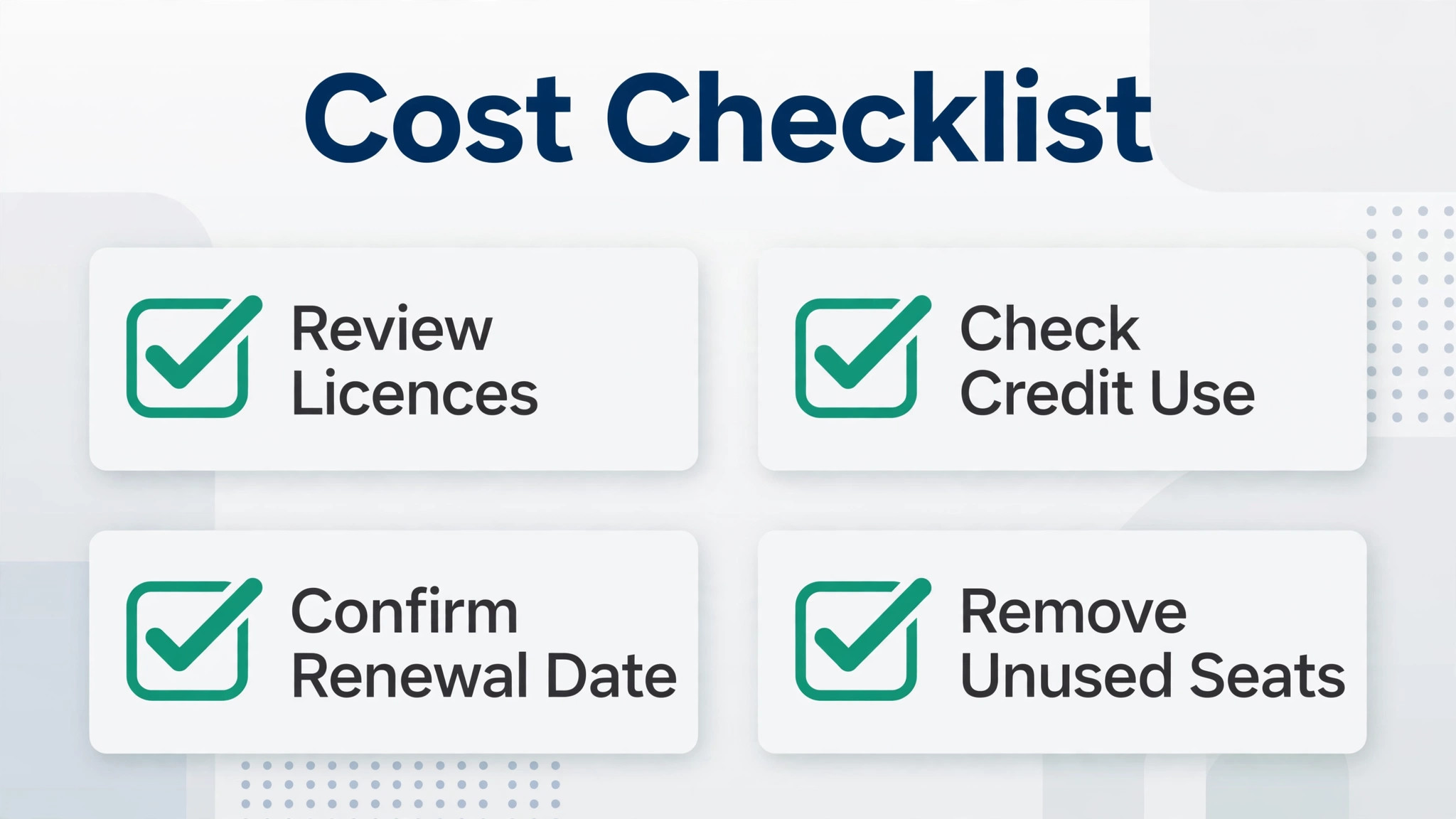
Confirm the individual Premium price and billing shape at checkout, because Adobe pages are region and login gated and listings differ. Pricing coverage reports Premium at 9 dollars and 99 cents a month billed monthly with no annual commitment, plus a 30 day free trial. If checkout shows a different figure for the region, the checkout figure governs, and the budget should be updated to match it before approval.
Confirm the Teams first year rate, the regular rate, and the two seat minimum in writing. Teams is reported at 4 dollars and 99 cents per licence per month in the first year, then 7 dollars and 99 cents, on an annual plan with a minimum of two seats. Record the renewal date alongside those figures, so the year two step is visible to finance from day one rather than discovered in month thirteen.
Confirm storage for the chosen plan, because pricing coverage reports conflicting storage figures for Premium. Do not approve a storage dependent workflow, such as large video libraries, until checkout or Adobe support confirms the storage allowance for the account. Confirm generative credits as well, at 250 credits a month on Premium and Teams licences and 4,000 credits on Firefly Pro, and check whether unused credits roll over or expire each month.
Confirm whether Express Premium is already included in any existing Creative Cloud plan, because duplication is the easiest Express cost to avoid. Check tax at checkout too, because published figures exclude tax, and the checkout total per licence is the figure finance should approve. A team that approves the headline rate and then sees a higher invoiced total will treat Express as a surprise cost, even when the tool itself works well.
Frequently Asked Questions
Premium costs 9 dollars and 99 cents a month for an individual, billed monthly with no annual commitment published, according to pricing coverage checked in October 2026. It includes premium templates and assets, brand kits, one-click resize, video background removal, and 250 generative credits a month. A 30 day free trial is available.
How much does Adobe Express Teams cost?
Teams costs 4 dollars and 99 cents per licence per month in the first year, then 7 dollars and 99 cents per licence per month, on an annual plan with a minimum of two seats. For the cost of Adobe Express for small business monthly at five licences, Teams totals 24 dollars and 95 cents a month in year one and 39 dollars and 95 cents a month afterwards.
Is Adobe Express free?
Yes, a free tier exists with templates, stock assets, and basic creation tools at no cost. It lacks premium templates, brand kits, video background removal, and the 250 monthly generative credits that Premium provides. A business that needs brand consistency weekly will likely need Premium or Teams, while an occasional maker may fit free.
How many generative credits do I get?
Premium and Teams licences include 250 generative credits a month per user, while Firefly Pro includes 4,000 generative credits a month, according to pricing coverage. Track credit use in the first month, because heavy AI makers may need Firefly Pro while template editors will stay well inside 250 credits.
No annual price for individual Premium appears on the Adobe pricing page as reported in pricing coverage, which describes Premium as billed monthly with no annual commitment. One pricing roundup mentions 99 dollars and 99 cents a year, but that figure conflicts with the monthly only description, so do not budget from it until checkout confirms an annual option.
Is Express included with Creative Cloud?
Pricing coverage reports that Express Premium is included with Creative Cloud Pro and certain other Creative Cloud plans. A business that already subscribes to Creative Cloud should check its plan before buying Express separately, because it may already own Express Premium and buying again would duplicate the cost.
Teams is usually better once headcount reaches two, because it costs less per licence than individual Premium in year one and afterwards, and it adds shared brand assets. Individual Premium suits solo owners and single seats outside a team. Mixed plans work well too, with heavy AI makers on Firefly Pro and everyone else on Teams.
Verdict
For most small businesses, the sensible Adobe Express answer is Teams for two or more makers, individual Premium for a solo maker, and Firefly Pro only for a heavy AI maker. Teams at 4 dollars and 99 cents per licence in year one and 7 dollars and 99 cents afterwards is one of the lowest team design bills available, and its brand sharing alone justifies the switch from separate individual seats. The cost of Adobe Express for small business monthly stays low only when licences match real makers, year two is budgeted from the start, and credits are managed by individual use.
Start free, test brand kits and premium assets for two weeks, then buy Teams for the makers who actually design weekly. Do that, and Express becomes a predictable, low cost design standard. Buy individual seats for everyone, ignore the year two rate, and upgrade the whole team for one heavy AI user, and the same tool will cost far more than it needs to for the same posts.
More Reading on Stratilyze
– Cost of Grammarly for a Small Business, Monthly – Best Website Builder for Wedding Photographers (12 Tools) – Best Class Management Software for Art Studios (5 Tools) – Best Booking Software for Nail Salons (11 Tools) – Best Order Management Software for Meal Prep Businesses (13 Tools)