
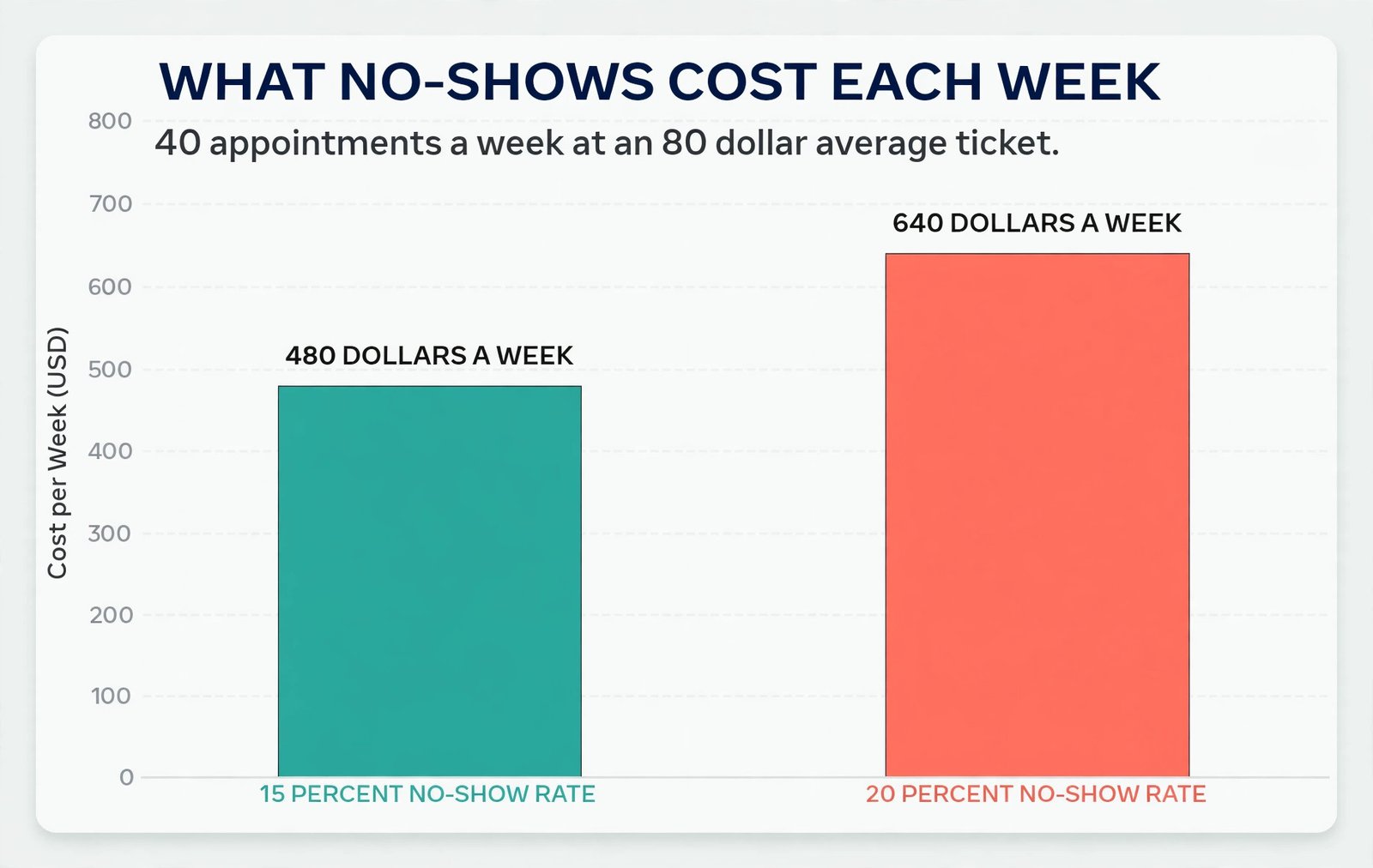
Industry tracking puts the average salon no-show rate at 15 to 20 percent when no automated reminder system is in place, and vendor and industry reports consistently put the reduction from automated reminders at 30 to 50 percent. For a salon doing 40 appointments a week at an average ticket of 80 dollars, even a 15 percent no-show rate means six empty chairs a week and about 480 dollars in lost service revenue before product waste, idle staff time and the clients who were turned away are counted. A small salon booking system setup is not mainly a software purchase.
It is a set of decisions about services, time, money and client behaviour, made once and then tested in real bookings, that turns that leak into booked, confirmed and paid time.
This guide walks through that setup in order. You will define services with honest durations and buffers, pick a tool that fits a solo chair or a small team rather than a chain, build a booking page a client can finish on a phone in under a minute, set reminders that confirm rather than nag, and put a fair no-show policy behind deposits and a waitlist. Prices quoted here reflect vendor pages and October 2026 comparison listings, and they change often, so check the official pricing page and checkout before you pay for any tool named here.
What a Small Salon Booking System Setup Actually Includes
A booking system has four parts, and a salon that buys only the first part will still struggle. The first part is the calendar itself, with staff schedules, service durations and buffers that stop double bookings and late running. The second part is the client facing booking page, where a new or returning client picks a service, a staff member and a time without creating an account, downloading an app or waiting for a reply. The third part is communication, meaning instant confirmation, reminders, reschedule links and rebooking prompts. The fourth part is money and protection, meaning deposits, card on file rules, cancellation terms and a waitlist that can refill a cancelled slot the same day.
Start With Services, Durations and Buffers
Software cannot fix a service menu that does not match real work. List every service exactly as clients ask for it, not only as staff shorthand describes it. A client searching for highlights should find highlights, even if your internal name is half head foils, and a client booking a nail service should see the difference between a basic manicure, a gel set and a removal plus a new set. Put the price or the starting price beside each service, and put the realistic duration beside it too. A price without a duration invites a client to book the cheapest option and expect the longest result.
Set durations from timed reality, not from optimism. Time ten recent appointments for each core service, including consultation, preparation, processing and cleanup, and use the typical time, not the fastest time. Colour work is where most salons understate time, because processing time is real chair time even when the stylist is free to do another task. If a cut and colour typically takes 120 minutes from greeting to payment, book 120 minutes. Booking 90 minutes because that looks better on a price list will push every later client late, and late running is one of the fastest ways to lose repeat bookings.
Buffers are the second duration decision, and they deserve the same honesty. A 10 to 15 minute buffer between clients covers cleaning, notes, a drink, a short delay and a proper handover, and it is cheaper than the alternative, which is a day that unravels by mid afternoon. Short services such as a brow shape or a fringe trim may need only five minutes, while chemical services, bridal work and large nail sets may need 15 to 20 minutes. Put buffers inside the system rather than relying on staff to remember them.
When a buffer is a system rule, no one has to defend it to a client who asks for a tighter slot, because the slot simply does not appear.
Add-ons need the same care. A toner, a treatment, extra length, nail art or a beard trim changes both price and time, and a booking system that treats add-ons as free text notes will misprice the visit. Set each add-on as a priced item with its own extra minutes, and set rules for which services it can join. Removal should be required before a new gel set where that is your policy, and a patch test should be required before certain colour services. Those rules feel strict on a booking page, but they prevent the far worse experience of a client arriving for a service you cannot safely start.
Finally, decide who can book what. A senior stylist may be the only person for corrections, extensions or complex colour, while cuts and blow dries may be open to every chair. New clients may need a consultation first for certain services, and junior staff may need longer durations for the same service while they build speed. A careful small salon booking system setup makes those rules visible in the booking flow, so clients choose a correct option first time, rather than booking the wrong chair and being moved by phone later.
Choose a Tool That Fits a Small Salon, Not a Chain
Salon tools fall into three broad groups, and the right group matters more than the prettiest dashboard. Getting that group right is a central step in a small salon booking system setup. The first group is salon specific platforms such as GlossGenius, Vagaro, Booksy and Fresha, built around chairs, services, client records and salon payments. The second group is general appointment tools such as Square Appointments, which suit a salon that already takes Square payments or sells retail at the till.
The third group is premium salon platforms such as Mangomint and Boulevard, which suit larger teams that need deeper staff controls, payroll help and advanced reporting, and which cost far more than a small salon usually needs at the start.
For a solo stylist or a two to three chair salon, the decision usually comes down to predictable monthly cost against marketplace reach. A platform with no marketplace fee keeps every booking at the same cost, which is easier to budget, while a marketplace platform can bring new clients who found you through its app, at a fee on that first visit. Neither model is wrong. A salon with a full book from referrals does not need to pay a marketplace fee for clients it already has, while a new salon in a busy area may gladly pay a one off fee for a client who then returns directly.
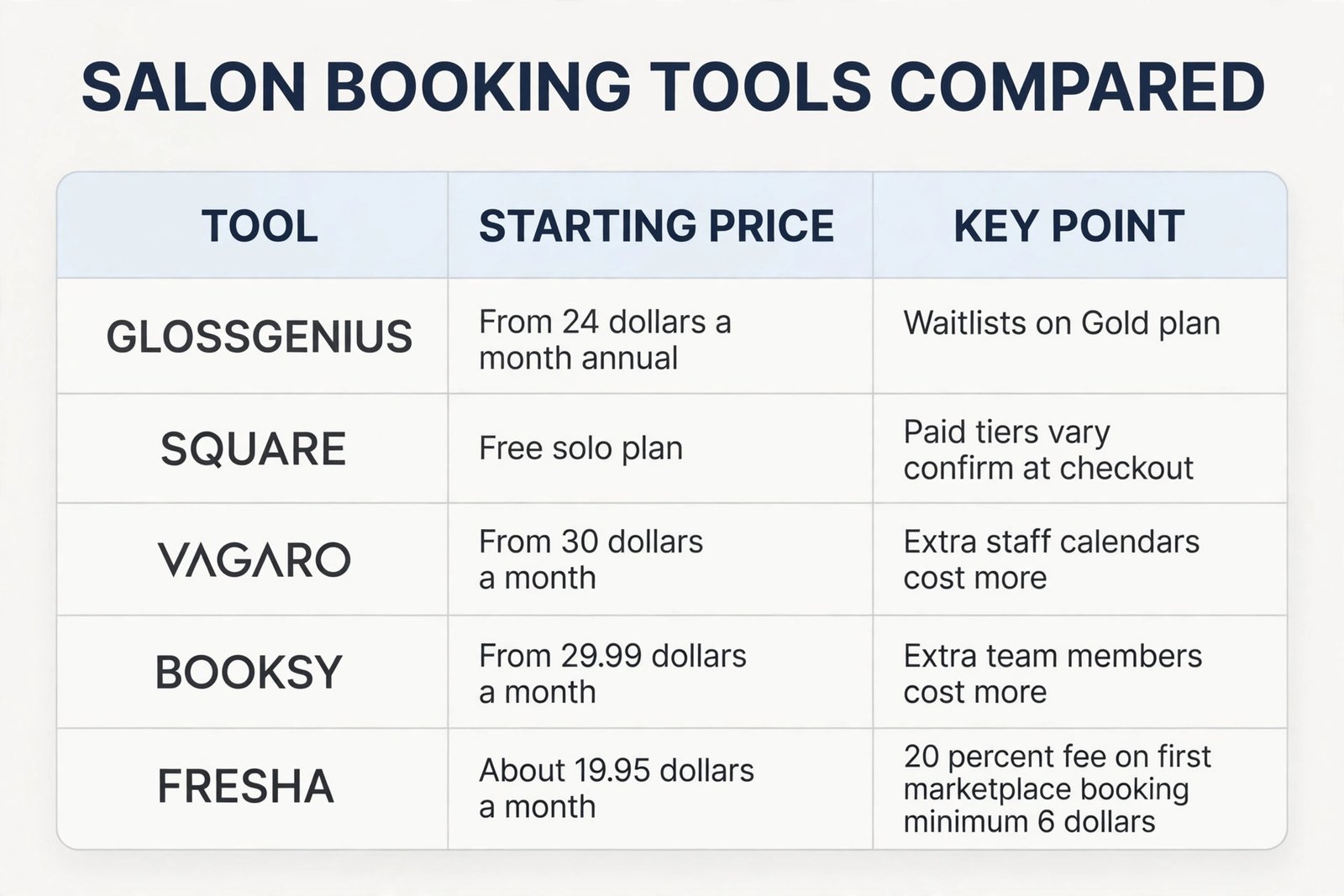
The table below gives starting prices from vendor pages and October 2026 listings. Treat every figure as a starting point, not a final bill, because staff count, text credits, add-ons and card rates change the total. Check the official pricing page and checkout before you commit, and price your actual team size, not the headline solo rate.
| Tool | Starting price | What to watch |
|---|---|---|
| GlossGenius | From 24 dollars a month on annual billing for Standard, 28 dollars monthly | Gold at 48 dollars annual adds waitlists, forms and rebooking prompts |
| Square Appointments | Free for a solo plan, paid plans per location | Paid tier prices have changed during 2026, so confirm the current tier at checkout |
| Vagaro | From 30 dollars a month for one bookable calendar | About 10 dollars a month for each extra staff calendar |
| Booksy | From 29.99 dollars a month for a solo plan | About 20 dollars a month per extra team member, plus optional Boost fees |
| Fresha | About 19.95 dollars a month for a solo plan | 20 percent fee on a first booking from its marketplace, minimum 6 dollars |
| Mangomint | From 120 dollars a month per location plus 10 dollars per user | A step up for larger small teams, not a starter price for one chair |
Card processing is a separate cost on every platform, and it is where small tickets feel the pinch. GlossGenius lists in person card payments at 2.4 percent plus 15 cents, and online payments at 3.4 percent plus 15 cents. Square lists in person payments at 2.6 percent plus 15 cents on its free plan. On a 40 dollar service, that difference is small per visit, but across 150 card payments a month it becomes a real line in the accounts. Do not pick a platform on subscription price alone. Add a month of card fees at your average ticket, add text credits if they are charged separately, and add any marketplace fee on new clients, then compare totals.
Build a Booking Page Clients Can Finish in Under a Minute
Speed is the booking page test that matters most, and it is also a practical test of a small salon booking system setup, because a slow page loses the booking it was built to capture. Every extra field, account step or confusing service name is a chance for a client to leave and call a competitor, or to send a direct message instead and restart the whole back and forth. Aim for a flow a returning client can finish in under a minute, and a new client in under two minutes.
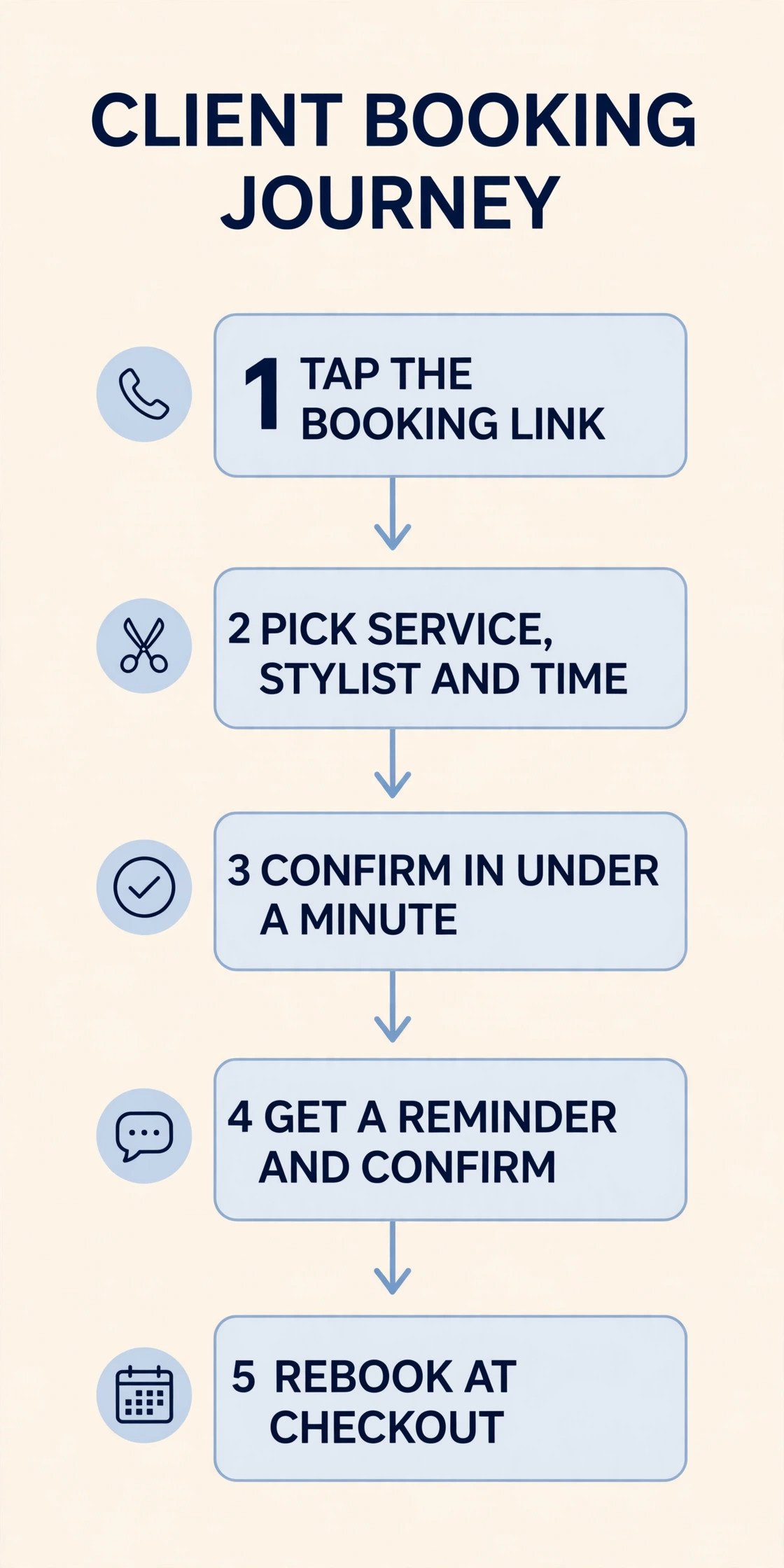
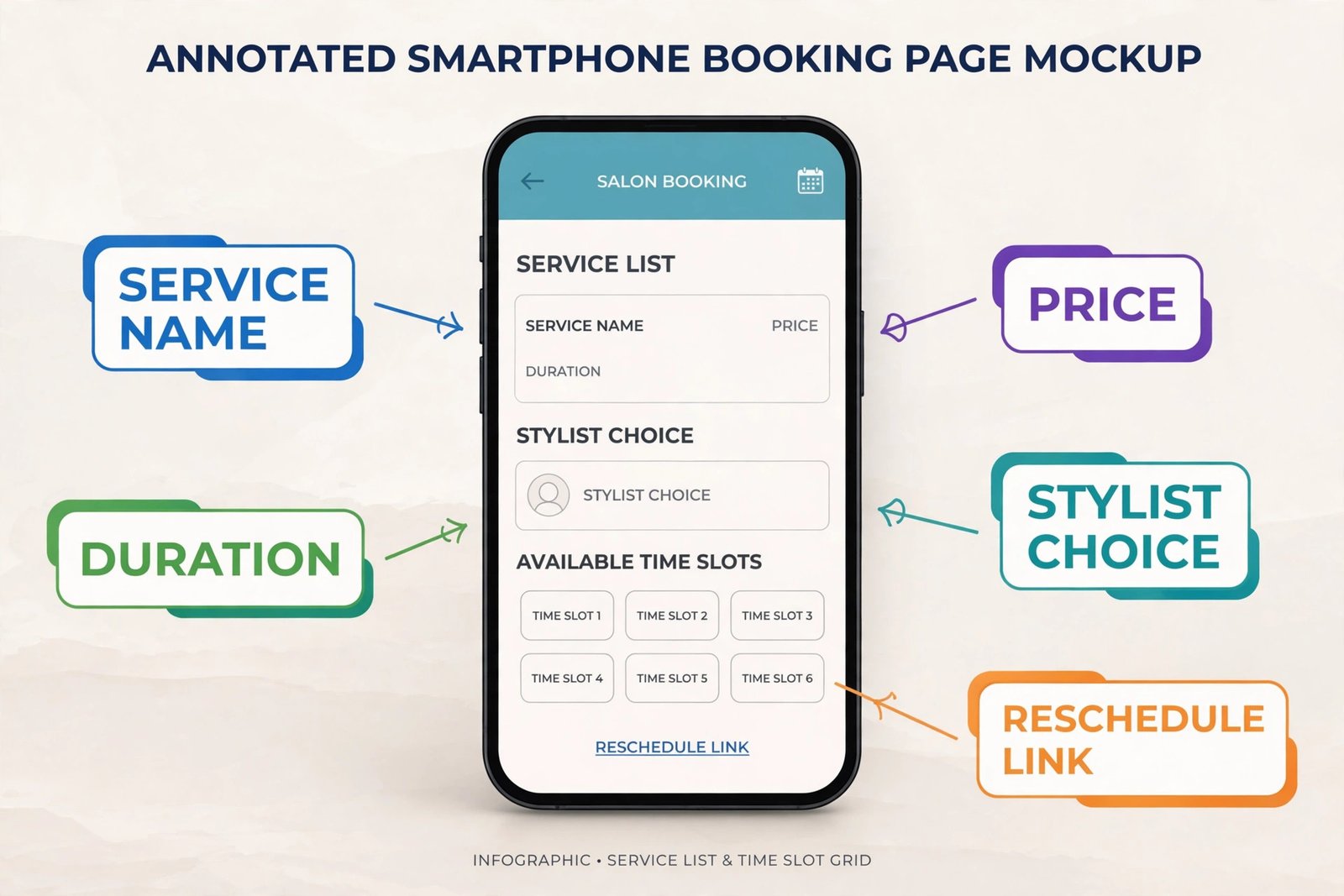
That means a clear service list, a staff choice that includes first available, a calendar that shows only real open slots, and a confirmation screen that states the service, stylist, date, time, price and how to change the booking.
Set Reminders That Confirm, Not Nag
Reminders are the single highest return part of a small salon booking system setup, and they work best as a short sequence with a clear job for each message. Industry and vendor reports put SMS open rates at 95 to 98 percent, against 20 to 35 percent for email, which is why text reminders outperform email alone for time sensitive appointments. That does not mean email is useless. Email is better for longer detail, such as preparation instructions, aftercare and a receipt, while text is better for the short confirmation that needs a quick reply.
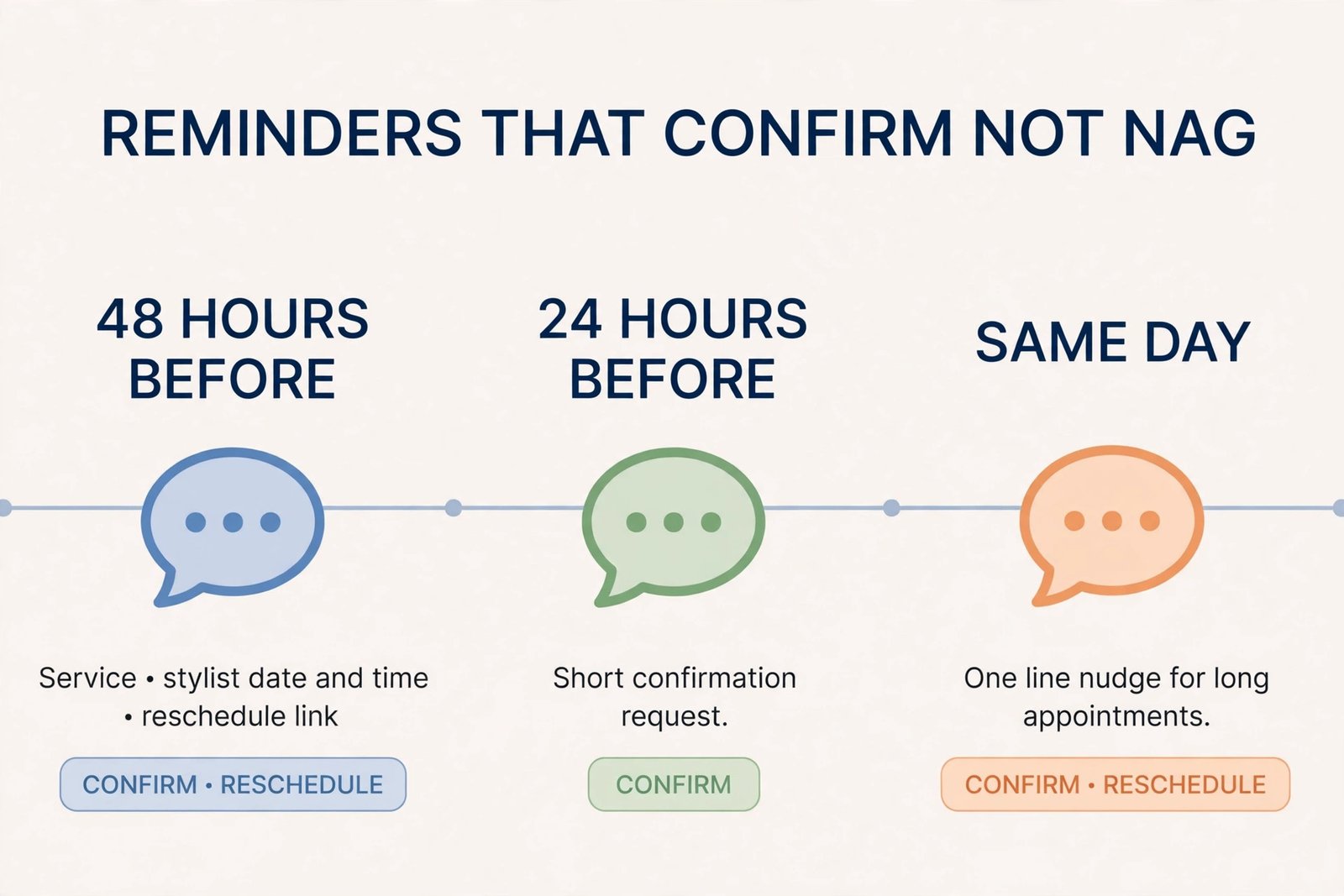
A practical sequence for most salons is three touches, and no more. The first message goes out 48 hours before the appointment, with the service, stylist, date, time and a one tap reschedule link. That timing matters, because it falls before most cancellation windows close, so a client who cannot attend can cancel in time for you to refill the slot. The second message goes out 24 hours before, or on the morning of the appointment, as a short confirmation request. The third is a same day nudge two hours before, kept to one line, for high value or long appointments where a late no-show wastes the most time.
For a short trim, two touches are often enough, and adding a third can feel like nagging.
Make every reminder two way. A message that only says that an appointment is coming, with no reply option and no reschedule link, tells you nothing about whether the client will arrive. A message that asks for a simple confirm reply, and that links to reschedule in one tap, turns silent clients into early cancellations you can act on. Track replies daily, not weekly. A client who has not confirmed by the morning of the appointment is a flag for a quick personal message or call, not a surprise at the chair.
Fix No-Shows With Deposits, Policy and a Waitlist
Reminders reduce no-shows, but they do not remove them, because some clients will still forget, double book or simply not turn up, which is why a small salon booking system setup needs a deposit and waitlist layer as well as reminders. The fix is a system that makes showing up easy, cancelling early easy, and no-showing costly enough to change behaviour, without punishing loyal clients or creating arguments at reception.
Start with deposits for the appointments where a no-show hurts most. Long, high value or hard to refill services, such as full colour, extensions, bridal work and large nail sets, are the right place for a deposit, typically 25 to 50 percent of the service price, taken at booking and applied to the visit. Vendor and industry reports put the no-show reduction from deposits as high as 50 to 70 percent for new clients, because a client who has already paid something has a reason not to forfeit it.
Keep deposits off short, low value services for returning clients where the friction would cost more bookings than it saves, and state clearly when a deposit is refundable, transferable to a rescheduled visit, or kept after a late cancellation.
Write a cancellation policy a client can repeat back in one sentence. A common fair version is that cancellations with at least 24 hours notice can reschedule free of charge, cancellations inside 24 hours lose the deposit or pay a stated fee, and a no-show without any message is charged the same fee and must prepay in full for the next booking. Put that policy on the booking page, in the confirmation message and in the reminder, so no client can honestly say they did not see it. Apply it consistently, including to friendly regulars, because a policy applied only to strangers is not a policy, it is a source of resentment.
A waitlist is the other half of the fix, and it only works if it is fast. When a slot opens, message waitlisted clients in order, with a short expiry, such as 30 minutes to claim the slot, and move to the next person if there is no reply. A waitlist that messages one person and waits all day will leave the slot empty, while a waitlist that messages three people at once will double book it. Use the system waitlist where your platform has one, and keep a simple manual list at reception for clients who prefer a call. The goal is a cancelled slot refilled the same day, not a perfect list that never moves.
| No-show cause | Fix that works | How to set it |
|---|---|---|
| Client forgot the appointment | Two way text reminders at 48 hours and on the day | Turn on confirm replies and a one tap reschedule link |
| Client booked too far ahead | Rebooking prompt and a reminder one week out for long lead bookings | Add a long lead reminder for bookings made more than three weeks ahead |
| Client could not reschedule easily | One tap reschedule inside the reminder, no phone call needed | Test the reschedule link yourself before launch |
| Client was unsure about price or service | Clear service names, prices and durations on the booking page | Audit the service menu with a new client test booking |
| New client had no stake in the visit | Deposit of 25 to 50 percent on long or high value services | Apply deposits to new clients first, then extend with care |
| Late cancellation left no time to refill | 48 hour reminder before a 24 hour cancellation window closes | Time the first reminder to fall before the window, not after it |
| Cancelled slot sat empty | Waitlist with a 30 minute claim window, messaged in order | Message in order, move on fast, and log refills weekly |
| Repeat no-show client kept booking freely | Card on file and prepayment in full for the next visit | Apply the rule after a second no-show, and explain it in writing |
Your Two Week Setup Checklist
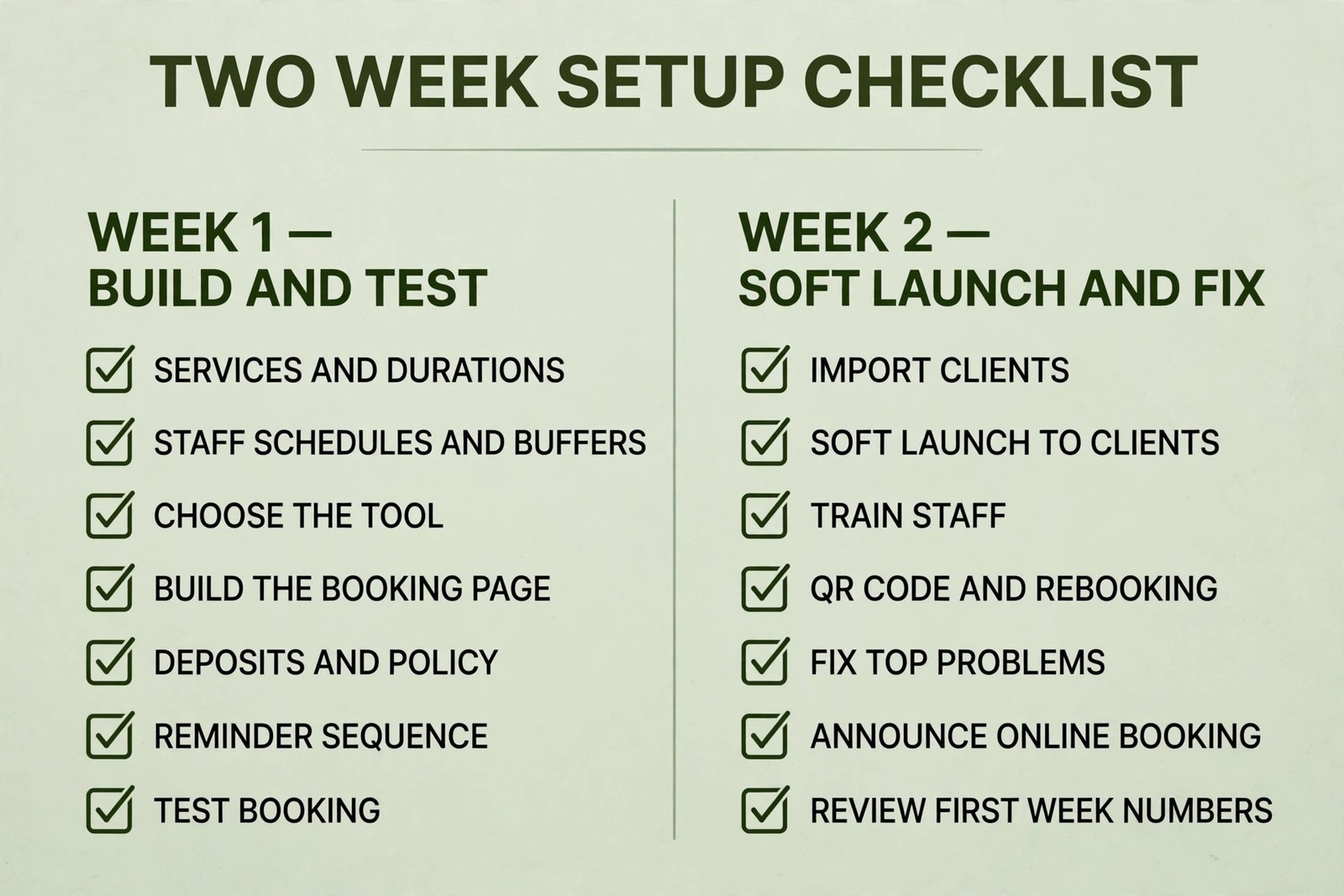
A setup that drags on for two months will lose staff enthusiasm and client patience, so a small salon booking system setup should run as a two week project with a clear order. Week one is build and test, week two is soft launch and fix, and public launch comes only after real clients have booked, rescheduled and cancelled without help. The checklist below is the overview proof for this guide, because a salon that completes every item has a system, while a salon that completes only the booking page has a link.
| Day | Task | Done when |
|---|---|---|
| Day 1 | List services with real names, prices, durations and add-ons | A new client can pick the right service without calling |
| Day 2 | Set staff schedules, buffers and who can book what | No service can be booked in a gap shorter than its duration |
| Day 3 | Choose the tool on total monthly cost, not headline price | Subscription plus card fees plus texts plus marketplace fees are totalled |
| Day 4 | Build the booking page and add the link to Instagram, Facebook and Google | The link works from a phone, with no account or app download |
| Day 5 | Set deposits, card on file rules and the cancellation policy in writing | The policy appears on the booking page and in confirmation messages |
| Day 6 | Set the reminder sequence at 48 hours, 24 hours and same day for long services | Every message has a confirm reply and a reschedule link |
| Day 7 | Test book, reschedule, cancel and waitlist with staff and one regular client | Every test produces a clear client message and a correct calendar entry |
| Day 8 | Import or enter existing clients, with notes, formulas and preferences | Staff can see notes at check-in without searching paper books |
| Day 9 | Soft launch to existing clients by text and email, with the booking link | At least ten real bookings come through the new system |
| Day 10 | Train staff on walk-ins, double bookings and the waitlist claim window | Every staff member can handle a walk-in and a cancellation without the owner |
| Day 11 | Add a QR code at reception and a rebook before you leave prompt | Rebooking at checkout is part of the payment routine |
| Day 12 | Fix the top three problems from soft launch, and update service durations | The same error does not appear twice in test bookings |
| Day 13 | Announce online booking on social channels and pin the post | The announcement links directly to the booking page, not to the home page |
| Day 14 | Review the first week numbers, including online share and no-show rate | The baseline and the first week are written down for comparison next month |
How to Choose Between a Simple Tool and a Full Salon Platform
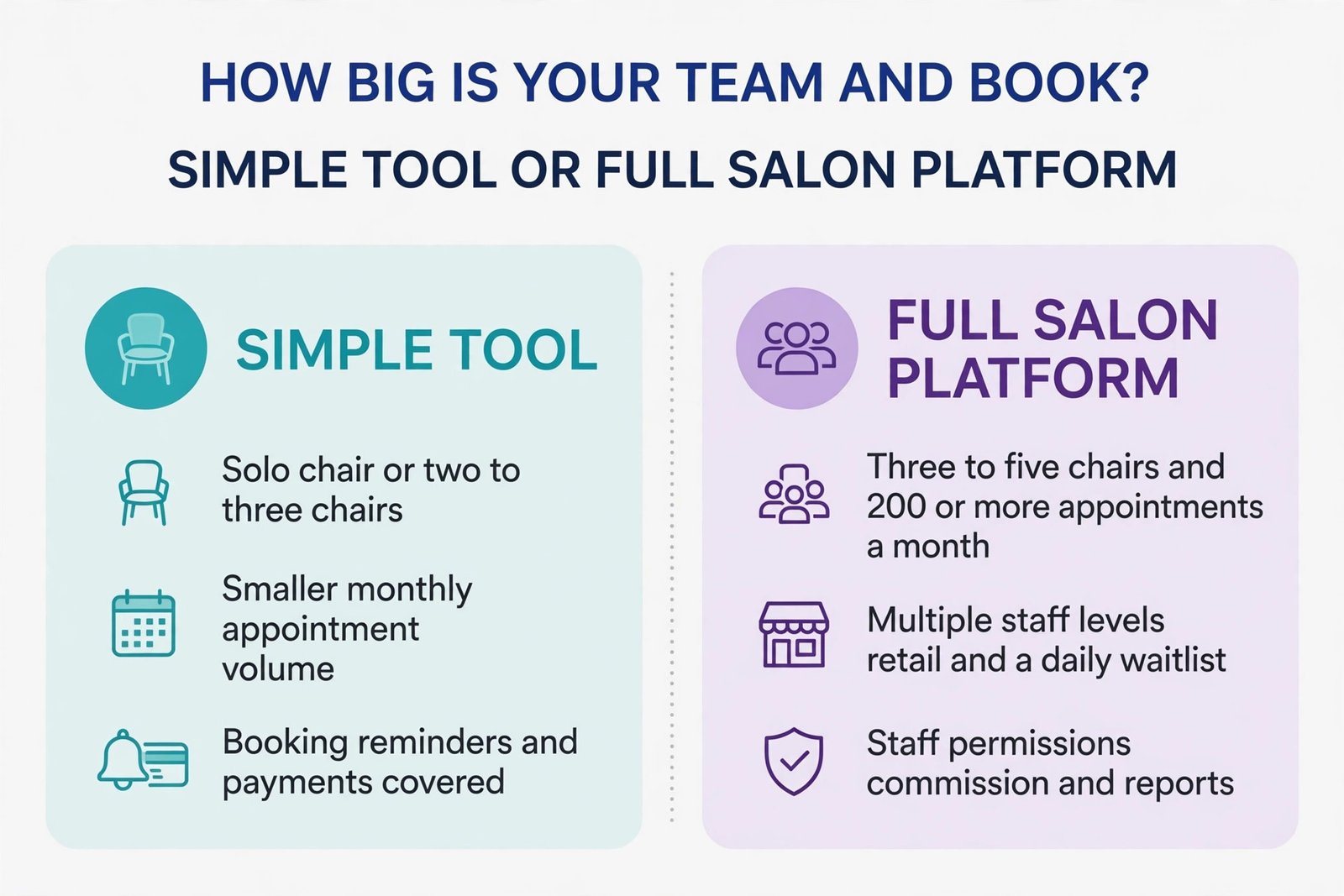
A three to five chair salon with 200 or more appointments a month, multiple staff levels, retail sales and a waitlist that matters daily will usually need a fuller salon platform. At that volume, staff permissions, commission tracking, inventory for retail and colour, client notes that travel between chairs, and reports by staff member and service stop being nice extras and start being daily controls. The extra subscription cost is easier to justify when it replaces separate tools for payments, messaging and reporting, and when it saves the owner several hours a week on admin.
Ask four questions before you sign a yearly plan. First, can a client book, reschedule and cancel without help, on a phone, in under two minutes. Second, can staff see the notes, history and buffer they need without asking the owner. Third, does the total monthly cost, including card fees, texts and marketplace fees, stay below the value of the no-shows and admin time it saves. Fourth, can you export your client list, service history and appointments if you leave. A tool that fails the fourth question is a lock-in risk, no matter how good its booking page looks, so test the export during the trial, not after a year of data is inside it.
Mistakes That Quietly Break a New Booking System
The first mistake is leaving the old booking channels open with no rules. If clients can still book by direct message, phone, text and walk-in with no record in the system, the calendar will double book, because the system only knows about bookings made inside it. Close or redirect the old channels gradually. Keep the phone for urgent questions and for clients who cannot book online, but route routine bookings to the link, and enter every phone or walk-in booking into the system at once. A single source of truth is not a slogan. It is the only way a calendar stays trustworthy, and it is a basic test of a small salon booking system setup.
The second mistake is setting durations from the price list rather than from timed work. A salon that books colour in 90 minutes when it takes 120 will run late by noon, cut buffers to catch up, and then blame the software for a day that was impossible from the start. Fix durations first, then judge the tool. The third mistake is turning on online booking for every service at once, including complex work that needs a consultation. Start with straightforward services, add complex services only after consultation rules, patch test rules and deposit rules are tested, and keep a consultation service on the booking page for new colour clients.
The fourth mistake is a reminder sequence that is too long, too vague or too late. A single email reminder the day before, with no reply option, will not move a 16 percent no-show rate much. A five message sequence, including marketing messages mixed with reminders, will train clients to ignore all of them. Keep reminders short, specific and separate from marketing, and keep the first reminder before the cancellation window closes. The fifth mistake is a policy that exists on paper but is never enforced, or enforced only when the owner is angry.
Staff need a written script for the first late cancellation, the first no-show fee and the first prepayment request, so enforcement is calm, consistent and not personal.
The sixth mistake is launching without a waitlist or a refill routine. A cancellation is not a loss if it is refilled, and it is a full loss if no one is messaged. Assign one person each day to watch cancellations and work the waitlist, even in a solo salon where that person is the owner between clients. The seventh mistake is ignoring the data after launch. Check weekly which services are booked online most, which staff are most requested, which days have gaps, and which services produce the most late cancellations.
Those answers should change service durations, buffer times, deposit rules and even opening hours over the next quarter, because a booking system that never changes after launch slowly drifts away from how the salon really works.
Launch Week and the First 30 Days
Launch week should feel quiet, not dramatic. Send the booking link to existing clients first, with a short message that states the benefit in their terms, such as booking any time without waiting for a reply, and rescheduling in one tap. Ask them to book their next visit online, and thank the first clients who do. Post the announcement on social channels only after existing clients have tested the flow, because a public post that drives new clients into a broken booking page costs more goodwill than a slower launch.
For related reading, best AI tools for nail salons covers tools for nail specific booking and client work, best AI tools for barbershops is useful if your salon includes barber services, best scheduling apps compares general scheduling options beyond salon platforms, best AI tools for small business puts booking in the wider small business toolkit, and automate small business with AI shows how reminders and rebooking fit a broader automation routine.
Frequently Asked Questions
How long does a small salon booking system setup take?
A focused setup takes about two weeks, with week one for services, tool choice, booking page, reminders and deposits, and week two for a soft launch to existing clients and fixes. A solo stylist with a simple menu can finish faster, while a multi chair salon with imported client history should allow the full two weeks rather than rushing a public launch.
How much should a small salon pay for booking software?
A solo stylist can start at 0 dollars on a free plan plus card fees, or from about 24 dollars a month on annual billing for a salon specific platform, while a small team should budget 30 to 150 dollars a month for subscription plus card fees and text costs. Price your actual team size and monthly appointments, including card rates and any marketplace fee, and check the official pricing page and checkout before you pay.
Do I need deposits to reduce no-shows?
Deposits help most for long, high value or hard to refill services, where a 25 to 50 percent deposit taken at booking gives a new client a reason to attend or cancel early. For short services with returning clients, reminders and easy rescheduling often reduce no-shows enough without deposit friction, so apply deposits where the loss is greatest first.
What reminder timing works best for salons?
A 48 hour reminder with a confirm reply and a reschedule link, followed by a 24 hour or morning of confirmation, works well for most salons, with a same day nudge two hours before for long or high value appointments. The key timing rule is that the first reminder must arrive before the cancellation window closes, so a client can cancel in time for the slot to be refilled.
Should I keep taking bookings by phone and direct message?
Keep the phone for urgent questions and for clients who cannot book online, but enter every phone, message and walk-in booking into the system at once, and route routine bookings to the online link. Running paper, messages and a digital calendar in parallel is the fastest route to double bookings, because no single calendar holds the truth.
Can clients book without downloading an app or creating an account?
Yes, on most salon platforms clients can book from a browser link with no app download and no forced account, and that low friction flow is one of the main reasons online booking converts. Test the flow yourself on a phone before launch, and prefer a tool that lets a client see real times and confirm in under a minute.
A Fuller Book Without a Fuller Phone
A good booking system, built through a careful small salon booking system setup, does not make a salon busier by magic. It makes the bookings you already earn easier to keep, easier to confirm and easier to refill when plans change. Define services honestly, pick a tool on total cost for your team size, build a page a client can finish on a phone, send reminders that ask for a confirmation, back long services with a fair deposit, and work a fast waitlist every day. Do those six things, measure online share and no-show rate for a month, and adjust durations, reminder timing and deposit rules from what the numbers show. The reward is not only fewer empty chairs.