

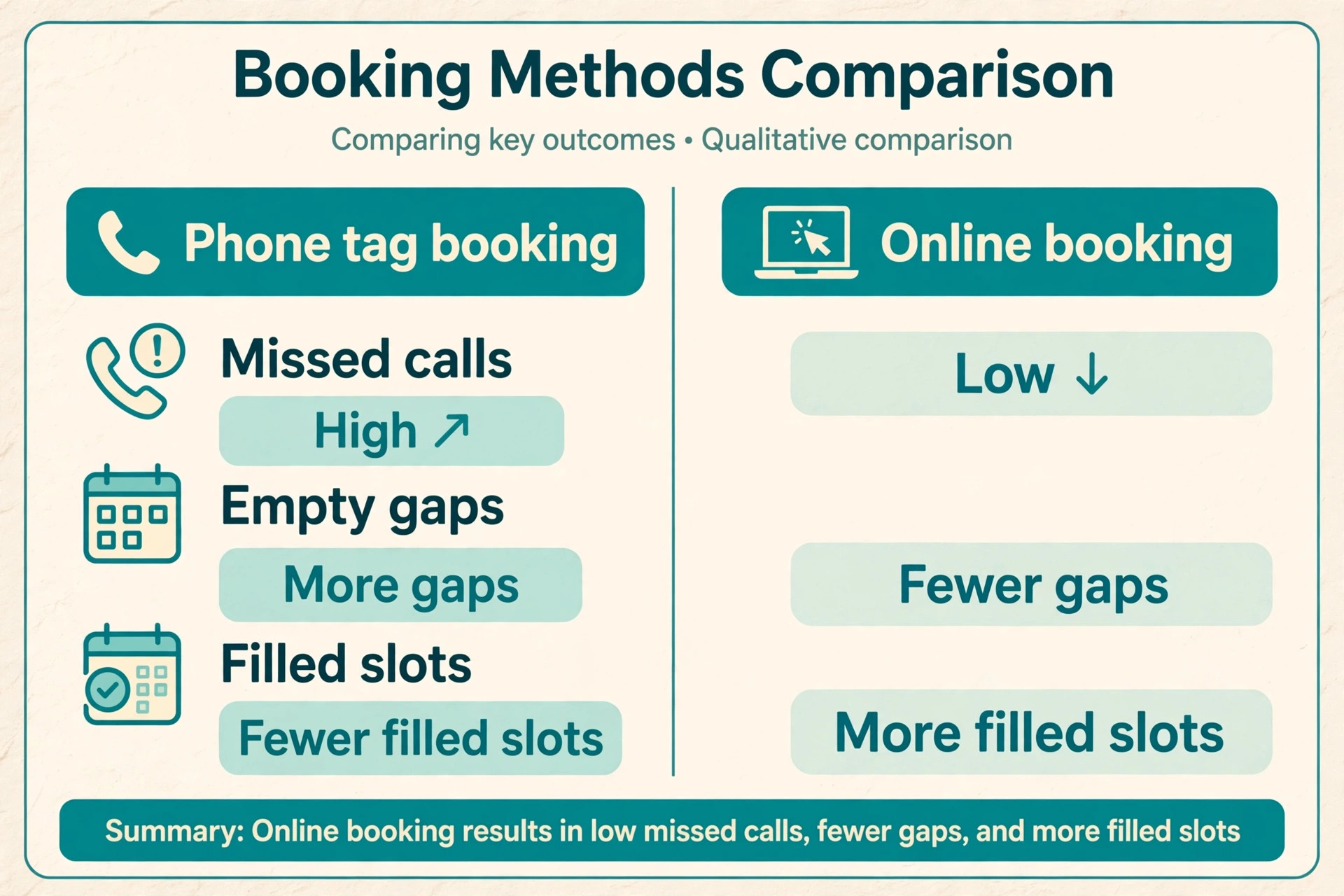
Two grooming salons open at 9 am on a Saturday. In the first, the groomer is mid bath while the phone rings and goes to voicemail. By lunch, three callers have booked elsewhere, and the afternoon has a gap that nobody will fill. In the second salon, the booking page took four appointments overnight, two clients confirmed by text before breakfast, and a waitlist message went out the moment a morning slot opened. The grooming skill in both rooms may be identical. The difference is the booking system around it. That contrast is why more owners now decide to use AI for pet grooming appointments, not to replace the groomer, but to protect the groomer’s time.
This guide covers the full loop, from the first booking click to the review that brings the next client in. You will see how a booking page, an AI phone helper, reminders, deposits, and a timed review request fit together, what each part costs, where setup usually goes wrong, and how to keep the service feeling personal. Prices change often, so check the official pricing page and checkout before you pay for any tool named here.
What an AI Booking System Actually Does in a Grooming Salon
An AI booking system is not one product. It is usually a combination of four pieces that work together. First, an online booking page lets clients pick a service, a groomer, and a time without calling. Second, a calendar and staff schedule stops double bookings and shows real gaps. Third, automated messages confirm bookings, send reminders, and chase a reply when a client goes quiet. Fourth, an AI receptionist or chatbot answers calls and messages when staff cannot, collects the details that matter for grooming, and writes the booking into the same calendar.
Grooming needs more detail than a haircut booking. Breed, size, coat condition, matting, temperament, last groom date, and vaccination status all change how long a groom takes and who should do it. A generic scheduler that only asks for a name and a time will create problems at the table. A grooming specific system asks those questions up front and blocks the right amount of time for a large double coated dog.
AI helps most in the gaps between jobs. It can answer a price question at midnight, offer the next open slot when a client cancels, send a reminder at the right hour, and draft a reply to a review. The salons that get the best return treat AI as a front desk helper with clear limits. Anything about health, behaviour, pricing for a badly matted coat, or a complaint goes to a human, fast, with the full conversation history attached.
How to Use AI for Pet Grooming Appointments Without Losing the Personal Touch
Clients choose a groomer for trust, not for software. A regular client wants to know that the person who knows their dog’s fear of the dryer, skin sensitivity, and preferred cut will still be there. That trust is easy to damage with a cold booking flow, such as a form that asks for a card before it asks for the dog’s name, or a reminder that reads like a bill.
That is the test to apply when you use AI for pet grooming appointments in a real salon. Every automated step should either save the client effort or give the groomer better information. If it does neither, remove it. A booking page that remembers the pet, the last cut, and the preferred groomer passes the test. A chatbot that forces a client through five screens to ask one price question does not. A reminder that includes the pet’s name, the service, and a one tap reschedule link passes the test. A reminder that only says an appointment is coming up does not.
Personal touch also lives in the handoff. Tell clients plainly when they are talking to an automated helper, and give them a fast way to reach a person. A short line on the booking page works well, for example that an assistant takes bookings after hours and a groomer reviews every new booking each morning. Record the details the assistant collects, and make sure the groomer reads them before the dog arrives. When the groomer greets a first time client by name, mentions the matting behind the ears noted in the booking, and asks about the dryer concern already on file, the client does not care whether a human or a helper took the booking.
They care that the salon listened.
Set one rule for tone. Write the confirmation, the reminder, and the review request in your own words first, then load them into the tool. Use the pet’s name, avoid jargon, and never send a marketing message in the same text as a reminder.
The Booking Workflow That Fills Gaps Instead of Creating Them
A good booking workflow answers four questions in order. What does the client want, which pet is it for, when can it happen, and what happens if plans change. The workflow below shows how to use AI for pet grooming appointments from first click to pickup, with a human check at each risky step.
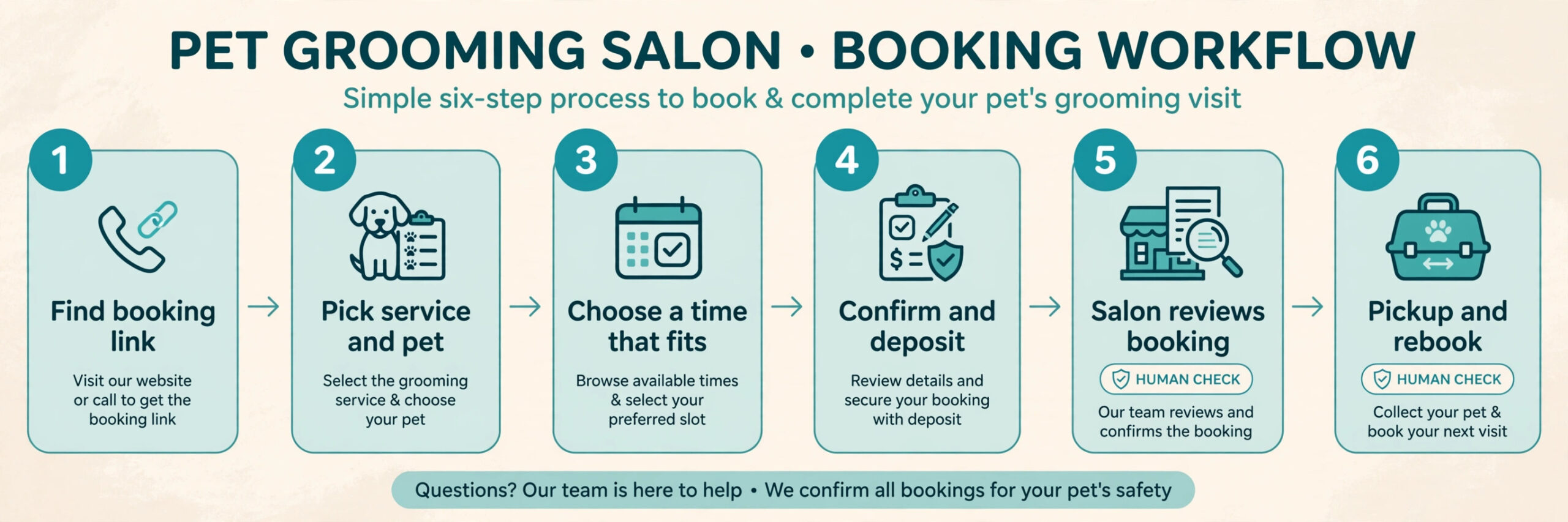
Step 1. The client finds the booking link on your website, Google profile, Instagram bio, or text signature. The page shows real availability, not a request form that promises a reply later. Clients who have to wait for a callback often book elsewhere.
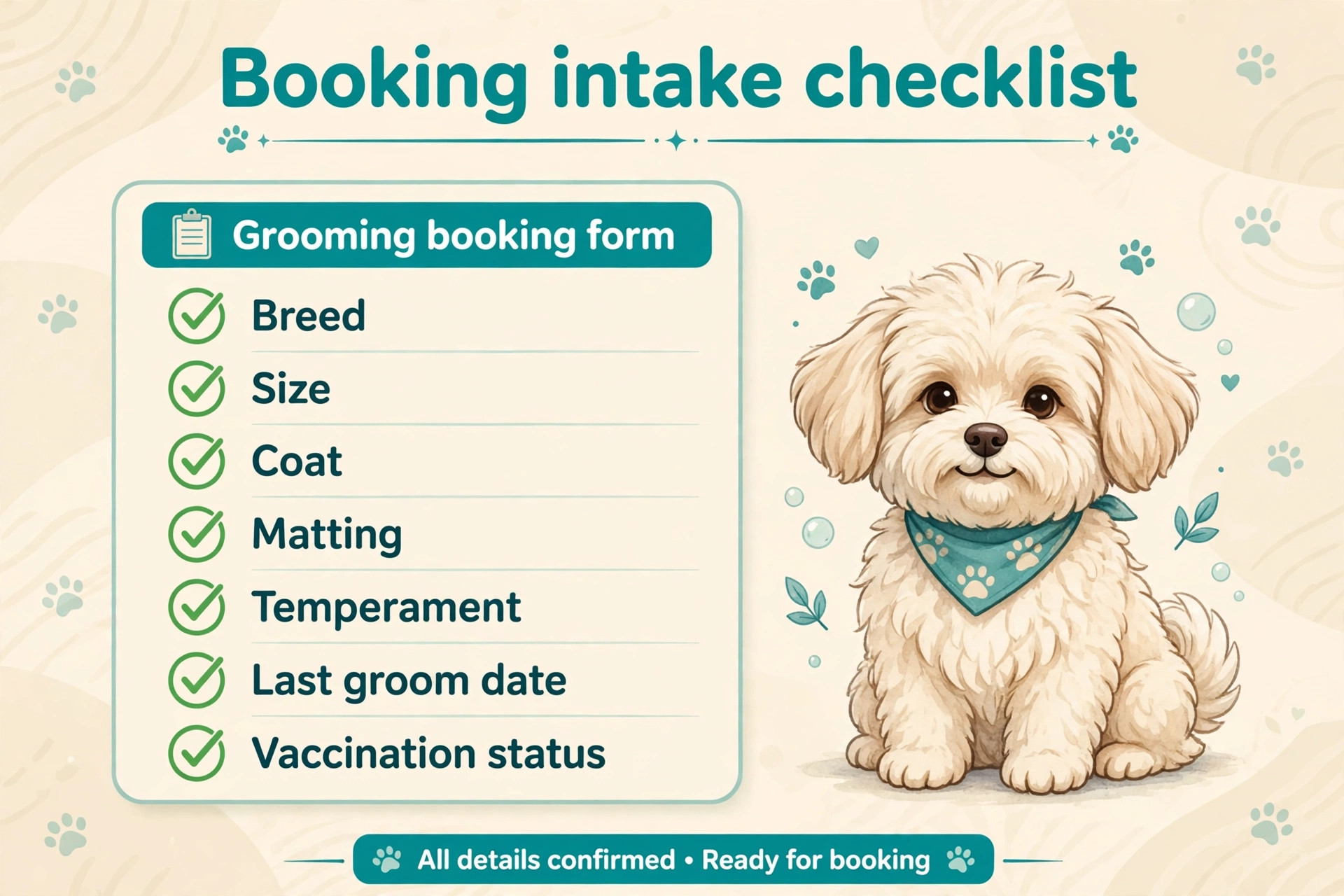
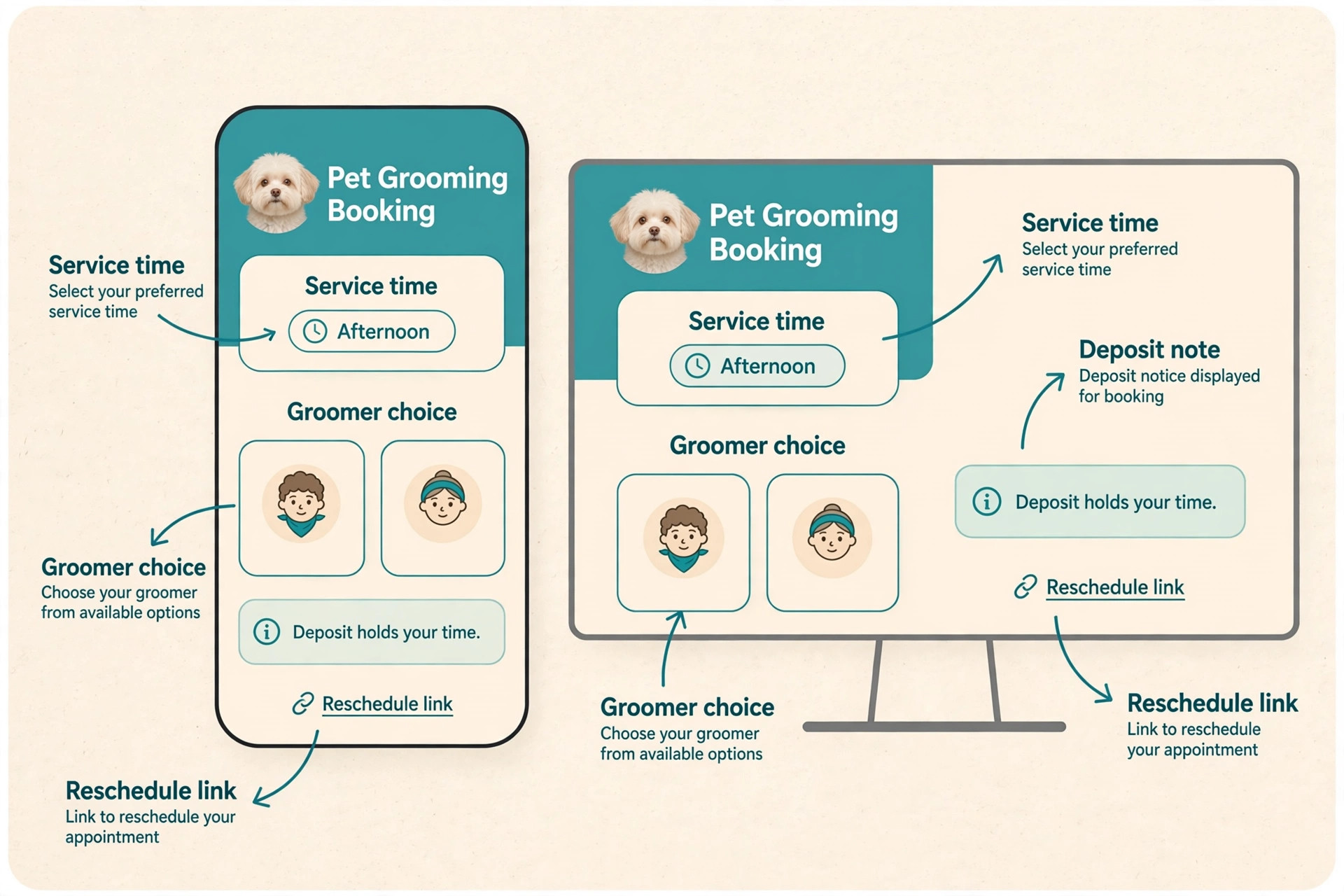
Step 2. The client picks a service and a pet, or adds a new pet. For a new pet, the form asks for breed or mix, approximate weight, coat length, matting, temperament notes, and the date of the last groom. Keep the form short enough to finish on a phone, and move vaccination proof and detailed history to the confirmation step.
Step 3. The system offers times that fit the groomer, the service length, and the buffer between dogs. A full groom for a large dog needs more time than a bath and tidy for a small dog. If you run a mobile service, the system should also group bookings by area so driving time does not eat the day.
Step 4. The client confirms, pays a deposit where your policy requires one, and gets an instant confirmation with the date, the service, the groomer, and the drop off window. The confirmation should also state the cancellation window in plain words, because a client who agreed to it at booking usually will not argue later.
Step 5. The salon reviews new bookings each morning, checking first visits, flagged coats, and any note that needs a call, such as a senior dog, a recent surgery, or a bite history. The AI helper can collect information, but it should not approve a risky booking on its own.
Step 6. At pickup, the groomer notes the cut, the coat condition, any skin issue spotted, and the recommended next groom date, then rebooks on the spot or sends a rebooking link within a day. A client who leaves without a next date must be won back later with marketing, and that costs more than a 30 second conversation at the till.
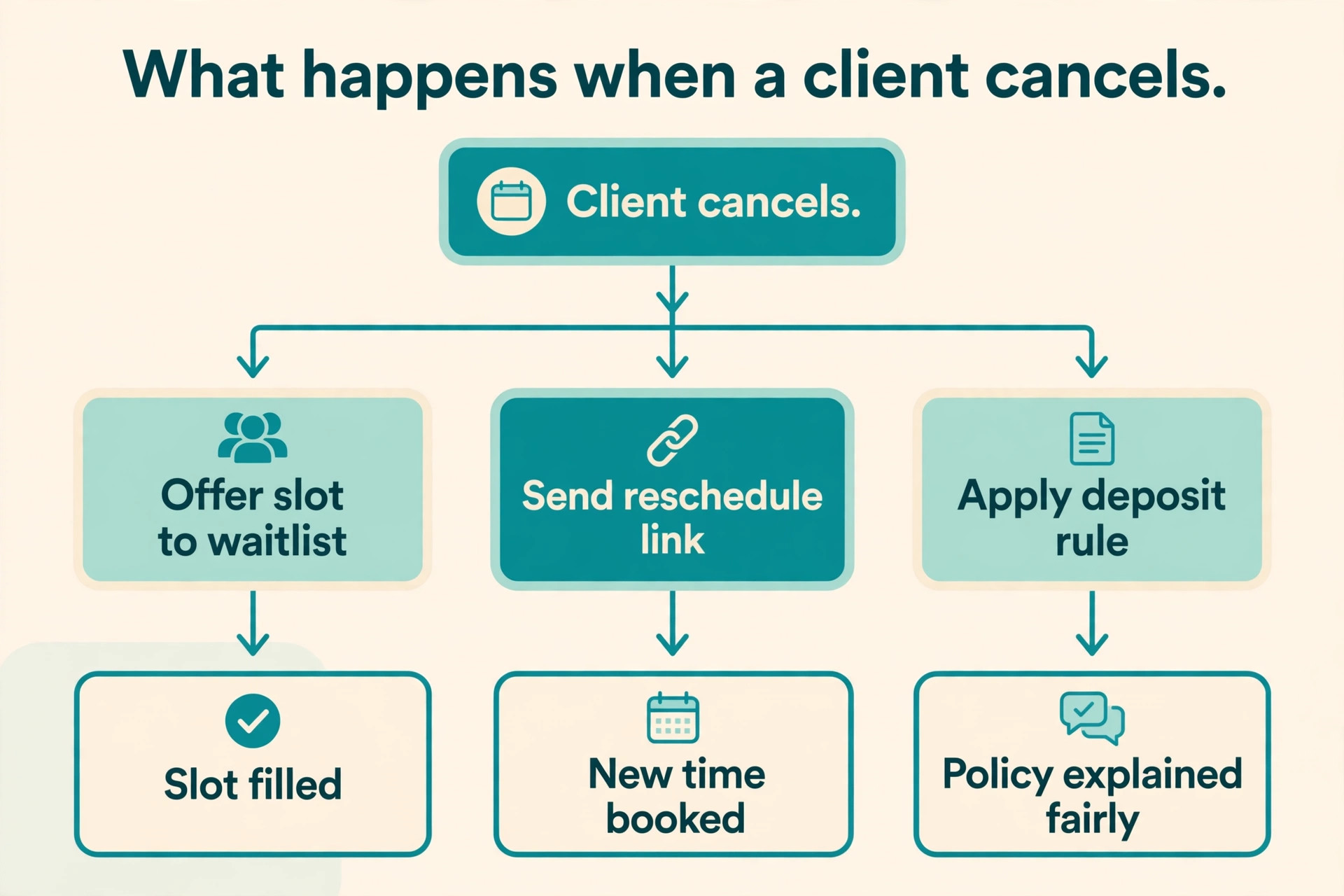
Two design choices make this workflow work. First, show a waitlist on the booking page and in texts. When a slot opens, offer it to the waitlist in order, with a short reply window, before it opens to everyone. Second, keep phone booking open. Some clients will always want a human voice, and the goal is fewer phone calls, not zero phone calls.
Reminders That Cut No-Shows Without Annoying Clients
No-shows are the quiet profit leak in grooming. Industry guides commonly put a typical no-show rate between 5 percent and 15 percent. For a salon doing 40 grooms a week at an average ticket of 65 dollars, a 10 percent no-show rate means four empty slots a week, or about 260 dollars of lost capacity before tips and retail are counted.
When you use AI for pet grooming appointments, the reminder sequence matters more than the reminder tool. The pattern that works best in salon guides is a two touch sequence, with an optional third touch for bookings made far ahead. Send the first reminder 48 hours before the appointment, when a client can still reschedule and you can still fill the slot. Send the second reminder on the morning of the appointment, short and practical, with the pet’s name, the time, and a reschedule link. For a booking made more than three weeks ahead, add a gentle reminder one week before, so the appointment does not come as a surprise.
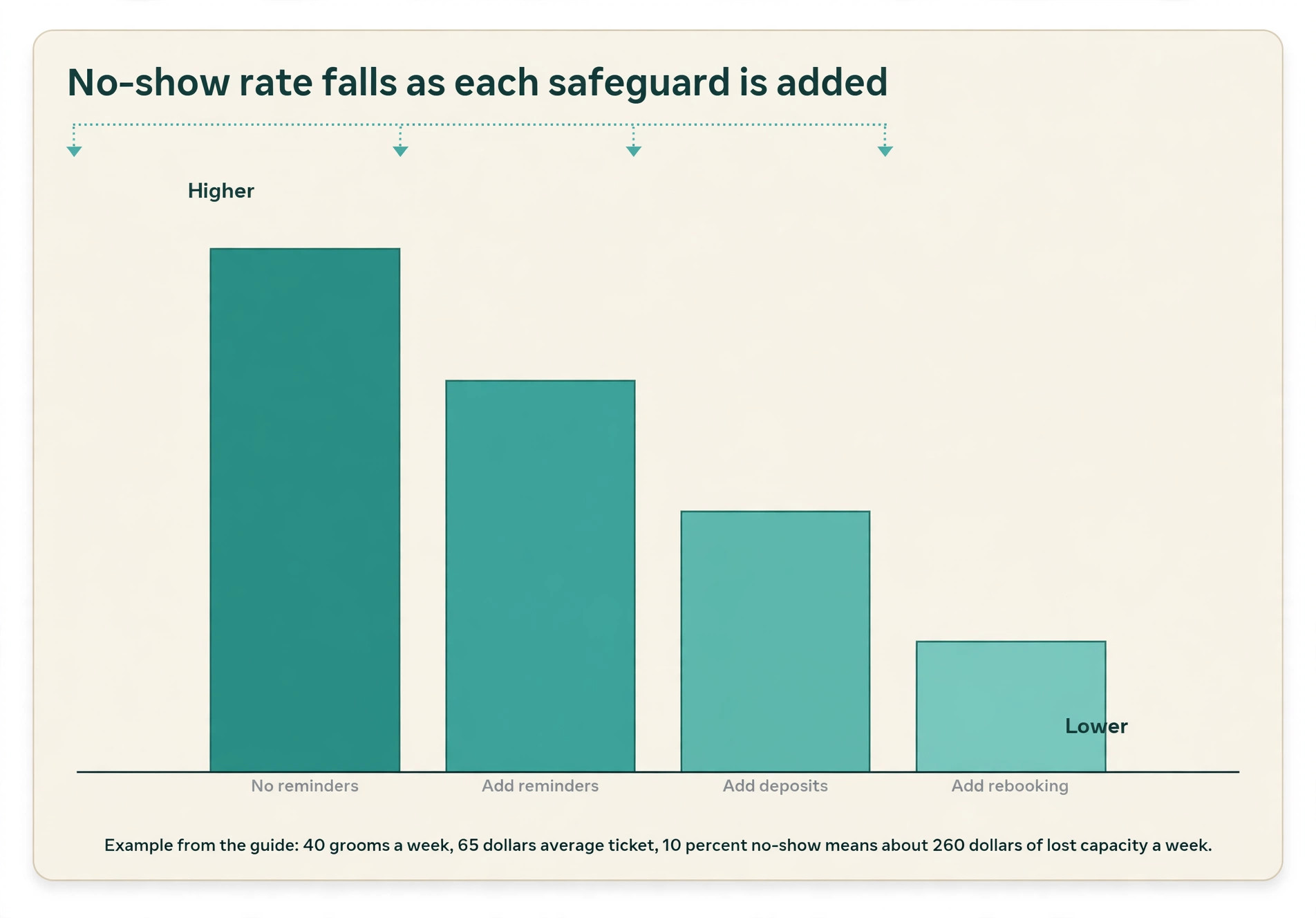
Timing and channel matter as much as wording. Use text for reminders and quick confirmations, and email for the full booking record. Do not send both at the same hour with the same words, or clients will stop reading the messages that actually matter.
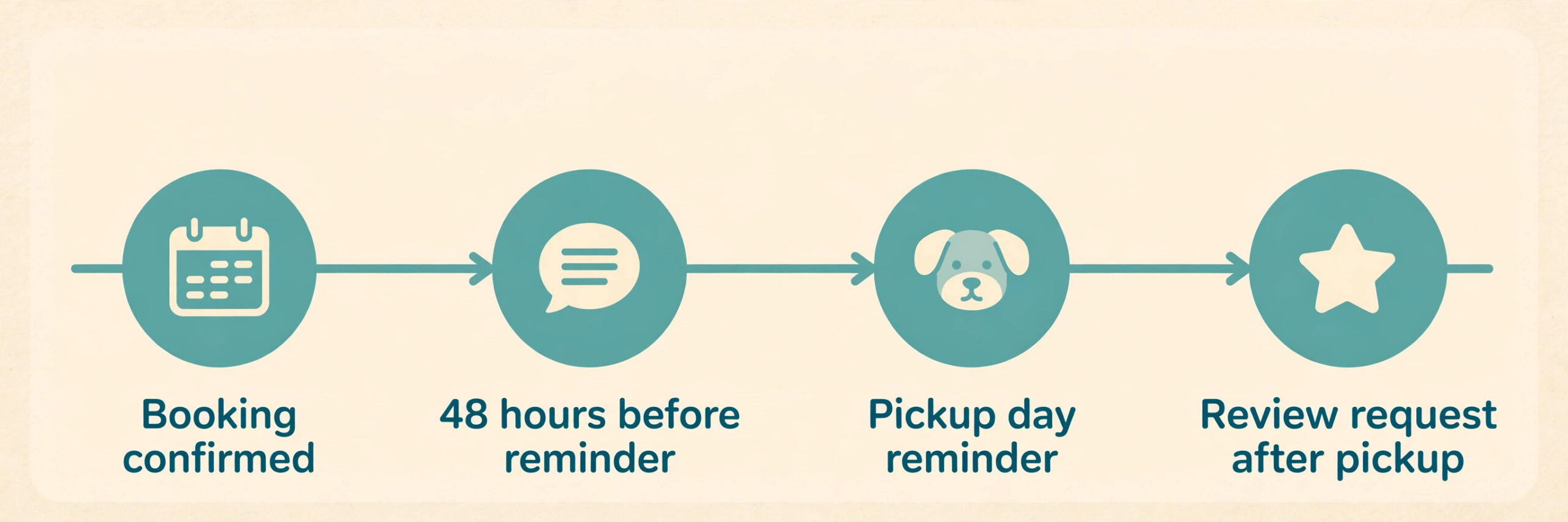
Write reminders that make the next step obvious. A strong reminder names the pet, states the day and time in words, names the salon, and offers one action, such as replying with a single word to confirm or tapping a link to move the booking. Avoid long policy text in a reminder, and keep it to the details the client needs that day.
Watch the reply rate, not just the send rate. New clients, first visits, and long gaps since the last groom are the highest risk groups, and those clients deserve a deposit or a confirmation call for a high value groom, while a regular with a strong attendance record does not need extra friction.
Deposits, Cards on File and Cancellation Rules That Clients Accept
Reminders reduce forgetfulness. Deposits and cards on file reduce casual cancellations, which are a different problem. A client who booked three salons and planned to pick one will not be helped by a reminder alone, which is why the deposit rule must be explained at booking, not at the door.
Owners who use AI for pet grooming appointments often make deposits easier to accept by tying them to a clear benefit. A deposit holds a specific groomer and a specific time, and it is applied to the groom, not kept as an extra fee when the client shows up. For a standard bath, a small deposit or a card on file may be enough. For a full groom on a large dog, a multi pet booking, or a first visit that blocks two hours, a larger deposit is reasonable. State the amount, the cancellation window, and what happens to the deposit if the client moves the booking inside that window, in the same screen where the client pays.
Keep the policy human. A 24 to 48 hour cancellation window works for most salons, because it gives enough time to fill the slot from the waitlist. Waive the fee the first time a regular client has a genuine emergency, and require a deposit or prepayment from repeat no-shows before the next booking.
Test the deposit flow yourself, on a phone, with a real card, before you turn it on for clients. Check the receipt, the refund path, and what happens if a client disputes the charge. A deposit system that is hard to refund will create reviews that cost more than the no-show it prevented. Money disputes go to a person, every time.
Reviews and a Request Template That Works After Every Groom
Reviews are the second half of the booking loop. A new client searching for a groomer reads reviews before they read a service list. Yet most happy clients never leave a review, not because they are unhappy, but because nobody asked at the right moment, or the ask required searching for the salon and working out where to tap. The fix is a direct link, sent at the right time, with no extra steps.
Salons that use AI for pet grooming appointments well send the review request after the groom, not a week later. The best moment is within a few hours of pickup, while the owner can still see the result, or the next morning for a client who picked up late. Send the request by text if the client booked by text, and by email if the client prefers email. Include a direct Google review link, which you can copy from your own Google Business Profile by opening the profile, choosing the reviews section, and selecting the option to get more reviews.
Test the link in a private browser window before you print it or load it into a template, and check that it opens the review form for the right location if you have more than one shop.
Do not ask only happy clients, do not offer a reward for a review, and do not suggest a star rating. Those practices break Google rules and can get reviews removed. Ask every client, in neutral words, and reply to every review within a few days. A calm reply to a bad review apologises for the experience and invites a direct conversation, and future clients read replies more carefully than owners expect.
Here is a review request template you can copy and adapt. Replace the bracketed parts with your salon details, and load the finished version into your booking tool so it sends on its own after each groom.
Template for a text message. Hi [owner first name], thank you for bringing [pet name] in today. We loved seeing [him or her] and we hope the cut holds up well until the next visit. If you have a minute, would you share your experience on Google. Here is the direct link [paste your Google review link]. Thank you for trusting us with [pet name].
Template for an email. Use a short subject line, such as a quick thank you after [pet name] visit. Open with thanks, mention one specific detail from the groom, such as the tidy cut or the bath and brush out, then ask in neutral words whether the owner would share their experience, with the direct link as the only link in the message. Close with the next groom suggestion and your salon name. Keep the whole email under 120 words. A long email after a groom feels like marketing, and most owners will close it before they reach the link.
Measure the template like any other part of the system. Track how many requests go out and how many reviews arrive within seven days. If reviews are low, check whether the link is broken, the timing is late, or the message is too long, and fix one variable at a time.
Tool Options and Honest Prices
The table below compares the tools most grooming salons actually shortlist. Prices are from vendor pages and reputable listings checked in October 2026, and they vary by plan, location, and billing period, so confirm the final figure at checkout.
| Tool | Best for | Starting price found | Watch out for |
|---|---|---|---|
| MoeGo | Grooming salons and mobile groomers | 49 dollars a month for mobile Basic, 99 dollars for Growth | Higher tiers add features you may not need in year one |
| DaySmart Pet | Salons that want pet profiles and reminders | 29 dollars a month for Basic, up to 249 dollars for Platinum | The top tier is priced for larger teams |
| Square Appointments | Solo groomers and shops that already take card payments | Free for individuals, then Plus and Premium per location | Recent US listings differ on paid tiers, so check checkout |
| Calendly | Simple booking links for a solo groomer | Free, then Standard at 10 dollars per seat a month on annual billing | No grooming intake, pet profiles, or groomer notes built in |
| AI receptionist add-on | Salons losing calls while grooming | About 109 dollars a month for one vendor plan found | Price varies by minutes, calls, and integrations |
MoeGo suits salons that want grooming specific booking, two way messaging, reminders, and no-show protection in one place. Its official mobile pricing lists Basic at 49 dollars a month and Growth at 99 dollars a month. MoeGo pricing is the page to check for current salon plans, because mobile and salon pricing are shown separately.
DaySmart Pet suits salons that want a long standing grooming system with online booking, pet profiles, two way texting, and reputation tools. Listings put Basic at 29 dollars a month, Deluxe at 69 dollars, Premier at 129 dollars, and Platinum at 249 dollars, with a free trial. DaySmart Pet describes online booking, recurring appointments, and reminders as core features. The lower tiers cover most single shop needs.
Square Appointments suits a solo groomer or a small shop that already uses Square for payments. The free plan covers basic booking, while paid plans add waitlists and cancellation fees. Recent US listings disagree on the paid tiers, with some pages showing Plus at 29 dollars and Premium at 69 dollars per location, and others showing Plus at 49 dollars and Premium at 149 dollars per location, after a pricing change. Square Appointments is the page to confirm before you budget, and card processing fees sit on top of any subscription.
Calendly suits a solo groomer who only needs a clean booking link, not a grooming system. Calendly pricing lists Free at zero, Standard at 10 dollars per seat a month on annual billing, and Teams at 16 dollars per seat a month on annual billing. The trade off is clear. You get a fast booking page, but you must handle pet intake, groomer notes, and repeat cycles elsewhere, which adds admin back in.
AI receptionist tools such as Cleverpaws, Retrevr, and AgentZap answer calls when groomers cannot, collect breed, coat, and temperament details, and write bookings into your scheduler. Cleverpaws focuses on grooming intake and human handoff for complex cases. Retrevr focuses on missed call text back and booking straight into an existing scheduler. One vendor plan found for AgentZap was listed at 109 dollars a month, but minutes and call volume change the real bill, so request a quote based on your actual call count. Count missed calls for two weeks before you buy one.
How to Choose the Right Setup for Your Salon
Start with your biggest leak, not with a feature list. If the phone is the problem, fix booking and missed calls first. If no-shows are the problem, fix reminders and deposits first. If new clients cannot find you, fix reviews and your Google profile first.
If you use AI for pet grooming appointments for the first time, start with one tool and one workflow, then add the next piece after 30 days. A practical first month looks like this. Week one, build the booking page with honest service times and a short intake form. Week two, turn on confirmations and the two touch reminder sequence. Week three, add a deposit rule for first visits and high value grooms. Week four, turn on the review request and reply to every review. Measure each week before you add the next tool. That pace keeps the team confident and gives you clean data on what actually moved.
Match the tool to the salon shape. A solo mobile groomer needs route grouping, a simple booking page, and text reminders. A two chair shop needs staff calendars, repeat booking, and groomer notes. A multi location group needs shared client records and reporting by location. In every case, trial with real bookings, not a demo account, and run the system for two weeks alongside your old method before you switch fully.
Ask five questions before you pay. Does the tool block the right time by breed, size, and service. Does it store groomer notes where the groomer will see them before the appointment. Does it send reminders with a reschedule link that works on a phone. Does it take deposits and store a card on file in a way clients will trust. Can you export your client list and pet records if you leave.
Mistakes That Undo a Good Booking System
The first mistake is publishing a booking page with wrong service times. A full groom listed at 60 minutes when it takes 120 minutes will double book the groomer and create late pickups. Audit service times with real data, using the last 30 grooms by service and breed size plus a buffer, and review the times every quarter.
The second mistake is automating every message and then stopping all human contact. Keep a human touchpoint in the loop, such as a short personal note at pickup, a call for a first visit with a complex coat, and a personal reply to a review. AI should reduce admin, not remove the relationship that keeps clients coming back.
The third mistake is hiding the cancellation policy until after a no-show. A policy that appears only in small print will feel unfair when it is enforced. Put the policy on the booking page, in the confirmation email, and in the deposit screen, in the same plain words each time.
The fourth mistake is asking for reviews too early, too often, or with a reward. Send one request, at the right time, with a direct link, and then stop. If a client does not review, try again after the next groom, not after the same groom.
The fifth mistake is buying an AI receptionist without training it on your salon. A generic voice helper that cannot explain your prices, breed limits, drop off window, or vaccination rule will book the wrong appointments. Give the vendor your service list, prices, hours, and weekly questions, listen to ten real calls in the first month, and keep a human handoff for health, behaviour, and complaint calls.
The sixth mistake is never checking the numbers. Service times go stale, reminders go to the wrong number after a client changes phones, and a broken review link can sit unnoticed for months. Set a monthly 30 minute review of bookings by source, no-show rate, reminder replies, review count, and waitlist fills, and fix the weakest number first.
For related reading on running a small service business with the same kind of automation, see automate small business with AI, best scheduling apps, best AI tools for veterinarians, how to start a pet sitting business with AI, and best CRM software for small business.
Frequently Asked Questions
Do I need a grooming specific tool, or will a general scheduler work?
A general scheduler works for a solo groomer with a short service list and simple intake. You can use AI for pet grooming appointments with a general scheduler, but you will need a separate form for breed, coat, and temperament details, and a separate place for groomer notes. A grooming specific tool costs more, but it keeps pet profiles, repeat cycles, reminders, and notes in one record.
How many reminders should I send before a groom?
Two reminders work for most clients, one 48 hours before and one on the morning of the appointment. Add a third reminder one week before only for bookings made more than three weeks ahead, or for high value grooms that block a long slot. More than three reminders feels like pressure, and clients start to ignore them. Always include a reschedule link, so a client who cannot attend can free the slot instead of simply not showing up.
Will clients mind talking to an AI receptionist?
Most clients mind a bad experience, not the technology behind it. They mind long holds, wrong bookings, and answers that do not fit their dog. They accept a fast, accurate helper that books the right service and hands off to a person for health, behaviour, or complaint questions. Tell clients when they are talking to an automated helper, and review real calls in the first month.
Should I take deposits for every groom?
No. Deposits work best where the risk is highest, such as first visits, large dogs, multi pet bookings, and long grooms. Regular clients with a strong attendance record do not need a deposit for a standard bath. Use a card on file for regulars, a deposit for higher risk bookings, and a clear waiver for a first genuine emergency.
How do I get Google reviews without breaking the rules?
Ask every client, in neutral words, shortly after a good visit, with a direct link from your Google Business Profile. Do not offer a reward, do not ask only clients you expect to be happy, and do not suggest a star rating. Reply to every review, and fix the service issue behind a bad review before you worry about the review itself. Google provides the link and QR code in the profile, and the official help page explains how to copy and share them.
Can AI really cut no-shows, or is that just vendor marketing?
AI alone does not cut no-shows. The combination does, through timely reminders, easy rescheduling, a waitlist, deposits for high risk bookings, and rebooking at checkout. Salon guides report that automated text reminders can cut missed appointments by roughly a third, and vendor claims go higher when deposits and prepayment are added. Track your own rate for 60 days before and after the change.
Book the Dog, Not the Phone Tag
The salons that win are not the ones with the most software. They are the ones that use AI for pet grooming appointments to protect the work that actually matters, which is the groom, the dog in front of you, and the client who trusts you with that dog. A booking page that works at midnight, a reminder that arrives before a client forgets, a deposit rule that is fair and clear, and a review request that arrives while the result is still fresh will fill more slots, with less phone tag, than any single feature on its own.
Start small and start this week. Put one booking link on your website and Google profile, set honest service times, turn on two reminders, and send one review request after each groom. Run that setup for 30 days, check the no-show rate and the review count, and then add the next piece, whether that is a deposit rule, a waitlist, or an AI helper for missed calls. That steady loop is what turns a booking tool from a monthly cost into a fuller calendar, calmer days, and clients who rebook before they leave.