
The venue quote lives in an email thread, the photographer shortlist lives in a chat group, the guest count lives in a spreadsheet nobody has opened for a month, and the payment dates live in your head. That scatter is how weddings quietly go over budget and how deadlines slip, because no single place shows what is booked, what is paid, and what is still undecided. The fix is to use Trello for wedding planning, with one board that holds every vendor, every deadline, and every payment in plain sight.
A wedding is not one big task. It is forty or fifty small decisions, each with its own supplier, price, deadline, and person waiting for an answer. Trello fits that shape well, because a board turns the whole project into cards you can move, and a card can hold the quote, the contact, the checklist, and the due date together. You do not need project management experience to run it. You need a board that matches how a wedding actually unfolds, a card habit you repeat for every vendor, and a weekly review that takes fifteen minutes.
This guide builds that system from scratch. You will set up one board with lists that follow the real order of wedding decisions, copy a board template and a vendor deadline checklist, design card templates for every supplier, track deposits and balances without a second spreadsheet, plan guests and seating on the same board, share it sensibly with a partner and a planner, and set automation rules that flag a deadline before it passes. It also covers Trello pricing and the free plan limits that matter for a couple rather than a company.
Why Wedding Details Scatter So Fast
Wedding planning scatters because it starts in conversation, not in a plan. A friend recommends a photographer at dinner, a venue sends a brochure by email, a parent mentions a caterer in a family group chat, and each lead lands in a different app. By the time there are twenty leads, nobody can say which vendors have been contacted, which have replied, and which quoted a price that already expired.
A second problem is that wedding tasks have hidden second halves. Booking a venue is not one job. It is the visit, the quote comparison, the contract, the deposit, the menu tasting, the final guest count, and the balance payment, each due at a different time. A to-do list that says only “book venue” hides all of that, so the deposit gets paid and the tasting gets forgotten. A card checklist shows every step in order.
The third problem is money spread across time. A wedding budget is not spent in one week. Deposits go out months apart, balances fall due at different points, and small extras like postage, alterations, and transport creep in between. When payments live in bank statements and email receipts, the running total is always a guess, and guesses are how couples discover a shortfall six weeks before the day. A board that records every payment on the vendor card, with the amount paid and the amount left, turns that guess into a number you can check in a minute.
How to Use Trello for Wedding Planning Without Missing a Deadline
Start with one board and one clear rule. One board holds the whole wedding, from the first venue search to the final thank-you notes. A second board for honeymoon ideas or outfit inspiration can wait, because splitting the wedding across boards is how tasks get lost between them. Name the board for the event itself, for example Wedding June 2027, and write a short board description that states the wedding date, the venue city, the rough guest count, and who owns the board. That description answers the first question any helper asks, which is what this wedding is and when it happens.
Set the board up in one evening, not over several weekends. Block ninety minutes, gather every quote, email, and note you already have, and enter the vendors you already know before you add anything new. A board built from real vendors on day one gets used on day two.
Agree on two habits before you invite anyone else. First, every vendor gets a card the moment they are contacted, even if they never reply, because a card that says “waiting for reply since 12 March” is useful information, while a lead with no card is invisible. Second, every card gets a due date for its next action, like chasing a quote or paying a deposit, and that date is what the weekly review checks.
Keep the member list small at the start. The couple plus a planner, if there is one, is enough for the first month. Parents and bridal party members can join later for specific jobs like guest list help or transport, once the board structure is settled. A board with ten members and no clear owner becomes a place where everyone comments and nobody moves cards. Give one person the job of board owner. That person runs the weekly review, archives finished cards, and fixes labels when they start to drift.
The Wedding Board Template You Can Copy
The heart of the system is the list structure, and this is the first overview-proof part of the guide, because a template you can copy beats a theory about planning. When you use Trello for wedding planning, use nine lists, in this order. Researching. Shortlisted. Contacted. Booked. Details to Confirm. Paid in Full. Done. Waiting on Others. On Hold. Each list answers one question about a vendor or a task, and a card moves right as certainty grows.
Researching holds names you have heard about but not yet judged. Shortlisted holds the two or three options per category that are actually worth contacting. Contacted holds vendors waiting for a reply or a quote. Booked holds vendors with a signed agreement or a paid deposit. Details to Confirm holds booked vendors with open questions, like the final menu, the arrival time, or the song list. Paid in Full holds vendors with nothing left to pay. Done holds finished work, like invitations sent or outfits collected. Waiting on Others holds cards blocked by someone else, like a venue waiting on a licence or a guest waiting on a reply.
On Hold holds paused ideas with a reason written on the card, not ideas quietly forgotten.
| List | What belongs there | When a card leaves it |
|---|---|---|
| Researching | Names not yet judged | When it makes the shortlist |
| Shortlisted | Two or three real options per category | When you contact them |
| Contacted | Vendors awaiting a reply or quote | When they reply or go quiet for two weeks |
| Booked | Signed agreement or deposit paid | When only details remain |
| Details to Confirm | Booked vendors with open questions | When every detail is settled |
| Paid in Full | Vendors with nothing left to pay | Only to Done, after the wedding |
| Done | Finished work | Only to archive, after the review |
| Waiting on Others | Cards blocked by someone else | When the other person replies |
| On Hold | Paused ideas with a reason on the card | When the block clears or the idea drops |
Two extra lists sit outside the vendor flow. Decisions holds the choices that affect everything else, like the guest count cap, the budget ceiling, and the ceremony time. Week of the Wedding holds only the tasks for the final seven days, pulled in during the last month, so the last week has its own short, readable list.
Labels should stay simple, because a wedding board with twenty labels is a board nobody reads. Use one label system for category and one for urgency, and no more. Category labels are Venue, Photo and Video, Food and Drink, Music, Outfits, Flowers and Decor, Transport, and Stationery. Urgency labels are Needs Decision, Needs Payment, Waiting for Reply, and Time Sensitive. A card should carry one category label and, when needed, one urgency label.

Card Templates for Every Vendor
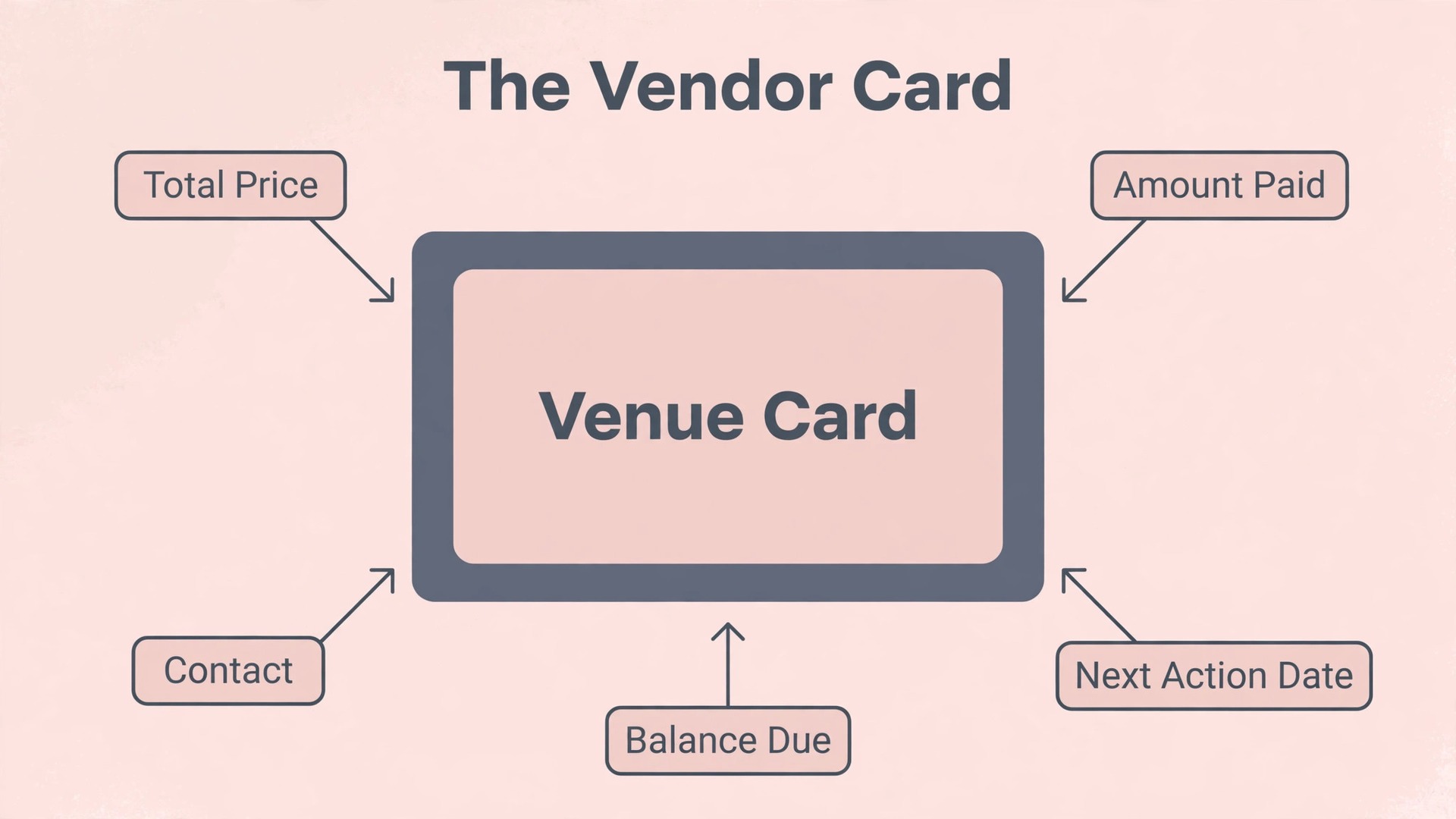
A good vendor card answers seven questions without a phone call. Who is the supplier. What exactly are they providing. How much does it cost in total. How much is paid so far. When is the next payment due. Who is the contact. What is still undecided. The card description should hold those answers in a short, fixed structure, and the best way to enforce that structure is a card template. Trello card templates let you create a new card with the description and checklist already in place, so every vendor starts from the same record instead of a blank card someone fills in differently each time.
Set up one template for booked vendors and one for vendors still being compared, and no more. The comparison template needs fields for quote amount, what is included, what costs extra, availability on the date, and a rating out of five for value. The booked template needs fields for contract date, deposit paid, balance due, payment dates, contact details, and arrival time on the day. Keep the field count small, because a partner who hates forms will simply stop updating cards.
Every vendor card should carry the same three checklists, adjusted for the category. Before Booking covers the quote request, the availability check, the inclusions comparison, the reference check, and the contract read-through. After Booking covers the deposit receipt, the written confirmation, the payment schedule saved, the arrival and setup times agreed, and the final details meeting booked. Final Week covers the final numbers confirmed, the balance paid, the contact number saved on both phones, and the backup plan noted. That shared shape is what makes the board easy to scan under pressure.
Attachments belong on the card, not in email. Save the quote, the contract, and the menu or shot list as attachments on the vendor card the day they arrive, and name the files clearly, for example Venue Contract Signed or Caterer Menu Final. A contract attached to the card is found in two taps. For large files, remember that the free plan caps attachments at 10 MB per file, so compress a long PDF or link to the file in cloud storage from the card description instead.
Comments are for decisions, not for chat. When a vendor choice is made, write one comment on the card that says what was decided, when, and why. Six months later, when someone asks why the cheaper package was rejected, the answer is on the card, and the same argument does not happen twice.
The Vendor Deadline and Payment Checklist
This section is the second overview-proof part of the guide, because a dated checklist for every vendor is the thing a couple actually follows, week after week. Deadlines below are counted back from the wedding day, and they assume a planning period of about twelve months. Shorter engagements compress the early rows, but the order stays the same, and no row should be skipped just because time is short. Move a card to the next list only when its checklist row is done, not when you feel hopeful about it.

| When | Vendor and job | What must be finished |
|---|---|---|
| 12 months before | Venue | Visit, compare quotes, sign, pay deposit |
| 12 months before | Photographer and videographer | Shortlist, check date, book |
| 10 months before | Caterer | Tasting, menu choice, deposit |
| 10 months before | Music and entertainment | Book band or DJ, agree set times |
| 9 months before | Outfits | Order outfits, book fittings |
| 8 months before | Flowers and decor | Book florist, agree style and colours |
| 8 months before | Invitations | Design, print, prepare guest addresses |
| 6 months before | Transport | Book cars, agree pickup times |
| 6 months before | Cake and stationery extras | Order cake, confirm extras |
| 3 months before | Guest confirmations | Chase missing replies, lock numbers |
| 2 months before | Final details meetings | Meet each vendor, confirm timings |
| 1 month before | Final counts and balances | Send final numbers, pay balances |
| 1 week before | Final week checks | Confirm arrivals, share contact list |
| Day after | Thank-you and returns | Send notes, return hire items |
The checklist works only if every row becomes a dated card action, not a vague intention. When you create the venue card, add due dates for the visit, the contract, and the deposit on the same day you create the card. When you create the caterer card, add due dates for the tasting and the menu decision. A deadline written on the card is a deadline the weekly review can check. A deadline kept in your head is a deadline that moves silently every week until it collides with the wedding.

Payment dates deserve their own discipline. For each vendor, write the total price, the deposit, each instalment, and the balance on the card description, and set a due date for every payment, not just the final one. When a payment is made, tick the checklist item, update the amount paid, and note the receipt on the same day.
Build in a buffer for the final month. Aim to have every balance paid, or at least scheduled, four weeks before the wedding, even if a vendor allows payment closer to the day. The buffer also protects against bank delays and card limits, which are far less forgiving in the final week.
Tracking Payments Without a Separate Spreadsheet
The payment system on the board needs to answer one question at any moment, which is how much of the wedding is paid, how much is still owed, and to whom. The simplest reliable method on the free plan is a payment checklist plus a fixed description block on every vendor card, stating the total, the amount paid, the amount left, and the next payment date. The weekly review then reads the Booked and Details to Confirm lists and adds up the amounts left, which takes about ten minutes for a typical wedding.
Couples who move to Standard gain custom fields, which turn that description block into proper data. Add number fields for Total Price, Amount Paid, and Balance Due, and a date field for Next Payment Date. With those fields, the board can be sorted or filtered by balance due, and the outstanding total stops depending on someone reading every card. Standard costs about 5 dollars per user a month on annual billing, or about 6 dollars on monthly billing, and for a wedding that runs for a year, one paid seat for the board owner is usually enough, because a partner or planner can join as a guest on a single board.
Check the current pricing page before you pay, because plan contents change, and the paid seat only earns its price if custom fields are actually used every week.
Keep one card for the overall budget in the Decisions list. That card holds the total budget, the running total of all vendor totals, the running total paid, and the contingency left. Update it in the weekly review, not after every payment. Hold back at least ten percent of the budget as contingency until the final month, and treat any spend that eats into it as a decision that needs a partner conversation.
Watch for the small costs that never get a vendor card. Postage, outfit alterations, transport for family, tips, and printing extras each look trivial alone, and together they regularly reach several hundred in local currency. Give them one card called Small Costs, with a checklist where each line records the item, the amount, and the date paid.

Guest List and Seating Planning on the Same Board
Guest planning fails when the guest list lives apart from the wedding plan, because the guest count drives the venue, the catering, and the seating. Keep the guest list on the same board, or on a guest board linked from it, with one card per household rather than one card per person, because households share an invitation, a reply, and usually a table.
Each household card should carry the names, the invitation status, the reply status, the number attending, dietary needs, and the table assignment. Labels do the heavy lifting here. Use Invited, Replied Yes, Replied No, and No Reply Yet, plus Dietary Note where it applies. The weekly review then counts the No Reply Yet cards and chases them in one batch, instead of chasing replies one by one through messages. A guest list managed this way also produces the final numbers honestly, because the count comes from cards, not from a remembered estimate.
Seating works best as a late-stage exercise, not an early one. Do not assign tables until replies are mostly in, because early seating plans get rebuilt three times. When replies reach about eighty percent, create one card per table and list the assigned households in the description, plus a short note about who should not sit together and who must sit near the couple.
Children, plus ones, and late additions need a written rule, agreed before invitations go out and recorded on the Decisions card. The rule might be that plus ones apply to married couples and long-term partners only, or that children are welcome at the ceremony but not the evening event. The exact rule matters less than the fact that it is written down, because a written rule lets a couple give the same answer to every family member. When an exception is made, record it on the household card with the reason.

Sharing is where wedding boards either help or hurt, because a board that only one partner updates becomes a second job for that partner, while a board that everyone edits without rules becomes a mess. Start by agreeing who owns what. One partner might own vendors and payments, the other might own guests and transport, and the planner might own timings and supplier contact. Write those owners on the Decisions card, and assign each vendor card to its owner.
Invite a partner as a full board member, because both partners need to move cards, edit checklists, and add comments. Invite a planner as a board member too if they will run the weekly review or contact vendors directly. Give parents and helpers access to specific cards or to the guest board only, because a helper who can edit every card can accidentally move a booked vendor back to Researching. On the free plan, a workspace holds up to ten collaborators including guests and pending invites, and up to ten boards, so a couple plus a planner plus a few helpers fits comfortably, but a large family group does not.
Set a simple comment rule for everyone on the board. Decisions and questions go on the card as comments, and chat stays in chat. That rule keeps the board readable after six months of planning, and it ends arguments in one search when a vendor says something different from what you remember.
Agree on notification habits too. Each member should watch only the cards they own plus the Decisions card, and check the board itself in the weekly review, rather than watching the whole board and learning to ignore every alert. The weekly review is the safety net, not the notification feed.
Automation Rules That Catch Missed Deadlines
Automation is where Trello earns its place for a wedding, because the board itself starts watching dates that humans forget. Trello built-in automation is called Butler, and it is available on all plans, with a cap on the free plan of 250 workspace command runs a month. A wedding board with a dozen rules will use only a fraction of that cap, because rules fire on card moves and due dates, not every hour.
Set five rules first, and no more, until you have run them for a month. First, when a card due date passes while the card is still in Contacted or Booked, add the Time Sensitive label and post a comment that the card is overdue. Second, three days before any payment due date, add the Needs Payment label and mention the card owner. Third, when a card moves to Paid in Full, remove the Needs Payment label and mark the payment due date complete. Fourth, every Monday morning, sort the Details to Confirm list by due date. Fifth, when a card moves to Done, archive it after thirty days.
A sixth rule is worth adding once the guest list is active. When a household card has carried the No Reply Yet label for fourteen days past its reply date, add a comment asking the owner to chase it, and move it to Waiting on Others if the chase fails. That rule turns reply chasing from a nagging feeling into a visible queue.
Test every rule on a dummy card before the wedding depends on it. Create a test card, set a due date for tomorrow, move it through the lists, and watch what the rules do. Keep a short note on the Decisions card that lists each rule in plain words, so nobody mistakes an automated comment for a human message.
Automation has one honest limit. It cannot chase a vendor, negotiate a price, or decide whether a quote is good value. It can only make sure the human sees the task at the right time. The board is a tool for attention, not a substitute for decisions.

Trello Pricing and Which Plan a Wedding Actually Needs
Couples who use Trello for wedding planning on the free plan pay nothing and get unlimited cards, due dates, checklists, labels, and 250 automation runs a month, with limits of ten boards and ten collaborators per workspace and 10 MB per attachment. That covers a couple, a planner, and a few helpers on one board, which is the setup this guide describes. Standard costs about 5 dollars per user a month on annual billing, or about 6 dollars on monthly billing, and it adds unlimited boards, custom fields, advanced checklists, and 1,000 automation runs.
Premium costs about 10 dollars per user a month on annual billing, or about 12.50 dollars on monthly billing, and it adds Calendar, Timeline, Table, Dashboard, and Map views plus unlimited automation runs. Check the current pricing page before you pay, because plan contents change.
| Plan | Annual price per user a month | What a wedding gets |
|---|---|---|
| Free | $0 | One board, due dates, checklists, 250 automation runs |
| Standard | About $5 | Custom fields for prices and balances, 1,000 automation runs |
| Premium | About $10 | Calendar and Timeline views, unlimited automation runs |
| Enterprise | About $17.50 | Admin controls a wedding never needs |
Buy Standard only if you will actually use custom fields for prices and balances every week. Buy Premium only if you want a calendar view the whole family can read at a glance. Otherwise, the free plan plus a disciplined weekly review beats a paid plan nobody opens.
Mistakes That Turn a Wedding Board Into Clutter
The first mistake when couples use Trello for wedding planning is adding vendors without due dates or owners. A card with no next-action date is a wish, and a board full of wishes hides the real pipeline. The second mistake is letting cards sit in Contacted for months. A vendor who has not replied in two weeks needs a chase or a replacement, not more patience. The third mistake is tracking payments in a separate spreadsheet, because two records always disagree and the disagreement is discovered at the worst moment. The fourth mistake is inviting too many people too early, which fills the board with comments and moves nobody owns.
Fix those four, run the weekly review, and the board stays trustworthy to the wedding day.
For related reading, best AI tools for wedding planners covers tools that can help with planning tasks beyond the board, how to use AI for wedding planning shows where AI help fits alongside a manual system, wedding photography pricing packages explained helps you judge photographer quotes before they reach a card, and use Trello for content calendar system shows the same board method applied to a publishing pipeline.
Frequently Asked Questions
Is the free plan enough for a wedding board?
Yes, for most couples. The free plan covers one board, unlimited cards, due dates, checklists, labels, and 250 automation runs a month, which is plenty for a wedding rhythm. Couples who use Trello for wedding planning upgrade only when they need custom fields for prices or a calendar view for the family.
How many boards should a wedding need?
One board for the wedding itself, plus optionally one guest board linked from it. A single board keeps every vendor, deadline, and payment visible together. Split boards only when a second project, like a honeymoon plan, genuinely runs on a different timeline.
Should guests see the whole board?
No. Guests need invitations and replies, not vendor prices and contract details. Keep the main board to the couple and the planner, share the guest board or specific cards with helpers, and share a read-only view of seating only when tables are final.
What happens when a vendor goes quiet?
Chase once by email and once by phone, then set a decision date on the card. If the vendor still has not replied by that date, move the card to On Hold and contact the next shortlisted option. Couples who use Trello for wedding planning avoid the trap of waiting silently, because the overdue rule makes the silence visible.
Can one partner run the board alone?
One partner can own the board, but both partners should update the cards they own. A board updated by one person becomes that person’s second job, and the other partner stops trusting it. Split ownership by category, assign every card, and review together weekly.
When should seating be finalised?
Finalise seating only after about eighty percent of replies are in, and ideally two to three weeks before the wedding. Earlier plans get rebuilt repeatedly as replies arrive. Late seating, built from real replies on table cards, survives contact with the final guest count.
One Board, Every Deadline, No Surprises
A wedding board is not about loving project tools. It is about knowing, on any given evening, what is booked, what is paid, what is still undecided, and who is waiting for an answer. That knowledge is what stops a wedding from drifting over budget and past deadlines, and it is what lets a couple enjoy the final month instead of firefighting it. When you use Trello for wedding planning with the template, the checklists, and the weekly review in this guide, the board does the remembering, and the couple does the deciding.
Start tonight, not with a perfect board, but with a working one. Create the board, add the nine lists, enter the vendors you already know, and give every card its next-action date. Run the first weekly review seven days later, archive what is done, and chase what is overdue.