
A typical commercial novel runs 70,000 to 100,000 words, and a first draft at that length can take a year or more of steady work. Across that year, a writer must track dozens of characters, scores of scenes, a timeline that has to stay consistent, and a world full of rules that cannot contradict themselves. When you use Obsidian for novel writing, that scattered material stops living in separate documents and starts living in one connected vault where every scene, character, and decision can be found again in seconds.
This guide builds that vault from the ground up. You will set up a folder structure that survives a 90,000 word draft, write scene and character notes that link to each other, track your timeline and worldbuilding without a separate wiki, keep every draft version safe, run revision in passes instead of random edits, and export a clean manuscript at the end. It also covers what Obsidian cannot do, what it costs, and the mistakes that turn a promising vault into a second pile of files.
Why Novels Break Ordinary Note Apps
A novel is not one document. It is a system of hundreds of small pieces that have to agree with each other, and most writing tools treat it as a single long file. A word processor gives you one scrolling document where finding the scene in which a minor character first appeared means searching and hoping you remember the right word. A cloud notebook gives you pages, but those pages live in a hosted database, offline access is limited, and export is rarely as clean as the original. A dedicated novel app gives you structure, but it locks your book into its own format and its own price. The failure shows up mid draft.
You change a character’s age in chapter nine and forget that chapter two states it differently. You move a scene from spring to autumn and leave a reference to snow in the next chapter. You invent a rule for how your fictional city is governed, then break it sixty pages later because the rule lived only in your head. None of these are talent problems. They are retrieval problems, and retrieval is exactly what a linked vault is built to solve.
Obsidian stores every note as a plain Markdown file on your own device. If Obsidian disappeared tomorrow, your novel would still open in any text editor, and your links would still be readable as text. That durability matters for a project that takes a year. The trade is real. Obsidian gives you almost no novel structure out of the box. There is no built in manuscript view, no ready made character sheet, and no word count target tracker in the core app. You build the structure yourself and maintain the habits that keep it useful. That setup cost is worth paying if you want full control over a book you will live with for a long time.
How to Use Obsidian for Novel Writing in Five Parts
A workable novel vault has five parts, and each part has one job. Mixing those jobs is how vaults become messy. The parts are the manuscript, scene notes, character notes, worldbuilding notes, and project notes. The manuscript is the draft itself, written in order, one file per chapter or scene. Scene notes are the planning and revision record for each scene. Character notes are the facts, arcs, and relationships for each person in the book. Worldbuilding notes hold the rules, places, and history that scenes draw on. Project notes hold the outline, the timeline, revision checklists, and submission records.
Keeping these parts separate changes how you draft. When you sit down to write, you open the manuscript file for the current scene and keep its scene note beside it. When you need a fact, you open the character or world note instead of searching a 90,000 word document. When you revise, you work from the revision checklist, not from a vague feeling that something is wrong.
The Vault Structure
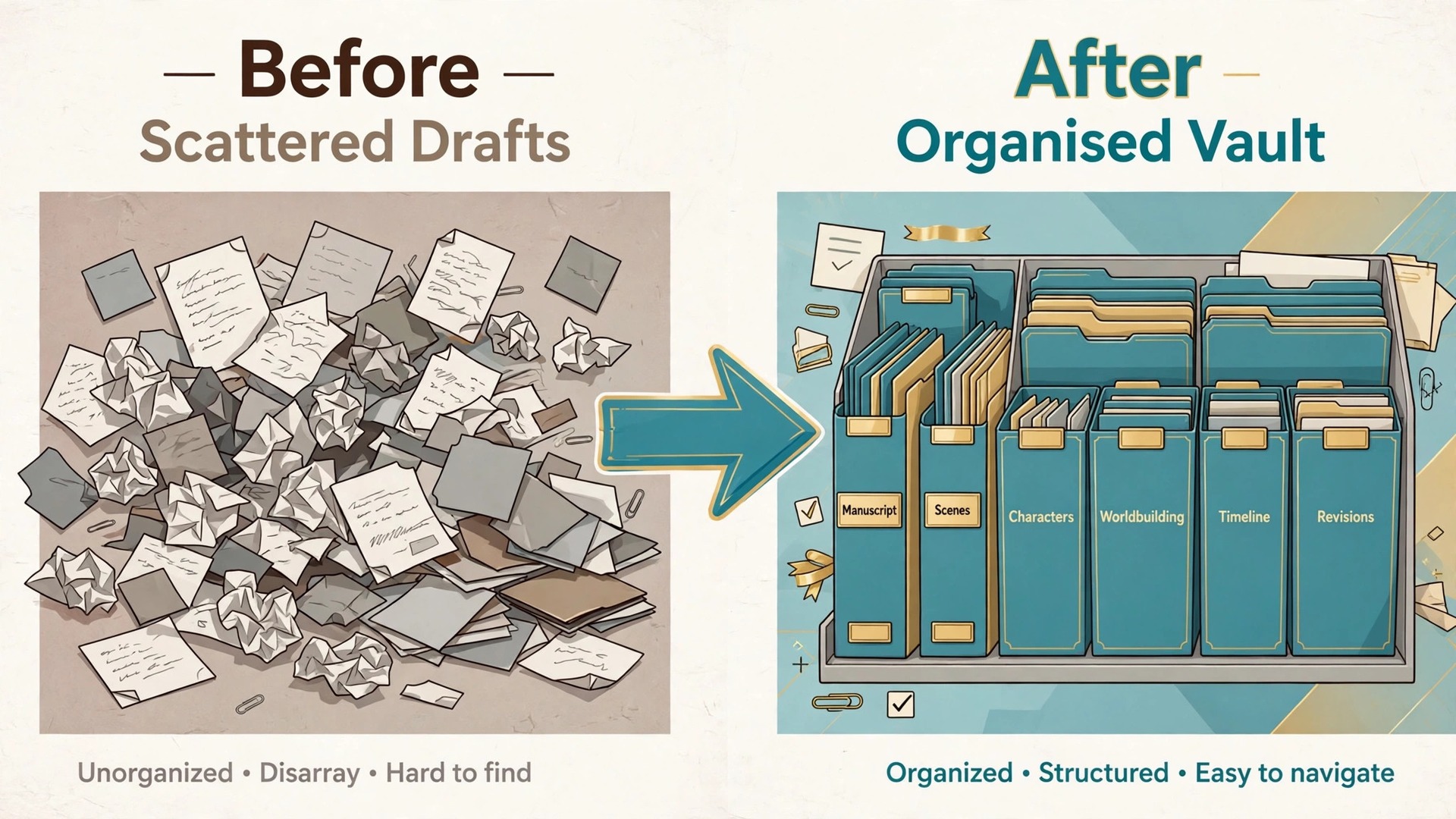
Use the structure below exactly as written for your first draft, and change it only after you can say why the change helps. The point of a fixed structure is to remove daily decisions about where a note goes. Every note has one home folder, and links do the work of placing it in several conversations at once.
“`text Novel Vault 00 Inbox 01 Manuscript 02 Scenes 03 Characters 04 Worldbuilding 05 Timeline and Outline 06 Revisions 07 Research 08 Templates 09 Archive “`
The Inbox is temporary. A new note starts there and moves to its real folder within a week. The Archive holds cut scenes and abandoned ideas, so active folders stay readable. Keep images and large reference files out of the vault where possible, so sync stays fast.
| Folder | What lives there | Rule to keep it clean |
|---|---|---|
| 00 Inbox | Unprocessed notes and ideas | Empty it every Sunday, or it becomes a second pile |
| 01 Manuscript | Draft chapters, one file per chapter | Never edit an old chapter file to plan a new one |
| 02 Scenes | One planning note per scene | One scene, one note, named by chapter and scene |
| 03 Characters | One note per character | Major characters get full notes, minor ones get short notes |
| 04 Worldbuilding | Places, rules, history, organisations | One topic per note, titled as a fact, not a question |
| 05 Timeline and Outline | Outline, timeline, and plot threads | Update the timeline the day a scene moves |
| 06 Revisions | Pass checklists and revision logs | One log per pass, dated, with scenes covered |
| 07 Research | Real world facts the book draws on | Note the source, so a fact can be checked later |
| 08 Templates | Note templates only | No working notes live here |
| 09 Archive | Cut scenes and retired ideas | Nothing in the Archive is edited, only read |
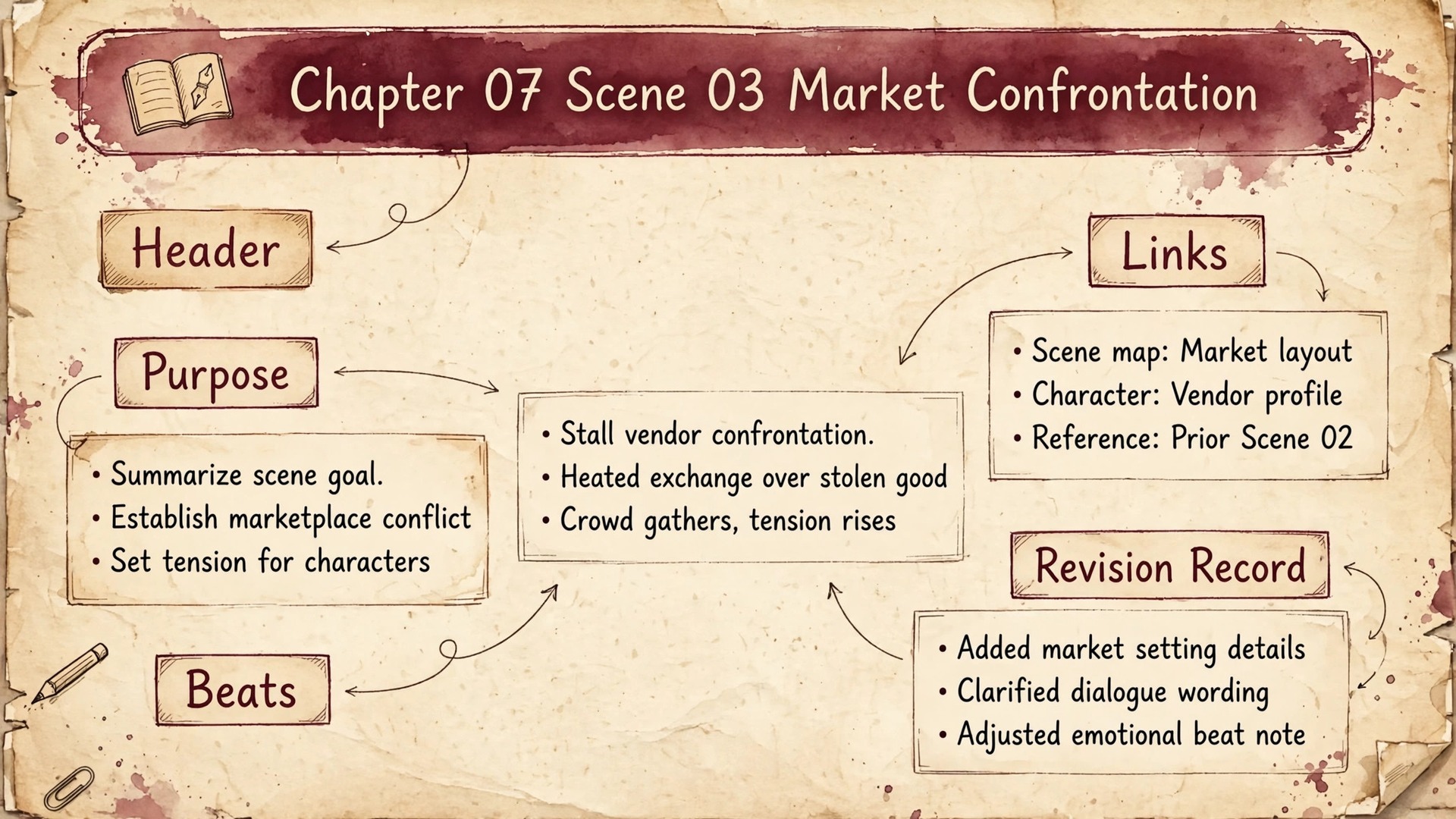
If you use Obsidian for novel writing with this structure, name scene notes by chapter and scene, for example Chapter 07 Scene 03 Market Confrontation. Name character notes by full name, and worldbuilding notes as facts, for example The Harbour City Bans Night Fishing. A fact title forces you to decide what is true in your world before you file the note, and it makes search readable later, because each result states a rule rather than a vague topic. Tags stay small and boring. Use about ten tags for status and type, such as draft, revised, needs research, and viewpoint character, and let links carry the story connections.
A tag list with eighty entries is a filing system nobody maintains, so prune tags in the weekly review.
Templates are what make this structure fast. A scene template holds the fields you fill in for every scene, and a character template holds the fields for every person. Create them once in the Templates folder, then create each new note from the template instead of from a blank page. Consistency here pays off during revision, because every scene note answers the same questions.
Scene Notes That Stay Findable
A scene note has five parts, and the order matters. First comes the header, with the chapter, the viewpoint character, the location, the story date, and the draft status. Second comes the purpose, one sentence stating what this scene must change in the story. Third comes the beats, a short numbered list of what happens in order, written before you draft the scene, not after. Fourth comes the links, pointing to every character who appears, every place used, and every plot thread the scene advances. Fifth comes the revision record, added later, noting what each pass changed.
Write the beats before the prose. This is the single habit that most improves a draft, because it separates story decisions from sentence decisions. When you already know that the scene must end with the protagonist refusing help, you stop writing three pages of wandering dialogue while you work out where the scene is going. Five to eight lines is enough for most scenes, and a scene that needs twenty beats is usually two scenes.
Link aggressively inside scene notes. Link the viewpoint character, every speaking character, the location, and the plot threads the scene touches. These links are what make the vault useful months later. When you wonder where a plot thread last appeared, you open its note and read its backlinks, which list every scene that linked to it. When you wonder how often a minor character has appeared, you open their note and count the backlinks. The graph view can show the same connections visually, but the backlinks panel is the working tool. Check it when you plan a scene, not when you are lost.
Draft the prose in the manuscript file, not in the scene note. The scene note is the plan and the record. The manuscript file is the book. Keeping them separate means your draft stays clean for export, while the planning material stays available without cluttering the text a reader will eventually see. Never paste long prose into a scene note, and never paste planning notes into the manuscript. When the two bleed together, export becomes a cleanup job and revision becomes guesswork.
Character Notes With Links
A character note starts with facts, then moves to arc, then to relationships. Facts are the stable details, full name, age, occupation, appearance, speech habits, and the details that other scenes will rely on. Write them as short lines, not paragraphs, so a fact can be checked at a glance while drafting. Arc is the change the character undergoes, stated as a before and after.
The arc statement is the most valuable line in the note. A character without a stated arc drifts, because nothing in the vault reminds you what they are supposed to become. Write the arc before the first draft, and revisit it after each major revision pass. If the draft took the character somewhere else, either update the arc deliberately or revise the scenes back toward it. An accidental drift is a continuity error waiting for a reader to find it.
Minor characters deserve short notes, not no notes. A shopkeeper who appears in three scenes still needs a name, a voice trait, and a link from each scene, because the fourth appearance will otherwise contradict the first. The cost of a short note is two minutes. The cost of a contradiction found by a beta reader is a revision pass across every scene that character touches. For a large cast, a single cast index note helps. It lists every character with one line each, grouped by importance, and links to the full notes.
Relationships change, and the note should show the change. When two characters fall out in chapter twelve, update both notes with the new state and the chapter reference. This sounds like admin work, and it is, but it prevents the most common novel continuity error, which is characters acting as if a rupture never happened.

Timeline and Worldbuilding Notes
A novel timeline is a single note with one line per story event, in story order, each line carrying the story date, the chapter and scene, and a link to the scene note. Keep it in one note, not spread across chapter files, because a timeline only works when the whole sequence is visible at once. When a scene moves, update the timeline the same day. A timeline updated a month late is a timeline that lies, and a lying timeline is worse than none, because you will trust it. A plot thread note lists every scene that advances that thread, in order, with one line per scene about what changed. This is how you check pacing.
If a thread disappears for eight chapters, the thread note shows the gap plainly. If two threads resolve in the same chapter, the thread notes show the collision before a reader feels it. Most novels have three to six real threads, and naming them early makes the whole book easier to steer.
Worldbuilding notes follow one rule. One topic per note, titled as a fact. A note about a magic rule covers that rule, its limits, and its cost, and nothing else. Splitting topics this way means a scene can link to exactly the rule it uses, and a revision that changes a rule touches one note, not a sprawling world bible. It also stops the most common worldbuilding trap, which is writing fifty pages of lore before chapter one. Write the world note when a scene needs the fact, not before.
Research notes sit beside worldbuilding notes but are not the same thing. Research is real world fact, and each research note names its source. Worldbuilding is invented fact, and each world note states the rule as the book treats it. Keeping the two apart matters when an editor asks where a detail came from.

Draft Versioning Without Losing a Chapter
A vault is a single folder, which makes backup simple and makes loss catastrophic if you skip it. The first layer is Obsidian Sync version history, which keeps past versions of every note and lets you restore one from inside the app. The second layer is Git, which gives you a full change history for text files and a commit message for each writing session. The third layer is a monthly snapshot, a dated copy of the whole vault on an external drive or a separate cloud folder, kept apart from daily sync.
Sync choices have trade offs worth naming. Obsidian Sync is encrypted end to end, handles mobile well, and includes version history, which is why many writers pay for it despite the free app. A cloud folder through iCloud, Dropbox, or OneDrive costs nothing extra if you already pay for storage, but it can create sync conflicts on mobile and it does not give you Obsidian specific version history. Git gives you the best version history for text, but it needs comfort with commits and it handles large binary files badly, so keep images out of the vault if you sync with Git.
Versioning is also a drafting method, not only a safety net. When you start a major revision, duplicate the manuscript folder into the Archive with a date, then revise the live copy. That way the previous draft still exists in full, and you can compare a revised scene against its earlier version without relying on memory. Name archived drafts by date and pass, such as Draft 1 complete 2026 03 14, so the folder sorts itself.
Word counts deserve a note of their own. Obsidian counts words per note in the status bar, but it does not total a whole manuscript automatically. Community plugins can total a folder, or you can keep a running count in a project note, updated at the end of each writing session. Track the count daily during drafting. A novel is a long project, and a visible count turns a vague goal into a habit you can see working.
The Revision Workflow
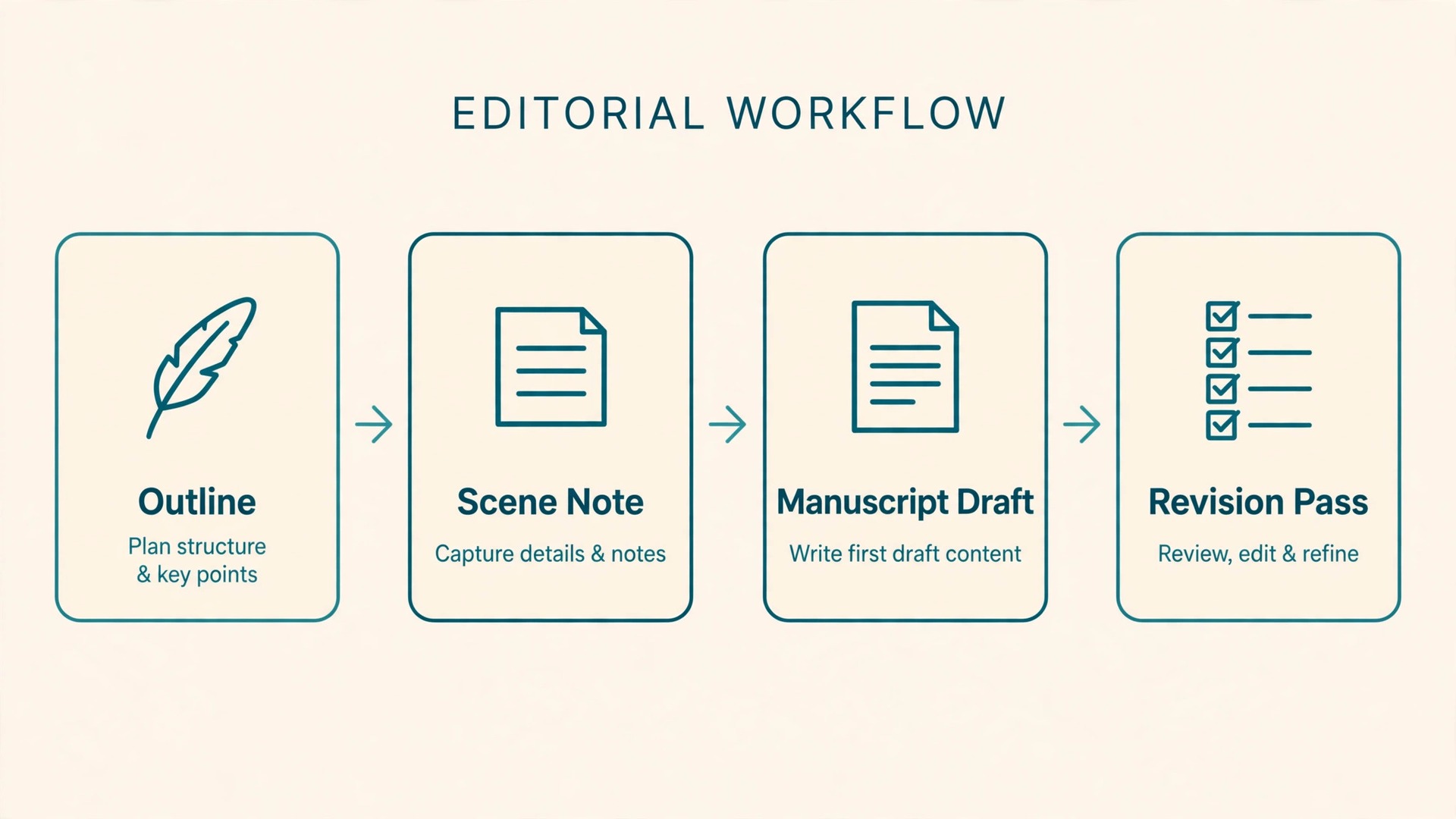
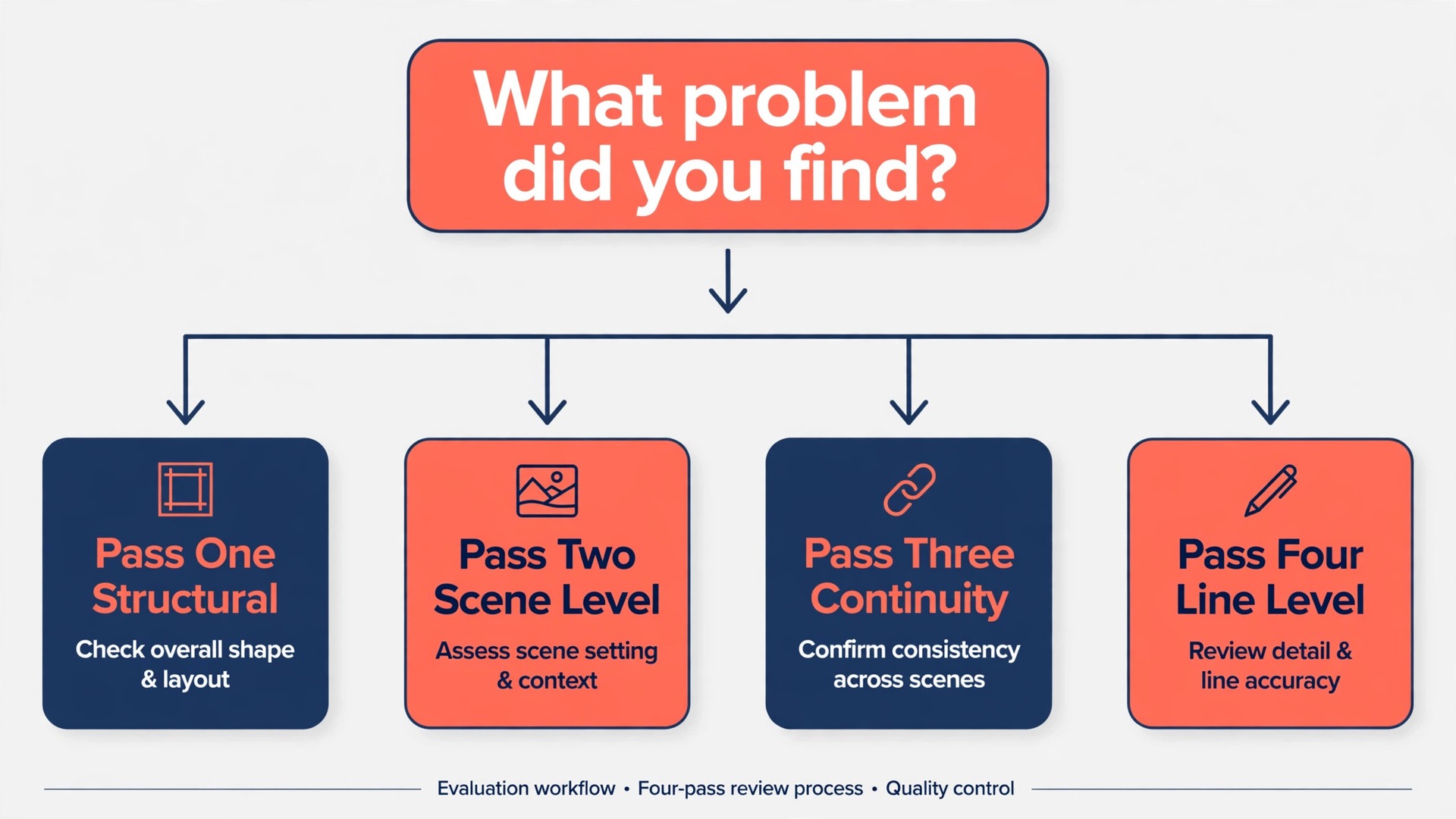
Revision fails when it tries to do everything at once. A writer rereading chapter one will fix a comma, question a plot point, rewrite a paragraph, and lose the thread of the whole chapter in a single sitting. Passes fix this by giving each read one job. Run four passes, in order, and do not let an earlier pass borrow a later pass’s job.
Pass one is structural. Read the outline and the plot thread notes, not the prose. Ask whether the story turns in the right places, whether any thread vanishes for too long, and whether the ending is earned by the scenes that precede it. Move, cut, or add whole scenes here, and update the timeline the day you move anything.
Pass two is scene level. Work through the scene notes in order, and for each scene ask whether it earns its place. A scene earns its place by changing something, a decision, a relationship, a piece of knowledge, or the stakes. Scenes that only transport characters, repeat information, or restate a point made earlier get cut or merged. For each surviving scene, check the purpose line against the actual draft.
Pass three is continuity. Open the character notes, the timeline, and the worldbuilding notes, and check the draft against them. Ages, dates, distances, names, rules, and relationship states all get verified here. Log every fix in the revision log for that pass, with the scene reference, so a fix can be traced later if it creates a new problem.
Pass four is line level. Only now do sentences get close attention. Read the manuscript aloud where possible, because awkward rhythm and repeated words are audible before they are visible. Cut filler words, vary sentence length, and check dialogue against each character’s speech habits in their note.
When you use Obsidian for novel writing with this pass order, each pass has a written record. The revision log for a pass lists the scenes covered, the changes made, and the problems deferred to a later pass. Deferred problems are not failures. They are decisions with a home, and a pass that ends with a short deferred list is a pass that stayed focused. Between passes, take at least a day away from the manuscript. Fresh eyes find structural problems that tired eyes walk past.
Export to Manuscript Format
Export is where a vault system proves its worth or shows its seams, so plan it before the final pass, not after. The manuscript files are already plain Markdown, which converts cleanly. The standard route is Pandoc, a free document converter, which turns Markdown into a Word document with chapter headings intact. Run it on the manuscript folder in chapter order, check the output once for heading levels and scene breaks, and fix any formatting problem in the Markdown source, not in the Word file.
Two details decide whether export is painless. First, use one heading level for chapter titles throughout, and one consistent marker for scene breaks, such as three asterisks on their own line, so the converter treats every chapter the same way. Second, keep planning material out of manuscript files. Scene notes, revision logs, and worldbuilding notes stay in their own folders, so the export contains only the book.
Community plugins can help here. Longform is a popular plugin that manages a manuscript as a sequence of scenes inside Obsidian, with word counts per scene and a compile step that joins them in order. It suits writers who want manuscript management without leaving the vault. For submission, most agents and publishers still ask for a Word document or a PDF, so the final step is usually Pandoc or a word processor, whatever the drafting tool.
When you use Obsidian for novel writing, test the full export with three chapters early in the project, not with a finished book, because a heading problem found at chapter three is a ten minute fix and the same problem found at chapter forty is a lost weekend.
Costs, Limits, and What Obsidian Cannot Do
The core Obsidian app is free for personal use, with no account required and no feature limit on the app itself. Since February 2025, a commercial licence is optional rather than required, so a writer earning from a book does not face a licence fee for the app. The paid add ons are Obsidian Sync and Obsidian Publish. Sync Standard costs 4 dollars per month billed annually, or 5 dollars billed monthly, for one synced vault with one month of revision history. Sync Plus costs 8 dollars per month billed annually, or 10 dollars billed monthly, for up to ten vaults and twelve months of revision history.
Publish costs 8 dollars per month billed annually, or 10 dollars billed monthly, per site, and it is for putting notes on the web, which most novelists do not need.
The honest limits matter as much as the price. Obsidian has no built in manuscript compile, no track changes, and no collaborative editing that works like a shared document. An editor who expects tracked changes in Word will need a Word export, not vault access. Obsidian has no grammar checker in the core app, so writers who want one add a plugin or run the export through a separate tool. Mobile writing works, but the phone app suits notes and short scenes better than long drafting sessions. And the vault is only as good as its maintenance.
A writer who skips the weekly review will end up with an inbox full of unfiled notes and a timeline that no longer matches the draft.
For a wider view of the surrounding toolkit, the comparison of Notion and Obsidian lays out the local versus cloud trade off in full, and the guide to book writing software places Obsidian among dedicated novel tools. Writers who already keep research in a vault may also find the PhD research database guide useful for its folder discipline, even though a novel vault is a different system. When you use Obsidian for novel writing alongside other tools, keep one rule. The vault is the home of the book’s facts, and other tools are visitors, not second homes, or the same fact will soon exist in two places and disagree with itself.
Mistakes That Quietly Break a Novel Vault
The first mistake is building the system instead of writing the book. A writer can spend a month perfecting templates, themes, and plugins while chapter one stays blank. Set a limit. One weekend for setup, then daily writing, and system improvements only during the weekly review. A vault that holds ten chapters beats a beautiful vault that holds none.
The second mistake is linking everything to everything. A note with forty links is not connected, it is noisy, and its backlinks panel becomes useless. Link characters, places, threads, and rules that a scene actually uses. Leave out passing mentions. When you use Obsidian for novel writing, link quality matters more than link count, and a sparse graph that answers real questions beats a dense one that answers none.
The third mistake is never emptying the Inbox. An Inbox with two hundred notes is not an inbox, it is an unfiled archive, and it teaches you to stop trusting the vault because search returns unprocessed material alongside finished notes. Protect a weekly thirty minute review. Move each inbox note to its folder, link it, or delete it.
The fourth mistake is revising in place without snapshots. A writer who rewrites a scene and later wants the original back has only memory to work with, and memory flatters the new version. Archive a dated copy before every major pass, as described in the versioning section, so every earlier draft remains recoverable. The fifth mistake is writing worldbuilding notes nobody needs. Fifty pages of lore before chapter one feels like progress, but lore without a scene is inventory, not story. Write the world note when a scene demands the fact, and let the book’s needs set the size of the world.
For wider reading on the surrounding toolkit, the book writing software guide compares dedicated novel apps against a vault system, the screenwriting tools guide covers a neighbouring form with different formatting demands, and the sync conflicts fix guide is the one to bookmark before a deadline week, when a sync problem hurts most.

Frequently Asked Questions
Is Obsidian free for novel writing?
Yes. The desktop and mobile apps are free, with no account required and no feature limit on the app itself. You pay only if you choose Obsidian Sync for encrypted cross device sync, Obsidian Publish for a public site, or an optional supporter contribution. Check the official pricing page and checkout before paying, because listed rates change.
Can Obsidian replace a dedicated novel app like Scrivener?
It can, but the trade is real. A dedicated novel app gives you a manuscript view, compile, and word count targets out of the box. Obsidian gives you linked notes, plain text durability, and full control over structure, but you build the manuscript workflow yourself with folders, templates, and plugins such as Longform. Writers who value linked story facts over built in compile usually prefer the vault.
How many notes should a novel vault contain?
There is no target number, and chasing one creates filler. A typical novel might produce one scene note per scene, which could be fifty to eighty, plus one note per character and one per worldbuilding topic. Judge the vault by whether you can answer a continuity question in under a minute, not by its note count.
Can I write a novel on my phone in Obsidian?
Yes, for notes and short scenes. The mobile apps are free and open the same vault, and many writers capture scenes and ideas on a phone. Sync is the part to plan carefully, because the official Sync service handles mobile most smoothly, while a cloud folder can be fiddly on mobile and Git needs a separate mobile setup.
What happens to my novel if I stop using Obsidian?
Your novel remains as plain Markdown files in a folder on your device, readable in any text editor and convertible with Pandoc or a word processor. Links are written as plain text, so the connection structure survives even without the app. That portability removes the risk of losing a book to a subscription change or a shutdown.
Usually not directly. A vault is a personal working space, and editors generally work better from a Word export with comments, or a PDF for beta readers. Share the manuscript export when feedback is needed, and keep the vault private, especially where it contains cut scenes or unpublished ideas you may reuse later.
Start With One Scene, Then Let the System Grow
A novel writing system is not judged in the week you build it. It is judged in the month you revise, when an editor asks why a character acted out of character or a reader spots a timeline error. On that day, a single long document makes you search, a scattered set of files makes you guess, and a well kept vault makes you answer, because the scene, the character note, the timeline entry, and the revision log are one click apart.
Start this week with the ten scene test. Create the vault, copy the folder structure, write scene notes for the first ten scenes, and draft them from the beats you planned. If you use Obsidian for novel writing with that small test first, the workflow either proves itself or breaks while the fix is still cheap. A year from now, the difference between a pile of files and a novel system will not be the tool you chose. It will be the notes you wrote, the links you kept, and the weekly habit that stopped the pile from coming back.