
A landlord with one duplex who pays a per-unit platform fee and a landlord with ten doors who pays a flat monthly fee can end up with bills that point in opposite directions, even when both use tools that claim to be cheap. That contradiction is the heart of this guide to the best property management software for small landlords, because the cheapest tool at one portfolio size is often the most expensive tool at another. The comparison hook that matters is not the headline price. It is the bill at your exact unit count, with fees, add-ons and the work you still do by hand counted in.
Small landlords do not need enterprise software. They need rent collected on time, maintenance requests tracked without a spreadsheet, leases signed without a printer, and books clean enough for tax season. A tool that covers those four jobs at a fair price beats a platform with fifty features that nobody opens. This guide tests six tools against that standard, using real published prices and the fee math at three portfolio sizes.
Prices change and plans get renamed, so treat every figure below as a starting point checked at writing time. Confirm the current price on the vendor page before you pay. The right choice rests on fit and total cost at your unit count, not on a single promotional month.
Why the best property management software for small landlords Is Not One Size Fits All
Portfolio size changes everything about this decision. A free tool can be perfect for two units and painful at twenty, because the free tier often caps features, charges tenants per payment, or lacks the accounting depth a larger portfolio needs. A professional platform can be perfect at fifty units and wasteful at three, because its base fee alone exceeds what the portfolio earns in a month.
The second difference is who does the work. Some landlords self-manage every task and only need software to collect rent and store leases. Others use a part-time manager, an accountant, or a maintenance contractor, and need owner portals, permissions and reporting. A tool built for a solo operator will frustrate a small team, while a tool built for a management company will feel heavy for one person.
The third difference is fee placement. Some platforms charge the landlord a flat fee and let tenants pay free by bank transfer. Others look free to the landlord but charge tenants per payment, which creates friction at collection time. Judge a tool by the total cost across landlord and tenant, not by the price on the pricing page alone.
Start With Portfolio Size, Not Features
Write down three numbers before you compare anything. How many units you manage today, how many you expect to manage in two years, and how many people need access to the system. Those three numbers rule out half the market immediately, because per-unit tools punish growth while flat tools reward it, and team tools charge for seats that solo tools give away.
Next, list the jobs the tool must do every week. Rent collection, maintenance tracking, tenant screening and lease signing cover most small portfolios. Accounting depth, owner statements and trust accounting matter only when you manage for other owners or hold client funds. Buying accounting depth you do not need is the most common overspend in this category.
Finally, count support as a feature, not a bonus. Small landlords often manage alone, so a slow support reply on rent day is a real cost. Check whether support is live chat, email only, or phone, and whether help articles cover the exact tasks you will do most. A tool with fast human help beats a cheaper tool that leaves you searching forums when a payment fails.
How Screening, Payments and Support Were Tested
Every tool in this guide was judged on the same four tests, because a feature list cannot show how a tool behaves when money and tenants are involved. The first test is screening. A good tool orders a credit and background check without forcing the landlord to learn a second system, and it returns results fast enough to fill a vacancy before a good applicant moves on. The best property management software for small landlords must make screening feel like one step, not a separate project.
The second test is payment reliability. Rent must arrive on the due date, autopay must not fail silently, and the landlord must see a clear record when a payment is late or returned. Tools that send automatic reminders and late fee notices protect the landlord from awkward conversations, and tools that show payout timing clearly prevent cash flow surprises at the end of the month.
The third test is maintenance handling. A tenant should be able to report a problem from a phone in under a minute, with a photo attached, and the landlord should be able to assign it, track it and close it without a phone call. Tools that bury maintenance behind menus create delays, and delays create damage. The test also covers contractor access, because a landlord who cannot share a job with a plumber will end up relaying messages by hand.
The fourth test is support when something breaks. Small landlords cannot wait three days for an answer on rent day, so response time and human availability matter as much as price. A tool that answers quickly, with staff who understand landlord work, earns its subscription in the moments that matter most. Judge support during the trial by asking a real question, not by reading a marketing claim.
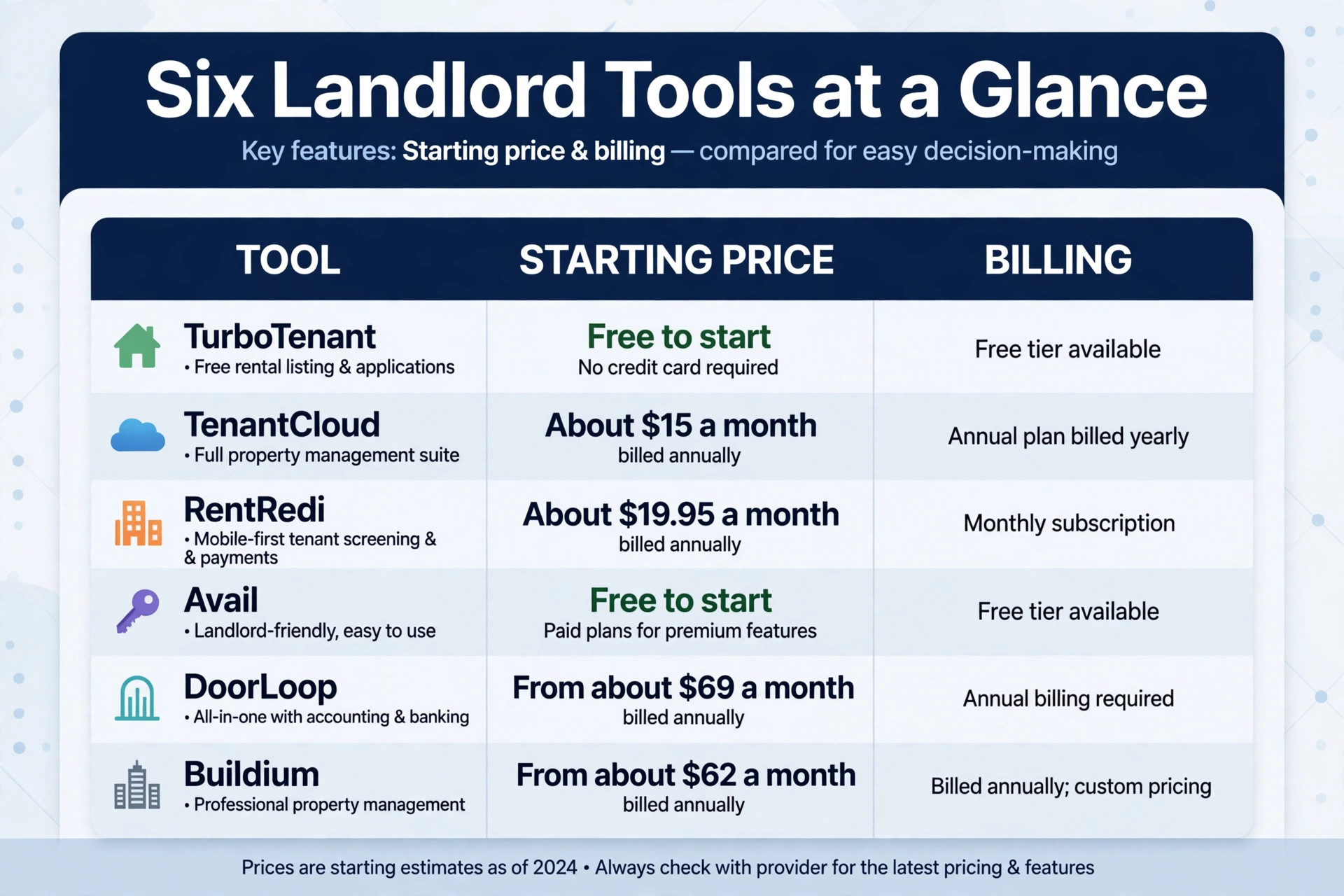
The Six Tools at a Glance
| Tool | Starting price | Best for |
|---|---|---|
| TurboTenant | Free to start | Landlords who want free rent collection |
| TenantCloud | About 15 dollars a month billed annually | Landlords who want a low flat fee |
| RentRedi | About 19.95 dollars a month | Landlords who want one flat plan |
| Avail | Free to start | Landlords who want free leasing tools |
| DoorLoop | From about 69 dollars a month billed annually | Landlords moving toward professional management |
| Buildium | From about 62 dollars a month | Landlords who need full accounting |
Read the table as a shortlist, not a ranking. The free tools suit small portfolios with simple needs, while the paid platforms earn their price through accounting, portals and automation. Pick three finalists from the table, then read their full sections before deciding.
Each Platform in Depth
TurboTenant
TurboTenant is the pick for landlords who want free rent collection and simple leasing. The free plan covers listings, applications, tenant screening options, rent collection and lease templates, which is enough for many landlords with a handful of units. Paid plans add features such as faster payouts, additional screening options and expanded reporting, all for a flat monthly fee rather than a per-unit charge.
The trade-off is accounting depth. TurboTenant handles rent and basic records well, but landlords who need full bookkeeping, owner statements or trust accounting will need another tool for the books. Choose TurboTenant if your portfolio is small, your needs are simple, and a free start matters more than deep accounting. Skip it if you manage for other owners, because that job needs a platform built for it.
TenantCloud
TenantCloud is the pick for landlords who want a low flat fee with unlimited properties. The Starter plan costs about 15 dollars a month when billed annually for up to 10 leases, while higher plans cover 30 and 60 leases at higher flat rates. Every plan includes unlimited properties, so landlords with scattered houses are not penalised for how their portfolio is organised.
The feature set covers the full self-management workflow. Online rent payments with autopay, listings, applications, screening, maintenance requests, lease templates and e-signatures all live in one place. Higher plans add inspections, message boards, tax reports and bank reconciliation as the portfolio grows.
Watch the fee placement before you commit. Tenants pay per-transaction bank transfer fees on the lower plans, and card payments carry a percentage fee on top. Accounting is lighter than a professional platform, so landlords who need general ledger depth should weigh that gap. For straightforward management at a flat price, TenantCloud is one of the strongest values here.
RentRedi
RentRedi is the pick for landlords who want one flat plan with every feature included. The monthly price is about 19.95 dollars a month, and annual billing brings the effective monthly cost down to about 9 dollars. Units and tenants are unlimited, so the bill does not move when a landlord adds a door. Rent collection, listings, applications, screening, maintenance, lease signing and two-way messaging all come standard.
That simplicity is the selling point. There is no tier comparison, no per-unit math and no feature gates to study. Mobile apps for landlords and tenants are well regarded, tenants can pay from their phones, and rent payments can be reported to credit bureaus to help tenants build credit. Support quality is a recurring praise in user reviews.
The catch is accounting. The base plan does not include the accounting module, which is a paid add-on, and there is no automated sync with QuickBooks Online, so exports are manual. Landlords who run their books in QuickBooks will feel that gap. If rent collection and tenant management matter more than bookkeeping, RentRedi is hard to beat at this price.
Avail
Avail is the pick for landlords who want free leasing tools with no unit cap. The Unlimited plan costs landlords nothing and includes unlimited units, listing syndication, applications with screening, state-specific leases with e-signing, rent collection, maintenance tracking and bookkeeping. For a landlord with a few doors, that is a complete toolkit at zero landlord cost.
The paid Unlimited Plus plan costs 9 dollars per unit per month and adds faster next-day payouts, waived bank transfer fees, customisable leases and a branded property website. It makes sense once payout speed and customisation matter more than the per-unit cost, though the bill climbs fast as units grow.
The free plan has a catch in fee placement. Tenants pay a small fee per bank transfer on the free plan, and card payments carry a percentage fee on either plan. If tenants mostly pay by card, they will feel the cost, and the landlord may hear about it. Avail also lacks the trust accounting and team features professional managers need. For self-managing landlords, though, the free tier is genuinely hard to argue with.
DoorLoop
DoorLoop is the pick for landlords moving toward professional management without enterprise complexity. The Starter plan starts from about 69 dollars a month when billed annually and covers up to 20 units, with higher plans adding automation, reporting and portfolio tools. The platform combines rent collection, leasing, maintenance, accounting and owner portals in one system that is easy to learn.
That balance is the appeal. DoorLoop feels like a professional platform but sets up faster and costs less than the enterprise names, which suits landlords who are growing from self-management into managing for others. Accounting, bank reconciliation and owner reporting are stronger here than in the free tools, and the interface is consistently praised for clarity.
The honest test is the bill at your size. At one or two units, a 69 dollar starting price is hard to justify against a free tool, and the value only appears once the portfolio or the workload grows. Run DoorLoop through a real month of your work, price it at next year’s unit count, and judge whether the time saved beats the subscription. Growth is where DoorLoop earns its place.
Buildium
Buildium is the pick for landlords who need full accounting and owner reporting. The Essential plan starts at about 62 dollars a month, with Growth at about 192 dollars and Premium at about 400 dollars, and prices rise as unit counts grow. Every tier includes accounting, maintenance, online portals, task management and leasing, and all plans come with a trial period.
Where Buildium separates from the self-management tools is the back office. Full general ledger accounting, bank reconciliation, tax form e-filing, owner statements, trust accounting and a dedicated owner portal are built in. Online rent collection supports bank transfers, cards and autopay, with transaction fees that fall on higher tiers.
The honest math is that 62 dollars is a starting figure, not a ceiling. The actual price depends on units, and landlords with one or two doors will find the platform expensive and deep for their needs. Implementation can also carry fees. For managers who need real accounting and owner reporting, Buildium remains the benchmark, but small self-managing landlords should only buy it when the books demand it.
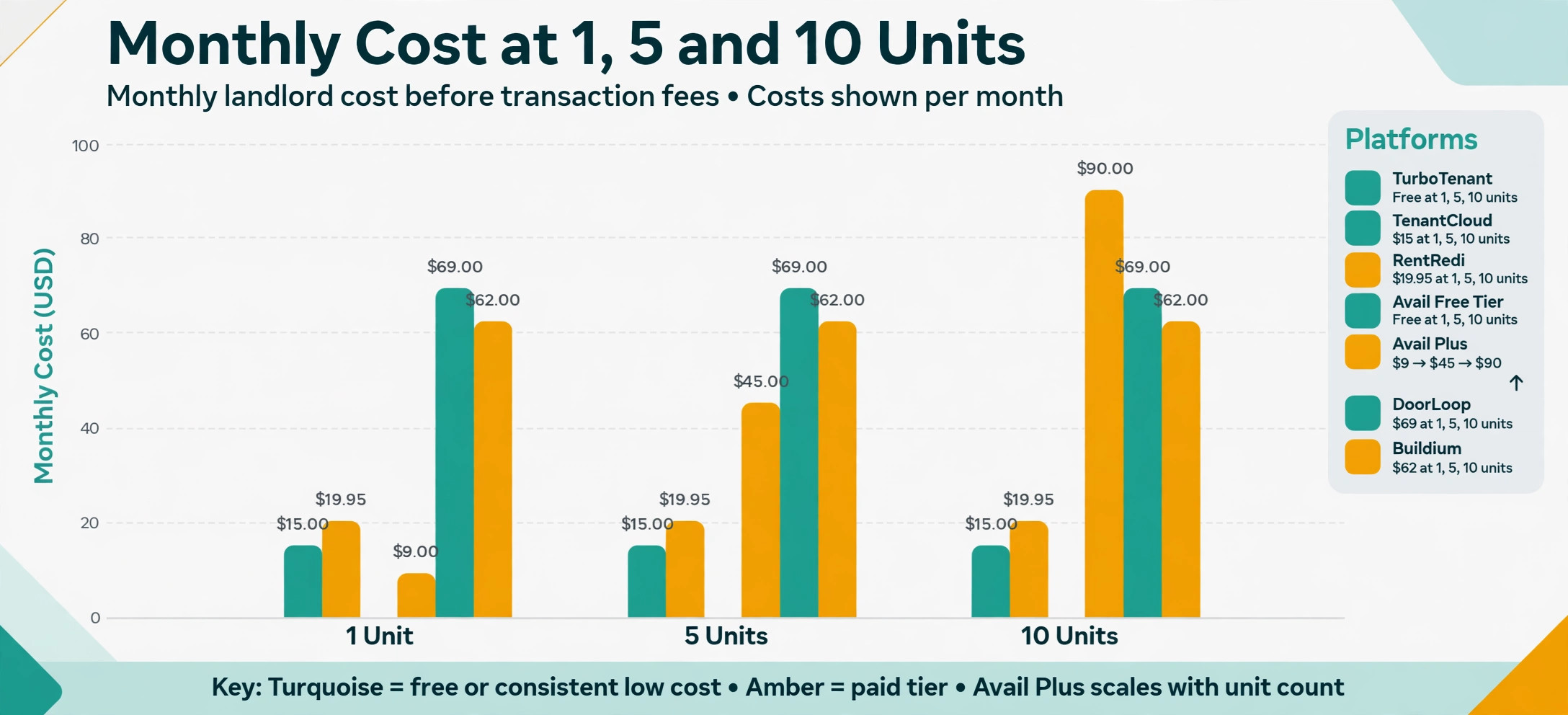
What Each Tool Costs at 1, 5 and 10 Units
This table is the overview-proof check for this guide, because it shows the monthly landlord cost before transaction fees at three realistic portfolio sizes. Free tiers cost nothing to the landlord at any size shown, while per-unit pricing climbs with every door added.
| Tool | 1 unit | 5 units | 10 units |
|---|---|---|---|
| TurboTenant | Free | Free | Free |
| TenantCloud | About 15 dollars | About 15 dollars | About 15 dollars |
| RentRedi | About 19.95 dollars | About 19.95 dollars | About 19.95 dollars |
| Avail free tier | Free | Free | Free |
| Avail Plus tier | About 9 dollars | About 45 dollars | About 90 dollars |
| DoorLoop | From about 69 dollars | From about 69 dollars | From about 69 dollars |
| Buildium | From about 62 dollars | From about 62 dollars and up | From about 62 dollars and up |
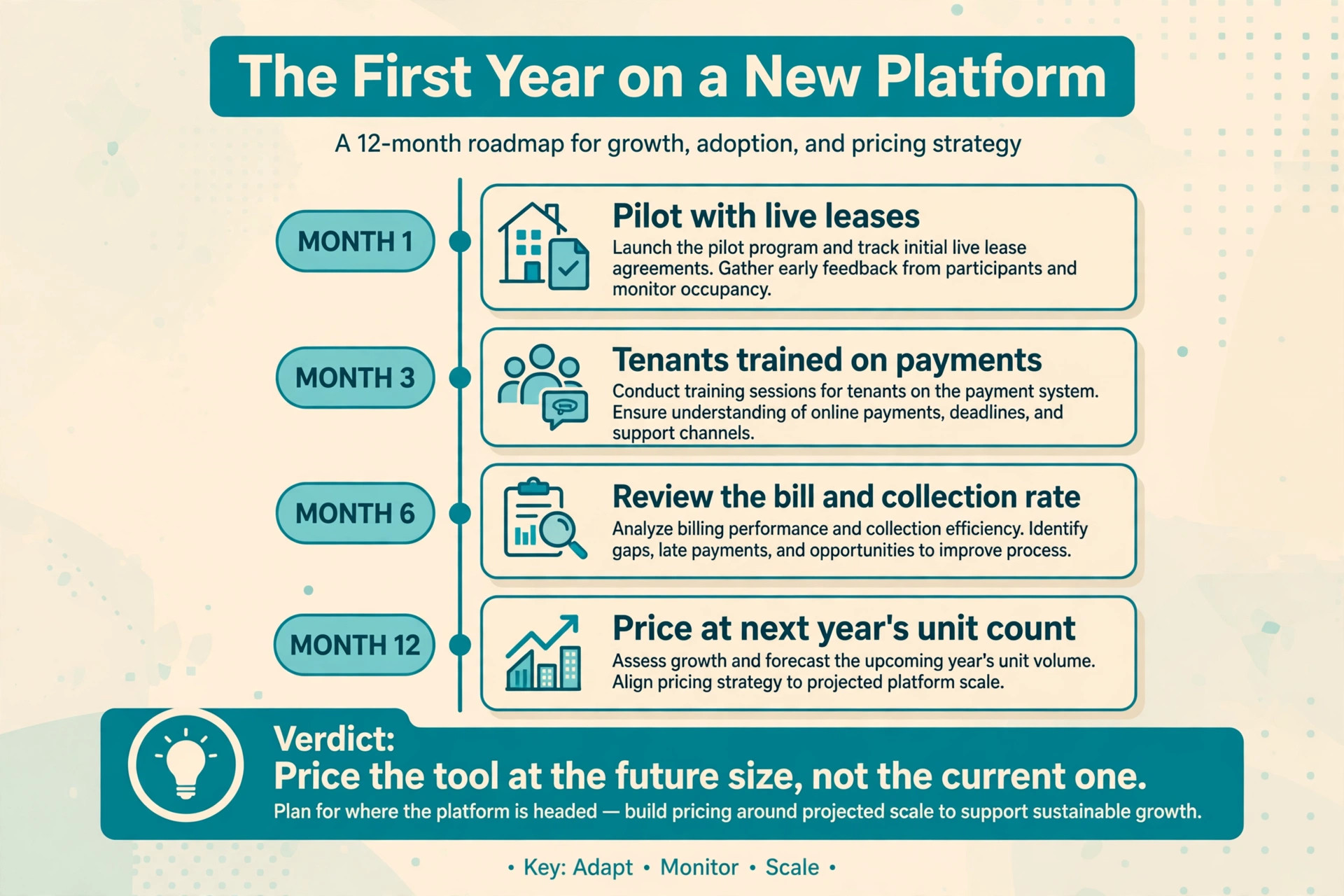
Read the pattern, not just the row. Flat tools hold their price as you grow, which rewards growth, while per-unit tools start cheap for one door and become the most expensive option at ten. A landlord planning to grow should price the tool at the future size, not the current one, because switching platforms mid-growth costs time and risks lost records.
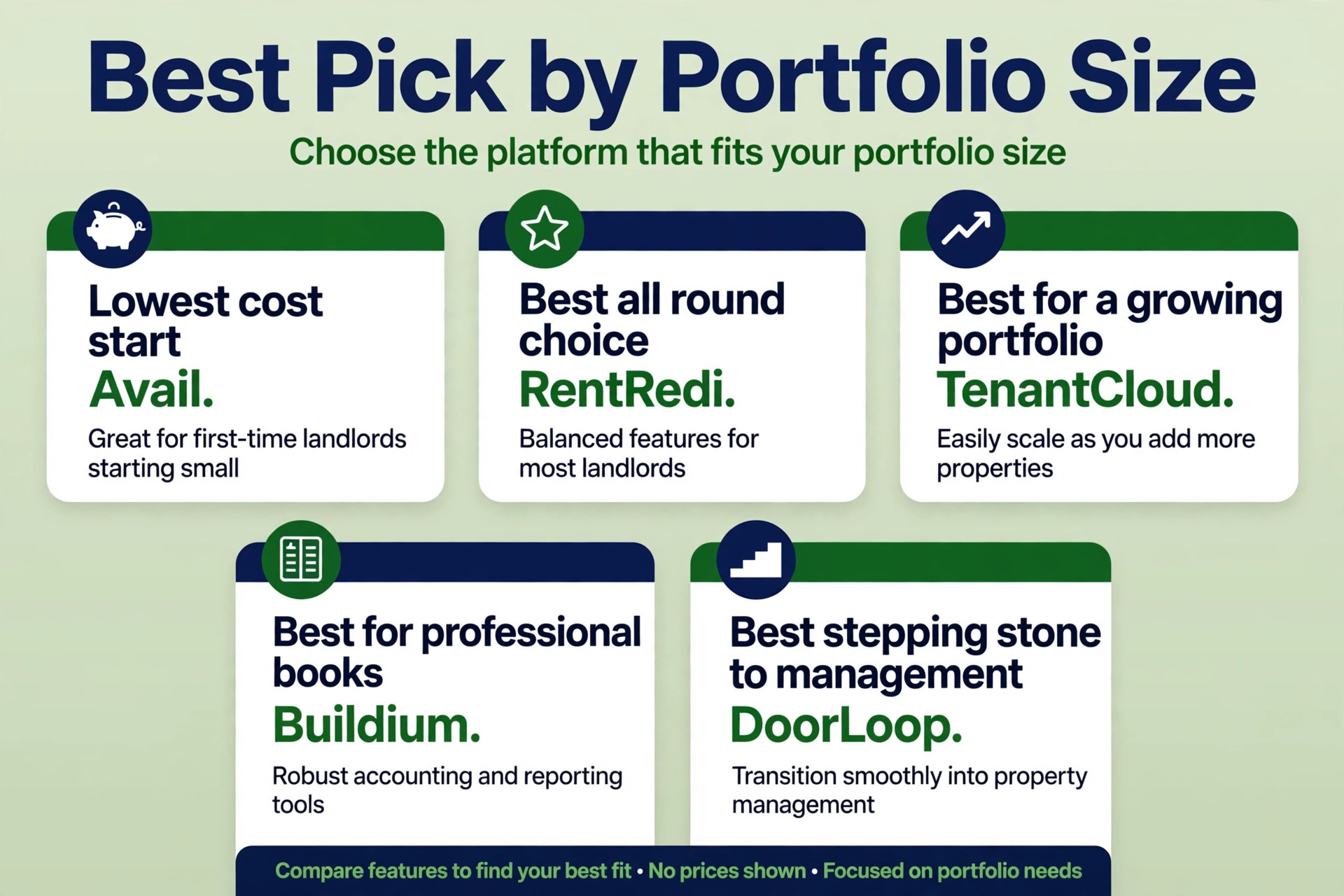
Best Pick by Portfolio Size
| Job | Best pick | Why it wins for that job |
|---|---|---|
| Lowest cost start | Avail | Free landlord tier with full leasing tools |
| Best all round choice | RentRedi | One flat plan with every feature included |
| Best for a growing portfolio | TenantCloud | Low flat fee that holds as leases grow |
| Best for professional books | Buildium | Full accounting and owner reporting built in |
| Best stepping stone to management | DoorLoop | Professional features without enterprise weight |
Use this table to match the tool to the job, because the best overall tool is not always the best tool for a specific portfolio. A landlord with one unit and a landlord managing for owners have different jobs, and the table points each one to the tool built for that exact situation.
The Full Monthly Cost Beyond the Subscription
The headline price is only the first line of the bill. Transaction fees, screening charges, accounting add-ons and payout speed all sit on top of it, and the total at a realistic size is what a landlord actually pays. A free tool that charges tenants per payment can cost goodwill, while a paid tool that includes free bank transfers can be cheaper in practice than its price suggests.
Count screening carefully. Some tools include screening in the plan, others pass the screening fee to the applicant, and a few charge the landlord per report. For a landlord who fills several vacancies a year, that difference adds up. Count payment fees the same way, checking who pays for bank transfers and who pays the card percentage, because card fees are the largest hidden cost in this category.
Finally, count your own time. A tool that saves two hours a month on rent chasing and bookkeeping is worth more than its subscription if those hours go to finding the next property or handling maintenance well. Price the tool against hours saved and errors avoided, not against the cheapest rival on the pricing page. For the best property management software for small landlords, that time test often decides the winner more honestly than any feature comparison.
A second hidden cost is payout timing. A tool that holds rent for five days creates a cash flow gap that a landlord with a mortgage payment cannot ignore, while a tool with next-day payouts keeps the month smooth. Check the payout schedule during the trial, and weigh faster payouts against any fee charged for speed. A small fee for fast access can be worth it when a mortgage due date falls close to rent day.

Moving In Without Losing a Rent Cycle
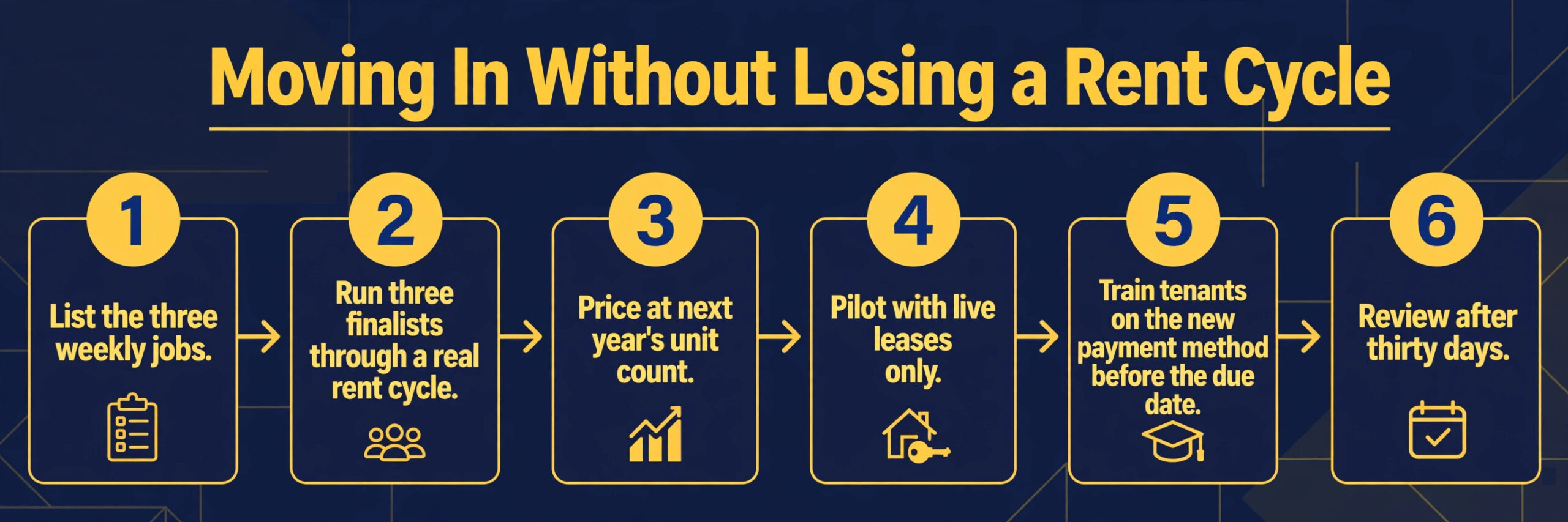
Switching tools fails most often from rushing, not from choosing badly. A short, careful workflow protects the rent, the tenants and the records that the business depends on every month. Follow these steps in order, and do not skip the trial, because the trial is where most problems reveal themselves cheaply.
1. List the three weekly jobs the new tool must handle, and write down how each job works today. 2. Pick three finalists from this guide, and run each one through a real rent cycle with a real tenant. 3. Price each finalist at your unit count in twelve months, including fees and add-ons. 4. Import only live leases for the pilot, and check that balances and payment history match the old system. 5. Train tenants on the new payment method before the next due date, with a reminder in writing. 6. Review the bill, the collection rate and tenant feedback after thirty days, and fix the setup before blaming the tool.
Mistakes That Eat the Saving
The most common mistake is buying for the portfolio you wish you had, instead of the portfolio you actually run. A landlord with three units does not need trust accounting, and a landlord with thirty units should not run the books on a free tool built for two. Buy for the next twelve months, not for a future that may never arrive, and upgrade when growth demands it.
The second mistake is ignoring the exit. A tool that holds lease records hostage, charges heavily to export, or breaks every integration on cancellation will cost far more at exit than it saved at entry. Export leases, payment history and tenant records monthly, keep a copy outside the system, and know the cancellation terms before you sign.
The third mistake is letting tenant-paid fees damage the relationship. Tenants notice when a payment method suddenly costs them money, and a landlord who never explains the fee will hear about it at renewal time. Choose the payment options deliberately, tell tenants what each option costs, and keep at least one low-cost payment path open.
A fourth mistake is buying on a discount month and ignoring the renewal price. Introductory pricing, annual billing discounts and waived setup fees all expire, and the second-year bill is the real price. Ask for the renewal rate in writing before you commit, and model the second year at your expected unit count. A tool that only looks cheap in month one will disappoint by month thirteen, while a tool priced fairly from the start rarely surprises.
A fifth mistake is skipping the mobile test. Landlords work from job sites, cars and kitchens, not desks, and tenants pay from phones. If the landlord app cannot record an expense or answer a maintenance request on the move, work piles up until desk time appears. Open the mobile app during the trial, complete a full payment and a maintenance task on it, and only then judge the tool. Desktop polish means little when daily work happens on a phone.

The Verdict for Small Landlords
Start with unit count, then the fee math, then the trial. For most small landlords in this guide, RentRedi is the safest first trial, because one flat plan covers every feature and the bill does not move as doors are added. A landlord with a very tight budget should start with Avail or TurboTenant instead, because a free tier covers the core jobs at zero landlord cost. Whatever you shortlist, keep the trial honest and the fee math complete, and let a real rent cycle cast the deciding vote. The cheapest subscription rarely wins that vote on its own, because collection reliability, tenant experience and clean books shape the result far more than a few dollars of monthly price difference.
The best property management software for small landlords decision does not need to be perfect, it needs to be tested. Run a real rent cycle, price the tool at next year’s unit count, and judge it on whether rent arrives faster and records stay cleaner. A tool that passes that test is worth keeping, even if a rival looks better on a pricing page, because daily collection is the test that actually matters.
For a final check, compare the shortlist against the best property management software for small landlords on total cost at your real unit count before you pay for a year. A shortlist built around the best property management software for small landlords should still be tested with a real tenant, because a pricing page cannot show how tenants experience payment day.
More Reading on Stratilyze
Readers comparing landlord tools usually check the neighbouring guides next. The guide to AI tools for property managers covers a closely related decision, the guide to Airtable for rental management explains a workflow that pairs well with this choice, and the guide to smart locks for rental property helps with the wider setup around it.
Frequently Asked Questions
Is free landlord software really free
Free landlord software is usually free to the landlord, not free to everyone in the transaction. Tenants may pay per bank transfer or a percentage on card payments, and screening or accounting features may sit behind a paid tier. Check who pays each fee before you call a tool free, and keep a low-cost payment path open for tenants.
How many units make a paid plan worth it
A paid plan becomes worth it when the time saved or the features gained beat the monthly fee at your size. For many landlords, that point arrives between five and ten units, when manual tracking starts to take hours each month. Below that point, a free tier often covers the core jobs, while above it, flat paid plans usually beat per-unit pricing. When judging the best property management software for small landlords, that crossover point matters more than any single price.
Should I pay per unit or a flat fee
Flat fees suit landlords who plan to grow, because the bill holds steady as doors are added. Per-unit pricing suits a landlord with one or two units who values premium features such as faster payouts or custom leases. The right choice depends on growth plans, not on the starting price alone.
Do I need full accounting software as well
Many small landlords do not, because rent tracking, expense records and tax reports inside a management tool cover the basics. Landlords who manage for other owners, hold client funds, or file complex owner statements need deeper accounting, and should choose a platform with a general ledger built in rather than bolting on a second system.
Can tenants pay by card without high fees
Tenants can usually pay by card, but card fees are the largest cost in this category, and someone always pays them. Some tools pass the percentage to the tenant, others charge the landlord, and a few absorb part of it on higher tiers. Offer bank transfer as the default, keep card payment as an option, and tell tenants the cost of each method upfront.
What happens to my records if I cancel
Records usually remain exportable for a period after cancellation, but the exact terms vary by vendor and plan. Export leases, payment history, tenant records and tax reports before cancelling, and keep a copy outside the system. A tool with easy export is worth a small premium, because trapped records cost far more at exit than they save at entry. That export test belongs in every best property management software for small landlords shortlist, because the cheapest tool today can become the most expensive tool on the day you leave.