

Buy SimplePractice first if you want the safest all-round choice, and use this guide to check whether a cheaper or more specialised rival fits your practice better. That verdict opens this guide to the best practice management software for therapists, because most therapists do not need the most powerful platform. They need scheduling, notes, billing, telehealth and a client portal that work together without adding admin hours to a clinical week, and the winner depends on caseload, insurance mix and budget.
Therapy practices differ sharply in what they need. A solo private-pay therapist needs elegant booking, simple notes and easy payments. An insurance-heavy practice needs deep claims handling, eligibility checks and treatment planning that speaks the language of behavioural health. A group practice needs per-clinician pricing that stays fair as staff join, plus admin seats that do not inflate the bill. This guide compares fifteen tools against all three shapes.
Prices below are starting figures checked at writing time, and several vendors have changed pricing in the last two years. Confirm the current price on the vendor page before you buy, and price every finalist at your real clinician count and session volume.
Why the best practice management software for therapists Must Cut Admin Hours
Admin work is the hidden tax on therapy. Intake forms, progress notes, superbills, bounced claims, rescheduling requests and reminder messages all eat hours that could go to clients or rest, and for a solo practitioner that load decides whether the practice feels sustainable. Software earns its subscription only when it removes hours, not when it moves them from paper to a screen.
The second test is billing depth. A private-pay practice can live on simple invoicing and card payments, but an insurance practice lives on claims, eligibility checks, electronic remittance and denial handling. A tool with shallow billing will force the practice into a second system or a billing service, and that second cost often exceeds the subscription saving that attracted the buyer in the first place.
The third test is the client experience. Online booking, a clear portal, secure messaging and simple telehealth links reduce no-shows and missed messages, which protects revenue directly. Clients judge a practice by how easy it is to book, pay and join a session, so a clumsy portal costs more than it appears to. Judge every tool below by admin hours saved, billing depth and client ease together.
Judging by Caseload, Insurance Mix and Team Size
Start with three facts about your practice. How many sessions you run each week, what share of those sessions bills insurance versus private pay, and how many clinicians and admin staff need access. Those three facts rule out half the market, because a tool priced per clinician punishes group growth, while a tool with shallow billing punishes insurance volume, and a tool capped at twenty appointments a month punishes a full caseload.
Next, list the daily jobs the tool must do without help. Scheduling, note writing, claim submission, payment collection and reminders cover most practices, and telehealth matters for any practice with remote sessions. A tool that covers those five jobs well beats a tool that covers twenty jobs badly, because daily work is what the practice judges week after week.
Finally, run a real trial with a real client journey. Book an appointment, complete an intake form, write a note, submit a claim or invoice, and collect a payment, all in the trial system. A demo with test data hides the slow step and the missing field, while a real journey reveals them before the practice pays for a year.

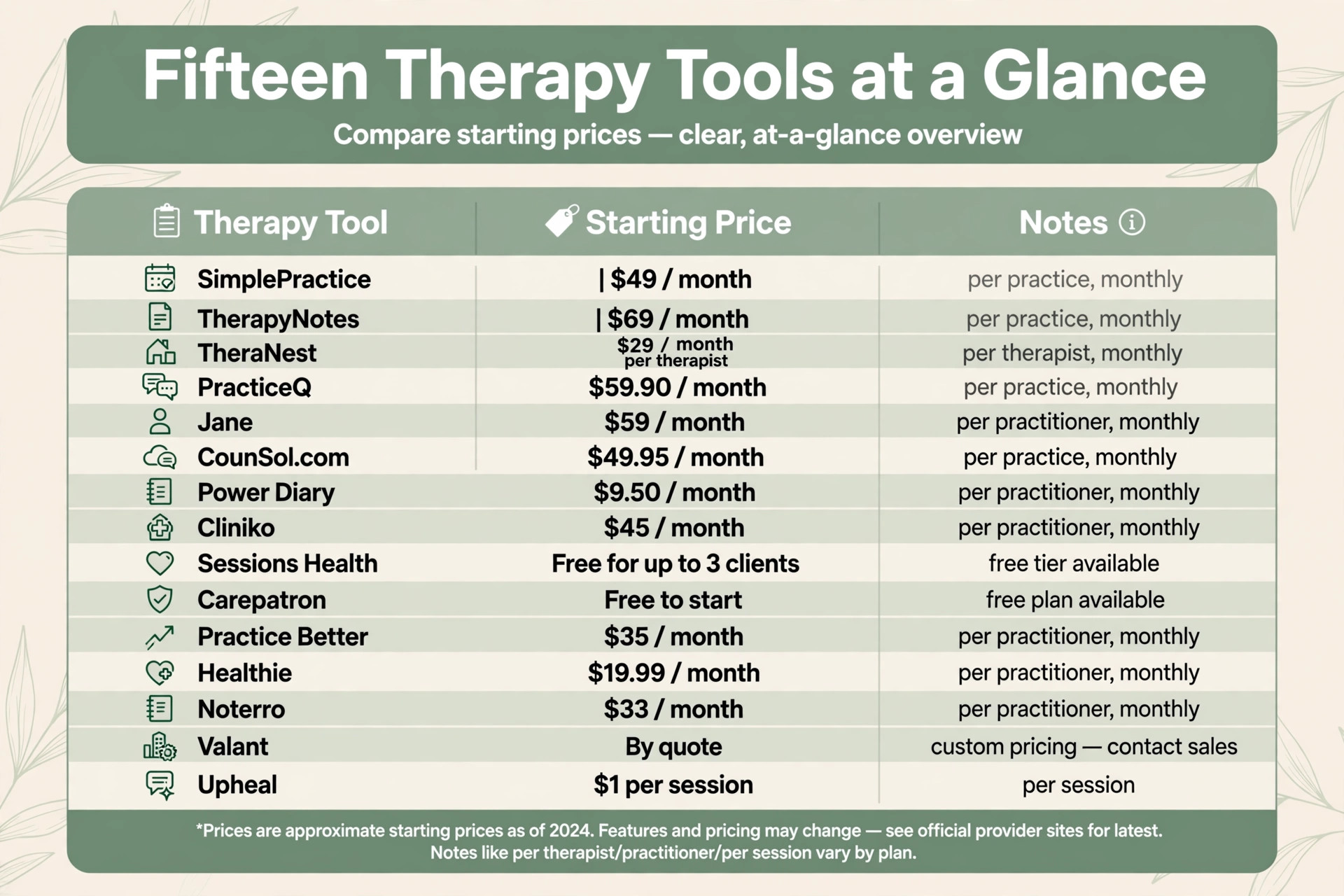
The Fifteen Tools at a Glance
| Tool | Starting price | Best for |
|---|---|---|
| SimplePractice | From about 49 dollars a month | Solo therapists wanting polish and depth |
| TherapyNotes | From about 69 dollars a month | Insurance-heavy practices |
| TheraNest | From about 29 dollars a month per therapist | Budget-conscious solo and small group practices |
| PracticeQ | From about 59.90 dollars a month | Customisable intake and workflow automation |
| Jane | From about 59 dollars a month | Multi-disciplinary clinics |
| CounSol.com | From about 49.95 dollars a month | Therapist-focused simplicity with personal support |
| Power Diary | From about 9.50 dollars a month | Lean practices wanting the lowest bill |
| Cliniko | From about 45 dollars a month | Scheduling-first clinics |
| Sessions Health | Free for up to 3 clients | The cheapest real electronic health record |
| Carepatron | Free to start | Part-time and solo practices watching cost |
| Practice Better | From about 35 dollars a month | Nutrition, wellness and program-led practices |
| Healthie | From about 19.99 dollars a month | Small caseloads and group programs |
| Noterro | From about 33 dollars a month | Massage, chiropractic and physiotherapy clinics |
| Valant | By quote | Psychiatric groups and larger programs |
| Upheal | From about 1 dollar per session | AI-first documentation |
Read the table as a shortlist, not a ranking. The cheapest tools suit part-time and private-pay practices, while the most expensive suit insurance-heavy and group practices. Pick three finalists from the table, then read their full sections before deciding.
Each Tool Under Review
SimplePractice
SimplePractice is the pick for solo therapists wanting polish and depth. Starter costs about 49 dollars a month, Essential about 79 dollars and Plus about 99 dollars, with extra clinicians priced from about 74 dollars each. Scheduling, documentation, billing, telehealth, a client portal, secure messaging and appointment reminders all live in one interface that feels designed rather than assembled, and the mobile apps are genuinely full-featured.
The catch is the total bill. Starter works for private-pay-only practices, but insurance work pushes a practice toward Essential or Plus, and then claims at about 39 cents each, card processing and add-ons such as the AI Note Taker at about 35 dollars per clinician a month stack on top. SimplePractice is still the most complete option here, it is just not the cheapest once everything is counted.
TherapyNotes
TherapyNotes is the pick for insurance-heavy practices wanting billing efficiency. Solo costs about 69 dollars a month, and group pricing starts at about 79 dollars for the first clinician plus about 50 dollars per additional clinician, with unlimited non-clinical staff included. Note templates, treatment plans and billing workflows speak the language of therapy from the first login, and per-claim fees near 14 cents are among the lowest in the category.
The trade-offs are real. The mobile app is newer and still cannot do notes or billing, which frustrates clinicians who work from their phones, and data export is per client rather than bulk, so switching later has friction. If the practice lives on insurance billing and values a system designed for therapists rather than adapted for them, TherapyNotes earns its place near the top.
TheraNest
TheraNest is the pick for budget-conscious solo and small group practices. Essentials starts at about 29 dollars per therapist a month, Advanced at about 59 dollars and Premier at about 89 dollars, which undercuts both SimplePractice and TherapyNotes by a wide margin. The core package covers scheduling, notes, billing and a client portal, and Premier bundles telehealth, a treatment planner library and more free claims.
The lower price shows in places. Telehealth costs extra on the lower tiers, there is no full-featured mobile app, and the interface feels more utilitarian than the leaders. Claims beyond the free allowance run about 23 cents each, and admin seats carry their own fees. If the practice mainly needs solid scheduling, notes and billing without the premium layer, TheraNest delivers the essentials at a price nobody else in the top tier matches.
PracticeQ
PracticeQ is the pick for customisable intake and workflow automation. Starter costs about 59.90 dollars a month and covers 25 appointments per practitioner, while Pro at about 84.90 dollars opens it up to 500 appointments. The identity is customisation, with a form builder offering unlimited templates, conditional logic and automated workflows, plus paperless onboarding that moves new clients from booking to signed consent without staff involvement.
The honest catch is that PracticeQ serves many specialties, so it never feels as therapy-native as TherapyNotes, and the two-week trial is tight for a proper evaluation. For therapists who run distinctive intake processes, memberships or packages, though, the automation depth is the best in this list, and the one-to-one onboarding calls help a practice actually set it up.
Jane
Jane is the pick for multi-disciplinary clinics and allied health teams. Balance costs about 59 dollars a month and covers a solo practitioner up to 20 appointments monthly, Practice at about 79 dollars removes the cap, and Thrive at about 99 dollars adds rooms, packages and waitlist management. Booking is genuinely pleasant, charting is flexible, and month-to-month billing with no long-term contract is rare in this category.
The limits matter for psychology specifically. Twenty appointments a month on Balance is too few for most full-time therapists, so budget for Practice at 79 dollars, and insurance billing costs extra with a separate clearinghouse subscription. Jane is a generalist that handles mental health well but does not speak therapy the way TherapyNotes does. For group or multi-disciplinary settings, though, it is one of the easiest platforms to run.
CounSol.com
CounSol.com is the pick for therapist-focused simplicity with personal support. Standard costs about 49.95 dollars a month and includes unlimited clients, scheduling, notes, billing and secure messaging, while higher tiers add unlimited insurance billing and telehealth up to Premium Plus at about 69.95 dollars. Every account gets a personal account manager, a human who knows the practice, and non-clinical staff are free with no setup fees.
The platform shows its age in the interface, and it lacks the design polish and mobile experience of the leaders. Telehealth requires at least the Premium tier, and the integration list is thin. Solo therapists who value being able to call a person who answers, and who want straightforward per-clinician pricing without claim surprises on the higher tiers, keep choosing CounSol for exactly that reason.
Power Diary
Power Diary is the pick for lean practices wanting the lowest monthly bill. Starter costs about 9.50 dollars a month for one practitioner with 1,000 appointments, and the Power plan at about 24.50 dollars removes the cap and adds unlimited file storage, telehealth and advanced features. For a part-time therapist or a practice just getting started, that is a fraction of what the therapy-specific platforms charge, and support is available around the clock.
The trade-off is specialisation. Power Diary, now rebranded as Zanda, serves all allied health, and its United States insurance billing is not as deep as TherapyNotes or SimplePractice. If billing is mostly private pay and the practice wants competent scheduling, notes and billing at the lowest possible price, nothing else here comes close.
Cliniko
Cliniko is the pick for scheduling-first clinics with straightforward needs. Pricing starts at about 45 dollars a month for one practitioner, with additional practitioners priced per seat. The platform covers online booking, treatment notes, invoicing, payments and client records in a clean interface that international clinics use widely, and it suits practices whose main job is keeping a busy diary organised.
The limit for United States therapy practices is insurance depth. Cliniko handles superbills and invoices well, but electronic claims workflows are thinner than in therapy-native platforms, so insurance-heavy practices may need a second billing path. Choose Cliniko if scheduling and notes dominate the week and billing stays simple, and look elsewhere when claims volume grows.
Sessions Health
Sessions Health is the pick for the cheapest real electronic health record. The free tier covers up to 3 clients, the Professional plan costs about 39 dollars a month for unlimited clients, and additional practitioners cost about 29 dollars each. Claims run about 25 cents each, telehealth costs about 10 dollars per practitioner, and an AI documentation add-on costs about 35 dollars a month.
The appeal is obvious for a new practice. A therapist can start free, move to a low flat plan, and keep the total bill far below the category leaders while still getting scheduling, notes, billing and telehealth. The trade-off is company size and integration depth, because a smaller vendor cannot match the template libraries and partner ecosystem of the leaders. For a solo practice on a tight budget, that trade is often worth making.
Carepatron
Carepatron is the pick for part-time and solo practices watching cost. The free tier covers basic scheduling and records, while paid plans cost about 31 dollars or about 39 dollars a month with wider features including telehealth, an AI scribe and a client portal. Electronic claims run through a clearinghouse connection, and the platform suits therapists who want a modern interface without a premium subscription.
The limits appear at scale. Insurance billing depth and reporting are thinner than in TherapyNotes, and practices with complex group workflows may outgrow the simpler structure. For a part-time therapist, a new practice, or a clinician testing private practice alongside other work, Carepatron offers a genuine low-cost start with room to grow into a paid plan.
Practice Better
Practice Better is the pick for nutrition, wellness and program-led practices. Pricing runs from about 35 dollars a month on the entry plan through about 69 dollars and up to about 155 dollars on higher plans, with team pricing adding per-member fees. The platform covers charting, programs and courses, protocols, telehealth and client engagement, which suits practitioners who sell packages and structured programs rather than single sessions alone.
The trade-off for talk therapy is focus. Practice Better is built for programs and protocols, so a pure talk therapy practice may find some features unnecessary while missing therapy-native note templates. Choose Practice Better when programs, courses and packages drive revenue, and choose a therapy-native tool when session notes and insurance claims drive the week.
Healthie
Healthie is the pick for small caseloads and group programs. Pricing starts at about 19.99 dollars a month, with mid plans near 49.99 dollars and higher plans near 129.99 dollars, and group pricing adding per-member fees on top of a base plan. The platform covers scheduling, charting, telehealth, programs and a client app, which suits wellness and nutrition practices that run groups alongside individual sessions.
The limit for therapy practices is insurance depth and therapy-native templates, which are thinner here than in the leaders. A small caseload practice with simple billing will find Healthie good value, while an insurance-heavy therapy practice will feel the gaps quickly. Choose Healthie for program-led and small caseload work, and test claims handling carefully during the trial if insurance matters.
Noterro
Noterro is the pick for massage, chiropractic and physiotherapy clinics that also employ therapists. Pricing runs from about 33 dollars a month through about 55 dollars to about 77 dollars on higher plans, with extra seats priced per practitioner. The platform covers booking, charting, payments and a clinic-branded client app, with superbills on mid plans and automated claim form filling on the top plan.
The fit for talk therapy is partial. Noterro handles clinic operations beautifully, but therapy-specific note templates and treatment planning are thinner than in therapy-native tools. Choose Noterro when the practice is a multi-discipline clinic where therapy sits alongside physical treatments, and choose a therapy-first tool when talk therapy is the whole business.
Valant
Valant is the pick for psychiatric groups and larger programs that need depth over simplicity. Pricing is by quote only, and the platform covers electronic health records, integrated clearinghouse billing, telehealth and AI-assisted notes, with strong support for intensive programs and multi-site groups. For a psychiatric practice with prescribers, Valant covers medication workflows that therapy-only tools leave out.
The trade-off is cost transparency and setup weight. Quote-only pricing makes comparison slower, and smaller practices will find the platform heavier than they need. Choose Valant when the practice includes prescribers, intensive programs or multiple sites, and skip it when a solo therapy practice only needs scheduling, notes and simple billing.
Upheal
Upheal is the pick for AI-first documentation. Pricing runs at about 1 dollar per session with no seat fee, or about 99 dollars a month for unlimited sessions with the full assistant, and claims cost about 30 cents each with payment processing near 2.9 percent plus 30 cents per transaction. Session notes, preparation and follow-up drafts are generated from the session itself, which directly attacks the documentation hours therapists dread.
The trade-off is breadth. Upheal is newer and AI-led, so practice management depth, template libraries and integrations are still catching up with SimplePractice. Therapists who prioritise documentation time over platform completeness will love it, while therapists who need the deepest billing and scheduling ecosystem should weigh that gap. For note-heavy practices, the per-session math below makes the comparison concrete.
Best Pick by Practice Shape
| Job | Best pick | Why it wins for that job |
|---|---|---|
| Best all round choice | SimplePractice | Strongest balance of polish, features and mobile apps |
| Insurance-heavy practice | TherapyNotes | Deepest billing with low per-claim fees |
| Lowest cost start | Power Diary | Lowest entry price with a usable free tier path |
| Budget group practice | TheraNest | Lowest per-therapist price among major platforms |
| Documentation time saving | Upheal | AI notes built in rather than bolted on |
| Multi-discipline clinic | Jane | Easiest booking across many disciplines |
| Intake automation | PracticeQ | Deepest form and workflow customisation |
Use this table to match the tool to the job, because the best overall tool is not always the best tool for a specific practice. A solo private-pay therapist and an insurance-heavy group practice have different jobs, and the table points each one to the tool built for that exact situation. For the best practice management software for therapists, that job match matters more than any single feature.

Per-Session Fee Math
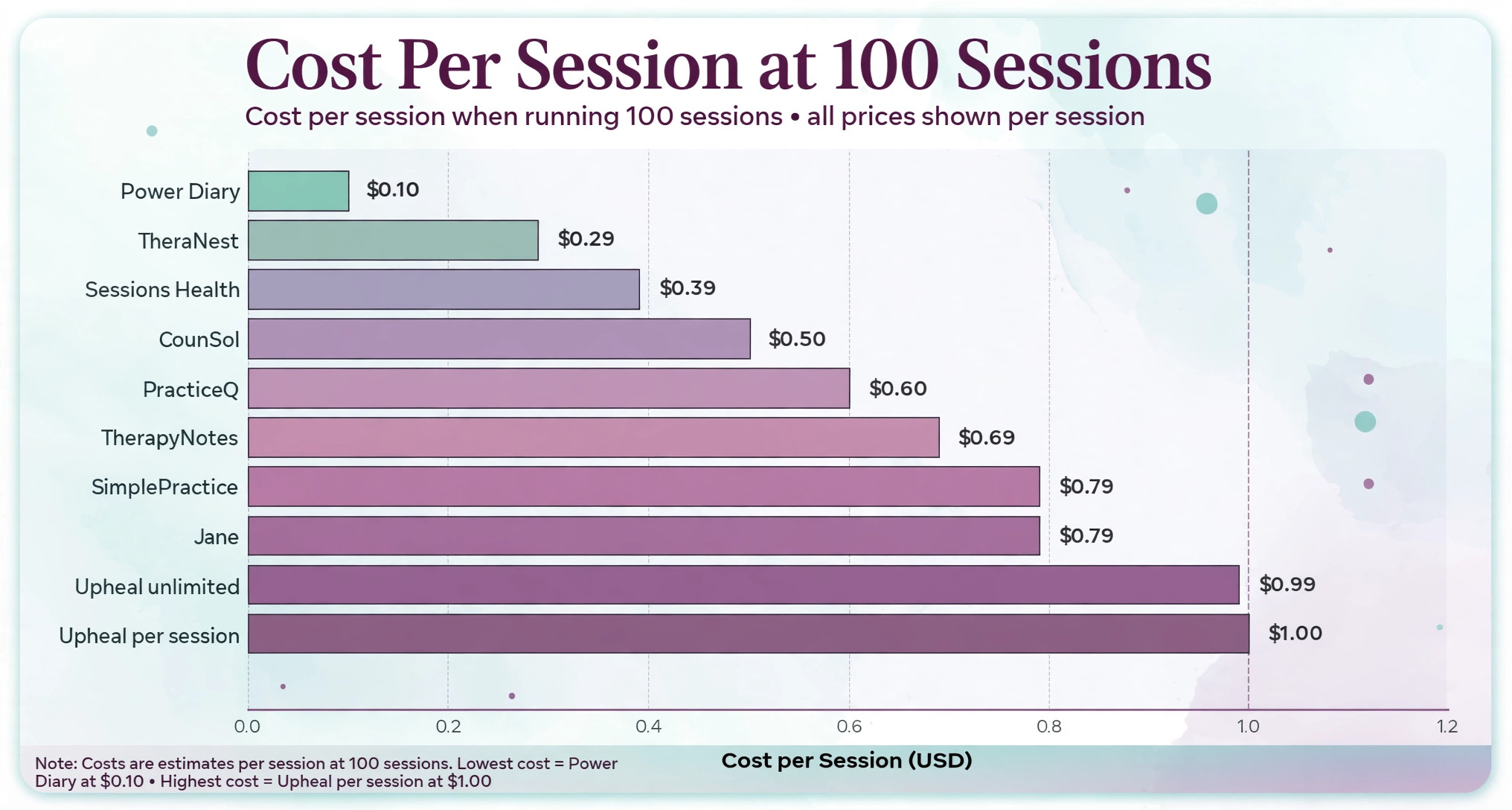
Subscription prices hide the real comparison, because a therapist who runs 100 sessions a month pays a very different per-session cost than a therapist who runs 30. This table is the overview-proof check for this guide, using simple division on published monthly prices at 100 sessions a month, before claims and processing fees. Any best practice management software for therapists shortlist should pass this per-session test before price decides anything.
| Tool | Monthly price used | Cost per session at 100 sessions |
|---|---|---|
| SimplePractice Essential | About 79 dollars | About 79 cents |
| TherapyNotes Solo | About 69 dollars | About 69 cents |
| TheraNest Essentials | About 29 dollars | About 29 cents |
| PracticeQ Starter | About 59.90 dollars | About 60 cents |
| Jane Practice | About 79 dollars | About 79 cents |
| CounSol Standard | About 49.95 dollars | About 50 cents |
| Power Diary Starter | About 9.50 dollars | About 10 cents |
| Sessions Health Professional | About 39 dollars | About 39 cents |
| Upheal per session | About 1 dollar per session | About 1 dollar |
| Upheal unlimited | About 99 dollars | About 99 cents |
Read the pattern, not just the row. Per-session cost falls as volume rises on flat plans, which rewards a full caseload, while per-session pricing stays flat no matter how busy the practice gets. A part-time therapist running 30 sessions a month pays about 2.63 dollars per session on a 79 dollar plan, but only 1 dollar per session on Upheal pricing, so low-volume practices should favour per-session or low flat pricing.
Claims change the math further. At 100 insurance claims a month, SimplePractice claim fees near 39 cents each add about 39 dollars, TherapyNotes fees near 14 cents add about 14 dollars, and TheraNest fees near 23 cents add about 23 dollars after any free allowance. Add card processing on top, and the cheapest subscription can become the most expensive total for an insurance-heavy practice. Model claims, telehealth add-ons and processing together, because the subscription alone never tells the full story.
The headline price is only the first line of the bill. Claims, eligibility checks, telehealth add-ons, AI documentation, card processing and admin seats all sit on top of it, and the total at a realistic caseload is what a practice actually pays. A tool that looks cheap for one clinician can double in cost once a second clinician, an AI add-on and a telehealth upgrade join the bill.
Count admin seats carefully. Some tools include unlimited non-clinical staff, which suits group practices, while others charge per admin seat, which quietly inflates the bill as the front desk grows. Count reminder costs too, because text reminders carry per-message fees on several platforms, and a busy practice sends hundreds of reminders a month. Those small fees add up faster than most buyers expect.
Finally, count documentation time as money. An AI note tool that saves fifteen minutes per session returns hours each week, and for a full caseload that saving can exceed the add-on price many times over. Judge add-ons by hours returned, not by sticker price, because an hour of a therapist’s week is worth more than any monthly fee in this guide.
Moving Over Without Losing Clients
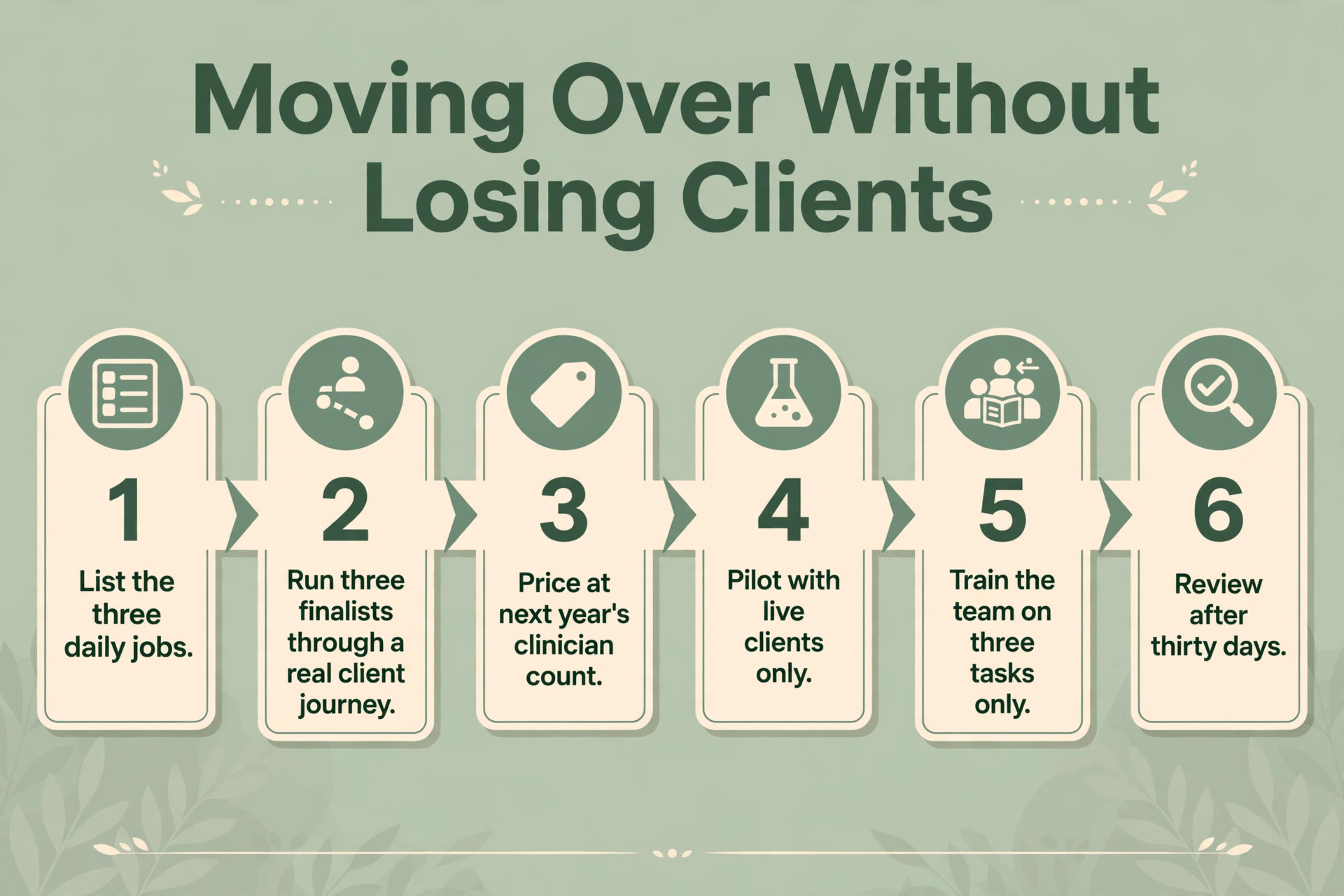
Switching tools fails most often from rushing, not from choosing badly. A short, careful workflow protects client records, bookings and billing during the change. Follow these steps in order, and do not skip the trial, because the trial is where most problems reveal themselves cheaply.
1. List the three daily jobs the new tool must handle, and write down how each job works today. 2. Pick three finalists from this guide, and run each one through a real client journey from booking to payment. 3. Price each finalist at your clinician count in twelve months, including claims, add-ons and processing. 4. Import only live clients for the pilot, and check that notes, balances and bookings match the old system. 5. Train the team on three tasks only, then expand training once those three habits feel automatic. 6. Review the bill, the booking flow and team feedback after thirty days, and fix the setup before blaming the tool.
Fee Traps in the Monthly Bill
The most common mistake is buying for the practice you wish you had, instead of the practice you actually run. A part-time therapist does not need enterprise reporting, and a solo operator does not need multi-site dashboards. Buy for the next twelve months, not for a future that may never arrive, and upgrade when caseload demands it.
The second mistake is ignoring the exit. A tool that holds client records hostage, charges heavily to export, or exports notes one client at a time will cost far more at exit than it saved at entry. Export client lists, notes and billing history before cancelling, keep a copy outside the system where regulations allow, and know the cancellation terms before you sign.
The third mistake is letting add-ons pile up. AI notes, e-prescribing, premium telehealth and reminder packs each look small alone, yet together they can double a subscription. Review add-ons quarterly, cancel the ones the team never opens, and keep only the add-ons that return hours or revenue. Unused add-ons are the quietest waste in any practice software budget.

The Verdict for Therapists
Start with caseload, then insurance mix, then the trial. For most therapists in this guide, SimplePractice is the safest first trial, because it balances polish, features and mobile apps better than the extremes. A therapist with a very tight budget should start with Power Diary or TheraNest instead, while an insurance-heavy practice should start with TherapyNotes, because billing depth matters more there than polish.
The best practice management software for therapists decision does not need to be perfect, it needs to be tested. Run a real client journey, price the tool at next year’s clinician count, and judge it on whether admin hours fall and clients book easily. A tool that passes that test is worth keeping, even if a rival looks better on a pricing page, because weekly admin hours are the test that actually matters.
For a final check, compare the shortlist against the best practice management software for therapists on total cost at your real session volume before you pay for a year. A shortlist built around the best practice management software for therapists should still be tested with real clients, because a pricing page cannot show how a tool feels between sessions.

More Reading on Stratilyze
Readers comparing therapy tools usually check the neighbouring guides next. The guide to AI tools for therapists covers a closely related decision, the guide to AI tools for speech therapists explains a workflow that pairs well with this choice, and the guide to AI scribe tools for clinics helps with the wider setup around it.
Frequently Asked Questions
Do I need therapy-specific software or will a general clinic tool work
A general clinic tool works when the practice mainly books appointments and invoices simply, because scheduling is its strength. A therapy practice needs treatment plans, therapy note templates, superbills and claims workflows, and a general tool forces those jobs into custom fields. Once clinical work lives outside the system, the software has stopped being the system of record.
How much should a solo therapist budget each month
A solo therapist should budget for the subscription plus claims, telehealth add-ons and card processing, modelled at real session volume. Entry tools start near 10 to 30 dollars a month, mid-range tools cluster near 49 to 79 dollars a month, and premium plans climb near 99 dollars a month before add-ons. The honest budget is the second-year total, not the first-month promotion. That total is the fairest way to compare the best practice management software for therapists, because it includes the fees that subscriptions hide.
Is per-clinician or per-session pricing better
Per-clinician pricing suits a full caseload, because the per-session cost falls as sessions rise. Per-session pricing suits a part-time practice, because the bill follows volume exactly and quiet months stay cheap. The right choice depends on sessions per month, not on the headline price alone.
Can one tool handle both in-person and telehealth sessions
Yes, when the tool includes built-in video, a client portal and reminders that work for both visit types. Most tools in this guide include telehealth on at least one plan, though some charge extra on lower tiers or cap group video. Test a real video session during the trial, because video quality and ease of joining decide whether clients actually use it.
What happens to client notes if I cancel
Client notes usually remain exportable for a period after cancellation, but the exact terms and format vary by vendor, and some tools export one client at a time. Export notes, client lists and billing history before cancelling, and keep a copy outside the system where regulations allow. A tool with bulk export is worth a small premium, because rebuilding clinical records costs far more than any subscription saving.
Should I pay for AI note writing
AI note writing is worth paying for when documentation eats a meaningful share of the week, because the hours returned usually exceed the add-on price. Therapists who write short notes quickly may not need it, while therapists with long notes and heavy caseloads gain the most. Trial the AI tool on real sessions first, and check every draft before filing, because accuracy still rests with the clinician.