

The short verdict is that most service businesses should budget for Plus at 43 dollars a month, not Lite at 23 dollars, because the client cap on Lite is the limit most owners hit first. A freelancer with four steady clients can live happily on Lite. A consultant, agency, or trades business with a growing client list will outgrow five billable clients fast, and the upgrade to Plus is then unavoidable. Start from your client count, not from the cheapest price on the page. That verdict is the core of the cost of FreshBooks for small business monthly for most service firms.
This guide sets out the cost of FreshBooks for small business monthly in real terms. That means the subscription, the extra team member fee, the payment processing cost on every invoice, and the payroll add-on where it applies. FreshBooks is built for service businesses that bill by time or project, and it is strongest on invoicing, estimates, time tracking, and expenses. It is not a full inventory system or a deep general ledger for a product business, and buyers should judge it on that job.
FreshBooks pricing is based mainly on billable clients, not on seats. Every plan includes one user, with extra team members charged separately. That model suits a solo operator or a small team with one bookkeeper, and it punishes a business that needs four or five people inside the accounts every day. Count clients first, then count users, and the right tier usually becomes obvious.
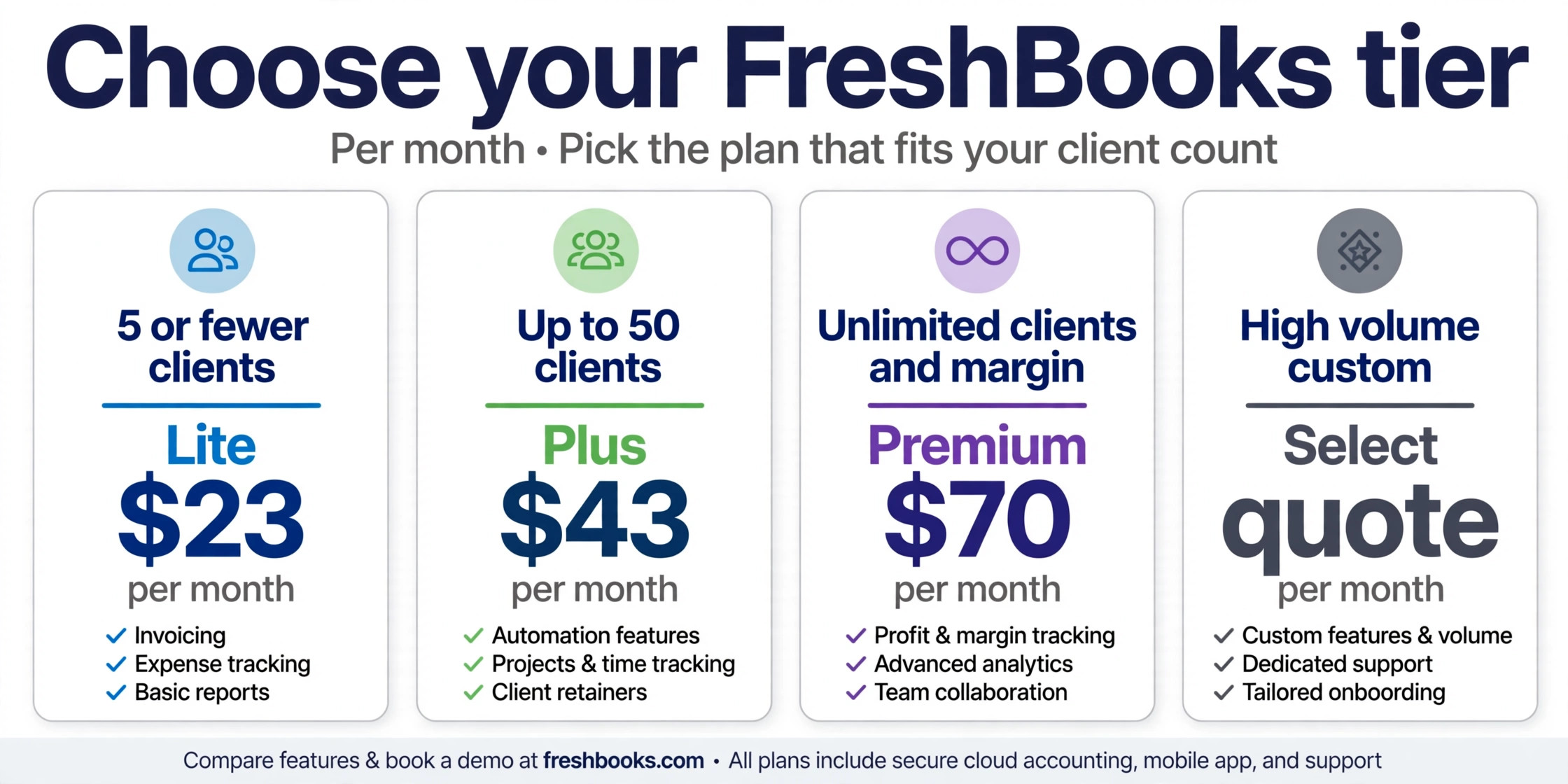
| Plan | Monthly price | Annual price each month | Billable clients | Users included |
|---|---|---|---|---|
| Lite | 23 dollars | 20 dollars and 70 cents | 5 | 1 |
| Plus | 43 dollars | 38 dollars and 70 cents | 50 | 1 |
| Premium | 70 dollars | 63 dollars | Unlimited | 1 |
| Select | Custom quote | Custom quote | Unlimited | 2 |
Prices here are United States list prices as reported in October 2026 comparison coverage. Annual billing saves about 10 percent, which is smaller than the annual saving on many rival tools. Select is quote only, and it adds lower card fees, capped bank transfer fees, and migration help. Confirm the current prices and Select terms on the vendor page before you buy, because FreshBooks raised prices in 2026 and introductory discounts can hide the renewal rate.
Why Five Billable Clients Is a Harder Limit Than It Looks
A billable client is not the same as an active project this month. It is a client you bill through FreshBooks, and past clients can still count toward the cap if they remain in the system as billable. A freelancer who has worked for twelve clients over two years may already exceed the Lite cap, even if only three clients are active now. That is why Lite suits a very new business or a specialist with a handful of long term clients, and why it frustrates everyone else.
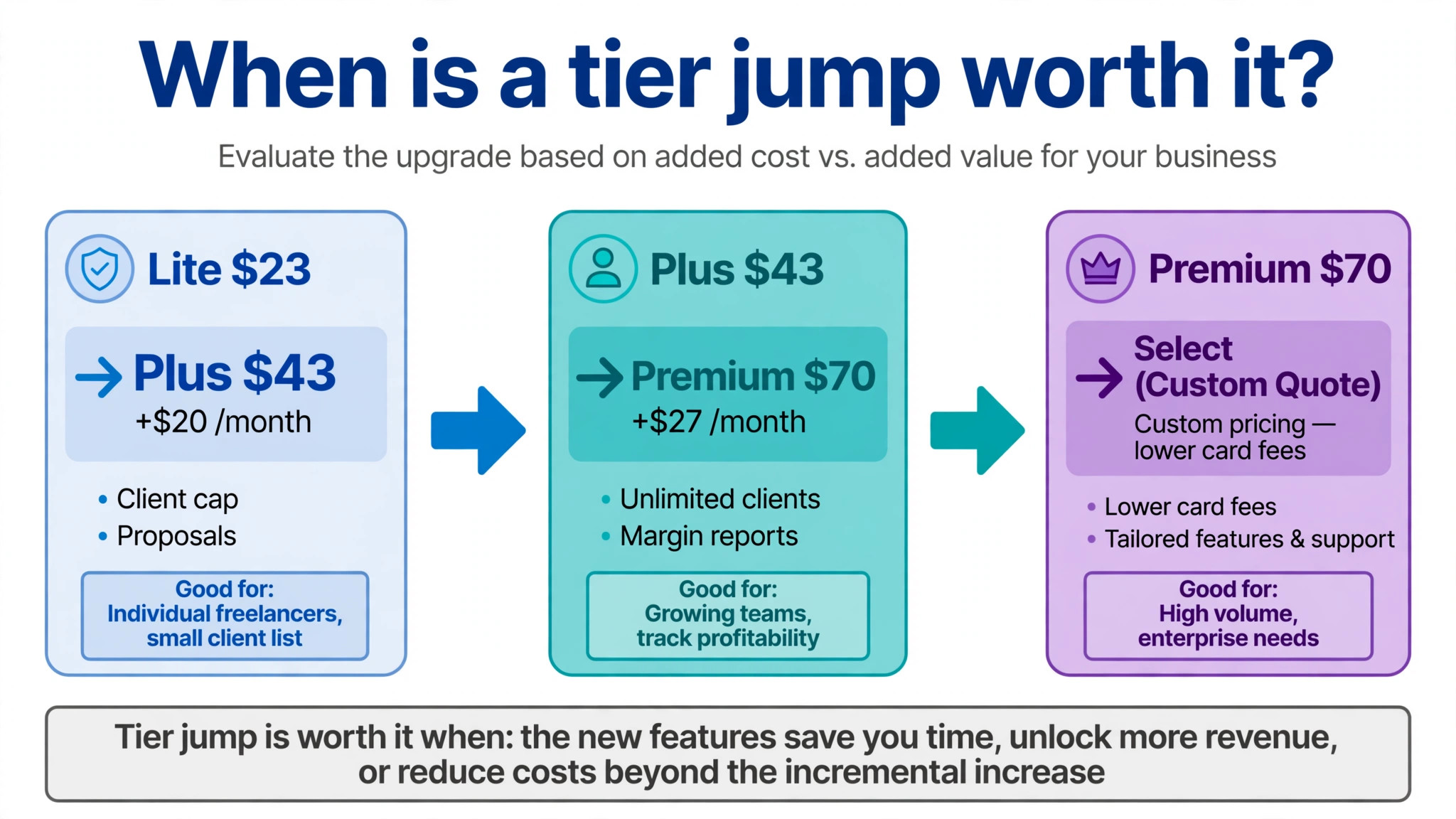
The jump from Lite to Plus is 20 dollars a month on monthly billing, or about 18 dollars a month on annual billing. That is a modest increase for ten times the client capacity, plus proposals, retainers, electronic signatures, bank reconciliation, double entry reports, and accountant access. In practice, most buyers who choose Lite for the saving end up on Plus within a few months, having spent time worrying about a cap that Plus removes entirely for most small firms.
There is also a workflow cost to a client cap, and it belongs in any honest account of the cost of FreshBooks for small business monthly. When a business nears the limit, staff start to delay adding a new client, invoice outside the system, or delete old records they may need later. Those workarounds save 20 dollars a month and create messy books, missed follow-ups, and extra work at tax time. A pricing tier should remove friction from billing, not add a reason to avoid billing. If you are close to five clients already, choose Plus and move on.
Lite at 23 Dollars Each Month
Lite gives a solo freelancer the core billing tools at a low price. It includes unlimited invoices, estimates, time tracking, and expense tracking, which is a strong package for someone who bills a few clients for hours or fixed projects. A designer, writer, coach, or consultant starting out can send professional invoices, track time against a project, and record expenses without learning a full accounting system. The mobile app also helps, because invoices and expenses can be created on site rather than at a desk at week end.
What Lite does not include matters as much as what it does. Bank reconciliation and accountant access start on Plus, so a Lite user must handle more of the bookkeeping alone and cannot simply invite an accountant into the same account in the same way. Proposals, retainers, and electronic signatures are also Plus features, which matters for businesses paid before work starts rather than after it. A freelancer who wins work with formal proposals will feel that gap quickly.
Lite is the right choice for a solo operator with no more than five billable clients, no staff, and simple bookkeeping. It is the wrong choice for a business that already has six clients, plans to add clients this quarter, or needs an accountant to review the books regularly. The saving against Plus is small, and the cost of a later migration of habits, however easy the data move may be, is larger than the saving. Buy Lite only when the client count is clearly and durably small.
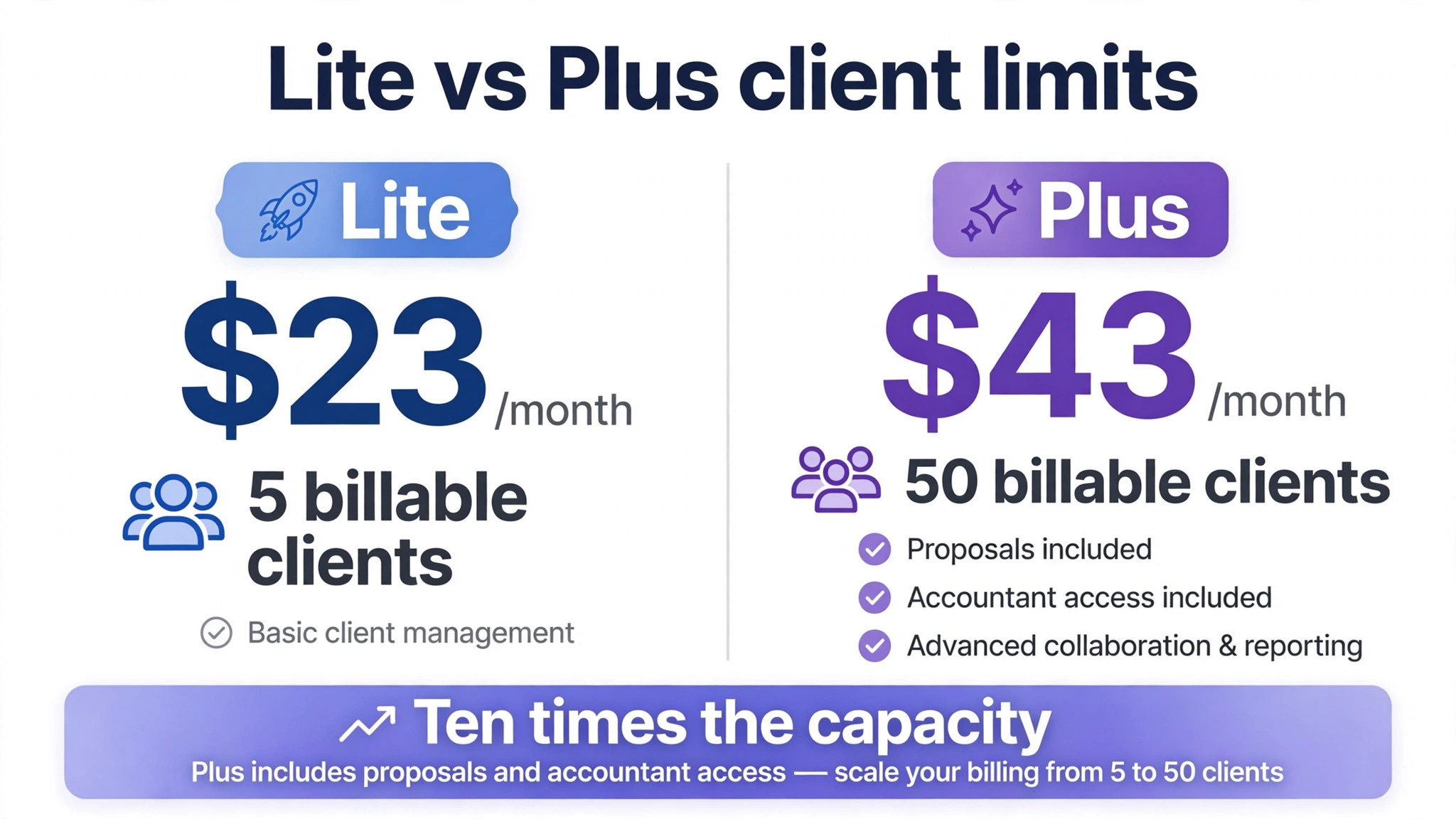
Plus at 43 Dollars Each Month
Plus is the tier most small service businesses should start on, because it removes the Lite constraints that cause the most friction. Fifty billable clients cover a healthy small agency, consultancy, or trades firm for years, and the added proposals, retainers, and signatures support a more professional sales process. Double entry reports and bank reconciliation give the books more depth, and accountant access means a professional can review the same records without a separate export routine.
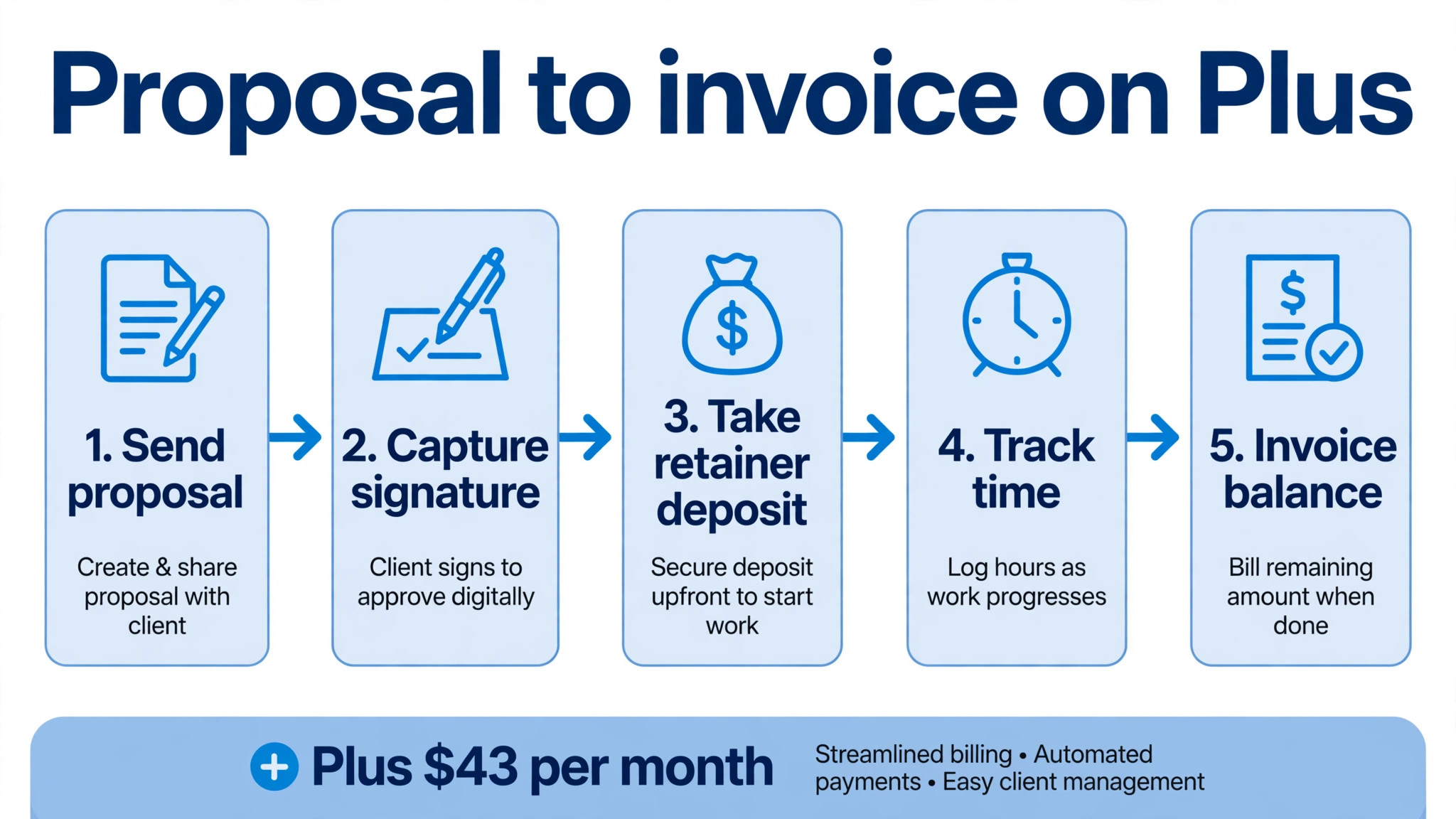
The practical difference in the cost of FreshBooks for small business monthly shows up in daily work. A Plus user can send a proposal, capture a signature, take a deposit through a retainer, track time, and invoice the balance without leaving the system. That flow reduces the gaps where work is done but not billed, which is a common leak in small service businesses. The tier does not make a business profitable on its own, but it removes several small frictions that add up to lost revenue over a year.
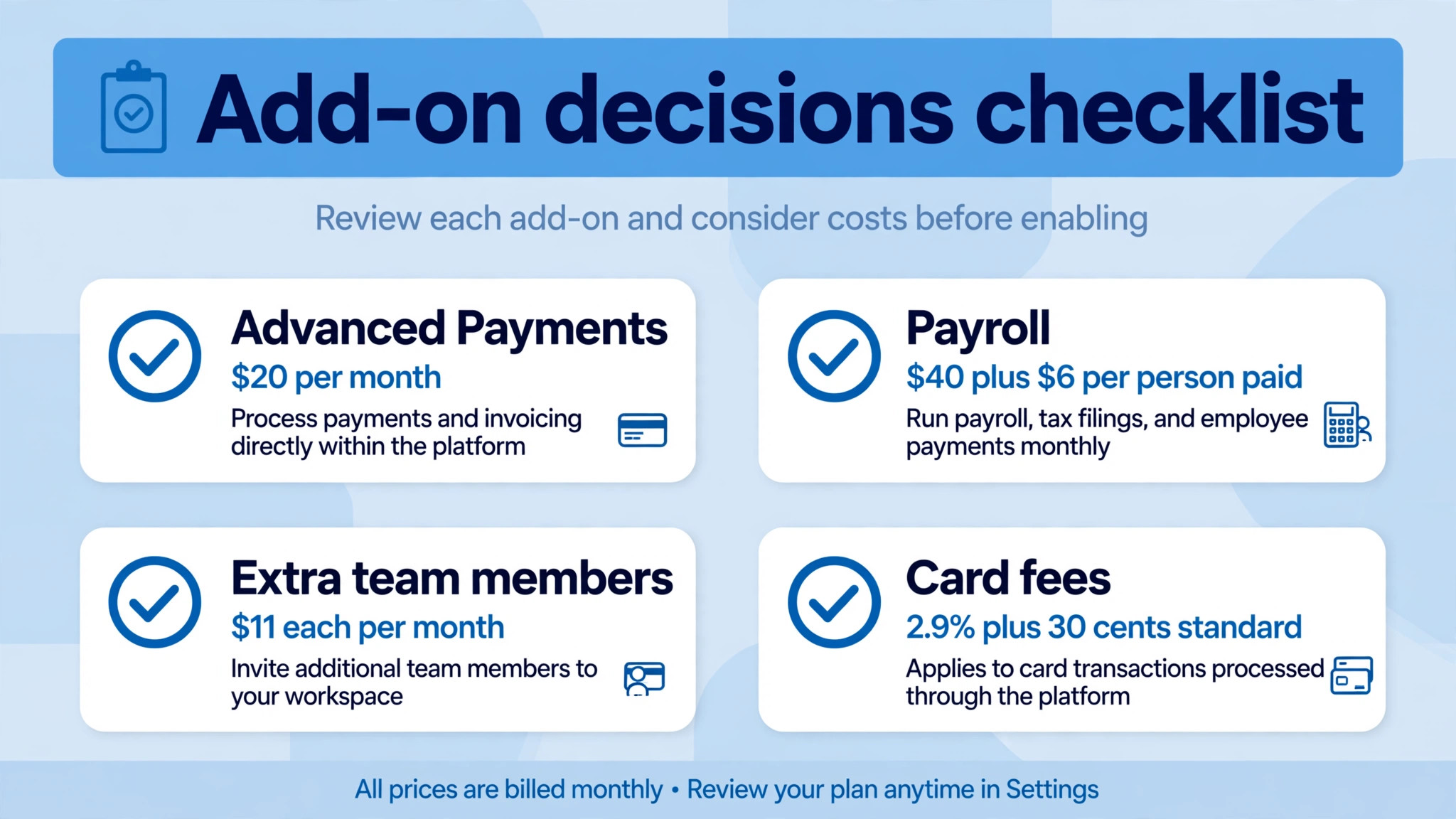
Plus still includes only one user, so a business with two or three people who need access must add team members at 11 dollars each per month. That fee is modest for one extra person and noticeable for a team of four, where the subscription plus three extra seats reaches 76 dollars a month before any other add-on. A business with a larger team should compare Premium and Select, and should also compare a general ledger that includes more users in the base price.
Premium removes the client cap entirely and adds tools for a project based firm that needs to know margin, not just revenue. Project profitability shows whether a job made money after time and expenses, rather than merely showing what was invoiced. Accounts payable tools, bill receipt capture, and custom email templates support a larger operation with suppliers, subcontractors, and a more formal billing routine. For a firm juggling many projects at once, those features are the difference between busy and profitable.
The jump from Plus to Premium is 27 dollars a month on monthly billing. That increase is easy to justify when project margin reporting changes a pricing or staffing decision, and hard to justify when a business runs a handful of simple projects and never opens the profitability report. Buyers should ask a direct question during the trial. Which project last month would have been priced or staffed differently with margin data, and what was that decision worth. If no project qualifies, Plus remains the better buy.
Premium also suits a business that has outgrown fifty clients but does not yet need the custom terms, lower fees, or migration help of Select. Unlimited clients remove the last capacity worry, and the added payable tools help a firm that pays many suppliers. A business that reaches Premium mainly for unlimited clients should still check whether Select, with two users included, would cost less once team member fees are added to Premium.
Select on a Custom Quote
Select is the tier for a larger firm that wants a conversation rather than a checkout page. It includes everything in Premium, plus two team members, lower card fees, capped bank transfer fees, Advanced Payments, and Easy Switch migration help from FreshBooks specialists. That package suits a firm with higher payment volume, where a lower card rate can save more than the subscription difference, and a firm moving a long history from another system without wanting to do the migration alone.
Because Select is quote only, a buyer cannot compare it cleanly from the pricing page alone. Request a written quote that states the monthly subscription, the card and bank transfer rates, the included team members, and the length of any introductory discount. Ask what happens when the discount ends, and whether the lower card rate applies to all card types or only to standard cards. Those details decide whether Select saves money or merely bundles services the firm would not otherwise buy.
Select is not a sensible default for a solo freelancer or a small firm with low payment volume. The negotiation time, the custom terms, and the larger package only pay off when volume, team size, or migration complexity is high. A small firm that asks for a Select quote out of curiosity may still learn something useful about its card rates, but it should not feel obliged to buy a larger package than its client count requires.
Cost of FreshBooks for Small Business Monthly by Client and Invoice Volume
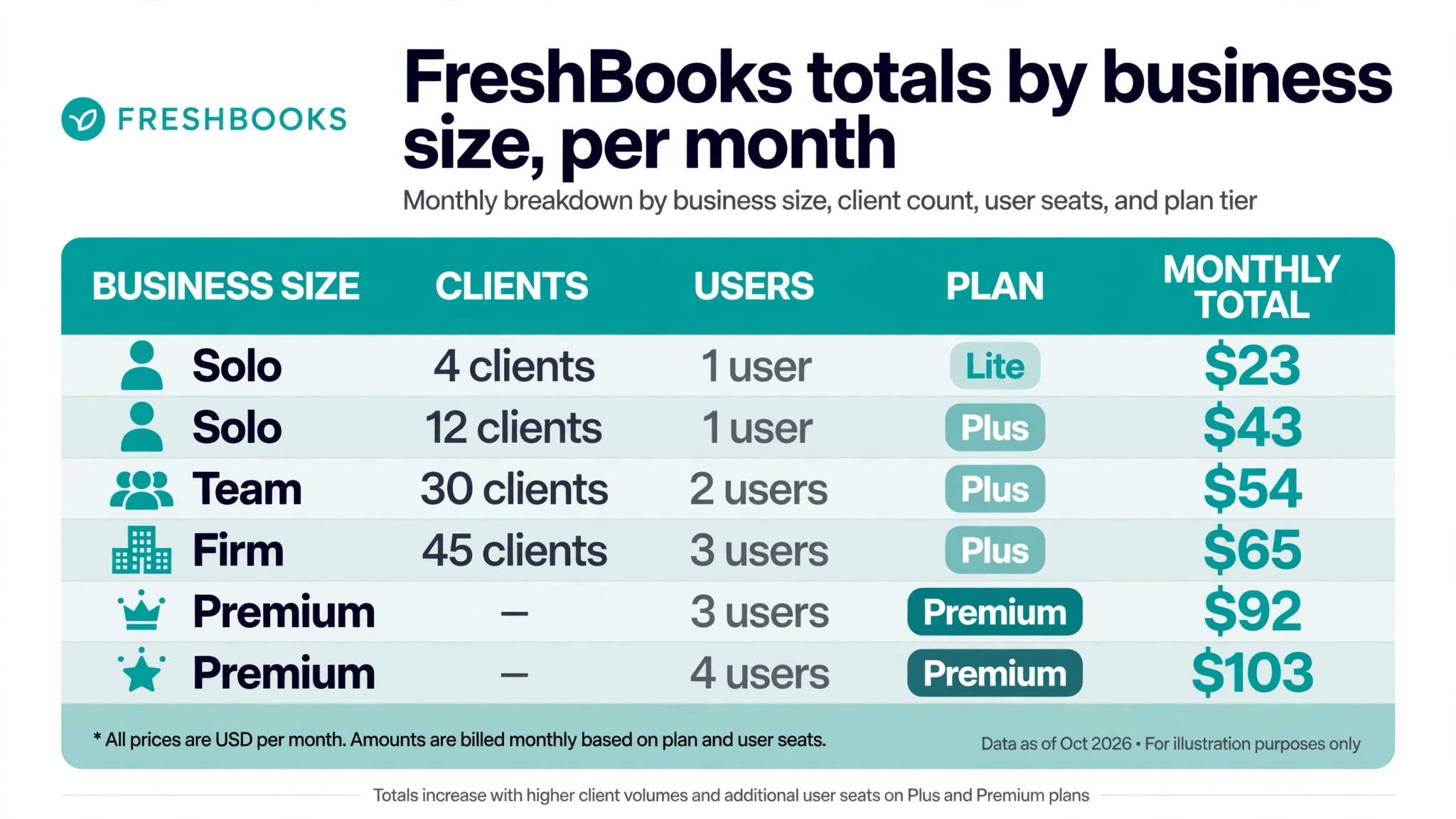
The table below shows subscription totals before payment processing, payroll, and tax. It is organised by the size of the business, because FreshBooks prices on clients rather than seats. Add team members at 11 dollars each per month, and add processing fees separately, because those fees depend on how much you actually collect.
| Business size | Plan | Subscription each month | Extra team members | Indicative total |
|---|---|---|---|---|
| Solo, 4 clients | Lite | 23 dollars | 0 | 23 dollars |
| Solo, 12 clients | Plus | 43 dollars | 0 | 43 dollars |
| Small team, 30 clients, 2 users | Plus | 43 dollars | 11 dollars | 54 dollars |
| Growing firm, 45 clients, 3 users | Plus | 43 dollars | 22 dollars | 65 dollars |
| Larger firm, unlimited clients, 3 users | Premium | 70 dollars | 22 dollars | 92 dollars |
| Larger firm, unlimited clients, 4 users | Premium | 70 dollars | 33 dollars | 103 dollars |
A solo freelancer with four clients pays 23 dollars a month, which is excellent value for professional invoicing and time tracking. Once that freelancer reaches twelve clients, the cost rises to 43 dollars a month on Plus, and that is still good value because the alternative is manual invoicing and chasing. The step is small in money and large in capacity, which is why so many businesses make it early.
A small team with thirty clients and two users pays 54 dollars a month on Plus, while a growing firm with forty five clients and three users pays 65 dollars a month. Those totals show why team fees matter. The plan price stays at 43 dollars, but the real subscription rises with every extra person. A firm with four users on Premium reaches 103 dollars a month before processing or payroll, which is a very different budget from the 70 dollar headline.
Payment processing then adds the largest variable cost for many firms. At the rates reported after the March 2026 change, standard cards cost 2.9 percent plus 30 cents per transaction in the United States, and American Express costs 3.5 percent plus 30 cents. On 5,000 dollars of card collections in a month, standard card fees alone reach about 145 dollars plus per transaction charges, which dwarfs the subscription. That does not make FreshBooks expensive, because every payment provider charges a similar rate, but it does mean the subscription is only part of the monthly cost of getting paid.
Payment Processing, Advanced Payments, and Payroll Add-Ons
Advanced Payments is a 20 dollar a month add-on on Lite, Plus, and Premium, and it is included on Select. It supports checkout links and additional payment options, and for a business that sells without an invoice, it can be the feature that makes FreshBooks work as a payment tool rather than only an invoicing tool. A business that always invoices first may not need it, while a business that takes deposits or sells fixed packages online may find it essential. Test it against a real sale, not a feature list.
Payroll is a separate add-on reported at 40 dollars a month plus 6 dollars per user, which in this context means per person paid. A business with five staff would therefore add about 70 dollars a month for payroll, on top of the subscription. That is a major line item, and it changes the comparison with a general ledger that bundles payroll differently. A business with no employees should ignore payroll entirely, while a business with staff should price it from day one and check whether a specialist payroll provider would cost less.
The interaction between add-ons is where budgets go wrong. A Premium firm with three users, Advanced Payments, and payroll for five staff could pay 92 dollars for the subscription, 20 dollars for Advanced Payments, and 70 dollars for payroll, reaching 182 dollars a month before card fees and tax. None of those lines is hidden, but none appears in the headline price either. List every add-on you need, price each one, and only then compare FreshBooks with a rival that may bundle one of them.
Card rates deserve the same care in any account of the cost of FreshBooks for small business monthly. Select advertises lower card fees and capped bank transfer fees, which can save a high volume firm real money. A firm collecting 20,000 dollars a month by card could save hundreds of dollars a month from even a small rate reduction, which would outweigh a higher subscription. A firm collecting 2,000 dollars a month by bank transfer will save almost nothing from the same offer. Work from your own collections, not from a generic saving claim.
When the Tier Jump Is Worth It, and When It Is Not
The Lite to Plus jump is worth it the moment the client cap, proposals, retainers, or accountant access becomes a weekly need. Twenty dollars a month is a small price for removing a cap that distorts billing behaviour, and the added features support a more professional sales process. It is not worth it for a genuinely small practice with four clients and no plans to grow, where Lite already covers every job. Let client count and sales process decide, not ambition alone.
The Plus to Premium jump is worth it when project profitability, unlimited clients, or payable tools change a decision. A firm that discovers an unprofitable project type, reprices a service, or stops taking low margin work has earned the extra 27 dollars a month many times over. It is not worth it when the firm runs simple projects, has fewer than fifty clients, and never uses margin reporting. In that case, the extra money buys headroom, not value, and headroom can be bought later at renewal.
The Premium to Select jump is worth it when payment volume, team size, or migration complexity makes custom terms valuable. Lower card fees on high volume, two included users, and specialist migration help can each justify the conversation. It is not worth it for a small firm that simply wants a lower price, because Select is a larger package, not a discount tier. Ask for the quote, compare it line by line with Premium plus add-ons, and choose the lower total for the same work.
Costs That Sit Outside the Subscription
Tax is the first extra, because list prices are quoted before tax and the invoice total will be higher. Bank and card fees are the second, and they scale with collections rather than with the plan. Payroll, Advanced Payments, and extra team members are the third group, and they are easy to forget because they are presented as options rather than as part of the core price. A first year budget should list all four groups, with a realistic monthly figure for each.
Time is the fourth cost in the cost of FreshBooks for small business monthly, and it is the one owners most often ignore. Setting up clients, projects, tax categories, and invoice templates takes hours, and learning a new system takes longer for a team than for a solo user. FreshBooks is easier to learn than a full general ledger, which is part of its appeal, but it still needs a proper setup. Budget a few focused sessions in the first month, and do not judge the tool on a rushed first invoice sent from a half finished account.
Migration is a related cost, and Select addresses it directly with Easy Switch help. A business moving from spreadsheets may migrate quickly, while a business moving years of invoices, expenses, and client history from another system should allow more time and check what history actually transfers. A clean migration saves hours at tax time, while a rushed migration creates duplicate clients and missing records that cost far more to fix later.

Common Billing Mistakes to Avoid
The first mistake is choosing Lite for a business that already has more than five billable clients, or that will reach that number within a quarter. The saving is 20 dollars a month, and the cost is workarounds, delayed invoicing, and a forced upgrade under time pressure. Count every client you have billed in the past year, not just this month, and choose the tier that fits that real number.
The second mistake that raises the cost of FreshBooks for small business monthly is forgetting team member fees when comparing plans. A Premium headline of 70 dollars becomes 92 dollars with two extra users, and 103 dollars with three extra users, before any other add-on. A rival that includes more users in its base price may then be cheaper overall, even if its headline price looks higher. Always compare the total for your actual user count, not the price for one user.
The third mistake is ignoring payment volume when judging card fees. A business that collects mostly by bank transfer cares little about a card rate reduction, while a business that collects mostly by card should treat the card rate as a major cost line. Check your last three months of collections by payment method, and use those figures to judge Select, Advanced Payments, and any rival offer. Generic advice on fees is useless without your own numbers.
The fourth mistake is buying payroll or Advanced Payments before they are needed. Payroll for a business with no staff is wasted money, and Advanced Payments for a business that always invoices first adds a line with no benefit. Add each product when a named job requires it, review add-ons quarterly, and cancel anything that has not been used in the past month. A subscription review takes minutes and can save a meaningful sum over a year.
Final Call on Which Tier Fits Your Business
Lite fits a solo freelancer with five or fewer billable clients, simple invoicing, and no staff. It is a clean, low cost start, and it should be kept only while that description stays true. The moment client count, proposals, or accountant access becomes a regular need, Plus is the better home, and delaying the move rarely saves anything worth the friction.
Plus fits most small service businesses, from a growing freelancer to a small agency or consultancy with up to fifty clients. It balances price, capacity, and professional billing tools, and it is the tier to choose when in doubt. Premium fits a project based firm that needs unlimited clients and margin reporting, or a larger firm with many suppliers and a formal payable routine. Select fits a larger firm where payment volume, team size, or migration help makes a custom quote worthwhile.
The cost of FreshBooks for small business monthly is therefore a range, not a single figure. It runs from 23 dollars a month for a solo Lite user to more than 180 dollars a month for a Premium firm with team members, Advanced Payments, and payroll, before card fees and tax. Count clients, count users, price the add-ons you will actually use, and the right tier will be clear. That method gives a monthly budget you can trust, and a billing system that supports growth instead of slowing it down.
More Reading on Stratilyze
Readers sorting out invoicing and accounting choices often check related guides next. The guide to invoicing software for freelancers compares billing tools for solo operators, the guide to accounting software for small firms places FreshBooks beside general ledgers, and the guide to invoicing software for mobile mechanics shows how field billing changes the same decision.
Frequently Asked Questions
How much does FreshBooks cost per month for a freelancer?
A freelancer with five or fewer billable clients pays 23 dollars a month for Lite on monthly billing, or 20 dollars and 70 cents a month on annual billing. That covers unlimited invoices, estimates, time tracking, and expenses for one user. Extra team members cost 11 dollars each a month, and card processing is charged separately on collections. A freelancer with more than five clients should budget for Plus at 43 dollars a month instead.
Is FreshBooks good for a small business with employees?
FreshBooks works well for a service business with a small team, but payroll is a paid add-on at 40 dollars a month plus 6 dollars per person paid, and extra team members cost 11 dollars each a month. Those fees can make the total higher than a general ledger that bundles payroll or users differently. Price the subscription, team fees, and payroll together, and compare that total with a rival before committing.
Does FreshBooks charge for each invoice sent?
FreshBooks does not charge per invoice on the published plans, and Lite, Plus, and Premium all include unlimited invoices within their client limits. The cost that scales with invoicing is payment processing, at 2.9 percent plus 30 cents per standard card transaction and 3.5 percent plus 30 cents for American Express, as reported after the March 2026 change. Bank transfer fees and Select terms differ, so confirm the current rates on the vendor page.
Plus covers up to fifty billable clients and adds proposals, retainers, signatures, bank reconciliation, double entry reports, and accountant access. Premium removes the client cap and adds project profitability, accounts payable tools, bill receipt capture, and custom email templates. The price difference is 27 dollars a month on monthly billing. Choose Premium when margin reporting or unlimited clients changes a real decision, and stay on Plus otherwise.
Can I cancel FreshBooks easily if it does not fit?
FreshBooks offers a 30 day trial with no card required, and a 30 day money back guarantee after purchase, as reported by comparison sources. That gives a new buyer time to test real invoicing, time tracking, and reporting before committing long term. Export your clients, invoices, and expenses before cancelling, and check the renewal terms for an annual plan, so a trial does not roll into a year you did not intend to buy.
Does FreshBooks include payroll for a small team?
Payroll is not included in the base subscription. It is a paid add-on reported at 40 dollars a month plus 6 dollars per person paid, and it must be added to Lite, Plus, or Premium where staff need to be paid through the system. A business with no employees can ignore it entirely. A business with staff should add it to the monthly total from the start, and compare it with a specialist payroll provider before deciding.