

Most law firms do not lose time on legal judgment. They lose it on the work around it: reading hundreds of pages to find one clause, checking citations by hand, rebuilding the same document from a past matter, and chasing clients for intake forms and payments. The best AI tools for lawyers attack that middle work. They search case law, flag risky clauses, draft from approved templates, and move documents through review faster, so lawyers spend their hours on advice, negotiation, and advocacy instead of admin.
This guide groups 12 tools by the legal job each one does best: legal research, contract review and drafting, document automation, e-discovery and case management, and client intake and billing. Prices are October 2026 figures in US dollars. Where a vendor hides pricing or sources disagreed, the guide says check checkout rather than guessing. One rule runs through the whole guide: AI output in legal work must be checked by a licensed lawyer before it reaches a client or a court. Several courts have sanctioned lawyers for filing briefs with AI invented citations, so verification is not optional.
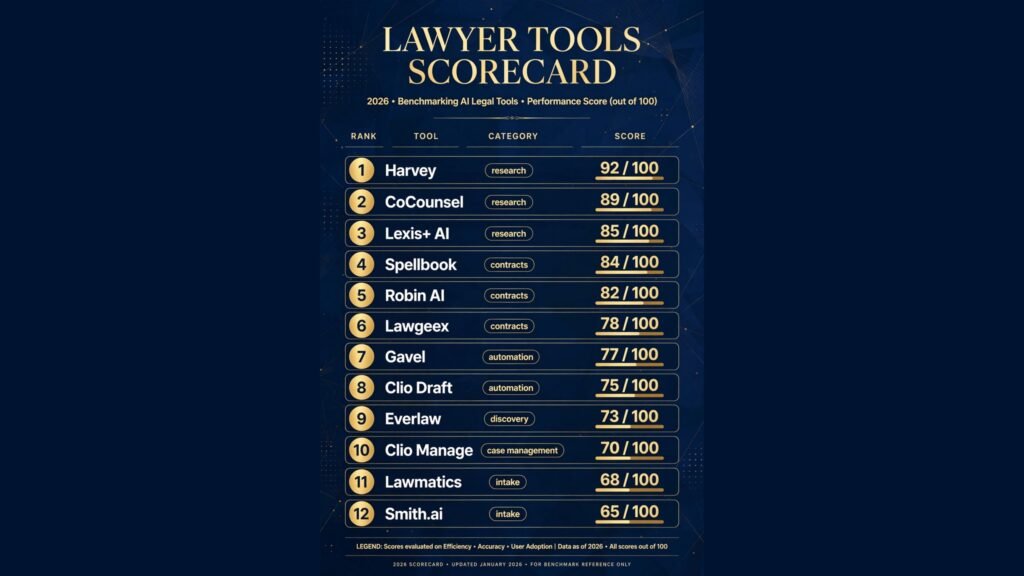
The 12 best AI tools for lawyers at a glance
| Tool | Best job | Free option | Paid from |
|---|---|---|---|
| Harvey | Enterprise research and drafting | No | Custom, check checkout |
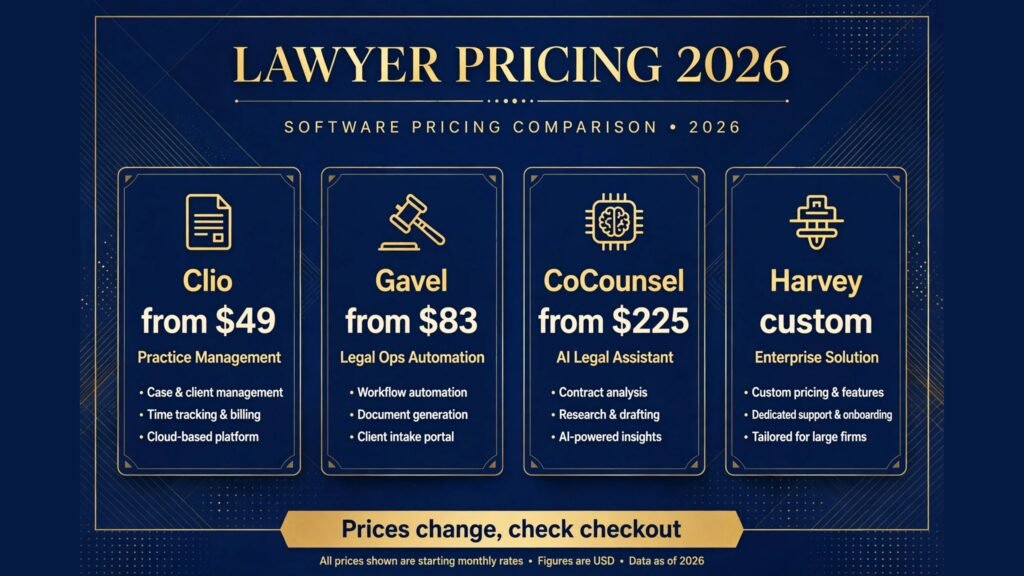
| CoCounsel | Citation grounded research | No | Around $225 per user per month |
| Lexis+ AI | Research inside Lexis | No | Custom, check checkout |
| Spellbook | Contract drafting in Word | 7 day trial | Check checkout, reported around $89 per user per month |
| Robin AI | Contract review at scale | No | Custom, check checkout |
| Lawgeex | Automated contract review | No | Custom, check checkout |
| Gavel | Document automation workflows | 7 day trial | $83 per month |
| Clio Draft | Court forms and templates | No | Included in Clio plans, check checkout |
| Everlaw | E-discovery and case preparation | No | From $250 per month |
| Clio Manage | Case and practice management | 7 day trial | $49 per user per month |
| Lawmatics | Intake and marketing automation | No | Custom, check checkout |
| Smith.ai | Virtual reception and intake calls | No | Check checkout |
Best pick by job
| Your job | Start with | If that fails, try |
|---|---|---|
| Research across a large firm | Harvey | CoCounsel |
| Research with Westlaw citations | CoCounsel | Lexis+ AI |
| Draft contracts inside Word | Spellbook | Robin AI |
| Review high volume contracts | Lawgeex | Robin AI |
| Automate repeat documents | Gavel | Clio Draft |
| Run discovery on a big case | Everlaw | Clio Manage |
| Run the whole practice | Clio Manage | Lawmatics |
| Capture every intake call | Smith.ai | Lawmatics |
| Automate intake and follow-up | Lawmatics | Clio Grow |
Research is where AI helps most and where it fails most visibly. These three tools are built on real legal databases, so their answers come with citations a lawyer can open and check. General chatbots do not offer that, and should never be the research tool of record.
1. Harvey
Harvey is the enterprise legal AI platform, used by most of the Am Law 100. It combines research, drafting, and document analysis in one system, with a vault that can hold up to 100,000 documents per matter and workflows that chain research, review, and drafting into one process. Its research answers cite verifiable sources, and its scale suits diligence across thousands of documents.
Pricing: Custom enterprise pricing only, reported at roughly $1,200 to $2,000 per user per month, with seat minimums reported around 25 seats. There is no self serve signup and no small firm tier, so check checkout and expect a six figure annual contract.
Best for: Large firms and corporate legal departments running high volume research, diligence, and document review.
Watch out for: Price and the seat floor. A five lawyer firm cannot buy Harvey at any price that makes sense, and the platform needs dedicated staff to run well. Small firms get most of the same capability from CoCounsel or Lexis+ AI at a fraction of the cost.
Try it at: harvey.ai

2. CoCounsel
CoCounsel, from Thomson Reuters, is the research first option for firms already inside the Westlaw world. It answers legal questions with citations to Westlaw content, drafts memos and briefs from those sources, and reviews documents against a firm’s own playbooks. Because it sits on Westlaw, its citations are the ones judges and opposing counsel already trust.
Pricing: Reported from around $225 per user per month, rising with the capabilities switched on, with a Westlaw bundle reported near $639 per user per month for a solo attorney. Thomson Reuters does not publish a single AI seat price, so check checkout for the current bundle.
Best for: Litigation and research heavy practices that already use Westlaw, and firms that want citation grounded answers without building a research system of their own.
Watch out for: Cost creep through modules. The base seat is only part of the bill, and specialised content unlocks add up. Test it against a standard Westlaw search before rolling it out firm wide.
Try it at: thomsonreuters.com
3. Lexis+ AI
Lexis+ AI brings generative AI inside Lexis, so lawyers can ask questions across Lexis content, summarise cases, and draft from research without leaving the platform they already search. Its strength is continuity: the research, the source documents, and the draft live in one workflow, and the citations point back to Lexis sources.
Pricing: Custom, sold as an add on to Lexis+ subscriptions, with all in Lexis plus AI seats reported roughly between $250 and $500 per user per month depending on content. Lexis does not publish the AI seat alone, so check checkout.
Best for: Firms already paying for Lexis that want AI research without adding a second vendor, and research teams that value source linked answers.
Watch out for: Double paying for content. If a firm already pays for Lexis and then adds a separate AI research tool, it pays for the same underlying content twice. Pick one research home and build the workflow around it.
Try it at: lexisnexis.com
Contract review and drafting: read faster, draft from what works
Contract work is repetitive by nature: the same clauses, the same risks, the same negotiation points, matter after matter. These three tools bring a firm’s own playbook to each document, flagging what deviates and drafting from approved language instead of from scratch.
4. Spellbook
Spellbook lives inside Microsoft Word and Google Docs, which is its main advantage. Lawyers draft where they already draft, and Spellbook suggests clauses, benchmarks language against market data, reviews a contract against a playbook, and flags risky terms as the lawyer works. It suits transactional lawyers who spend their day inside documents rather than inside a separate platform.
Pricing: No published price list. Third party estimates put it around $89 to $199 per user per month, with enterprise tiers reported far higher and a 7 day free trial available. Spellbook directs prospects to a demo for real pricing, so check checkout.
Best for: Transactional lawyers and small to mid size firms drafting commercial contracts daily inside Word.
Watch out for: Narrow scope by design. Spellbook works on documents, not matters. It does not manage cases, deadlines, billing, or intake, so it pairs with a practice management tool rather than replacing one. It also lacks European data residency, which matters for firms with EU clients.
Try it at: spellbook.com

5. Robin AI
Robin AI combines AI contract review with human lawyers on demand. Its software reads a contract, extracts key terms, and produces a report against a playbook, and its managed service adds lawyer review for teams that want a second pair of eyes. That hybrid model suits in house teams facing a sudden pile of vendor contracts or a diligence deadline.
Pricing: Custom, sold by volume and scope, with managed review priced per contract. Robin AI does not publish a standard seat price, so check checkout and price a real batch of contracts, not a single document, before committing.
Best for: In house teams and firms handling high volume contract review, especially during deals and diligence.
Watch out for: The managed service is the cost driver. Pure software review is cheaper but needs internal reviewers to act on the flags, while the managed service adds a per contract fee that grows with volume. Model both paths against your real monthly volume.
Try it at: robinai.com
6. Lawgeex
Lawgeex is the automated review specialist. Upload a contract and it reviews it against a firm’s policy in minutes, marking each clause as accepted, flagged, or needing negotiation, with explanations a lawyer can act on. It is built for teams that review the same contract types repeatedly, such as NDAs, vendor agreements, and employment contracts.
Pricing: Custom, priced by volume and contract type. Lawgeex does not publish a standard rate card, so check checkout and ask for pricing tied to your actual monthly contract count.
Best for: Legal departments and firms with repeatable contract types and a written review policy that can be encoded once and applied every time.
Watch out for: Policy setup time. Lawgeex only works as well as the playbook behind it, and building that playbook takes senior lawyer hours up front. Firms without a written review policy should write one before buying any automated review tool, or the tool will encode inconsistency at speed.
Try it at: lawgeex.com
Document automation: stop retyping the same document
Most legal documents are assemblies: standard clauses, client facts, and matter details combined in a familiar order. Automation tools turn that assembly into a questionnaire, so a correct first draft appears in minutes and junior staff stop retyping documents senior lawyers already approved.
7. Gavel
Gavel, formerly Documate, is the no code document automation platform for law firms. Lawyers build intake questionnaires that generate documents, collect client data, and route completed drafts for review, without writing code. Its separate AI contract review product, Gavel Exec, is sold on its own plan for teams that also want review inside Word.
Pricing: Gavel Workflows runs from $83 a month on the Lite tier to $417 a month on Scale, with two months free on annual billing and a 7 day free trial on Lite. Gavel Exec is reported at $160 per user per month. Check checkout for the current tier limits.
Best for: Firms with repeatable documents, such as estate planning, family law, and business formation, where automation directly cuts drafting hours.
Watch out for: Build time versus payoff. A workflow that is used twice a year is not worth building. Automate the ten documents a firm produces weekly first, and measure the hours saved before expanding the library.
Try it at: gavel.io
8. Clio Draft
Clio Draft, formerly Lawyaw, turns court forms and standard documents into fillable workflows inside the Clio ecosystem. Court forms are kept current, client data flows from the matter record into the form, and completed documents sync back to the case file. For firms already on Clio, it removes the double entry that causes most form errors.
Pricing: Sold as part of Clio plans, with pricing tied to the firm’s Clio tier. Check checkout for the current bundle, since Clio Draft is not sold as a standalone product in most markets.
Best for: Clio firms that file court forms regularly and want matter data to flow into forms without retyping.
Watch out for: Ecosystem lock in. Clio Draft only makes full sense inside Clio, so firms on another practice management system should look at Gavel instead. Its form library also varies by jurisdiction, so check coverage for your courts before relying on it.
Try it at: clio.com
E-discovery and case management: run the case, not the folders
Discovery is where cases are won and lost on organisation. These two tools cover opposite ends of the problem: one handles massive document review for litigation, and the other runs the daily practice that holds every case together.
9. Everlaw
Everlaw is the litigation platform for discovery at scale. It ingests documents, email, and chat data, applies AI clustering and predictive coding to rank relevance, and gives teams visual analytics, deposition outlines, and a story builder for trial preparation. Its interface is consistently rated among the easiest in e-discovery, which matters when review teams rotate.
Pricing: Starting price reported at $250 a month, with full pricing by data volume and case size. Everlaw does not publish a complete rate card, so check checkout and price a real case data set, not a demo set, before budgeting.
Best for: Litigation teams handling large document sets, internal investigations, and cases where review speed and defensibility both matter.
Watch out for: Volume pricing. The entry figure is not the case figure. Data ingestion, hosting, and processing scale with the size of the production set, so a case that doubles in documents can more than double in cost. Get a written estimate tied to your actual gigabyte count.
Try it at: everlaw.com

10. Clio Manage
Clio Manage is the practice management core for small and mid size firms: matters, contacts, documents, calendars, time tracking, billing, and client portal in one system. Its AI features include matter summaries and drafting assistance, and its app directory connects to most legal tools a firm already uses.
Pricing: EasyStart costs $49 per user per month, Essentials $89, Advanced $129, and Complete $159, with a 7 day free trial and discounts on annual billing. AI features sit on higher tiers, so check which tier your must have features live on.
Best for: Solo and small to mid size firms that want one system for matters, documents, time, and billing, and firms building a stack around a single core platform.
Watch out for: Tier jumps for AI and reporting. The entry tier covers the basics, but firms that want AI summaries, advanced reporting, and full intake need higher tiers. Small firms should also read our best AI tools for small business guide for the wider stack around the practice system.
Try it at: clio.com
Client intake and billing: answer every enquiry, get paid faster
A firm that misses intake calls loses clients it never knew about, and a firm that bills late collects slowly. These two tools close both gaps: one automates intake and follow-up, and the other answers the phone when the firm cannot.
11. Lawmatics
Lawmatics is the intake and marketing automation platform for law firms. It builds intake forms, runs automated follow-up sequences, tracks lead sources, and moves a signed client into the practice management system without retyping. For firms spending on advertising, its attribution reporting shows which channel actually produces signed clients.
Pricing: Custom, priced by firm size and features. Lawmatics does not publish a standard rate card, so check checkout and ask for pricing tied to your monthly lead volume.
Best for: Firms with steady advertising spend and high intake volume, especially personal injury and family law practices where speed to contact decides who signs.
Watch out for: Depth versus simplicity. Lawmatics offers far deeper automation than a basic intake form, and that depth needs setup and maintenance. Firms with low intake volume get faster value from a simple form plus a phone service. Teams collecting enquiries through their own site should also see our best AI form builders guide for the form side of intake.
Try it at: lawmatics.com
12. Smith.ai
Smith.ai provides virtual receptionists and AI phone answering for law firms, answering calls around the clock, qualifying callers, booking consultations, and taking messages. For solo firms and small teams, it is the cheapest way to stop missing the call that becomes a client, without hiring a full time receptionist.
Pricing: Plans are priced by call volume and features, with AI answering cheaper than live receptionist plans. Smith.ai does not publish a single flat rate that fits every firm, so check checkout and price your real monthly call volume.
Best for: Solo and small firms that miss calls during court, meetings, or after hours, and firms that want every enquiry answered by a human or an AI agent rather than voicemail.
Watch out for: Qualification quality. A receptionist service can book a consultation, but it cannot give legal advice or judge case merit. Script the intake questions carefully, and route anything complex to a lawyer the same day. Teams that run phone intake at scale can also see our best AI call centre software guide.
Try it at: smith.ai

Pricing compared
| Tool | Free option | Paid from | Pricing note |
|---|---|---|---|
| Harvey | No | Custom | Enterprise only, seat minimums reported |
| CoCounsel | No | Around $225 per user per month | Bundle pricing varies, check checkout |
| Lexis+ AI | No | Custom | Add on to Lexis+ subscription |
| Spellbook | 7 day trial | Check checkout | Reported around $89 per user per month |
| Robin AI | No | Custom | Managed review priced per contract |
| Lawgeex | No | Custom | Priced by volume and contract type |
| Gavel | 7 day trial | $83 per month | Workflows Lite to Scale |
| Clio Draft | No | In Clio plans | Check bundle, varies by tier |
| Everlaw | No | From $250 per month | Volume pricing by case data |
| Clio Manage | 7 day trial | $49 per user per month | AI on higher tiers |
| Lawmatics | No | Custom | Priced by lead volume |
| Smith.ai | No | Check checkout | Priced by call volume |
A realistic starter stack costs $49 to $150 per user per month: Clio Manage for the practice, Gavel Lite for automation, and Smith.ai for intake calls. A mid size stack with CoCounsel or Lexis+ AI plus Spellbook runs $250 to $500 per user per month. An enterprise stack with Harvey or Everlaw at scale runs into custom annual contracts, so price the full configuration, including implementation and data volume, before signing.
How to choose
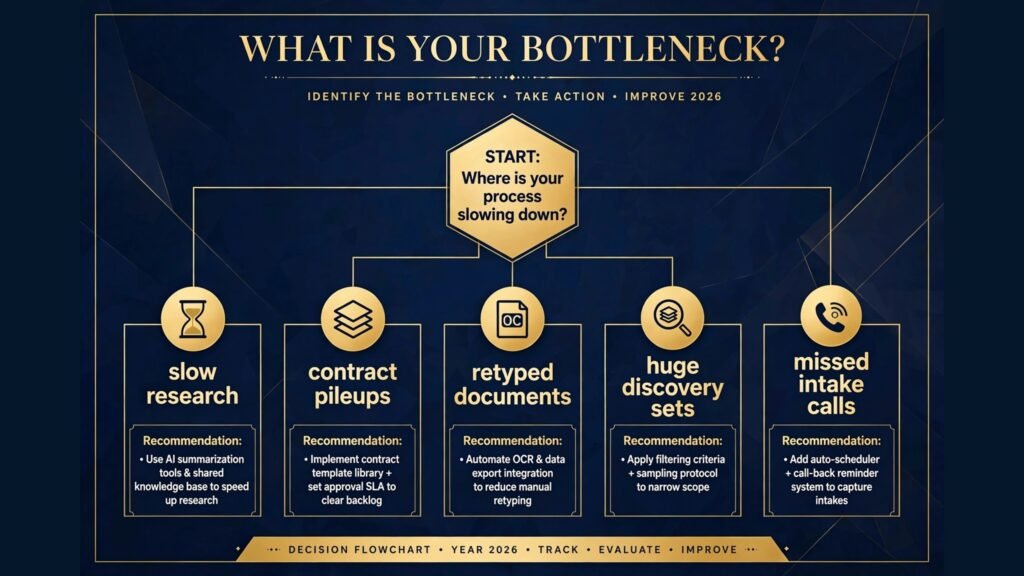
Start from the bottleneck, not from the tool list. If research eats the week, start with CoCounsel or Lexis+ AI and measure hours saved per memo. If contracts pile up, start with Spellbook or Lawgeex and fix the review playbook first. If intake calls go unanswered, start with Smith.ai before buying any research tool, because a signed client pays for every other tool on this list.
Second, verify every output before it leaves the firm. Build a checking step into the workflow: citations opened and read, contract flags reviewed by a lawyer, and automated documents proofread against source facts. The firms that get sanctioned are not the ones that use AI, they are the ones that file unchecked AI output.
Third, count the real cost per matter, not the headline seat price. Seat minimums, data volume charges, per contract review fees, and implementation all land on the same budget. Run one real month of matters through a shortlist and record the true cost, the hours saved, and the error rate. Property lawyers should also check our best AI tools for real estate agents guide, and teams that send fee proposals should see our best AI proposal software guide.
Frequently Asked Questions
Can AI tools replace lawyers?
No. AI tools research, draft, review, and organise, but they do not exercise judgment, advise a client, or appear in court. The lawyer remains responsible for every output, and courts hold the lawyer, not the tool, accountable for errors.
Is it safe to put client data into AI legal tools?
It depends on the tool and the matter. Enterprise tools offer SOC 2 certification, data residency options, and no training on client data, while general chatbots may retain inputs. Check the vendor’s security terms and your jurisdiction’s confidentiality rules before uploading sensitive matter data.
Will AI invented citations get a lawyer sanctioned?
Yes, it already has happened in several courts. Lawyers have faced sanctions for filing briefs containing cases that do not exist, generated by AI tools. Every citation in an AI draft must be opened and verified in a real legal database before filing.
How much should a small firm pay for AI legal tools?
Between $49 and $150 per user per month covers a working starter stack: practice management, document automation, and intake answering. Add research AI only when research hours justify the seat, and reserve enterprise platforms for the point where volume, not budget, is the constraint.
Do AI contract tools understand my firm’s playbook?
Only after it is written down and encoded. Tools like Spellbook, Robin AI, and Lawgeex review against a playbook the firm provides. A firm without a written review policy should write one first, or the tool will apply inconsistent standards at speed.
Which single tool should a new firm start with?
Clio Manage, for most small firms, because matters, documents, time, and billing arrive in one system that other tools plug into. Research heavy firms should add CoCounsel or Lexis+ AI next, and contract heavy firms should add Spellbook.
Conclusion
The best AI tools for lawyers do not practise law. They remove the slow parts: the research slog, the contract re-read, the retyped document, the unreviewed discovery set, and the missed intake call. Harvey, CoCounsel, and Lexis+ AI ground research in real sources. Spellbook, Robin AI, and Lawgeex bring a playbook to every contract. Gavel and Clio Draft automate the documents a firm produces weekly. Everlaw and Clio Manage hold the case and the practice together. Lawmatics and Smith.ai make sure every enquiry gets answered and every client gets billed.
Start with the bottleneck. If research is slow, fix research. If contracts pile up, fix review. If intake calls go unanswered, fix the phone first. Verify every output before it leaves the firm, measure hours saved per matter, and keep only the tools that earn their fee. The firms that win with AI in 2026 are the ones whose lawyers spend their hours on judgment, while the tools handle the rest.