
If you want the short answer first, here it is: most people searching for Webflow alternatives do not need a weaker copy of Webflow. They need a builder that matches how they actually work. If you want visual control with less learning time, Framer is the closest modern match. If you want the widest plugin and theme choice, WordPress still wins. If you sell products, Shopify is the safer business choice. This guide compares 15 options on real decision points: design freedom, speed to launch, content editing, ecommerce strength, cost over two years, and who each tool frustrates. Pricing notes reflect listings seen in October 2026. Always check checkout before you buy, because plans and limits change often.
Webflow earned its reputation for a reason. It gives designers precise control over layout, interactions, and CMS content without writing production code by hand. That power comes with a cost. The learning curve is steep, the editor can feel slow for simple edits, and ecommerce, memberships, and logic features add separate costs and complexity. Many teams start in Webflow because a designer recommended it, then discover that a marketer, founder, or client cannot update a page without help. Others hit a budget wall when site plans, CMS items, and team seats stack up. The tools below are not ranked only by features. They are grouped by the job they do best, so you can skip straight to the section that fits your site.
Webflow alternatives at a glance
| Tool | Best for | Free plan | Standout strength | Main trade-off |
|---|---|---|---|---|
| Framer | Design led marketing sites | Yes | Fast, polished publishing | Smaller CMS limits than Webflow |
| Wix | All round small business sites | Yes | Huge app market and templates | Less precise layout control |
| Squarespace | Portfolios and service sites | No, trial only | Beautiful templates, simple editing | Limited deep customisation |
| WordPress | Blogs, large content sites | Software free, hosting paid | Unlimited extensibility | Needs maintenance and care |
| Shopify | Online stores | No, trial only | Checkout, inventory, and apps | Less flexible for non store pages |
| Wix Studio | Agencies building client sites | Yes | Responsive controls and workspaces | Learning curve for beginners |
| Duda | Agencies and local business sites | No, trial only | Client tools and white label options | Fewer third party integrations |
| Webstudio | Open source visual building | Yes | Code export and self hosting option | Smaller template library |
| Bubble | Web apps, not just websites | Yes | Database and workflows built in | Overkill for a simple brochure site |
| Dorik | Fast landing pages | Yes | Low price and quick setup | Fewer advanced design controls |
| Carrd | One page sites | Yes | Extremely cheap and fast | Not for multi page sites |
| Readymag | Editorial and portfolio sites | Yes | Striking typography and layout | Weak for ecommerce |
| Format | Photographer portfolios | No, trial only | Client proofing and store tools | Narrow focus beyond portfolios |
| Unicorn Platform | Startup landing pages | Yes | AI assisted page generation | Limited blog depth |
| Softr | Sites from Airtable or Google Sheets | Yes | No code apps and directories | Design freedom is narrower |
For design led marketing sites
1. Framer
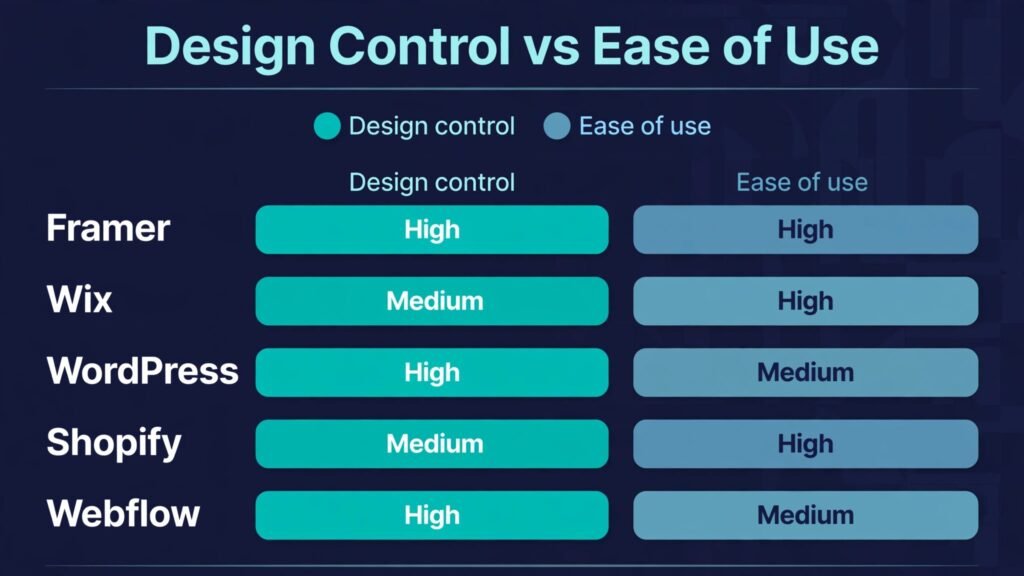
Framer is the Webflow alternative most designers mention first, and the reason is simple: it feels fast. You draw layouts on a canvas, add animations with a few controls, and publish without a separate hosting step. Templates are modern, type looks good by default, and the CMS handles blogs, case studies, and landing pages well for small to mid sized sites. Framer also includes AI assisted starting points that generate a draft page from a prompt, which you then edit visually. That helps founders who stare at a blank canvas.
Watch out for: CMS collection limits on lower plans, and ecommerce is not Framer’s core strength. If you need a full store with complex shipping rules, discounts, and inventory, Shopify or WordPress with WooCommerce will serve you better. Framer is also a newer platform, so its plugin range is smaller than WordPress or Wix. Pricing in October 2026 includes a free starter tier, with paid plans for custom domains, more CMS items, and team features. Check checkout for the current seat and CMS limits, because those are the two limits that force upgrades most often.

2. Readymag
Readymag suits editorial sites, portfolios, and campaign pages where typography and spacing carry the message. Its freeform canvas lets you place elements with precision, animate on scroll, and build pages that do not look like a template. Designers who found Webflow powerful but heavy often like Readymag for smaller projects, because a striking page can be finished in an afternoon. It handles image heavy work well, and published pages load cleanly.
Watch out for: Readymag is not a general business platform. Forms, blogs, and ecommerce are basic compared with Wix or WordPress, and large content libraries are harder to manage. Use it when the page itself is the product, such as a portfolio, lookbook, or launch page. For a growing company site with dozens of pages and a blog, pick a stronger CMS first. Pricing includes a free plan, with paid tiers for custom domains and more projects. Check checkout before committing to a yearly plan.
3. Webstudio
Webstudio is the open source option in this list, and that matters if you dislike lock in. You build visually, then you can export code or self host. That combination appeals to developers who want a visual starting point without losing control of the final output. The builder supports modern layout tools, CMS data, and component reuse, and the community is active. For teams with technical skills, Webstudio can replace Webflow for marketing sites while keeping costs low.
Watch out for: the template and integration library is smaller than the big commercial builders, and documentation assumes some web knowledge. Non technical users may need help with setup, domains, and hosting if they self host. If you want a fully managed service with support on call, Wix or Squarespace will feel easier. Pricing includes a free cloud tier, with paid plans for more projects and features. Check checkout and the self hosting docs before you choose a route.
For small business and all round sites
4. Wix
Wix remains the easiest all round answer for a small business that needs a site live this week. Templates cover restaurants, salons, clinics, consultants, and shops. The editor is drag and drop, the app market adds bookings, forms, chat, and payments, and built in SEO tools cover titles, descriptions, and sitemaps. Wix also handles multilingual pages and member areas, which many small teams need as they grow. For a full comparison of two popular hosted builders, see our guide to wix-vs-squarespace.
Watch out for: once you pick a template, switching templates later is not a clean one click move, so choose carefully at the start. Design control is good but not as precise as Webflow or Framer, and very large sites can feel harder to organise. Pricing in October 2026 includes a free plan with Wix branding, plus paid plans for a custom domain, more storage, and ecommerce. Check checkout for renewal pricing, which can differ from the first year offer.

5. Squarespace
Squarespace is the calm choice. Templates are consistent, images look strong, and editing is simple enough for a team member who only updates the site once a month. It covers portfolios, service businesses, blogs, and small stores in one place, with scheduling, email campaigns, and member areas available as add ons. If your main goal is a credible, good looking site without a designer on staff, Squarespace is hard to beat for speed and polish.
Watch out for: deep customisation requires code or workarounds, and advanced ecommerce features lag behind Shopify. The template system also rewards staying close to the intended layout. If you fight the template on every page, you will be happier in Framer or WordPress. Pricing is paid only after a trial, with tiers for personal sites, business features, and commerce. Check checkout for transaction fees on lower commerce plans.
6. Duda
Duda is built for agencies and for businesses with many locations. It offers white label client editing, team roles, and tools that let clients update text and images without breaking the design. That client proofing workflow is the reason agencies pick Duda over a general builder. Sites load fast, templates are business focused, and local SEO features help multi location brands. If you build sites for others, Duda deserves a trial.
Watch out for: the third party app range is narrower than Wix, and the design system is more structured than Webflow. Solo founders may find the agency features unnecessary and the price higher than a simple builder. Pricing is paid after a trial, with agency plans priced by site count. Check checkout for the per site cost at your volume, because that is the real price driver.
For content, blogs, and large sites
7. WordPress
WordPress powers a huge share of the web because it has no hard ceiling. You can run a blog, a magazine, a membership site, a course hub, or a store with WooCommerce, and you can change themes, hosts, and plugins as you grow. The block editor is now capable for everyday pages, and page builders add visual control when you need it. Content teams benefit from revisions, roles, categories, and a mature SEO plugin range. Our broader roundup of wordpress-alternatives is useful if you want to compare the wider field.
Watch out for: WordPress needs maintenance. Updates, backups, security, and plugin conflicts are your job or your host’s job, and a poorly chosen plugin set can slow a site badly. It is not a set and forget platform like Squarespace. Budget for good hosting and a backup tool from day one. Software itself is free, while hosting, themes, and premium plugins carry the cost. Check checkout totals across a full year, not just the first month price, because renewal rates matter here.

8. Softr
Softr takes a different route: it turns Airtable or Google Sheets data into websites, directories, client portals, and internal tools. If your content already lives in a spreadsheet, Softr can publish a searchable directory or member portal in hours, with login controls and filtered views. That makes it a strong Webflow alternative for listings, resource hubs, and community sites where data, not freeform design, is the core.
Watch out for: visual design is template driven and narrower than Framer or Webflow. You trade layout freedom for speed with structured data. Softr is also less suited to a traditional marketing site with long editorial pages. Pricing includes a free tier, with paid plans for more records, custom domains, and advanced permissions. Check checkout for record limits, which decide the right tier.
For stores and selling
9. Shopify
Shopify is the default choice when selling is the main job of the site. Checkout is trusted and fast, inventory and discount tools are mature, and the app store covers shipping, email, subscriptions, and accounting. Themes are clean, and the platform handles traffic spikes, tax basics, and payment options without manual server work. If you compare store platforms before you commit, our shopify-alternatives guide covers the wider set.
Watch out for: content pages and blogs work, but they are not as flexible as WordPress, and app costs can add up quickly. Transaction fees apply unless you use Shopify Payments in supported regions. Design freedom is good within a theme, but pixel perfect custom layouts need a developer or a page builder app. Pricing in October 2026 is paid after a trial, with tiers for small stores through to larger brands. Check checkout for app costs on top of the base plan when you budget.

10. Format
Format is a niche pick that earns its place for photographers, artists, and visual creators. Portfolios look strong, client galleries support proofing and delivery, and a built in store sells prints and digital work. The workflow from shoot to client delivery is tighter than a general builder, which saves time for working photographers. If your site is mainly a portfolio with occasional sales, Format is more focused than Webflow.
Watch out for: Format is not a general business builder. Blogs, complex service pages, and large stores are limited, and template variety is narrow by design. Use it for its niche, not as a replacement for a full company site. Pricing is paid after a trial, with tiers for portfolio size and store features. Check checkout for storage limits on image heavy plans.
For apps, landing pages, and quick launches
11. Bubble
Bubble is not a straight website builder. It is a no code platform for web apps with user accounts, databases, and workflows. You can build a marketplace, a booking tool, a dashboard, or an internal tool without a traditional backend team. That makes Bubble the right Webflow alternative when your project needs logged in users, saved data, and logic, not just pages. Templates and plugins speed up common app patterns, and the visual editor handles both design and behaviour in one place.
Watch out for: Bubble has a real learning curve, and simple brochure sites do not need its database power. Performance and pricing depend on workload units, so a popular app needs careful planning. If you only need pages and a blog, Framer or WordPress will be faster and cheaper. Pricing includes a free tier for learning and testing, with paid plans for live domains and higher capacity. Check checkout for workload limits before you launch a public app.
12. Dorik
Dorik is built for speed and low cost. You pick a template, replace text and images, connect a domain, and publish a landing page or small business site in an hour. It includes AI assisted copy and page generation, simple CMS pages for blogs, and integrations for forms and payments. For freelancers, startups, and side projects that need a credible page without a monthly bill that hurts, Dorik is one of the best value options in this list.
Watch out for: advanced animations, complex layouts, and deep ecommerce are limited. Dorik is a launch fast tool, not a design studio. If your site will grow into a large content hub or a full store, start with a platform that scales in that direction. Pricing in October 2026 includes a free plan, with paid tiers that remain low compared with most builders. Check checkout for the CMS and page limits on each tier.
13. Carrd
Carrd does one thing extremely well: single page sites. Link pages, event pages, personal profiles, product waitlists, and simple portfolios all fit. The editor is fast, templates are clean, and the price is among the lowest of any serious builder. Many creators use Carrd as a bridge page while their main site is being built, then keep it because it works. If your whole site can fit on one scrolling page, do not pay for a larger platform.
Watch out for: Carrd is not for multi page sites, blogs with archives, or stores with many products. You will outgrow it if you need sections, search, and a CMS. Treat it as a specialist tool. Pricing includes a free tier, with a very low paid tier for custom domains and more features. Check checkout for the yearly rate, which is where Carrd’s value shows most clearly.
14. Unicorn Platform
Unicorn Platform focuses on startup landing pages. It generates a draft page from a short description, then lets you edit sections, add pricing tables, testimonials, and signup forms. The result is a clean, modern page that looks funded even when the product is early. Founders who need a waitlist page, a launch announcement, or a simple product page will move faster here than in a general builder.
Watch out for: blog depth, multi page structure, and ecommerce are basic. Unicorn Platform is a landing page specialist, and a growing company will eventually need a fuller CMS. Use it to validate an idea quickly, then migrate the winning message to a larger platform if traffic grows. Pricing includes a free tier, with paid plans for custom domains and more pages. Check checkout for page limits before you build a full site on it.
15. Wix Studio
Wix Studio is Wix’s professional tier for agencies and advanced builders. It adds responsive design controls for different screen sizes, reusable sections, client workspaces, and code options for developers. Agencies can manage many client sites, set roles, and reuse assets across projects. For teams that liked Wix’s ease but needed more control, Wix Studio closes much of the gap with Webflow while keeping hosting, security, and updates managed.
Watch out for: beginners may find Wix Studio more complex than standard Wix, and the best features assume you build sites often. Solo users with one simple site will be happier with standard Wix or Squarespace. Pricing includes a free tier for design work, with paid site plans for publishing. Check checkout for the plan that matches your traffic and storage needs, and compare it with standard Wix before you commit.
Best pick by job
| Your job | First pick | Runner up | Why |
|---|---|---|---|
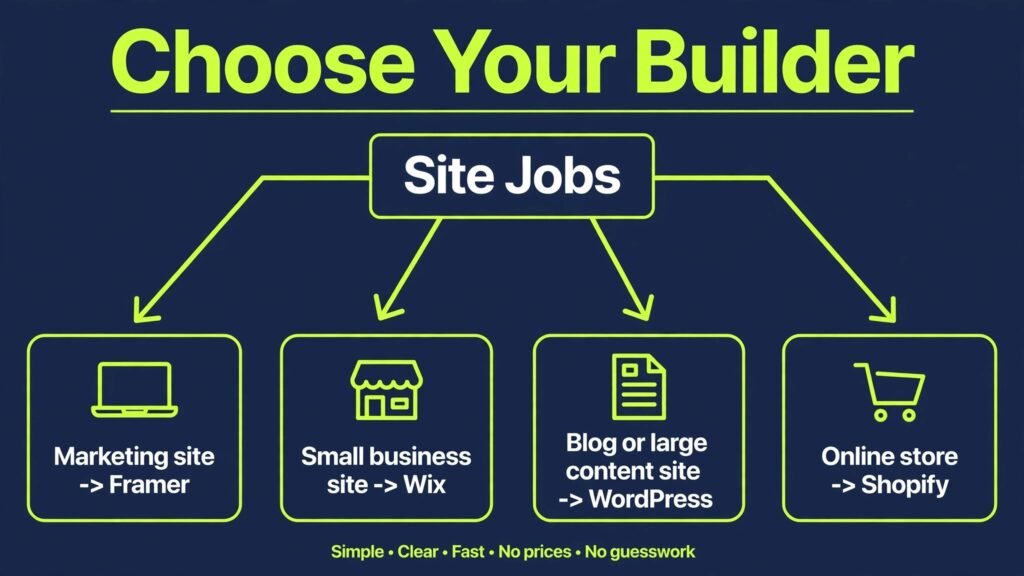
| Design led marketing site | Framer | Webstudio | Speed plus polish, without Webflow’s learning time |
| Small business site this week | Wix | Squarespace | Templates, apps, and easy editing in one place |
| Blog or large content site | WordPress | Softr for data driven directories | No ceiling on content, plugins, or structure |
| Online store | Shopify | Wix | Checkout and inventory strength outweigh page freedom |
| Agency client sites | Duda or Wix Studio | WordPress | Client editing and multi site management matter most |
| Web app with logins and data | Bubble | Softr | Database and workflows are built in |
| Single page or waitlist | Carrd | Dorik | Lowest cost and fastest launch |
| Portfolio or editorial page | Readymag | Format | Typography and visual impact lead the decision |
How to choose among Webflow alternatives
Start with the site’s main job, not with a feature list. A portfolio, a store, a blog, and a web app are different products, and the best builder changes with each one. Write down the three actions visitors must complete in the first month. If those actions are read, enquire, and buy, you need strong pages, forms, and checkout. If the actions are sign up, save, and return, you need accounts and data, which points to Bubble or Softr. This one test removes half the list quickly.
Next, test editing with the person who will actually update the site. Give them a draft page and ask them to change a headline, swap an image, and publish a blog post. If that test takes more than ten minutes or needs your help each time, the builder is too complex for that team. Webflow fails this test in many small teams, which is why a simpler editor often wins even when it has fewer features. Design freedom that only one person can use becomes a bottleneck.
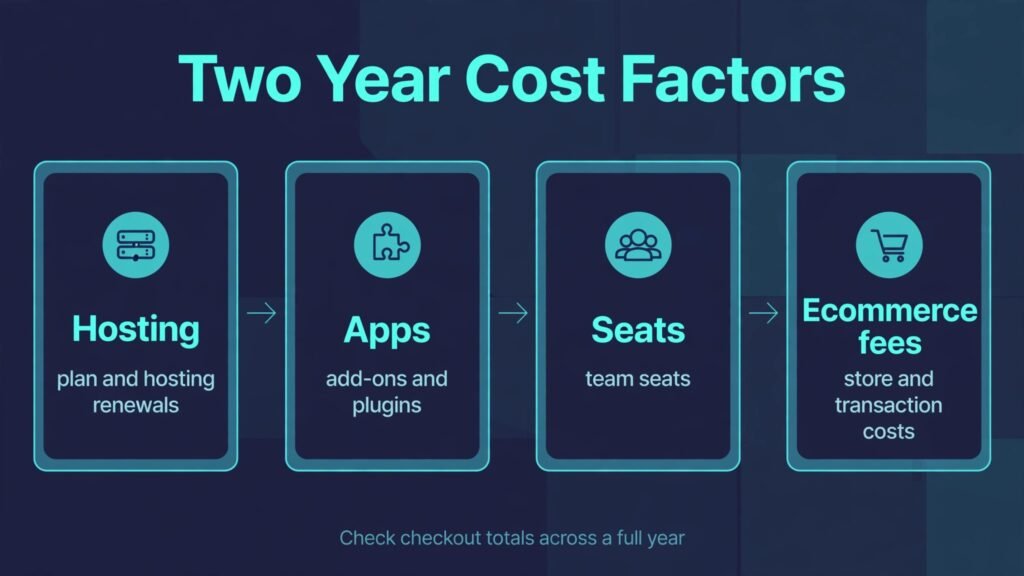
Then check the two year cost, not the first month price. Add hosting, domain, premium templates, essential apps, team seats, and ecommerce fees. A cheap builder with five paid apps can cost more than a pricier platform that includes those features. Also check limits that force upgrades: CMS items, storage, form submissions, and bandwidth. Ask what happens at each limit, and whether the next tier is a small step or a large jump.
Finally, check exit options. Can you export content, redirect old URLs, and move your domain without a fight? WordPress and Webstudio score well here because content and code are portable. Hosted builders vary, so read the export help page before you invest months of content. A builder that makes leaving painful deserves extra scrutiny, even if the first month feels easy. For creators building a visual brand, our guide to best-ai-tools-for-graphic-designers can help with assets that work across any platform you choose.
Mistakes to avoid when you switch
The most common mistake is copying a Webflow design pixel for pixel into a new builder. Each platform has a layout model, and fighting it wastes weeks. Instead, keep the message, the hierarchy, and the brand assets, and rebuild the layout in the new tool’s natural way. The result will look native, load faster, and be easier to edit.
Another mistake is ignoring redirects and SEO basics. If URLs change, set up 301 redirects, keep titles and meta descriptions, and resubmit your sitemap. A rebuild that loses search traffic can take months to recover. Keep the old site live until redirects are tested, and check your top ten pages in search results after launch.
A third mistake is choosing on templates alone. Templates show a builder at its best, with professional photos and copy. Your content will differ, so test with your own text and images. A template that looks great with short headlines may break with your longer product names or service descriptions. Build one real page before you pay for a year.
Do not overlook forms, email, and analytics either. Test a form submission end to end, confirm notification emails arrive, and check that analytics and search console connections work. These small links cause the most launch day panic, and they are easy to verify in a trial. Also confirm who owns the account, the domain, and the billing details, so a team change does not lock you out later.
Frequently asked questions
Is Framer really easier than Webflow?
For most marketing sites, yes. Framer’s canvas, templates, and publishing flow are simpler, and small teams publish faster. Webflow still offers deeper CMS and interaction control for complex sites, so the gap narrows on large projects with many content types.
Can I move my Webflow content to WordPress?
Yes, with planning. Export CMS content where possible, rebuild pages in WordPress, and set up redirects for changed URLs. Text and images move more easily than interactions and custom code, so budget time for rebuilding animations and forms rather than expecting a one click transfer.
Which Webflow alternative is cheapest for a small site?
Carrd is cheapest for a single page, and Dorik is among the cheapest for a multi page site. Wix and Framer free tiers work for testing, but a custom domain usually requires a paid plan on any hosted builder, so compare paid prices, not free tiers, for a live business site.
Do I need ecommerce features if I only sell one product?
Not necessarily a full store. A simple checkout link, a payment form, or a single product page on Wix, Squarespace, or Dorik can be enough. Move to Shopify when you need inventory tracking, discounts, shipping rules, and a larger catalogue, because those features justify the higher base cost.
Is WordPress too hard for a beginner in 2026?
WordPress is manageable if you choose good hosting and limit plugins to the essentials. Managed hosts handle updates and backups, and the block editor covers most pages without code. It still needs more care than Squarespace, so pick WordPress when you value control and growth room over total simplicity.
What if I need both a website and a web app?
Start with the app requirement. Bubble handles logins, data, and workflows that page builders lack, while Softr covers data driven portals from spreadsheets. You can link a marketing site built in Framer or WordPress to an app built in Bubble, which often works better than forcing one tool to do both jobs poorly.
How long does a switch from Webflow usually take?
A small business site takes one to three weeks including content, design, and testing. A large content site or store takes four to eight weeks, mainly because of migration, redirects, and checkout testing. Allow extra time if you have many CMS items, custom forms, or third party integrations to rebuild.
A closing view, not a single winner
Webflow remains excellent for designers who want control and are willing to learn the tool. The alternatives above win when a different job matters more: speed, simplicity, selling, content scale, or app logic. Framer is the best default for a modern marketing site. WordPress is the best long term bet for content. Shopify is the best bet for a store. Wix and Squarespace are the best bets when one person must do everything. Pick the tool that your team can actually edit in six months, not the one that looks most impressive in a demo. That choice is what keeps a site alive after launch day.