
Clinicians do not burn out on medicine. They burn out on notes. A typical clinic day ends with hours of charting, inbox messages, referral letters, and coding queries, much of it done after the last patient leaves. The best AI scribe tools for clinics attack that after hours work directly. They listen to the visit, draft a structured note, push it toward the chart, and free the clinician to look at the patient instead of the keyboard.
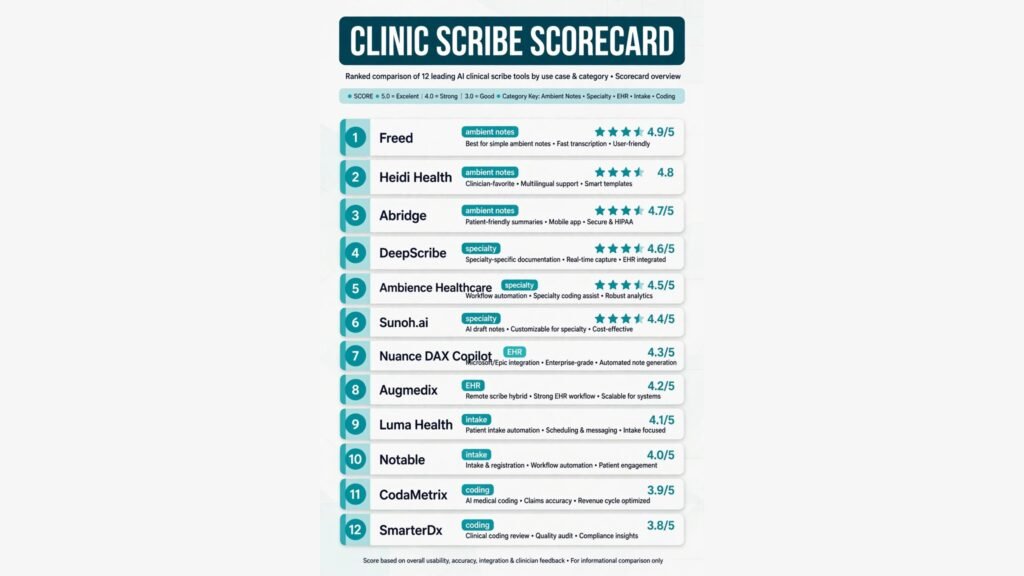
This guide compares 12 tools grouped by the clinic job each one does best: ambient documentation, specialty scribing, EHR integration, patient intake and scheduling, and billing and coding support. Prices are October 2026 figures in US dollars. Where a vendor does not publish pricing, or where sources disagreed, the guide says check checkout rather than guessing. One rule runs through the whole guide: an AI note is a draft, not a signed record. The clinician must read, correct, and sign every note before it becomes part of the chart. AI scribes reduce typing. They do not remove clinical responsibility.
The 12 best AI scribe tools for clinics at a glance
| Tool | Best job | Free option | Paid from |
|---|---|---|---|
| Freed | Ambient notes for small clinics | Free trial | Around $99 per clinician per month, check checkout |
| Heidi Health | Ambient notes with templates | Free tier | Check checkout |
| Abridge | Ambient notes for large systems | No | Custom, check checkout |
| DeepScribe | Specialty documentation | No | Custom, check checkout |
| Ambience Healthcare | Specialty and coding aware notes | No | Custom, check checkout |
| Sunoh.ai | Scribing inside eClinicalWorks | Free trial | Check checkout |
| Microsoft Nuance DAX Copilot | EHR integrated ambient notes | No | Custom, check checkout |
| Augmedix | EHR integrated scribing service | No | Custom, check checkout |
| Luma Health | Intake and scheduling automation | No | Custom, check checkout |
| Notable | Intake and front desk automation | No | Custom, check checkout |
| CodaMetrix | Coding support from notes | No | Custom, check checkout |
| SmarterDx | Coding and revenue review | No | Custom, check checkout |
Best pick by job
| Your job | Start with | If that fails, try |
|---|---|---|
| Ambient notes in a small clinic | Freed | Heidi Health |
| Ambient notes across a health system | Abridge | Microsoft Nuance DAX Copilot |
| Specialty clinic documentation | DeepScribe | Ambience Healthcare |
| Scribing inside eClinicalWorks | Sunoh.ai | DeepScribe |
| Notes that land directly in the EHR | Microsoft Nuance DAX Copilot | Augmedix |
| Intake forms and scheduling | Luma Health | Notable |
| Front desk automation at scale | Notable | Luma Health |
| Clean codes from visit notes | CodaMetrix | SmarterDx |
| Revenue review after coding | SmarterDx | CodaMetrix |
Ambient documentation: notes written while you talk
Ambient tools listen to the conversation, separate speakers, and draft a visit note without clicks or dictation commands. They suit general practice, primary care, and urgent care, where visit types repeat and speed matters more than deep specialty logic.
1. Freed
Freed is the most popular ambient scribe for small and independent clinics. It records the visit, drafts a SOAP style note in the clinician’s preferred format, and lets the clinician edit before copying the note into the chart. It also drafts patient instructions and referral letters from the same visit, which removes a second round of typing after the appointment.
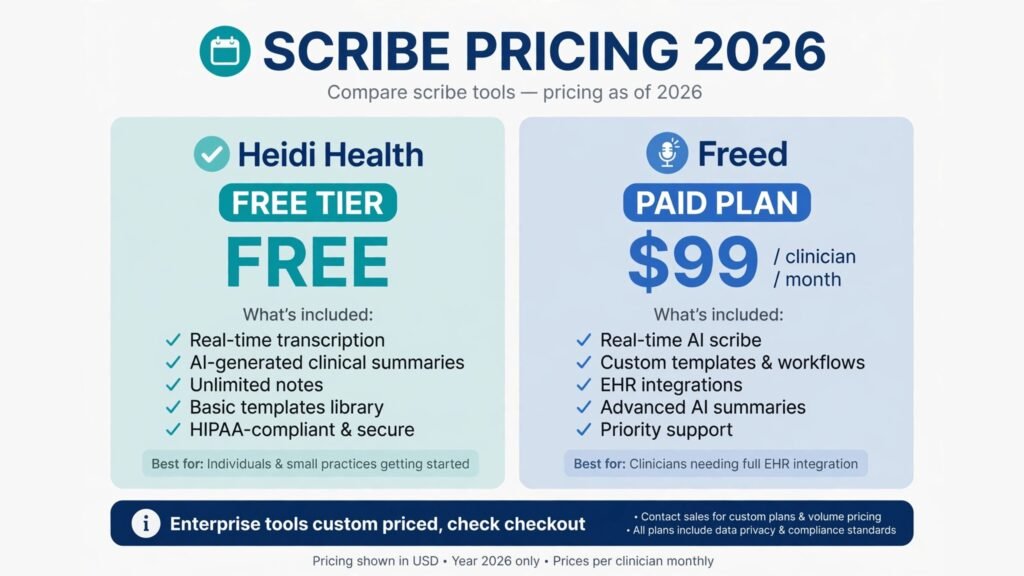
Pricing: A free trial is offered. Paid plans are reported from around $99 per clinician per month, with higher tiers for teams. Confirm the current figure at check checkout, since Freed has changed plan names and prices more than once.
Best for: Solo clinicians and small clinics that want a fast setup, a low monthly cost, and no EHR replacement project.
Watch out for: Freed is a documentation tool, not a full EHR integration in every setup. In some clinics the workflow still involves copying the finished note into the chart by hand. Test that copy step on a real clinic day before rolling it out to every clinician.
Try it at: freed.ai

2. Heidi Health
Heidi Health is an ambient scribe built around templates and customisation. Clinics can shape note structure, add their own templates, and use it across general practice, mental health, allied health, and several other settings. A free tier makes it easy to trial, and the interface is deliberately simple, which helps clinicians who dislike complex software.
Pricing: A free tier is available for basic use. Paid plans are not consistently published across regions, so check checkout for the current price in your country before budgeting.
Best for: Clinics that want template control and a free starting point, including mental health and allied health practices that larger US focused tools serve less well.
Watch out for: Template freedom cuts both ways. A clinic without agreed note standards can end up with ten clinicians producing ten different note styles. Agree the template set first, then lock it down for the team.
Try it at: heidihealth.com
3. Abridge
Abridge is an enterprise ambient platform used by large health systems. It captures the visit conversation, drafts a note, and links parts of the note back to the audio so a clinician can check any sentence against what was actually said. That audit link matters in large organisations, where note quality is reviewed and where trust in AI output has to be earned.
Pricing: Custom enterprise pricing only, with contracts sized by clinician count and system size. There is no self serve price to quote, so check checkout through an enterprise sales conversation.
Best for: Hospitals and large clinic groups that need auditability, enterprise security review, and deployment across many sites at once.
Watch out for: Abridge is built for scale, and small clinics may find the sales process and the minimum commitment heavier than the tool itself. A clinic with fewer than ten clinicians will usually get faster value from Freed or Heidi Health.
Try it at: abridge.com
Specialty scribing: notes that understand the specialty
General ambient tools handle a routine visit well. Specialty clinics need more: the right exam elements, the right terminology, and note structures that match how that specialty actually works. These three tools are built for that deeper fit.
4. DeepScribe
DeepScribe focuses on specialty documentation, with support for many specialties and note formats tuned to each one. It captures the visit, drafts a structured note, and aims to reduce the editing burden that general tools leave behind in complex visits. It is a strong choice for cardiology, orthopedics, oncology, and other specialties where a generic note template misses key detail.
Pricing: Custom pricing, quoted per clinician or per organisation. No public self serve price is published, so check checkout for a quote based on specialty mix and volume.
Best for: Specialty clinics where general scribes produce notes that need heavy editing, and where specialty terminology is a daily reality.
Watch out for: Specialty depth still needs specialty review. DeepScribe reduces editing, it does not remove it, and a new specialty rollout should be piloted with one clinician for two weeks before the whole group adopts it.
Try it at: deepscribe.ai
5. Ambience Healthcare
Ambience Healthcare combines ambient documentation with coding aware drafting. Its notes are designed to support accurate coding and billing, not just readable prose, which matters for clinics where missed codes and vague documentation cost real revenue. It also covers several specialties and supports pre visit preparation and post visit summaries.
Pricing: Custom enterprise pricing. Ambience sells to groups and systems rather than solo clinicians, so check checkout for a quote tied to clinician count.
Best for: Specialty groups and larger clinics that want documentation and coding support in one workflow, rather than fixing codes after the note is signed.
Watch out for: Coding aware does not mean coder approved. A coder should still review a sample of Ambience notes in the first month, especially for procedures and complex visits, before the clinic treats its output as final.
Try it at: ambiencehealthcare.com
6. Sunoh.ai
Sunoh.ai is the ambient scribe from eClinicalWorks, and its strength is obvious: it is built to work inside that EHR. For clinics already running eClinicalWorks, Sunoh reduces the copy and paste step that standalone scribes often require, and it keeps the note workflow inside a system staff already know.
Pricing: A free trial is offered. Paid pricing is tied to eClinicalWorks plans and is not consistently published standalone, so check checkout for the current figure for your practice size.
Best for: Clinics already on eClinicalWorks that want scribing without adding a separate vendor workflow.
Watch out for: Sunoh makes most sense inside its home EHR. A clinic on a different EHR should compare it honestly against Freed, Heidi Health, or DeepScribe, rather than switching EHRs to fit a scribe.
Try it at: sunoh.ai
EHR integration: notes that land in the chart
A scribe that drafts a perfect note still fails if the note never reaches the chart cleanly. These two tools are built around EHR integration, so the finished note moves into the record with less copying, less reformatting, and fewer chances for a note to sit unsent.
7. Microsoft Nuance DAX Copilot
DAX Copilot, from Microsoft and Nuance, is an ambient clinical intelligence tool that drafts notes and pushes them toward the EHR, including Epic. It is widely deployed in large US health systems, and its integration depth is its main selling point: the note workflow stays close to the chart, and the tool benefits from Microsoft’s enterprise security and compliance posture.
Pricing: Custom enterprise pricing, usually sold as part of a larger Microsoft or Nuance agreement. There is no small clinic self serve price, so check checkout for an enterprise quote.
Best for: Large systems on Epic or other major EHRs that want ambient notes inside their existing record workflow, with enterprise governance.
Watch out for: Implementation takes time. EHR integration projects involve IT, compliance, and clinician training, and a DAX rollout should be planned in months, not days. Small clinics will find the process disproportionate to their size.
Try it at: nuance.com

8. Augmedix
Augmedix combines AI scribing with human review and EHR integration, and it has long served clinics on major EHR platforms including Epic and Oracle Health. The hybrid model matters: AI drafts the note, and trained medical documentation specialists review it before it reaches the chart. That extra check appeals to clinics that are uneasy about fully automated notes.
Pricing: Custom pricing, quoted by clinician count and service level. Check checkout for a quote, since Augmedix offers different tiers of human review.
Best for: Clinics that want EHR integrated scribing plus a human safety net, especially where note accuracy is reviewed closely or where clinicians distrust pure AI output.
Watch out for: Human review adds cost and a small time delay compared with instant AI only tools. Clinics that need a note in seconds, rather than minutes, should test turnaround on real visits before committing.
Try it at: augmedix.com
Patient intake and scheduling: fix the front door first
A scribe fixes the end of the visit. Intake tools fix the start. If patients arrive with incomplete forms, insurance questions unanswered, and schedules full of no shows, even a perfect note cannot save the clinic day. These two tools handle the front desk work that surrounds the visit.
9. Luma Health
Luma Health automates patient intake, scheduling, reminders, and rescheduling across phone, text, and web. Patients can complete forms before arrival, confirm or move appointments by text, and get waitlist offers when slots open. For a busy clinic, that automation cuts phone volume and reduces the empty slots that cost revenue every week.
Pricing: Custom pricing, sized by clinic count and volume. Check checkout for a quote based on locations and message volume.
Best for: Clinics with high phone volume, high no show rates, or intake forms that still arrive on paper. Small clinics can start with scheduling and reminders, then add intake forms later.
Watch out for: Automation needs clean scheduling rules. If the clinic’s appointment types, durations, and clinician availability are messy in the EHR, Luma will automate that mess at speed. Clean the schedule templates before launch.
Try it at: lumahealth.io

10. Notable
Notable automates front desk workflows including intake, registration, authorisations, and scheduling, using AI agents that work across the EHR and payer systems. It suits larger groups that want to automate repetitive administrative steps rather than hiring more front desk staff for each new location.
Pricing: Custom enterprise pricing. Notable sells to groups and systems, so check checkout for a quote tied to locations and workflow scope.
Best for: Multi location groups with repetitive intake, registration, and authorisation work that scales poorly with headcount.
Watch out for: Notable is an operations platform, not a simple scheduling app. It needs process mapping and EHR access work up front, and a clinic that only needs reminders and forms will find Luma Health simpler and faster to launch.
Try it at: notablehealth.com
Clinics rebuilding intake often need better forms before they need more automation. For a comparison of form tools that work well for clinic intake, see the guide to AI form builders. Clinics that still handle most booking by phone should also compare AI call centre software for after hours answering and call routing.
Billing and coding support: get paid for the work done
Documentation and coding are linked. A vague note produces a vague code, and a vague code produces a denied claim or lost revenue. These two tools review notes and claims to catch coding gaps, rather than drafting the note itself.
11. CodaMetrix
CodaMetrix uses AI to assign medical codes from clinical documentation, including radiology, pathology, and other high volume areas. It aims to code faster and more consistently than manual review, and to flag documentation gaps that would otherwise lead to denials. For clinics with high imaging or procedure volume, coding speed is a real bottleneck.
Pricing: Custom pricing, quoted by volume and specialty. Check checkout for a quote based on monthly claim or report volume.
Best for: Clinics and groups with high volume coding needs, especially radiology and pathology, where manual coding backlogs delay billing.
Watch out for: Automated coding still needs coder oversight in the early months. Run CodaMetrix output alongside human coding for a sample period, measure agreement rates, and only then reduce manual review.
Try it at: codametrix.com
12. SmarterDx
SmarterDx reviews coded claims and clinical documentation to find missed diagnoses, complications, and revenue opportunities, and to flag claims at risk of denial or audit. It works after coding, as a safety net, rather than replacing the coder. Hospitals and larger groups use it to recover revenue that routine coding misses.
Pricing: Custom pricing, usually tied to hospital or group size and claim volume. Check checkout for a quote.
Best for: Larger clinics and hospital affiliated groups that want a second review pass over coded claims, especially where case mix and complexity are high.
Watch out for: SmarterDx finds revenue opportunities, but every suggestion still needs clinical and coder judgment. A suggestion is not a code until a qualified coder confirms the documentation supports it. Treating its output as automatic revenue is an audit risk.
Try it at: smarterdx.com
Pricing compared: what a clinic should actually budget
Only two tools in this guide publish a clear small clinic price: Freed from around $99 per clinician per month, and Heidi Health with a free tier for basic use. Every enterprise tool, including Abridge, DAX Copilot, Ambience Healthcare, Notable, CodaMetrix, and SmarterDx, is custom priced, which means the real cost depends on clinician count, locations, EHR, and contract length. A clinic should budget for more than the licence fee: implementation time, template setup, clinician training, and coder review in the first month all cost staff hours.
A realistic starter budget for a small clinic is one ambient scribe per clinician plus intake automation, which usually lands well below the cost of a part time human scribe. A realistic enterprise budget is a per clinician annual contract plus IT implementation time, and it should be judged on hours saved per clinician per week, not on the monthly fee alone. If a tool saves two hours of charting per clinician per day, it pays for itself quickly. If it saves twenty minutes and adds a new copy step, it does not, whatever the price. For small clinics weighing the whole operating budget, the guide to software for small business helps place a scribe inside the wider tool stack.
How to Choose the right scribe for your clinic
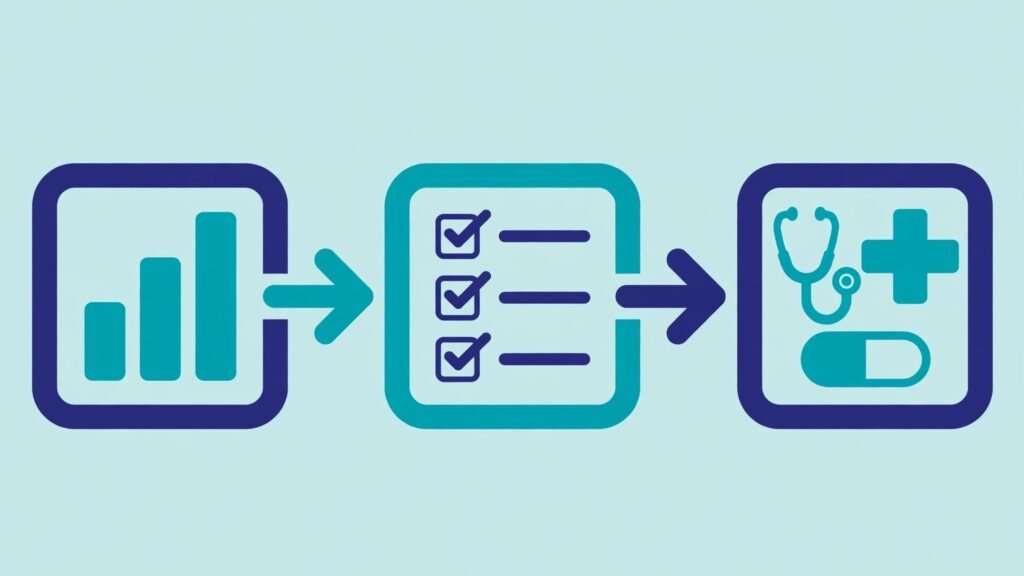
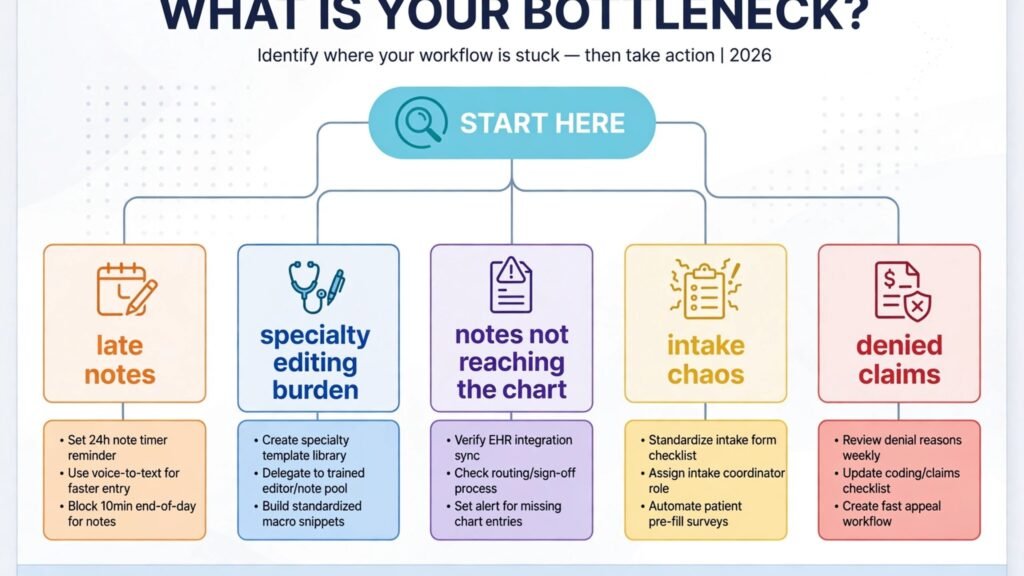
Start with the bottleneck, not the brand. If notes run late every night, start with an ambient tool. If specialty notes need heavy editing, start with a specialty tool. If intake chaos ruins the day before the visit starts, start with intake automation. If denials pile up, start with coding support. Buying all four at once is how clinics end up with four half adopted tools.
Next, test the EHR step on a real day. A scribe demo always looks fast. The real test is whether the finished note lands in the chart, in the right format, without a clinician copying text between systems. Run a two week pilot with two or three clinicians, measure note completion time, after hours charting time, and editing burden, and ask those clinicians directly whether they trust the output.
Then check security and compliance before signing. Ask for HIPAA compliance terms, Business Associate Agreement availability, data retention policy, whether visit audio is used to train models, and where data is stored. Enterprise tools usually answer these questions cleanly. Smaller tools should too, and a vague answer is a reason to pause.
Finally, plan the human checks. Agree who reviews notes in the first month, how coding suggestions are approved, and what happens when the AI mishears a drug name or a dose. The clinics that succeed with AI scribes treat the first month as a supervised rollout, not a switch flip. They measure, correct templates, retrain staff, and only then expand to the full team.
Frequently asked questions
Do AI scribes work with my EHR?
It depends on the tool and the EHR. DAX Copilot and Augmedix integrate deeply with major EHRs, Sunoh.ai is built for eClinicalWorks, and standalone tools like Freed and Heidi Health often rely on copying the finished note into the chart. Ask the vendor to show the exact EHR workflow for your system before buying.
Is patient audio stored, and is it used for training?
Policies differ by vendor. Enterprise tools typically offer no training on customer data, defined retention periods, and deletion controls. Smaller tools vary, so read the privacy terms and the Business Associate Agreement carefully, and confirm the policy in writing for any tool that will handle real patient visits.
Will an AI scribe replace human scribes completely?
For routine visits, often yes, and that is the point. For complex visits, procedures, and clinics that want a human review layer, a hybrid model like Augmedix, or AI plus coder review, remains common. Many clinics keep human scribes for their most complex clinicians and move routine visits to AI first.
How accurate are AI generated notes?
Accuracy is high for routine visits and lower for complex, multi problem, or noisy visits. Speaker separation, accents, overlapping speech, and background noise all affect output. That is why every note must be read and signed by the clinician. Accuracy should be measured in your own clinic during a pilot, not taken from a vendor demo.
Can AI scribes help with coding and billing?
Yes, but indirectly. A complete, specific note supports a complete, specific code. Ambience Healthcare drafts with coding in mind, CodaMetrix assigns codes from documentation, and SmarterDx reviews coded claims for missed revenue. None of these replace a qualified coder, and every coding suggestion needs human confirmation.
What does an AI scribe cost for a small clinic?
A small clinic can start with a free tier or a trial, then pay around $99 per clinician per month for a tool like Freed, with prices varying by plan. Enterprise tools cost more and are custom priced. Budget for training and template setup time as well as the monthly fee.
Which single tool should a small clinic start with?
Freed, for most small clinics, because setup is fast, pricing is clear, and ambient notes solve the most painful problem first: after hours charting. Clinics on eClinicalWorks should start with Sunoh.ai, and clinics that need specialty depth should start with DeepScribe instead.
Conclusion
The best AI scribe tools for clinics do not change medicine. They change the hours around medicine. Freed and Heidi Health give small clinics fast ambient notes at a clear price. Abridge, DAX Copilot, and Augmedix bring ambient notes into large systems and into the chart itself. DeepScribe, Ambience Healthcare, and Sunoh.ai fit specialty and EHR specific needs. Luma Health and Notable fix intake and scheduling before the visit starts. CodaMetrix and SmarterDx make sure the work documented is the work billed.
Start with the bottleneck. Pilot with two or three clinicians. Measure after hours charting, editing time, and note quality. Check security terms before signing, and keep a human in the loop for every note and every code. A clinic that does that will buy one tool that earns its fee, rather than four tools that gather dust. The reward is simple and worth it: clinicians who finish their notes before they leave, and patients who get eye contact instead of a keyboard.