

Most proposals fail before the client reads page two. The document is late, the pricing is unclear, or the client cannot sign without printing something. The best AI proposal software fixes the whole chain, not just the design. It builds the document from approved content, prices it correctly, tracks who opened it, and lets the client accept and pay in the same place.
This guide groups 12 tools by the proposal job each one does best: proposal creation and templates, e-signatures and closing, pricing and quoting (CPQ), sales enablement and tracking, and proposals for freelancers and small teams. Prices are October 2026 figures in US dollars. Where a vendor hides pricing or sources disagreed, the guide says check checkout rather than guessing.
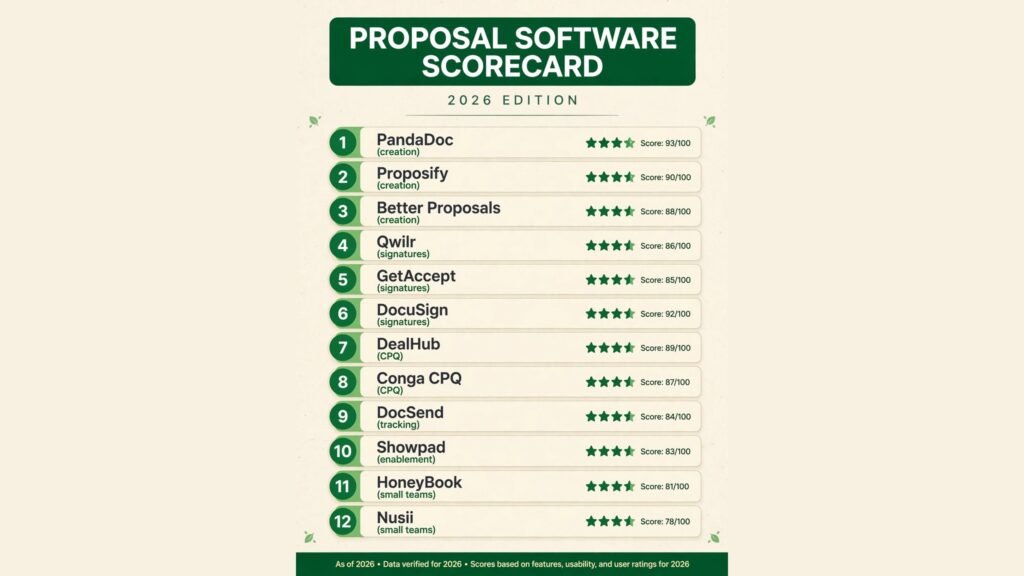
The 12 best AI proposal software at a glance
| Tool | Best job | Free option | Paid from |
|---|---|---|---|
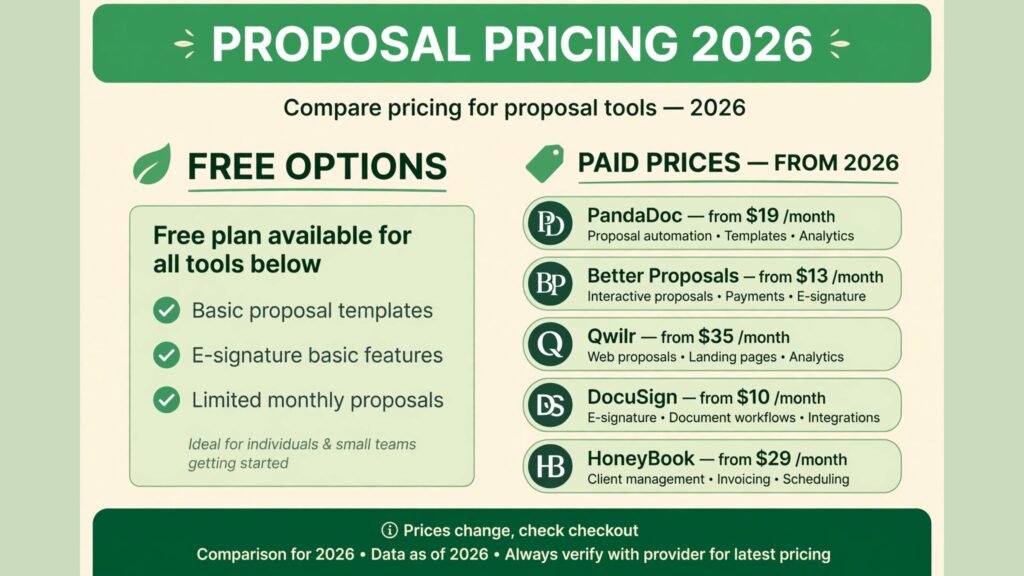
| PandaDoc | All in one proposals and contracts | Yes, eSign only | $19 per user per month |
| Proposify | Branded proposals with approvals | No | $35 per user per month |
| Better Proposals | Fast proposals on a budget | No | $13 per user per month |
| Qwilr | Interactive web proposals | No | $35 per user per month |
| GetAccept | Deal rooms and buyer engagement | No | $25 per user per month |
| DocuSign | Trusted e-signatures at scale | No | $10 per month |
| DealHub | CPQ and complex quoting | No | Around $50 per user per month |
| Conga CPQ | Enterprise quoting rules | No | Around $35 per user per month |
| DocSend | Document tracking and analytics | No | $10 per user per month |
| Showpad | Sales enablement and content | No | Custom, check checkout |
| HoneyBook | Proposals plus bookings and payments | No | $29 per month |
| Nusii | Flat priced proposals for freelancers | No | $29 per month |
Best pick by job
| Your job | Start with | If that fails, try |
|---|---|---|
| Build proposals plus contracts in one place | PandaDoc | Proposify |
| Keep every proposal strictly on brand | Proposify | Qwilr |
| Send polished proposals on a tight budget | Better Proposals | Nusii |
| Send a proposal clients actually enjoy reading | Qwilr | GetAccept |
| Close multi stakeholder deals | GetAccept | DocuSign |
| Sign documents clients already trust | DocuSign | PandaDoc |
| Quote complex products without errors | DealHub | Conga CPQ |
| Quote inside Salesforce at enterprise scale | Conga CPQ | DealHub |
| See exactly who read what, and when | DocSend | GetAccept |
| Equip a whole sales team with content | Showpad | DocSend |
| Run a solo service business end to end | HoneyBook | Nusii |
| Send proposals at one flat monthly price | Nusii | Better Proposals |
Proposal creation and templates: build it once, send it well
Creation tools are the core of this guide. They hold your templates, your approved content and your pricing tables, so a rep can build a correct proposal in minutes instead of copying last month’s document and editing it by hand.
1. PandaDoc
PandaDoc is the default all in one choice. It handles proposals, quotes, contracts and forms in one platform, with more than 1,000 templates, a drag and drop editor, a shared content library, approval workflows and built in payments through Stripe, PayPal and Square. Teams that live inside documents usually start here.
Pricing: Free eSign plan for signing only, with limited uploads. Essentials costs $19 per user per month billed annually, Business costs $49, and Enterprise is custom. Note the jump: CRM integrations sit on Business, not Essentials, so teams that need Salesforce or HubSpot sync should budget for Business from day one.
Best for: Growing sales teams that want proposals, contracts and quotes in one place, and teams that need approval workflows before anything goes to a client.
Watch out for: The tier jump and the analytics limits. Engagement data covers opens and general activity, not page by page reading time, so reps who want to know exactly which section a prospect studied should pair PandaDoc with a tracking tool or pick GetAccept. Teams building their prospect list first should read our best AI sales prospecting tools guide before buying a proposal platform.
Try it at: pandadoc.com

2. Proposify
Proposify is the brand control option. Its template editor, content library and snippet system keep every proposal on brand while still letting reps personalise the details. Built in approvals route proposals through the right reviewers before they go out, and real time analytics show how long prospects spend on each section.
Pricing: Reported from $19 per user per month on older Basic listings, with current tier lists showing Build at $35 per user per month billed annually, Grow at $325 a month for five seats, and Scale at around $1,066 a month for ten seats. Tiers and prices have moved, so check checkout for the current plan names and limits.
Best for: Agencies, consultants and sales teams that send many proposals and need consistency, approvals and section level analytics.
Watch out for: Send limits and add on costs. Lower tiers cap monthly sends, and some integrations cost extra per user. A team that sends high volumes should price the tier that actually covers its send count, not the headline tier.
Try it at: proposify.com
3. Better Proposals
Better Proposals is the budget speed pick. It offers polished templates, e-signatures, payment collection and send and open tracking at the lowest per seat price in this guide, with a clean editor that gets a first proposal out in under an hour.
Pricing: Starter costs $13 per user per month billed annually, with higher tiers at $21 and $42. Starter is a single seat plan with a monthly send cap, so small teams should check whether the cap fits their volume before committing.
Best for: Freelancers, agencies and small service businesses that want attractive proposals fast without paying for enterprise features they will never use.
Watch out for: Depth. Better Proposals is thinner on approval workflows, content libraries and CRM depth than PandaDoc or Proposify. It wins on speed and price, not on governance.
Try it at: betterproposals.io
E-signatures and closing: turn a yes into a signature
A proposal that cannot be signed in the same place loses deals to friction. These three tools focus on the closing moment: interactive documents, buyer engagement and signatures clients trust.
4. Qwilr
Qwilr turns proposals into interactive web pages instead of static documents. Clients open a branded page with pricing tables they can adjust, embedded video, accept buttons and payment, all tracked section by section. For sales led teams, the proposal becomes part of the pitch rather than an attachment after it.
Pricing: Starter costs $35 per user per month billed annually, or $49 month to month. Growth costs $55 and Scale costs $75 per user per month, both annual only, with seat minimums of five and ten respectively. Salesforce integration sits on Scale, and custom branding sits on Growth, so check which tier your must have features live on.
Best for: Sales led teams and agencies where design and interactivity win deals, and teams that want to see exactly which pricing option a prospect viewed.
Watch out for: Seat minimums and the page format. A team of three cannot buy Growth or Scale at its own size, and some clients still expect a Word or PDF document rather than a web page. Qwilr also meters automated documents on Starter, with extra documents billed per document.
Try it at: qwilr.com
5. GetAccept
GetAccept combines proposals with digital sales rooms, video messages, live chat, mutual action plans and CPQ, so multi stakeholder deals stay in one place. Stakeholder level engagement insights show which person in the buying group opened what, which is exactly the information a rep needs for the follow up call.
Pricing: eSign costs $25 per user per month with unlimited signatures. Business is reported at $40 and Enterprise at $60 per user per month in some listings, while other listings show Professional at $49 per user per month with a five seat minimum and Enterprise in the $10,000 to $50,000 a year range. Tier names and prices have changed, so check checkout, and note that CPQ is an add on rather than included on every plan.
Best for: Mid market B2B teams selling to buying groups, and teams that want deal rooms, video and engagement tracking in one subscription.
Watch out for: Contract terms and the CPQ add on. Some plans require annual contracts with written notice to cancel, and teams that assume CPQ is included often see their effective per seat cost jump once it is added. Price the full configuration, not the headline tier.
Try it at: getaccept.com
6. DocuSign
DocuSign is the signature standard. When a client sees a DocuSign envelope, they already know how to sign it, and legal and procurement teams already trust the audit trail. It is not a proposal builder, and that is the point: it does one job, at scale, better than any generalist.
Pricing: Personal costs $10 a month billed annually with five envelopes a month. Standard costs $25 per user per month billed annually with 100 envelopes per user per year, and Business Pro adds payment collection and bulk send. Envelope limits are the real cost driver, so count your annual envelope volume before choosing a tier.
Best for: Teams that already build proposals elsewhere and need trusted signing, and regulated industries where the audit trail matters as much as the signature.
Watch out for: Post send limits. Engagement tracking, deal guidance and proposal building sit outside DocuSign, so teams that want to know what a prospect read will need a second tool. Workflow flexibility is also limited without expensive add ons.
Try it at: docusign.com
Pricing and quoting (CPQ): quote complex products without errors
When a product has options, bundles, discounts and subscription terms, a proposal builder is not enough. CPQ tools configure the product, apply pricing rules and produce a quote that sales, finance and the client all agree on.
7. DealHub
DealHub is the mid market CPQ pick. It combines guided selling, CPQ automation, contract lifecycle management and billing in one platform, so reps build quotes through a guided flow instead of editing spreadsheets, and approvals and discount rules are enforced automatically.
Pricing: Reported from around $50 to $100 per user per month, with a free trial available. DealHub does not publish a full price list, so check checkout and expect pricing tied to seat count and modules.
Best for: Mid market sales led teams with complex products, bundles or subscription pricing, and teams that want quoting, contracts and billing in one workflow.
Watch out for: Implementation effort. CPQ pays off only when the product catalog, pricing rules and approval chains are set up properly, and that setup takes real work. Teams with simple products will get faster value from PandaDoc or Qwilr.
Try it at: dealhub.io

8. Conga CPQ
Conga CPQ is the enterprise quoting engine, built Salesforce native. It handles complex pricing rules, multi model sales across subscriptions, services and one time purchases, and high volume quoting, with contract lifecycle tools alongside. If your team already lives in Salesforce, nothing in this guide integrates as deeply.
Pricing: Reported from around $35 per user per month, with a free trial available. Conga sells through quotes tied to seat count and modules, so check checkout for the current figure, and budget for implementation on top of the licence.
Best for: Enterprises with complex catalogs, intricate pricing structures and high quote volumes, especially teams already running Salesforce.
Watch out for: Total cost and deployment time. The licence sits on top of required Salesforce seats, and implementations commonly run months. This is the enterprise default, not the budget pick, and small teams should not buy it for simple quotes.
Try it at: conga.com
Sales enablement and tracking: know what the buyer actually read
Enablement tools answer the question every rep asks after sending a proposal: did anyone open it, what did they read, and who should I call first? They also give whole sales teams one library of approved content.
9. DocSend
DocSend is the tracking specialist. Upload a proposal, deck or contract, send a tracked link, and see who opened it, how long they spent on each page, and whether they forwarded it. Link controls, password protection and expiry dates keep sensitive documents from circulating after the deal closes.
Pricing: Reported from $10 per user per month, with a free trial available. Higher tiers add advanced analytics, spaces and integrations, so check checkout for the current tier list.
Best for: Founders, reps and teams that send proposals built elsewhere and want precise reading analytics before the follow up call.
Watch out for: It tracks documents, it does not build them. DocSend pairs with a proposal builder rather than replacing one, and teams that want templates, signatures and payments in the same tool should look at PandaDoc or GetAccept instead.
Try it at: docsend.com
10. Showpad
Showpad is the full enablement platform. It gives sales teams one searchable library of approved content, coaching and training tools, and buyer engagement analytics, so every rep pitches from the same material and managers can see which content actually moves deals.
Pricing: Custom only, sold as an annual contract quoted by seat count and modules. Showpad does not publish a price list, so check checkout and expect a sales conversation.
Best for: Larger sales organisations that need content governance, onboarding and coaching alongside proposal and content tracking.
Watch out for: Scope and price. Showpad is an enablement platform, not a proposal builder, and its cost only makes sense when content chaos is a real problem. Small teams will get faster value from DocSend plus a proposal tool.
Try it at: showpad.com
Proposals for freelancers and small teams: close without the enterprise price
Solo operators and small teams need proposals plus the business around them: contracts, bookings, invoices and payments, at one flat price, without per seat maths.
11. HoneyBook
HoneyBook bundles proposals with contracts, invoices, payments, scheduling and a light CRM, so a solo service business runs the whole client workflow in one place. Clients accept a proposal, sign the contract and pay from the same flow, which removes the gaps where small deals stall.
Pricing: Starter costs $29 a month billed annually, with higher tiers at around $36.75 and $81.75 a month billed annually in current listings, and an Unlimited plan at $39 a month in older listings. Tier names have moved, so check checkout for the current plans and what each one includes.
Best for: Solo freelancers and small creative and service businesses that want proposals plus contracts, invoicing and payments in one subscription.
Watch out for: CRM depth. HoneyBook is not a sales CRM, and it lacks the HubSpot and Salesforce integrations that larger teams rely on. It wins as a client workflow tool, not as a sales platform. Freelancers building the wider solo stack should also read our best AI tools for freelance writers guide and our best AI tools for small business guide.
Try it at: honeybook.com

12. Nusii
Nusii is the smaller, flat priced proposal tool, built for freelancers and small creative agencies. It offers clean templates, e-signatures, payment collection and client notifications at one monthly price, with caps on active proposals rather than per seat charges.
Pricing: Freelancer costs $29 a month flat for one user and five active proposals, Agency costs $49 a month, and Business costs $129 a month. No free plan, with a 14 day free trial. Flat pricing makes the monthly cost predictable, but the active proposal cap is the real limit to check.
Best for: Freelancers and small agencies that send a steady, predictable number of proposals and want one flat bill instead of per seat maths.
Watch out for: Scale limits. The active proposal caps and the smaller template and integration library mean growing agencies may outgrow Nusii faster than they outgrow PandaDoc. It is a starting tool, not a forever tool.
Try it at: nusii.com
Pricing compared
| Tool | Free option | Paid from | Pricing note |
|---|---|---|---|
| PandaDoc | Yes, eSign only | $19 per user per month | CRM integrations need Business at $49 |
| Proposify | No | $35 per user per month | Older listings show $19, check checkout |
| Better Proposals | No | $13 per user per month | Starter is one seat with a send cap |
| Qwilr | No | $35 per user per month | Growth and Scale have seat minimums |
| GetAccept | No | $25 per user per month | CPQ is an add on, check the full price |
| DocuSign | No | $10 per month | Envelope limits drive the real cost |
| DealHub | No | Around $50 per user per month | Quote based, check checkout |
| Conga CPQ | No | Around $35 per user per month | Plus Salesforce seats and implementation |
| DocSend | No | $10 per user per month | Tracking only, pairs with a builder |
| Showpad | No | Custom | Annual contract, check checkout |
| HoneyBook | No | $29 per month | Flat price, tier names have moved |
| Nusii | No | $29 per month | Flat price, active proposal caps apply |
A realistic starter stack costs $13 to $35 per user per month: Better Proposals or PandaDoc Essentials for building, plus DocSend for tracking if the builder’s analytics are too thin. A mid market stack with deal rooms and CPQ runs $25 to $50 per user per month before add ons. An enterprise stack with Conga or Showpad runs into custom annual contracts, so price the full configuration, including implementation, before signing.
How to choose
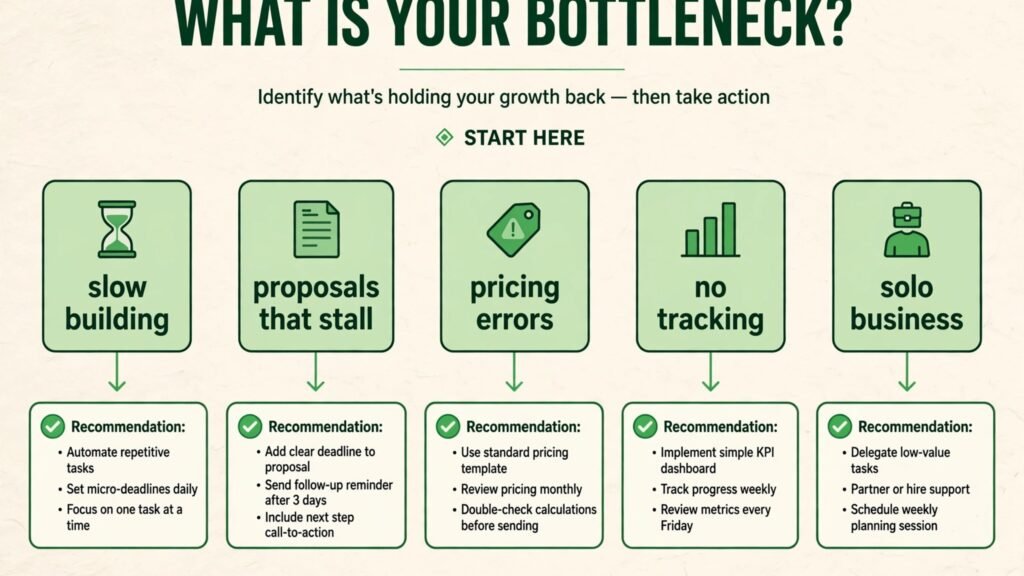
Start from the bottleneck, not from the tool list. If proposals take too long to build, start with PandaDoc or Better Proposals and fix templates and content libraries first. If proposals go out but never close, start with Qwilr or GetAccept and fix interactivity, engagement tracking and the signing step. If quotes come back with pricing errors, start with DealHub or Conga and fix the quoting rules before buying another proposal builder.
Second, count the real cost per proposal, not the headline price. Per seat fees, send caps, envelope limits, seat minimums and add ons all land on the same invoice. Run one real month of proposal volume through your shortlist and record the true cost, the time to build, and the close rate.
Third, protect the client experience while you automate. A proposal that looks generated, prices inconsistently or forces a client to print and scan will cost more trust than it saves in time. Test every finalist with a real proposal to a real prospect, and keep only the tool that shortens the path from yes to signature. Teams that score leads before they propose should check our best AI lead scoring tools guide, and teams that collect proposal requests through their own site should see our best AI form builders guide. Content teams that attach case studies to proposals can also see our best AI tools for content creators guide.
Frequently Asked Questions
What is the difference between proposal software and e-signature software?
Proposal software builds, prices, tracks and sends the proposal. E-signature software only collects the signature. Tools like PandaDoc and GetAccept do both, while DocuSign does signing only and pairs with a builder.
Do clients need an account to sign a proposal?
No, not on any tool in this guide. Clients open a link, review the proposal and sign in the browser. Some tools add identity verification or SMS confirmation on higher tiers for sensitive deals.
Are electronic signatures legally binding?
Yes, in most countries, under laws like the US ESIGN Act and the EU eIDAS regulation, provided the signature is tied to an audit trail showing who signed, when, and from where. DocuSign, PandaDoc and GetAccept all provide that trail.
How much should a small team pay for proposal software?
Between $13 and $35 per user per month covers most small teams, or $29 a month flat for a solo operator on HoneyBook or Nusii. Stay on the cheapest tier that covers your send volume and signature needs, and upgrade only when a cap or a missing integration actually blocks a deal.
Can proposal software replace my CRM?
No. Proposal tools track documents, not relationships. They integrate with HubSpot, Salesforce, Pipedrive and Zoho so proposal activity lands on the right deal record, but the CRM still owns the pipeline. Teams that also run phone outreach should check our best AI call centre software guide for the calling side of the pipeline.
Which single tool should a new team start with?
PandaDoc, for most teams, because proposals, contracts, quotes and a free signing tier arrive in one place. Freelancers and solo operators should start with HoneyBook or Nusii instead, since the flat price and the built in payments fit a one person business better.
Conclusion
The best AI proposal software shortens the path from first conversation to signed deal. PandaDoc, Proposify and Better Proposals build the document. Qwilr, GetAccept and DocuSign close it. DealHub and Conga price complex deals correctly. DocSend and Showpad show what the buyer actually read. HoneyBook and Nusii give small teams the whole workflow at one flat price.
Start with the bottleneck. If building is slow, fix templates. If proposals stall after sending, fix tracking and signing. If quotes come back wrong, fix the pricing rules. Test with a real proposal, measure time to build and time to signature, and keep only the tool that earns its fee. The teams that win at proposals in 2026 are not the ones with the prettiest documents. They are the ones whose clients can say yes, sign and pay without ever leaving the proposal.