
In recent guides, Mindbody entry pricing is reported from $79 a month per location. That figure alone does not explain why a studio buys it. The real number is capacity. Take a studio with twelve reformers. One empty reformer in a peak evening class is not a small gap. It is a place that could have been sold, a waitlist client who could have taken it, and a member who may drift to another studio if classes always look full or always look empty. Owners who decide to use Mindbody for pilates studio class booking usually do so after counting those empty places for a month and finding the pattern painful.
Pilates booking is harder than general fitness booking because the class type changes everything. A reformer class has a fixed number of machines, a mat class has a flexible room capacity, a private session has one client and one instructor, and a duet sits in between. Each type needs a different capacity rule, a different cancellation rule and a different price. A system that treats every class as a generic room booking will overbook reformers, underfill mat classes and confuse members about what they actually bought. A studio system must hold class type, instructor, room, equipment, membership and waitlist together.
This guide shows how to set Mindbody up for a Pilates studio specifically. It covers the class setup, the booking workflow, the checklist that prevents a full class turning into a complaint, and the alternatives worth comparing before signing a contract. Prices quoted here come from vendor pricing pages and reputable comparison guides checked at writing time, so confirm the current price on the vendor page before buying. Where a figure is reported from a third party guide rather than a vendor page, the draft says so plainly.
Why Pilates Classes Look Full and Still Lose Money
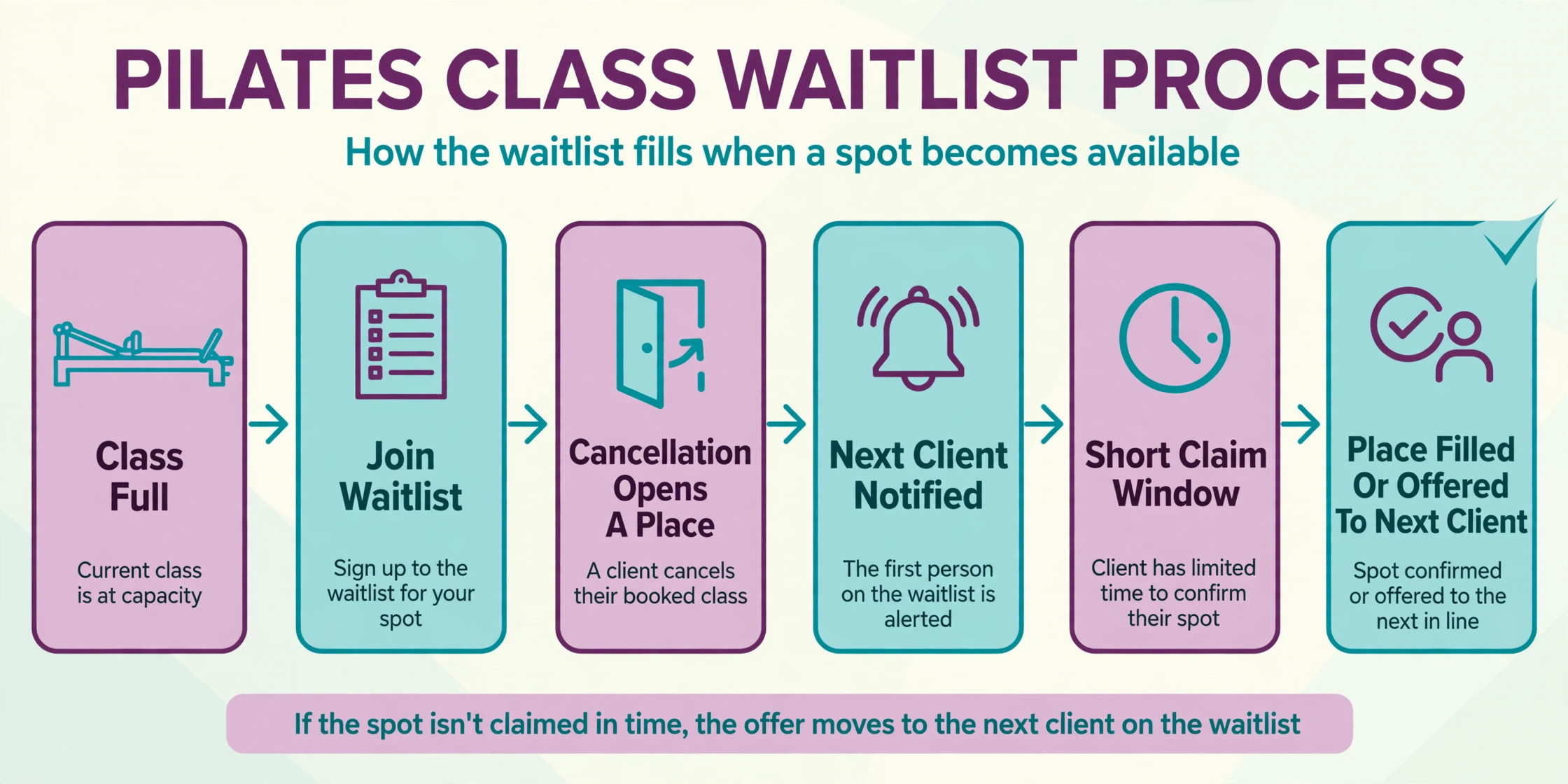
The first problem is capacity confusion. A member sees a reformer class marked full, assumes the studio is busy, and does not book, while two places later open through cancellations and sit empty because nobody on the waitlist was notified in time. The class looked full on the timetable, but it ran with empty reformers. A waitlist that notifies automatically and gives the next client a short window to claim the place closes that gap. A waitlist that only exists on paper does not.
The second problem is membership confusion. A client buys a ten class pack, books a private session by mistake, and discovers at the desk that the pack does not cover it. Another client buys an unlimited monthly membership and books five reformer classes a week, while a class pack client cannot get a peak place. Both problems come from booking rules that do not match the product rules. A system that checks the membership or pack at booking time, and tells the client immediately when a class is not covered, prevents a desk argument and a refund request.
The third problem is instructor and room reality. A class needs the right instructor, the right room and the right equipment at the same time. A reformer class booked in a mat room, a class assigned to an instructor on leave, or two classes booked into one room at the same time all create a last minute scramble. A studio system that holds instructor availability, room capacity and equipment count as booking rules, rather than as notes in a diary, stops those clashes before clients are notified.
How to Use Mindbody for Pilates Studio Class Booking in Practice
The practical way to use Mindbody for pilates studio class booking is to treat it as the single timetable, membership record and payment record, not as an extra app alongside a spreadsheet. The timetable lives in Mindbody, members book through the studio website widgets or the Mindbody app, the desk sees the same timetable, and payments land against the member record. When a class lives in two places, the two versions disagree, and a member follows the wrong one.
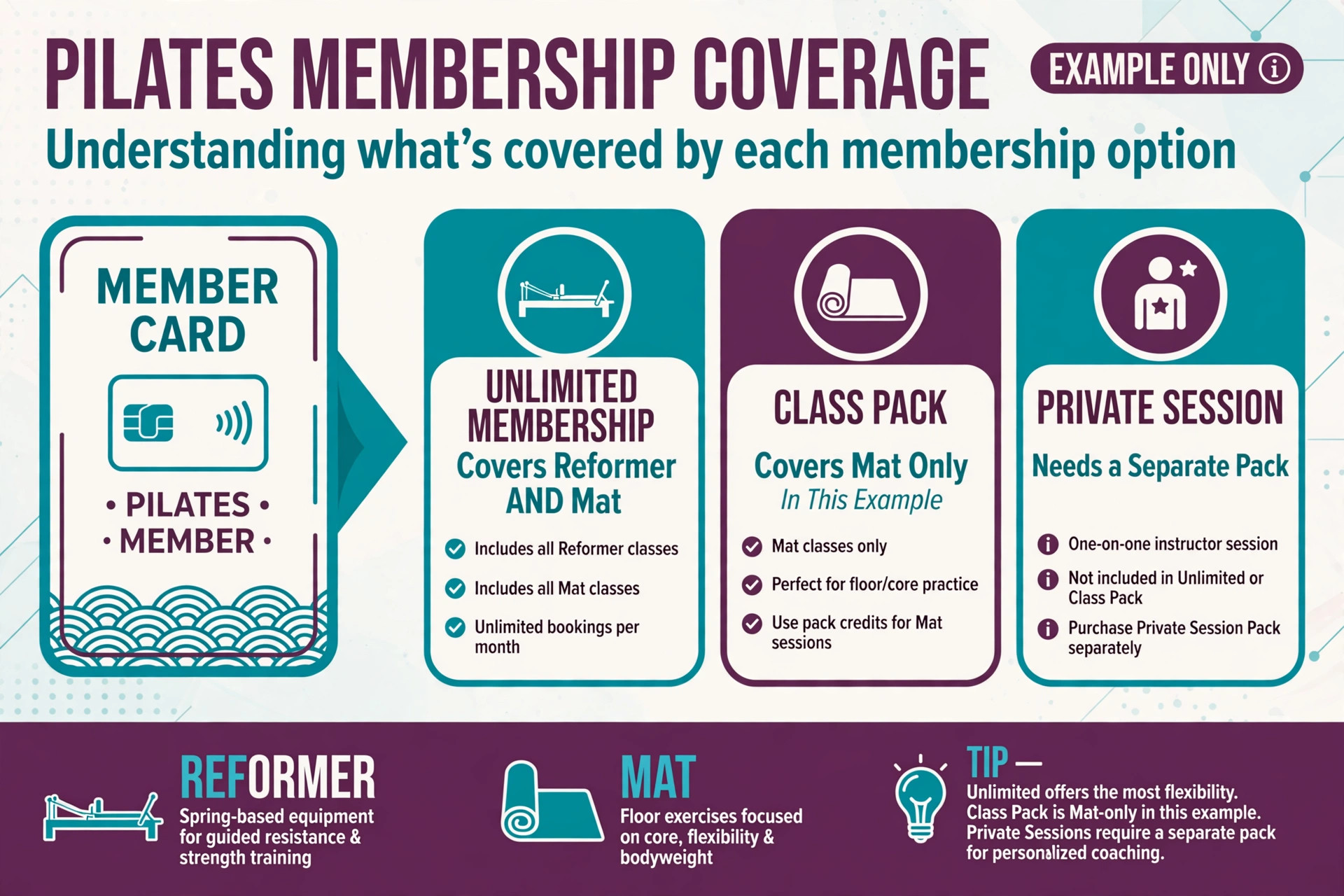
Start with class types that match real Pilates work. Create separate class types for reformer, mat, tower, private, duet and prenatal where the studio offers them, each with its own capacity, duration, price rule and instructor requirement. Add the memberships and class packs as separate products, with clear rules for which class types each product covers, how far ahead a member can book, and how late a member can cancel without losing a credit. Those rules are the booking system. Without them, the timetable is only a pretty calendar.
Set the booking windows before the first live class. Decide how far ahead members can book, when the waitlist opens, how long a waitlisted client has to claim a place, and how late a cancellation returns a credit. Peak reformer classes need tighter rules than off peak mat classes, because a late cancellation in a peak class wastes a scarce place, while a late cancellation in a mat class can often be filled from the room capacity. Publish those rules where members book, not only in terms that nobody reads.
The Class Booking Workflow, Step by Step
A strong Pilates booking workflow moves a client from first interest to a completed class in ten steps. Each step has one job, and skipping a step is what creates overbooked reformers and membership disputes. The steps work for a solo instructor and for a multi instructor studio, and they work whether the first contact is a website booking, the Mindbody app or a walk in visit.
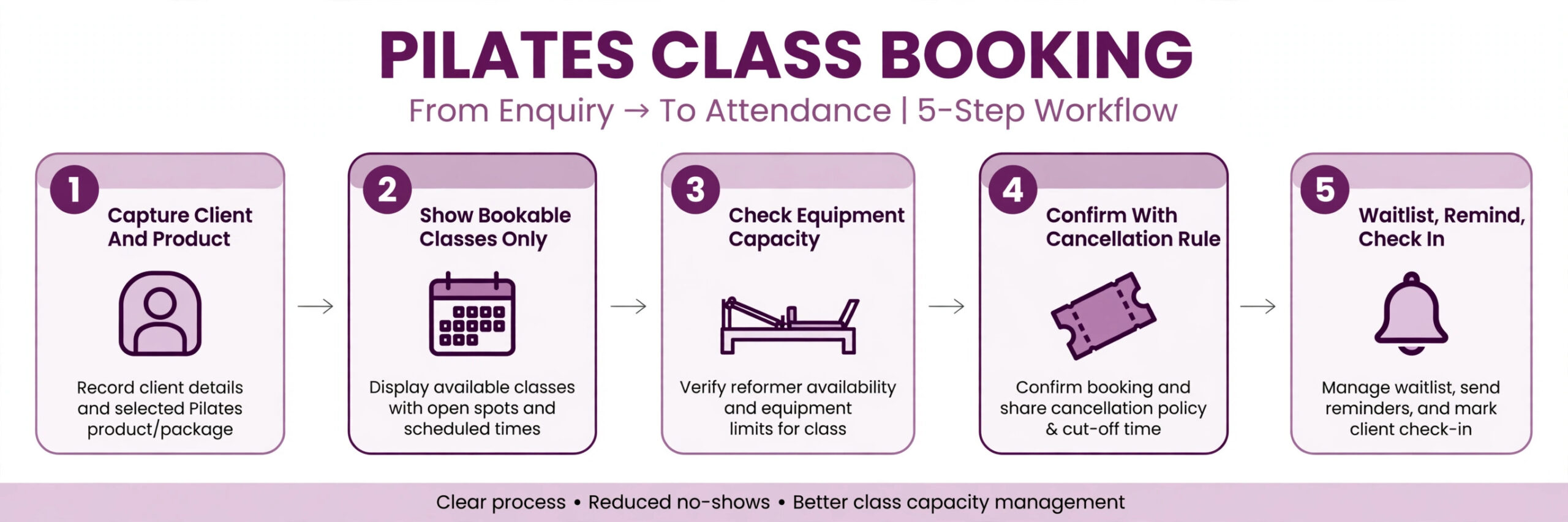
1. Capture the client with the right product attached. Record the client, the membership or class pack, any injury or pregnancy note the client chooses to share, and the class types they are cleared for, before offering a booking. 2. Show only classes the client can actually book. Filter the timetable by class type, membership coverage, capacity and instructor, so a client never books a class their product does not cover. 3. Check capacity by equipment, not just by room. A reformer class is full when the reformers are full, even if the room could hold more people standing, and a mat class is full when the mat spaces are full. 4. Confirm with class, instructor, room and cancellation rule in writing. Send the date, time, class type, instructor and the time by which a cancellation returns a credit, so the client can plan around it. 5. Manage the waitlist automatically. When a class fills, offer the waitlist immediately, notify the next client when a place opens, and give a short claim window before offering the place to the next person. 6. Remind the client before the class. Send a reminder the day before and on the morning of the class, with the studio location, what to bring and any late arrival rule. 7. Check in from the class roster. Use the roster at the desk or in the studio, mark attendance, and record no shows against the membership rule that was published. 8. Handle late cancellations by the published rule. Return a credit when the cancellation is inside the window, apply the published loss when it is outside, and do not invent exceptions at the desk that the next client will then expect. 9. Sell the next step at close out. After a class, invite the client to book the next class, renew a pack before it runs out, or try a different class type that fits their goal. 10. Review the timetable weekly. Check which classes fill, which run with empty places, and which instructors and times consistently draw clients, and adjust the timetable from that evidence.
The Class Booking Checklist
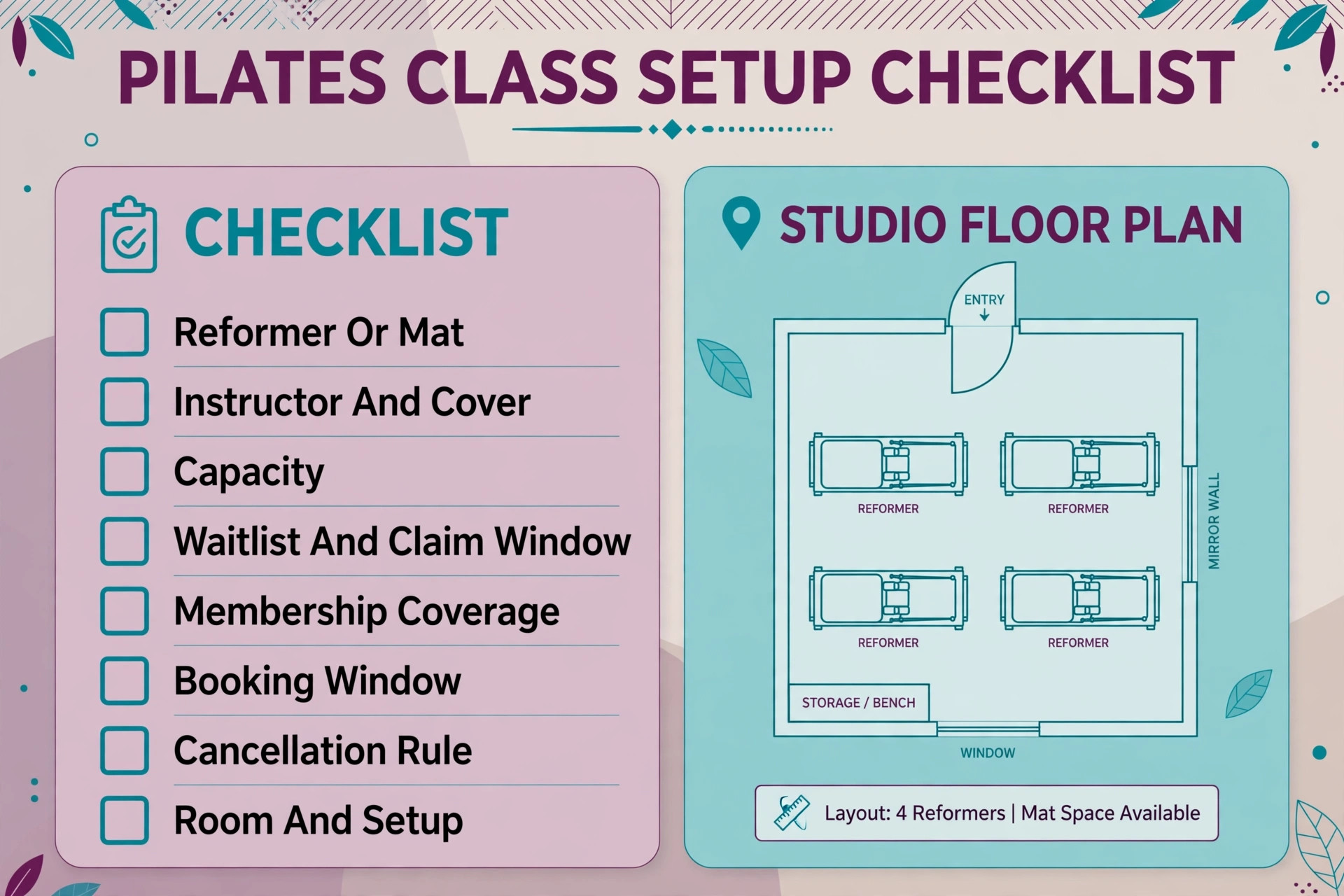
The checklist below is the overview proof element for this guide. Use it as a class setup form, a booking check and a desk close out record, with one check per class type. If a field is blank, the class is not ready to publish, and the studio should complete it rather than leave it blank. The checklist works inside Mindbody as class settings, service categories and staff settings, and it works on paper only if the completed sheet is then entered into the system.
| Checklist item | What to record | Why it changes the booking |
|---|---|---|
| Reformer vs mat | Class type, equipment count, room | Decides true capacity for the class |
| Instructor | Named instructor, cover instructor | Prevents a class with no teacher |
| Capacity | Reformers, mat spaces, private slots | Decides when the class is full |
| Waitlist | Waitlist on, claim window, notify order | Fills cancellations before class starts |
| Memberships | Which memberships and packs cover this class | Prevents a booking the product does not cover |
| Booking window | How far ahead, late booking cutoff | Controls peak demand fairly |
| Cancellation rule | Credit return deadline, late loss rule | Protects scarce reformer places |
| Client notes | Injury, pregnancy, experience level | Keeps the class safe and suitable |
| Room and setup | Room, reformer layout, props needed | Prevents a room clash or missing equipment |
| Follow up | Next booking invite, pack renewal prompt | Turns one class into a regular habit |
Keep the checklist short enough for a studio manager to complete during class setup without a long meeting. Use fixed choices for class type and capacity where possible, and leave one open text box for anything unusual. Review the checklist quarterly and after any timetable change, and remove any field the team keeps skipping, because a field that produces no data is worse than no field at all. For prenatal and rehabilitation oriented classes, add a screening note to the class type, so only suitable clients can book without a conversation first.
Setting Up Reformer, Mat, Private and Waitlist Rules
Reformer classes, when you use Mindbody for pilates studio class booking, need the tightest rules in the studio, because reformers are scarce and peak demand is high. Set reformer capacity to the exact number of machines, not to a room estimate. Set a booking window that gives regular members a fair chance without letting one client block peak places weeks ahead. Set a waitlist claim window of a few hours, not a full day, so a place opened in the morning can still be filled by the evening class. Publish the late cancellation rule for reformers prominently, because that rule is what protects the studio when a peak place is cancelled late.
Mat classes need different rules. Capacity can be higher and more flexible, because mats can be added within room limits, but the class still needs a maximum for safety and for instructor attention. Late cancellations matter less in a mat class, because an empty mat does not waste a machine, but no shows still matter for planning. A mat cancellation rule that is too strict will discourage casual clients, while a rule that is too loose will leave the instructor unsure how many clients to expect. Set the mat rule from actual no show data, not from a guess.
Private and duet sessions need diary rules, not class rules. A private session occupies one instructor and one room or reformer for a fixed time, and it should block that instructor from group classes at the same time. A duet needs two clients who both confirm, and the booking should not be confirmed until both have confirmed or the studio has agreed a single payer rule. Publish a separate cancellation rule for privates, with a longer notice period, because a cancelled private wastes an instructor hour that cannot be resold at short notice in the same way as a group place.
Memberships, Packs and Payments
Membership and pack design, when you use Mindbody for pilates studio class booking, decides whether booking feels fair. An unlimited membership suits a client who attends four or more classes a week, while a ten class pack suits a client who attends once a week and wants flexibility. A studio that sells only unlimited memberships will lose the once a week client, while a studio that sells only packs will lose the frequent client who wants a simple monthly payment. Offer both, with clear class type coverage, and let the booking system enforce the coverage at booking time.
Expiry and renewal rules need the same clarity. State how long a pack lasts, whether unused classes roll over, and when a membership renews. Send a renewal prompt before a pack runs out, not after a client tries to book and finds no credits left. That prompt is a service, not a sales push, because it prevents a booking failure at the moment the client is most motivated to attend. Record the renewal prompt on the client record, so the desk does not send the same prompt twice.
Payments should land against the member record automatically. When a client buys a pack online, the credits should appear immediately, and when a client books a class, the credit deduction should be visible on the booking confirmation. A payment that requires desk action to appear will create a gap where a client has paid but cannot book, and that gap produces a support message at exactly the wrong time. Test the purchase to booking flow with a real test client before opening a new product to members.
Tools Compared for Pilates Studio Class Booking
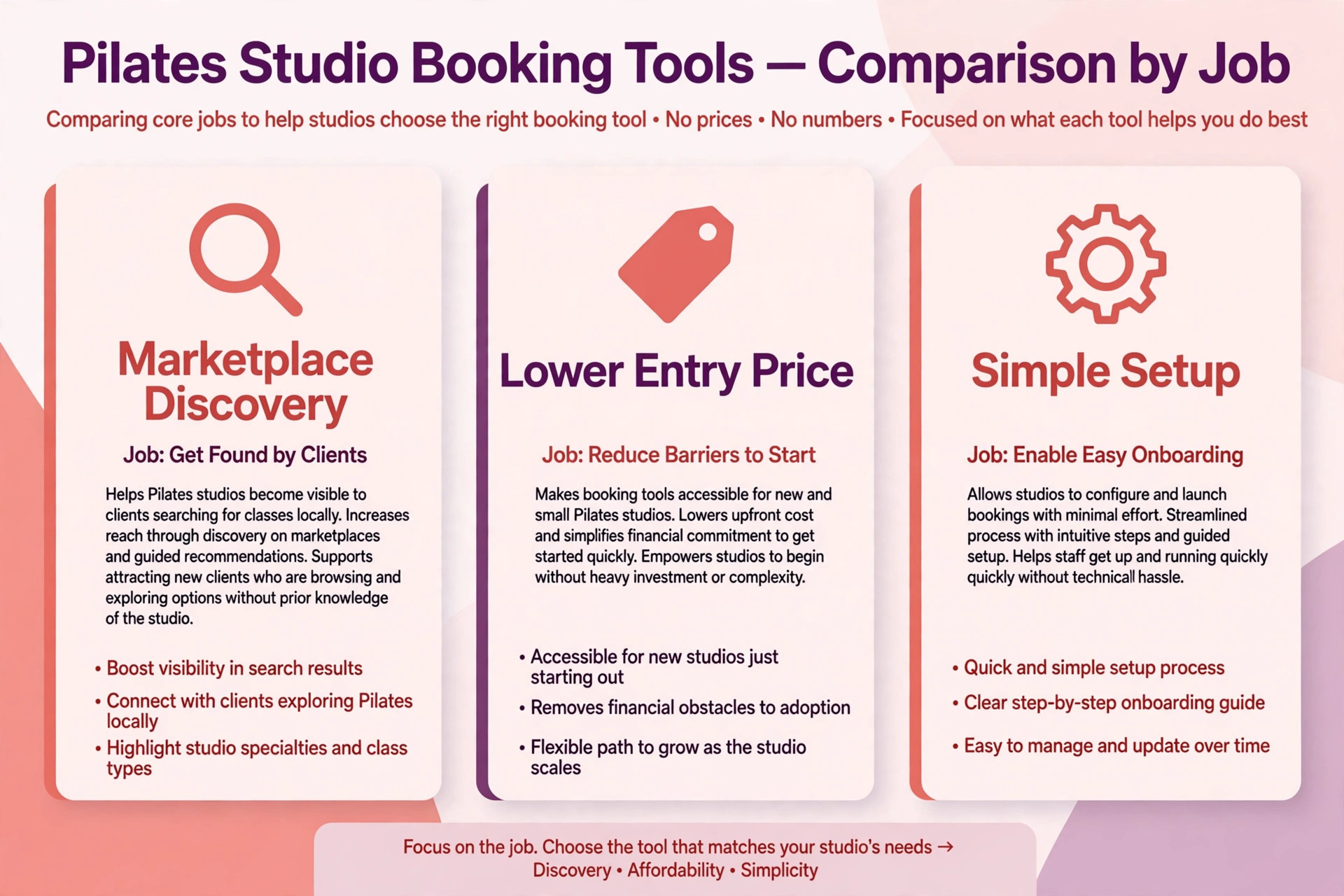
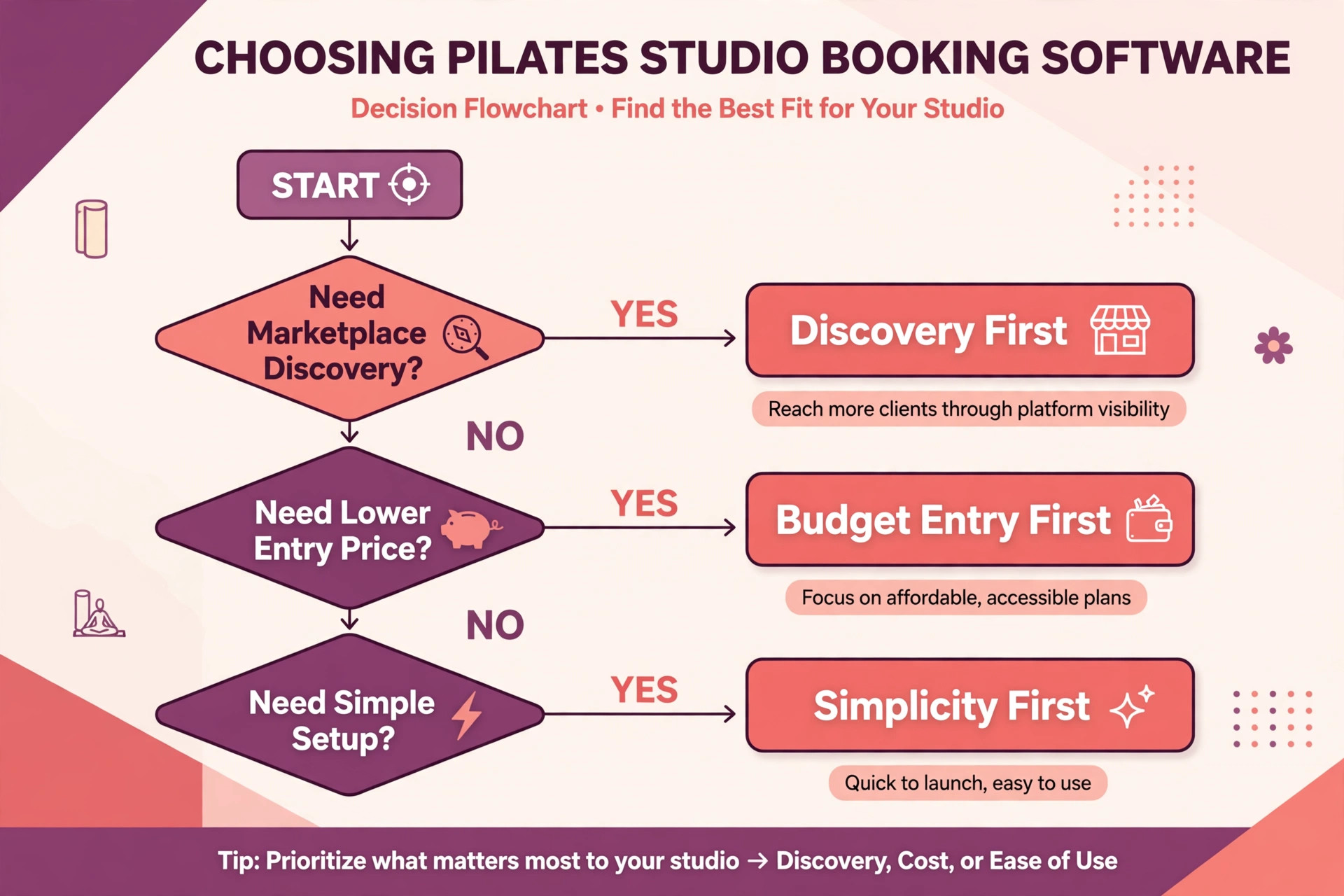
The tools below compare Mindbody with real alternatives for Pilates studio booking. Prices are reported from vendor pages and comparison guides, and they change, so confirm the current price on the vendor page before choosing. The right choice depends less on the feature list and more on whether the studio needs marketplace discovery, a low entry price, or a simple setup without a sales conversation.
| Tool | Best for | Reported starting price | Trade off |
|---|---|---|---|
| Mindbody | Pilates studios wanting class booking, marketplace listing, payments and a done for you website | From $79 a month per location reported in recent guides, higher tiers quote only | Strong discovery and depth, but real quotes above entry are commonly higher |
| WellnessLiving | Studios wanting booking plus marketing at a lower entry price | Starter reported from $69 a month in recent guides | Lower entry price, but the website presence tool is a paid add on |
| Gymdesk | Yoga and Pilates studios wanting a simple setup | Reported from $75 a month in recent guides | Simple and clear, but less marketplace reach than Mindbody |
| Momence | Studios wanting modern booking and marketing tools | Pricing not public in recent guides, quote only | Modern feel, but no public price to compare without a sales call |
| Walla | Larger studios wanting advanced booking and operations | Core reported from $299 a month per location in recent guides | Powerful for larger studios, but expensive for a small studio |
Mindbody suits a studio that values discovery through the Mindbody app, integrated payments and a broad feature set, and is willing to accept a sales quoted price above the entry figure. WellnessLiving suits a studio that wants a lower entry price and strong marketing tools, provided the team checks the add on costs before signing. Gymdesk suits a studio that wants a straightforward setup without a complex sales process. Momence suits a studio that prioritises a modern booking experience and is willing to get a quote. Walla suits a larger studio where the advanced features justify the higher monthly cost.
When owners choose to use Mindbody for pilates studio class booking, the deciding test should be a live trial with real classes. Load a week of reformer and mat classes, set the capacities and membership rules, book test clients through the website widget and the app, run a waitlist claim, and process a late cancellation. If members can do all of that without calling the desk, the system fits. If the desk must fix membership coverage by hand, the setup needs work before paying for a year.
Marketing, Retention and the Timetable
A timetable, when you use Mindbody for pilates studio class booking, is also a marketing tool. Classes that fill consistently should be repeated at the same time, because clients build a habit around a time, not just around a class type. Classes that run with empty places for three weeks in a row should be moved, shortened or replaced, because an empty class costs instructor time and signals low demand to anyone who sees it. Review fill rates by class type, instructor and time of day, and let that evidence, not a guess, drive timetable changes.
Retention in a Pilates studio comes from habit and progress, not from discounts alone. A client who books the same reformer class twice a week for a month is far more likely to renew than a client who books sporadically. The booking system can support that habit by making rebooking easy, by prompting a client who has not booked for two weeks, and by showing progress such as classes attended. Those prompts should be personal and timed, not generic blasts, because a prompt that arrives after a long absence feels like care, while a daily blast feels like noise.
New client onboarding deserves a booking path of its own. A first time client should be offered an intro class, a private assessment or a beginner mat class, not a peak advanced reformer class where they will feel lost. Create a separate booking flow for new clients, with clear guidance on what to wear, what to bring and how early to arrive. A first class that feels welcoming turns into a membership. A first class that feels confusing turns into a single visit and a lost client.
Measuring What the System Earns
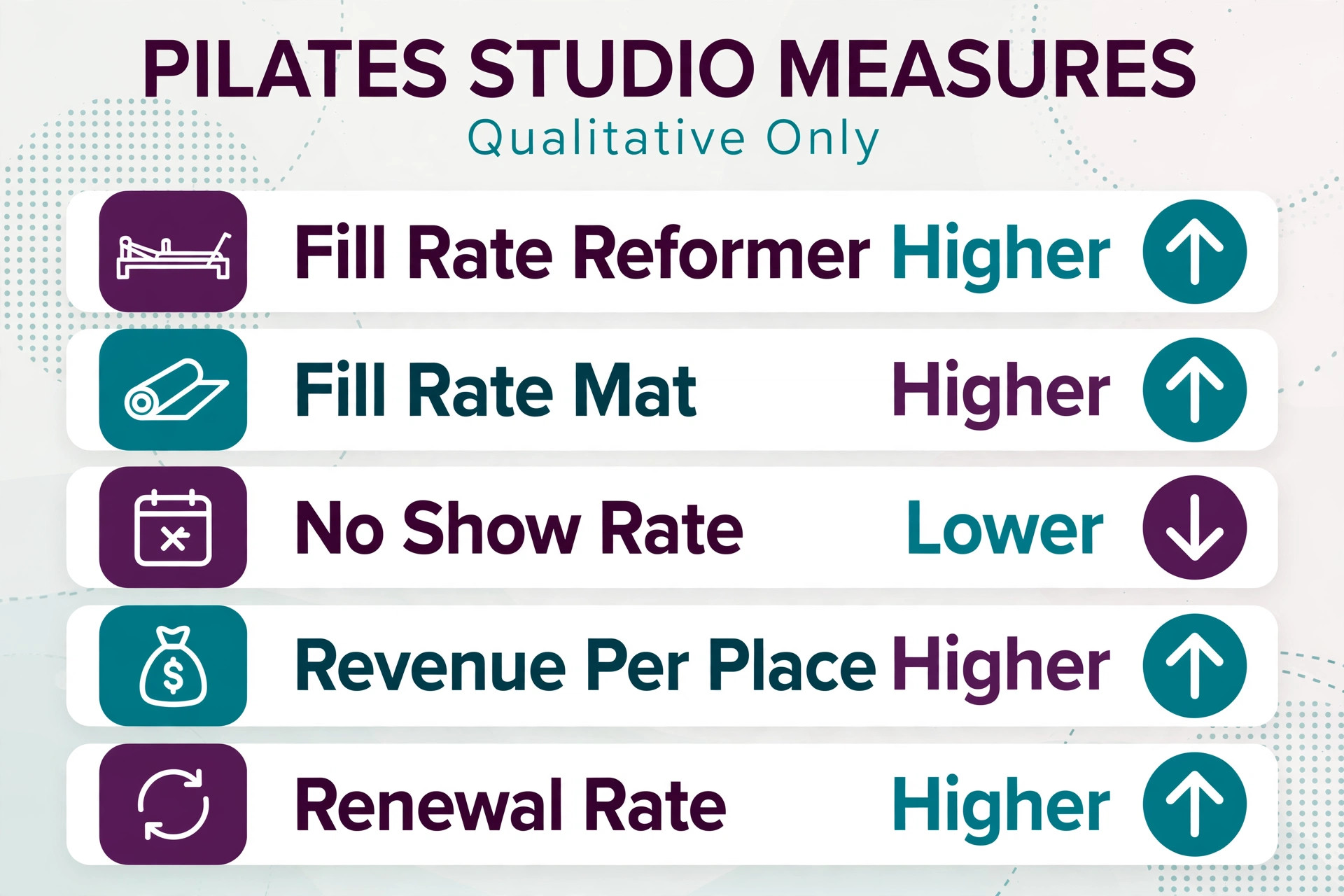
A system built to use Mindbody for pilates studio class booking should pay for itself in fuller classes, fewer no shows and more renewals, and the only way to know is to measure a small set of numbers every month. Start with the fill rate, meaning the share of available places actually booked, split by reformer and mat, because a combined fill rate hides a reformer problem behind mat capacity. Then measure the no show rate, meaning the share of booked places that do not attend, and the waitlist conversion rate, meaning the share of waitlisted clients who actually take a place.
Add two money numbers to those three service numbers. The first is revenue per available place, which shows whether the timetable is earning from its scarce reformer capacity or only from flexible mat places. The second is renewal rate, meaning the share of memberships and packs that renew, because renewal is cheaper than winning a new client and because booking ease only earns its keep if clients stay. If fill rates rise but renewal does not, the problem is class experience or pricing, not booking. If renewal rises but fill rates do not, the problem is timetable shape, not retention messaging.
Review these numbers monthly for the first quarter, and change one thing at a time. Changing the timetable, the cancellation rule and the membership prices in the same week makes it impossible to know what worked. A simple monthly review, with the five numbers written down and one change agreed, will improve the system faster than a large overhaul every six months. Keep the review short, keep it honest, and keep instructors involved, because instructors see booking problems first and will tell the studio if anyone asks.
Mistakes That Undo a Good Setup
The most common mistake is publishing classes before membership rules are ready. Clients book classes their pack does not cover, the desk corrects the booking by hand, and the studio spends the week apologising for a system that was supposed to save time. Finish the class types, capacities and membership coverage first, test them with real test clients, and only then open booking to members. A week spent on product rules saves a month of desk corrections.
The second mistake is letting the system book every class type without limits. A studio that allows online booking for advanced reformer classes, prenatal classes and private assessments without any screening will receive bookings from clients who are not suitable, and the corrections that follow damage trust. Limit automated booking to standard classes for suitable clients, and route sensitive classes to a conversation or a screening check first. When owners choose to use Mindbody for pilates studio class booking in this limited way, the system feels helpful rather than reckless, because it knows its own limits.
The third mistake is ignoring the instructors. If instructors do not trust the roster, they will keep paper lists and call the desk to double check every class, and the studio will have two booking systems instead of one. Involve instructors in setting capacities and cancellation rules, show them how the roster now reflects real bookings, and fix the first three roster errors they report. A system instructors trust is a system that actually gets used, and a system they work around is just an extra cost.
Verdict, Is Mindbody Worth It for a Pilates Studio
For a small Pilates studio, the case to use Mindbody for pilates studio class booking is strong, provided the setup is done in the right order. Build the class types and capacities, set the membership and cancellation rules, define the waitlist claim window, and only then open booking through the website and the app. Done in that order, the system fills reformers from waitlists, prevents membership disputes, gives instructors a reliable roster and turns one class into a regular habit. The monthly cost is usually smaller than the value of a few recovered reformer places and one retained member per week.
The case weakens when the studio wants software to replace judgment entirely. No booking system can judge whether a client is ready for an advanced reformer class, handle a sensitive health note, or welcome a nervous first time client as well as a person can. The studios that get the best return are the ones that use Mindbody for pilates studio class booking for speed, capacity control and coverage, while keeping people in charge of screening, instructor decisions and client care. That split is not a compromise. It is the whole point, because speed fills the class and judgment keeps the client.
Start small if the budget is tight. A single location plan with reformer and mat classes, membership rules and waitlists will already cut a large share of the losses, and marketing add ons can wait until the timetable is proven. Measure the five numbers from the earlier section for a month, compare them with the month before, and let the results decide the next spend. If the numbers move, expand. If they do not, fix the class rules or the timetable before buying more software, because another tool will not fix a capacity set to the wrong number.
More Reading on Stratilyze
For a related booking system, read use AI for carpet cleaning booking and best scheduling software for home care agencies. For a different service comparison, see best CRM for cleaning companies.
Frequently Asked Questions
How much does Mindbody cost for a Pilates studio
Mindbody entry pricing is reported from $79 a month per location in recent guides, while higher tiers are quote only and are commonly reported higher in third party guides. Payment processing, a branded app and marketing add ons can add further cost, so confirm the full quote on the vendor page before signing, including contract length and processing rates.
Can members book reformer classes through the Mindbody app
Yes, members can book through the studio website widgets or the Mindbody app, subject to capacity, membership coverage and booking windows set by the studio. Reformer capacity should be set to the exact number of machines, so a class is full when the reformers are full, even if the room could hold more people.
What happens when a reformer class is full
The client should be offered the waitlist immediately, notified when a place opens, and given a short claim window before the place is offered to the next person. A waitlist that notifies automatically fills cancellations before class starts, while a paper waitlist usually leaves the place empty.
Should a Pilates studio use the same cancellation rule for reformer and mat classes
No, reformer classes need tighter rules because reformers are scarce and peak demand is high, while mat classes can allow more flexibility because capacity is higher. Set the reformer rule from peak demand and the mat rule from actual no show data, and publish both rules where members book.
How do memberships and class packs work in Mindbody
Memberships and packs are set up as products with rules for which class types they cover, how far ahead a member can book, and how late a cancellation returns a credit. The booking system checks those rules at booking time, so a client is told immediately when a class is not covered, rather than discovering it at the desk.
Can a solo Pilates instructor run a studio on Mindbody
Yes, and it often helps a solo instructor more than a larger team, because a solo instructor teaches, answers messages and manages bookings at the same time. Online booking, automated reminders and a reliable roster capture work during classes without hiring desk staff. Start with one location, standard classes and waitlists, and add marketing tools when the timetable is proven.