
Speech therapy guides report a pattern that every practising clinician recognises. A session that starts without a written plan drifts, a session that starts with a clear goal, a chosen activity, and a home practice task moves, and the difference shows up in the progress note at the end of the week. Therapists who decide to use AI for speech therapy session planning usually do so after a month of late night planning, repeated notes, and sessions where the activity was chosen because it was at hand, not because it matched the goal. The clinical skill is rarely the problem. The planning system around it is.
Speech therapy session planning is harder than ordinary appointment planning, because a session is not one activity of a fixed length. It is a goal, a baseline, a cueing level, a set of stimuli, a home practice task, and a progress record, and every one of those details changes with age, diagnosis, setting, and the client’s response in the room. A system that books a flat thirty minute slot and asks nothing else will produce sessions that look busy and measure little, and a progress report that cannot say, with numbers, whether the client is actually improving.
This guide builds a planning workflow that starts from the treatment goal, chooses matching activities, sets home practice the client can actually do, and records progress another clinician can read and continue. It covers the planning questions that prevent drift, the tools that handle notes and scheduling well, the documentation and privacy rules that protect clients, and the measures that show whether the system earns its keep. Prices quoted here come from vendor pages and comparison guides checked at writing time, so confirm the current price on the vendor page before buying. This guide is about planning and documentation support, not a substitute for clinical judgment, and every AI drafted plan should be reviewed by the treating clinician before use.
Why Speech Therapy Planning Drifts
Most therapy practices lose quality in three quiet places, and none of them appears as one large error. The first is the goal free session. A therapist who opens a familiar game or worksheet without naming the goal, the target, and the success measure for that session will still do good work, but the work will be hard to repeat, hard to measure, and hard to hand to another clinician. Over weeks, that drift shows up as sessions that feel productive and progress notes that cannot prove it.
The second leak is the home practice gap. A session that ends without a specific, written home task, with a clear frequency and a clear way to record it, will usually produce no practice between sessions, and the next session starts by reteaching what was already taught. Published therapy note guides consistently list home practice, caregiver report, and carryover as core parts of a session record, precisely because progress in the clinic room alone is slower than progress supported at home and at school. A planning system that treats home practice as an afterthought will always underperform one that treats it as part of the session.
The third leak is the note that is written late, vaguely, or not at all. A note that says “continue therapy” without numbers, cueing levels, or a next step tells the next clinician almost nothing, and it tells a payer, a school team, or a family even less. Therapy note guides warn against vague plans and against targets that are too broad to measure, and they recommend specific, realistic next steps tied to the data from the session. A planning system that drafts the note structure during planning, rather than after the session, makes a good note far more likely.
How to use AI for speech therapy session planning without losing clinical judgment
The best way to use AI for speech therapy session planning is to let software handle the routine parts and keep the clinician in charge of every clinical decision. Software should organise goals, suggest activity ideas, draft note structures, schedule sessions, and remind clients about home practice. A person should choose the goal, judge the client’s response, set the cueing level, decide when a target is mastered, and approve every note before it is filed. When that split is clear, planning becomes faster and clinical quality rises, rather than falling to automation.
Start by defining what the system may draft on its own. Activity ideas for a stated goal, home practice sheets for a stated target, session templates for a stated age group, and note structures with blank data fields are safe to automate, because the clinician still fills in the judgment. Anything outside that list, such as a new diagnosis, a change in treatment frequency, a discharge decision, or a recommendation to another service, should stay with the clinician, with no automated decision. Clients and families accept AI supported planning when the system is honest about that split and when the clinician’s review is visible in the record.
Tone and privacy matter as much as speed, because therapy records hold sensitive health information. Planning messages should sound like the practice, with the practice name and real session times, and they should never include clinical details in an unsecured message or in a tool that is not approved for health information. Test the system with awkward cases, including children, adults after stroke, bilingual clients, and clients with complex needs, and check how it handles goals, stimuli, and home practice before it goes live. A fast draft that leaks privacy or invents a clinical claim will cost more trust than a slow plan ever could.
The Session Planning Workflow, Step by Step
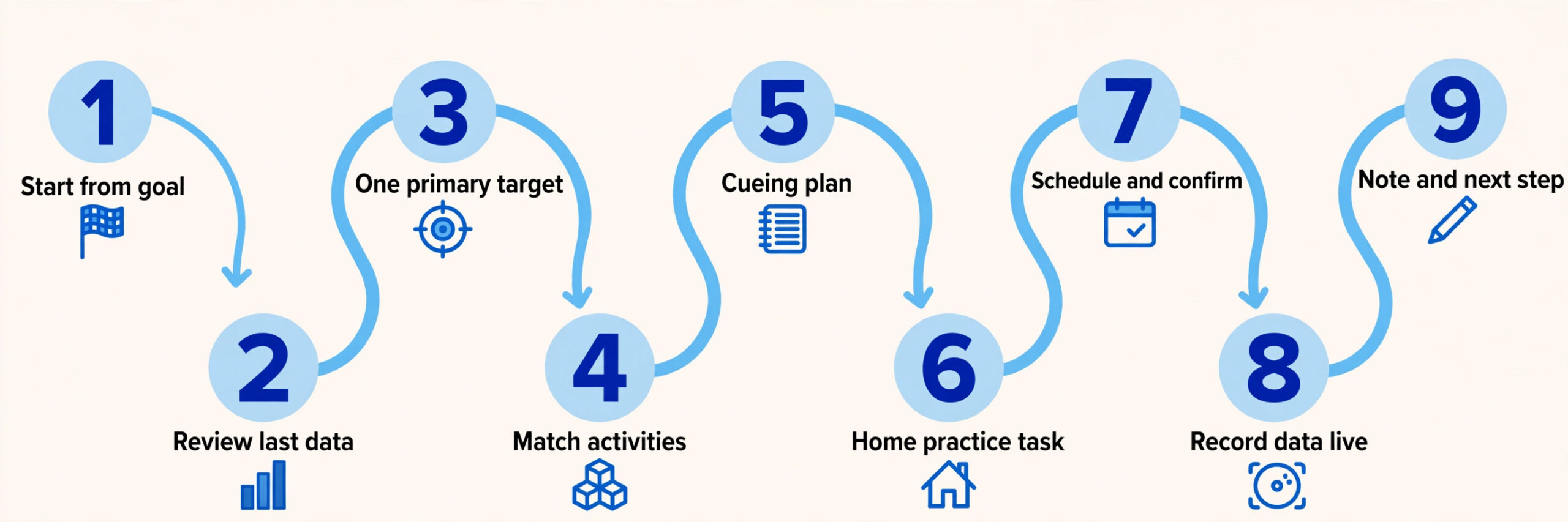
A strong planning workflow moves a clinician from treatment goal to a measured, documented session in nine steps. Each step has one job, and skipping a step is what creates drift, weak notes, and slow progress. The steps below work for a solo clinician and for a small practice, and they work whether the session is in person, in a school, or by telehealth.
1. Start from the active treatment goal. Open the goal as written in the plan of care, with its target, context, and success measure, before choosing any activity, so the session serves the goal rather than the other way round. 2. Review the last session data. Check the last accuracy, cueing level, and home practice report, so the new session starts at the right difficulty, not at last week’s difficulty or at a guess. 3. Choose one primary target for the session. Name the sound, language structure, fluency strategy, or functional skill that is the focus, and name the secondary target only if time allows, so the session has a clear measure of success. 4. Select activities that match the goal and the client. Choose play, conversation, reading, or structured tasks that elicit the target naturally for that age and setting, and prepare the stimuli and materials before the session starts. 5. Set the cueing and support plan. Decide the starting cue level, the fading plan, and the point at which support increases or decreases, so the session measures learning rather than only performance with full support. 6. Plan the home practice task in the same step as the activity. Write a short, specific task, with frequency, duration, and a simple recording method, and prepare the sheet or message before the session, not after it. 7. Schedule and confirm the session with reminders. Book the session, send the time, location or telehealth link, and the home practice reminder, so cancellations and no shows fall and the diary stays full. 8. Run the session and record data as you go. Track trials, accuracy, and cueing in the plan template during the session, rather than reconstructing numbers from memory at the end of the day. 9. Close the loop with a note and a next step. Write the progress note from the recorded data, name the next target and the next home task, and share the summary with the family or team as the practice policy allows.
The Session Plan Template
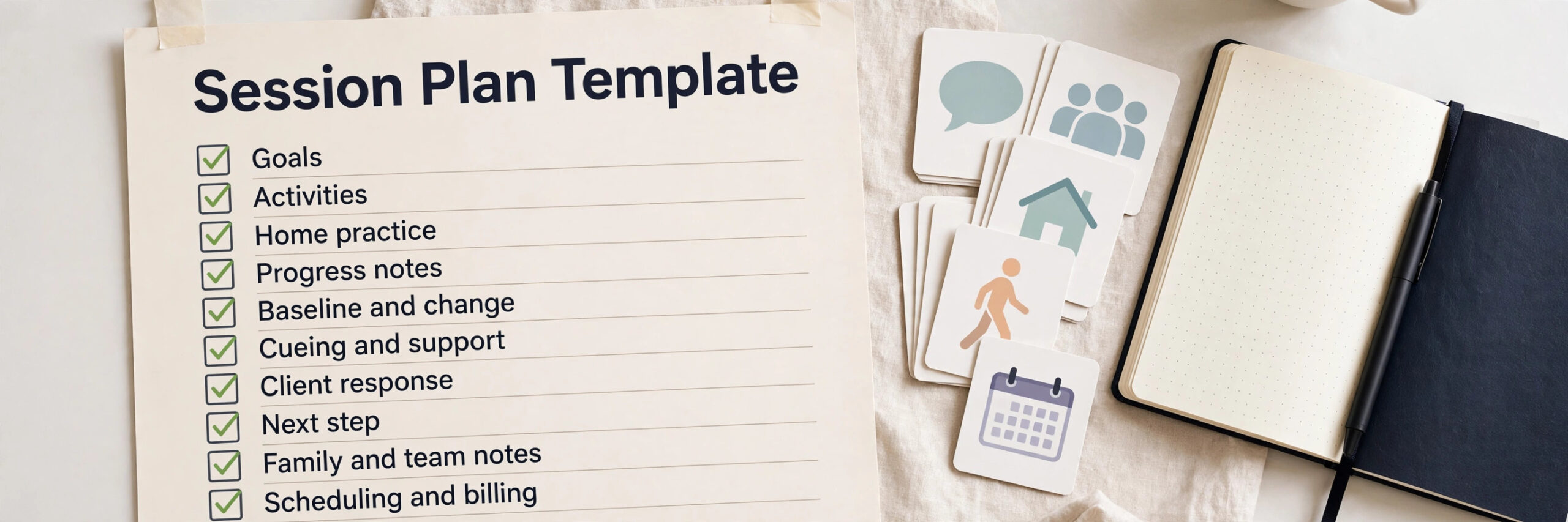
The session plan template below is the heart of the system, because every field on it prevents drift or a weak note. Use it as a planning form, as a session sheet, and as a note template the clinician completes during and after the session. If a field is missing, the plan is not ready, and the system should flag it rather than leave it blank.
| Template field | What to record | Why it matters |
|---|---|---|
| Goals | Active goal, target, context, success measure | Keeps the session tied to the plan of care |
| Activities | Chosen activity, stimuli, materials, setting | Shows what elicited the target |
| Home practice | Specific task, frequency, duration, recording method | Drives carryover between sessions |
| Progress notes | Trials, accuracy, cueing level, participation | Proves progress with numbers |
| Baseline and change | Last session data, current data, direction of change | Shows whether the plan is working |
| Cueing and support | Starting cue, fading plan, support given | Separates learning from prompted performance |
| Client response | Engagement, behaviour, fatigue, communication attempts | Explains data that numbers alone miss |
| Next step | Next target, next activity, next home task, review date | Makes the next session start cleanly |
| Family and team notes | Caregiver report, school or team input, questions | Keeps the wider team aligned |
| Scheduling and billing | Session length, type, attendance, billing code where used | Keeps the diary and records consistent |
Keep the template short enough to complete in a few minutes before the session, using tap choices for session type, cueing level, and attendance, with open text only for the clinical detail that matters. Therapy note guides recommend a SOAP style structure, with subjective report, objective data, assessment, and plan, and the template above maps cleanly to that structure, so a planned session becomes a complete note with little extra writing. Review completed plans weekly for the first month, and remove any field that clinicians keep skipping or filling with vague text, because a field that produces bad data is worse than no field at all.
Goal Types, Age Groups and Settings That Change the Plan
Not all speech therapy sessions are planned the same way, and a planning system that uses one template for every client will either overcomplicate a simple session or underserve a complex one. An articulation session for a young child, a language session for a school age child, a fluency session for a teenager, and a functional communication session for an adult after stroke are different plans in goals, activities, cueing, and home practice. Build the template around goal types, with age appropriate activities and measures for each, so the clinician starts from a relevant structure rather than from a blank page.
Age group changes the plan in ways that a generic system misses. For younger children, the plan needs more emphasis on play based activities, caregiver involvement, and shorter, more frequent practice, with home tasks a parent can actually do in ten minutes. For adolescents and adults, the plan can use longer sessions, functional communication in daily life, and more independent practice, with home tasks tied to real situations such as ordering food, making a phone call, or presenting at work. A planning system should offer age appropriate templates, rather than letting software suggest the same worksheet for a five year old and a fifty year old.
Setting also changes the plan, and the system must respect it. A school session must fit the timetable, the classroom, and the education plan, with progress shared with the educational team as policy allows. A clinic session can use more materials and longer activities, while a telehealth session needs digital stimuli, a stable connection check, and a home practice task that works without clinic materials. The plan template should record the setting, the materials used, and any setting limits, so the next clinician can repeat the session in the same setting without guessing.
Tools Compared for Speech Therapy Session Planning
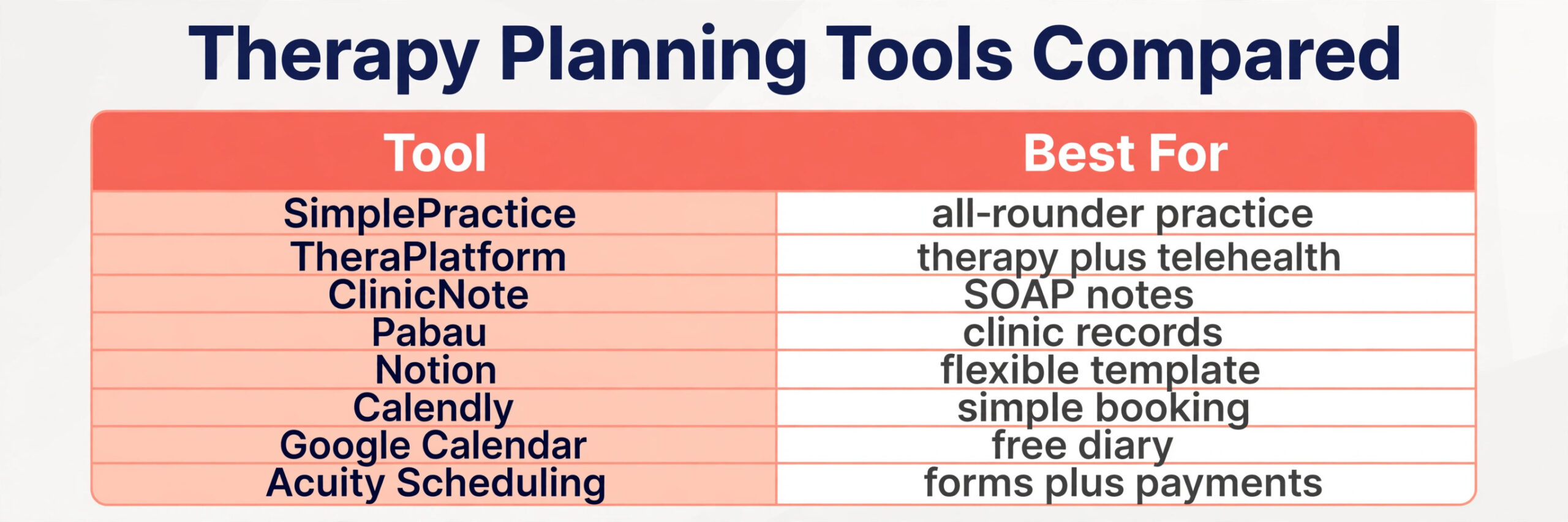
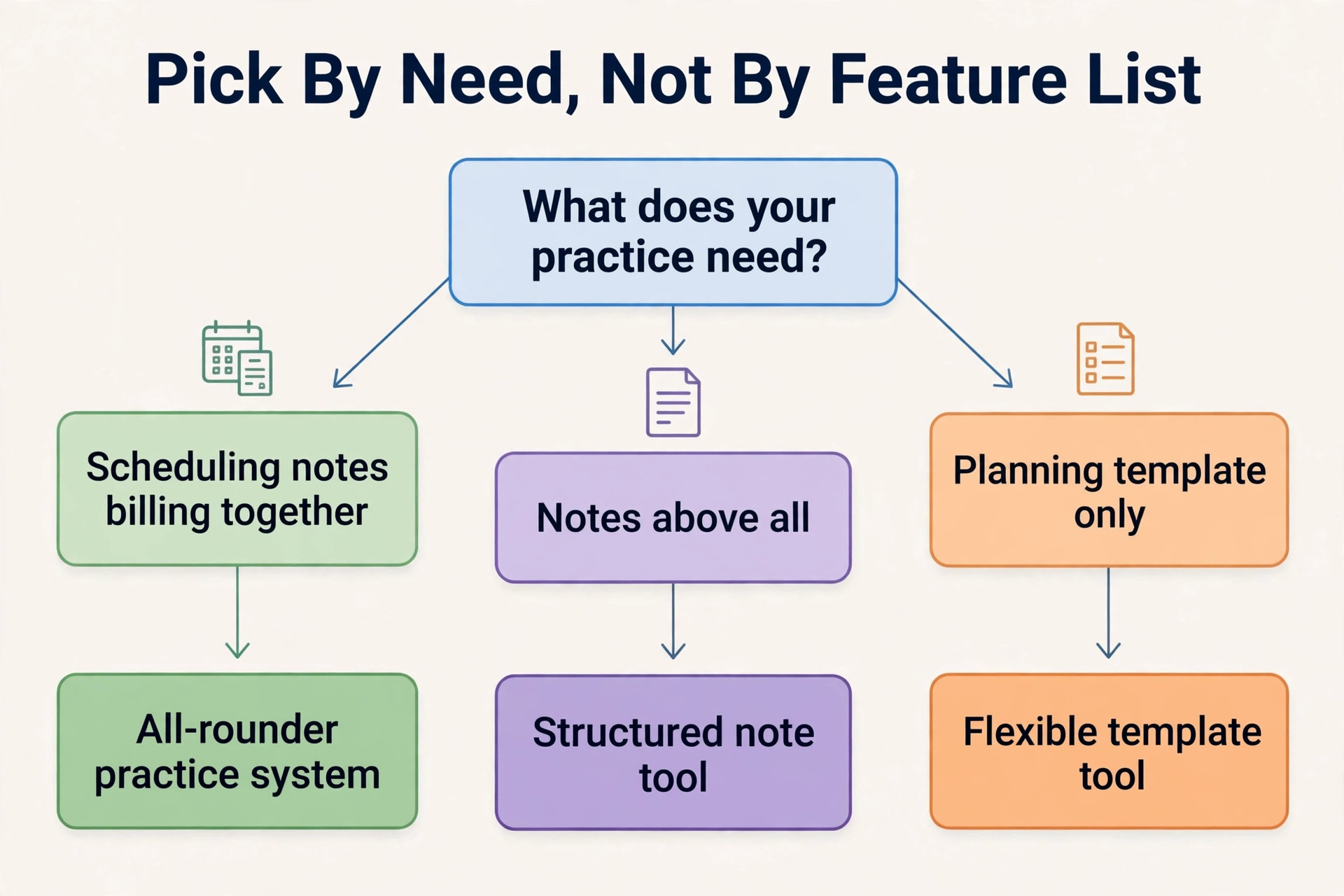
The tools below cover the main ways a speech therapy practice can run planning, from therapy specific platforms to general scheduling and note tools. Prices are reported from vendor pages and comparison guides, and they change, so confirm the current price on the vendor page before choosing. The right choice depends less on the feature list and more on whether the practice needs goals, notes, scheduling, billing, and telehealth in the same tool or only needs a planning template.
| Tool | Best for | Reported starting price | Trade off |
|---|---|---|---|
| SimplePractice | Solo and small practices needing scheduling, notes and billing together | Quoted per business in recent guides | Strong all rounder, but therapy templates need setup |
| TheraPlatform | Practices wanting practice management, records and telehealth together | Quoted per business in recent guides | Good therapy depth, but heavier for a solo clinician |
| ClinicNote | Clinicians wanting structured SOAP notes and session templates | Quoted per business in recent guides | Strong note structure, but less full practice billing |
| Pabau | Clinics wanting notes, scheduling and client records together | Quoted per business in recent guides | Broad clinic system, but speech specific depth varies |
| Notion | Solo clinicians wanting a flexible planning template they design themselves | Free for personal use, paid plans reported from about $10 a month in recent guides | Very flexible, but not built for health records or billing |
| Calendly | Solo clinicians booking sessions and consultations | Free for one event type, paid from about $10 a seat a month in recent guides | Simple and familiar, but no goals or notes depth |
| Google Calendar | Solo clinicians wanting a free diary with reminders | Free with a Google account in recent guides | Free and familiar, but no clinical records |
| Acuity Scheduling | Solo clinicians wanting booking with intake forms and payments | Paid plans reported from about $16 a month in recent guides | Good forms and payments, but not therapy specific |
SimplePractice
SimplePractice suits a solo clinician or small practice that wants scheduling, progress notes, billing, and client messaging in one system, with note templates that can be shaped around speech therapy goals and home practice. Its breadth is the attraction, though the practice should test the note template against a real past session before switching, because a template that looks complete on a sales page may still miss cueing or carryover fields.
TheraPlatform
TheraPlatform suits a practice that wants practice management, electronic records, and telehealth in one therapy focused system, with note templates that support treatment goals, objective data, cueing levels, and home practice recommendations. Its therapy depth is strong, though a solo clinician with a small caseload may find the full system more than the practice needs in its first year.
ClinicNote
ClinicNote suits a clinician who wants structured SOAP notes above all, with a clear template for subjective report, objective data, assessment, and plan, and with examples across common caseload types. Its note discipline helps a practice that struggles with vague notes, though a practice that also needs billing and telehealth will still need another system alongside it.
Pabau
Pabau suits a clinic that wants notes, scheduling, and client records together, with templates that can carry goal data, accuracy, and next steps. Its clinic system view helps a multi clinician practice, though speech specific depth varies, so the practice should check articulation, language, and fluency templates against its own caseload before committing.
Notion
Notion suits a solo clinician who wants a flexible planning template designed around their own goals, activities, and home practice sheets, with easy sharing to a team. Its flexibility is ideal for planning, though it is not built for health records, billing, or secure clinical messaging, so the practice must keep clinical records in an approved system and use Notion only for planning drafts where policy allows.
Calendly
Calendly suits a solo clinician who mainly needs to book sessions, consultations, and reassessments without a full practice system. It is simple and familiar, but it cannot hold goals, track progress, or draft notes, so it works best as a front door that feeds into a proper planning and record system behind it.
Google Calendar
Google Calendar suits a solo clinician who wants a free diary with reminders and shared calendars for a small practice, and is willing to run planning templates separately. The cost is attractive, but it offers no clinical records, no goal tracking, and no note structure, so it should never hold sensitive clinical detail beyond what practice policy allows for a diary entry.
Acuity Scheduling
Acuity Scheduling suits a solo clinician who wants booking with intake forms, deposits, and payments in one tool, with clients able to choose a session type, answer intake questions, and pay at booking. Its forms are the attraction, though it is not therapy specific, so goal, activity, and home practice questions must be built deliberately into the form and kept out of any unsecured record.
Pricing, Scheduling and Cancellation Rules
A practice that decides to use AI for speech therapy session planning still needs scheduling rules that families can understand in one reading. Publish the session length, the frequency options, the cancellation window, and the rule for late cancellations and no shows, with a note that frequency and duration are clinical decisions, not booking choices. Families who can see the schedule rules before booking are more likely to keep appointments, and less likely to argue about a late cancellation charge, because the rule was visible from the start.
Deposits and cancellation policies matter in therapy work, because a missed session is not only lost income, it is lost progress for a client who may have waited weeks for a place. A booking system should send reminders at a useful interval, offer a waitlist for cancelled slots, and record cancellation reasons, so the practice can see whether cancellations cluster around school holidays, transport, or illness, and adjust the schedule accordingly. A clear window, with a rebooking offer for cancellations inside the window, is a fair balance for most practices, and it should be applied consistently, not invented case by case.
Handling Cancellations, Complex Needs and Telehealth Limits
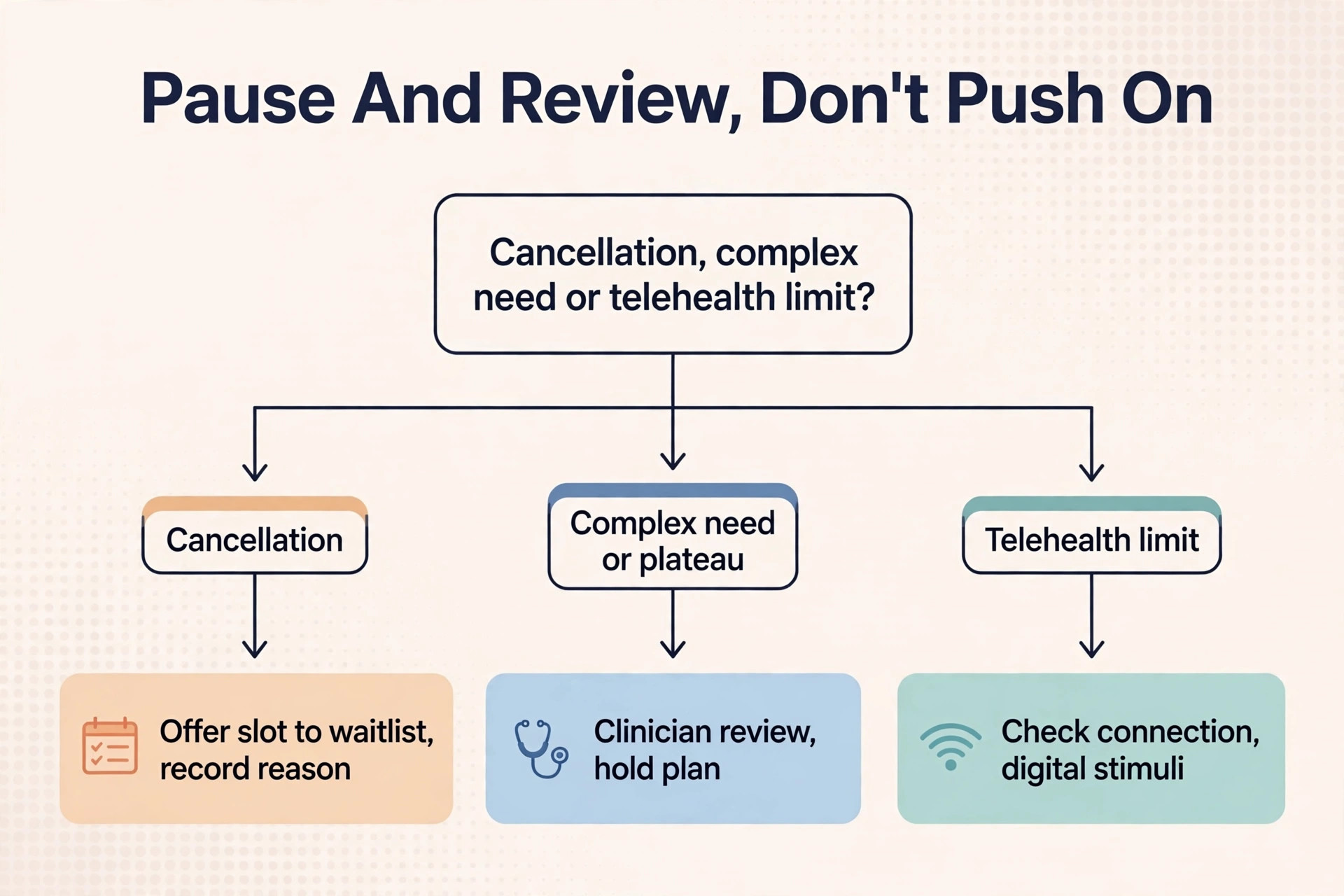
Cancellations need a system, not a scramble. When a client cancels, the booking system should offer the slot to the waitlist immediately, rather than leaving the hour empty, and it should record the reason, so the practice can distinguish a one off illness from a pattern that needs a schedule change. When a client repeatedly cancels, the clinician should review the schedule, the session time, and the home practice burden, because a pattern of cancellations is often a signal that the plan, not the family, needs adjusting.
Complex needs need a human decision before a plan is drafted. A client with multiple diagnoses, a client whose progress has plateaued, a client with a new medical change, or a client whose goals conflict across school, clinic, and home should trigger a clinician review, even if the system has drafted a plan. The system should flag plateau data automatically, such as accuracy that has not moved across several sessions, and hold the next plan as provisional until the clinician reviews it. That pause costs a few minutes, but it prevents a practice repeating a plan that is no longer working.
Measuring What Session Planning Earns
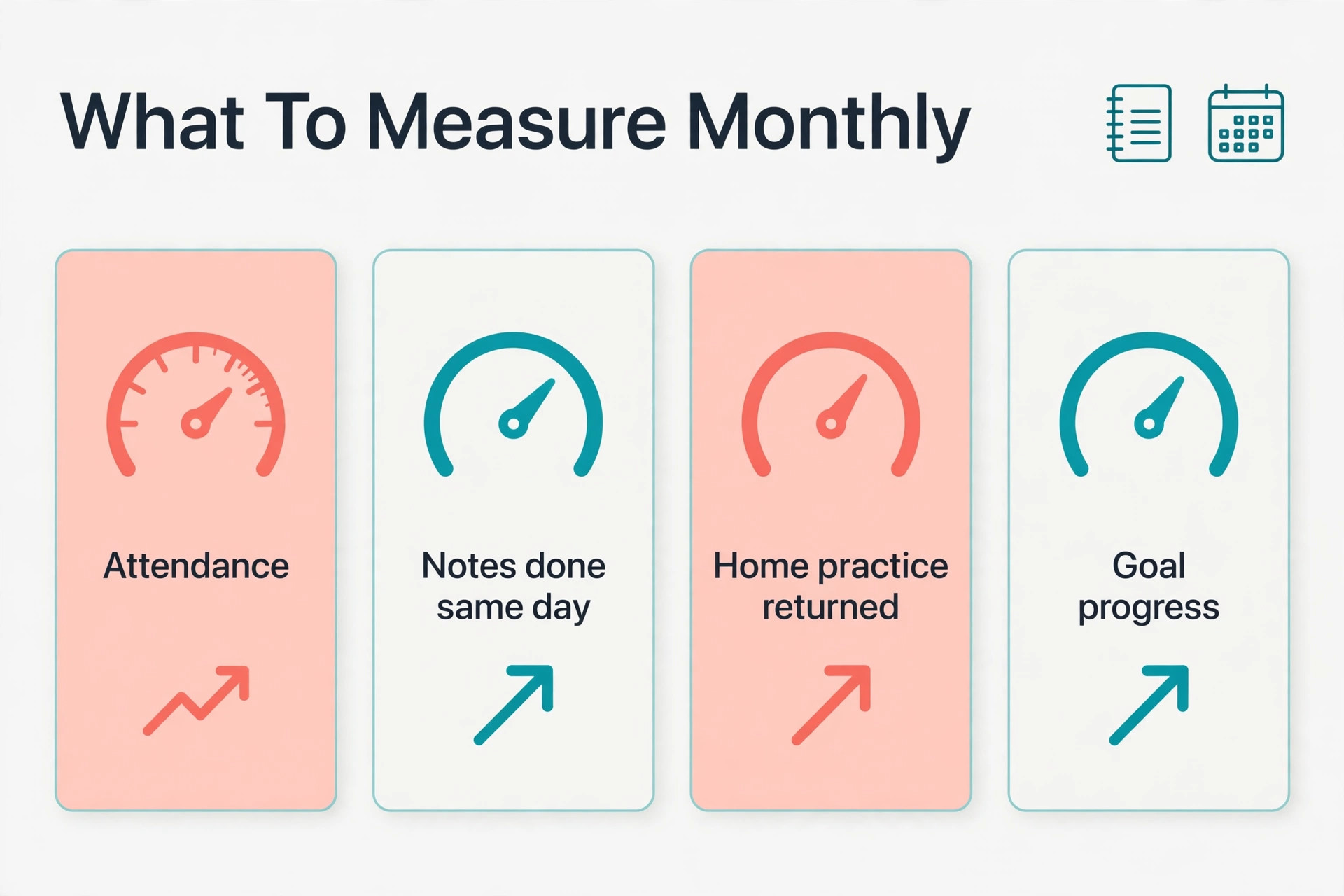
A system for practices that use AI for speech therapy session planning should pay for itself in better progress, fuller diaries, and stronger notes, and the only way to know is to measure a small set of numbers every month. Start with the attendance rate, meaning the share of booked sessions that actually happen, because that number decides how much therapy a client really receives. Then measure the note completion rate, meaning the share of notes finished on the day of the session, and the home practice return rate, meaning the share of home tasks returned with a record.
Add two clinical numbers to those three service numbers. The first is goal progress rate, meaning the share of active goals moving in the right direction over a reporting period, measured from recorded accuracy and cueing data, not from impression. The second is retention rate, meaning the share of clients who stay in therapy to the planned review point, because retention reflects both progress and family trust. If attendance rises but goal progress does not, the problem is the plan, not the diary. If notes are complete but home practice return is low, the problem is the home task design, not the family.
Mistakes That Undo a Good Therapy Setup
The most common mistake is launching the planning system before the goal templates are finished. Clinicians open a blank template, improvise a session, and write a vague note, and the office spends the month handling progress reports that cannot be written from the notes. Finish the goal types, the session template, and the home practice formats first, test them with five real past sessions, and only then roll the system out to the full caseload. A week spent on templates saves a month of weak notes.
The second mistake is letting the system draft clinical decisions without review. A practice that allows an automated draft to set a new goal, change frequency, or recommend discharge without a clinician signature will produce records that cannot be defended, and families will rightly lose trust. Limit automation to drafts, activity ideas, and note structures, and require clinician review and signature for every clinical decision. When owners choose to use AI for speech therapy session planning in this limited way, the system feels helpful rather than reckless, because it knows its own limits.
Verdict, Is It Worth It for a Small Therapy Practice
For a solo clinician or a small practice, the case is strong, provided the setup is done in the right order. Fix the goal templates, build the session plan template, set the scheduling and cancellation rules, and only then add automated drafting and reminders. Done in that order, the system cuts late night planning, produces notes that another clinician can continue, and gives families home tasks they can actually do. The software cost is usually smaller than the value of one recovered session a week, and most practices lose more than one hour a week to planning and note writing that a good template would have shortened.
The case weakens when the practice wants software to replace clinical judgment entirely. No automated system can judge a client’s response in the room, decide when a target is mastered, or explain a plateau to a family as well as a clinician can. The practices that get the best return from this approach are the ones that use AI for speech therapy session planning for organisation and drafting, while keeping clinicians in charge of goals, decisions, and notes. That split is not a compromise. It is the whole point, because speed helps planning and judgment keeps therapy safe and effective.
More Reading on Stratilyze
For a related therapy business system, read best practice management software for therapists and best scheduling software for home care agencies. For a different clinic workflow, see use AI for physical therapy clinic scheduling.
Frequently Asked Questions
How much does session planning software cost for a speech therapy practice
A solo clinician can start free with a diary and a self designed template, while a fuller practice system is quoted per business in recent guides, before add ons, and a general scheduling tool is reported from about $10 to $16 a month for basic paid plans.
Do families accept AI supported session planning
Most families accept it readily when the clinician explains that software organises goals and drafts note structures, while the clinician still makes every clinical decision and reviews every note. Problems arise when families feel a plan was generated without clinician review, or when a home task is generic rather than matched to their child or situation.
What happens when an AI drafted plan does not fit the client
The clinician should revise the plan before the session, record why the draft was changed, and use that case to improve the template, rather than running a plan that does not fit. Do not simply run the draft and hope the session works, because that produces weak data and a weak note.
Should a practice use AI to write progress notes
AI can draft note structures and organise recorded data, but the clinician should write or review the clinical interpretation, the assessment, and the plan, and sign the note before filing. When owners choose to use AI for speech therapy session planning, the note workflow should keep the clinician as author, with data entered during the session, so the note reflects what actually happened rather than what a draft predicted.
How do I design home practice that families actually do
Keep home tasks short, specific, and doable with household materials, with a clear frequency and a simple recording method, such as a tick sheet or a short message. Review the home practice return rate weekly, and change the task format if return is low, rather than blaming the family.
Can automated planning work for a one person therapy practice
Yes, and it often helps a solo clinician more than a larger team, because a solo clinician does all the planning and all the notes alone, usually late at night. A session plan template plus reminders can cut that burden without hiring staff, and the template means notes are started during planning rather than from memory at the end of the day.