
Figma is the default design tool for product teams, but it is not the only serious option, and for many teams it is not even the best fit. Some teams need a tool that works offline or self hosted. Some need a website builder rather than a design canvas. Some need AI to generate a first mockup in seconds, not a blank frame to fill by hand. Compare Figma against the tools below on the job you actually do, and the right alternative usually becomes obvious within a week of testing. The Figma alternatives below cover UI design, websites, AI mockups and prototyping.
This guide compares 12 tools grouped by job: UI design, website building, AI assisted design and prototyping. Prices are October 2026 figures in US dollars. Where a vendor does not publish pricing, or where sources disagreed, the guide says check checkout rather than guessing. One rule runs through the whole guide: judge a design tool by whether developers can build from its output, because a beautiful mockup that never ships is just a picture.
The 12 best Figma alternatives at a glance
| Tool | Best job | Free option | Paid from |
|---|---|---|---|
| Penpot | Open source UI design | Free | Free |
| Sketch | Mac UI design | Free trial | Around $10 per month |
| Lunacy | Windows UI design | Free version | Around $12 per month |
| Adobe XD | Adobe ecosystem design | Free tier | Check checkout |
| Framer | Design to live website | Free tier | Around $5 per month |
| Webflow | Visual website building | Free tier | Around $14 per month |
| Uizard | AI generated mockups | Free tier | Around $12 per month |
| Visily | AI wireframes and mockups | Free tier | Around $12 per month |
| Motiff | AI assisted product design | Free tier | Check checkout |
| UXPin | Interactive prototypes | Free trial | Around $20 per month |
| ProtoPie | Advanced interaction prototypes | Free trial | Around $24 per month |
| Canva | Fast marketing design | Free tier | Around $13 per month |

Best pick by job
| Your job | Start with | If that fails, try |
|---|---|---|
| Open source UI design | Penpot | Lunacy |
| UI design on a Mac | Sketch | Penpot |
| UI design on Windows | Lunacy | Penpot |
| Design inside Adobe tools | Adobe XD | Sketch |
| Turn a design into a live site | Framer | Webflow |
| Build a marketing site visually | Webflow | Framer |
| Generate a mockup from a prompt | Uizard | Visily |
| Wireframes from text or sketch | Visily | Uizard |
| AI help inside product design | Motiff | Uizard |
| Testable interactive prototypes | UXPin | ProtoPie |
| Complex interaction prototypes | ProtoPie | UXPin |
| Fast marketing and social design | Canva | Framer |
UI design: the core Figma replacement
These four tools are the closest direct replacements for Figma’s core job: designing interfaces with components, styles and developer handoff.
1. Penpot
Penpot is the open source answer to Figma. It runs in a browser, supports components, auto layout and shared libraries, and can be self hosted by teams that need full control over their files. For teams that value openness and data ownership, it is the strongest alternative available.
Pricing: Free and open source, including self hosting. Paid cloud options exist for managed hosting; check checkout for current pricing.
Best for: Product teams, open source projects and privacy conscious companies that want a capable design tool without vendor lock in.
Watch out for: Penpot’s plugin ecosystem is smaller than Figma’s, and very large files can feel slower. Test it with a real project before migrating a whole design system.
Try it at: penpot.app

2. Sketch
Sketch is the tool Figma originally disrupted, and it remains excellent for Mac based product teams. It offers a refined vector editor, strong symbol and library support, and a large plugin library built over a decade. Its offline Mac app suits designers who prefer working outside a browser.
Pricing: A free trial covers full features for a limited period. Paid plans start at around $10 per editor per month. Check checkout for current pricing.
Best for: Mac based design teams that want a mature, offline capable UI design tool with deep plugin support.
Watch out for: Sketch is Mac only, which limits cross platform teams, and its collaboration features are less fluid than Figma’s browser based multiplayer.
Try it at: sketch.com
3. Lunacy
Lunacy is the Windows answer to Sketch: a free desktop design tool with Sketch file support, built in graphics, icons and photos, and AI features for background removal and image upscaling. For Windows designers, it is the most capable free option.
Pricing: A free version covers most features. Paid plans start at around $12 per month for advanced features. Check checkout for current pricing.
Best for: Windows designers and small teams that need a capable UI tool without a subscription for basic work.
Watch out for: Lunacy’s collaboration and developer handoff are simpler than Figma’s, so large product teams should test handoff before committing.
Try it at: icons8.com
4. Adobe XD
Adobe XD is the natural choice for teams already paying for Adobe Creative Cloud. It covers UI design, prototyping and sharing, with smooth integration into Photoshop and Illustrator assets. Adobe has slowed XD development, but it remains a solid tool for existing Adobe customers.
Pricing: A free tier covers basic use. Full features are bundled with Creative Cloud plans; check checkout for current pricing in your region.
Best for: Designers and teams already in the Adobe ecosystem who want UI design without adding another subscription.
Watch out for: XD development has slowed and its plugin ecosystem is smaller than Figma’s, so new teams should prefer Penpot or Sketch unless Adobe integration is decisive.
Try it at: adobe.com
Website building: from design to a live site
Figma designs need building. These two tools skip that step by turning design directly into a published website.
5. Framer
Framer started as a prototyping tool and is now a full website builder. Design a site visually, add animations and interactions, and publish it live without writing code. For marketing sites and portfolios, it is the fastest path from design to a real URL.
Pricing: A free tier covers basic sites. Paid plans start at around $5 per month. Check checkout for current pricing and site limits.
Best for: Designers, startups and freelancers who need a live marketing site or portfolio with strong animation and interaction.
Watch out for: Framer suits marketing sites, not complex web apps. For app like functionality, design in Penpot or Sketch and build separately.
Try it at: framer.com
6. Webflow
Webflow is the most powerful visual website builder on this list. It offers precise layout control, a CMS, ecommerce and hosting, with clean code output that developers can work with. Agencies use it to ship client sites without a separate development step.
Pricing: A free tier covers basic design. Paid site plans start at around $14 per month. Check checkout for current pricing and CMS limits.
Best for: Agencies, startups and marketers who need a full website with CMS and ecommerce, built visually. For the wider website building guide, see our how to build a website with AI guide.
Watch out for: Webflow has a real learning curve, closer to front end development than to drag and drop builders. Budget a week to learn it properly.
Try it at: webflow.com
AI assisted design: mockups in seconds
These three tools use AI to generate a first mockup from a prompt, a sketch or a screenshot, which changes the starting point of design work entirely.
7. Uizard
Uizard turns text prompts, hand drawn sketches and screenshots into editable UI mockups. Describe an app or upload a sketch, and it generates screens you can edit, restyle and export. For early stage ideas and client pitches, it compresses days of work into an afternoon.
Pricing: A free tier covers limited projects. Paid plans start at around $12 per month. Check checkout for current project and screen limits.
Best for: Founders, product managers and designers who need a credible mockup fast for a pitch, test or stakeholder review.
Watch out for: Uizard output is a starting point, not a finished design system. Expect to refine spacing, components and states in a full design tool.
Try it at: uizard.io
8. Visily
Visily is similar to Uizard but stronger on wireframes and product flows. It generates screens from text, converts screenshots into editable designs, and offers a large library of templates and components for common app patterns like onboarding, dashboards and checkouts.
Pricing: A free tier covers basic use. Paid plans start at around $12 per month. Check checkout for current pricing.
Best for: Product teams that need wireframes and flows quickly, especially for common patterns where a template beats a blank canvas.
Watch out for: Visily templates can look generic if used without customisation. Treat generated screens as a draft and apply your brand system before presenting.
Try it at: visily.ai
9. Motiff
Motiff is an AI native product design tool from the team behind a popular prototyping app. It combines a Figma like canvas with AI features that generate UI, suggest layouts and automate repetitive design tasks, aiming to keep designers in one tool from idea to handoff.
Pricing: A free tier covers basic use. Paid plans are available for teams; check checkout for current pricing, since Motiff has adjusted its tiers.
Best for: Product teams that want AI assistance inside a full design canvas, rather than a separate generation tool.
Watch out for: Motiff is newer than Figma, Penpot and Sketch, so its plugin ecosystem and community resources are smaller. Test handoff with your developers before migrating.
Try it at: motiff.com
Prototyping: test the interaction, not just the screen
Static screens hide interaction problems. These two tools build prototypes that behave like real products, so teams can test before building.
10. UXPin
UXPin builds interactive prototypes with real data, conditional logic and states, so a test user can click through a flow that behaves like the finished product. It also supports design systems with code backed components, which keeps prototypes honest about what developers can build.
Pricing: A free trial covers full features for a limited period. Paid plans start at around $20 per editor per month. Check checkout for current pricing.
Best for: Product teams that user test complex flows and need prototypes with logic, states and realistic data.
Watch out for: UXPin is more complex than a screen design tool, so small teams may find it heavy for simple marketing pages. Use Framer or Webflow for those.
Try it at: uxpin.com

11. ProtoPie
ProtoPie is the most capable interaction prototyping tool on this list. It handles sensors, voice, multi device interactions and complex conditional logic without code, which makes it popular for automotive, IoT and advanced mobile products.
Pricing: A free trial covers full features for a limited period. Paid plans start at around $24 per month. Check checkout for current pricing.
Best for: Teams prototyping advanced interactions, hardware products and multi screen experiences that other tools cannot express.
Watch out for: ProtoPie is a specialist tool. For standard app flows, UXPin or even Framer will be faster and easier to learn.
Try it at: protopie.io
12. Canva
Canva is not a product design tool, but it belongs on this list because many teams use Figma mainly for marketing and social design. For that job, Canva is faster, simpler and better stocked with templates, stock and brand tools, and most non designers can use it without training.
Pricing: A free tier covers basic design. Canva Pro starts at around $13 per month. Check checkout for current pricing in your region.
Best for: Marketers, small businesses and teams whose design work is mostly social, presentations and marketing materials. For the full comparison, see our Canva alternatives guide.
Watch out for: Canva cannot replace a product design tool for app interfaces, components or developer handoff. Use it alongside Penpot or Sketch, not instead of them.
Try it at: canva.com
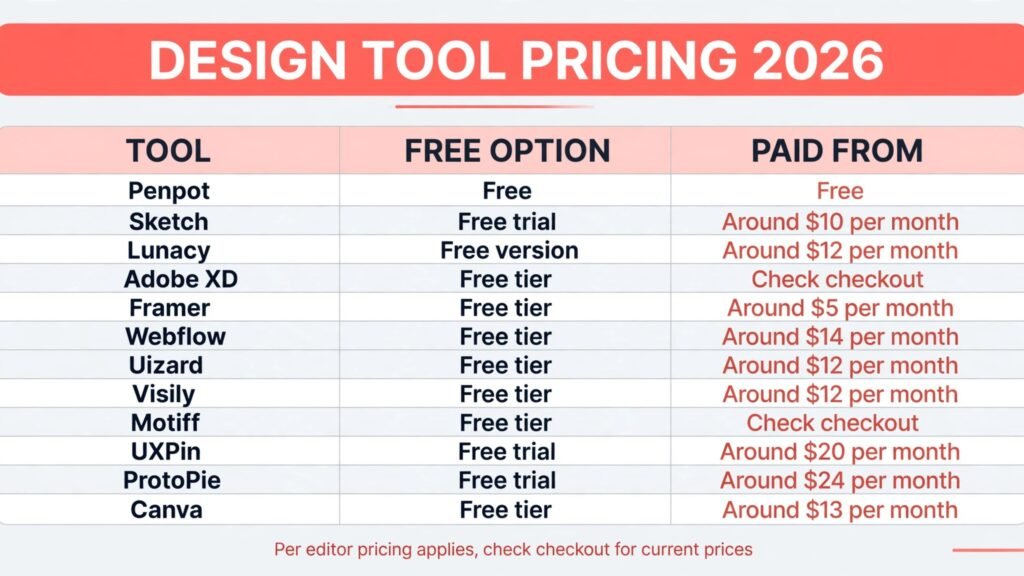
Pricing compared: what design tools really cost
| Tool | Free option | Paid from | Pricing note |
|---|---|---|---|
| Penpot | Free | Free | Self hosting is free |
| Sketch | Free trial | Around $10 per month | Per editor pricing |
| Lunacy | Free version | Around $12 per month | Most features free |
| Adobe XD | Free tier | Check checkout | Bundled with Creative Cloud |
| Framer | Free tier | Around $5 per month | Site limits apply |
| Webflow | Free tier | Around $14 per month | CMS limits apply |
| Uizard | Free tier | Around $12 per month | Project limits apply |
| Visily | Free tier | Around $12 per month | Screen limits apply |
| Motiff | Free tier | Check checkout | Tiers have changed before |
| UXPin | Free trial | Around $20 per month | Per editor pricing |
| ProtoPie | Free trial | Around $24 per month | Team pricing varies |
| Canva | Free tier | Around $13 per month | Bundled with Canva Pro |
A realistic starter setup costs $0 to $14 a month: Penpot free for product design, plus Framer or Canva for marketing output. A professional setup lands around $25 to $50 a month by adding a prototyping tool and a website builder on top. Pay more only when a specific job, such as user testing complex flows or shipping client sites, justifies it. In every case, check checkout for renewal terms and per editor pricing, because both change often.
How to Choose the right Figma alternative
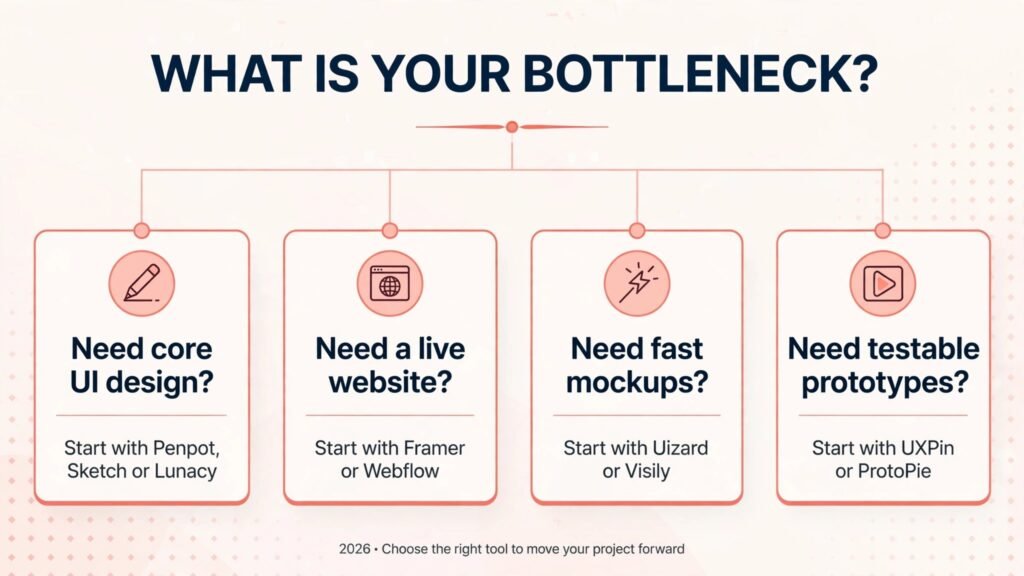
Start with the output, not the canvas. If the output is a product interface, start with Penpot or Sketch and test developer handoff on a real screen. If the output is a live website, start with Framer or Webflow and publish a test page. If the output is a pitch mockup, start with Uizard and see whether stakeholders take it seriously.
Next, test the collaboration step before you commit. Multiplayer editing, comments and version history are where Figma shines, and a tool that lacks them will slow a team even if its canvas is better. Run a real review cycle in each finalist.
Then check the component step. Build a small design system, a button, a card and a form, and reuse them across screens. The tool that makes reuse painless will save more time than any single feature.
Finally, test the handoff step. Hand a finished screen to a developer and ask what is missing: measurements, assets, states, code. The tool with the cleanest handoff is usually the right one, even if another tool has a prettier canvas.
Mistakes to avoid when switching design tools
The first mistake is migrating the whole design system at once. A big bang migration disrupts every project, breaks components mid sprint, and leaves the team without a stable library for weeks. Migrate one project first, rebuild its core components in the new tool, and let the team learn the workflow before moving the rest. A pilot project reveals problems while they are still cheap to fix.
The second mistake is ignoring developer handoff. A tool can have a beautiful canvas and still fail if developers cannot extract measurements, assets and states cleanly. Hand a finished screen to a developer during the trial period and ask what is missing. The answer tells you more about the tool than any feature page, because handoff quality varies far more than canvas quality.
The third mistake is presenting an AI mockup as a finished design. AI tools generate credible first drafts, but their spacing, component use and edge cases are rarely production ready. Treat generated screens as a draft, apply your design system, and design the empty states, error states and long text cases by hand. Stakeholders who approve a mockup will expect the shipped product to match it.
The fourth mistake is choosing a tool for its canvas instead of its collaboration. Multiplayer editing, comments and version history are where a design tool earns its keep on a team. A tool with a nicer canvas but weaker collaboration will slow reviews and create conflicting versions, which costs more time than any single feature saves.
The fifth mistake is skipping component discipline. A new tool tempts teams to design screens one by one without building reusable components, and that shortcut compounds into an inconsistent product within months. Build the button, card, form and navigation components first, reuse them everywhere, and treat a one off design as a warning sign rather than a convenience.
Frequently Asked Questions
Is there a free Figma alternative?
Yes. Penpot is free and open source, Lunacy offers a capable free version, and Framer, Webflow, Uizard, Visily, Motiff and Canva all offer free tiers. For product design specifically, Penpot is the strongest free option.
Which Figma alternative is best for UI design?
Penpot for open source and cross platform teams, Sketch for Mac teams, and Lunacy for Windows designers. All three cover components, libraries and handoff well enough for most product work.
Which Figma alternative is best for websites?
Framer for fast marketing sites with animation, and Webflow for full sites with CMS and ecommerce. Both publish live sites, which removes the design to build gap entirely.
Can AI generate a usable app mockup?
Yes, for early stages. Uizard and Visily produce credible first drafts from a prompt or sketch, but expect to refine them in a full design tool before development. AI mockups accelerate starting, they do not finish a design system.
Which tool should a small business start with?
Canva for marketing design, plus Framer for a website. That combination covers most small business design needs without a product design tool, and both are easy for non designers to learn.
Do these tools support developer handoff?
Penpot, Sketch, Lunacy, UXPin and Motiff all offer handoff features with measurements, assets and code snippets. Test handoff with your own developers, since the quality of handoff varies more than the quality of the canvas.
Conclusion
The best Figma alternatives do not try to copy Figma exactly. They win one job: Penpot wins openness, Sketch wins Mac design, Lunacy wins Windows design, Framer and Webflow win live websites, Uizard and Visily win fast mockups, UXPin and ProtoPie win testable prototypes, and Canva wins marketing design.
Start with the output you need. Test the free tier on a real project, run a review cycle and a developer handoff, and only then pay. The right alternative is the one that ships work your team can build from, not the one with the most familiar canvas.