
Choosing the best AI tools for event planners in 2026 is less about finding one platform that does everything and more about fixing the four places where events actually break down. Timelines slip when tasks live in five different inboxes. Venues and vendors get booked late because quotes arrive as scattered emails. Guest lists go stale between registration and check in. Marketing looks rushed because invitations, social posts and signage are made at the last minute. The tools below are judged on those four jobs, not on how many features they list on a pricing page.
This guide covers 12 tools. Each one is placed in the job where it is strongest, even if it can also do other things. Prices are October 2026 figures in US dollars. Where a vendor does not publish pricing, or where a price depends on event size, the guide says check checkout rather than guessing a number that would be wrong for your event. The test that matters is simple. If a tool does not save a planner time in the week before the event, when everything is urgent at once, it is not worth paying for.
The 12 best AI tools for event planners at a glance
| Tool | Best job | Free option | Paid from |
|---|---|---|---|
| Cvent | Large event planning and sourcing | Demo | Check checkout |
| Planning Pod | Timelines, budgets and floor plans | Free trial | Check checkout |
| Aisle Planner | Planning checklists and client pages | Free trial | Check checkout |
| Social Tables | Seating diagrams and floor plans | Free trial | Check checkout |
| Tripleseat | Venue sales and event bookings | Demo | Check checkout |
| HoneyBook | Vendor proposals and payments | Free trial | Around $19 per month |
| Whova | Conference agendas and networking | Free tier | Check checkout |
| Eventbrite | Ticketing and registration | Free to list | Fees per ticket |
| Zkipster | Guest lists and check in | Demo | Check checkout |
| Bizzabo | Event marketing and registration | Demo | Check checkout |
| Grip | AI matchmaking for trade shows | Demo | Check checkout |
| Canva | Invitations and event design | Free tier | Around $15 per month |

Start here: the right pick for each event job
| Your event job | Start with | If that fails, try |
|---|---|---|
| A large conference or expo | Cvent | Bizzabo |
| A detailed planning timeline | Planning Pod | Aisle Planner |
| A wedding or private celebration | Aisle Planner | HoneyBook |
| Seating and room layouts | Social Tables | Planning Pod |
| Venue bookings and inquiries | Tripleseat | Cvent |
| Vendor proposals and payments | HoneyBook | Planning Pod |
| Conference networking | Whova | Grip |
| Selling tickets online | Eventbrite | Bizzabo |
| VIP guest lists and check in | Zkipster | Whova |
| Event promotion and registration pages | Bizzabo | Eventbrite |
| Trade show meetings that matter | Grip | Whova |
| Invitations, posts and signage | Canva | Bizzabo |
Planning and timelines: where the event is won or lost
A good timeline does not just list tasks. It shows who owns each task, what it blocks, and what happens if it slips by a day. These three tools keep that picture in one place, which is why they come first in the guide.
1. Cvent
Cvent is the enterprise planning platform in this list. It covers sourcing, registration, event websites, attendee management and reporting in one system, and its AI features help with content suggestions, attendee matching and post event reporting. Large conferences, corporate events and associations use it because it can handle thousands of attendees without the workflow falling apart.
Pricing: Pricing is custom and depends on event size and modules. Request a quote and check checkout for the modules you actually need, since the full suite costs far more than a single event module.
Best for: Large conferences, corporate events and associations that run many events a year and need one system of record.
Watch out for: Cvent is heavy for a small team. Setup takes time, training matters, and a planner running one wedding or one local workshop will pay for capacity that is never used.
Try it at: cvent.com
2. Planning Pod
Planning Pod is built around the daily work of planning. It combines timelines, task lists, budgets, floor plans, seating and client collaboration, so a planner can move from a budget line to a room layout without opening a spreadsheet. The layout tools are the reason many planners stay with it after trying simpler checklist apps.
Pricing: A free trial is offered. Paid plans are priced by user and features. Check checkout for current pricing before committing a whole team.
Best for: Independent planners and small planning teams that need timelines, budgets and layouts in one place.
Watch out for: The interface packs a lot into each screen, so new users should expect a learning curve. It is a planning workspace, not a ticketing platform, so ticket sales still need a separate tool.
Try it at: planningpod.com
3. Aisle Planner
Aisle Planner is designed for weddings and private celebrations, where the client relationship matters as much as the task list. It gives planners checklists, timelines, budgets, vendor tracking and client pages that clients can actually use, which cuts down on status update emails. The client facing pages are its strongest feature.
Pricing: A free trial is offered. Pricing depends on plan and team size. Check checkout for current pricing, since wedding planning plans differ from corporate plans.
Best for: Wedding planners and private event planners who need clients to see progress without constant messages.
Watch out for: It is less suited to large conferences or trade shows. Ticketing, expo floor management and large scale registration are outside its core job.
Try it at: aisleplanner.com
Venue and vendor sourcing: book the right room, then the right people
Venue and vendor work fails in two ways. Either the right room is booked too late, or the right vendor is booked on a verbal promise with no written scope. These tools create a paper trail for both decisions.
Social Tables is the layout tool planners reach for when a room plan has to be right. It builds floor plans and seating diagrams that vendors can read, shows capacity and table counts, and lets planners test a layout before the venue walkthrough turns into an argument about space. A clear diagram prevents more event day problems than almost any other document.
Pricing: A free trial is offered. Pricing depends on plan and features. Check checkout for current pricing.
Best for: Planners who run seated dinners, galas, weddings and conferences where the room layout is part of the guest experience.
Watch out for: Social Tables is a layout tool, not a full planning suite. Timelines, budgets and guest communication still need another system or a separate workflow.
Try it at: socialtables.com

5. Tripleseat
Tripleseat is built for venues and for planners who work closely with venues. It manages inquiries, bookings, banquet event orders, payments and client communication, so a venue team can move from an inquiry to a signed event without losing details in email threads. For planners who book venues often, that shared record is the value.
Pricing: A demo is offered and pricing is custom. Check checkout for a quote based on venue size and volume.
Best for: Venues, hotels and planners who manage venue bookings as a core part of their work.
Watch out for: Tripleseat is venue first. Independent planners who only need a timeline and a guest list will find it too venue focused for their daily work.
Try it at: tripleseat.com
6. HoneyBook
HoneyBook helps planners and vendors run the business side of events. It covers proposals, contracts, invoices, payments and client communication, with AI help for drafting messages and proposals. The benefit is practical. A vendor quote becomes a signed proposal and a paid deposit without chasing PDFs across email.
Pricing: A free trial is offered. Paid plans start at around $19 per month. Check checkout for current plan pricing, since features differ by plan.
Best for: Independent planners, wedding vendors and small event businesses that need proposals and payments in one client flow.
Watch out for: HoneyBook is a client management tool, not an event floor planner. Large event layouts, seating and ticketing still need dedicated tools. Planners who also write for clients should see our AI tools for freelance writers guide for the writing side of proposals.
Try it at: honeybook.com
Guest lists and registration: from first ticket to the door
Registration is where a good event can quietly go wrong. Duplicate names, unpaid tickets, dietary notes lost in a form, and a check in queue that moves too slowly all damage the first impression. These three tools keep the guest record clean from registration to arrival.
7. Whova
Whova is the conference app planners use when networking matters as much as the agenda. It covers agendas, speaker pages, attendee messaging and AI powered networking suggestions, so attendees can find the right sessions and the right people without a printed program. The agenda builder and the attendee app work as one system, which keeps updates in one place.
Pricing: A free tier is offered for small events. Paid plans depend on event size and features. Check checkout for current pricing.
Best for: Conferences, summits and association events where attendees need an agenda, networking and updates in one app.
Watch out for: Whova is conference focused. For a simple ticketed party or a wedding, its agenda and networking features add complexity that is not needed.
Try it at: whova.com
8. Eventbrite
Eventbrite is the ticketing standard for public events. It covers event pages, ticket types, promo codes, payments and attendee lists, and its marketplace helps new audiences discover events. AI help with event descriptions and promotion is useful, but the core value is simpler. People know how to buy a ticket on Eventbrite, so fewer buyers drop out at checkout.
Pricing: Listing an event is free. Eventbrite charges fees per paid ticket sold. Check checkout for current fee rules, since fees vary by ticket type and region.
Best for: Public events, workshops, concerts, classes and festivals that sell tickets online.
Watch out for: Fees add up on large ticket volumes, and the event page design is limited compared with a dedicated event website. Large conferences that need complex registration logic may need a fuller platform.
Try it at: eventbrite.com
9. Zkipster
Zkipster is the guest list tool for events where who is at the door matters. It covers guest lists, invitations, seating, check in and real time arrival tracking, so a host or a security team can see exactly who has arrived and who is still expected. For galas, product launches and VIP events, that live list is the whole point.
Pricing: A demo is offered and pricing is custom. Check checkout for a quote based on event size and features.
Best for: Galas, launches, premieres and private events with a controlled guest list and a formal check in process.
Watch out for: Zkipster is guest list first. It does not replace a planning timeline, a ticketing platform or a marketing tool, so it works best alongside them.
Try it at: zkipster.com

Marketing and design: fill the room, then make it look planned
An event that is well planned but poorly promoted still has empty seats. These three tools cover promotion, matchmaking and design, the three marketing jobs that most planners do under time pressure.
10. Bizzabo
Bizzabo is an event platform with strong marketing tools. It covers event websites, registration, email campaigns and reporting, with AI help for content and agenda building. The reporting matters after the event too, because it shows which channels brought registrations and which sessions held attention.
Pricing: A demo is offered and pricing is custom. Check checkout for a quote based on event size and modules.
Best for: Corporate events, conferences and marketing teams that need registration, promotion and reporting in one platform.
Watch out for: Bizzabo is a full platform, so small one off events may find it heavier than Eventbrite plus a simple website. Price it on the events you will actually run, not on a single flagship event.
Try it at: bizzabo.com
11. Grip
Grip is the matchmaking tool for trade shows and large business events. Its AI recommends meetings based on attendee profiles and interests, then helps attendees book those meetings in the app. At a trade show, that is the difference between random booth visits and a day of meetings that were worth travelling for.
Pricing: A demo is offered and pricing is custom. Check checkout for a quote based on event size.
Best for: Trade shows, expos and large business events where attendee to attendee and attendee to exhibitor meetings are the main value.
Watch out for: Grip needs good attendee data to work well. If profiles are thin or registration data is messy, its recommendations will be weak, so data quality has to be planned in advance.
Try it at: grip.events
12. Canva
Canva is the design tool most planners already know, and its AI features now cover invitations, social posts, programs, signage and presentations from one set of brand assets. That consistency matters. When invitations, social posts and venue signage share the same colours and type, the event looks planned even before guests arrive.
Pricing: A free tier is offered. Paid plans start at around $15 per month for Pro. Check checkout for current team pricing.
Best for: Planners who design their own invitations, social content, programs and signage without hiring a designer for every asset.
Watch out for: Canva is a design tool, not a planning system. Timelines, guest lists and vendor contracts still need dedicated tools. Planners who work with property clients should also see our AI tools for real estate agents guide for event style marketing in that sector.
Try it at: canva.com

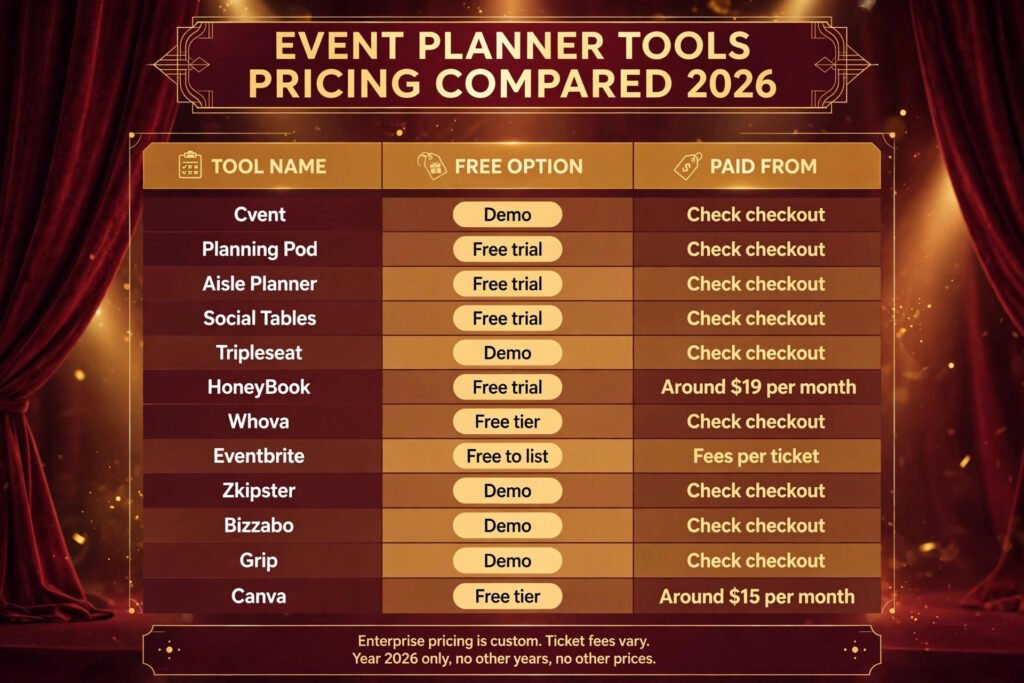
Pricing compared: what event software really costs
| Tool | Free option | Paid from | Pricing note |
|---|---|---|---|
| Cvent | Demo | Check checkout | Custom, by event size |
| Planning Pod | Free trial | Check checkout | By user and features |
| Aisle Planner | Free trial | Check checkout | By plan and team size |
| Social Tables | Free trial | Check checkout | By plan and features |
| Tripleseat | Demo | Check checkout | Custom, venue based |
| HoneyBook | Free trial | Around $19 per month | By plan |
| Whova | Free tier | Check checkout | By event size |
| Eventbrite | Free to list | Fees per ticket | Fees vary by region |
| Zkipster | Demo | Check checkout | Custom, by event size |
| Bizzabo | Demo | Check checkout | Custom, by modules |
| Grip | Demo | Check checkout | Custom, by event size |
| Canva | Free tier | Around $15 per month | Pro price, teams higher |
The cheapest stack for a small planner is not one platform. It is Canva for design, Eventbrite for tickets and Planning Pod or Aisle Planner for the timeline, with HoneyBook added when proposals and payments become regular work. That stack stays under a single enterprise platform price in most months, and each tool can be replaced without rebuilding the whole workflow. The expensive mistake is buying an enterprise platform for one large event and then paying for it all year when most events are small. Price tools on a full year of events, including the quiet months, and check renewal terms before signing. A tool that looks cheap for one event can become the largest line in a planner’s software budget by the third event.
How to Choose the right AI tool for event planners
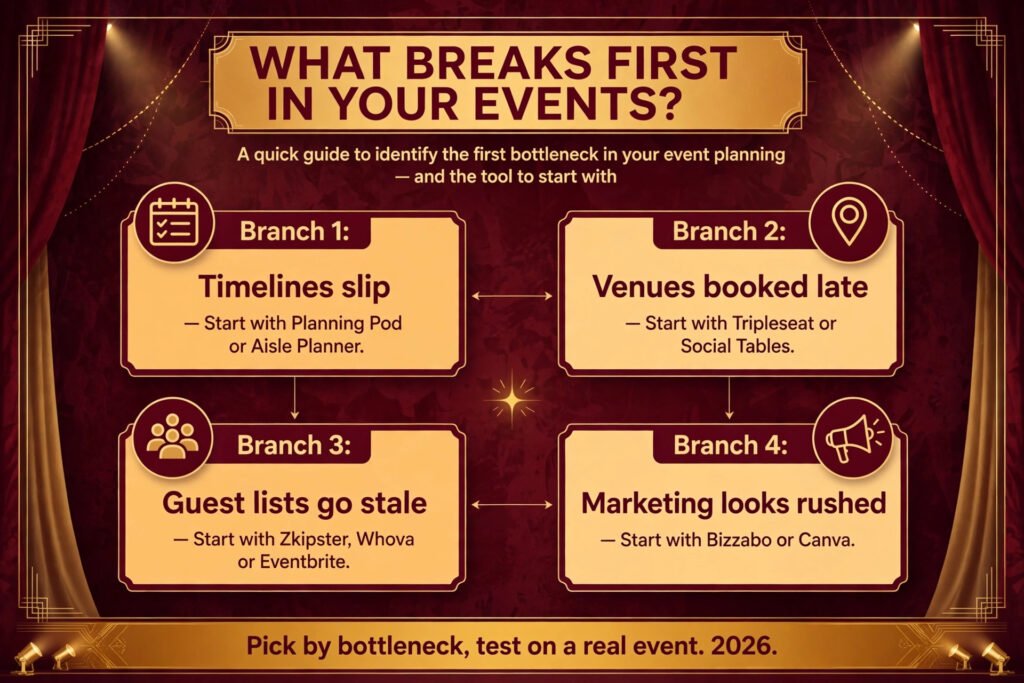
Start with the event you run most often, not the largest event you hope to run. A planner who runs ten workshops a year needs a different stack from a planner who runs two conferences a year. Write down the three tasks that take the most time today. If those tasks are timelines and budgets, start with Planning Pod or Aisle Planner. If they are venue bookings, start with Tripleseat or Social Tables. If they are tickets and guest lists, start with Eventbrite, Whova or Zkipster.
Next, test the tool on a real event, not on a demo event. Load a real guest list, build a real seating plan and send a real invitation. Watch where the tool slows down. The places where a planner has to export data to a spreadsheet are the places where the tool is weak for that planner’s work. Then check the guest experience. Buy a ticket, open the attendee app and try to check in, as a guest would. A tool that is easy for a planner but confusing for a guest will create work at the door.
Finally, check integration and exit. A tool that exports clean guest lists, ticket data and budgets is safer than a tool that locks data inside its own reports. Ask how data moves to email tools, payment tools and accounting tools before signing, and ask what happens to past event data if the subscription ends. Planners who also study how teams learn new software should see our AI tools for learning to code guide for a useful contrast in how teams adopt tools, even though the audience is different.
Mistakes to avoid
The first mistake is buying a platform for features that will never be used in a real event week. A long feature list looks impressive in a demo and becomes a training burden when the event is three days away. The second mistake is splitting guest data across tools with no single source of truth. When registration, check in and seating use different lists, someone important will be missing from one of them. Fix the guest list workflow before buying new design tools.
A third mistake is designing marketing last. Invitations and social posts made the night before an event look rushed, and they reach fewer people. Build the design templates when the event is confirmed, not when tickets go on sale. A fourth mistake is ignoring the door. Check in, seating and vendor access need a plan and a test run, not just a tool. Finally, do not sign a yearly enterprise contract after one good demo. Run one paid event on the tool first, measure the time saved, and only then commit for a year.
Frequently Asked Questions
Which AI tool for event planners is best for small events?
Planning Pod or Aisle Planner for the timeline, Eventbrite for tickets and Canva for design. That combination covers most small events without an enterprise platform price.
Which tool is best for large conferences?
Cvent for full scale planning and sourcing, with Whova for the attendee app and networking. Bizzabo is a strong alternative when marketing and reporting are the priority.
Can AI tools replace an event planner?
No. AI tools draft content, suggest matches, build layouts and speed up registration, but they do not negotiate with venues, calm a nervous client or fix a seating problem at the door. The best tools give a planner more time for those human jobs.
Which tool is best for weddings?
Aisle Planner for checklists and client pages, Social Tables for seating, and HoneyBook for proposals and payments. That stack matches how wedding planning actually works, client by client.
Do I need a separate ticketing tool?
For public events that sell tickets, yes in most cases. Eventbrite handles ticket types, promo codes and payments well. For private events with a controlled guest list, Zkipster or Whova may be a better fit than public ticketing.
What should I check before paying for an event platform?
Check the price for a full year of events, the fee on paid tickets, the export options for guest and budget data, and the check in experience as a guest. Run one real event on a trial before signing a yearly contract.
Conclusion
The best AI tools for event planners do not win by doing everything. They win one job well. Cvent wins large event scale, Planning Pod wins detailed timelines, Aisle Planner wins client facing wedding planning, Social Tables wins room layouts, Tripleseat wins venue bookings, HoneyBook wins proposals and payments, Whova wins conference networking, Eventbrite wins ticketing, Zkipster wins controlled guest lists, Bizzabo wins event marketing, Grip wins trade show matchmaking, and Canva wins fast, consistent design.
Start with the event you run most often. Pick the tool that fixes the task that costs the most time today, test it on a real event, and add the next tool only when the first one is actually saving time. That stack, built job by job, is what keeps an event on time, on budget and calm at the door.