
Nutritionists lose most of their working week to work that is not nutrition. Meal plans are rebuilt in spreadsheets, food diaries arrive as photos and vague notes, nutrient math is checked by hand, and client check ins are chased by email. The best AI tools for nutritionists in 2026 do not replace clinical judgement. They remove the repetitive work around it, so a practitioner can spend the session on the client in front of them instead of the paperwork behind them.
This guide compares 12 tools by the job a nutrition practice actually needs done. Some are built for meal planning, some for tracking what clients eat and how they progress, some for nutrient analysis, and some for running the business itself. Prices are October 2026 figures in US dollars where vendors publish them. Where a vendor prices by seat, by client count, or only on request, the guide says check checkout rather than guessing a number that will be wrong by the time a reader clicks through. The test for every tool here is simple: does it save a nutritionist time without weakening the advice given to the client.
The 12 best AI tools for nutritionists at a glance
| Tool | Best job | Free option | Paid from |
|---|---|---|---|
| Nutrium | Meal planning and client follow up | Free trial | Paid plan, check checkout |
| That Clean Life | Ready meal plans for clients | Free trial | Paid plan, check checkout |
| EatLove | Personalised meal plans at scale | Free trial | Paid plan, check checkout |
| Healthie | Client tracking and telehealth | Free trial | Paid plan, check checkout |
| Practice Better | Practice management and coaching | Free trial | Paid plan, check checkout |
| Keenoa | Photo food diaries for clients | Free trial | Paid plan, check checkout |
| Cronometer Pro | Nutrient analysis and food logging | Free tier | Paid plan, check checkout |
| Nutritionix | Food database and API logging | Free tier | Paid plan, check checkout |
| ESHA Food Processor | Professional nutrient analysis | Free trial | Paid plan, check checkout |
| NutriAdmin | Client records and meal plans | Free trial | Paid plan, check checkout |
| DietMaster Pro | Clinic nutrient analysis | Free trial | Paid plan, check checkout |
| Jane App | Booking, billing and client records | Free trial | Paid plan, check checkout |

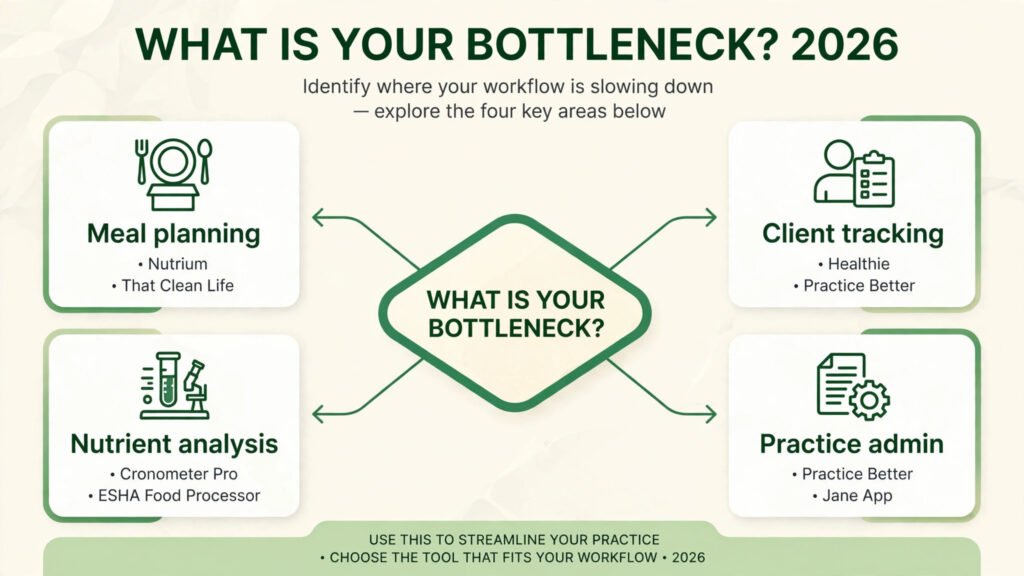
Start here: best pick by job
| Your job | Start with | If that fails, try |
|---|---|---|
| Meal plans clients actually follow | Nutrium | That Clean Life |
| Ready plans without building each one | That Clean Life | EatLove |
| Plans for many clients at once | EatLove | Nutrium |
| Tracking, messaging and telehealth | Healthie | Practice Better |
| Running the whole practice in one place | Practice Better | Jane App |
| Food diaries clients will complete | Keenoa | Cronometer Pro |
| Checking nutrient intake in detail | Cronometer Pro | ESHA Food Processor |
| Building an app or portal with food data | Nutritionix | Cronometer Pro |
| Formal nutrient analysis for reports | ESHA Food Processor | DietMaster Pro |
| Simple client records plus meal plans | NutriAdmin | Nutrium |
| Clinic analysis with printed reports | DietMaster Pro | ESHA Food Processor |
| Booking and billing without extra tools | Jane App | Practice Better |
Meal planning: plans clients actually follow
A good meal plan is not a long list of perfect meals. It is a plan a real client will cook on a Tuesday night with the food they already buy. These three tools handle the structure, the portions and the swaps, so the nutritionist can focus on the client and the goal.
1. Nutrium
Nutrium is the meal planning pick for practitioners who want planning and client follow up in one place. It builds meal plans from client data, tracks measurements and food intake, and lets clients log meals and message their nutritionist from an app. The plan builder handles portions and nutrient targets, which cuts the spreadsheet work that eats into clinic time.
Pricing: A free trial is offered. Paid plans are priced for practitioners, check checkout for current plan pricing.
Best for: Nutritionists and dietitians who write individual plans and want to follow client progress between sessions.
Watch out for: Nutrium works best when the practitioner builds the plan inside it. Importing a large library of old plans takes time, and clients who prefer paper will still need a printed version.
Try it at: nutrium.com

2. That Clean Life
That Clean Life is the ready plan pick. It gives practitioners a library of dietitian created meal plans and recipes that can be filtered by diet, calories and client preferences, then shared with a client in a clean format. For a practice that needs a solid plan quickly, it removes the blank page problem.
Pricing: A free trial is offered. Paid plans are priced for practitioners, check checkout for current plan pricing.
Best for: Practitioners who need quality plans fast, especially for common goals such as weight management and general healthy eating.
Watch out for: Ready plans are a starting point, not a finished clinical plan. A client with medical needs, allergies or a complex history still needs individual review before the plan is sent.
Try it at: thatcleanlife.com

3. EatLove
EatLove is the scale pick for meal planning. It generates personalised meal plans from client preferences, restrictions and calorie targets, and it can produce plans for many clients without rebuilding each one by hand. The value is in volume: a practice with a waiting list can serve more clients without lowering the quality of each plan.
Pricing: A free trial is offered. Paid plans are priced by use, check checkout for current plan pricing.
Best for: Practices, clinics and programmes that need personalised plans for large numbers of clients.
Watch out for: Automated plans still need a human check. Taste, culture, budget and cooking skill do not show up in a calorie target, and a plan that ignores them will not be followed.
Try it at: eatlove.com
Client tracking and coaching: seeing progress between sessions
The session is only one hour. What a client eats, how they sleep and whether they follow the plan happens in the other 167 hours. These tools make that visible, so coaching is based on evidence rather than memory.
4. Healthie
Healthie is the client tracking pick for practices that combine coaching with telehealth. It covers client records, messaging, programmes, forms and video sessions, so a nutritionist can run follow ups, share resources and track progress without switching between five tools. For a remote first practice, that single home matters.
Pricing: A free trial is offered. Paid plans are priced for practitioners and practices, check checkout for current plan pricing.
Best for: Nutritionists who coach remotely and want tracking, messaging and telehealth in one client portal.
Watch out for: Healthie is a full practice platform, so setup takes longer than a simple food diary app. Small practices that only need meal plans may find it heavier than they need. Clinics that also need medical scribing should also see our AI scribe tools for clinics guide for the wider clinic stack.
Try it at: gethealthie.com
5. Practice Better
Practice Better is the practice management pick. It handles client intake, programmes, messaging, invoicing and scheduling alongside coaching tools, so the business side of a nutrition practice runs in the same place as the client work. That matters because admin is where most solo practices lose time.
Pricing: A free trial is offered. Paid plans are priced for practitioners, check checkout for current plan pricing.
Best for: Solo nutritionists and small teams who want intake, coaching, billing and scheduling in one system.
Watch out for: Practice Better is strong on practice operations and lighter on deep nutrient analysis than Cronometer Pro or ESHA. Pair it with an analysis tool if detailed nutrient reporting is a core service.
Try it at: practicebetter.io

6. Keenoa
Keenoa is the food diary pick for clients who will not weigh and type every meal. Clients photograph their food, and the nutritionist reviews the diary, estimates portions and gives feedback in the app. Photo diaries are less precise than weighed logs, but they are completed far more often, and a completed diary beats a perfect diary that was abandoned after three days.
Pricing: A free trial is offered. Paid plans are priced for practitioners, check checkout for current plan pricing.
Best for: Clients who struggle with detailed logging, and practitioners who coach on habits and patterns rather than exact grams.
Watch out for: Photo based logging needs practitioner review to be useful. Without feedback, clients stop photographing, and the diary becomes another silent app on their phone.
Try it at: keenoa.com
Food logging and nutrient analysis: getting the numbers right
Meal plans and coaching need numbers behind them. These three tools handle the food database, the nutrient math and the analysis, so a nutritionist can defend a recommendation with data instead of a guess.
7. Cronometer Pro
Cronometer Pro is the nutrient analysis pick for day to day practice. Clients log food, and the practitioner sees detailed nutrient breakdowns, trends and gaps across vitamins, minerals and macros. The database is strong on branded and whole foods, and the reports are clear enough to show a client in session.
Pricing: A free tier is offered for basic logging. Paid Pro plans are priced for practitioners, check checkout for current plan pricing.
Best for: Nutritionists who need detailed nutrient intake data and want clients to log in a familiar app.
Watch out for: Detailed logging suits motivated clients. For clients who find logging stressful, a photo diary such as Keenoa will give better adherence, even if the numbers are less exact.
Try it at: cronometer.com

8. Nutritionix
Nutritionix is the food data pick, not a coaching app. It provides a large food database and an API that other apps and portals use to look up foods, estimate nutrients and log meals. A practice building its own client portal, or a team that needs food data inside another system, will use Nutritionix behind the scenes.
Pricing: A free tier is offered for basic use. Paid plans are priced by API use, check checkout for current plan pricing.
Best for: Practices and developers who need reliable food data inside their own app, portal or internal tool.
Watch out for: Nutritionix is a data service, not a ready made client coaching tool. A solo nutritionist who just wants to send meal plans should start with Nutrium or That Clean Life instead.
Try it at: nutritionix.com
9. ESHA Food Processor
ESHA Food Processor is the formal analysis pick for clinics and professionals who produce nutrient reports. It is built for detailed analysis of recipes, menus and client intake, with a large food database and reporting that suits clinical and institutional work. When a report must stand up to scrutiny, this is the tool practitioners reach for.
Pricing: A free trial is offered. Paid plans are priced by licence, check checkout for current plan pricing.
Best for: Clinics, hospitals, schools and practitioners who need formal nutrient analysis and printed reports.
Watch out for: Food Processor is desktop software with a learning curve, not a quick client app. It is overkill for a practice that only needs simple food logging and meal plans.
Try it at: esha.com
Practice and business: booking, billing and records without the chaos
Good clinical work still fails if booking is messy, invoices are late and client records live in three places. These three tools keep the business side clean, so the practice can grow without adding admin hours for every new client.
10. NutriAdmin
NutriAdmin is the simple records pick. It combines client records, meal plans, questionnaires and invoicing in a straightforward system built for nutrition professionals. It does not try to be a telehealth platform or a food database, and that focus is its strength for a small practice.
Pricing: A free trial is offered. Paid plans are priced for practitioners, check checkout for current plan pricing.
Best for: Nutritionists who want client records and meal plans in one simple system without a large platform to learn.
Watch out for: NutriAdmin is lighter on coaching programmes and telehealth than Healthie or Practice Better. Practices that coach mainly by video may need a second tool for sessions.
Try it at: nutriadmin.com
11. DietMaster Pro
DietMaster Pro is the clinic analysis pick for practices that combine nutrient analysis with client management. It analyses intake, builds plans and produces reports, and it suits clinics that see clients in person and need a structured workflow from assessment to plan to follow up.
Pricing: A free trial is offered. Paid plans are priced by licence, check checkout for current plan pricing.
Best for: Clinics and practitioners who want analysis, planning and reporting in a single desktop workflow.
Watch out for: DietMaster Pro is a traditional clinic tool, not a modern client app. Clients who expect an app with messaging and photo diaries will need a companion tool such as Keenoa.
Try it at: dietmasterpro.com
12. Jane App
Jane App is the booking and billing pick for health practices. It handles online booking, client records, invoicing, payments and telehealth in a clean system used by many kinds of health practitioners, including nutritionists. For a practice that is growing, reliable booking and payment matter as much as a good meal plan.
Pricing: A free trial is offered. Paid plans are priced per practitioner, check checkout for current plan pricing.
Best for: Nutrition practices that need booking, billing and records in one place, especially teams with more than one practitioner.
Watch out for: Jane is a general health practice platform, not a nutrition specific tool. It will not build meal plans or analyse nutrients, so pair it with Nutrium, Cronometer Pro or a similar nutrition tool. Teams hiring support staff should also see our AI tools for HR teams guide.
Try it at: jane.app
Pricing compared: what a nutrition practice really pays
| Tool | Free option | Paid from | Pricing note |
|---|---|---|---|
| Nutrium | Free trial | Paid plan | Priced for practitioners, check checkout |
| That Clean Life | Free trial | Paid plan | Priced for practitioners, check checkout |
| EatLove | Free trial | Paid plan | Priced by use, check checkout |
| Healthie | Free trial | Paid plan | Priced for practitioners and practices |
| Practice Better | Free trial | Paid plan | Priced for practitioners, check checkout |
| Keenoa | Free trial | Paid plan | Priced for practitioners, check checkout |
| Cronometer Pro | Free tier | Paid plan | Free basic logging, Pro for practitioners |
| Nutritionix | Free tier | Paid plan | Priced by API use, check checkout |
| ESHA Food Processor | Free trial | Paid plan | Priced by licence, check checkout |
| NutriAdmin | Free trial | Paid plan | Priced for practitioners, check checkout |
| DietMaster Pro | Free trial | Paid plan | Priced by licence, check checkout |
| Jane App | Free trial | Paid plan | Priced per practitioner, check checkout |
The honest total for a solo nutritionist is usually one planning tool plus one tracking tool, not all twelve. A common stack is Nutrium for plans, Keenoa or Cronometer Pro for logging, and Practice Better or Jane for booking and billing. That stack costs less than a single enterprise platform, and each tool is used for the job it does best. The cost that catches practices out is not the monthly fee. It is paying for a full platform while only using the meal plan feature, or paying per client on a tool where inactive clients still count. Before buying, count active clients, not total clients ever seen, and check whether a free tier covers the first few clients.

How to choose: match the tool to the client, not the other way round
Start with the client, not the feature list. A busy parent needs a plan they can cook and a diary they can complete in under a minute. An athlete needs precise nutrient data and a practitioner who can read it. A clinic needs formal reports and clean records. The same tool will not serve all three well, and buying the most powerful tool for a simple job wastes money and confuses clients.
Next, test adherence before you commit. Give five real clients a trial, load real plans and run a real fortnight on the tool. The tool clients actually open is the right one, even if another tool looks stronger in a demo. Check the client app on a phone, not just the practitioner dashboard on a laptop, because the client app is where the plan lives or dies.
Then check the data you will rely on. Does the food database cover the foods your clients eat, including local and cultural foods, or only common branded items. Can you export client data if you leave. Does the tool let you adjust a plan by hand when the automated plan is wrong. A tool that locks you into its own plans and its own data is a risk, however good the first month feels.
Finally, price the stack, not the single tool. Add the planning tool, the logging tool and the booking tool together, then compare that total with a single platform such as Healthie or Practice Better. Sometimes one platform is cheaper. Sometimes two specialist tools are cheaper and better. The answer depends on how many clients you serve and how much of each platform you actually use.
Mistakes that cost nutritionists clients and time
Sending an automated plan without a human check is the top mistake. A plan that ignores allergies, budget, cooking skill or cultural food will be abandoned, and the client will blame the nutritionist, not the software. A second mistake is choosing a tool clients will not use. A detailed logging app is useless if the client stops logging in week two, while a simple photo diary that is completed every day gives the practitioner something real to coach on.
A third mistake is buying for the demo, not the daily workflow. A tool that looks impressive in a sales call but adds ten minutes to every plan will be quietly dropped by a busy practice. A fourth mistake is keeping client data in too many places. Plans in one app, diaries in another, invoices in a third, and notes in email means nothing is found when it is needed. Pick a home for client records and keep it there, even if other tools feed into it.
Frequently asked questions
What is the best AI tool for nutritionists who are just starting out?
Nutrium for meal planning and client follow up, plus Keenoa for food diaries if clients struggle with detailed logging. Both are built for practitioners, both offer a trial, and neither needs a large setup before the first client can use them.
Can AI meal plans replace a nutritionist?
No. AI tools can build a plan, check nutrients and save time, but they cannot assess a client, spot a medical red flag, or adapt a plan to a real life. The value of a nutritionist is judgement, context and coaching, and the tool should support that work, not replace it.
Which tool is best for tracking what clients actually eat?
Keenoa for photo diaries that clients complete, and Cronometer Pro for detailed nutrient logging when precision matters. Many practices use both: photo diaries for most clients, detailed logging for clients with specific nutrient goals.
Do clients need to pay for these tools?
In most cases, no. Practitioner plans usually include client access through the practitioner account or app, but the exact model varies by tool. Check checkout before promising a client that their access is free, especially on tools priced per client.
How do I migrate clients from spreadsheets to a nutrition tool?
Start with new clients on the new tool, and move existing clients in small groups. Import the current plan and key measurements first, and leave old history in the spreadsheet until the new system is proven. A full migration in one weekend creates errors and loses client trust.
Which single tool should most nutritionists start with?
Nutrium, because it covers the core job of a nutrition practice: building plans and following clients. Add Cronometer Pro for detailed analysis or Practice Better for practice management once the practice grows. Writers building a nutrition content business should also see our AI tools for freelance writers guide.
Conclusion
The best AI tools for nutritionists do not win by having the longest feature list. Nutrium wins meal planning with follow up, That Clean Life wins ready plans, EatLove wins plans at scale, Healthie wins tracking with telehealth, Practice Better wins practice management, Keenoa wins food diaries clients complete, Cronometer Pro wins nutrient detail, Nutritionix wins food data, ESHA wins formal analysis, NutriAdmin wins simple records, DietMaster Pro wins clinic reporting, and Jane wins booking and billing.
Start with the client in front of you, test the tool with real clients for a fortnight, and build a small stack where each tool does one job well. The right setup is the one clients actually use, the practitioner actually opens every day, and the practice can afford as it grows.