Zoom vs Google Meet is the comparison most teams settle before they buy anything else for remote work. Both tools join a call in a browser or an app, both handle a hundred people without drama, and both cost nothing to start. The difference shows up later, in the third month of weekly calls, when one tool keeps saving time and the other keeps adding small friction. This guide tests both on the jobs that actually matter: hosting a meeting, sharing a screen, recording a call, and running a webinar. Prices are October 2026 plan models, and where a vendor prices by seats or add-ons, the guide says check checkout rather than guessing a figure.
Quick Verdict
| If you need | Pick |
|---|---|
| The most meeting controls and the biggest webinars | Zoom |
| The simplest setup inside Google Workspace | Google Meet |
| The lowest friction for guests who never install anything | Google Meet |
| Breakout rooms, polls, and whiteboards in one place | Zoom |
| A free tier for regular short calls | Either, with different time limits |
The short version: Zoom wins on meeting features and scale. Google Meet wins on simplicity and on life inside Google Workspace. Most teams that already pay for Workspace should start with Meet and only move to Zoom when they hit a specific limit. Most teams that run training, webinars, or large client calls should start with Zoom.
Zoom vs Google Meet at a Glance
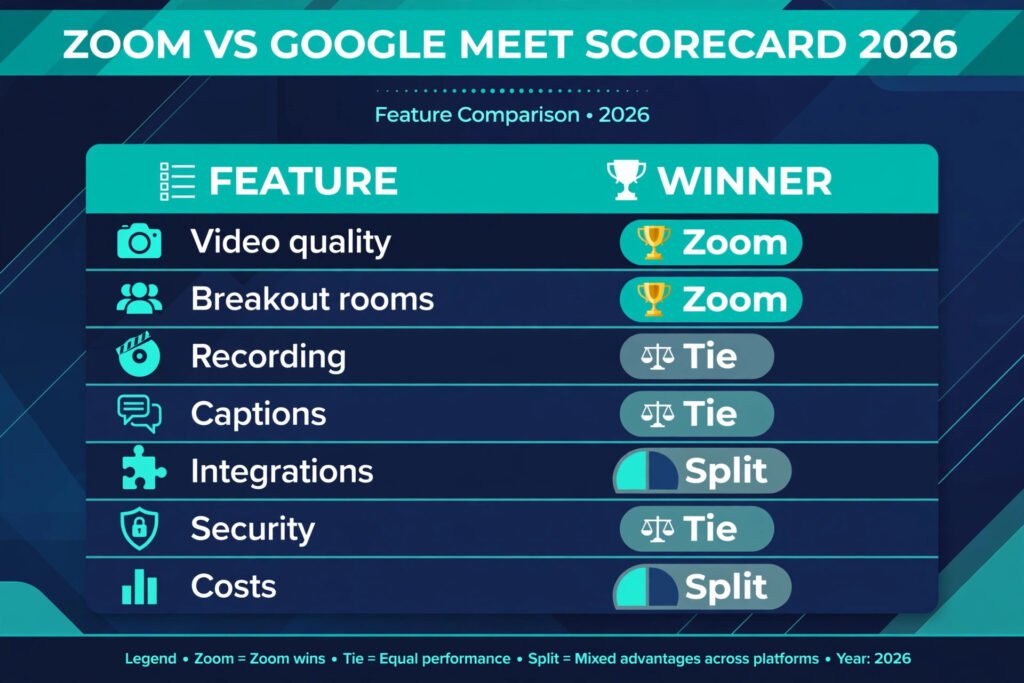
| Feature | Zoom | Google Meet |
|---|---|---|
| Free tier | Yes, group calls capped at 40 minutes | Yes, group calls capped at 60 minutes |
| Breakout rooms | Yes, on paid plans | Yes, on paid Workspace plans |
| Cloud recording | Paid plans | Paid Workspace plans |
| Live captions | Yes | Yes |
| Whiteboard | Yes, built in | Yes, through Jamboard successor tools and add-ons |
| Webinar hosting | Yes, dedicated webinar add-on | Yes, through Workspace and YouTube live options |
| Best for | Training, webinars, large meetings | Workspace teams, quick calls, guests |
| Pricing | Free tier, paid plans by host, check checkout | Free tier, paid Workspace plans, check checkout |
Head-to-Head Comparison
Video and audio quality
Both tools deliver clear 720p video by default on a normal connection, and both step up to 1080p on paid plans when bandwidth allows. In practice, Zoom holds up slightly better when a connection weakens, because it adjusts video quality more aggressively before it drops audio. Google Meet is steadier when everyone is on Chrome and on a strong connection, which is most office setups. Neither tool fixes a bad microphone, and both sound noticeably better with a headset than with laptop speakers. For a call where one person presents and twenty listen, the difference is small. For a call where ten people talk over each other, Zoom’s noise suppression and speaker handling feel a touch more controlled.
Breakout rooms
Zoom built its reputation partly on breakout rooms, and it still leads here. A host can pre-assign rooms, move people between rooms during the call, broadcast a message to every room, and set a timer that pulls everyone back. Google Meet offers breakout rooms on paid Workspace plans, and they work well for a simple split into groups. The gap is in control: Zoom gives the host more ways to manage rooms on the fly, while Meet keeps the controls simpler and slightly more limited. If your weekly work depends on small group discussion, Zoom is the safer pick. If you split into rooms once a month, Meet covers it.
Recording and transcripts
Zoom records to the cloud on paid plans and to a local drive on most plans, and it produces a transcript and, on higher tiers, a meeting summary. Google Meet records to Google Drive on paid Workspace plans, with transcripts available on eligible plans. The practical difference is where the recording lives. Zoom recordings sit inside Zoom until you move them. Meet recordings land in Drive, next to the documents and slides the meeting was about, which makes them easier to find a month later. Teams that already live in Drive usually prefer Meet for this reason alone. Teams that need local recording without a paid plan lean toward Zoom.
Captions and accessibility
Both tools offer live captions in English and a growing set of other languages, and both let participants pin an interpreter or keep captions on by default. Zoom adds translated captions on some paid plans, which helps multilingual teams. Meet captions are accurate on clear audio and integrate with Google’s language tools. Neither replaces a human captioner for a legal or medical call, but for a normal team meeting both are good enough that most participants leave them on without thinking about it.
Integrations
Zoom connects to calendars, Slack, HubSpot, Salesforce, and hundreds of other tools, and its marketplace is one of the largest in this category. Google Meet connects most deeply to Gmail, Calendar, Docs, Sheets, and Slides, and that depth matters: a Meet link appears in a calendar invite automatically, a Doc can be presented in one click, and a recording lands in Drive without an extra step. A team that runs on Google Workspace gets more value from Meet’s native links than from Zoom’s longer app list. A team that runs on mixed tools, or on Microsoft 365 plus Slack, usually gets more from Zoom’s breadth.
Security and admin control
Both tools offer waiting rooms, meeting passwords, host controls, end-to-end encryption options for certain meeting types, and admin dashboards. Zoom’s admin controls are more granular, which large IT teams like, and its waiting room and lock controls are quick to reach during a live call. Google Meet benefits from Workspace admin controls, including data regions and retention policies that Workspace admins already manage. For a small team, both are safe enough with default settings plus a waiting room. For a regulated company, the deciding factor is usually which admin console the IT team already runs.
Costs
Both tools are free to start, and both charge per host or per user on paid plans, so the bill depends on how many people host meetings rather than how many attend. Zoom’s paid plans add longer meetings, cloud recording, and webinar options, with webinar capacity as a separate add-on, so check checkout for the exact tier that matches your audience size. Google Meet’s paid tiers come bundled with Workspace, which also buys Gmail, Drive storage, and Docs, so the meeting tool alone looks cheaper only if the team already needs Workspace. A team that only needs meetings should compare Zoom’s per-host price against the full Workspace bundle, not against Meet alone. A team that already pays for Workspace gets Meet at no extra cost, which is hard to beat.

Zoom in Depth
Zoom is the meeting tool for teams that run meetings as a core part of their work. Its strength is control: the host can manage participants, rooms, polls, reactions, and recording from one toolbar, and co-hosts can share that load. The whiteboard is built in, so a brainstorm does not need a second app. Polls and Q and A run inside the meeting, which keeps a training session or a town hall in one window.
Pricing follows a per-host model. The free tier covers one-to-one calls without a strict limit and group calls up to 40 minutes, which suits occasional use. Paid plans remove the time limit, add cloud recording, and open breakout rooms and reporting. Webinar capacity is an add-on with its own pricing, so check checkout before promising a 500-person event on a base plan. The watch-outs are real but manageable: the free tier’s 40-minute cap interrupts longer calls, and the number of add-ons can push the bill up if a team buys webinar and large-meeting capacity it rarely uses.
Best for: training teams, coaches, webinar hosts, and any team that meets clients in large or structured sessions.
Watch out for: the 40-minute free group limit, and add-on costs for webinars and large meetings.
Try it at: zoom.us
Google Meet in Depth
Google Meet is the meeting tool for teams that want the call to disappear into the workday. There is no separate account to create for a Workspace user, no app to install for a guest on a desktop browser, and the link lives inside the calendar invite. A host starts a meeting from Gmail or Calendar, shares a Doc or a slide deck in one click, and finds the recording in Drive afterwards. That chain of small conveniences adds up to real time saved across a week of calls.
Pricing is bundled with Workspace. The free tier covers group calls up to 60 minutes, which is longer than Zoom’s free cap and enough for most team standups. Paid Workspace plans remove the cap, add recording, breakout rooms, noise cancellation, and attendance tracking on eligible tiers, so check checkout for the tier that includes the features your team needs. The watch-outs are about ceiling rather than quality: Meet’s webinar story is less direct than Zoom’s, large events usually need YouTube live alongside it, and advanced meeting controls are fewer.
Best for: Workspace teams, freelancers who meet clients inside Google tools, and schools or nonprofits already on Workspace.
Watch out for: webinar capacity, which needs a different setup than Zoom’s dedicated webinar product, and fewer host controls for very large sessions.
Try it at: meet.google.com
Side-by-Side Tests
Test 1: Host a meeting
Setting up a call takes under a minute on both tools. In Meet, the host creates a calendar event and the link is already there, and guests join from a browser without installing anything. In Zoom, the host schedules from the app or a calendar plugin, and guests on desktop can also join from a browser, though first-time guests are often nudged toward the app. For a team that meets the same people every week, the difference fades. For a team that meets new clients every day, Meet’s browser-first joining saves a small amount of friction on every call, and that friction is what makes guests late.
Winner: Google Meet, for guest joining.
Both tools share a full screen, a single window, or a browser tab, and both let the host hand control to someone else. Zoom’s annotation tools are stronger: participants can draw on the shared screen, and the host can save those marks. Meet’s tab sharing is cleaner for presenting slides, because it shares only the tab and keeps notifications and other windows private. For a design review, Zoom’s annotation wins. For a slide presentation, Meet’s tab sharing wins. Most teams will use whichever tool they already opened, and both are good enough that screen sharing rarely decides the purchase.
Winner: Tie, with Zoom ahead on annotation and Meet ahead on tab privacy.
Test 3: Record a call
Recording a call is one click on both tools, and the difference is what happens next. A Zoom recording needs a step to share: the host copies a link or downloads the file. A Meet recording appears in Drive and can be shared like any other file, with the same permissions the team already uses. For a team that records training sessions and shares them later, Meet’s Drive landing spot is a genuine advantage. For a team that records locally for editing, Zoom’s local recording option is the better fit, since Meet requires a paid plan for recording at all.
Winner: Google Meet, for sharing inside Drive; Zoom, for local recording.
Test 4: Run a webinar
This is where the gap opens up. Zoom’s webinar product handles registration pages, practice sessions, panelists versus attendees, Q and A moderation, and post-event reports in one place. A host can run a 500-person webinar without a second tool. Google Meet can host a large meeting, and Workspace plus YouTube live can stream to a bigger audience, but the setup involves more pieces and the attendee experience is less controlled. A team that runs one webinar a quarter can make Meet work. A team that runs webinars monthly should buy Zoom for this job alone, even if it uses Meet for daily calls.
Winner: Zoom, clearly, for webinars.

Pricing Compared
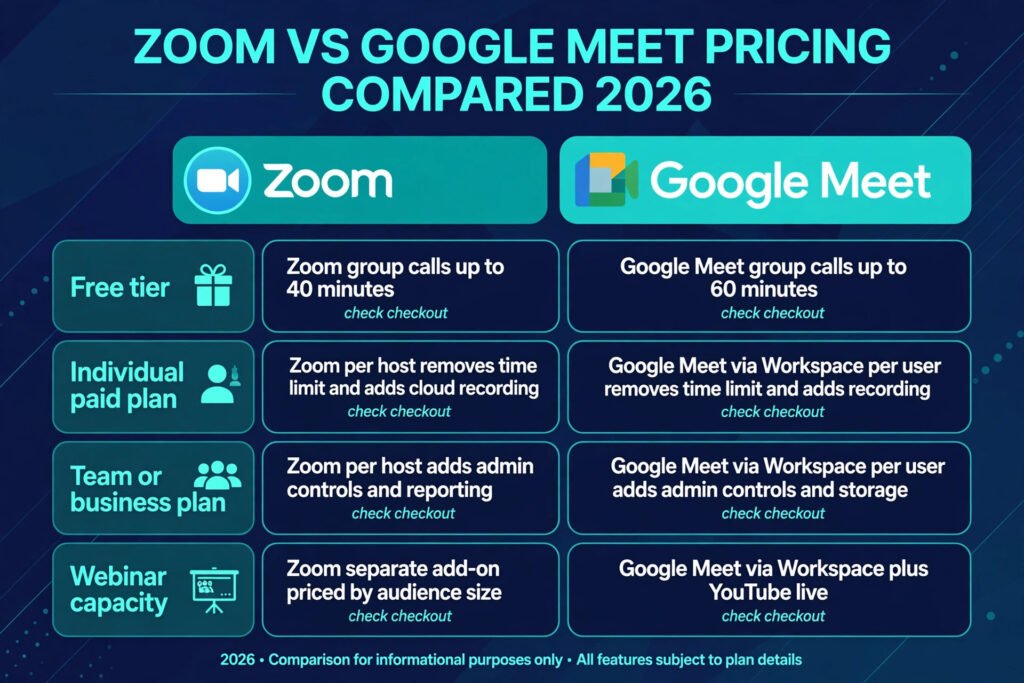
| Plan level | Zoom | Google Meet |
|---|---|---|
| Free tier | Group calls up to 40 minutes, check checkout for current limits | Group calls up to 60 minutes, check checkout for current limits |
| Individual paid plan | Per host, removes time limit, adds cloud recording, check checkout | Via Workspace per user, removes time limit, adds recording, check checkout |
| Team or business plan | Per host, adds admin controls and reporting, check checkout | Via Workspace per user, adds admin controls and storage, check checkout |
| Webinar capacity | Separate add-on, priced by audience size, check checkout | Via Workspace plus YouTube live, check checkout |
The honest way to compare cost is to price the whole stack. Zoom’s bill is the meeting tool plus any webinar add-on. Meet’s bill is the Workspace bundle, which also covers email and storage. A five-person team that only needs meetings usually pays less with Zoom. A five-person team that already needs Workspace email and Drive pays nothing extra for Meet.
How to Choose
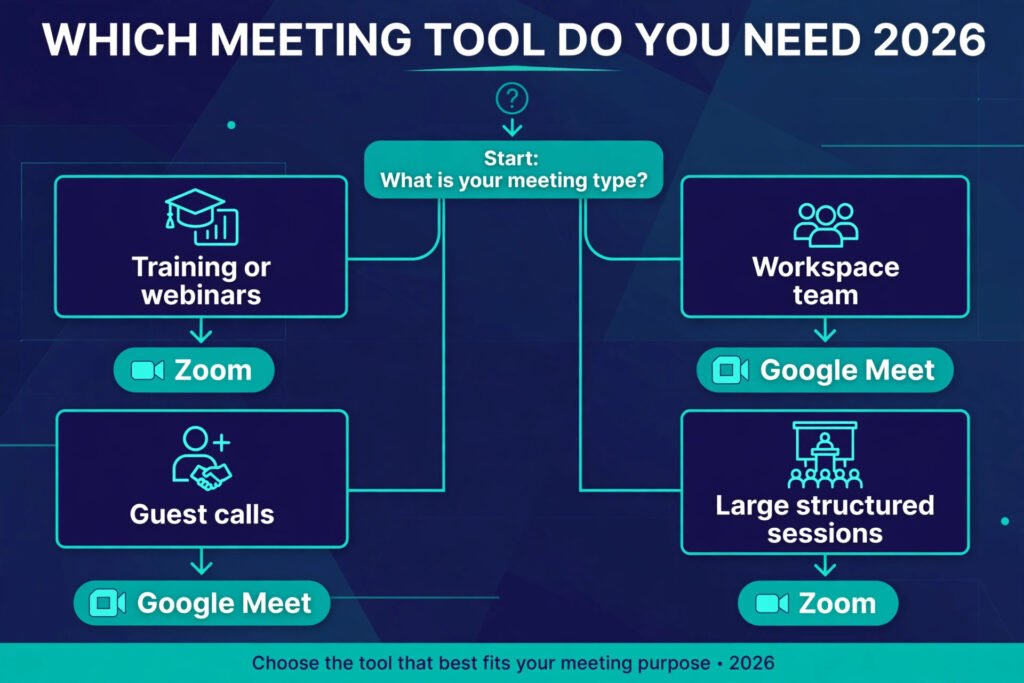
Pick Zoom if your week includes training sessions, client workshops, or webinars, or if you need breakout rooms with full host control. Pick Google Meet if your team already lives in Gmail, Calendar, and Drive, or if most of your calls are short internal check-ins and guest calls. Pick both if your budget allows it: run daily calls on Meet, where the calendar integration saves time, and run webinars and training on Zoom, where the controls earn their price. Many small teams do exactly this, and the cost is lower than buying a single premium tool for every job.
Freelancers who meet clients in different systems should weigh guest friction first. A client who joins from a browser without installing an app is a client who arrives on time. That single factor pushes many solo operators toward Meet for client calls, even when they use Zoom for their own group programs. HR teams running interviews and onboarding sessions often land the same way: Meet for interviews inside Workspace, Zoom for structured training cohorts that need breakout rooms. For more on tools that support that kind of client work, see the guide to the best AI tools for freelance writers and the guide to the best AI tools for HR teams.
If you are still unsure, run a two-week test. Host half your meetings on each tool, record one call on each, and run one breakout session on each. The tool that produces fewer support messages from guests is the tool your team will actually adopt, and adoption matters more than any feature table.
A note on hybrid teams
Hybrid teams deserve a special mention, because their meetings mix a room full of people with several remote callers, and that mix exposes weaknesses fast. Zoom handles the room better: its room systems and controller options are more mature, and a room camera plus a Zoom Room setup gives remote participants a clear view of everyone present. Google Meet handles the calendar side better: a room can be booked as a resource in the same invite, and remote guests join from the same link. The deciding question for a hybrid team is where the pain sits today. If remote participants keep saying they cannot hear the room, invest in Zoom plus better room audio. If meetings keep starting late because links and rooms are scattered, standardise on Meet and let the calendar do the coordination. Either way, budget for a decent room microphone before buying any premium plan, because no software fixes a room where only the loudest voice reaches the call.
Mistakes to Avoid
Buying a webinar add-on before running a single webinar is the most common waste. Start with a large meeting and only upgrade when attendance proves the need. Ignoring the free tier limits is the second mistake: a 40-minute Zoom cap or a 60-minute Meet cap will cut off a real meeting at the worst moment, so schedule paid coverage before a client call that must run long. Sharing a full screen instead of a single tab is a privacy mistake that both tools make easy, so choose tab sharing for slides. Skipping the waiting room is a security mistake on either tool, and it takes one unwanted guest to teach that lesson. Recording without telling participants is a trust mistake, and both tools show a recording indicator for a reason. Finally, judging either tool on a single bad call is a mistake: a weak home connection makes every tool look bad, so test on two networks before deciding.
Frequently Asked Questions
Is Zoom or Google Meet better for free use?
For occasional short calls, Google Meet’s 60-minute group cap beats Zoom’s 40-minute cap. For one-to-one calls, both are generous. For regular team meetings, a paid plan on either tool is worth the cost.
Can guests join without an account?
Yes on both tools. Meet guests join from a browser link without a Google account in most cases, though the host’s settings can require sign-in. Zoom guests join from a browser or the app without a Zoom account, though the app prompt can confuse first-time guests.
Which tool is better for webinars?
Zoom, by a clear margin. Its webinar product covers registration, panelists, Q and A, and reports in one place. Meet handles large meetings well but needs YouTube live alongside it for a true webinar audience.
Does Google Meet work without Google Workspace?
Yes. Anyone with a Google account can start a free Meet call, and guests can join from a browser. Paid features such as recording and breakout rooms need a Workspace plan.
Is Zoom safe for business meetings?
Yes, with sensible settings: enable the waiting room, require a passcode for public links, lock the meeting once everyone arrives, and keep the app updated. The same advice applies to Meet.
Can I use both tools?
Yes, and many teams do. Use Meet for daily calls inside Workspace and Zoom for webinars and training. The only cost is keeping two sets of links straight, which a calendar habit solves.
Final Verdict
Zoom vs Google Meet does not have one winner for every team, and that is the honest answer. Zoom wins the feature contest: more controls, better breakout rooms, and a webinar product that Meet cannot match without extra pieces. Google Meet wins the simplicity contest: it lives inside the calendar, joins from a browser, and costs nothing extra for a Workspace team. If you run training or webinars, buy Zoom. If you run a Workspace team and mostly need reliable calls, stay with Meet. If you run both kinds of work, use both tools and let each one do the job it does best.