
The best AI churn reduction tools in 2026 are not the ones with the longest list of alerts. They are the ones that turn a warning into a saved account before the renewal date arrives. Most churn does not happen on the day a customer cancels. It happens weeks earlier, when usage drops, a champion leaves, a support ticket goes unanswered, or a team quietly stops opening the product. By the time the cancellation form appears, the decision is often already made. The tools in this guide work on that earlier window: they spot accounts going quiet, shape what happens at cancel, and give lapsed customers a better reason to return than a generic discount email.
This guide is built around three save windows: before renewal, when a health score or prediction can still change the outcome; the cancellation flow itself, where the right offer can keep a customer leaving over one fixable problem; and after cancellation, when a timed win-back campaign can bring back customers who left for timing or budget reasons. A tool that covers only one window leaves the other two open. The strongest stack covers all three, even if that means pairing a prediction platform with a smaller cancel flow tool.
The thirteen tools below are grouped by the job they do best: prediction tools rank accounts by risk, cancellation flow tools try to save the account at cancel with targeted offers and pause options, health scoring tools turn scattered signals into one actionable score, and win-back tools run campaigns for former customers. Read the group that matches your biggest leak first, then check the pricing table, because several tools price by accounts or contacts, and that number grows faster than most teams expect.
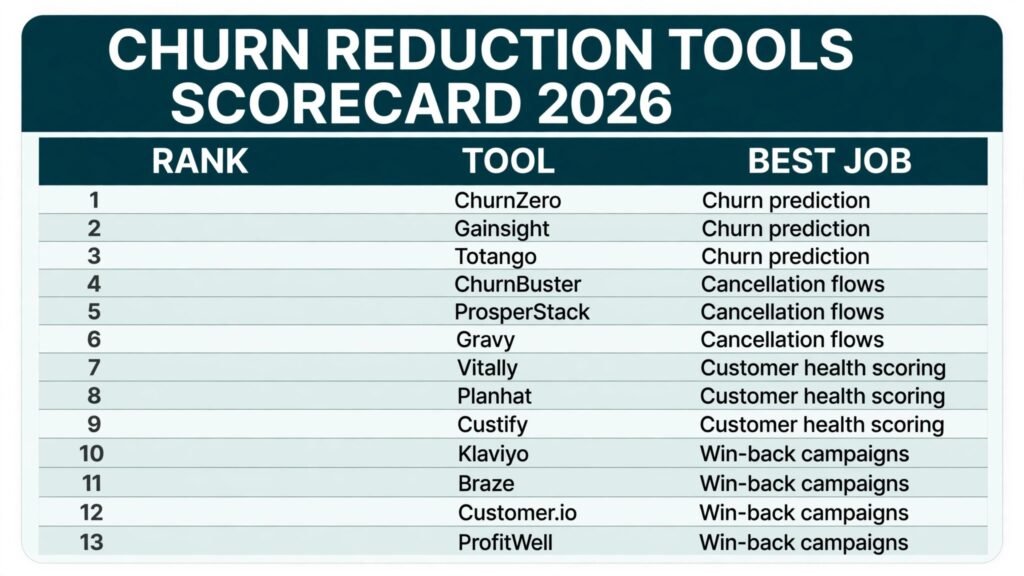
The 13 best AI churn reduction tools at a glance
| Tool | Best job | Free option | Paid model |
|---|---|---|---|
| ChurnZero | Churn prediction | No free tier | Subscription, check checkout |
| Gainsight | Churn prediction | No free tier | Subscription, check checkout |
| Totango | Churn prediction | Free tier | Subscription, check checkout |
| ChurnBuster | Cancellation flows | No free tier | Subscription, check checkout |
| ProsperStack | Cancellation flows | No free tier | Subscription, check checkout |
| Gravy | Cancellation flows | No free tier | Subscription, check checkout |
| Vitally | Customer health scoring | No free tier | Subscription, check checkout |
| Planhat | Customer health scoring | No free tier | Subscription, check checkout |
| Custify | Customer health scoring | No free tier | Subscription, check checkout |
| Klaviyo | Win-back campaigns | Free tier | Subscription, check checkout |
| Braze | Win-back campaigns | No free tier | Subscription, check checkout |
| Customer.io | Win-back campaigns | No free tier | Subscription, check checkout |
| ProfitWell | Win-back campaigns | Free tier | Subscription, check checkout |
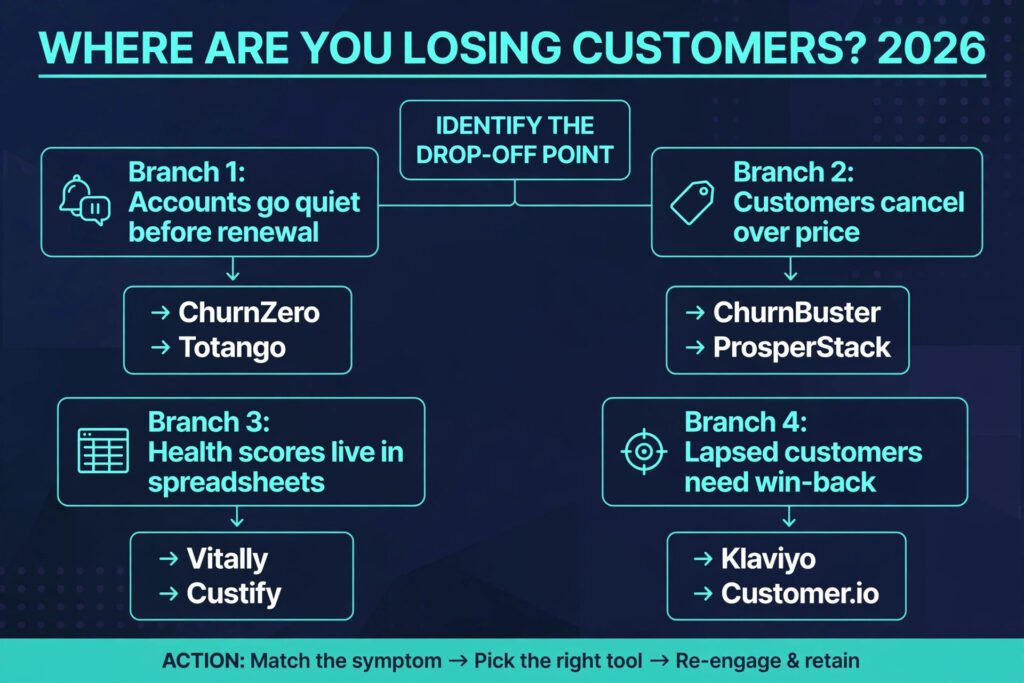
Best pick by job
| Your biggest leak | Start here | Why it fits |
|---|---|---|
| Accounts go quiet before renewal | ChurnZero | Risk ranking tied to playbooks, so a warning triggers an action |
| Enterprise accounts need a full success platform | Gainsight | Health scoring, journeys, and reporting in one system |
| Small team needs prediction without enterprise cost | Totango | Lighter setup with a free tier to start |
| Customers cancel over price alone | ChurnBuster | Cancel flows built for payment and pricing saves |
| You want cancel offers without heavy engineering | ProsperStack | No code flows with offer testing |
| Failed payments look like churn | Gravy | Recovery work on failed and past due payments |
| Health scores live in spreadsheets | Vitally | One score fed by product, billing, and support data |
| You need health plus revenue signals together | Planhat | Health, revenue, and product usage in one view |
| Mid market team wants fast health setup | Custify | Health scoring with lifecycle stages out of the box |
| Lapsed customers need email win-back | Klaviyo | Email and SMS flows with strong segmentation |
| Mobile and multi channel win-back matters | Braze | Cross channel campaigns with in product messages |
| Behaviour based win-back journeys matter | Customer.io | Journeys triggered by events and behaviour |
| Churn numbers you cannot trust or segment | ProfitWell | Free metrics show churn by cohort and plan, so win-back targets real segments |
Churn prediction
1. ChurnZero
ChurnZero watches product usage, support activity, and billing signals, then ranks accounts by churn risk and pushes the riskiest into playbooks such as a check in call, a training offer, or an executive review. The point is that the alert never sits in a dashboard unread. Teams that run it well treat it as a workflow tool, not a reporting tool, and the score is only useful if someone owns the next step and its deadline.
Pricing: subscription, check checkout, priced by accounts and plan tier, so get a quote on next year account count plus growth, not just today.
Best for: SaaS teams with a customer success team that already runs playbooks and wants AI risk ranking to prioritise them.
Watch out for: usage, CRM, and billing data must be connected before the scores mean anything. A team that skips the data work will get confident looking scores built on thin inputs.
Try it at: https://churnzero.com

2. Gainsight
Gainsight is the enterprise end of churn prediction. It combines health scoring, customer journeys, and reporting, and it is built for companies where one lost enterprise account matters more than a hundred small ones. Its strength is structure: health scores, success plans, and executive reporting live in one place, so a renewal conversation draws on the same data the success team used all quarter.
Pricing: subscription, check checkout, quote based.
Best for: larger SaaS companies with dedicated customer success managers and enterprise renewals to protect.
Watch out for: it can be more platform than a small team needs. With two success managers and a simple product, setup and admin may cost more time than the predictions save. Smaller teams should look at Totango or Vitally first.
Try it at: https://www.gainsight.com
3. Totango
Totango gives smaller teams a practical version of churn prediction: account health, segments, and campaigns without an enterprise implementation project. It suits teams that have outgrown spreadsheets but are not ready for Gainsight. The free tier lets a team test whether health scoring changes behaviour before paying. If nobody acts on the scores during the trial, a paid plan will not fix that.
Pricing: free tier, paid plans subscription, check checkout.
Best for: growing SaaS teams that want prediction and health in one tool at a lower starting cost.
Watch out for: advanced reporting and custom models are thinner than on enterprise platforms, and complex multi product portfolios may hit limits sooner.
Try it at: https://www.totango.com
Cancellation flows
4. ChurnBuster
ChurnBuster takes over the moment a customer clicks cancel and tries to save the account before cancellation completes. It is built around payment and pricing saves: offers, pauses, and plan changes at the exact point of decision. That timing matters. An email sent three days later reaches a customer who has already moved on, while a flow shown at cancel reaches them while the decision is still open.
Pricing: subscription, check checkout, typically tied to cancellation volume or revenue saved, so read the model carefully before comparing it with flat subscription tools.
Best for: subscription businesses where a large share of cancels cite price, payment failure, or a temporary pause need.
Watch out for: cancel flows only save customers whose problem is fixable in the flow. If customers leave because the product never worked for them, no offer will hold them, and heavy discounting at cancel can train customers to threaten cancellation for a lower price.
Try it at: https://churnbuster.io
5. ProsperStack
ProsperStack offers no code cancellation flows with offer testing, so a team can test which save offer works without engineering time. Show different offers to different segments, measure which ones retain customers past thirty days, and stop offers that save an account for a week and then lose it anyway. That discipline is the difference between a cancel flow that looks good and one that actually reduces churn.
Pricing: subscription, check checkout.
Best for: SaaS teams that want to run and test cancel flows quickly, without building the flow in house.
Watch out for: offer testing needs volume. A team with twenty cancels a month will take months to learn anything reliable, so start with one clear offer rather than five tests at once.
Try it at: https://prosperstack.com

6. Gravy
Gravy works on a leak many teams mislabel as churn: failed payments. A card expires, a payment fails, and the account closes, even though the customer never decided to leave. Gravy recovers failed and past due payments through outreach and retry logic. Involuntary churn can be a large share of total churn for subscription businesses, and it is often the cheapest churn to fix.
Pricing: subscription, check checkout. Some recovery services price on recovered revenue, so confirm the model before signing.
Best for: subscription businesses with noticeable failed payment volume and no dedicated dunning process.
Watch out for: Gravy fixes payment failure, not product fit. If voluntary churn is the bigger problem, start with prediction and health scoring, and treat Gravy as a complement.
Try it at: https://gravy.com
Customer health scoring
7. Vitally
Vitally turns product usage, billing, support, and CRM signals into health scores and segments a success team can work from every morning. Its value is clarity: one score, one segment, and a visible next step for each account. Teams that adopt it well review at risk accounts in a short daily standup rather than checking the dashboard once a month before renewals.
Pricing: subscription, check checkout, typically by accounts, so model it on next year account count.
Best for: SaaS teams that want a single health view fed by several data sources, without enterprise platform weight.
Watch out for: health scores need tuning. Out of the box weights rarely match your product, so expect a few weeks of adjusting thresholds before scores match what the team already knows about accounts.
Try it at: https://www.vitally.io

8. Planhat
Planhat combines customer health with revenue and product usage signals, so a team can see not only which accounts are at risk but what each account is worth. That pairing matters for prioritisation: two accounts can carry the same risk score, but the team should spend limited time on the one with larger expansion potential or renewal value. It also supports customer data management, which helps teams with data spread across a CRM, a billing tool, and a product analytics tool.
Pricing: subscription, check checkout. If your CRM is HubSpot and you are comparing customer platforms, see also our guide to HubSpot alternatives for how CRM choice shapes the data that feeds health scoring.
Best for: SaaS teams that want health, revenue, and usage in one view and need to prioritise by account value.
Watch out for: decide which signals matter before connecting everything, or the first health score will be noisy and the team will stop trusting it.
Try it at: https://www.planhat.com
9. Custify
Custify is built for mid market SaaS teams that want health scoring and lifecycle stages without a long implementation. Accounts move through stages such as onboarding, adoption, and renewal, and health scores flag where an account stalls. That framing helps because churn causes differ by stage: onboarding churn is usually a setup or training problem, while renewal churn is usually a value or pricing problem.
Pricing: subscription, check checkout.
Best for: mid market teams that want fast health scoring setup with lifecycle stages included.
Watch out for: large enterprise teams with complex hierarchies may find the model simpler than they need, so check parent and child account handling before committing.
Try it at: https://www.custify.com
Win-back campaigns
10. Klaviyo
Klaviyo runs email and SMS win-back campaigns with segmentation beyond a single lapsed list. Target customers who cancelled in the last thirty days differently from those who left six months ago, and exclude customers who left with a complaint a discount would only inflame. Win-back works best when the message matches the reason for leaving: a pause or a new feature for a timing exit, a smaller plan for a budget exit, and nothing at all for an angry exit until the underlying issue is fixed.
Pricing: free tier available, paid plans are subscription, check checkout, scaling with contacts, so clean lapsed lists regularly or you pay to store contacts you will never mail.
Best for: ecommerce and SaaS teams that want email and SMS win-back with strong segmentation.
Watch out for: deliverability and list hygiene matter more than template design. Mailing a stale lapsed list hurts sender reputation, so prune bounces and non openers on a schedule.
Try it at: https://www.klaviyo.com

11. Braze
Braze runs cross channel win-back campaigns across email, push, SMS, and in product messages, which matters when former customers still have your app installed or still visit your site. A single email is easy to ignore. A coordinated sequence across channels, timed around a new feature or a seasonal moment, is harder to miss. It is strongest for teams with mobile apps, where the journey can adapt to what the customer actually does rather than following a fixed script.
Pricing: subscription, check checkout. Braze is quote based and aimed at larger teams.
Best for: larger consumer and SaaS brands with mobile apps that need multi channel win-back journeys.
Watch out for: cross channel power can become noise. Cap frequency across channels, not per channel, or a former customer gets an email, a push, and an SMS in one day and blocks all three.
Try it at: https://www.braze.com
12. Customer.io
Customer.io builds behaviour based win-back journeys triggered by events: a former customer visits a pricing page, opens an email, or starts a trial again. That trigger based approach beats calendar based blasts because it responds to intent. A customer who just visited your pricing page is warmer than one who ignored six emails, and the journey should treat them differently. It also suits teams that already track product events, since the same event stream that powers onboarding can power win-back.
Pricing: subscription, check checkout, scaling with profiles and message volume, so model it on event volume.
Best for: product led teams with event data that want win-back journeys triggered by behaviour.
Watch out for: event based journeys need clean events. Duplicate or misnamed tracking fires journeys at the wrong moments, so audit events before building the win-back flow.
Try it at: https://customer.io
13. ProfitWell
ProfitWell, now part of Paddle, starts from a gap the other tools in this guide assume away: a team cannot run win-back well if it cannot measure churn properly. Its Metrics product connects to a billing provider and reports monthly recurring revenue, churn rate, lifetime value, and cohort retention, segmented by plan, pricing, and acquisition channel. That measurement is the foundation for win-back: it shows which cohorts leave fastest, which plans lose customers after trial, and which segments are worth a campaign at all.
The paid Retain product adds failed payment recovery on top of that measurement, with machine learning timed retries and dunning sequences for payments that failed rather than customers who chose to leave. Used together, Metrics tells a team where churn concentrates and Retain recovers the involuntary share without a separate dunning build.
Pricing: Metrics is free. Retain is a paid add-on priced on performance, so check checkout for current terms before modelling cost against recovered revenue.
Best for: SaaS teams that want free churn measurement with cohort detail, plus optional failed payment recovery in the same system.
Watch out for: Retain is now tied to the Paddle billing ecosystem, so teams on other billing providers should confirm access and terms before relying on it, and treat its recovery copy as managed rather than fully editable.
Try it at: https://profitwell.com
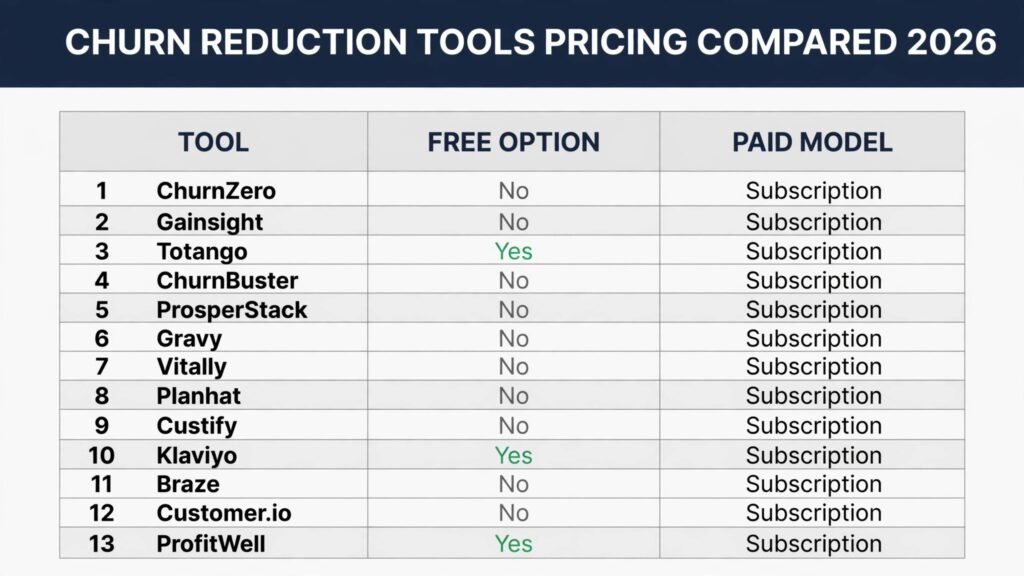
Pricing compared
| Tool | Free option | Paid model | Watch the cost driver |
|---|---|---|---|
| ChurnZero | No | Subscription, check checkout | Number of accounts |
| Gainsight | No | Subscription, check checkout | Accounts plus implementation |
| Totango | Yes | Subscription, check checkout | Accounts and plan tier |
| ChurnBuster | No | Subscription, check checkout | Cancellation volume or saved revenue |
| ProsperStack | No | Subscription, check checkout | Cancellation volume |
| Gravy | No | Subscription, check checkout | Recovered revenue share if applicable |
| Vitally | No | Subscription, check checkout | Number of accounts |
| Planhat | No | Subscription, check checkout | Accounts and data sources |
| Custify | No | Subscription, check checkout | Number of accounts |
| Klaviyo | Yes | Subscription, check checkout | Number of contacts |
| Braze | No | Subscription, check checkout | Messages and channels |
| Customer.io | No | Subscription, check checkout | Profiles and message volume |
| ProfitWell | Yes | Subscription, check checkout | Retain performance pricing if used |
The cheapest honest stack for a small team is Totango for prediction plus ProsperStack for cancel flows plus Klaviyo free tier for win-back, covering all three save windows for low starting cost. The enterprise version is Gainsight or ChurnZero plus a dedicated cancel flow tool plus Braze. Either way, budget for the data work: connecting product usage, billing, and support data is where most churn projects stall, and no tool fixes a missing data connection on its own.
How to Choose
Start from your churn split, not from a feature list. Separate voluntary churn, where the customer chose to leave, from involuntary churn, where a payment failed. Then separate early churn, in the first ninety days, from later churn at renewal. Each split points to a different tool: early churn to onboarding and health scoring, renewal churn to prediction and playbooks, payment churn to Gravy or dunning, cancel flow churn to ChurnBuster or ProsperStack. A team that buys a prediction platform when its real problem is failed payments will measure the wrong thing well.
Next, check your data before you buy. List the signals a prediction tool needs: logins, feature usage, support tickets, billing status, and CRM notes. If two of those live only in someone head or in a monthly spreadsheet, fix that first or pick a tool with lighter data needs. A health score built on login counts alone will flag every seasonal customer as at risk, and the team will learn to ignore it.
Then run a save test, not a demo. Pick twenty at risk accounts, run the tool playbook on them for thirty days, and measure how many stayed past the next renewal compared with a control group. Insist on measuring saves past thirty days, not saves on cancel day, because a discount that delays cancellation by two weeks is not a save.
Finally, assign an owner. Name one person who reviews at risk accounts each week, one who owns cancel flow offers, and one who owns win-back campaigns. Without owners, the tools become expensive dashboards that describe churn accurately while it keeps happening.
Mistakes to avoid
Buying prediction before fixing data is the most common mistake. A model trained on incomplete usage data will rank accounts with confidence and be wrong in ways that look plausible. Spend the first month on data connections and score tuning, even if that delays the launch.
Treating every cancel the same is the second mistake. A customer leaving over price, one leaving over a missing feature, and one leaving because their company shut down need different responses. Segment cancel reasons before writing offers, and build a different flow for each top reason.
Discounting at cancel without limits is the third mistake. A save offer that cuts price in half may keep the account this month and teach the customer that cancelling earns a discount. Put a floor on save offers, limit how often an account can receive one, and track whether saved accounts stay past ninety days.
Mailing every lapsed customer the same win-back email is the fourth mistake. Customers who left angry, for budget, or for timing are different audiences. Segment win-back by cancel reason and time since cancel, and suppress anyone with an open complaint or unresolved support case.
Measuring saves on cancel day only is the fifth mistake. A true save is an account still paying and using the product ninety days later. Report both numbers: cancels stopped at the flow, and accounts still active after ninety days. The gap tells you whether offers work or merely delay exits.
Ignoring involuntary churn is the sixth mistake. Failed payments are easy to overlook, but they can account for a large share of lost accounts. Check your failed payment rate before concluding that your product has a retention problem.
Frequently asked questions
Do AI churn tools actually reduce churn, or do they just predict it?
They reduce churn only when a prediction triggers an action with an owner and a deadline. A risk score alone changes nothing. Teams that pair prediction with playbooks, cancel flows, and win-back campaigns see results. Teams that buy a dashboard and keep working the same way see accurate reports about churn that continues.
What is the difference between churn prediction and health scoring?
Churn prediction ranks accounts by likelihood of leaving, often using machine learning on usage and billing signals. Health scoring combines signals into a single score a human can act on. Many tools do both.
How much data do I need before a churn tool is useful?
You need consistent usage data, billing status, and support history for your recent customer base. Perfect data is not required, but a tool fed only by billing dates will miss early warning signs from usage drops. Start with the three signals you already track reliably, and add more as data quality improves.
Should a small team buy an enterprise churn platform?
Usually not at first. A small team gets more value from Totango or Vitally for health and prediction, plus a cancel flow tool, than from an enterprise platform needing dedicated admin time. Move to Gainsight when account value and team size make the structure worth the overhead.
What cancel offer works best?
There is no universal best offer. Price sensitive customers respond to a smaller plan or a pause. Customers leaving over a missing feature respond to a roadmap answer or a workaround, not a discount. Customers leaving over support respond to a named contact and a fix. Test offers by cancel reason, and measure ninety day retention of saved accounts, not just the save rate at cancel.
How long should win-back campaigns run?
Most win-back value comes in the first ninety days after cancellation, while the customer still remembers the product and the reason for leaving. Run a short sequence in that window, then move long lapsed customers to a low frequency update list tied to genuine news such as a major feature release. Mailing a year old lapsed list weekly burns sender reputation for little return.
Conclusion
Churn reduction is not one tool. It is three windows, each needing its own owner and measure. Prediction and health scoring protect the window before renewal. Cancel flows protect the moment of decision. Win-back campaigns protect the months after cancellation. The tools in this guide cover those windows, but they only work when warnings turn into actions, offers match cancel reasons, and saves are measured at ninety days rather than on cancel day.
If you are starting from scratch, start with the leak you can measure today: failed payments first if they show in billing reports, health scoring and onboarding playbooks if early accounts go quiet, prediction and success playbooks if cancels cluster around renewal. Pick one window, assign an owner, run a thirty day save test, and expand from what the test proves.