
A call center manager starts the shift and cannot see which agents are ready, which are stuck on a hard call, and which have been idle for twenty minutes, and that blind floor is the problem the best ai employee monitoring tools for call centers are built to solve. A call center is a room full of simultaneous conversations, and a manager who can only see the queue totals cannot coach the agent who needs help right now. The tool is not there to watch people for the sake of watching. It is there to show the floor in real time, flag the agent who is struggling, and prove the work that the team actually did.
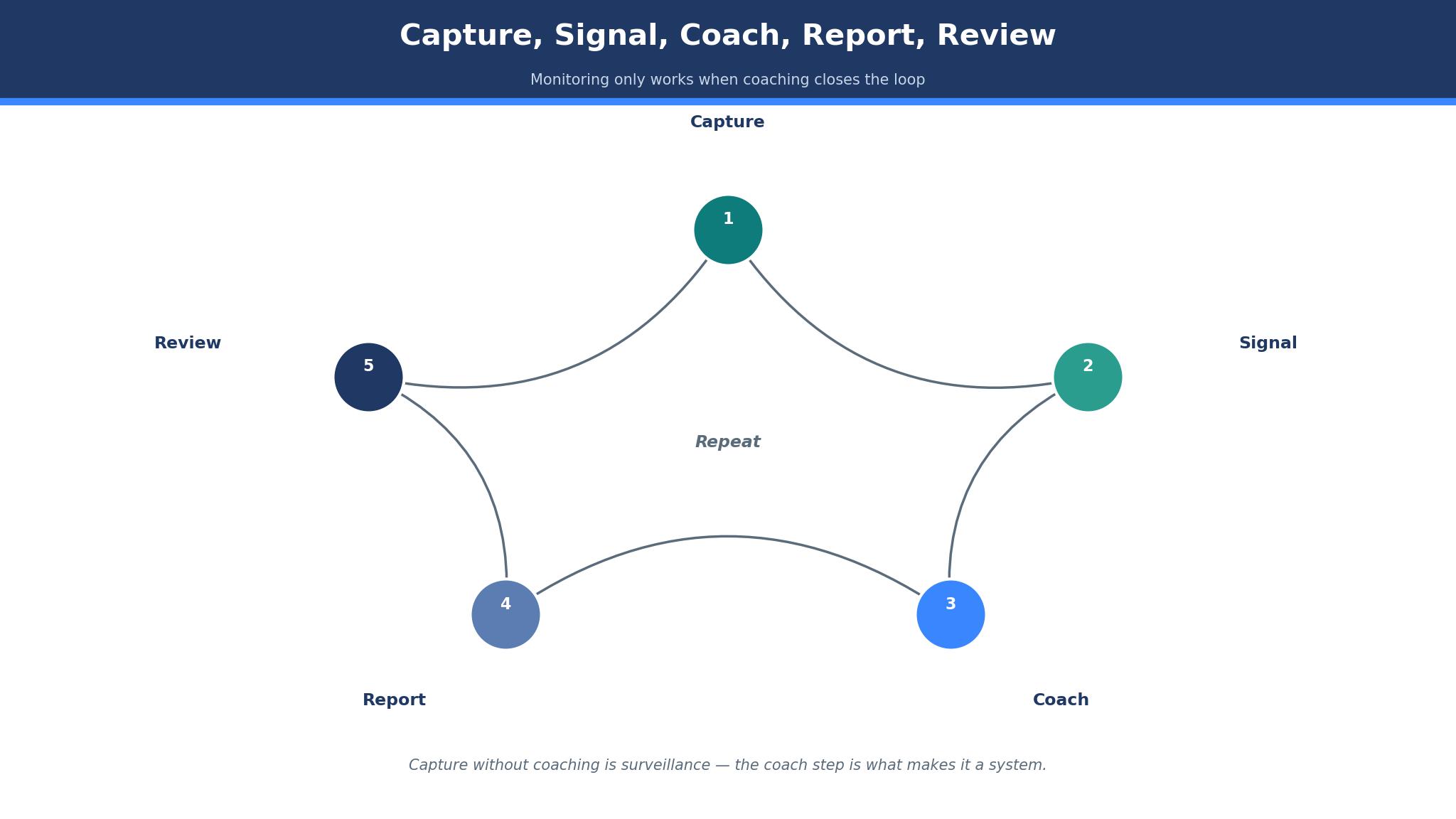
The workflow runs in four steps. Agent activity is captured across calls, screens and applications, the AI turns that activity into productivity and quality signals, the manager coaches from the signals rather than from gut feel, and the reports show the client what the team delivered.
Teramind leads this guide because it covers security, behaviour and productivity in one platform with the deepest monitoring in the category. ActivTrak follows for teams that want productivity analytics without keystroke logging. All fifteen tools were checked live in November 2026, and the prices are vendor list prices or figures the text flags as reported, so verify the live price before you buy.
A Call Center Runs on Visible Work
A call center floor is visible work, and a manager who cannot see it cannot run it. An agent on a hard call needs a supervisor’s help in the moment, not in a review a week later, and a team that is short-staffed on a busy morning needs the manager to see the gap before the queue explodes. The best ai employee monitoring tools for call centers earn their place by showing the floor live, because a problem spotted in real time is a problem that can be fixed before the customer feels it.
Quality is the second test. A center that only counts calls will reward fast agents and punish careful ones, while a center that watches quality beside speed can coach both.
Monitoring, Coaching and Trust in One System
Monitoring without coaching is surveillance, and a team that feels watched will find ways to look busy rather than to work well.
Trust needs rules the team can see. Agents should know what is captured, what is not, and who can read the reports, because a monitoring tool introduced in secret will damage morale faster than any productivity gain can repair.
The 15 Tools at a Glance
| Tool | Main job | Best for | Starting price |
|---|---|---|---|
| Teramind | Security and behaviour monitoring | Security-led centers | From 14 dollars a seat a month |
| ActivTrak | Productivity analytics | Analytics without keystrokes | Free, paid from 10 dollars a month |
| Hubstaff | Time tracking and payroll | Hourly and remote teams | From 4.99 dollars a month |
| Time Doctor | Time and productivity tracking | BPO and outsourced teams | From 6.67 dollars a month |
| Insightful | Workforce analytics | Hybrid and call center teams | From 8 dollars a seat a month |
| Veriato | Insider risk monitoring | High-security centers | Pricing on the vendor site |
| DeskTime | Automatic time tracking | Simple shift tracking | From 7 dollars a month |
| Monitask | Time and screenshot tracking | Small teams | Pricing on the vendor site |
| Kickidler | Screen and activity monitoring | Visual supervision | Pricing on the vendor site |
| Controlio | Real-time activity monitoring | Live floor visibility | Pricing on the vendor site |
| WorkTime | Non-invasive monitoring | Teams that reject screenshots | From 6.99 dollars a month |
| InterGuard | Employee monitoring suite | Regulated centers | Pricing on the vendor site |
| StaffCop | Monitoring and DLP | Security and compliance | Pricing on the vendor site |
| Apploye | Time tracking and monitoring | Small remote teams | Pricing on the vendor site |
| SentryPC | Computer monitoring and control | Small centers | Pricing on the vendor site |
Best Pick by Job
| Job type | First pick | Second tool | Why this pair works |
|---|---|---|---|
| Security-led center | Teramind | Veriato | Teramind covers behaviour and DLP and Veriato adds insider risk |
| Productivity analytics | ActivTrak | Insightful | ActivTrak analyses patterns and Insightful adds call center features |
| Hourly and remote teams | Hubstaff | Time Doctor | Hubstaff joins time and payroll and Time Doctor adds BPO depth |
| Tightest budget | Hubstaff | WorkTime | Hubstaff starts cheapest and WorkTime adds non-invasive tracking |
| Non-invasive monitoring | WorkTime | ActivTrak | WorkTime never captures screens and ActivTrak adds analytics |
Name the risk before naming the tool. A center handling payment data needs security and data loss prevention, while a center running hourly agents needs time tracking and payroll, and a platform that covers both halves halfway still leaves the floor blind on the work it does all day. Choose the tool built for the risk the center actually carries, and keep the other one in reserve for the gaps the first leaves open.
Headcount sets the bill. A center with fifty agents can run Hubstaff or Time Doctor for a few hundred dollars a month, while Teramind costs far more per seat. The best ai employee monitoring tools for call centers are judged on the visibility they give at real headcount, not on the entry price.
How to Judge the best ai employee monitoring tools for call centers
Start with one real shift, because that is where a monitoring tool either earns its fee or wastes it. Run the tool across the floor for a full shift, watch the live dashboard, and check whether it shows who is ready, who is stuck and who is idle without a manager walking the floor. A good tool surfaces the struggling agent in minutes, and a tool that only produces a report the next day is a historian rather than a manager.
Next, test the coaching loop. Pick one agent, look at the week’s signals together, and see whether the conversation is about the work rather than about the numbers. The best ai employee monitoring tools for call centers make the one-to-one better, because a manager who can show an agent their own week can coach rather than accuse.
Then check the privacy settings before the rollout. Confirm what is captured, what is blurred, and who can read the reports, and put those rules in writing for the team.
The 15 Tools in Detail
Live visibility, coaching value and honest pricing set the order below, so the tool that shows the floor best leads the list.
1. Teramind
Teramind is the deepest monitoring tool in this guide, covering behaviour analytics, insider risk and data loss prevention beside productivity tracking. The Starter plan costs 14 dollars a seat a month billed annually, with UAM at 28 dollars and DLP at 32 dollars, and every plan needs a five-seat minimum. The platform watches application use, web activity, file movement and screen behaviour, and it flags risky actions before data leaves the building.
The drawback is the price and the weight. Teramind costs more than any time tracker in this guide, and one source lists Starter at 21 dollars a seat a month, which conflicts with the 14 dollar annual figure, so the price should be confirmed with the vendor.
Teramind suits a security-led call center. It fits a center that handles payment data, and a team that must prove data protection to a client. The data loss prevention is the feature that matters, because a file that leaves the building unnoticed is a breach the center cannot explain.
Run a staged data-theft attempt and see how fast Teramind flags it. A warning that lands after the file is gone is a warning too late.
2. ActivTrak
ActivTrak is the analytics pick, built for productivity and workload patterns without keystroke logging. The free plan covers up to three people, and paid plans start at 10 dollars a user a month billed annually, with Workforce Management at 15 dollars and higher tiers above it. The platform shows which applications agents use, how time is spent, and where the workload is uneven, which helps a manager balance the floor.
The drawback is the add-on pricing and the screenshot gap. The best features start at 15 dollars a user, and screenshots come through a paid add-on whose price is not listed, so the honest comparison is the total cost per user rather than the entry price.
ActivTrak suits a center that wants analytics without intrusion. It fits a team that values workload balance, and a manager who coaches from patterns rather than from screenshots. The workload analytics are the feature that matters, because a floor with an even workload is a floor that burns out slower.
Compare the workload chart with the shift rota for one busy week. When the peaks line up with the nights the floor felt stretched, the analytics are telling the truth.
3. Hubstaff
Hubstaff is the cheapest entry in this guide, with Starter at 4.99 dollars a user a month billed annually, and it joins time tracking, screenshots and payroll in one place. The platform covers hourly and remote teams, with GPS for field staff, activity scores, and payments that run from the tracked hours. The Grow plan costs 7.50 dollars and Team costs 10 dollars a user a month.
The drawback is the activity measure and the minimums. Activity scores reward input rather than output, so an agent who types a lot looks better than one who solves a call calmly, and every paid plan needs a two-seat minimum.
Hubstaff suits an hourly and remote team. It fits a center that pays by the hour, and a team that needs time and payment in one place. The payroll link is the feature that matters, because hours tracked beside pay are hours the center can defend.
Pay one real week from Hubstaff hours and compare it with the roster. If the money matches the shifts worked, the tracking earns its keep.
4. Time Doctor
Time Doctor is the BPO pick, built for remote and outsourced teams with time tracking, productivity monitoring and payroll. The Basic plan costs 6.67 dollars a user a month billed annually, with Standard at 11.70 dollars and Premium at 16.70 dollars, and the platform adds work-life balance reporting that shows when agents are overworked. The tool is widely used in outsourcing, which suits a center with agents in several countries.
The drawback is the tier jump and the payroll gate. Payroll and integrations start at Standard, so a center that needs them pays nearly double the entry price, and the Basic plan is thin on the features a BPO client expects.
Time Doctor suits a BPO and outsourced center. It fits a team with agents across time zones, and a center that reports hours to a client. The BPO depth is the feature that matters, because a client that outsources wants proof of hours and proof of care.
Open the balance report after a heavy week and look for the agents who never stopped. The report should name them before the manager does.
5. Insightful
Insightful, formerly Workpuls, is the workforce analytics pick with dedicated call center features. The Workforce Analytics plan costs 8 dollars a seat a month billed annually, with Workflow Optimization at 12 dollars and a combined plan at 16 dollars, and the platform tracks location-aware productivity, call center metrics and screen activity with optional blur. The tool suits a hybrid team with agents on site and at home.
The drawback is the add-on pricing and the minimums. Screen recording and on-demand screenshots cost extra, at around 4 dollars a seat a month each, so the full monitoring picture costs more than the entry price.
Insightful suits a hybrid call center. It fits a team with agents on site and remote, and a center that needs call center metrics beside productivity. The call center features are the ones that matter, because a tool built for the floor understands the shift.
Put the call center metrics beside the queue board for a full day. A tool that reads the floor should mirror what the supervisors already see.
6. Veriato
Veriato is the insider risk pick, built for high-security centers that must watch for data theft and policy breaches. The platform monitors user behaviour, flags anomalies, and records activity for investigation, which suits a center that handles sensitive data and must prove its controls to a client or a regulator. The vendor does not publish a price, so a buyer must ask for a quote based on users and features.
The drawback is the price opacity and the focus. Veriato is a security tool first, so a center that mainly needs time tracking will pay for investigation features it never uses, and the lack of published pricing makes a quick comparison hard.
Veriato suits a high-security center. It fits a team that handles financial or health data, and a center that must investigate incidents. The investigation recording is the feature that matters, because a breach that is recorded can be proven and a breach that is not cannot.
Stage a policy breach and follow the investigation trail. The trail must read clearly to someone who was not in the room.
7. DeskTime
DeskTime is the simple automatic tracking pick, recording time, applications and documents without the agent starting a timer. The Pro plan is reported from around 7 dollars a user a month, with annual billing figures reported between 6.42 and 9.17 dollars, so the exact price should be confirmed on the vendor site. The platform suits a center that wants shift tracking with minimal setup.
The drawback is the depth and the price range. DeskTime is a time tracker rather than a full monitoring suite, so a center that needs screen recordings, DLP or coaching workflows will outgrow it.
DeskTime suits a center that wants simple shift tracking. It fits a team that needs automatic time capture, and a small center that wants a quick setup. The automatic tracking is the feature that matters, because a timer an agent forgets to start is a timer that loses the shift.
Let DeskTime run untouched for a week, then match its record against the roster. A tracker earns trust only when its hours add up.
8. Monitask
Monitask is the small-team pick, covering time tracking, screenshots and activity monitoring at a price that suits a center with a handful of agents. The platform shows live screenshots, tracks applications and websites, and produces reports a small manager can read in minutes. Plans are priced by the vendor per user, and the exact figure appears on the pricing page.
The drawback is the scale and the depth. Monitask is built for small teams, so a center with hundreds of agents will find the reporting and the admin tools thin, and the AI features are lighter than Teramind or ActivTrak.
Monitask suits a small call center. It fits a team of ten or twenty agents, and a manager who wants screenshots beside the hours. The live screenshots are the feature that matters, because a manager who can see the floor can coach it.
Show an agent one busy hour of screenshots and ask what happened. If pictures and calls agree, Monitask is doing its job.
9. Kickidler
Kickidler is the visual supervision pick, built around live screen viewing, recordings and activity tracking. A manager can watch the floor in real time, replay a call, and see exactly what an agent did, which suits a center where visual proof matters. The platform covers keystroke and application monitoring, with reports that show the day in detail. The vendor quotes on request.
The drawback is the intrusiveness and the trust cost. Kickidler watches screens closely, so a team that values privacy will push back, and a center that rolls it out without clear rules will damage morale.
Kickidler suits a center that needs visual supervision. It fits a team where screen proof settles disputes, and a manager who coaches from recordings. The live screen view is the feature that matters, because a floor a manager can see is a floor a manager can run.
Replay one tense call with the agent and coach from the recording. If the next call runs better, Kickidler has earned its place.
10. Controlio
Controlio is the live visibility pick, showing real-time activity across the floor as it happens. The platform tracks applications, websites and productivity in real time, with alerts that tell a supervisor when an agent goes idle or opens a blocked application. The tool suits a manager who runs the floor from a live dashboard rather than from end-of-day reports. Each deployment is priced separately.
The drawback is the visibility and the price. Controlio is less widely reviewed than the larger tools, so a buyer has fewer independent reports to lean on, and the pricing is not published plainly.
Controlio suits a center that runs on a live dashboard. It fits a manager who watches the floor in real time, and a team that needs idle alerts. The real-time alerts are the feature that matters, because an idle agent spotted in minutes is an idle agent who can be helped.
Let one agent go idle during a rush and time the alert. A supervisor told in minutes can help; one told at day’s end cannot.
11. WorkTime
WorkTime is the non-invasive pick, and it never captures screenshots or keystrokes at any tier. The platform tracks application use, website visits and productivity from performance data alone, which suits a center whose agents and whose clients reject screen capture. The Basic plan costs 6.99 dollars a user a month, with Premium at 8.99 dollars and Enterprise at 10.99 dollars, and a free plan covers up to three employees.
The drawback is the visual gap. WorkTime cannot show what an agent saw on screen, so a manager who needs screen proof for a dispute will find the tool thin, and the analytics are lighter than ActivTrak for a team that wants deep patterns.
WorkTime suits a center that rejects screenshots. It fits a team with a privacy-sensitive workforce, and a client that forbids screen capture. The no-screenshot promise is the feature that matters, because a tool the team accepts is a tool the team will not work around.
Ask the team whether the productivity scores feel fair after a week. A tool the agents accept will outlast one they work around.
12. InterGuard
InterGuard is the regulated-center pick, covering employee monitoring, data loss prevention and compliance in one suite. The platform tracks activity, blocks risky actions and records evidence for audit, which suits a center that must prove its controls to a regulator or a client. Modules and user counts drive the quote.
The drawback is the weight and the visibility. InterGuard is a full suite, so a small center will find the setup heavy and the price enterprise-shaped, and the brand is less widely reviewed than Teramind, so a buyer has fewer independent reports.
InterGuard suits a regulated call center. It fits a team that handles sensitive data, and a center that must pass audits. The compliance evidence is the feature that matters, because a control an auditor can verify is a control the center can keep.
Hand the audit trail to an outsider and ask what it proves. Evidence that convinces a stranger will convince an auditor.
13. StaffCop
StaffCop is the monitoring and DLP pick, built for security and compliance beside productivity tracking. The platform watches user activity, flags policy breaches and blocks data leaks, which suits a center that must protect client data while tracking the work. The vendor quotes plans by user count and feature set, with no public list price.
The drawback is the focus and the scale. StaffCop is a security tool first, so a center that mainly needs time tracking will find the depth unnecessary, and the platform is less known in the United States than Teramind, so a buyer has fewer independent reports.
StaffCop suits a security-minded center. It fits a team that protects client data, and a center that needs DLP beside monitoring. The DLP blocking is the feature that matters, because a leak that is blocked is a leak that never becomes a breach.
Try to move a restricted file and watch StaffCop react. A clean block with a clear report is the whole point.
14. Apploye
Apploye is the small remote team pick, covering time tracking, screenshots and productivity monitoring in a simple package. The platform suits a center with remote agents, with GPS tracking, payroll and reports that a small manager can read quickly. Pricing is set by the vendor for each team size, and the current plans are listed on its site.
The drawback is the scale and the depth. Apploye is built for small remote teams, so a center with hundreds of agents will find the reporting thin, and the AI features are lighter than Teramind or ActivTrak.
Apploye suits a small remote center. It fits a team with agents working from home, and a manager who needs time and screenshots together. The remote tracking is the feature that matters, because a remote floor a manager can see is a remote floor a manager can run.
Check a remote agent’s logged hours against the calls they handled. When the two agree, the remote floor is genuinely visible.
15. SentryPC
SentryPC is the small-center control pick, covering computer monitoring, application control and time tracking for a modest team. The platform lets a manager see activity, limit applications and set schedules, which suits a center that needs control over what agents can open. The cost follows the computer count and the feature set.
The drawback is the scale and the polish. SentryPC is built for small teams, so a large center will find the reporting and the admin tools thin, and the interface is functional rather than modern.
SentryPC suits a small center that needs control. It fits a team that must limit applications, and a manager who wants schedules beside monitoring. The application control is the feature that matters, because a floor where the right applications are open is a floor that stays on task.
Set an application limit, then watch whether agents stay inside it all week. Limits that hold without complaints are limits the floor accepts.
Monitoring Rules That Keep Agents on Side
The most expensive mistake is rolling out monitoring without telling the team. Agents who discover a monitoring tool by accident will assume the worst, and the trust that takes months to build will break in a day. Tell the team what is captured, what is not, and who reads the reports, and put it in writing before the first shift is watched. The best ai employee monitoring tools for call centers make those rules easy to set, because a program the team understands is a program the team will accept.
A second mistake is using the data only for discipline. A manager who only opens the reports to punish an agent will teach the team to game the numbers, while a manager who uses the same reports to coach will teach the team to improve. A monitoring tool that only punishes is a tool the team will work around.

Frequently Asked Questions
Is employee monitoring legal in a call center?
Yes, in most cases, when the employer tells the team what is monitored, follows the law in the state or country where the agents work, and limits the monitoring to work systems. Consent rules differ by location, and some places require notice before any monitoring starts. A center should check local law and put the monitoring policy in writing before the rollout.
Which monitoring tool is best for a call center?
Teramind is the best starting point for a security-led center, because it covers behaviour, insider risk and data loss prevention in one platform. ActivTrak is the better pick when the team wants analytics without keystrokes, and Hubstaff is the better pick when the budget is tightest. A center should test the top two with one real shift before paying.
How much does employee monitoring software cost per user?
Monitoring software costs between 4.99 and 14 dollars per user a month on the entry paid tier, with the median around 7 to 10 dollars on annual billing. Hubstaff starts at 4.99 dollars, Time Doctor starts at 6.67 dollars, and Teramind starts at 14 dollars a seat a month. Enterprise tools such as Veriato and InterGuard are priced by sales and cost far more.
Can monitoring improve agent performance?
Yes, when the data is used for coaching rather than for punishment, because an agent who sees their own week can fix what is slow and repeat what works.
What is the least invasive monitoring tool?
WorkTime is the least invasive tool in this guide, because it never captures screenshots or keystrokes at any tier and tracks productivity from performance data alone. ActivTrak is the next least invasive pick, since it does not log keystrokes and makes screenshots an optional add-on. A center that values trust should start with WorkTime and add depth only if the team agrees.
Do agents know they are being monitored?
They should, because a center that monitors in secret will lose trust the moment the team finds out, and several laws require notice before monitoring starts. A good rollout tells the team what is captured, what is blurred, and who reads the reports, and it shares each agent’s own data with that agent. Transparency is not just the law in many places, and it is the only way the program survives its first month.
The Verdict on AI Employee Monitoring Tools for Call Centers
Teramind takes the top spot because it is the tool a call center is least likely to regret. The monitoring is the deepest in this guide, the security features protect the client data the center is trusted with, and the behaviour analytics show the floor in real time. The price is the highest here, but the cost of a data breach is higher, and the best ai employee monitoring tools for call centers are the ones that protect the work while they measure it.
ActivTrak is the pick for analytics without intrusion, Hubstaff is the pick for the tightest budget, and WorkTime is the pick for a team that rejects screenshots. The best ai employee monitoring tools for call centers are not the ones with the longest feature list, they are the ones that show the floor honestly, coach the agents who need help, and cost less than the trust they preserve.
Choose by the risk the center carries first, by coaching value second and by price third. A center that picks this way will spend less time guessing about its floor and more time helping the agents who answer the phones.