Shopify vs WooCommerce is the comparison most new store owners actually need in 2026, because the two platforms solve the same problem in opposite ways. Shopify sells you a finished store system: hosting, checkout, security updates and support bundled into one monthly bill. WooCommerce gives you a free plugin for WordPress and leaves hosting, security and maintenance in your hands, which buys freedom at the price of responsibility. Neither approach is better in the abstract. The right choice depends on how much technical work you want to own, how fast you need to launch, and how much control you need over every part of the store.
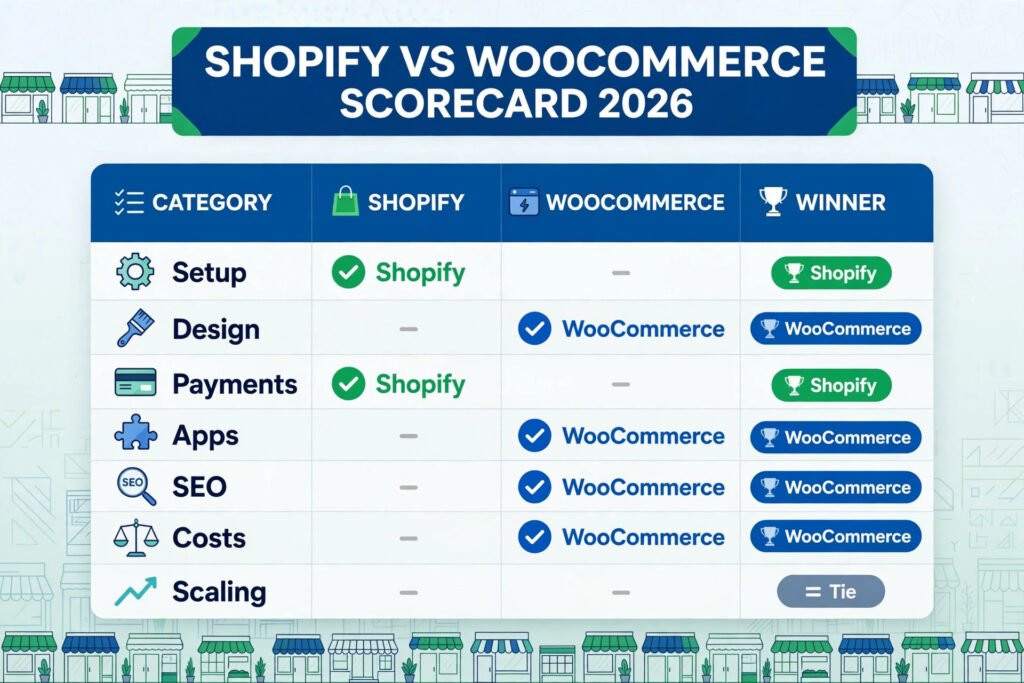
The honest summary is short. Shopify wins on speed to launch and on how little you have to manage day to day. WooCommerce wins on ownership and on long term flexibility, especially if you already run a WordPress site or you need a checkout flow that no hosted platform will let you build. Everything else in this guide is evidence for that summary, tested feature by feature, so you can see exactly where each platform earns its place.
Quick verdict: Shopify vs WooCommerce at a glance
| Question | Winner | Why it wins |
|---|---|---|
| Fastest store launch | Shopify | Hosted setup, guided onboarding, checkout ready in hours |
| Lowest starting cost | WooCommerce | Plugin is free, you pay only for hosting and a domain |
| Most design freedom | WooCommerce | Full access to theme code and any plugin you want |
| Easiest day to day running | Shopify | Updates, security and backups handled for you |
| Best for large catalogs | Tie | Both handle thousands of products with the right setup |
| Best for content led selling | WooCommerce | WordPress blogging and SEO tooling built in |
| Best for hands off owners | Shopify | One vendor, one bill, one support team |
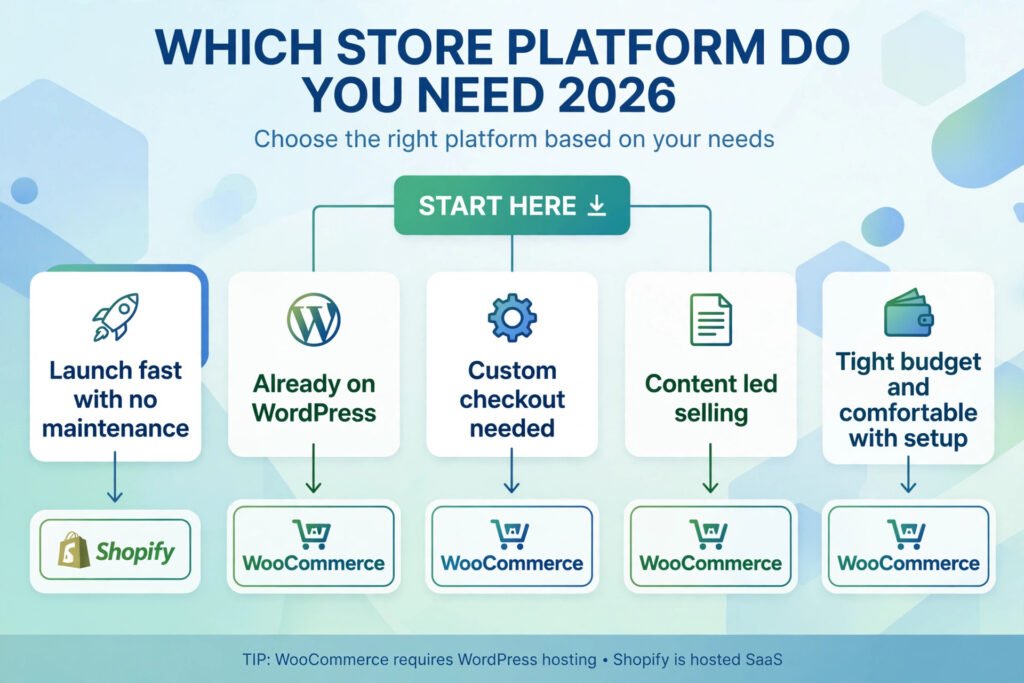
If you want to sell this week with as little setup as possible, pick Shopify. If you want to own every part of your store and you are comfortable managing a WordPress site, pick WooCommerce. If you already have a WordPress site with traffic, WooCommerce is usually the cheaper and simpler move, because you add selling to a site you already run.
Shopify vs WooCommerce head to head
| Feature | Shopify | WooCommerce |
|---|---|---|
| Setup | Sign up, pick a theme, add products, go live | Install WordPress, add hosting, install the plugin, configure |
| Hosting | Included in every plan | You buy it separately |
| Monthly cost model | Flat subscription plus apps and transaction fees | Hosting plus extensions, no platform subscription |
| Design control | Theme editor plus limited code access | Full theme and code access |
| Payment options | Shopify Payments plus 100 plus gateways | Stripe, PayPal and dozens more via extensions |
| App and plugin library | Shopify App Store, thousands of apps | WordPress plugin directory, tens of thousands of plugins |
| SEO control | Good basics, some URL and redirect limits | Full control over URLs, schema and redirects |
| Content and blogging | Basic blog built in | WordPress, the strongest blogging platform available |
| Security updates | Handled by Shopify | Your responsibility, or your host’s |
| Scaling | Upgrade plan, platform scales with you | Upgrade hosting, caching and database as you grow |
| Ownership | You rent the platform | You own the site, the data and the code |
The table shows the core trade clearly. Shopify trades control for convenience. WooCommerce trades convenience for control. The rest of this guide tests whether that trade holds up in the jobs that matter: launching, adding products, checking out and running a sale.
Shopify in depth
Shopify is a hosted commerce platform. You pay a monthly subscription and Shopify provides the store software, the hosting, the security certificates, the checkout and the support. You never touch a server, never apply a security patch and never worry about whether a plugin update will break the checkout. That is the whole appeal, and for many store owners it is worth the monthly fee on its own.
Getting started is deliberately simple. You create an account, choose a theme from the theme store, add your products with titles, prices and photos, connect a payment provider, and set a domain. A basic store can be live in a day, and a careful owner can do it in an afternoon. The theme editor lets you change colors, fonts, sections and page layouts without code, and the free themes are genuinely usable rather than placeholders designed to push you toward a paid theme.
Shopify’s checkout is its strongest asset. It is fast, tested on enormous traffic volumes, and optimized for mobile by default. Shop Pay, its accelerated checkout, lets returning customers complete a purchase in very few taps, which matters because checkout friction is where most lost sales happen. Abandoned cart recovery, discount codes, gift cards and multi currency selling are built in or one app away.
The app store extends Shopify in almost every direction: email marketing, reviews, subscriptions, bundles, loyalty programs, print on demand and accounting. The trade is cost. Apps are usually billed monthly, and a store with ten paid apps can easily double its platform bill. App quality also varies, so every new app deserves a trial and a check of its reviews and support history before it touches a live store.
Pricing: Shopify sells monthly plans in tiers, from a basic plan for new stores up to advanced plans for high volume sellers, with annual billing available at a lower monthly equivalent. Exact current rates change over time, so check checkout before you commit. Budget separately for paid themes and paid apps, which are the two costs that surprise new owners most.
Best for: First time store owners, owners who want to launch fast, and anyone who would rather pay a monthly fee than manage hosting and updates.
Watch out for: Transaction fees if you use a payment gateway other than Shopify Payments, app costs that stack up quietly, and limits on checkout customization unless you are on a higher tier plan.
Try it at: shopify.com

WooCommerce in depth
WooCommerce is a free, open source plugin that turns a WordPress site into a store. WordPress itself is free, but you still need hosting, a domain name and usually a few paid extensions. That stack is the point: you assemble the store from parts you choose, and you own every part of it. There is no platform vendor who can change your pricing, close your account under a policy change, or limit what your checkout can do.
Setup takes longer than Shopify, and you should budget for that honestly. You need a WordPress installation, a hosting plan that can handle commerce traffic, the WooCommerce plugin, a theme that supports it, and payment gateway extensions for Stripe or PayPal. Managed WooCommerce hosting removes much of this friction, and for most owners it is worth the extra hosting cost, because the host then handles backups, caching and security patching that you would otherwise do yourself.
Where WooCommerce pulls ahead is control. You can edit any template, build any checkout flow, add any custom field to a product, and connect to any service with an API. If you need a quote based checkout for wholesale buyers, a booking flow tied to a calendar, or a membership area bundled with products, WooCommerce can do it without asking a platform for permission. The plugin library is enormous, which is both a strength and a risk: with tens of thousands of options, choosing well maintained extensions matters more than choosing many of them.
Content is the other quiet advantage. WordPress is the most widely used content platform on the web, and its blogging, SEO and editorial tools are deeper than anything a hosted store platform offers. If your selling strategy depends on articles, guides and search traffic, that matters. A store that also publishes useful content will usually rank and convert better than a store that only lists products, and WooCommerce makes that strategy natural rather than bolted on. Owners who write regularly may also find the freelance writing workflow familiar, since WordPress is the same system many professional writers publish on every day, as covered in our guide to the best AI tools for freelance writers.
Pricing: The WooCommerce plugin itself is free. Your real costs are hosting, a domain, a theme if you buy a premium one, and paid extensions for payments, subscriptions, bookings or advanced shipping. That makes the total highly variable: a small store on shared hosting can run very cheaply, while a high traffic store on managed hosting with several premium extensions can cost as much as a Shopify plan. Check checkout for each extension before you buy, because extension pricing is usually annual.
Best for: WordPress site owners, owners who need custom checkout flows, content led stores, and anyone who wants full ownership of their site and data.
Watch out for: Update responsibility, plugin conflicts, and hosting quality. A cheap host that slows down under sale traffic will cost you more in lost orders than a better host costs in fees.
Try it at: woocommerce.com

Side by side tests
Test 1: Launch a store
On Shopify, launching means signing up, picking a theme, adding a logo and a handful of products, connecting payments and pointing a domain at the store. Most owners finish in a day, and the platform guides each step. On WooCommerce, launching means setting up WordPress and hosting first, then installing and configuring the plugin, choosing a theme, and connecting payments. Expect a weekend rather than a day unless you use managed hosting with a one click installer. Winner: Shopify, by a clear margin, for first time owners.
Test 2: Add a product
Both platforms handle product creation well. Shopify’s product editor is clean and consistent: title, description, photos, price, inventory and variants in one place. WooCommerce matches it and adds more flexibility, with custom attributes, downloadable products, grouped products and variable pricing rules available out of the box or through extensions. For a standard physical product there is no meaningful difference. For unusual products, such as a booking, a bundle with options, or a product with a dozen custom fields, WooCommerce is more flexible. Winner: tie for standard products, WooCommerce for unusual ones.
Test 3: Checkout
Shopify’s checkout is faster to set up and harder to break. It is a single, tested flow with accelerated options and strong mobile performance. WooCommerce checkout is fully customizable, which is powerful and also a risk: a badly chosen extension or a slow host can make checkout slower than Shopify’s. With good hosting and a standard gateway, WooCommerce checkout performs well, but it will not beat Shopify’s out of the box speed without work. Winner: Shopify for speed and reliability, WooCommerce for customization.
Test 4: Run a sale
Running a sale tests the whole store at once: traffic spikes, discount codes, inventory accuracy and email follow up. Shopify handles traffic spikes without owner intervention, and discount codes, automatic discounts and sale collections are built in. WooCommerce handles sales well too, but only if hosting is sized for the spike and caching is configured. Discount and coupon tools in WooCommerce are strong, and the ability to customize sale pages without limits is a real advantage for stores that run complex promotions. Winner: Shopify for hands off reliability, WooCommerce for promotion flexibility.

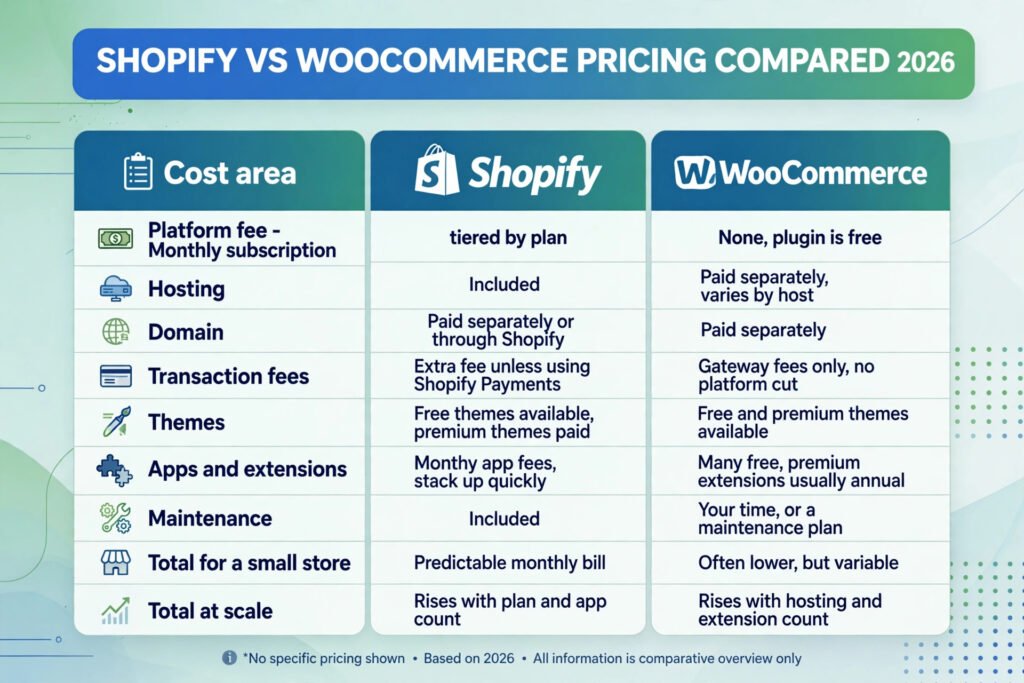
Shopify vs WooCommerce pricing compared
| Cost area | Shopify | WooCommerce |
|---|---|---|
| Platform fee | Monthly subscription, tiered by plan | None, plugin is free |
| Hosting | Included | Paid separately, varies by host |
| Domain | Paid separately or through Shopify | Paid separately |
| Transaction fees | Extra fee unless using Shopify Payments | Gateway fees only, no platform cut |
| Themes | Free themes available, premium themes paid | Free and premium themes available |
| Apps and extensions | Monthly app fees, stack up quickly | Many free, premium extensions usually annual |
| Maintenance | Included | Your time, or a maintenance plan |
| Total for a small store | Predictable monthly bill | Often lower, but variable |
| Total at scale | Rises with plan and app count | Rises with hosting and extension count |
The pricing lesson is simple: Shopify is predictable, WooCommerce is variable. A small store often costs less on WooCommerce, especially in year one, because there is no platform subscription. A store that grows will pay more on either platform, just in different places: Shopify in plan upgrades and apps, WooCommerce in hosting and extensions. Before you choose, add up the full stack you actually need, not just the headline price, and check checkout for every paid part.
Social selling belongs in that calculation too. Both platforms connect to Instagram and Facebook shops, so a store that already earns attention on social media can turn posts into product pages on either system. If Instagram is a major sales channel for you, read our guide to the best AI tools for Instagram before you pick a theme, because the tools that create social content will shape which product photos and videos you need.
Ownership, lock in and exit options
Ownership is the difference owners notice last and regret most, so it deserves its own section. With Shopify, you own your products, your customer list and your order history, and you can export them. You do not own the platform, the theme framework or the checkout code, and if Shopify changes its pricing or its policies, your options are to accept the change or migrate. Migration is doable, but it is real work, and it usually means rebuilding the design from scratch.
With WooCommerce, you own the site, the database, the theme files and every customization. You can move the whole store to a different host in an afternoon by moving files and a database, and no vendor can change your monthly bill or close your store. The price of that freedom is responsibility: backups, updates and security are yours to arrange, and a neglected store can break or get hacked in ways a hosted store would not.
Neither model is a trap, but they fail differently. Shopify fails by raising costs or limiting a feature you depended on. WooCommerce fails when maintenance slips and an outdated plugin breaks the checkout during a sale. Choose the failure
mode you would rather manage. If the thought of a plugin conflict keeps you up at night, Shopify is worth its fee. If the thought of
a platform price rise or policy change bothers you more, WooCommerce is worth its learning curve.
How to Choose: who should pick which
Pick Shopify if you want to launch this week, you have no WordPress site, you dislike technical maintenance, or you want one vendor to call when something breaks. It is also the safer pick if your team is small and nobody wants to own hosting, updates and security.
Pick WooCommerce if you already run WordPress, you need a custom checkout or product flow, content and search traffic drive your sales, or ownership of your data and code matters more to you than convenience. It is also the right pick if your budget is tight and you are comfortable learning basic WordPress maintenance.
Pick neither yet if you have no product and no audience. Both platforms are easy to start and hard to abandon once you have orders, customers and content tied to them. Validate the product first, with a simple landing page and a waitlist, then choose the platform that fits how you actually sell.
If you are still torn, run a two week test. Build the same five products on both platforms, run the same checkout test, and time how long each setup takes you. The platform that feels easier in that test is usually the right one, because ease of use in week one predicts ease of use in month twelve.
Mistakes to avoid
Choosing on price alone. The cheapest headline price rarely means the cheapest store. Count hosting, themes, apps, extensions and your own time before you compare.
Ignoring transaction fees. On Shopify, using a third party gateway adds a platform fee on top of the gateway fee. On WooCommerce, gateway fees still apply. Read the fee schedule before you launch, not after your first sale.
Installing too many apps or plugins. Every app is a monthly cost and a possible conflict. Start with the few you need, add one at a time, and remove anything you stop using.
Skipping backups. Shopify backs up your store as part of the service. WooCommerce owners must arrange backups, ideally automatic daily backups through the host or a backup plugin, and test a restore at least once.
Forgetting mobile. Most store traffic is mobile. Test every page, every product and the full checkout on a real phone before you announce the launch.
Copying a competitor’s stack. A store doing ten times your volume needs different hosting, apps and processes. Build for your current size with room to grow, not for someone else’s size.
Frequently asked questions
Is WooCommerce really free?
The plugin is free, but a working store is not. You pay for hosting and a domain, and usually for a theme or a few extensions. For a small store the total is often lower than a Shopify subscription, but it is never zero.
Can I move from Shopify to WooCommerce later?
Yes, products, customers and orders can be exported and imported, but themes, apps and checkout customizations do not transfer. Migration is possible and common, but budget a few days for it and expect to rebuild the design.
Can I move from WooCommerce to Shopify later?
Yes, with the same caveat in reverse. Your content and products move, your theme and plugins do not. Plan the migration around a quiet sales period.
Which platform is better for SEO?
WooCommerce has the edge, because WordPress gives full control over URLs, redirects, schema and content structure. Shopify covers the SEO basics well and ranks fine for most stores, but owners who depend heavily on search traffic usually prefer the extra control WooCommerce offers.
Do I need coding skills for WooCommerce?
No, for a standard store. You need comfort with installing plugins, reading settings pages and following setup guides. Code only becomes necessary for custom flows, and many owners hire a developer for those specific jobs.
Which platform handles high traffic better?
Both handle high traffic with the right setup. Shopify absorbs spikes automatically. WooCommerce needs hosting sized for the spike and caching configured in advance. If you expect a large launch day, test with a traffic simulation before it happens.
Final Verdict
Shopify vs WooCommerce comes down to a single question: do you want convenience or control? Shopify is the better choice for most new store owners, because it removes hosting, security and updates from your workload and gets you selling fast. WooCommerce is the better choice for owners who already run WordPress, need a checkout or product flow that a hosted platform will not allow, or value full ownership over convenience.
Our pick for a first store is Shopify, for speed and simplicity. Our pick for a content led store, a custom store, or a store built on an existing WordPress site is WooCommerce, for ownership and flexibility. Either way, choose based on how you will run the store in a year, not on which signup page looks friendlier today, and revisit the decision only when your needs genuinely change.