
HubSpot vs Salesforce is the CRM comparison most growing companies ask about first, and the answer is rarely about which platform is better in the abstract. It is about which platform fits the team that has to live in it every day. HubSpot grew out of inbound marketing and built a CRM around ease of use, with sales, marketing, service, and content tools that share one contact record. Salesforce grew out of enterprise sales and built a platform around depth, with a data model and automation engine that can be shaped to almost any sales process, provided someone is available to shape it. Both are proven at scale. Both can fail in the wrong company. The difference in 2026 is not features on a checklist. It is setup time, admin burden, total cost over two years, and how much process change your team will accept.
This guide compares the two platforms the way a buyer should test them: on the jobs a CRM must do daily. We cover ease of use, sales tools, marketing tools, automation, integrations, reporting, and costs. Then we run four side by side tests that mirror real work: adding a lead, building a pipeline, sending a campaign, and building a report. Pricing is described as October 2026 plan models, with a clear instruction to check checkout where a vendor prices by seats, edition, or usage, because CRM pricing changes with add ons and contract terms. At the end you get a straight verdict for each buyer type, and the mistakes that turn a good CRM choice into an expensive shelfware purchase.
Quick verdict: HubSpot vs Salesforce
| Buyer | Pick this one | Why in one line |
|---|---|---|
| Small team, no dedicated admin | HubSpot | Live in days, not months, with marketing included |
| Mid size team that needs marketing plus sales in one place | HubSpot | One contact record across marketing, sales, and service |
| Large sales org with complex territories and approvals | Salesforce | Deeper data model, permissions, and automation at scale |
| Company with a Salesforce admin or partner already | Salesforce | Existing skill makes the depth usable instead of costly |
| Team that wants the lowest admin burden | HubSpot | Less configuration, fewer decisions before first value |
| Regulated or multi entity org with strict governance needs | Salesforce | Granular permissions, audit trails, and custom objects |
The short version: HubSpot wins on speed to value and simplicity. Salesforce wins on depth, control, and scale. If your team will not staff an admin, that single fact should weigh more than any feature table. If your sales process genuinely needs custom objects, territory rules, and approval chains, no amount of simplicity will replace that depth.
HubSpot vs Salesforce at a glance
| Area | HubSpot | Salesforce |
|---|---|---|
| Ease of use | Strong. Clean interface, guided setup, most teams self serve | Capable but heavier. Powerful, with a learning curve and admin needs |
| Sales tools | Strong pipeline, sequences, meeting links, quotes, and forecasting | Very strong pipeline, forecasting, opportunity management, and CPQ options |
| Marketing tools | Built in: email, landing pages, forms, social, ads, and workflows | Strong through Marketing Cloud and Account Engagement, often separate products and cost |
| Automation | Visual workflows, good for common sales and marketing flows | Very deep: Flow, approvals, and custom logic for complex processes |
| Integrations | Large app marketplace, native tools cover most needs | Very large ecosystem through AppExchange, plus MuleSoft for enterprise integration |
| Reporting | Good dashboards and custom reports, simpler to build | Very deep reports and dashboards, with more setup effort |
| Costs | Free CRM to start, paid hubs by seat and tier, costs rise with hubs and contacts | Edition based pricing by user, costs rise with editions, clouds, and admin time |
| Best for | Small to mid size teams, marketing led growth | Large or complex sales orgs, enterprises with admin capacity |
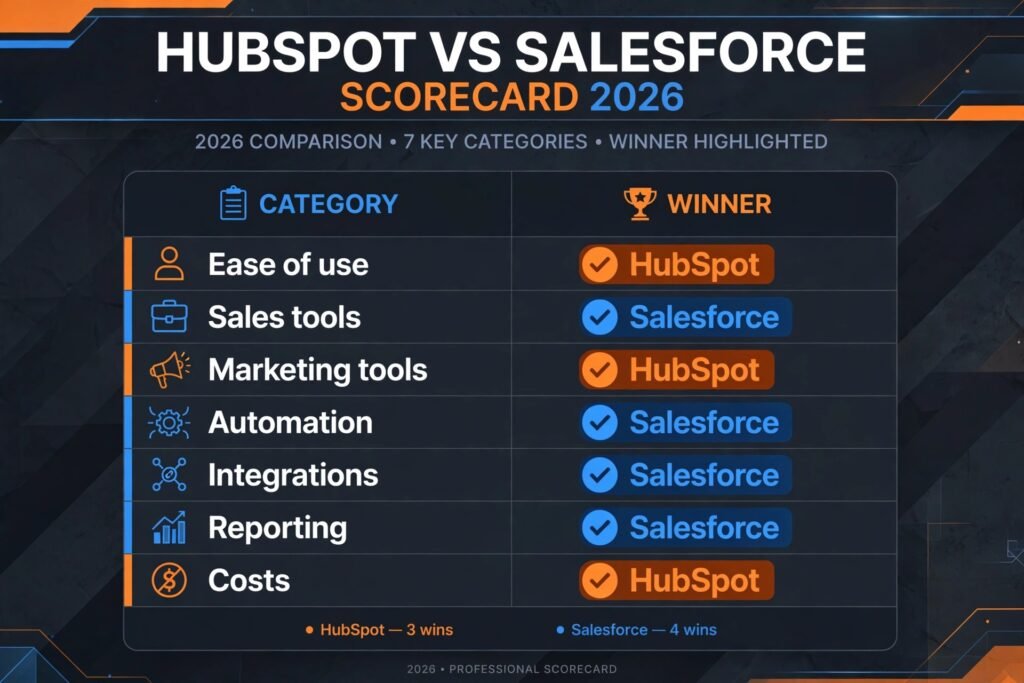
Read that table as a trade off, not a score. HubSpot gives you more of the system out of the box. Salesforce gives you more room to build exactly the system you want, at the price of building it.
HubSpot in depth
HubSpot is a customer platform built around one CRM record. Contacts, companies, deals, tickets, and marketing activity live in the same place, so a sales rep can see which emails a prospect opened, which pages they visited, and which support tickets are open, without switching tools. The platform is sold as hubs: Marketing Hub, Sales Hub, Service Hub, Content Hub, and Operations Hub. You can start with the free CRM and add hubs as needs grow. That modular path is one of the main reasons small teams pick HubSpot first.
The sales tools cover the daily work well. Pipelines are visual and easy to change. Sequences automate follow up emails and tasks. Meeting links remove scheduling back and forth. Quotes and payment links close the loop from deal to money for many small businesses. Forecasting is present in paid tiers and is good enough for teams with a standard pipeline, though it is less flexible than Salesforce forecasting for complex multi level rollups.
Marketing is where HubSpot pulls ahead for most buyers in this comparison. Email, landing pages, forms, workflows, social scheduling, and ad tracking are native, not bolted on. A form submission can create a contact, trigger a workflow, notify a rep, and enroll the lead in a nurture sequence with no integration work. For marketing led teams, that single record is the product. The trade off is that HubSpot is opinionated. It nudges you toward its way of working, and heavy customization outside its model takes workarounds or Operations Hub data tools.
Pricing: Free CRM available. Paid hubs are priced by tier and seats, with Starter, Professional, and Enterprise levels. Marketing contacts and add ons change the bill, so check checkout for your contact count and hub mix before budgeting. No precise total is quoted here because the same team can pay very different amounts depending on which hubs they buy.
Best for: Small to mid size teams, marketing led companies, and teams without a dedicated CRM admin.
Watch out for: Costs climb as you add hubs and marketing contacts. Advanced reporting and custom objects need higher tiers. Teams that outgrow the standard data model may need Operations Hub or a migration plan.
Try it at: hubspot.com

Salesforce in depth
Salesforce is a platform first and a CRM second, and that distinction explains both its strength and its cost. At its core is Sales Cloud: accounts, contacts, opportunities, leads, activities, and forecasting, built on a data model you can extend with custom objects, fields, and relationships. Around it sit Service Cloud, Marketing Cloud, Commerce Cloud, Slack, Tableau, and a large partner ecosystem on AppExchange. For a large company, that breadth is the point. One platform can carry sales, service, marketing, and analytics with shared identity and governance.
The sales tools are deep. Opportunity management handles complex deals with products, price books, quotes, and approvals. Forecasting supports hierarchy rollups and territory based views that large sales leaders rely on. Automation through Flow can route, approve, score, and update records across objects in ways that go well beyond simple if this then that workflows. Einstein AI features add forecasting insight, lead scoring, and generative help inside records, though value depends on data quality, which is true of every AI feature in this market.
The cost of that depth is admin effort. Salesforce rewards companies that invest in an admin, a clear data model, and change control. Without that, orgs accumulate unused fields, duplicate automation, and reports nobody trusts. Implementation timelines are longer than HubSpot in most cases, and partner help is common for enterprise rollouts. That is not a flaw. It is the price of a system designed to be shaped to a large company rather than adopted as is.
Pricing: Edition based pricing by user, with Starter, Professional, Enterprise, and Unlimited style tiers for Sales Cloud, plus separate clouds for marketing, service, and analytics. Exact totals depend on edition, user count, add ons, and contract terms, so check checkout and get a written quote before budgeting. Admin and implementation time should be budgeted alongside licence cost.
Best for: Large sales organisations, complex processes, multi team and multi entity companies, and teams that already have Salesforce skill in house.
Watch out for: Licence cost plus admin cost is the real total. Marketing tools often sit in separate clouds with separate pricing. Small teams can easily buy more platform than they will use in year one.
Try it at: salesforce.com
Side by side tests: the same four jobs in both platforms
Feature lists hide friction. Tests reveal it. Here are four jobs every CRM buyer should run in a trial, with what to expect in each platform.
Test 1: Add a lead and route it to the right rep
In HubSpot, a lead can arrive from a form, a manual entry, or an import, and a workflow can assign it by territory, company size, or source in minutes of setup. The rep gets a notification, the contact timeline shows the source, and follow up tasks appear automatically. A small team can build this without an admin.
In Salesforce, lead assignment uses assignment rules and queues, which are more powerful and more fiddly. You can route by territory, product interest, and rep capacity, and you can add approval steps for large deals. The setup takes longer, and testing matters, because a misrouted rule can send good leads to the wrong queue for days. Verdict: HubSpot is faster to set up. Salesforce is stronger when routing rules get complex. If your routing is simple, do not pay the complexity tax.

Test 2: Build a pipeline your managers will actually use
HubSpot pipelines are quick to create, easy to rename, and simple to report on. A sales manager can build stages, set required fields, and create a forecast view in one sitting. The limit appears when a company runs several product lines with different stages, approvals, and forecasting rules in one org. It can be done, but the model gets crowded.
Salesforce handles multi pipeline, multi team selling more naturally. Opportunity stages, record types, and forecasting hierarchies let each team work its own way while leadership rolls results up. The trade off is governance: someone must own the data model, or each team invents its own fields and reporting breaks. Verdict: HubSpot for one clear pipeline. Salesforce for several pipelines that must roll up cleanly.
Test 3: Send a campaign and prove what it did
HubSpot is built for this test. Build a list, write the email in the same tool, send it, and watch opens, clicks, and attributed deals on the contact record. Landing pages and forms feed the same system, so attribution is mostly automatic for standard campaigns. If social is a major channel in your campaigns, our guide to the best AI tools for Instagram can help you plan the social side, but the CRM job itself stays inside HubSpot.
Salesforce can do this well, but usually through a separate marketing product. Account Engagement suits B2B nurture and scoring inside the Salesforce world. Marketing Cloud suits large scale, multi channel journeys. Both are strong, and both add cost, integration, and skill needs. A buyer who expects marketing to be included in the CRM price will be surprised. Verdict: HubSpot wins this test for most small and mid size teams. Salesforce wins only when campaign complexity justifies a dedicated marketing cloud.

Test 4: Build a report a CEO will trust
HubSpot reports are fast to build and easy to read. Pipeline by stage, deals by source, and activity by rep are a few clicks away. Custom reports exist in higher tiers, and they cover most standard questions. The limit is cross object complexity. Questions that join many custom objects, or need weighted multi level forecasting, can hit walls.
Salesforce reporting is deeper and slower to master. Reports and dashboards can join objects, filter by hierarchy, and serve different views to different teams. Once built and governed, they are the system of record for large sales orgs. The risk is report sprawl: dozens of similar reports, each slightly different, each defended by its owner. Verdict: HubSpot for speed and clarity. Salesforce for depth, provided someone owns the reporting catalogue.
Pricing compared
| Area | HubSpot | Salesforce |
|---|---|---|
| Free option | Free CRM with core contacts, deals, and tasks | Trial and Starter tier, no full free CRM equivalent |
| Paid model | Hubs by tier and seat, plus marketing contacts | Editions by user, plus clouds and add ons |
| Marketing cost | Included in Marketing Hub tiers | Often separate Marketing Cloud or Account Engagement cost |
| Admin cost | Low for most small teams | Material: admin, partner, or both for large orgs |
| Cost risk | Hub and contact creep over time | Edition, cloud, and integration creep over time |
| Best value signal | One bill covering sales plus marketing | One platform covering complex sales at scale |
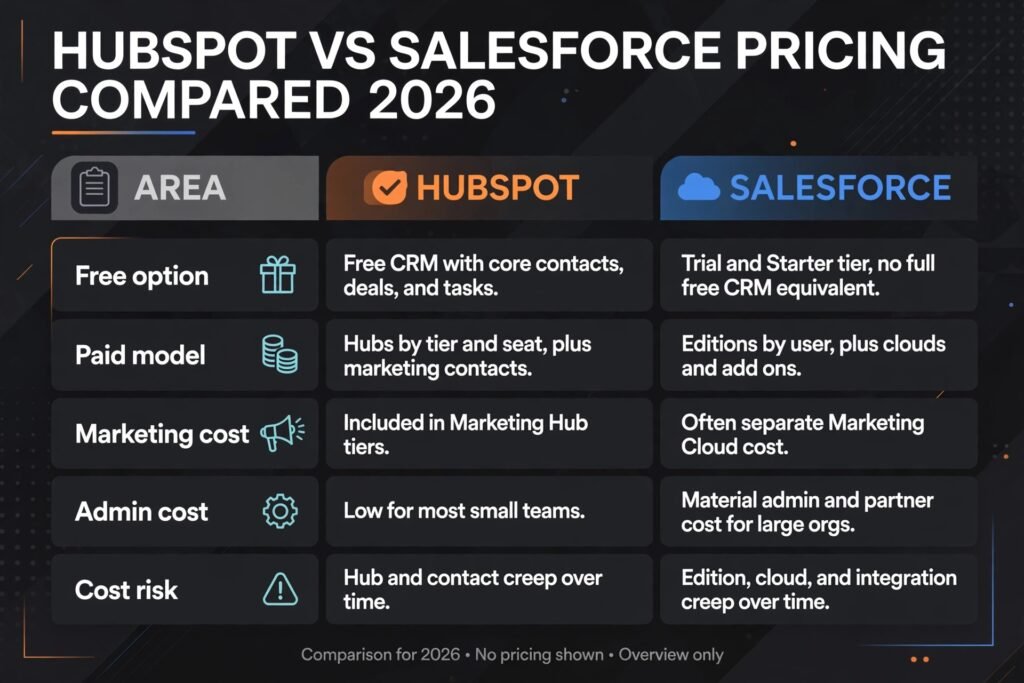
Do not compare headline seat prices alone. Compare the two year total: licences, hubs or clouds, implementation, admin time, training, and the cost of delay while the system is being configured. HubSpot usually wins the small team total. Salesforce can win the large org total, because the alternative is often several disconnected tools plus the integration work to hold them together. In both cases, check checkout and get pricing in writing for your exact seat count, edition, and hub mix. CRM vendors discount on contract, and list prices alone mislead in both directions.

How to Choose: who should pick which
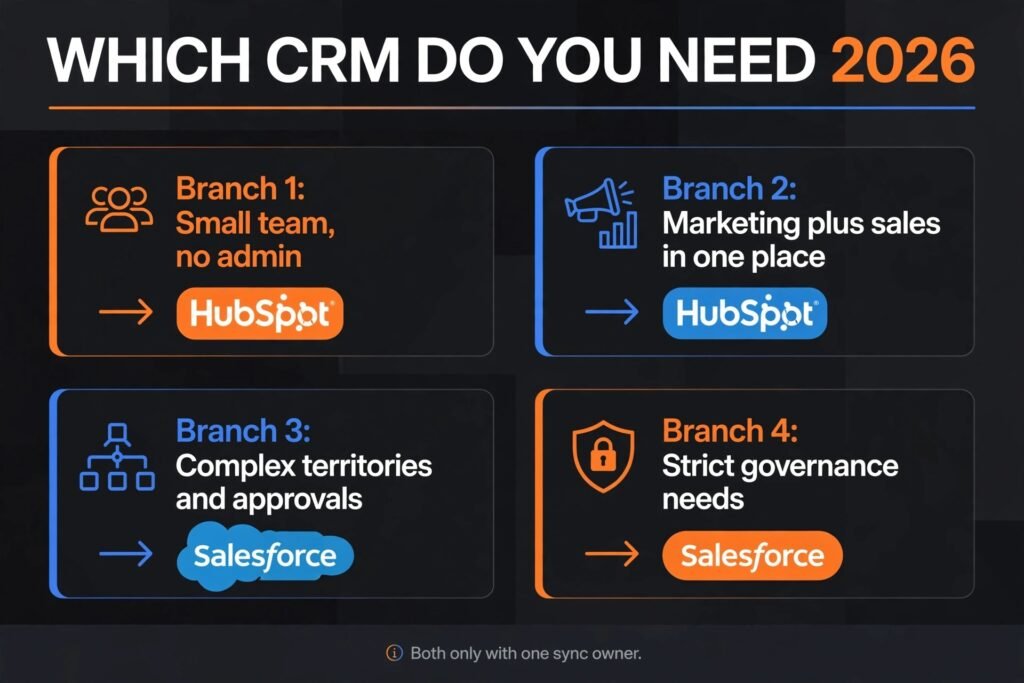
Pick HubSpot if most of these are true. Your team is under fifty people in sales and marketing. You have no dedicated CRM admin and do not plan to hire one soon. Marketing and sales must share one record without integration projects. You need value in the first month, not the first quarter. Your pipeline is standard, with one or two variations, not five. You would rather adapt your process slightly to a good system than build a perfect system slowly.
Pick Salesforce if most of these are true. Your sales org is large, layered, or split by territory, product, or region. Your process needs custom objects, approvals, and forecasting hierarchies. You already have, or will hire, Salesforce admin skill. Marketing runs at a scale that justifies a dedicated marketing cloud. Governance, audit, and permissions are board level requirements, not nice extras. You are buying a platform for five years, not a tool for this quarter.
Pick both only in a narrow case: a large company that runs Salesforce for enterprise sales and HubSpot for a marketing led business unit, with a clear integration and a single owner for the sync. Running both without that owner creates two versions of the truth, and the sync becomes a permanent project. For most companies, one system, used well, beats two systems half adopted.
A practical tie breaker is the trial test in the section above. Run the four tests with real data and real users, not demo data. Time each test. Ask the people who will live in the system which one they understood without training. The platform your team adopts is worth more than the platform with the longer feature list.
Mistakes to avoid
Buying on feature lists. A longer list does not mean a better fit. Score each platform on your four tests, not on a vendor slide.
Ignoring admin cost. Salesforce without admin time is an expensive database. HubSpot without a process owner still drifts, just more slowly. Budget the human cost in both cases.
Starting with a migration instead of a pilot. Run one team or one pipeline first. Prove routing, reporting, and adoption before moving the whole company.
Letting marketing and sales buy separately. Two tools, two records, and a sync project is the most common CRM regret in this comparison. Decide who owns the customer record before you sign.
Overbuilding in month one. Custom fields, workflows, and reports multiply fast. Every custom item is a future maintenance cost. Build the minimum that runs the business, then add only on evidence.
Forgetting data quality. Duplicate contacts, stale deals, and missing close dates break forecasting in both platforms. Clean data before migration, and assign an owner for it after.
Judging AI features on demos. AI scoring, summaries, and drafting help only when records are complete and consistent. Test them on your own messy data, not a polished demo org.
Signing for seats you will not fill. CRM contracts reward honesty about headcount. Buy for the team you have, with a path to grow, not for the team you hope to hire next year.
Frequently asked questions
Is HubSpot really free?
The core CRM is free, with contacts, deals, tasks, and basic reporting. Paid value starts when you need marketing automation, sequences, advanced reporting, or higher limits. Most growing teams pay for at least one hub, so budget for that step rather than assuming free forever.
Is Salesforce too complex for a small business?
It can be, but it is not always. Salesforce Starter suits small teams with simple needs. The risk is buying Enterprise editions and extra clouds before the process justifies them. Start small, prove adoption, and expand only when a specific limit blocks real work.
Can you migrate from HubSpot to Salesforce later?
Yes, and many companies do. Contacts, companies, deals, and activities migrate with planning, but workflows, reports, and custom logic must be rebuilt. Treat migration as a project with data cleaning and user training, not as a file export.
Can you migrate from Salesforce to HubSpot later?
Yes, with the same warning in reverse. Standard records move cleanly. Complex custom objects and automation need redesign to fit HubSpot’s model. Companies usually move this way to cut admin cost and simplify, so scope the simplification honestly before promising it.
Which one is better for marketing?
HubSpot, for most small and mid size teams, because marketing tools are native to the CRM. Salesforce marketing tools are strong at enterprise scale, but they usually arrive as separate products with separate pricing and skill needs.
Which one is better for reporting?
Salesforce, for depth and hierarchy reporting at scale, provided reporting is governed. HubSpot, for speed and clarity on standard sales and marketing questions. The right answer depends on whether your hardest question is simple or cross object.
Final verdict
HubSpot vs Salesforce ends where most good buying decisions end: with the buyer, not the product. Choose HubSpot if you want a system your team will adopt quickly, with marketing and sales on one record and low admin burden. You will give up some depth, and you will pay more as hubs and contacts grow, but you will get value fast and keep it with a small team.
Choose Salesforce if your sales process is genuinely complex, your org is large or layered, and you will staff the admin skill to run it well. You will pay more in licences and people, and setup will take longer, but you will get a platform that can carry that complexity for years without workarounds.
If you are still unsure after reading this guide, run the four tests with your own data and your own users. The platform that survives contact with your real pipeline, your real campaign, and your real report is the right one. Do not buy the platform that wins a slide deck. Buy the one your team will still be using, with clean data, in twelve months.