
Looka is the best pick for most photographers, because it produces a clean mark, hands over the vector files a print lab actually needs, and builds a small brand kit around the logo without charging a monthly fee for the privilege. The best logo makers for photographers are judged on a narrower test than most logo guides use. A photographer does not need a logo that looks clever on a screen. A photographer needs a mark that stays readable on a watermark across a wedding photo, on a business card handed to a bride, on the spine of an album, and on a website header at a hundred pixels wide.
The 8 Tools at a Glance
This table compares the best logo makers for photographers on the facts that decide a purchase. Each price below was taken from vendor pages and recent roundups checked in November 2026. When two sources quoted different prices, the guide flags the clash instead of smoothing it over.
| Tool | Entry price for usable files | Vector files | Best for |
|---|---|---|---|
| Looka | $65 one-time Premium | Yes, Premium | Most photographers |
| Tailor Brands | From $9.99 a month | Yes, paid plans | New business setup |
| Canva | Free, Pro about $120 a year | Yes, Pro | Fast social and print assets |
| Design.com | Free to start | Check at checkout | Fast start with a matching site |
| Wix Logo Maker | From about $20 | Yes, paid | Photographers already on Wix |
| Hatchful by Shopify | Free | Limited | A free first mark |
| Logo.com | Free to design | Paid plans | Quick experiments |
| Adobe Express | Free, Premium about $10 a month | Yes, Premium | Photographers in the Adobe world |
What a Photographer Logo Has to Survive
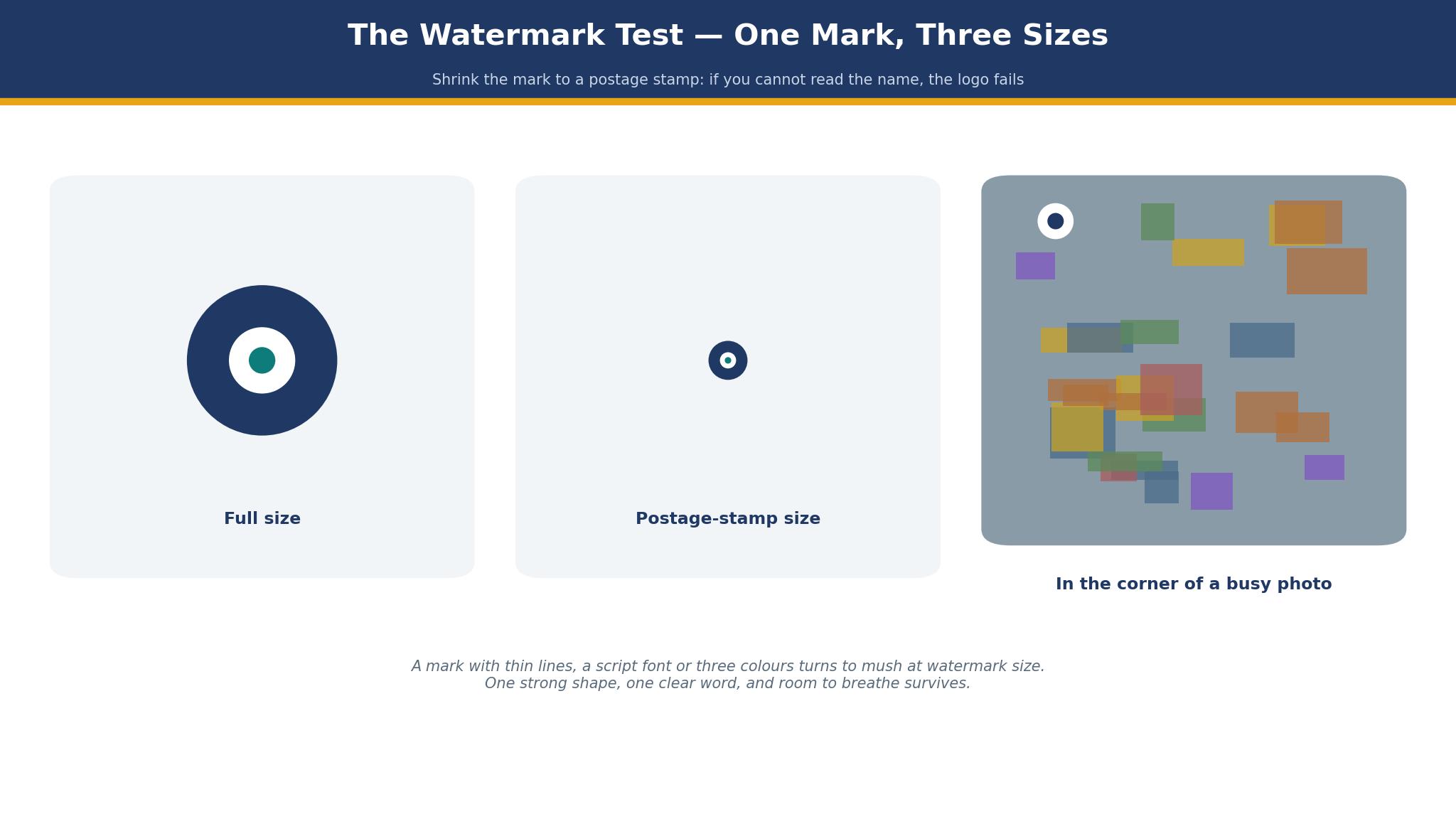
A wedding photographer watermarks hundreds of images a year. The mark sits in a corner of a photo that is already busy with faces, flowers and light, and it must be legible at a small size without shouting over the image. That test kills most logo maker output on the first try. A mark with thin lines, a script font, or three colours turns to mush at watermark size. A mark with one strong shape, one clear word, and room to breathe survives. Before you pay for anything, shrink the preview to the size of a postage stamp and look at it from arm’s length. If you cannot read the name, the logo fails, however pretty it looks full size.
The second test is print. Albums, business cards, thank-you cards and packaging all need files a printer can use, and a low-resolution PNG will not do. A printer wants a vector file, usually SVG or EPS, or a high-resolution PNG with a transparent background. Several makers in this list charge nothing to design and then charge for the files that matter, and the cheapest package often leaves out exactly those files. The real price of a logo is the price of the package that includes vectors, transparency and full commercial rights. Anything less is a preview you paid for.
The third test is consistency. A photographer is a brand across a website, an Instagram grid, a price guide, an album and a van. A logo maker that only sells a single image file leaves the photographer to rebuild the brand by hand in every new place. A maker with a brand kit, with matching social templates, business cards and email signatures, saves hours every month. That is why the subscription kits matter even when the one-time logo looks cheaper on day one.
There is a fourth test that many of the best logo makers for photographers pass only in part, and it is the single-colour test. A watermark on a dark wedding photo needs a white version, a stamp on a kraft album box needs a black version, and a foil deboss on a leather cover needs a mark that works with no colour at all. Ask the maker to show the logo in one colour before you pay, because a mark that needs three colours to read will fail on the very surfaces where a photographer uses it most, and fixing that after the albums are printed means paying for the brand twice.
The 8 Tools in Detail
This section tests the best logo makers for photographers one at a time, against the same three tests. A tool earns its place by passing the watermark test, the print test and the consistency test, not by having the longest template list. Every price named in this guide was checked in November 2026.
1. Looka
Looka is the strongest all-rounder in this list, and it earns the top spot by giving a photographer the files that matter at a one-time price. You answer a short set of questions about style and industry, and Looka generates variations from a logo-specific template engine. The finished package is a mark plus business cards, social templates and, on the higher tier, a basic website. For a photographer launching a studio, that bundle covers the first year of branding in one purchase.
Pricing shows how the tier works. Basic costs about $20 once and hands over a PNG logo, but only in limited sizes and with no transparent background. Premium costs about $65 once and adds SVG vectors, transparent-background PNGs in several sizes, black and white versions, and full commercial rights. The Brand Kit subscription runs about $96 a year and adds over 300 marketing assets, while Brand Kit with a website is around $129 a year. Some recent roundups list Premium at $72, so confirm the checkout figure before you pay.
One wedding photographer’s bill shows what the files really cost. A wedding photographer who buys Premium once pays $65 and owns the files outright. She can watermark every image, print business cards, and put the mark on an album cover without paying again. A photographer who also wants the Brand Kit pays $96 a year for the templates, which is $8 a month for a set of social posts, price guides and email signatures that would take hours to design by hand. The one-time purchase is the better deal for a photographer who already has design software. The subscription is the better deal for a photographer who wants the assets done for her.
The weakness is control. Looka generates variations from templates, and a photographer with a strong eye may find the options feel familiar rather than distinctive. You can edit colours, fonts and layouts, but you cannot draw a mark from scratch. If your studio name is unusual or your style is very specific, a template engine will struggle to capture it. For most photographers, the trade is worth it. For a studio built on a highly personal visual style, a freelance designer may still be the better spend.
2. Tailor Brands
Tailor Brands is less a logo maker than a business-launch platform with a logo maker inside it. Alongside logo design, it bundles LLC formation in the United States, a website builder, domain registration, and basic marketing tools. A photographer who has not yet formed a business, registered a domain, or built a site will find the bundle tempting, because it handles four jobs in one place.
Pricing is subscription-based, and the subscription math matters. Plans are commonly listed from $9.99 a month on the entry plan, rising with higher tiers that add vector files and more branding tools. Some guides list a Starter plan from $48 a year for branding access, while others list Essential and Elite tiers at $20 and $50 a month. LLC formation plans are separate, commonly $199 to $249 a year plus state fees. The spread in published figures means you should read the checkout page carefully and confirm what the plan you are buying actually includes.
The three-year maths tells the story better than the monthly price. A photographer paying $9.99 a month pays about $120 a year, every year, for a logo she could own outright for $65 elsewhere. The extra money buys the formation tools, the website builder and the ongoing templates, and those may be worth it in year one. By year three, the subscription has cost $360 against a $65 one-time purchase, and the gap is hard to justify unless the photographer still uses the formation and website tools. Do the three-year sum before you subscribe.
Tailor Brands falls short on the watermark test for some photographers. Its marks are clean and modern, but they lean toward corporate styles that suit a consultancy better than a creative studio. A photographer should test the mark at watermark size and on a real photo before paying, because a logo that looks good on a white page can disappear on a busy wedding image.
3. Canva
Canva is the tool most photographers already have open, and that familiarity is its strength. A photographer can design a logo, then immediately use it on a price guide, a social post, a thank-you card and a mood board, all in the same account. The logo maker itself is simple, and the value is in the assets around it rather than the mark alone.
The pricing is plain to read. Canva is free to design, and Pro costs about $120 a year, or about $10 a month on annual billing, with vector and transparent background downloads on the paid plan. A photographer who already pays for Pro for client galleries and social posts gets the logo tools at no extra cost, which makes Canva the cheapest option in practice for many studios.
The limit is distinctiveness. Canva logos are built from a shared library of shapes and fonts, and a mark made from them can look like a hundred other marks made the same week. A photographer should customise the mark heavily, change the fonts, and test it at small sizes, rather than accepting the first suggestion. Canva is the best tool in this list for the assets around the logo. It is not the best tool for the mark itself.
4. Design.com
Photographers rarely buy a mark on its own, they need the portfolio site beside it, and Design.com earns its place here by starting both in one account. A photographer can shape a mark, match the colours to the studio, and set a small portfolio site around them, all without a designer or design software. The site builder is simpler than a dedicated portfolio platform, and that simplicity is the point for a photographer who wants a tidy online presence rather than a complex one.
Depth is where it stops short. Design.com handles a logo, a simple site and matching cards, but it does not match Looka on file options or Canva on templates. A photographer who outgrows it will move to a bigger platform, and that move means rebuilding the brand assets. Think of it as a first mark to trade under, not the studio’s final identity. A photographer whose brand is still taking shape gains more than convenience when the mark and the site come from one place. If your job list is long, start with Looka for the mark and build the site separately.
You can design for free and pay only for the files that matter, but look at the checkout page first, because the tiers and their prices move. The saving comes from getting the mark, the site and the cards together, not from any one of them. A new photographer who needs a logo, a site and business cards from one account will save time, and time is the resource a new studio has least of.
5. Wix Logo Maker
Wix Logo Maker suits one photographer very well, the one who already runs a Wix site. The maker designs a mark from your answers, and the mark drops straight into your Wix site, your business cards and your social templates without an export step. That integration saves the fiddly work of resizing a logo for every platform.
Pricing starts from about $20 for a basic package, with higher tiers adding vector files and full rights. A photographer who does not use Wix will find better value elsewhere, because the maker is built to keep you inside the Wix world. A photographer who already pays for Wix gets a logo that matches the site with no extra software to learn.
The weakness is the same as the strength. The mark is tied to the Wix account, and leaving Wix means rebuilding the brand assets. Test the mark at watermark size before you pay, and confirm the package you buy includes the vector files your print lab needs.
6. Hatchful by Shopify
Hatchful is the free option, and it suits a photographer who needs a first mark and has no budget at all. It is made by Shopify, it asks a few questions, and it produces a set of logo variations with matching social assets. The price is nothing, and for a photographer testing a studio name or building a first portfolio, nothing is the right price.
The limit is files. Hatchful gives you usable PNG files for social media, but the vector options are limited, and a print lab may ask for a file Hatchful cannot supply. A photographer who starts with Hatchful should plan to upgrade to a paid maker once the studio earns its first bookings, and should treat the Hatchful mark as a placeholder rather than a permanent brand.
7. Logo.com
Logo.com is the quick experiment tool. You can design a mark in minutes, try a dozen variations, and see how a name looks in different styles without paying. That speed is useful when a photographer is choosing between two studio names or testing whether a mark works at all.
Pricing is free to design, with paid plans for high-resolution and vector downloads. The exact price should be checked at checkout, because the plans change and the free tier only covers previews. The mark quality is decent, and the editor is simple enough for a photographer who has never designed anything.
The gap is the missing kit around the mark. Logo.com has no brand kit to match Looka, no template library to match Canva, and no website builder to match Tailor Brands. It is a logo maker and nothing else. For a photographer who only needs the mark, that focus is fine. For a photographer who needs the assets around the mark, it is not enough.
8. Adobe Express
Adobe Express suits the photographer who already lives in the Adobe world. If you edit in Lightroom and Photoshop, Express keeps your brand assets, fonts and colours in the same account, and the logo you make drops into your social posts, price guides and client galleries without an export step. The Premium plan costs about $10 a month, and photographers who already pay for a Creative Cloud plan may find Express included.
The logo tools are simple, and the value is in the connection to the rest of Adobe rather than the mark alone. A photographer who does not use Adobe will find better value in Looka or Canva, because the integration that justifies the price does not apply. A photographer who does use Adobe will find Express the most convenient tool in this list for day-to-day brand work.
Express also covers the quick jobs that fill a studio week, such as resizing a mark for a story, adding it to a price guide, or making a thank-you card from a client photo. Those jobs are small on their own, and together they decide whether the brand looks consistent or patched together. A photographer who already pays for Adobe gets those jobs done in the same account, with the same fonts and colours, and that consistency is worth more than a slightly better mark made elsewhere.
File Formats the Best Logo Makers for Photographers Must Offer
Before you pay, write down the four files a print lab and a web designer will ask for, and confirm the package includes all of them. A vector file, usually SVG or EPS, scales to any size without losing sharpness, and it is the file an album printer and a sign maker need. A high-resolution PNG with a transparent background is the file you use for watermarks, because it sits over a photo without a white box around it. A black version and a white version of the mark cover dark and light photos, so the watermark stays readable on any image. A favicon and a small web version cover the website header and the browser tab.
If a package leaves out any of those four, it is not the real price. Add the cost of the next package up, and compare that figure instead. A $20 package without vectors is more expensive than a $65 package with vectors, because the $20 package cannot do the job and you will pay again.
File names matter more than most of the best logo makers for photographers admit in their marketing. A studio that downloads one file called logo.png will lose it in a folder of client photos within a month, and a print lab that receives a file called final-final.png will ask which version is the real one.
Save each version with a clear name that states the colour, the format and the use, keep the original vector in a folder that is backed up, and keep a short note of which package the files came from so the studio can prove the rights if a client or a printer ever asks. That small habit costs five minutes and saves an evening of searching later.
Best Pick by Job
The table below matches each job to one of the best logo makers for photographers, so you can skip the full comparison once you know your job.
| Job | Pick | Why it wins here |
|---|---|---|
| Most photographers | Looka | Vectors and rights for a one-time $65 |
| New business needing formation too | Tailor Brands | Logo plus LLC and website in one place |
| Social and print assets every week | Canva | Templates and brand kit in one account |
| Logo plus a simple site fast | Design.com | Matching logo and site from one start |
| Already on Wix | Wix Logo Maker | Mark drops straight into the site |
| No budget at all | Hatchful | Free first mark |
| Already in Adobe | Adobe Express | Brand assets shared with Lightroom and Photoshop |
What a Photographer Logo Really Costs Over Three Years
Add the numbers before you choose from the best logo makers for photographers, because the headline price is never the whole bill. A Looka Premium logo costs $65 once, and $65 over three years if you never buy the Brand Kit. A Canva Pro subscription costs about $120 a year, or $360 over three years, but it also covers social posts, price guides and client galleries, so the logo is only a fraction of what you pay for.
A Tailor Brands subscription at $9.99 a month costs about $360 over three years for the logo alone, and more if you add formation. Those three totals differ by $295, and the difference buys either a print run of albums or a year of templates, depending on the job.
The hours are the second cost, and they outweigh the bill. Designing a logo takes an evening, and rebuilding brand assets by hand takes an hour a week. A maker with a brand kit that saves five hours a month is worth $50 a month to a photographer whose time is worth $10 an hour, which is most photographers. Do not choose the cheapest maker if it costs you an evening a week. Choose the one you will actually open, because a brand you maintain beats a brand you abandon.
Renewal is the third cost, and it is the one logo makers hide best. A one-time logo has no renewal, but a brand kit subscription renews every year whether the studio uses it or not, and a kit that seemed cheap at $96 a year becomes $288 over three years if nobody cancels it. Put the renewal date in the calendar on the day you subscribe, check the templates you actually used in the past three months before it renews, and cancel the kit if the answer is none, because a subscription that only charges the studio is not a brand tool, it is a leak.
A Ten-Minute Check Before You Pay
Run this check on any logo before you enter your card details, because a logo that fails it will cost you twice.
First, shrink the mark to the size of a postage stamp and read the name from arm’s length. Second, place the mark in the corner of a busy wedding photo, in white and in black, and check it stays readable. Third, confirm the package includes a vector file, a transparent PNG, and full commercial rights, in writing on the checkout page. Fourth, print the mark on a business card at real size and check the lines do not blur. Fifth, show the mark to one client and ask what kind of photographer it suggests. If the answer does not match your studio, the mark is wrong, however much you like it.
Then check the name. Search the studio name with your town and your specialty, and confirm no other photographer nearby uses the same name or a mark that looks like yours. A logo that confuses your clients with a competitor is worse than no logo at all. Finally, save the original files in two places, one on your computer and one in cloud storage, because a logo you cannot find is a logo you have to buy again.
Frequently Asked Questions
How much should a photographer pay for a logo?
Most photographers should pay between $0 and $65 one time for the files, or about $96 to $120 a year for a subscription brand kit. A single mark with vectors and full rights sits at the low end, a kit with templates at the high end. If the total passes $150 a year before you have earned your first booking, check whether the extra features match a job you actually do, because many photographers pay for tools they never open.
Can I use a logo maker watermark on client photos?
Yes, if the package you buy includes full commercial rights and a transparent PNG. Check the rights in writing before you watermark client work, because the cheapest package on some makers only covers personal use. A watermark is a commercial use, and a client who sees a mark you do not own the rights to can cause a problem that costs more than the logo.
Do I need a designer to make a photographer logo?
No, not for a first logo. The makers in this guide are made for studio owners, and a careful photographer can publish a good mark in an evening. A designer is worth the fee when the studio has to stand apart, when the photographer wins on style, or when the owner has no hours to spare. Hire a designer for a refresh in year two, after the studio has proved which images matter, rather than before launch.
Is a free logo maker good enough for a photography business?
A free maker is good enough to test, and not good enough to trade on. Free plans give you previews and low-resolution files, and limit the formats a print lab needs, which tells clients the studio is not yet serious. Pay for the cheapest package that gives you vector files, a transparent background and full rights, then upgrade to a brand kit when the studio grows. The cost is less than one lost booking a month.
How long does it take to make a logo with one of these tools?
A first mark takes one evening, or two to three hours spread over a day. Testing it on real photos, printing it, and checking the files takes another hour. The design takes less time than the testing, so test the mark before you pay. A logo chosen in a rush with no testing stays a placeholder, while a logo tested on real photos earns its keep from the first wedding.
Which logo maker is easiest for a complete beginner?
Hatchful gets a first mark finished fastest, because it asks the fewest questions and charges nothing. Looka is easiest to grow with, because its files and brand kit cover the jobs that follow. Canva is easiest to make useful, because its templates turn the mark into assets the same day. Match the maker to the part you struggle with: finishing the mark, growing the kit, or using it every week.
The Verdict: Looka Takes It for Most Photographers
Looka wins this list of the best logo makers for photographers because it gives a photographer the files that matter at a one-time price, with a brand kit available when the studio is ready.
Canva is the better pick for a photographer who makes social and print assets every week, and Tailor Brands is the better pick for a photographer who also needs business formation. Hatchful is the pick when money is tight, and Adobe Express is the pick when the studio already lives in Adobe. Start with the watermark test, count the real three-year cost, and choose the maker whose files your print lab will accept. A mark that survives a wedding photo, a business card and an album cover will beat a prettier mark that only works on a screen, every time.