

A freelancer sends two invoices for the same amount of work, and one of them gets paid in three days while the other waits three weeks. The difference is rarely the client. The invoice itself is what separates the two. One arrives on time, reads clearly, offers a card payment button, and chases itself politely when the due date passes. The other arrives late, hides the total, and waits for the freelancer to remember to follow up. The best invoice generators for freelancers close that gap. They send the invoice, they remind the client, and they take the payment, so the freelancer can get back to the work that earns the next invoice.
The 15 Tools at a Glance
This table compares the best invoice generators for freelancers on the facts that decide a purchase. The prices in this guide were read off vendor pages and recent roundups in November 2026. When a vendor page and a roundup disagreed on a figure, the guide says so outright instead of burying the difference.
| Tool | Entry price | Free option | Best for |
|---|---|---|---|
| Wave | Free, Pro $19 a month | Yes | Free invoicing with books |
| FreshBooks | Lite $23 a month | 30-day trial | Time and retainer billing |
| Zoho Invoice | Free | Yes | Free invoicing, no catch |
| Invoice Ninja | Free, paid plans | Yes | Self-hosted option |
| Design.com | Free to start | Yes | Fast start with a matching logo |
| PayPal Invoicing | Free to send | Yes | Clients who already use PayPal |
| Square Invoices | Free to send | Yes | In-person plus online payments |
| HoneyBook | From about $19 a month | Trial | Client experience and contracts |
| Bonsai | From about $21 a month | Trial | Contracts plus invoicing |
| Stripe Invoicing | Pay per invoice | Yes | No subscription, card payments |
| QuickBooks Online | From about $35 a month | Trial | Accounting plus invoicing |
| Xero | From about $20 a month | Trial | Accounting with invoicing |
| Invoice Home | Free, $9 a month unlimited | Yes | Simple invoices fast |
| Refrens | Free, paid plans | Yes | Quotes plus invoicing |
| Indy | From about $9 a month | Yes | Solo freelancers on a budget |
What an Invoice Really Costs: The Fee Breakdown
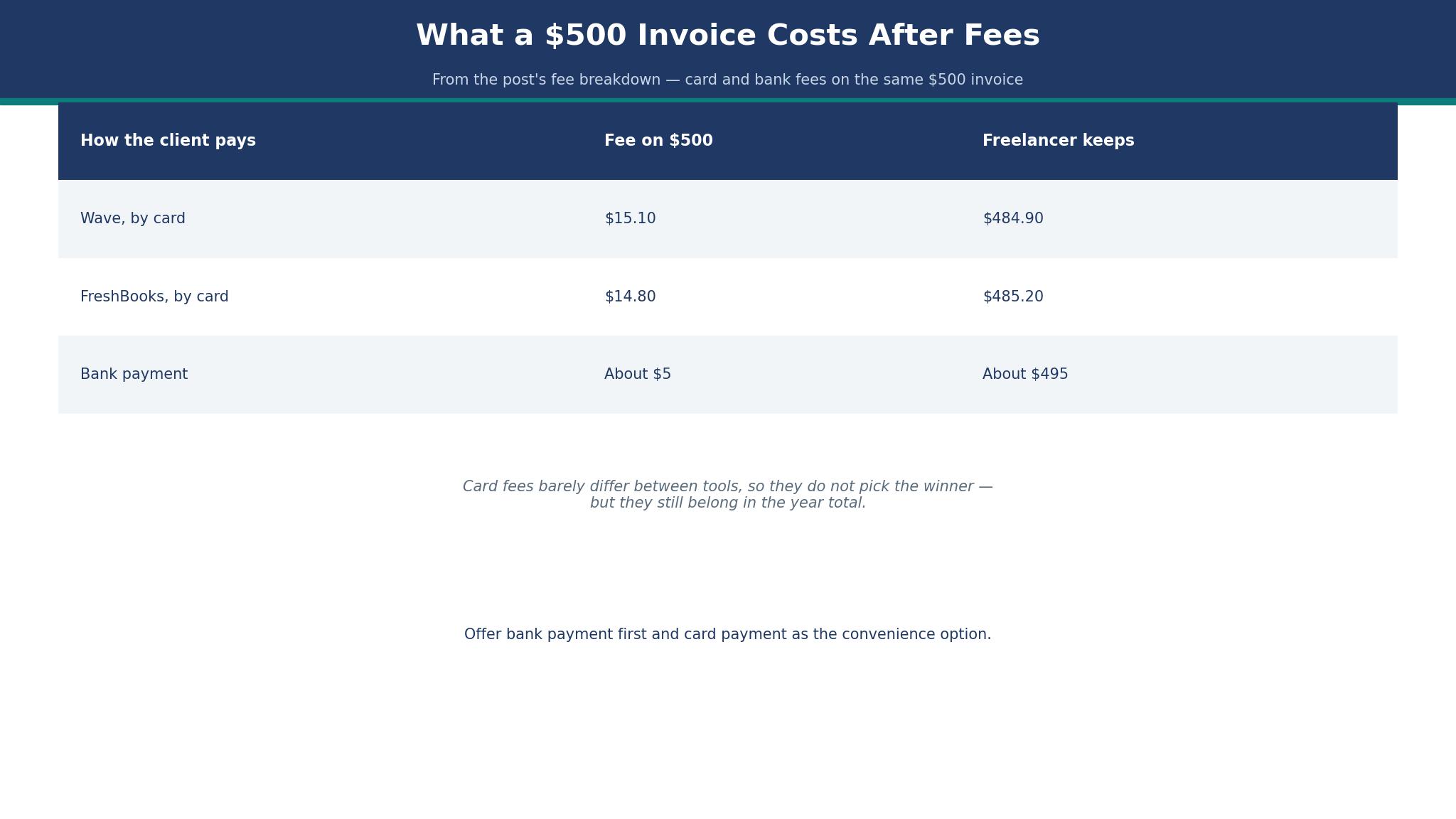
A freelancer who charges $1,000 a month and gets paid by card will lose about $29 to $35 of it to processing fees on most tools. Wave charges 2.9% plus $0.60 per card transaction on its Starter plan, so a $500 invoice paid by card costs about $15.10 in fees. FreshBooks charges 2.9% plus $0.30, so the same invoice costs about $14.80.
Stripe charges 0.4% per paid invoice plus the card rate, which changes the maths for a freelancer who sends many small invoices. Every tool in this list passes on roughly the same card fee, so it cannot pick the winner, yet it still belongs in the year total. A freelancer who budgets $228 a year for a subscription and forgets $350 in card fees has not budgeted at all.
Bank payments cost less. Wave charges 1% for bank payments with a $1 minimum, and FreshBooks charges about 1% with no cap stated. A $500 invoice paid by bank transfer costs about $5, which is a third of the card cost. A freelancer who offers bank payment as the default and card payment as the convenience option will keep more of every invoice, and most clients will choose the cheaper option if it is presented first.
The subscription is the smaller cost. Zoho Invoice charges nothing, Wave Starter charges nothing, and FreshBooks Lite charges $23 a month, or $276 a year. The difference between free and $276 a year is one late invoice that never gets paid, because a tool with automatic reminders will chase a client that a freelancer forgets to chase. The fee breakdown that matters is not the subscription. It is the cost of the invoices that never get paid at all.
The 15 Tools in Detail
This section tests the best invoice generators for freelancers one at a time, against the same three tests. A tool earns its place by sending a clear invoice, reminding the client without nagging, and taking payment without friction. Every figure in this guide was checked in November 2026.
1. Wave
Wave is the strongest free option in this list, and it earns the top spot by giving a solo freelancer real invoicing and real bookkeeping for nothing. The Starter plan is free, with unlimited invoices, estimates, bills and bookkeeping records. Pro costs $19 a month, or $190 a year, and adds automatic bank imports and other conveniences. A freelancer who wants free invoicing with books attached will find Wave the most generous tool here.
The card fee is the catch to understand. Wave charges 2.9% plus $0.60 per card transaction on Starter, which is higher than the $0.30 fixed fee on FreshBooks, and bank payments cost 1% with a $1 minimum. A $500 card payment costs about $15.10, and a freelancer who takes $4,000 a month by card will pay about $120 a month in fees. That is the real price of free software, and it is worth paying, because the software itself costs nothing.
Wave suits a solo operator with simple books. It is priced in US and Canadian dollars only, and Pro is billed per business profile, so two companies mean two $19 subscriptions. A freelancer with one business, a simple tax return, and a habit of getting paid by card will find Wave hard to beat.
2. FreshBooks
FreshBooks is the pick for freelancers who bill by the hour, need proposals and retainers, and have the client volume to justify the price. Lite costs $23 a month for 5 billable clients, Plus costs $43 a month for 50 clients, and Premium costs $70 a month for unlimited clients, all on monthly billing, with the yearly toggle showing about 10% off. The list prices are the struck-through figures on the pricing page, with temporary promotions that cut the first months, so confirm the standard price before you buy.
The strength is the workflow around the invoice. FreshBooks handles estimates, proposals, time tracking, project profitability and retainers as first-class features, not as add-ons. A freelancer who bills a retainer, tracks hours against it, and then invoices the balance will find that workflow in FreshBooks and nowhere else in this list at this price. The weakness is the client cap. Lite allows only 5 billable clients, and a freelancer who outgrows it must move to Plus at $43 a month, which is nearly double. Do that sum before you choose, because the cheaper plan can cost more once your client list grows.
One freelancer’s yearly bill shows what the tiers really cost. A freelancer on Plus pays $516 a year, plus card fees of about $14.80 per $500 invoice. A freelancer on Lite pays $276 a year, but hits the 5-client cap within months and upgrades anyway. The honest budget for a growing freelancer is Plus, not Lite.
3. Zoho Invoice
Zoho Invoice is the free option with the most room for small teams, and it charges nothing. Its single plan is free, not a trial, and it includes quotes, recurring invoices, automated payment reminders, expense and time tracking, and a client portal. The free plan allows 2 users, 3 projects and 2 organisations, and up to 500 invoices a year, which is about 41 invoices a month.
The strength is that the automation is free. Zoho gives away the reminders that other tools hold back on paid plans, which makes it the pick when the invoicing budget is zero.
That is why the best invoice generators for freelancers are often judged on reminders first and price second. A freelancer who sends under 500 invoices a year, works alone or with one partner, and wants reminders without paying will find Zoho the best deal in this list. The weakness is the cap. A freelancer who passes 500 invoices a year, or needs a third user, must move to Zoho Billing, from $25 per organisation a month billed annually. Most freelancers will never reach that cap, and the ones who do can afford the upgrade.
Zoho does not process payments itself, so card fees are set by the payment gateway the freelancer connects. That is a small extra step at setup, and a small saving every month, because the freelancer can choose the cheapest gateway rather than accepting the tool’s default.
4. Invoice Ninja
Invoice Ninja is the pick for a freelancer who wants control, including the option to host the software themselves. The free plan covers invoicing for a small number of clients, and paid plans add more clients, more users and more automation. The self-hosted option is free to run, which suits a technical freelancer who already runs a server and wants no subscription at all.
The strength is flexibility. Invoice Ninja handles quotes, recurring invoices, expenses, time tracking and a client portal, and it does so at a lower price than FreshBooks for a freelancer with many clients. The rough edge is the interface. The interface is less refined than FreshBooks or Wave, and a freelancer who values a clean client-facing invoice may find the templates plain. For a freelancer who counts value over looks, Invoice Ninja earns its place.
5. Design.com
A freelancer who needs a logo on the invoice and a site to match will find Design.com here because it builds both from one starting point. A freelancer can shape a mark, match the colours to the business, and put them on an invoice that carries the brand, with no designer and no design software to learn. The generator is simpler than Wave or FreshBooks, and that simplicity is the point for a freelancer who wants a tidy invoice rather than a full accounting platform.
The shortfall is the depth of the tool. Design.com handles a simple invoice with a logo, but it does not match Wave on bookkeeping or FreshBooks on reminders and retainers. A freelancer who outgrows it will move to a bigger platform, and that move means rebuilding the invoice templates. Think of it as a first invoicing setup to earn under, not the books the business keeps for good. A freelancer whose look is still half-formed gets a head start when the mark and the invoice come from one account. If your job list is long, start with Wave or Zoho instead.
Your first invoice goes out free, and the extras sit behind paid tiers that change often, so read the checkout page before you commit. The point is the set, a matching mark, site and invoice in one account, rather than any single item. A new freelancer who needs a logo, a site and an invoice from one account will save time, and time is the resource a new freelancer has least of.
6. PayPal Invoicing
PayPal Invoicing is the pick for clients who already use PayPal. It costs nothing to send an invoice, and the client pays with a PayPal account or a card without creating a new account. A freelancer whose clients are individuals, small businesses or overseas buyers will find PayPal the most familiar payment option in this list.
The strength is trust. A client who has never heard of Wave or Zoho has heard of PayPal, and that familiarity removes a reason to delay payment. The weakness is the fee. PayPal card fees are commonly around 2.9% plus a fixed fee, and the exact rate depends on the country and the payment type, so check the fee page before you quote a price. A freelancer who takes large payments should compare the PayPal fee against the Stripe fee, because the gap grows with the invoice size.
7. Square Invoices
Square Invoices is the pick when clients also pay in person. It costs nothing to send an invoice, and it connects to Square’s card readers, so a freelancer who sells at a market, a fair or a client site can take a card payment on the spot and send the invoice from the same account. That combination is the strength, and no other tool in this list covers in-person payments as well.
The weakness is the accounting. Square Invoices is an invoicing tool, not a bookkeeping platform, and a freelancer who needs full books will pair it with separate accounting software. For a freelancer who meets clients face to face, the in-person payment is worth more than the missing books.
8. HoneyBook
HoneyBook is the client experience tool, and it suits a freelancer whose work starts with a contract and ends with an invoice. It handles contracts, proposals, questionnaires, scheduling and invoicing in one flow, so a client signs, books and pays without leaving the same system. A wedding photographer, a designer or a coach will get more from HoneyBook than from a plain invoicing tool.
Pricing starts from about $19 a month, with higher tiers adding more features and automation. The value is in the flow, not in the cheapest invoice. A freelancer who only needs an invoice should not pay for HoneyBook. A freelancer who loses bookings because the contract and the invoice live in different places will find the price easy to justify.
9. Bonsai
Bonsai is the contracts plus invoicing tool, and it suits a freelancer who wants the legal protection first. It writes contracts, tracks time, sends invoices and chases late payments, all in one account. A freelancer who has been burned by a client who changed the scope will value the contract more than the invoice template.
Pricing starts from about $21 a month, with a trial to test the workflow. That mix is the reason to pay for it. The weakness is the price for a freelancer who only needs invoicing, because Bonsai costs more than Wave or Zoho for the invoice alone. For a freelancer who needs the contract, it is the better buy.
10. Stripe Invoicing
Stripe Invoicing is the no-subscription option, and it suits a freelancer who wants to pay only when an invoice gets paid. There is no monthly fee. Stripe charges 0.4% per paid invoice plus the card processing rate, so a freelancer who sends few invoices pays almost nothing in a quiet month, and pays more in a busy month. That shape fits freelance work, which is rarely steady.
The strength is the payment experience. Stripe checkout is fast, familiar and trusted, and it handles cards, bank payments and international payments with little setup. The weakness is the workflow around it. Stripe is a payment platform with invoicing added, not an invoicing platform with accounting, so a freelancer who needs reminders, retainers and time tracking will pair it with another tool. For a freelancer who only needs to get paid, Stripe is the cleanest option here.
11. QuickBooks Online
QuickBooks Online is the accounting plus invoicing tool, and it suits a freelancer whose books have outgrown a simple invoice generator. It handles invoicing, expenses, bank reconciliation, tax categories and reporting in one place, so the freelancer and the accountant work from the same numbers. Pricing starts from about $35 a month, with a trial to test the workflow.
The strength is depth. A freelancer with employees, inventory or complex taxes will find QuickBooks the most capable tool in this list. The weakness is price and complexity. A solo freelancer who only needs an invoice will find QuickBooks expensive and slow, and will be better served by Wave or Zoho. For a freelancer whose books are the business, QuickBooks earns its price.
12. Xero
Xero is the accounting with invoicing tool, and it suits a freelancer who works with an accountant who already uses Xero. It handles invoicing, bank feeds, expenses and reporting, and its interface is cleaner than QuickBooks for a freelancer who opens it once a week. Pricing starts from about $20 a month, with a trial to test the workflow.
The strength is the accountant connection. If your accountant uses Xero, the freelancer saves hours at tax time by using the same platform. The weakness is the same as QuickBooks. A solo freelancer who only needs an invoice will find Xero more than the job requires, and will be better served by a free tool.
13. Invoice Home
Invoice Home is the simple invoices fast tool, and it suits a freelancer who wants a professional invoice out in minutes. The free plan covers up to $1,000 in invoices a month, with over 100 templates, and the Unlimited plan costs $9 a month, adding recurring invoices and emailing. A freelancer who sends a few invoices a month and wants them to look good will find Invoice Home the fastest route from work done to invoice sent.
The limit is depth. Invoice Home is an invoice generator, not a bookkeeping platform, and it has no time tracking, no retainers and no accounting. For a freelancer who only needs the invoice, that focus is fine. For a freelancer who needs the books, it is not enough.
14. Refrens
Refrens is the quotes plus invoicing tool, and it suits a freelancer who sends a quote first and an invoice second. The free plan covers invoicing for a small business, and paid plans add more clients, more users and more automation. A freelancer who quotes for every job will find the quote-to-invoice flow in Refrens saves the double entry that other tools force.
The strength is the flow. A quote becomes an invoice with one click, and the client sees the same numbers in both documents. The weakness is familiarity. Refrens is less well known than Wave or FreshBooks, and a client who receives a Refrens invoice may take a moment longer to trust it. For a freelancer who quotes often, that trade is worth it.
15. Indy
Indy is the solo freelancer on a budget tool, and it suits a freelancer who wants contracts, proposals, time tracking and invoicing in one place for about $9 a month. It is the cheapest all-in-one in this list, and it covers the jobs a solo freelancer actually does, without the enterprise features that inflate the price elsewhere.
The strength is the price for the bundle. A freelancer who pays $9 a month for contracts, proposals and invoicing will find Indy hard to beat on value. The ceiling is team size. Indy is built for solo freelancers, and a freelancer who grows into a team will outgrow it and move to FreshBooks or HoneyBook. For a solo freelancer starting out, Indy is the right first tool.
Best Pick by Job
The table below matches each job to one of the best invoice generators for freelancers, so you can skip the full comparison once you know your job.
| Job | Pick | Why it wins here |
|---|---|---|
| Free invoicing with books | Wave | Unlimited invoices, free |
| Free invoicing, no catch | Zoho Invoice | Free, reminders included |
| Time and retainer billing | FreshBooks | Proposals, retainers, time tracking |
| No subscription | Stripe Invoicing | Pay per paid invoice only |
| Clients who use PayPal | PayPal Invoicing | Familiar payment, free to send |
| In-person payments too | Square Invoices | Card reader plus invoices |
| Contracts plus invoicing | Bonsai | Contracts first, invoices second |
| Client experience | HoneyBook | Contract to payment in one flow |
| Simple invoices fast | Invoice Home | $9 a month unlimited |
| Solo freelancer, all-in-one | Indy | $9 a month for the bundle |
A Seven-Step Workflow That Gets Freelancers Paid on Time
Use this workflow on every job, because a freelancer who follows it gets paid faster than one who invoices when they remember. First, agree the price in writing before the work starts, and confirm the payment terms, including the due date and the late fee if one applies. Second, send a deposit invoice if the job is large, and start work only when the deposit lands.
Third, track the hours and the expenses as you go, so the final invoice is ready the day the work ends, not a week later. Fourth, send the final invoice the same day the work is delivered, while the value is fresh in the client’s mind. Fifth, offer card payment and bank payment, with bank payment listed first, so the client chooses the cheaper option and still pays fast.
Sixth, let the tool send the reminder automatically when the due date passes, so the chase is not a personal favour. Seventh, stop work on the next job for a client who has not paid the last one, and say so plainly in the reminder.
Then review the numbers once a month. Count the invoices sent, the invoices paid on time, and the invoices still open after thirty days. If more than one in ten invoices is late, the problem is the workflow, not the clients, and the fix is a deposit, a reminder, or a shorter payment term. A freelancer who measures the payment time will shorten it, because the number makes the delay visible.

What the Best Invoice Generators for Freelancers Really Cost in a Year
Add the numbers before you choose from the best invoice generators for freelancers, because the headline price is never the whole bill. A freelancer on Zoho Invoice pays nothing for the software, and about $180 a year in card fees on $500 a month of card payments. A freelancer on Wave Starter pays nothing for the software, and about $181 a year in card fees on the same volume. A freelancer on FreshBooks Plus pays $516 a year for the software, plus about $178 a year in card fees. Those totals differ by $516, and the difference buys either a year of reminders or a year of retainer billing, depending on the job.
Chasing late payers is the second cost, and it dwarfs the subscription. Writing an invoice takes twenty minutes by hand, and chasing a late payment takes an hour. The best invoice generators for freelancers earn their place by removing that hour, not by making the invoice prettier. A tool that sends the invoice in two minutes and chases it automatically saves ten hours a month for a freelancer who sends twenty invoices, which is worth more than any subscription in this list. Do not choose the cheapest tool if it costs you an evening a week. Choose the one you will actually open, because an invoice you send beats an invoice you forget.
Frequently Asked Questions
How much should a freelancer pay for an invoice generator?
Most freelancers should pay between $0 and $23 a month for the software itself, plus card fees of about 2.9% on card payments. A simple invoicing job sits at the low end, a job with retainers and time tracking at the high end. If the monthly total crosses $50 before card fees, ask whether the extra features serve a job you actually do, because many freelancers pay for tools they never open.
Can I send invoices for free?
Yes, with Zoho Invoice, Wave Starter, Invoice Ninja, and PayPal Invoicing. Zoho Invoice is free for up to 500 invoices a year with reminders included, and Wave Starter is free with unlimited invoices and bookkeeping. A free tool is good enough to trade on, provided it includes the reminders and the payment button your clients need, because a free invoice that never gets paid costs more than a paid invoice that does.
Do invoice generators charge a fee when a client pays?
Yes, when the client pays by card. The card fee is commonly 2.9% plus $0.30 to $0.60 per transaction, and bank payments cost about 1%. The fee is charged by the payment processor, not by the invoice tool, so it applies on most tools in this list. Offer bank payment first to keep more of every invoice.
How do automatic payment reminders work?
The tool sends a polite email to the client on the due date, and again a few days later if the invoice is still open. The freelancer sets the timing once, and the tool follows it on every invoice. A reminder that arrives automatically is easier for a client to accept than a personal chase, and it removes the awkward conversation that stops many freelancers from following up at all.
Is a free invoice generator good enough for a freelance business?
A free generator is good enough for most freelance businesses, provided it covers reminders, recurring invoices and a payment button. Zoho Invoice and Wave Starter both cover those jobs for nothing. A paid tool is worth the money when the freelancer bills by the hour, needs retainers, or works with contracts, because those features are not free anywhere in this list.
Which invoice generator is easiest for a complete beginner?
Invoice Home is easiest to finish, because it asks the fewest questions and produces a professional invoice in minutes. Wave is easiest to grow with, because its free books cover the jobs that follow. FreshBooks is easiest to bill by the hour, because its time tracking and retainers cover the jobs that follow. Match the tool to the part you struggle with: finishing the invoice, growing the client list, or billing by the hour.
The Verdict: Wave Takes It for Most Freelancers
Wave wins this list of the best invoice generators for freelancers because it gives a solo freelancer unlimited free invoices and real bookkeeping for nothing, with card payments built in.
Zoho Invoice is the better pick for a freelancer who wants free reminders and a client portal, and FreshBooks is the better pick for a freelancer who bills by the hour and needs retainers. Stripe Invoicing is the pick when the freelancer wants no subscription at all, and Indy is the pick when the freelancer wants contracts, proposals and invoicing for $9 a month. Start with the fee breakdown, count the real year cost, and choose the tool whose reminders you will actually let run. An invoice that sends itself, reminds itself and takes payment will beat a prettier invoice that waits for you to remember it, every time.