

Verdict first: if you run a local moving firm and can only adopt one new system this year, pick a quoting and dispatch platform with video surveys, then add crew and payment tools around it. That single choice fixes the two problems that cost movers the most money: slow, inaccurate quotes and chaotic moving days. The best AI tools for moving companies are not the ones with the longest feature list. They are the ones that turn a customer inquiry into an accurate quote, a confirmed crew, and a paid invoice without the office retyping the same details four times.
Moving is a hard business to run on spreadsheets and phone calls. A customer describes a three bedroom home over the phone, the estimator guesses the truck size, the crew arrives to find a piano and a full garage, and the job runs three hours over. The customer is unhappy, the next job is late, and overtime eats the profit. AI tools attack that chain at the start. Video surveys let an estimator see the home without driving there. Quote software prices the job from an inventory list. Dispatch tools assign the right crew and truck. Messaging keeps the customer informed on moving day. None of this replaces good movers. It gives good movers a fair chance to do the job they quoted.
This guide compares fourteen tools across quoting, surveys, dispatch, crew management, storage, and payments. It includes large platforms and smaller tools, because a two truck local firm and a multi branch franchise do not need the same system. Pricing notes point you to check the current price at checkout, since moving software often prices by trucks, users, or jobs.
How the best AI tools for moving companies compare at a glance
| Tool | Best for | Standout strength | Watch first |
|---|---|---|---|
| Supermove | Growing local and long distance firms | End to end sales, dispatch and payments | Setup effort for a large team |
| SmartMoving | Firms that want an all in one system | CRM, dispatch, storage and reporting | Price for small firms |
| MoveitPro | Small to mid size movers | Fast quotes and dispatch | Fewer AI survey options |
| Moverbase | Simple, low cost operations | Easy scheduling and invoicing | Thinner reporting |
| Movegistics | Firms that want automation | Workflow automation and dispatch | Learning curve |
| Yembo | Accurate remote surveys | AI video surveys and inventory | Best paired with a dispatch tool |
| MoveHQ | Franchise and multi branch firms | Branch control and reporting | Setup time |
| MoverSuite | Firms that need a full CRM | Lead tracking and sales pipeline | Needs training for office staff |
| QuickQuote | Fast quote generation | Speed from inquiry to estimate | Limited dispatch depth |
| NetDispatcher | Dispatch focused firms | Crew and truck scheduling | Smaller marketing features |
| Updater | Customer experience and upsells | Moving checklists and partner offers | Not a full dispatch system |
| MoveMate | Small local teams | Simple job tracking | Fewer integrations |
| Elovate | Firms that want modern booking | Online booking and customer updates | Newer, check support hours |
| CrewControl | Crew scheduling and time tracking | Shift, clock in and payroll data | Needs a separate quoting tool |
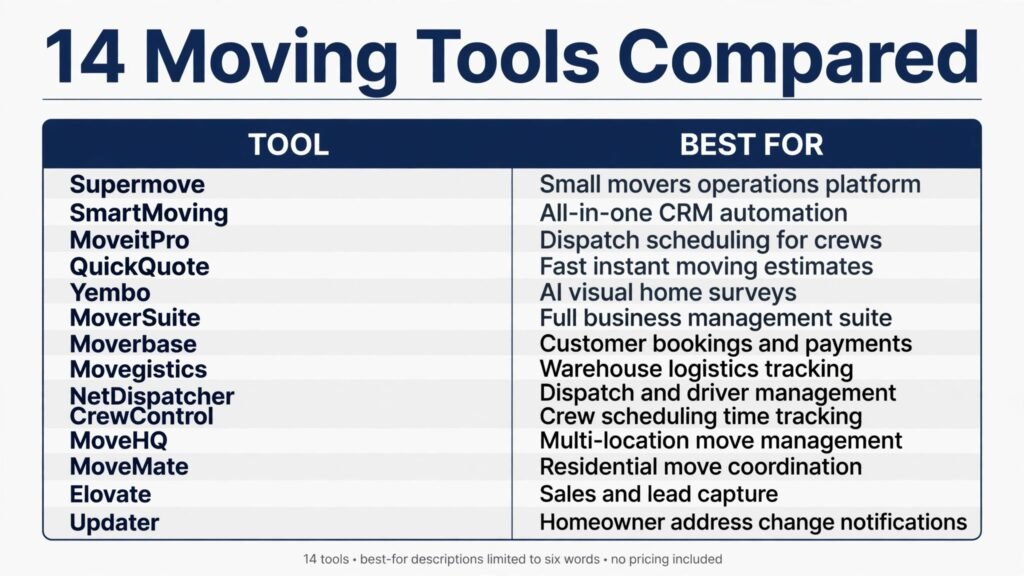
Tools grouped by the job they do best
Quoting and sales
A moving quote is a promise. If it is too low, the firm loses money. If it is too high, the customer books a rival. These tools make quotes faster and more accurate.
1. Supermove
Supermove is a full platform for movers that covers sales, dispatch, and payments. A customer can request a quote online, the office can build an estimate from an inventory list, and the crew can capture signatures and payments on moving day. Managers get a clear view of booked jobs, crew assignments, and revenue.
Supermove suits firms that have outgrown spreadsheets and want one system for the whole job. Pricing is subscription based and quoted by firm size. Check the current plan and any per job fees at checkout.
Watch out for: give the sales team time to learn the estimate builder. A powerful quote tool still produces a bad quote if the inventory list is incomplete.
2. SmartMoving
SmartMoving is an all in one system with CRM, dispatch, storage management, and reporting. It tracks a lead from first call to final payment, and it handles warehouse storage alongside moving jobs. That combination helps firms that offer both moving and storage, since the customer record stays in one place.
SmartMoving fits mid size and larger firms that want reporting by sales rep, crew, and job type. Pricing is subscription based with custom quotes for larger firms. Check the plan details at checkout, including storage features and user limits.
Watch out for: the breadth of the system means training matters. Assign one office champion to learn it first and then train the rest of the team.
3. MoveitPro
MoveitPro focuses on fast quoting and dispatch for small to mid size movers. The office can build a quote, schedule a crew, and track the job without a long setup process. It is a practical choice for a firm that wants to leave spreadsheets behind without adopting a large platform in one step.
Pricing is subscription based. Check the current tier limits at checkout, especially the number of users and trucks covered.
Watch out for: firms that rely heavily on video surveys should check whether their preferred survey tool connects cleanly, or plan to run surveys as a separate step.
4. QuickQuote
QuickQuote is a quote focused tool that turns an inquiry into an estimate quickly. The value is speed: a customer who gets a clear estimate the same day is far more likely to book than one who waits three days for a callback. The tool works best when the office uses a standard inventory checklist for every quote, so estimates stay consistent across staff.
Pricing is subscription based. Check at checkout whether dispatch and payment features are included or whether QuickQuote is meant to pair with another system.
Watch out for: speed without accuracy is dangerous. Always confirm access details, stairs, parking, and large items before finalising a quote.
Video surveys and inventory
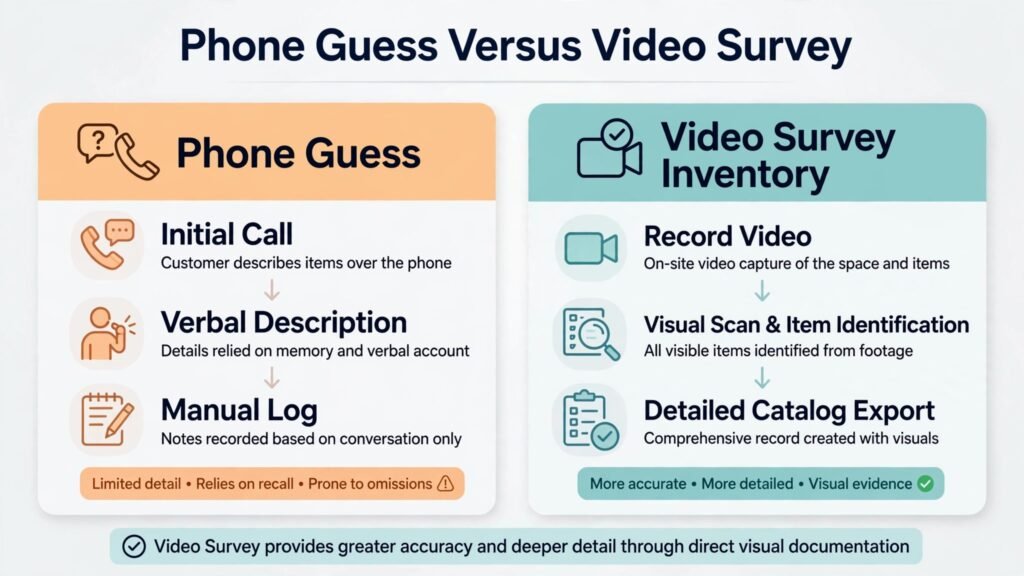
The most expensive sentence in moving is “we did not know about that.” Video surveys fix it by letting the estimator see the home.
5. Yembo
Yembo uses AI video surveys to build an inventory list from a customer walkthrough. The customer records a video on a phone, and the system identifies items and estimates volume. The estimator reviews the list, corrects anything missed, and prices the job from real evidence instead of a phone description.
For long distance and interstate movers, video surveys save an in person visit and still produce a defensible quote. For local firms, they speed up the quote process and reduce surprise items on moving day. Pricing is subscription based. Check the per survey or per user price at checkout.
Watch out for: customers need clear instructions. Send a short guide with the survey link that explains lighting, slow panning, and opening storage spaces. A rushed video produces a rushed inventory.

6. MoverSuite
MoverSuite is a CRM and operations tool for movers with lead tracking, estimates, and job management. Its strength is the sales pipeline: every lead, follow up, and quote lives in one view, so no inquiry is lost because it sat in an inbox. For firms that buy leads or run ads, that pipeline view shows which sources actually turn into booked jobs.
Pricing is subscription based. Check at checkout which CRM and dispatch features are included in your tier.
Watch out for: a CRM only helps if the office uses it daily. Build a rule that every inquiry enters the system before the end of the day, with no exceptions.
Dispatch, crews and trucks
Moving day is where profit is won or lost. The right crew, the right truck, and a clear schedule prevent overtime and damage claims.
7. Moverbase
Moverbase is a simpler operations tool for scheduling, dispatch, and invoicing. It suits small firms that want a clear daily board without a large platform. The office can assign jobs, track status, and send invoices from one place. Pricing is subscription based and positioned for small firms. Check the current limits at checkout.
Watch out for: reporting is thinner than in larger platforms. If you need detailed profit by job or by crew, export data regularly and review it in a spreadsheet until you outgrow the tool.

8. Movegistics
Movegistics emphasises workflow automation for movers. It can trigger reminders, follow ups, and status updates as a job moves through stages, which reduces the manual chasing that eats office time. Dispatch, CRM, and invoicing sit in the same system, so a job does not need to be re entered at each stage.
Movegistics fits firms with repeatable processes that want those processes to run with less hand holding. Pricing is subscription based. Check at checkout whether automation features are included in your plan.
Watch out for: automation needs good templates. Write your customer messages in plain, calm language and test them on a real job before turning them on for every booking.
9. NetDispatcher
NetDispatcher focuses on dispatch: crew scheduling, truck assignment, and job status. It is a good fit for a firm whose main pain is a chaotic dispatch board rather than lead generation. The office can see who is where, which truck is free, and which job is running late, then adjust the day before a small delay becomes a missed job.
Pricing is subscription based. Check at checkout how many crews and trucks your plan covers.
Watch out for: pair NetDispatcher with a solid quoting tool. Dispatch alone does not fix an inaccurate estimate.
10. CrewControl
CrewControl handles crew scheduling, clock in, and time tracking. For a firm with part time and seasonal movers, that data matters: it shows who worked which job, how long it took, and where overtime is building up. Managers can also track availability, so a crew is not booked on a day a key member is off.
Pricing is subscription based. Check at checkout whether payroll export is included, since that feature saves the office real time.
Watch out for: crews must clock in and out consistently or the data is useless. Make clock in part of the job start routine, not an optional extra.
11. MoveHQ
MoveHQ is built for franchise and multi branch moving firms. It gives head office control over branches, pricing, and reporting while letting each branch run its own dispatch. That balance is hard to get right, and it is why franchise firms often outgrow a single branch tool.
Pricing is quoted per business. Ask for a written quote and check contract terms at checkout.
Watch out for: a franchise rollout needs a phased plan. Pilot the system in one branch, fix the problems there, then roll out to the rest.
12. MoveMate
MoveMate is a simple job tracking tool for small local teams. It covers scheduling, job details, and customer communication without a large feature set. For a two truck firm, that simplicity is a benefit: the office can learn it in days, not weeks.
Pricing is subscription based. Check the current user and job limits at checkout.
Watch out for: as the firm grows, check whether MoveMate still handles storage, long distance paperwork, and reporting. If not, plan the upgrade before growth forces a rushed switch.
13. Elovate
Elovate offers modern online booking and customer updates for movers. Customers can book, receive updates, and see job progress without calling the office. That reduces the “where is my crew” calls that interrupt dispatch on moving day.
Pricing is subscription based. Check support hours and response times at checkout, since a newer tool needs a responsive support team to earn trust.
Watch out for: test the booking flow as a customer on a phone. If booking takes more than a few minutes, customers will call instead, and the benefit disappears.
14. Updater
Updater is not a dispatch system, but it improves the customer experience around a move. It gives customers a moving checklist, helps them update accounts and services, and can surface partner offers. Movers use it to stay helpful after the truck is unloaded, which supports reviews and referrals.
Pricing is arranged with partners and moving firms. Check the current arrangement at checkout before promising it to customers.
Watch out for: do not present partner offers as if they are required. Keep the checklist helpful first and commercial second, or customers will ignore it.
Best pick by job
| If you need | Start with |
|---|---|
| End to end platform | Supermove |
| All in one with storage | SmartMoving |
| Fast quotes, small firm | MoveitPro |
| Low cost operations | Moverbase |
| Accurate remote surveys | Yembo |
| Sales pipeline control | MoverSuite |
| Workflow automation | Movegistics |
| Dispatch focus | NetDispatcher |
| Crew time tracking | CrewControl |
| Franchise control | MoveHQ |
| Simple local tracking | MoveMate |
| Modern customer booking | Elovate |
| Post move customer experience | Updater |
| Speed from inquiry to quote | QuickQuote |
Choosing a system without buying twice
Start by mapping your current job flow on one page. Write each step from first inquiry to final payment, and mark where work is retyped, where customers wait, and where jobs go wrong. Most movers find the same three gaps: slow quotes, surprise inventory, and dispatch confusion. A tool that fixes only one of those gaps is a partial fix. A tool that fixes two is worth a trial.
Next, run a trial on real jobs, not sample data. Book five real moves through the trial system, including one difficult job with stairs, a piano, or tight parking. Watch how the crew uses the mobile view, how the office handles a change, and how the invoice is produced. If the trial feels smooth on an easy job but breaks on a hard one, it will break on moving day.
Then check the customer experience end to end. Request a quote as a customer, complete a video survey if the tool offers one, and read every automated message. Customers judge a mover on communication as much as on lifting. A tool that sends clear, timely updates will earn reviews that a cheaper tool will not.
Also review storage, claims, and paperwork. Firms that offer storage need a system that tracks items in and out of the warehouse. Firms that handle interstate work need paperwork and valuation options that match the job. Ask the vendor to show those flows in a demo, not just in a feature list.
Finally, add up the full cost: subscription, per user seats, per job fees, payment processing, text credits, and survey charges. A low monthly price with a high per job fee can cost more than a higher subscription for a busy firm. Get the full figure in writing and check it at checkout.
Movers often work closely with property professionals, so a look at best AI tools for real estate agents can help with referral partnerships. Firms that also handle building work may compare notes with best AI tools for contractors on scheduling and crew management.
Mistakes to avoid
The first mistake is quoting from memory. Even an experienced estimator misjudges a full home from a phone call. Use an inventory checklist or a video survey for every job, and keep the checklist identical for every estimator. Consistency is what makes quotes comparable and profitable.
The second mistake is overbooking crews on the hope that jobs finish early. They rarely do. Leave buffer time between jobs, especially for homes with stairs, elevators, or long carries. A crew that arrives on time to the second job protects the review for both jobs.
The third mistake is ignoring the day before the move. A confirmation call or message the day before, with parking, access, and item reminders, prevents most moving day surprises. Build that step into the system so it happens even when the office is busy.
The fourth mistake is treating damage claims as a surprise. Photograph items at load and unload, record existing damage honestly, and store those photos with the job record. Good records resolve most claims quickly and fairly.
The fifth mistake is buying software and skipping training. A system that only the owner understands will fail on the first sick day. Train at least two people on quoting, dispatch, and payments, and write down the steps for each.
Frequently asked questions
What is the best tool for a small local moving company?
MoveitPro and Moverbase are strong starting points because they cover quoting and dispatch without a large platform price. Add Yembo for video surveys if inaccurate quotes are your main problem.
Do video surveys really replace in person estimates?
For most residential moves, yes, when the customer follows the video guide. The estimator still reviews the inventory and confirms access details. For very large or complex moves, an in person visit remains the safer choice.
How much should a moving company expect to pay for software?
Pricing varies by trucks, users, and jobs, so there is no single figure. Compare the full monthly cost including per job fees and payment processing, and check the total at checkout before signing a contract.
Can one tool handle both moving and storage?
SmartMoving and Supermove both handle storage alongside moving jobs, which keeps the customer record in one place. Smaller tools may need a separate storage tracker, so test that workflow in the trial.
Should movers use AI phone answering?
AI answering helps after hours and during peak call times, but the messages must sound calm and specific. Test the wording on real calls, and always give the customer a fast path to a human for urgent moves.
How long does it take to switch moving software?
A small firm can switch in three to six weeks. A larger firm should plan eight to twelve weeks, including data migration, training, and a pilot period with one crew before a full rollout.
What matters most on moving day: crew, truck, or software?
Crew quality matters most, but software protects it. A great crew with a bad schedule still arrives late. A good crew with a clear schedule, accurate inventory, and timely customer updates delivers a far better result.
Closing verdict
The right system for a moving firm is the one that makes quotes accurate, dispatch calm, and payment fast. For most firms, that means Supermove or SmartMoving as a core platform, Yembo for surveys, and a crew tool such as CrewControl for time tracking. Smaller firms can start with MoveitPro or Moverbase and add survey and crew tools as volume grows. Franchise firms should test MoveHQ for branch control.
Run the trial on real jobs, confirm the full cost at checkout, and train two people on every core task. Those steps, more than any single feature, decide whether the best AI tools for moving companies actually improve your margins.
A sample job from first call to final payment
The best way to judge moving software is to walk one job through it from start to finish. Picture a family moving from a three bedroom house to a flat across town. They submit an inquiry on Tuesday evening. By Wednesday morning, the office has sent a video survey link with a short guide. The customer records a walkthrough on Wednesday night, including the garage and the balcony storage. The estimator reviews the inventory on Thursday, spots a piano that the phone description had missed, and adjusts the crew size and truck choice. The quote goes out Thursday afternoon with a clear breakdown: crew, truck, hours estimate, and packing options.

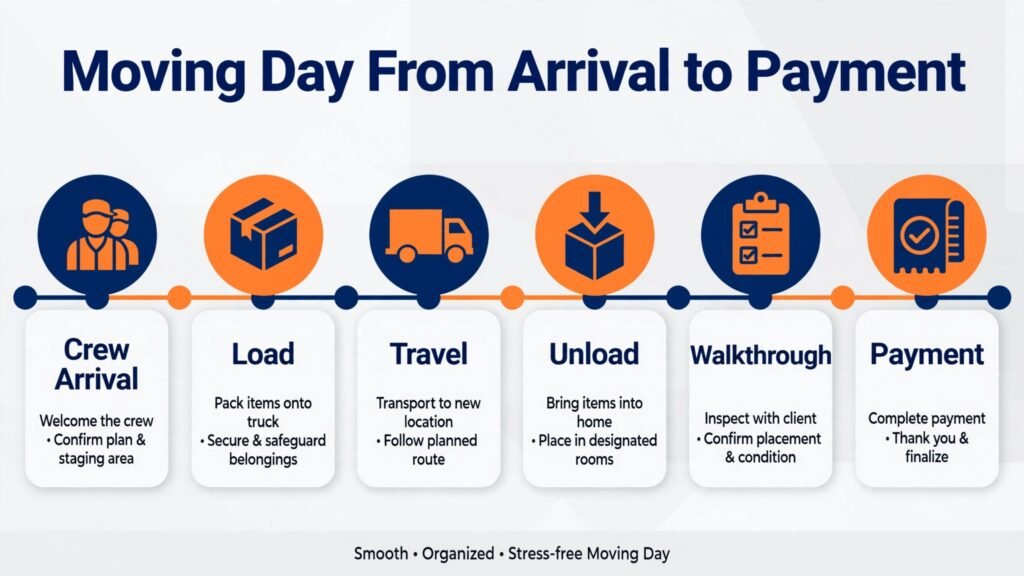
On Friday, the customer accepts. The system books the crew, reserves the truck, and sends a confirmation with parking and access questions. The day before the move, an automated message confirms the arrival window and reminds the customer to clear a path to the piano. On moving day, the crew leader checks the job on a phone, photographs large items at load, and records the start time. At unload, the customer signs on a tablet and pays the balance by card. That evening, a review request goes out. Every step used the same job record. Nothing was retyped, and the piano surprise was caught before moving day, not during it.
Now picture the same job without that chain. The phone quote misses the piano. The crew arrives with too small a truck. The job runs three hours over, the next job is late, and the customer disputes the final bill because the price changed on the day. The firm loses money on overtime and loses a review it could have earned. The difference between those two versions is not crew quality. It is whether the quote, the survey, the dispatch, and the payment all share one record.
Peak season planning deserves the same attention. Summer weekends book first, and a firm that waits until May to hire seasonal crew will struggle. Use the software to look at last year by week: which weekends were full, which crews were overbooked, and where overtime clustered. Hire and train before the peak, not during it. Build a standby list of trained part time movers, and keep their availability in the system so dispatch does not call people who are already booked. A crew that knows the system before peak season is worth far more than a crew hired in a panic during it.
Damage and claims handling also belongs in the workflow. Photograph items at load and unload, note existing damage honestly, and store those photos with the job. When a claim arrives, the record should answer it in minutes: what was photographed, who handled the item, and what the customer signed. Firms that keep that record resolve claims faster and keep customers who might otherwise leave a damaging review. Firms that rely on memory argue about every claim, and every argument costs more than the item.

Storage, interstate work and the paperwork trap
Firms that offer storage face a second business inside the first. Items must be logged in, labelled, stored, and logged out without confusion. A system that tracks moving jobs but not warehouse items will fail the first time a customer asks where a specific box is. Before offering storage, confirm that the chosen tool tracks items by customer and by location, and that warehouse staff can update records from a phone. Photograph furniture at intake, note existing damage, and give the customer a copy of the inventory. That record prevents most storage disputes, and it makes the final delivery faster because the crew knows exactly what to collect.
Interstate work adds paperwork that local work does not. Valuation options, inventory lists, and delivery windows must be clear before loading. A customer moving across state lines needs a written estimate, a delivery range, and a contact plan during transit. Build those documents into the system as templates, so no interstate job leaves without them. A firm that improvises interstate paperwork will eventually face a claim or a complaint that a template would have prevented. Ask the vendor to show the interstate document flow in a demo, and keep a printed backup for jobs where connectivity fails.
Referral partnerships that fill the calendar
Movers who wait for search traffic alone leave bookings behind. Estate agents, property managers, storage firms, and letting agents all meet customers at exactly the moment a move is planned. Build three or four referral partnerships and track them in the system: who sent the lead, whether it booked, and what it was worth. A partner who sends ten booked jobs a year is worth far more than an ad campaign that sends fifty inquiries and two bookings. Thank partners with fast feedback on every referral, even the ones that do not book, so they keep sending customers your way.