

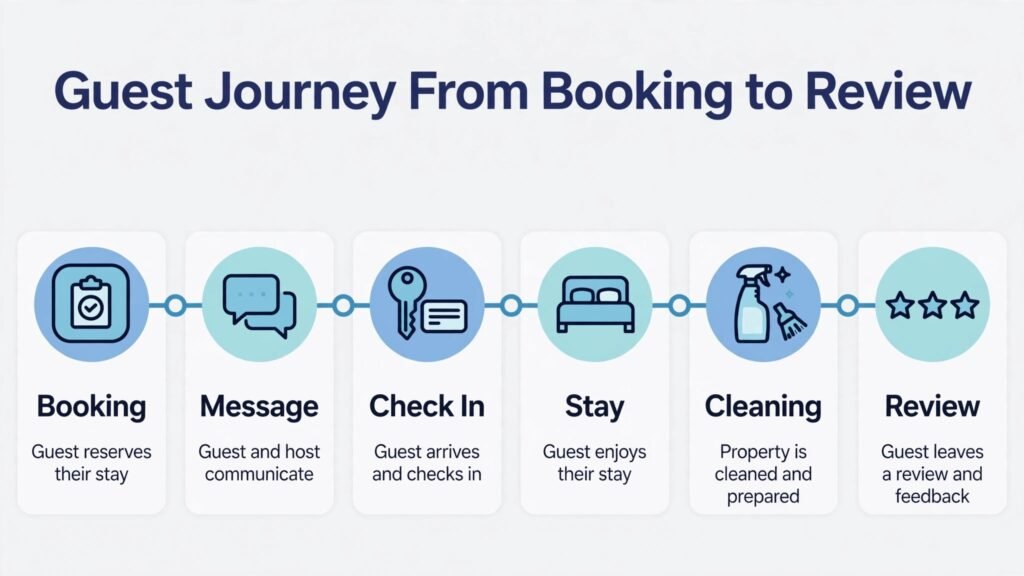
Compare two hosts with the same flat in the same city. One checks prices once a month, answers messages when time allows, and hopes the cleaner is free on turnover day. The other reprices nightly demand automatically, answers guest questions in minutes, confirms cleaning the moment a booking lands, and screens guests before arrival. Same flat, same city, very different income and very different reviews. The best AI tools for Airbnb hosts close that gap. They do not replace good hosting. They make good hosting repeatable across every night, every guest, and every turnover, even when the host has a full time job elsewhere.
Airbnb hosting has changed. Guests expect hotel speed with home character. They want fast replies, clear check in instructions, a spotless space, and a fair price that reflects the weekend, the season, and the local event calendar. Hosts who manage one listing can often handle this by hand. Hosts with three, five, or twenty listings cannot. The tools in this guide cover pricing, channel management, messaging, cleaning, guest screening, noise monitoring, and guidebooks. Some are built for a single host. Others are built for a portfolio. The right choice depends on how many listings you run and how much of the work you do yourself.
How the best AI tools for Airbnb hosts compare at a glance
| Tool | Best for | Standout strength | Watch first |
|---|---|---|---|
| PriceLabs | Dynamic pricing | Nightly price optimisation | Needs a pricing floor |
| Beyond | Pricing with support | Managed pricing and market data | Fee structure |
| Hospitable | Messaging automation | Guest messages and direct booking | Setup of message rules |
| OwnerRez | Direct booking focus | Direct booking sites and channel control | Learning curve |
| Guesty | Growing portfolios | Multi listing operations | Price for small hosts |
| Hostaway | Channel management | Multi channel calendar sync | Add on costs |
| Turno | Cleaning automation | Cleaner scheduling and checklists | Cleaner coverage in small towns |
| Breezeway | Cleaning and inspections | Turnover checklists and photos | Per property cost |
| Autohost | Guest screening | Screening and risk checks | Guest friction if rules are strict |
| Minut | Noise and occupancy monitoring | Privacy safe home sensors | Sensor placement and alerts |
| NoiseAware | Noise monitoring for larger homes | Noise alerts without recording | Subscription per property |
| Operto | Smart lock and access | Automated check in codes | Hardware compatibility |
| Touch Stay | Digital guidebooks | Guest guides and local tips | Content upkeep |
| Enso Connect | Guest experience and upsells | Guidebooks, upsells and verification | Feature overlap with other tools |
| Hostfully | Guidebooks and management | Guidebooks plus property tools | Best value at scale |
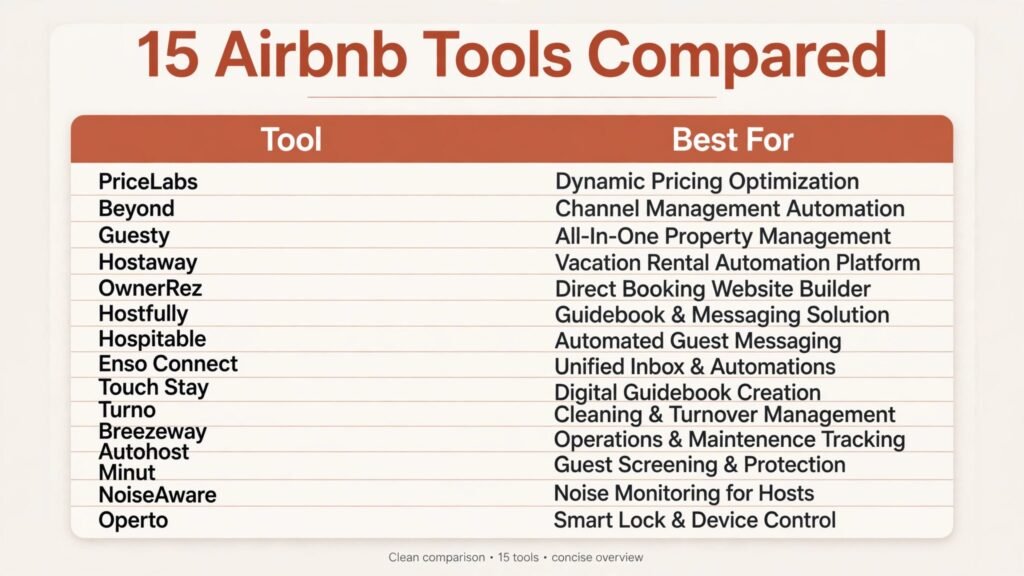
Pricing notes below point you to check the current price at checkout. Many hosting tools charge per listing or take a percentage of bookings, so the total depends on your portfolio size.
Tools grouped by the job they do best
Pricing and revenue
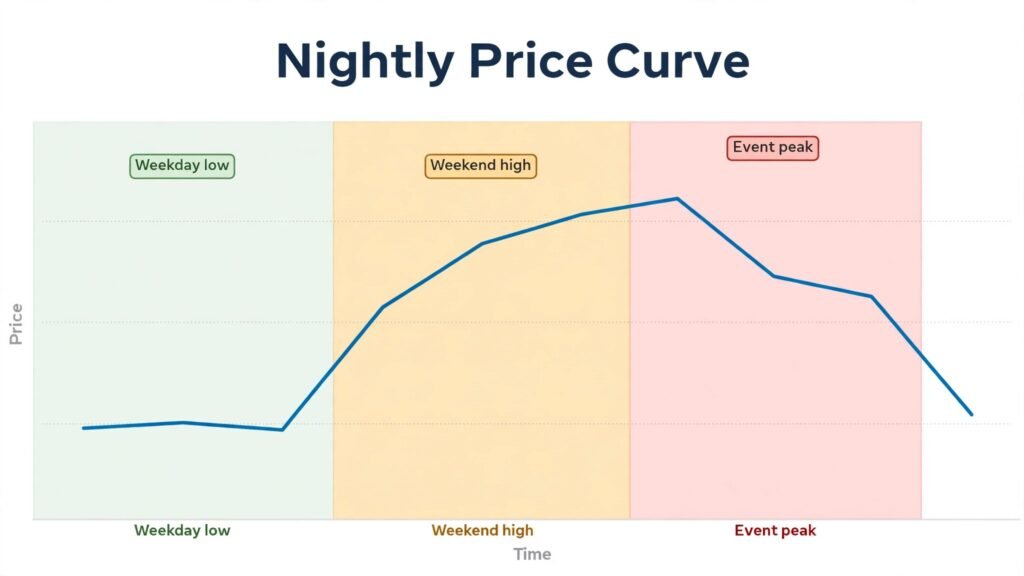
Price is the fastest lever a host owns. A price that is too low fills the calendar and leaves money behind. A price that is too high leaves nights empty. These tools adjust price with demand instead of guesswork.
1. PriceLabs
PriceLabs is a dynamic pricing tool for short term rentals. It adjusts nightly rates based on season, day of week, lead time, local demand, and your own rules. You set a minimum price, a maximum price, and rules for last minute gaps and far ahead bookings, and the system updates prices across connected channels.
PriceLabs suits hosts who want control. You can see why a price moved, adjust the rules, and compare your price with nearby listings. Pricing is subscription based per listing. Check the per listing price at checkout, since the total grows with your portfolio.
Watch out for: always set a minimum price that covers cleaning, fees, and wear. Dynamic pricing without a floor can sell a weekend night for less than the cost of turning the property over.

2. Beyond
Beyond offers dynamic pricing with market data and human support. It analyses local demand and adjusts rates, and hosts can review recommendations and ask for help with pricing strategy. For a host who wants pricing help without studying every market signal, that support is valuable.
Pricing is typically a percentage of booking revenue. Check the exact fee and what is included at checkout, because a percentage fee behaves differently from a flat subscription as revenue grows.
Watch out for: compare the fee with the extra revenue over three months. If pricing gains do not beat the fee after that period, adjust the rules or switch to a flat subscription tool.
3. Guesty
Guesty is a property management platform for hosts with multiple listings. It covers channel management, unified inbox, automation, reporting, and payments. For a host growing from one listing to ten, Guesty replaces a patchwork of tools with one operations view.
Pricing is quoted per business and varies by portfolio size. Ask for a written quote and check what is included at checkout, including channel connections and automation features.
Watch out for: Guesty is a large platform. A single listing host may find it more than needed. Trial it only if you plan to grow, or if you already manage several properties.
Channel management and direct booking
A double booking is one of the fastest ways to lose a listing reputation. Channel tools keep calendars in sync and help hosts build direct bookings that avoid platform fees.
4. Hostaway
Hostaway is a channel manager and property management system. It syncs calendars across Airbnb, Vrbo, Booking.com, and direct booking channels, and it centralises messages and tasks. For hosts listed on more than one platform, that sync prevents the double booking problem that a manual calendar cannot reliably prevent.
Pricing is subscription based per listing. Check the channel and feature limits at checkout.
Watch out for: set up channel connections carefully and test a booking on each channel before going live. A sync error found during a real booking is far harder to fix.
5. OwnerRez
OwnerRez focuses on direct booking and channel control. Hosts can build a direct booking website, manage quotes, handle payments, and sync calendars. Direct bookings reduce platform fees and give the host control over terms, deposits, and guest communication.
OwnerRez suits hosts who want to build a direct brand, especially those with unique properties or repeat guests. Pricing is subscription based. Check the plan limits at checkout, including the number of properties and booking features.
Watch out for: a direct booking site needs traffic. Do not expect direct bookings to replace platform bookings overnight. Use it alongside Airbnb and Vrbo, and promote it to past guests first.
6. Hostfully
Hostfully combines digital guidebooks with property management tools. Hosts can create a guidebook with check in instructions, house rules, local recommendations, and upsell offers, and manage properties from the same system. The guidebook reduces repetitive guest questions and gives the stay a professional feel.
Pricing is subscription based. Check the per property price at checkout.
Watch out for: guidebooks need upkeep. Review check in codes, local tips, and house rules every season, or guests will follow outdated instructions.
Messaging and guest communication
Fast, clear messages drive reviews. Guests forgive a small problem when the host replies quickly and fixes it. They rarely forgive silence.
7. Hospitable
Hospitable automates guest messaging across channels. It can send booking confirmations, check in instructions, mid stay check ins, checkout reminders, and review requests at the right time. Hosts can build message templates that sound personal by using guest names, dates, and property details.
Hospitable also supports direct booking tools. It suits hosts who spend too much time copying the same messages for every guest. Pricing is subscription based per listing. Check the plan limits at checkout.
Watch out for: read every automated message aloud before launch. A message that sounds robotic will hurt the personal feel that makes Airbnb different from a hotel. Keep the tone warm, short, and specific.
8. Enso Connect
Enso Connect combines guest verification, guidebooks, upsells, and messaging. Guests can verify identity, read the guidebook, and book extras such as early check in or a stocked fridge. For hosts who want to add revenue without adding work, upsells are a practical path.
Pricing is subscription based. Check the per property price and upsell terms at checkout.
Watch out for: do not overload guests with upsell offers. One or two relevant extras at booking and one at check in is enough. More than that feels like a sales funnel, not a welcome.
9. Touch Stay
Touch Stay builds digital guidebooks that guests open on a phone. A good guidebook covers check in, wifi, heating, parking, bins, local food, and emergency contacts. It reduces messages, prevents check in confusion, and helps guests enjoy the area.
Pricing is subscription based. Check the plan limits at checkout.
Watch out for: a guidebook is only useful if guests actually open it. Send the link in the check in message and mention one useful tip from it, so guests learn to use it.
Cleaning, turnover and inspections
Cleaning decides reviews. A spotless turnover with fresh linen and a quick photo check prevents most complaints. These tools make turnover reliable.
10. Turno
Turno connects hosts with cleaners and automates scheduling. When a booking lands, Turno can assign a cleaner, send a checklist, and track completion. Hosts can see turnover status without calling the cleaner for every change.
Turno suits hosts who use local cleaners and want a clear turnover record. Pricing and cleaner fees vary by market. Check the current terms at checkout.
Watch out for: cleaner availability varies by town. In a small market, build a backup cleaner list before you rely fully on automated assignment.

11. Breezeway
Breezeway focuses on cleaning operations, checklists, and inspections. Cleaners follow a property specific checklist, upload photos, and flag problems such as damage or low supplies. The host sees proof of completion and can act on issues before the next guest arrives.
Breezeway suits hosts with several properties or high turnover. Pricing is subscription based per property. Check the price at checkout.
Watch out for: checklists must match the property. A generic checklist will miss the details that guests notice, such as a specific coffee machine or a tricky lock. Customise the list for each home.
Screening, safety and access
Good screening and safe access protect the host, the neighbours, and the property. These tools handle that part quietly.
12. Autohost
Autohost screens guests using identity and risk checks before arrival. It can flag high risk bookings and help hosts decide whether to accept, ask for more information, or decline. For hosts with whole home listings or neighbours close by, screening reduces party and damage risk.
Pricing is subscription based. Check the per booking or per property price at checkout.
Watch out for: keep screening fair and consistent. Apply the same checks to every guest, explain the process politely, and follow platform rules for declines.
13. Minut
Minut is a privacy safe sensor that monitors noise, occupancy, and temperature without recording conversations. Hosts get an alert if noise rises above a set level, so they can message the guest early instead of learning about a party from neighbours the next day.
Pricing is subscription based per sensor plus hardware. Check the full cost at checkout.
Watch out for: tell guests about the sensor in the listing and in the house rules. Transparency builds trust and prevents complaints about monitoring.
14. NoiseAware
NoiseAware monitors noise levels in rental properties without recording audio. It alerts hosts when noise stays high, which helps with larger homes and properties with strict neighbour rules. The data also helps resolve noise complaints fairly, since the host can see when noise rose and fell.
Pricing is subscription based per property. Check the hardware and subscription cost at checkout.
Watch out for: place sensors where they measure living areas, not bedrooms, and set alert thresholds that match the property and the neighbourhood.
15. Operto
Operto automates access with smart lock codes. Each guest gets a unique code that works only for their stay, and the code expires at checkout. That removes key handovers, lockbox confusion, and the risk of an old code still working after a stay.
Pricing is subscription based plus compatible hardware. Check hardware compatibility at checkout before buying locks.
Watch out for: always keep a backup access plan. A lock with a dead battery or a failed connection should never leave a guest locked out at midnight.

Best pick by job
| If you need | Start with |
|---|---|
| Dynamic pricing | PriceLabs |
| Pricing with support | Beyond |
| Guest messaging | Hospitable |
| Direct bookings | OwnerRez |
| Multi listing operations | Guesty |
| Channel sync | Hostaway |
| Cleaner scheduling | Turno |
| Turnover checklists and photos | Breezeway |
| Guest screening | Autohost |
| Noise monitoring | Minut |
| Noise data for large homes | NoiseAware |
| Smart lock access | Operto |
| Digital guidebooks | Touch Stay |
| Guidebooks plus upsells | Enso Connect |
| Guidebooks plus management | Hostfully |
How to choose a hosting stack
Start with your listing count and your time. A host with one listing and a local cleaner needs pricing, messaging, and cleaning. A host with ten listings needs channel management, a unified inbox, and turnover tracking first. Write down how many hours a week you spend on messages, pricing, cleaning coordination, and guest problems. The largest number points to your first tool.
Next, set your pricing rules before you automate pricing. Choose a minimum price that covers cleaning, platform fees, supplies, and wear. Choose a maximum price for peak weekends. Only then turn on dynamic pricing. Without those guardrails, automation can price a night below cost during a quiet week.
Then build your message templates. Write a booking confirmation, a check in message, a mid stay check in, a checkout reminder, and a review request. Read each one as a guest. If any message sounds cold or confusing, rewrite it. Good templates save hours and still sound human when they use the guest name, the property name, and specific instructions.
Also plan cleaning as a system, not a favour. Give cleaners a checklist, a photo requirement, and a supply list for each property. Confirm who covers a last minute change and what happens if a cleaner is ill. A cleaning system that works only when one person is available will fail at the worst time.
Finally, add up the full stack cost per listing. A pricing tool, a messaging tool, a cleaning tool, and a sensor can add up to a meaningful monthly figure. Compare that figure with the extra nights and higher rates the stack should deliver. If the stack does not pay for itself in three months, simplify it and keep only the tools that save the most time or earn the most revenue.
Hosts who also manage longer lets often compare best AI tools for real estate agents for tenant and owner communication ideas. Those who run rentals as a business may also read how to automate your rental business with AI for a full workflow view. Photographers who shoot listings can be found through best AI tools for photographers when a host wants better listing photos.
Mistakes to avoid
The first mistake is setting a price and forgetting it. Markets move with seasons, events, and new listings. A price set in January will be wrong in July. Review pricing rules monthly, even with automation on.
The second mistake is automating messages without reading them. Guests notice a message that refers to the wrong property, the wrong date, or a feature the home does not have. Audit messages after every tool change.
The third mistake is treating cleaning as an afterthought. Book the cleaner when the booking lands, not when checkout approaches. A confirmed cleaner is part of the booking, not a separate task.
The fourth mistake is hiding house rules until arrival. Put the important rules in the listing, in the booking message, and in the guidebook. Guests who know the rules before arrival are far more likely to follow them.
The fifth mistake is ignoring the review request. A polite review request after checkout, sent at the right time, builds the review count that drives future bookings. Do not ask for five stars directly. Ask for honest feedback and thank the guest for staying.
Frequently asked questions
What is the best tool for a first time Airbnb host with one listing?
PriceLabs for pricing and Hospitable for messaging cover the two highest value jobs. Add Turno or Breezeway for cleaning once bookings become regular.
Do dynamic pricing tools really earn more than manual pricing?
For most hosts, yes, because they adjust for demand every day instead of once a month. The gain depends on your market and your minimum price. Track revenue per available night before and after adoption to judge the result fairly.
Should hosts use noise monitoring sensors?
Sensors help hosts with whole home listings, close neighbours, or past noise problems. Tell guests about the sensor, place it fairly, and use alerts to message guests early rather than to punish them after the fact.
Is direct booking worth the effort for a small host?
Direct booking is worth it for repeat guests and for unique properties, because it saves platform fees. It rarely replaces platform bookings for a new host. Build the direct channel slowly alongside Airbnb and Vrbo.
How do hosts handle cleaning when a booking changes at short notice?
A cleaning tool that auto assigns on booking changes helps, but a backup cleaner list is essential. Confirm the cleaner for every turnover and keep a simple checklist that any backup cleaner can follow.
Can one tool replace the whole hosting stack?
Guesty and Hostaway come closest for multi listing hosts, but most hosts still pair a core platform with a pricing tool and a cleaning tool. Choose the smallest stack that covers pricing, messages, and cleaning reliably.
What should a host automate first?
Automate pricing and messaging first, because they affect every booking. Then automate cleaning scheduling. Screening and sensors come next, especially for whole home listings.
Closing verdict
Hosting well at scale is a systems problem, not a personality problem. PriceLabs or Beyond for pricing, Hospitable for messaging, and Turno or Breezeway for cleaning form a strong core stack for most hosts. Add Hostaway or Guesty when listings multiply, OwnerRez when direct bookings matter, and Autohost, Minut, and Operto when screening and access need to be tight.

Start with the job that costs you the most time, confirm the full per listing cost at checkout, and test every message and checklist as a guest would see it. That discipline, plus the best AI tools for Airbnb hosts, is what turns a single listing into a calm, well reviewed portfolio.
A 90 day rollout for a new hosting stack
Hosts often buy three tools in one week and then wonder why nothing improves. A slower rollout works better. In the first thirty days, fix pricing and messaging, because those two jobs touch every booking. Set your minimum and maximum prices, turn on dynamic pricing for one listing, and compare the result with a similar listing or with last month. At the same time, write and test your five core messages: confirmation, check in, mid stay, checkout, and review request. Read each message as a guest and fix anything confusing before it goes live.
In days thirty to sixty, fix cleaning. Give cleaners a property specific checklist, a photo requirement, and a supply list. Confirm the cleaner for every turnover when the booking lands, not when checkout approaches. Build a backup cleaner list, even if it has only two names. During this phase, watch your review comments for cleaning mentions. If cleaning complaints fall, the system is working. If they stay flat, the checklist probably misses something guests notice, such as a specific appliance, a shower drain, or a bin routine. Ask your cleaner what guests complain about most, and add those items to the checklist first.
In days sixty to ninety, add screening, sensors, and direct booking in that order. Screening matters most for whole home listings. Sensors matter most where neighbours are close or past noise problems exist. Direct booking matters most once you have repeat guests to invite back. Do not add all three at once. Each addition needs a message to guests, a rule in the system, and a week of watching the results. A host who adds everything at once cannot tell which change caused a problem.
Reading your numbers keeps the stack honest. Track four figures each month: occupancy, average nightly rate, revenue per available night, and review score. Revenue per available night is the key figure, because it combines occupancy and price. A host with full occupancy at a low price may earn less than a host with slightly lower occupancy at a better price. Compare those figures before and after each tool change, and keep only the tools that move a number that matters. A tool that feels modern but does not change occupancy, price, or reviews is a cost, not an investment.
Seasonal rules deserve a final note. Set a different minimum price for peak season, a different stay rule for weekends, and a longer minimum stay for holiday periods if that suits your market. Review those rules every season, because a rule set in winter will misprice summer. Hosts who review pricing rules quarterly earn more steadily than hosts who set prices once and forget them, even when both use the same software.
House rules that guests actually follow
House rules fail when they are long, vague, or hidden until arrival. Guests follow short, specific rules that they see before booking. Put the five rules that matter most in the listing: quiet hours, maximum occupancy, no smoking, pet policy, and parking. Explain each rule in one plain sentence and say why it exists, such as neighbours close by or a shared driveway. Guests accept rules they understand. They ignore rules that read like a legal document.
Party risk deserves a direct approach. State the occupancy limit, the quiet hours, and the consequence of a breach in the listing and in the booking message. Screening and noise sensors support those rules, but the rules themselves do the main work. A guest who books knowing the limits is far less likely to break them than a guest who discovers them on arrival. For larger homes, consider a higher minimum stay on weekends and a clear guest count policy, including visitors. Those two settings alone prevent many of the problems hosts complain about most.
Promoting direct bookings without hurting platform rank
Direct bookings save fees, but they need guests to find the direct site first. The most reliable source is past guests. After a good stay, send a thank you message with a direct booking link and a small reason to return, such as a flexible check in time or a welcome extra. Past guests already trust the property, so they need far less convincing than a new visitor. List the direct site in the guidebook and in the post stay message, not in platform messages where it may break platform rules. Over a year, even a modest share of repeat direct bookings improves margins noticeably, because those nights carry no platform fee and often involve guests who already know the house rules.