
Most roundups of the best AI ad creative generators list features. Features don’t sell products — the actual ads do. And AI ad tools are notorious for demos that look slick and outputs that look like every other AI ad in the feed: gradient background, floating product, three exclamation marks.
So we tested output, not marketing pages. We gave four tools — AdCreative.ai, Creatopy, Predis.ai, and Canva — the exact same ad brief and compared the creative sets they produced: a direct-to-consumer launch ad for a fictional but realistic product (details below). For each tool we recorded how many usable variants came out of the first generation, which ad formats and sizes were covered (Meta feed, Stories/Reels, Google Display, YouTube), how faithfully the brand kit was applied, and what each finished, downloadable creative actually costs once you decode the credit and download meters.
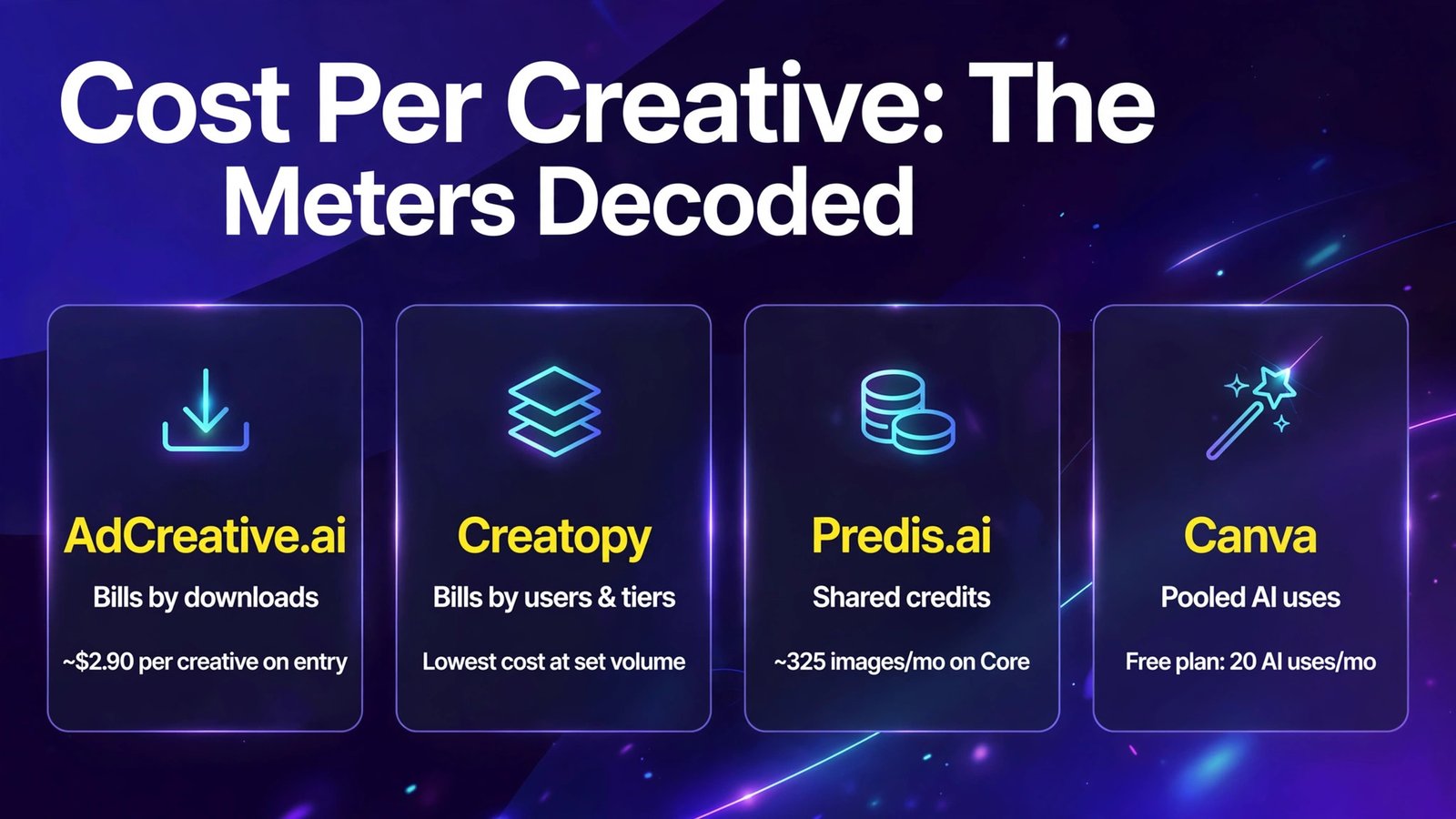
That last point matters more in 2026 than the headline price: these tools bill in downloads, credits, and AI uses — three incompatible meters — and two look cheap until you do the per-creative math.
Quick Answer
| Tool | Entry price (Oct 2026) | Free plan / trial | Usable variants from our brief (first run) | Best for |
|---|---|---|---|---|
| AdCreative.ai | From $29/mo (10 downloads) | 7-day trial, no free plan | 6 of 12 | High-volume static ad testing with performance scores |
| Creatopy | From ~$36/mo | Trial only | 5 of 8 (after template pick) | Display/HTML5 banner sets and batch resizing at agency scale |
| Predis.ai | Core $19/mo annual ($32 monthly) | 3-day trial (card required) | 5 of 10 | Small teams wanting ads + organic social + scheduling together |
| Canva | Free; Pro $144/yr | Yes — permanent free plan | 4 of 8 | Brand-safe, designer-controlled ads and teams already in Canva |
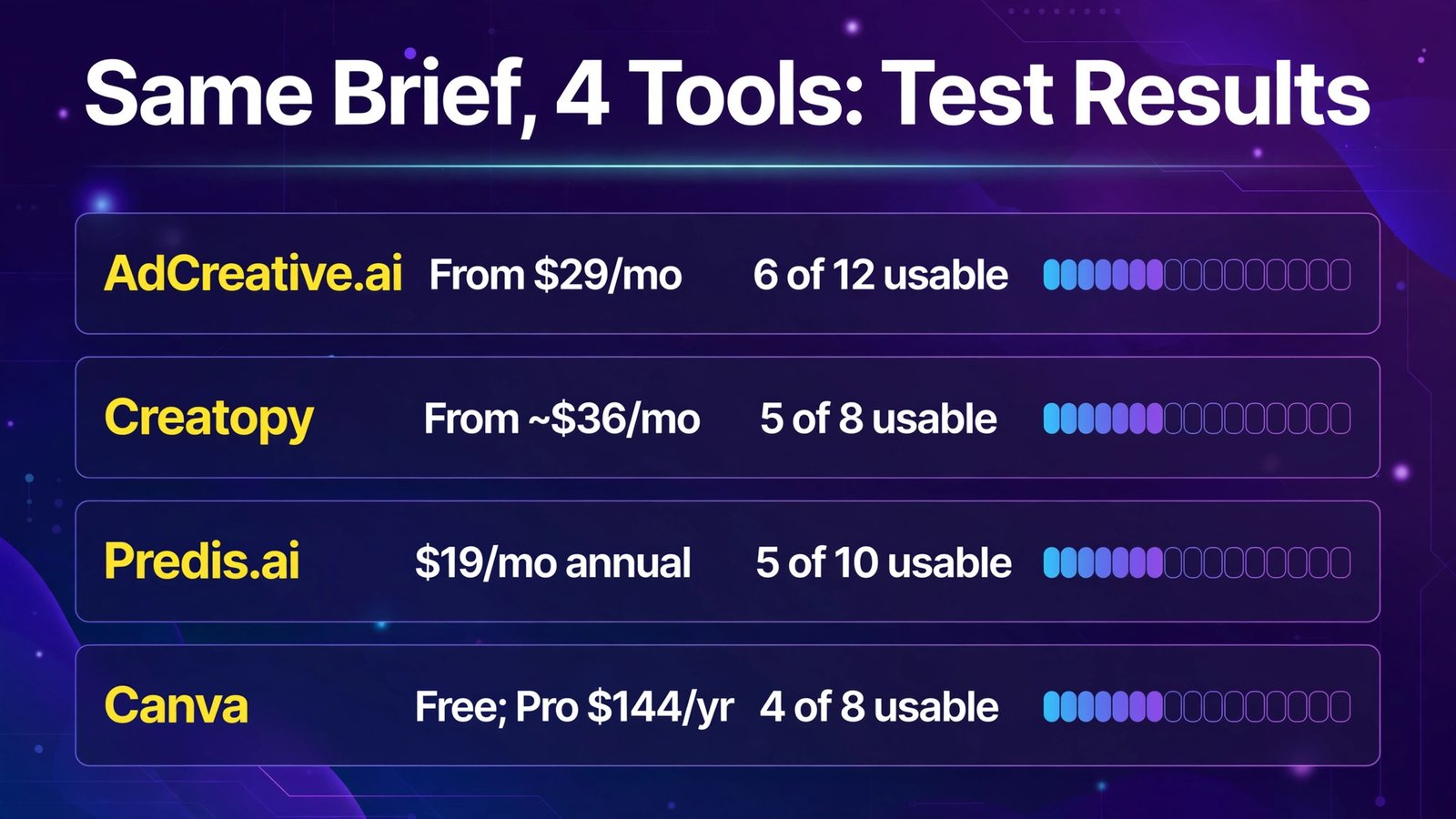
Bottom line: If your bottleneck is volume of testable static ads, AdCreative.ai generates the most variants and scores them — but it meters downloads, so budget per creative, not per month. If your bottleneck is brand safety and control, Canva’s editor-plus-brand-kit wins and its free plan is real. Creatopy is the display-ad specialist agencies should shortlist. Predis.ai is the best value bundle if you also need organic social and scheduling — just watch the credit burn on video.
The Test Brief: One Product, One Offer, Four Tools
Every tool received the same inputs — same product photo, same logo and brand colors (deep teal + warm coral), same offer:
Product: “Trailbrew” insulated travel mug, 20oz, keeps drinks hot 8 hours. Price $34, launch offer 20% off with code TRAIL20. Audience: commuters and hikers, 25–44. Goal: Meta feed ad (1:1 and 4:5), Stories/Reels (9:16), and Google Display (300×250, 728×90, 160×600). Tone: outdoorsy, direct, no hype words like “revolutionary.” Must include: price and code in at least the feed variants.
We graded each creative set on: (1) Variety — genuinely different layouts/concepts, or one design in five colorways? (2) Format support — could it produce all five sizes without manual rebuilding? (3) Brief fidelity — price, code, and tone respected; no invented claims (“keeps drinks hot 24 hours” was an automatic fail). (4) Brand safety — logo placement, brand colors, no distorted product or garbled text. (5) Cost per finished creative — plan price divided by what the meter actually lets you download.
1. AdCreative.ai — The Volume-and-Scoring Machine
What it is: AdCreative.ai is the specialist: you connect a brand kit (logo, colors, fonts), give it product inputs or a URL, and it generates large batches of static ad creatives — plus ad copy/headlines — each stamped with a predicted performance/conversion score. It is built for media buyers who test many variants, not for designers who want to art-direct.

2026 pricing (verified October 2026): No free plan — a 7-day free trial leads into paid tiers starting at $29/month for the entry plan with 10 downloads, scaling through higher download allowances up to enterprise-grade tiers near $999/month. The critical detail is the meter: AdCreative.ai bills by downloads, not generations. You can generate generously, but every creative you actually export spends your allowance — so your real cost per finished creative on the entry plan is about $2.90 per download if you use all ten, and much worse if you download three and let the rest lapse. Video creative features sit on higher tiers, not the entry plan.
Our test: AdCreative returned the largest set — 12 feed variants in the first run, of which we rated 6 genuinely usable with zero or one edit. Layout variety was real: product-hero, split comparison, lifestyle-background, and offer-forward designs rather than recolors. The performance scores were useful as a tiebreaker (its top-scored variant was also our pick), though treat any predicted CTR as a hypothesis, not data. Brief fidelity was good on price and code — both appeared correctly in the offer-forward set — but two variants invented “all-day heat” phrasing that stretched our 8-hour spec, a reminder that AI ad copy always needs a claims check. Format coverage was the gap: Meta sizes were one-click, but classic Google Display sizes (especially 160×600 and 300×250) were less native than Creatopy’s, with some awkward crops on the skyscraper.
Pros:
- Highest usable variant count in our test; real layout variety
- Performance scoring helps prioritize what to test first
- Brand kit training keeps colors/logo consistent at batch scale
- Generates matching ad copy and headlines, not just images
- Fast: a full test batch in minutes
Cons:
- Download-based billing makes cost per creative higher than headline suggests
- Entry plan’s 10 downloads is a tasting menu, not a workflow
- Google Display sizes less polished than Meta formats
- Occasional invented product claims — human review is mandatory
- No permanent free plan
Best for: Performance marketers and DTC brands running structured creative testing on Meta, who will actually use 50+ variants a month on a higher tier.
AdCreative.ai fits the question “which of these 20 ads should get budget?” — not “help me design one beautiful ad.” The scoring model only pays off if you test at the volume it assumes.
What it is: Creatopy (formerly Bannersnack) is an ad design automation platform built around template sets, a capable editor, and batch generation/resizing — with its strength in HTML5 and display advertising: animated banners, full IAB size sets, and programmatic-ready exports. Its AI features assist generation and adaptation rather than replacing the template-driven workflow.

2026 pricing (verified October 2026): Creatopy runs trial-first with paid plans starting at around $36/month for its ad-focused tiers, priced by users/workspaces and feature level (higher tiers add automation, more exports, and team controls). There is no permanent free plan. Because Creatopy’s tiers and user counts change the bill significantly, treat the entry figure as a starting point and price your exact seat-and-brand combination at checkout — agencies in particular should model the set-generation features on the tier that actually includes them. Its cost per creative, once you are producing full size sets from one master design, is the lowest in this test at volume: one design becomes 10+ sizes without per-download metering.
Our test: Creatopy’s workflow is different: you pick (or build) a master template, then generate the size set. From our brief it produced 5 of 8 first-run variants we’d ship — a lower hit rate than AdCreative on concept variety, but the highest fidelity on the hard part: every Google Display size — 300×250, 728×90, 160×600 — plus Meta 1:1, 4:5, and 9:16 exported cleanly, with the price and TRAIL20 code legible even in the skyscraper. Animated HTML5 versions of the leaderboard were a genuine bonus no other tool here matched. Brand safety was excellent — the editor gives you real control, so nothing ships off-brand unless you let it. The trade-off: concept variety comes from templates, so your ads can look like (good) templates, and the AI generation is less “type a brief, get concepts” than AdCreative or Predis.
Pros:
- Best format coverage in the test — full display/IAB sets plus social sizes
- Batch resize from one master design; cheapest per creative at volume
- HTML5 animated banner export for programmatic campaigns
- Editor control means strong brand safety and no garbled surprises
- Built for agency workflows: multiple brands, sets, and exports
Cons:
- No permanent free plan; trial only
- Concept generation is template-led — less AI “ideation” than rivals
- Social/video ad creation is not its home turf
- Pricing depends on seats and tier; confirm your exact configuration
Best for: Agencies and in-house teams running display and programmatic campaigns who need complete, correct size sets fast.
Creatopy wins the unglamorous, expensive part of ad production — the 11 sizes nobody wants to build by hand. If your media plan is Meta-only, its specialty is wasted; if Google Display is in your mix, it is the first tool to trial.
What it is: Predis.ai is an AI content platform that generates complete social posts and ad creatives — image, carousel, and short video, with caption and hashtags — from a prompt or a product link, then schedules and auto-publishes them. For e-commerce sellers it can pull product data directly, which makes it the most “brief-to-posted” tool in this test.
2026 pricing (verified October 2026, from Predis.ai’s pricing page): A 3-day trial (credit card required) leads into credit-metered plans: Core $19/month billed annually ($32 monthly) with 1,300 credits/month (roughly 325 images or 33 videos by Predis’s own estimate), 1 brand, 10 publish channels, and no auto-posting; Rise $40/month billed annually with 3,200 credits, up to 4 brands, and auto-posting; Enterprise+ $212/month billed annually with 10,000 credits and unlimited brands. Two metering warnings: credits are shared across everything (ads, organic posts, videos), and video burns credits roughly 3–5× faster than static images — a video-heavy month empties Core long before the headline “1,300 credits” suggests.
Our test: Predis produced 5 usable creatives out of 10 first-run outputs, including the only ready-to-post carousel in the test. Its copy was the most social-native — the feed caption read like a good organic post with the offer woven in, rather than a banner with text on it. E-commerce product-link generation was genuinely handy: paste the product page and the price/offer arrive pre-filled (and correct). Weaknesses showed on the display brief: Google Display sizes are not its focus (exports lean social-first), and two video variants used a mechanical AI voiceover we would replace. Brand-kit application was good on colors and logo, slightly loose on typography. For a solo seller, though, the brief-to-scheduled-post path was the fastest end-to-end of the four.
Pros:
- Generates creative + caption + hashtags and schedules it — fewest tools in the chain
- Product-link import gets price/offer right automatically
- Strong value on Core for static creative volume (~325 images/month)
- Carousels and UGC-style video formats included
- Competitor analysis built in
Cons:
- Credits shared across everything; video drains the pool 3–5× faster
- Trial is only 3 days and requires a card
- Google Display formats are an afterthought
- AI voiceovers sound mechanical; plan to re-record or use captions-only
- No auto-posting on the Core plan
Best for: Small e-commerce brands and solo marketers who want ads and organic content from one brief and one bill.
Predis.ai is the pragmatic pick for a team of one: it will not out-generate AdCreative.ai or out-format Creatopy, but it covers the most of a small brand’s actual week per dollar.
4. Canva — The Brand-Safe All-Rounder (With a Real Free Plan)
What it is: Canva is the design platform most teams already have, and its Magic Studio AI (Magic Design, Magic Media, background tools, and one-click Magic Resize across ad sizes) makes it a legitimate ad creative generator — one where a human keeps editor control over every output. It is the only tool here with a permanent free plan.

2026 pricing (verified October 2026): Free plan is permanent and includes the editor, 1.6M+ templates, and a small AI allowance — up to 20 standard/premium AI uses per month. Canva Pro is $144/year for one person ($18/month on monthly billing), adding the full premium library, Brand Kits (up to 5), Magic Resize, background remover, and a much larger AI allowance (up to ~200 premium AI uses/month). Business is $250/year per person with team brand controls. The metering to understand: Canva counts AI uses across Magic Studio, so heavy AI image generation competes with your other AI tasks for the same pool. And the classic free-plan gotcha applies to ads too: designs using premium elements carry a watermark on free exports — stick to free assets or license the element.
Our test: Canva’s Magic Design produced 4 of 8 variants we’d ship from the brief — fewer raw concepts than AdCreative, but the highest brand safety of the test: with our Brand Kit loaded, fonts, colors, and logo lockup were exactly right every time, and because you are in a real editor, fixing the two variants that mis-stated the offer (“hot all day”) took twenty seconds each. Magic Resize generated the full size set — Meta 1:1/4:5/9:16 and the three display sizes — from one approved design in one action, rivaling Creatopy for resize speed (though without HTML5 animation). Text rendering was the cleanest here: no garbled letters, which still plagues fully generative tools. What Canva does not give you: performance scoring, batch variant generation at AdCreative volume, or copy testing analytics. It makes ads; it does not tell you which ad to run.
Pros:
- Only permanent free plan in the test; generous Pro value at $144/year
- Best brand safety — Brand Kit + full editor control over every pixel
- Magic Resize covers Meta + display sizes from one design
- Cleanest text rendering; no AI-garbled copy in exports
- Your team probably already knows it — zero learning curve
Cons:
- AI uses are pooled and metered; heavy generation hits the allowance
- No performance scoring or creative-testing analytics
- Variant generation is slower/manual compared with AdCreative.ai
- Free exports watermark designs that include premium elements
Best for: Teams that prioritize on-brand, approved creative over raw variant volume — and anyone who wants to start free.
Canva is the control pick: if a brand review stands between generation and publication at your company, its model — AI proposes, human disposes, brand kit enforces — fits that reality best.
Full Comparison Table
| AdCreative.ai | Creatopy | Predis.ai | Canva | |
|---|---|---|---|---|
| Entry price | From $29/mo | From ~$36/mo | $19/mo annual ($32 monthly) | Free; Pro $144/yr |
| Free plan | No (7-day trial) | No (trial) | No (3-day trial, card) | Yes, permanent |
| Meter | Downloads | Users/tier | Credits (shared) | AI uses (pooled) |
| Cost per creative signal | ~$2.90/download on entry | Lowest at set volume | ~325 images on Core | Included in AI allowance |
| Usable from our brief | 6 of 12 | 5 of 8 | 5 of 10 | 4 of 8 |
| Meta sizes | Excellent | Very good | Very good | Excellent (via Resize) |
| Google Display sizes | Fair | Excellent | Weak | Very good (via Resize) |
| Video ads | Higher tiers | HTML5 animation | Yes (credit-hungry) | Yes (Magic Media) |
| Performance scoring | Yes | No | No | No |
| Brand kit | Yes (trained) | Yes (editor-led) | Yes | Yes (best control) |
| Scheduling/publishing | No | No | Yes (Rise+) | Yes (Pro scheduler) |
How to Choose
- Name your bottleneck honestly. Variant volume for testing → AdCreative.ai. Size-set production for display → Creatopy. Brief-to-posted for a one-person brand → Predis.ai. Brand approval and control → Canva. These tools solve different problems; “best” is meaningless until the bottleneck is named.
- Decode the meter before the price. Downloads (AdCreative), shared credits (Predis), pooled AI uses (Canva), seats/tiers (Creatopy). Estimate your finished creatives per month, then price each tool at that output level — the ranking usually flips.
- Weight video carefully. If video ads are core, note that AdCreative gates video to higher tiers, Predis burns credits 3–5× faster on video, and Creatopy’s strength is animated HTML5 rather than social video. Test your exact format in the trial.
- Run a claims check on every output. Two of four tools invented or stretched product claims in a single test brief. Build a 60-second human review — price, code, factual claims, logo, text legibility — into your process whichever tool you choose.
- Trial with your real brief, your real brand kit. Every tool here offers a trial or free tier. Load your actual colors, logo, and a live product, generate the full size set, and count usable exports. That count — not the demo gallery — is the review that matters.
Frequently Asked Questions
What is the cheapest way to generate ad creatives with AI?
Canva’s free plan costs nothing and covers basic ad creation with a limited monthly AI allowance, as long as you stick to free elements. Among paid tools, Predis.ai Core at $19/month billed annually offers the lowest entry for volume static generation (~325 images/month by its credit math). AdCreative.ai’s $29 entry looks close, but its 10-download meter makes the per-creative cost the highest here at low volume.
How much does an AI ad creative actually cost?
On entry plans in October 2026: roughly $2.90 per downloaded creative on AdCreative.ai’s starter tier (if you use all 10 downloads), a few cents per static image at Predis.ai Core volumes, and effectively bundled into a $144/year Canva Pro seat. At higher volumes the order reverses — batch/set tools like Creatopy and upper AdCreative tiers push per-creative cost down sharply. Always divide the plan price by finished, exported creatives, not generations.
Do AI ad creative generators support Google Display sizes?
Yes, but unevenly. Creatopy is built for it — full IAB sets (300×250, 728×90, 160×600 and more) from one master design, including HTML5 animation. Canva’s Magic Resize covers display sizes well from an approved design. AdCreative.ai focuses on social formats, with display as a weaker secondary. Predis.ai is social-first; display is not its strength.
Are AI-generated ads brand-safe?
They can be, with the right tool and a review step. Canva and Creatopy give you editor-level control and brand kits, so nothing ships unapproved. Batch generators (AdCreative.ai, Predis.ai) apply brand kits well for colors and logos but occasionally stretch product claims or mangle fine text — in our test, two tools invented claims from a simple brief. Keep a human claims-and-price check before any AI creative goes live.
AdCreative.ai vs Canva: which should I choose?
Choose AdCreative.ai if you run performance campaigns and need many scored variants to test each month — and budget for a tier with enough downloads. Choose Canva if you need fewer, tightly on-brand ads, already design in Canva, or want to start on a real free plan. Many teams use both: Canva for brand/hero creative, AdCreative for testing variants.
Can AI ad generators make video ads too?
Yes, with caveats. Predis.ai generates short social video (but credits burn 3–5× faster and voiceovers can sound mechanical), Canva’s Magic Media creates short AI clips within its AI allowance, Creatopy excels at animated HTML5 banners rather than social video, and AdCreative.ai’s video features sit on higher-priced tiers. For serious video ad volume, budget a tier above entry on any of them.
Conclusion
The best AI ad creative generators in 2026 each win a different job: AdCreative.ai for scored variant volume on Meta, Creatopy for flawless display size sets and HTML5, Predis.ai for the small-brand brief-to-posted bundle, and Canva for brand-safe control with the only real free plan. Our same-brief test showed usable hit rates between 4-of-8 and 6-of-12 everywhere — good enough to transform production speed, not good enough to skip human review.
The deciding factors are rarely creative quality alone. They are the meter (what a finished creative costs you), the formats (does it nail your ad sizes?), and the review workflow (can anything off-brand reach the publish button?). Answer those three for your team and the winner usually names itself.
Next step: copy our Trailbrew brief, swap in your own product and offer, and run it through Canva’s free plan and one trial (AdCreative.ai for testing volume, Creatopy for display). Count the usable exports and divide by the plan price — you’ll have your answer, with your own numbers, inside an hour.