

To fix Bluetooth earbuds keeps disconnecting, start with the test that separates an earbud problem from a phone problem. Pair the earbuds with a second phone or tablet, walk around with them for ten minutes, and note whether they drop. If they drop on the second device too, the earbuds, their case, or their battery are at fault. If they stay connected on the second device, your first phone, its Bluetooth stack, or its settings are at fault. That verdict saves you from resetting earbuds that were never broken, and from blaming a phone when the earbuds are dying.
If you want to fix Bluetooth earbuds keeps disconnecting, run that test first, then work the causes in order, from range and battery, through pairing, to interference and firmware.
Bluetooth earbuds disconnect for a small set of reasons, and most of them are mundane. The phone moves out of range, or a wall, a bag, or your own body blocks the signal. The battery in one earbud runs low before the other, and the low bud drops first. The saved pairing becomes corrupted after an update or a failed connection, and the phone and earbuds keep negotiating a broken link. Interference from a crowded station, a gym full of devices, or a microwave oven overwhelms the radio. Firmware on either side has a bug that a restart or an update fixes. Rarely, the earbuds themselves have a hardware fault in one bud, the case charging pins, or the antenna.
This guide separates those causes by symptom, so you fix the right layer first.
Range, Body Blocking, and How Bluetooth Really Behaves
Bluetooth range on paper is generous, often quoted near 10 metres for earbuds, and up to 30 metres or more in open space for newer versions. Real world range is much shorter, because walls, floors, bags, and bodies absorb the 2.4 GHz signal that Bluetooth uses. Your body is mostly water, and water absorbs that frequency well, which is why earbuds can drop when the phone is in a back pocket, in a bag behind you, or in a jacket pocket on the opposite side from the earbud antenna. A phone in a front trouser pocket usually works, while a phone in a backpack while you run often does not, even though the distance is similar.
Test range deliberately. Put the phone on a table in the same room, stand two metres away with a clear line of sight, and play music for five minutes. If the earbuds hold steady there but drop when the phone goes into a pocket or another room, range and blocking are the cause, not pairing or battery. Move the phone to a front pocket, a chest pocket, or an armband on the same side as the dominant earbud, and test again. Small changes in phone position often fix a problem that looked like a hardware fault, because the signal path changes completely when the phone moves from behind you to beside you.
Walls matter more than distance alone. A single plaster wall may be fine, while a concrete floor, a metal door, or a fridge between phone and earbuds can break the link at short range. If earbuds drop every time you walk into the kitchen or leave the phone charging in another room, that is range, not a defect, and the practical fix is to keep the phone on your person or accept that earbuds are designed for near body use. Expecting earbuds to play reliably through two rooms is expecting more than the radio was designed to deliver.

Battery, Case, and Charging Pins
Low battery is the most underestimated cause of disconnections. Earbuds do not simply play until they stop, they often stutter, drop one side, or disconnect and reconnect as voltage falls, especially when the battery is old and its capacity has faded. Manufacturers commonly advise charging when the level falls below 10 percent, and some support pages note that levels below 5 percent can cause disconnection outright. Check the battery level for each earbud separately, not just the case, because one bud often drains faster than the other, particularly the bud that handles the microphone or the main Bluetooth link.
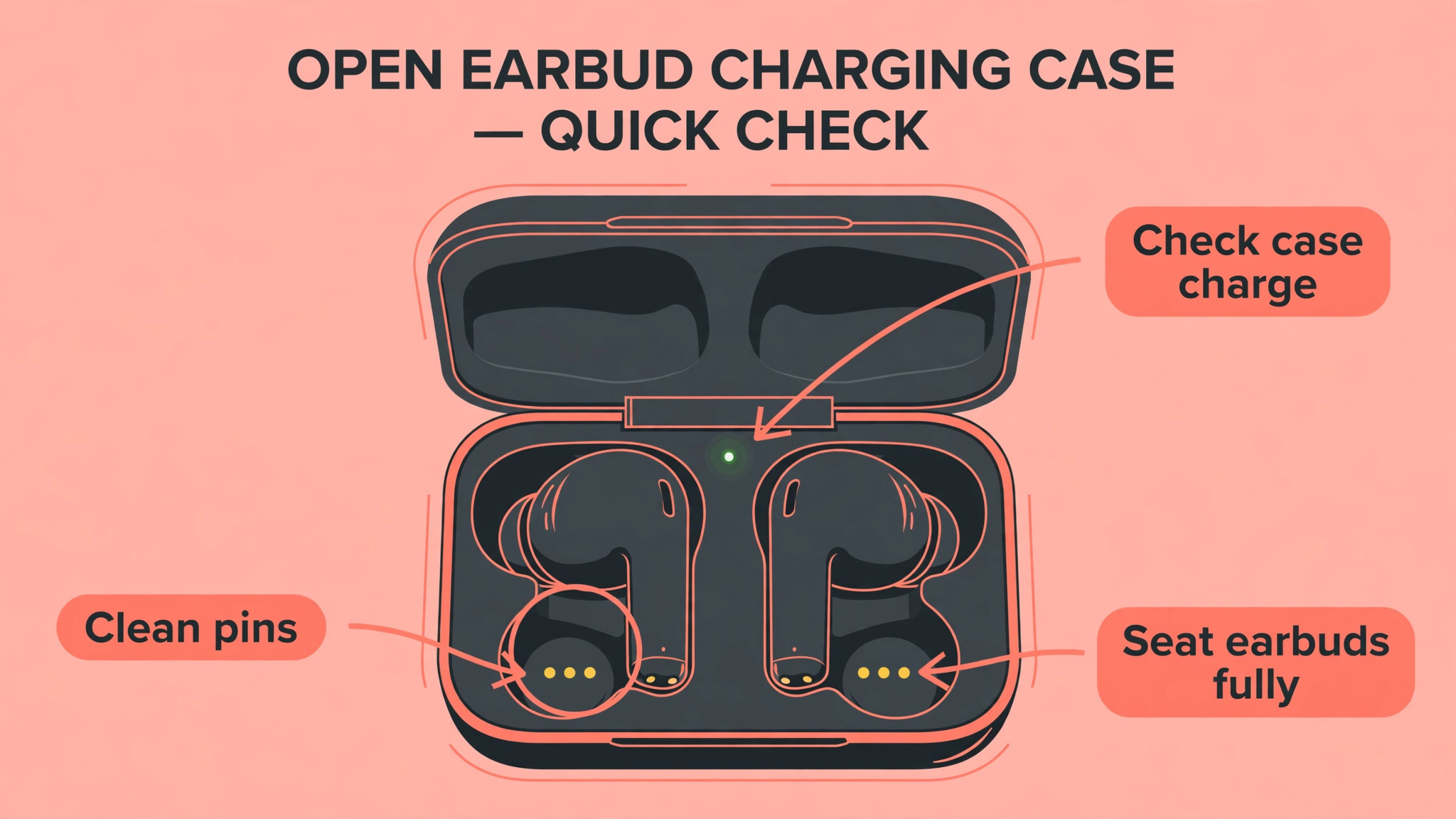
Clean the charging pins, because a dirty pin is a hidden battery problem. Open the case, look at the metal contacts on each earbud and inside the case, and wipe them gently with a dry cloth or a cotton swab. Lint, earwax residue, and pocket dust can prevent a bud from charging fully even when the case light says charging, so one bud starts the day half charged and drops mid morning. After cleaning, place both buds in the case, close the lid, wait a minute, and check that both buds report charging.
If one bud consistently fails to charge, try reseating it firmly, and check whether the case itself is charged, since a dead case cannot charge buds no matter how long they sit in it.
Battery age matters too. Earbud batteries are tiny, they cycle daily, and after a year or two of heavy use their capacity falls noticeably. An old bud that drops after an hour, while the other lasts three, is showing age, not a pairing fault. No reset will restore lost capacity. If the earbuds are old, heavily used, and one side consistently dies first, compare the cost of a replacement bud or pair against continued troubleshooting, because the economics of a worn battery favour replacement once capacity has clearly faded.
Fix Bluetooth Earbuds Keeps Disconnecting in Order
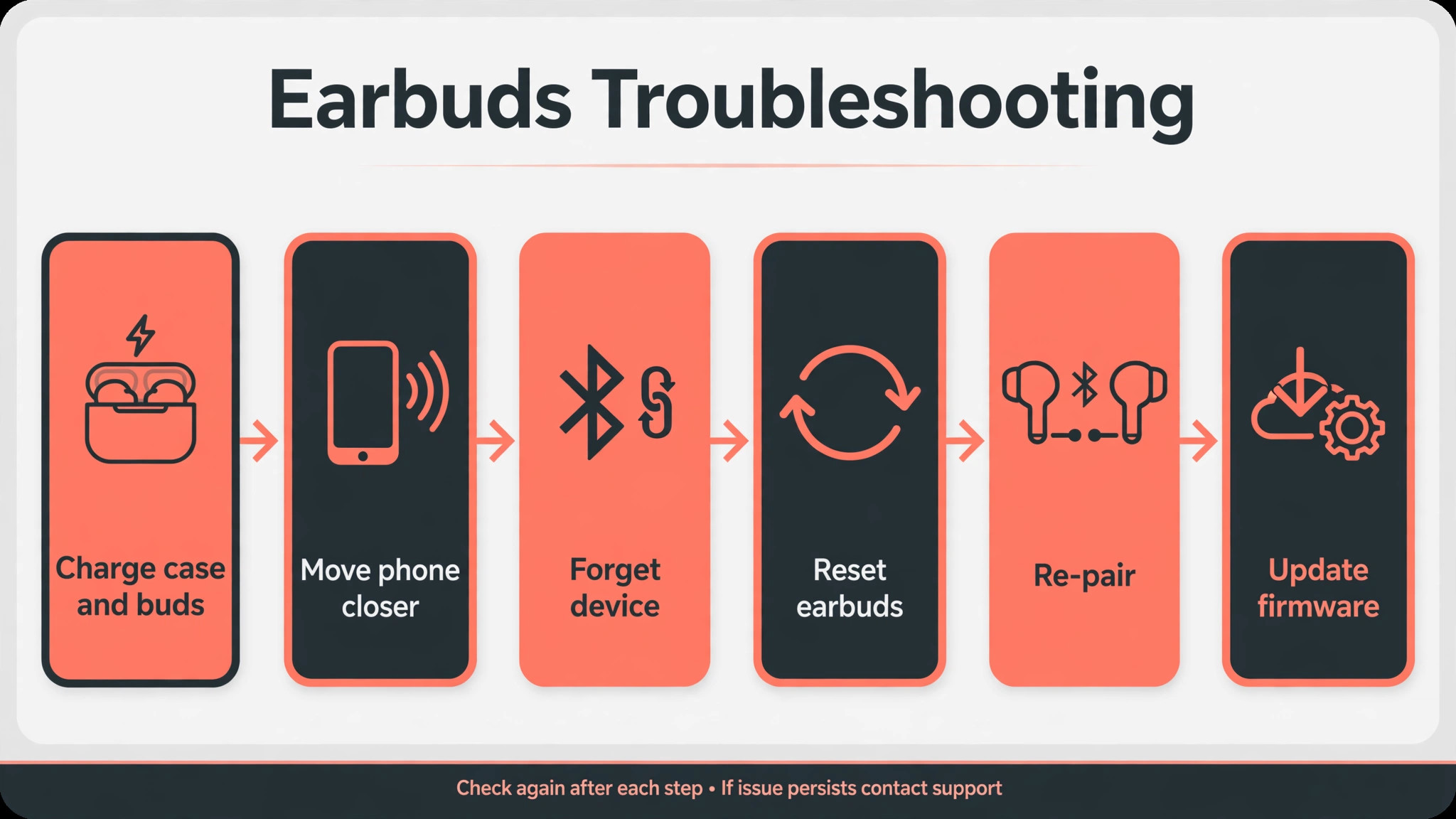
Work this list top to bottom, testing with five minutes of playback after each step. Stop as soon as the connection holds.
- Charge both earbuds and the case fully, clean the charging pins, and check each bud battery level separately.
- Put the phone in a front pocket or on a table nearby with a clear path, and test at close range.
- Put both buds back in the case, close the lid for ten seconds, take them out, and let them reconnect.
- Toggle Bluetooth off and on on the phone, then reconnect the earbuds.
- Restart the phone, which clears the Bluetooth stack and radio state.
- Forget the earbuds in phone Bluetooth settings, then pair them again as a new device.
- Reset the earbuds to factory settings using the maker method, usually a long press on the case button or both buds, then pair again.
- Update the phone operating system and the earbud firmware through the maker app if one exists.
- Test on a second device to separate an earbud fault from a phone fault.
- Move away from crowded interference, such as a busy station or a microwave oven, and test in a quiet room.
The order starts with power and range because those are the most common and cheapest causes, then moves to the connection itself, then to software, and finally to environment and hardware. Resetting before charging wastes a reset on a flat battery, and pairing again before testing range wastes a pairing on a blocked signal.
Forget, Reset, and Re-Pair Properly
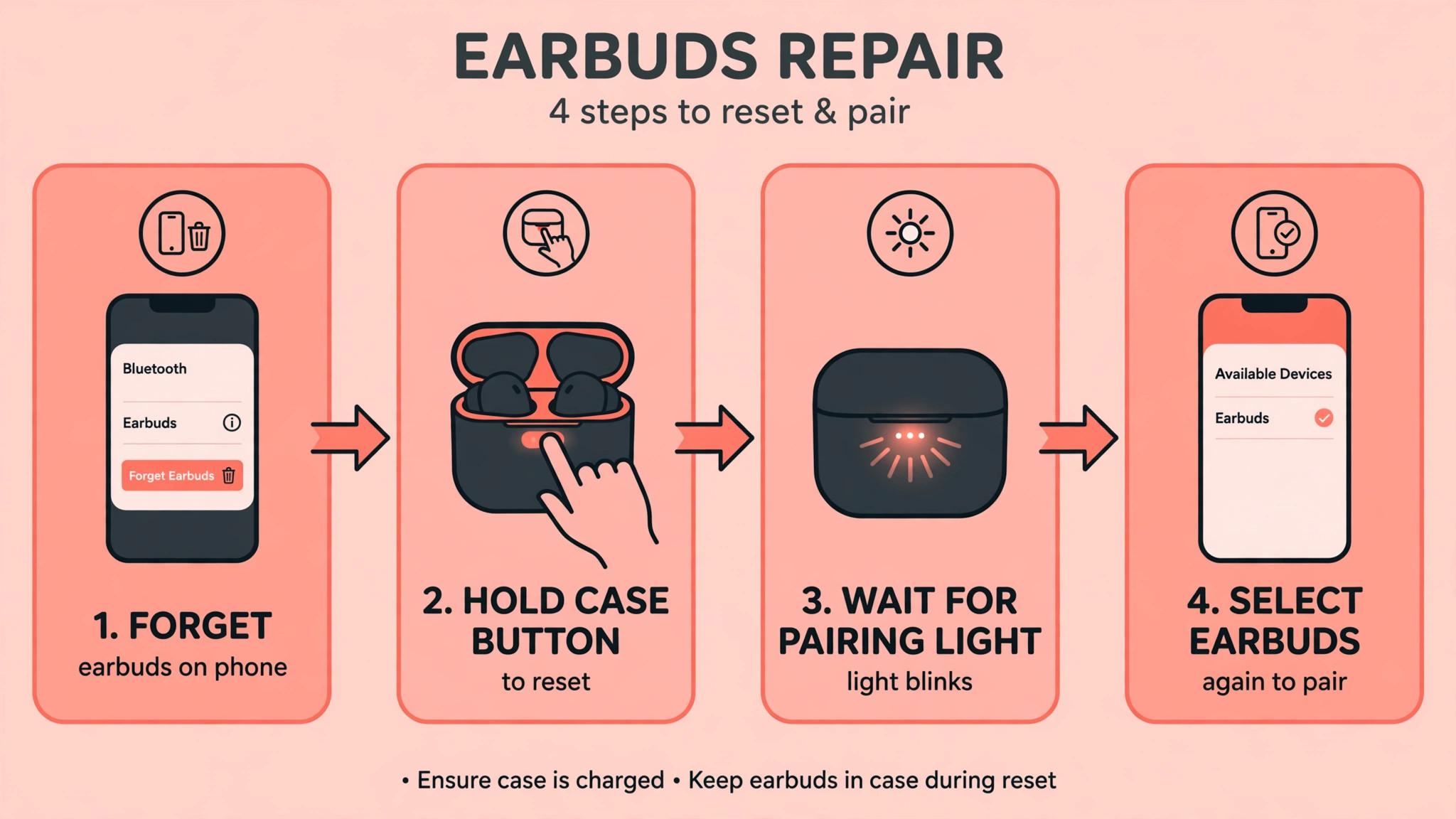
Forgetting and re-pairing is the most powerful software fix, but only when done completely. Open phone Bluetooth settings, find the earbuds, tap Forget or Unpair, and confirm. Do not simply disconnect, since disconnecting keeps the saved pairing and its corrupted data. After forgetting, turn Bluetooth off, restart the phone if you have not already, put the earbuds in pairing mode according to the maker instructions, and pair them as a new device. Test with music and with a call, since a pairing can hold for music but fail for calls if the hands free profile did not negotiate cleanly.
A factory reset of the earbuds goes one step further and clears the earbuds own stored pairings and settings. The method varies by maker, and using the wrong method can leave the buds half reset, so check the maker guide for your exact model. Common patterns include holding the case button for ten seconds with the buds inside and the lid open, or holding both buds for five seconds outside the case, until a light flashes in the reset pattern. After a factory reset, forget the earbuds on the phone as well, then pair fresh.
A reset on one side only, with the old pairing still saved on the other side, often recreates the same fault, so reset both sides together.
After re-pairing, test in a quiet room at close range before testing in a crowded place. A fresh pairing that holds in a quiet room but drops in a station is an interference story, not a pairing story, and you will know that because you tested the two conditions separately. If a fresh pairing drops in a quiet room at close range with full batteries, the fault is likely hardware, and further resets will not change it.
Interference, Multipoint, and Codec Problems
Interference is the cause people blame least and experience most in public places. Bluetooth shares the 2.4 GHz band with Wi-Fi, microwaves, and thousands of other Bluetooth devices, and a crowded train station, gym, or office can overwhelm a weak link. Symptoms that appear only in crowds, only near a microwave, or only when many devices are active point at interference. Move a few steps away, turn off Wi-Fi on the phone temporarily to reduce band contention, and test again.
If the connection stabilises away from the crowd, interference is confirmed, and the practical fix is to keep the phone close and accept occasional drops in the densest environments, or to use a wired option for critical calls in those places.
Multipoint connections, where earbuds stay connected to two devices at once, such as a phone and a laptop, can also cause drops. The earbuds may switch audio focus between devices, or one device may steal the connection when it plays a notification sound. If you use multipoint, test with the second device Bluetooth off, or disconnect the earbuds from the laptop, and see whether drops stop. Many users discover that their earbuds were not disconnecting randomly at all, they were switching to a laptop that played a system sound, and the fix is to manage multipoint deliberately rather than leaving both connections live all day.
Codec and audio settings can contribute in subtler ways. Some phones let you change Bluetooth audio codec, sample rate, or absolute volume settings in developer options, and a codec that the earbuds handle poorly can cause stutter that feels like disconnection. Leave developer audio settings at defaults unless you know the earbuds support the codec you chose, and test with default settings after any change. A high quality codec that stutters is worse than a standard codec that holds, especially for calls where stability matters more than fidelity.

Symptom Guide for Earbud Disconnections
| What you see | Most likely cause | First move |
|---|---|---|
| Drops when phone is in a bag or back pocket | Range and body blocking | Move phone to a front pocket or nearby table |
| One bud drops first, then the other | Low or ageing battery in that bud | Check each bud level, clean charging pins |
| Drops in crowds or near microwaves | 2.4 GHz interference | Test in a quiet room, keep phone close |
| Drops after a phone or app update | Corrupted pairing or firmware bug | Forget and re-pair, update firmware |
| Drops when a laptop plays a sound | Multipoint switching | Disconnect the second device and test |
| Drops on every device, in every room | Earbud hardware fault | Factory reset once, then consider replacement |
| Drops only on one phone | Phone Bluetooth stack or setting | Restart phone, forget and re-pair, update OS |
Match the symptom before resetting. A bud that drops in a bag does not need a factory reset, and a bud that drops on every device does not need a phone update. The table turns a random complaint into a targeted first move.
One Bud Versus Both Buds
One bud dropping is a different problem from both buds dropping, and the distinction guides the fix. When one bud drops while the other plays, suspect that bud battery, its charging pin, its fit in the case, or its individual pairing with the main bud. Clean the pins for that bud, check its level separately, and test it alone if the maker allows single bud use. Some earbuds designate one bud as primary, and the secondary bud connects through the primary, so a primary bud fault can look like a secondary bud problem. Swapping which bud is primary, where the maker app allows it, can clarify that.
When both buds drop together, suspect the phone link, the range, interference, or the shared pairing, since both buds share the phone connection. Test range and second device first for a both buds failure, because a shared cause is more likely than two buds failing at once. If both buds drop at the same moment every time, note what else happens at that moment, such as a notification on a second device, a Wi-Fi handover, or entering a crowded area. A shared trigger that coincides with every drop is the cause, even if it seems unrelated to audio.
Fit and sensor behaviour can mimic disconnection for one bud. Some earbuds pause or disconnect when they detect removal, using an in ear sensor, and a loose fit that shifts the sensor can trigger pauses that feel like drops. Test with a different ear tip size for a secure fit, and check whether the maker app offers a wear detection toggle to disable for testing. A bud that pauses when you chew, talk, or adjust it may be a sensor issue, not a radio issue, and a tip change fixes it faster than any reset.

Firmware, Phone Settings, and App Updates
Firmware updates for earbuds arrive through the maker app, and they fix radio stability, battery reporting, and multipoint behaviour that no phone setting can address. Open the maker app, check for firmware updates, and install them with the earbuds charged and in the case or nearby as instructed. Do not update firmware on a low battery, since an interrupted firmware update can brick a bud. After updating, forget and re-pair once if the maker recommends it, and test in a quiet room before judging the result.
Phone settings that affect Bluetooth stability include battery optimisation, which can kill the Bluetooth process or the maker app in the background, and absolute volume or audio codec settings changed in developer options. Check that the maker app is exempt from battery optimisation, so it can maintain the connection and deliver firmware updates. Reset network settings only as a later step, since that forgets Wi-Fi networks and Bluetooth pairings together, and it should follow a failed forget and re-pair, not precede it. A network reset is a broad tool, and using it early destroys useful evidence about which pairing was at fault.
Keep the phone operating system updated as well, because Bluetooth stack bugs are fixed in OS updates. If drops started after an OS update, check for a patch, and search the maker support pages for known issues with that OS version. A bug that affects many users on one OS version is a waiting game, and a workaround such as disabling multipoint or using a single device connection can carry you until the patch lands.

Mistakes That Keep Earbuds Dropping
The first mistake is resetting before charging. A flat bud will drop after any reset, and the user concludes the reset failed, when the battery was the cause all along. Charge fully, clean pins, check levels, and only then reset. The order of those steps is the difference between a fix and a loop.
The second mistake is re-pairing without forgetting. Disconnecting and reconnecting keeps the old pairing data, including whatever corruption caused the fault. Forget the device, restart the phone, and pair as new. A half done re-pair is the most common reason users say re-pairing did not work, when they never actually re-paired.
The third mistake is testing only in the place where the problem happens. A crowded gym test cannot separate interference from hardware, because interference is always present there. Test in a quiet room at close range first to establish a baseline, then test in the problem environment. Without a baseline, every test is ambiguous.
The fourth mistake is ignoring the second device test. Users spend hours on phone settings for earbuds that drop on every device, and hours on earbud resets for a phone whose Bluetooth stack is at fault. Ten minutes with a second device answers the question definitively, and it should come before any factory reset or service decision.
A Stable Listening Routine
Build a routine that keeps the link stable by default. Charge the case overnight, keep the pins clean, and check bud levels before a long session rather than discovering a flat bud mid call. Keep the phone on your person in a front pocket for runs and commutes, and keep multipoint to one active device during important calls. Update firmware when the maker app offers it, and update the phone OS promptly, but test Bluetooth after a major update while you are still at home.
Replace ear tips when they wear out, since a loose fit causes sensor pauses and a poor seal that users mistake for audio drops. Keep a spare set of tips in the case pouch, and note which size fits each ear, since ears differ. A stable physical fit and a stable radio link go together, and both deserve the same routine attention as charging. When drops return after a long stable period, work the symptom table again, because a new phone, a new case, a new app, or a new commute route is usually the trigger, and the pattern will name it.
Earbuds for Calls Versus Music, and Why They Fail Differently
Music and calls use Bluetooth differently, and a pair that plays music perfectly can still drop on calls, which confuses diagnosis. Music uses a one way high quality audio profile that tolerates brief signal dips by buffering, so a weak link may sound fine for songs while failing for calls. Calls use a two way hands free profile that sends your voice back to the phone at the same time, which demands a steadier link, lower latency, and more radio work from the earbuds. A connection that is just good enough for music can therefore be not good enough for calls, and the fix must address link quality, not just playback.
Microphone duty also drains one bud faster. In many designs, one bud handles the microphone and the main phone link during calls, so that bud works harder, heats more, and drains faster than the other. A call that drops after thirty minutes while music lasts three hours may simply be that primary bud reaching low battery under call load, even though its music battery looked healthy. Check bud levels after a call, not just after music, and test calls with the phone close and the primary bud fully charged.
If calls drop only when the primary bud is low, battery duty during calls is the story, and the remedy is charging discipline and, for long call days, a wired headset or a speakerphone break.
Call settings on the phone add another layer. Noise reduction, voice isolation, and hands free audio enhancements process your voice in real time and can interact with a weak link to produce dropouts that sound like disconnections. Test a call with enhancements off, in a quiet room, at close range, to establish a baseline. If the baseline holds and the enhanced call drops, the enhancement processing plus a marginal link together cause the failure, and turning the enhancement off for calls is a practical trade.
Also test whether drops happen on cellular calls, on app calls, or on both, since app calls add internet quality to the Bluetooth quality, and a poor internet connection can look like a Bluetooth drop when the earbud link is actually fine.
When you fix Bluetooth earbuds keeps disconnecting on calls specifically, test the call path separately from the music path, because the two paths have different demands and different fixes. A music fix that ignores call duty will leave call drops untouched, and a call fix that ignores range will leave both broken. Note which path fails, test each path at close range with full batteries, and let the failing path guide the next step. That separation is how you fix Bluetooth earbuds keeps disconnecting for work calls without buying a new pair for a music problem you never had.
More Reading for Everyday Tech Fixes
If your earbuds hold steady now, the wider fix guides on Stratilyze cover the next audio and phone problem in the same order. The guide to fixing Bluetooth that will not turn on covers the phone radio itself, the guide to fixing a smartwatch that will not sync applies the same second device test to wearables, the guide to fixing an iPhone with no sound covers speaker checks, and the guide to fixing a speaker that will not connect to a laptop helps when a larger Bluetooth device misbehaves. Read the Bluetooth phone guide next if earbuds work on a second device but not on your main phone, since that pattern points at the phone.
Frequently Asked Questions
Why do my earbuds disconnect when my phone is in my pocket?
Your body absorbs Bluetooth signals, especially when the phone sits behind you in a back pocket or a bag, and walls and distance add to the loss. Pocket position is the first check when you fix Bluetooth earbuds keeps disconnecting during walks and commutes. Move the phone to a front pocket, a chest pocket, or an armband on the same side as the main earbud, and test again. If earbuds hold steady on a nearby table but drop in a pocket, range and body blocking are the cause, not pairing or battery, and phone position is the fix.
How do I fix Bluetooth earbuds keeps disconnecting on one side only?
Check that bud battery level separately, clean its charging pins, and reseat it firmly in the case to ensure it charges fully. Test that bud alone if single bud use is supported, and try a different ear tip size for a secure fit, since a loose fit can trigger wear sensor pauses. If one bud consistently dies first or fails to charge after cleaning, its battery may be ageing, and a factory reset will not restore lost capacity. Compare replacement cost once a hardware pattern is clear.
Should I forget and re-pair or factory reset my earbuds first?
Forget and re-pair on the phone first, since it clears corrupted pairing data without touching earbud settings. A complete forget and re-pair is the core step to fix Bluetooth earbuds keeps disconnecting after a phone update. If that fails, factory reset the earbuds using the maker method, forget them on the phone as well, and pair fresh. Resetting both sides together matters, because a reset on one side alone can recreate the same fault from the old pairing still saved on the other side. Test in a quiet room at close range after each step.
Do Bluetooth earbuds disconnect more in crowded places?
Yes. Bluetooth shares the 2.4 GHz band with Wi-Fi and many other devices, and a crowded station, gym, or office can overwhelm a weak link. Crowd interference is a frequent reason people try to fix Bluetooth earbuds keeps disconnecting in public places. Drops that appear only in crowds and vanish in a quiet room point at interference. Keep the phone close, turn off Wi-Fi temporarily to reduce band contention, and accept occasional drops in the densest places, or use a wired option for critical calls there. Interference is an environment limit, not necessarily a defect.
Can a phone update cause earbuds to disconnect?
Yes. An operating system update can change the Bluetooth stack, corrupt a saved pairing, or introduce a bug that affects certain earbud models. Forget and re-pair after an update, check for a patch, and update earbud firmware through the maker app. If drops started the day of an update and affect many users on that version, a patch is the likely cure, and disabling multipoint or using a single device connection can serve as a workaround until it lands.
When should I replace earbuds that keep disconnecting?
Replace them when drops persist on every device, in quiet rooms, at close range, with full batteries, after a proper forget and factory reset, or when one bud battery has clearly faded and dies far earlier than the other. Those patterns point at hardware or worn batteries, and further resets will not change them. Check warranty first, since a hardware fault inside the warranty period should go to the maker rather than to a new purchase.
A Steadier Connection From Here
Earbud drops feel random, but they follow patterns, and patterns have fixes. Range and body blocking, low or ageing batteries, corrupted pairings, interference, and multipoint switching cover almost every case, and each one has a test that proves it. When you fix Bluetooth earbuds keeps disconnecting by testing on a second device, charging fully, and re-pairing properly, you replace guessing with evidence, and the fix that follows is usually simple.
Keep the routine going after the fix. Charge the case, clean the pins, keep the phone close, and update firmware when offered. A stable link is less about buying new earbuds and more about giving the radio a clean signal, full power, and a fresh pairing to work with, and those three things are all within your control.