

Some warmth while charging is normal, and that fact alone causes a lot of confusion when you try to fix Android phone overheating charging. A phone that feels warm during fast charging or wireless charging is operating within its design, and Samsung own guidance says a device may feel hotter during fast or wireless charging without that affecting lifespan or performance. The problem starts when warm becomes hot, when the phone throttles charging, shows a temperature warning, shuts down, or stays hot long after it should have cooled.
Surveys of phone repair shops routinely put heat and battery complaints among the most common reasons people seek help, and heat is the one symptom users are right to take seriously, because a swollen or damaged battery is a safety issue, not a performance quirk. If you want to fix Android phone overheating charging, the first job is to tell normal warmth from dangerous heat, and the second job is to work the causes in order, from the charger in your hand to the battery inside the phone.
Heat during charging comes from several sources at once. The charger converts mains power and loses some as heat. The battery accepts charge and its internal resistance turns some energy into heat, more so during fast charging. The processor generates heat if you use the phone while it charges, especially for games, video calls, or navigation. The case traps heat that would otherwise escape. The environment adds heat when the phone sits in sunlight, on bedding, or in a hot car. Any one of those sources alone is manageable. Stack three of them, which is a fast charger plus a heavy case plus a game in sunlight, and the phone crosses from warm to hot very quickly.
Normal Warmth Versus Heat That Needs Action
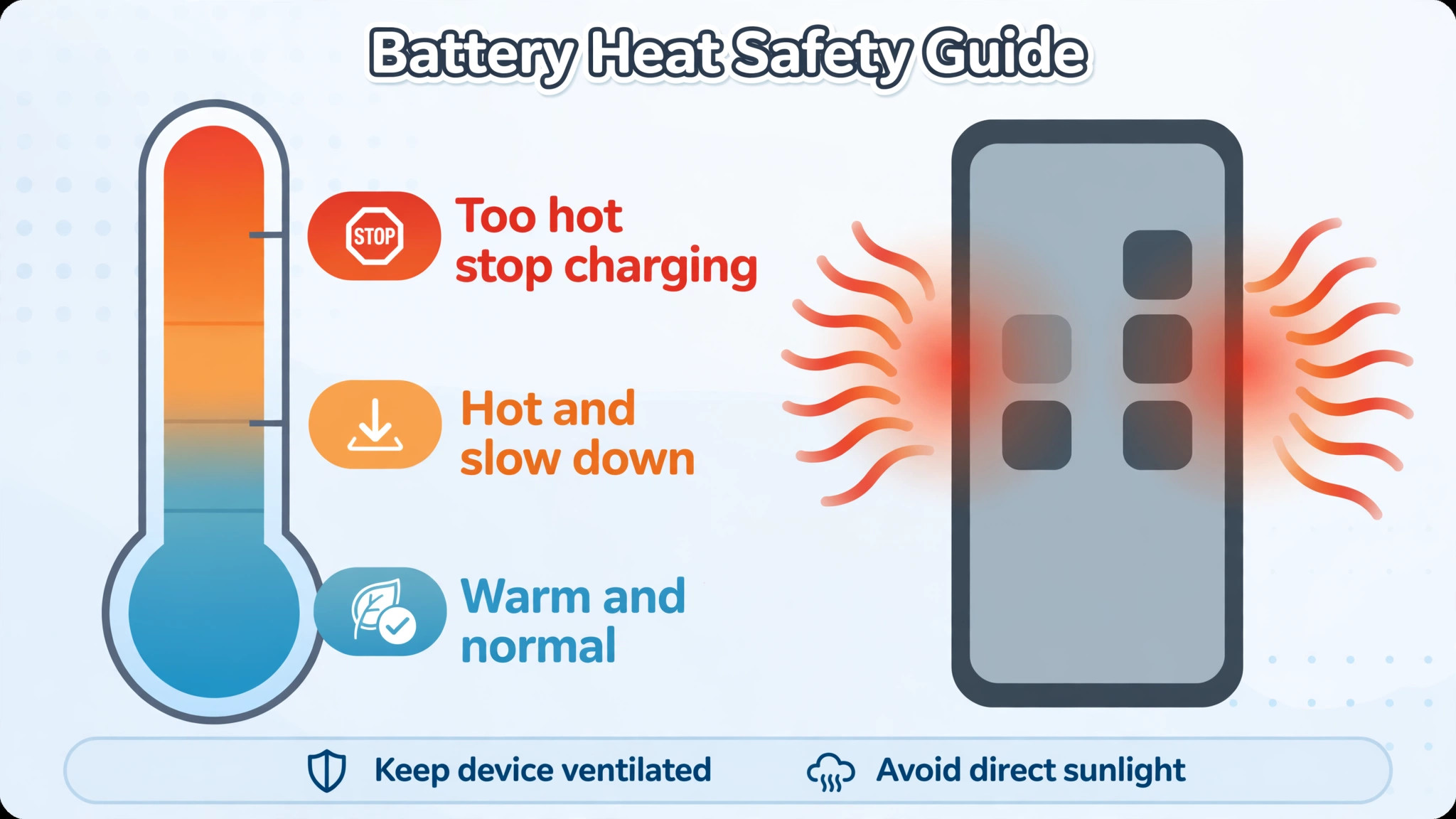
Learn the difference before you change anything, because it decides whether you need a fix or reassurance. Normal warmth feels like a hand warmer on a low setting, spread evenly across the back, during fast charging or heavy use, and it fades within minutes of unplugging or stopping the heavy app. The phone still charges at a normal rate, the screen stays responsive, and no warning appears. That warmth is the cost of pushing a lot of energy into a small battery quickly, and it is expected.
Heat that needs action feels different. The phone becomes uncomfortable to hold, or hot in one spot rather than evenly warm, especially near the battery or the charging port. Charging slows dramatically or stops, a temperature warning appears, the phone dims the screen or closes apps on its own, or it shuts down. A battery that bulges, lifts the screen, or makes the back cover separate is an emergency, not a troubleshooting case. Stop charging at once, do not puncture or bend the phone, keep it away from flammable material, and take it to a service centre. Swelling means the battery has failed internally, and no settings change will make it safe again.
Also watch for heat that persists when the phone is idle and unplugged. A phone that stays hot with no charger and no app running has a different problem, usually a runaway app, a failing battery, or a hardware fault, and charging fixes will not address it. Note when the heat appears, how long it lasts, and whether it follows the charger, the cable, the app, or the location. That pattern is your best diagnostic tool, and it is worth writing down before you start swapping parts.
Cause Table for Overheating While Charging
| Cause | How it shows up | How to confirm it |
|---|---|---|
| Fast charging at high wattage | Even warmth, faster early then slower later | Heat drops sharply on a slower charger |
| Damaged or uncertified charger or cable | Heat near the port or charger, erratic charging | Heat disappears with the original charger and cable |
| Heavy use while charging | Heat rises during games, video, or navigation | Heat falls when the phone idles while charging |
| Thick or insulating case | Whole phone stays hot, cools fast case off | Temperature drops noticeably without the case |
| Hot environment or sunlight | Heat worse outdoors, in cars, or on bedding | Same charger stays cool in a cool room |
| Runaway background app | Heat and battery drain even when idle | Battery usage screen shows one app dominating |
| Wireless charging with objects between phone and pad | Local hot spot, slow charging | Removing cards or metal from the pad fixes it |
| Ageing or damaged battery | Heat plus fast drain, swelling, shutdowns | Battery health check or service diagnosis confirms it |
Use the table to pick your first test. If heat follows the charger, test the charger. If heat follows the app, test the app. If heat follows the room, move the room. Randomly replacing parts without a pattern wastes money and hides the real cause.

Fix Android Phone Overheating Charging in Order
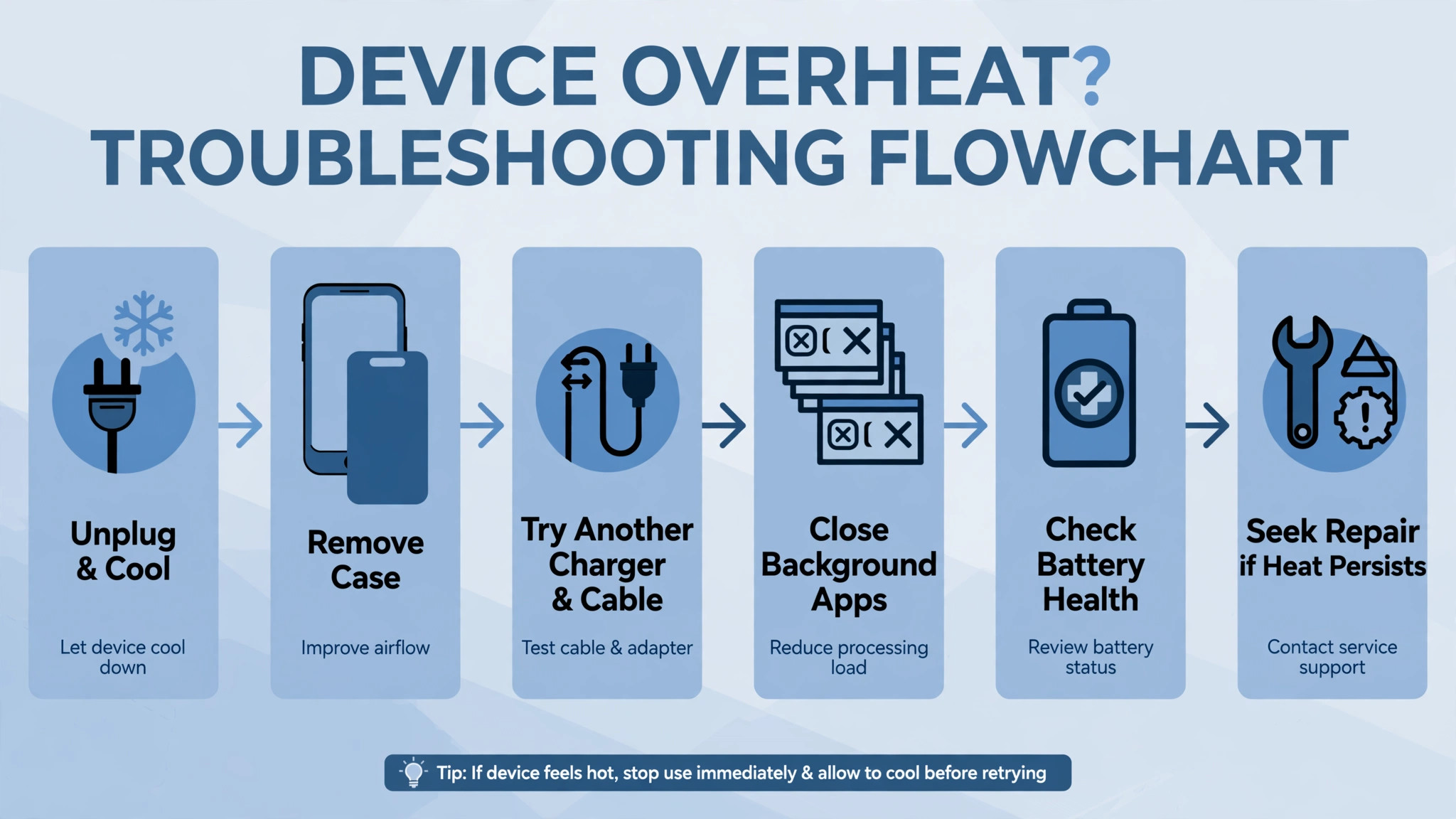
Work this list top to bottom, and test charging after each step with the phone idle, on a cool surface, for at least twenty minutes.
- Unplug at once if the phone is too hot to hold, swollen, or showing a temperature warning, and let it cool before any further test.
- Remove the case, move the phone out of sunlight and off bedding, and charge on a hard, cool surface.
- Swap to the original or manufacturer certified charger and cable, and test on a different wall outlet.
- Stop using the phone while it charges, and close games, video calls, and navigation during the test.
- Switch from fast charging to standard charging for the test, or use a lower wattage charger, and compare the heat.
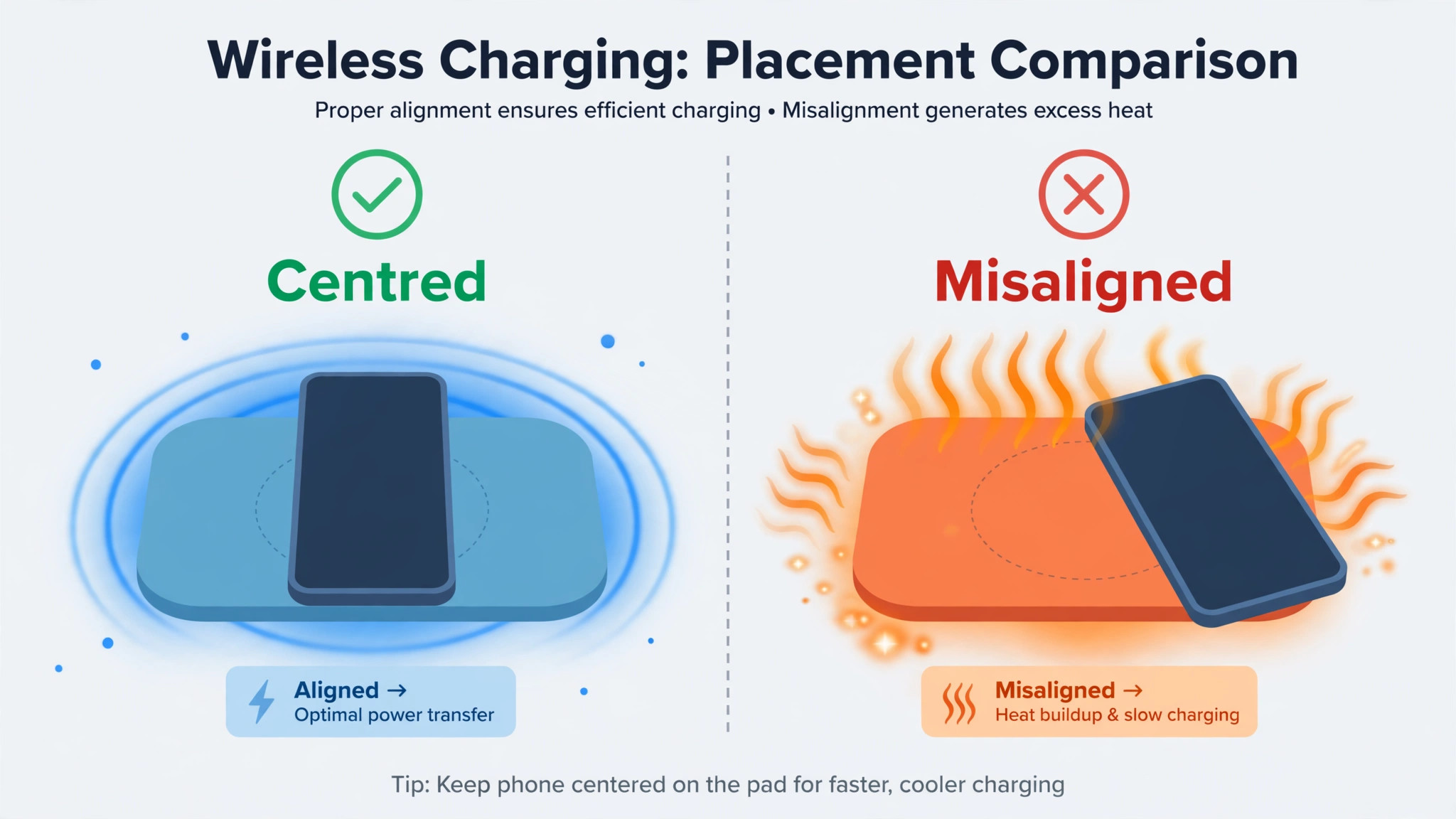
- For wireless charging, remove cards, metal objects, and magnets from between the phone and the pad, and centre the phone on the pad.
- Restart the phone, check battery usage, and restrict or uninstall any app that dominates battery use.
- Update Android and all apps, since updates often include thermal and power management fixes.
- Turn on battery saver or device care optimisation during charging tests to limit background activity.
- If heat persists with a certified charger, a cool room, and an idle phone, back up data and book a battery diagnosis.
The order starts with safety and environment because those are free and immediate, then moves to the charger, which is the most common hardware cause, then to use and software, and finally to the battery itself. A battery diagnosis is last because it costs money, but it should not be delayed when swelling, shutdowns, or persistent idle heat are present.
Charger, Cable, and Port Checks in Detail
Chargers are not interchangeable in practice, even when the plug fits. A charger that delivers the wrong voltage profile, a cable with damaged wiring, or a cheap uncertified adapter can all cause excess heat, and Samsung and HTC guidance both stress using approved or branded chargers and cables for exactly this reason. Inspect the cable for fraying, kinks, exposed wire, or a loose connector, and inspect the port for lint, dust, or corrosion. A port packed with pocket lint can cause a poor connection that heats up during charging, and a careful clean with a wooden or plastic pick, with the phone off, often fixes it.
Do not use a metal pin inside the port, since a short there can damage the phone.
Test with the original charger and cable if you still have them, on a wall outlet rather than a computer USB port or a car adapter, since wall power is the cleanest baseline. If the original charger runs cool and the third party charger runs hot, the third party charger is the answer, regardless of its claimed wattage. If both chargers run hot, the problem is downstream, in the cable, the port, the battery, or the phone use. Test one variable at a time, and keep the phone idle during each test, because a game running during a charger test will make every charger look hot.
Fast charging deserves a fair assessment, not blame by default. Fast charging generates more heat by design, and the phone manages it by slowing down as the battery fills and as temperature rises. If your phone gets warm on a fast charger but cool on a standard charger, and it charges normally otherwise, the fast charger is working as designed and the choice is yours. Use fast charging when you need a quick top up, and standard charging overnight, when speed does not matter and cooler charging is kinder to long term battery health. That routine gives you speed when it counts and cool charging when it does not.

Background Apps, Settings, and Battery Health
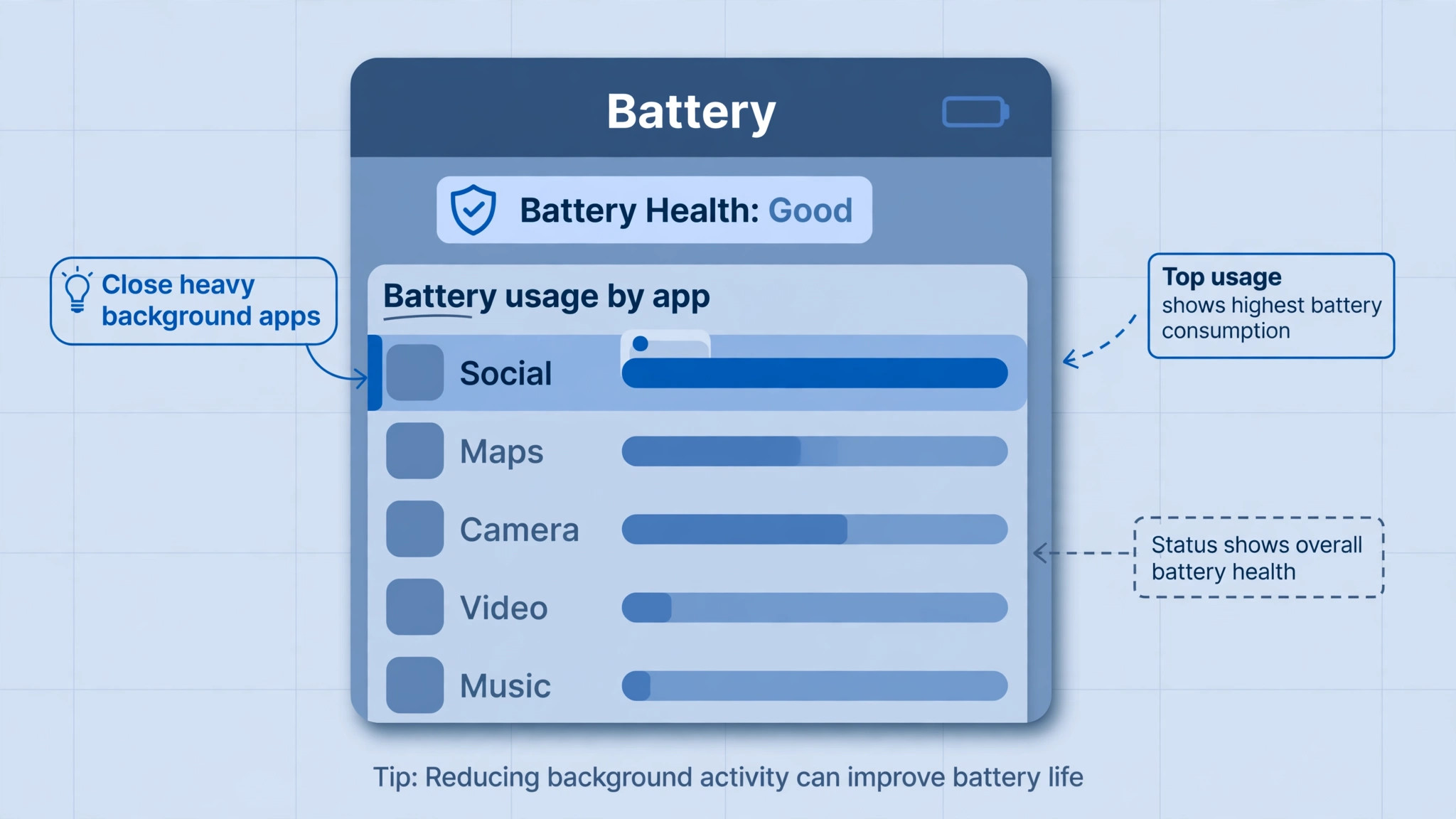
A runaway app can make a phone hot even on a perfect charger. Open Settings, then Battery, then Battery usage, and look for an app that uses a large share of battery in the background, especially a social app, a game, a navigation app, or a recently updated app that started misbehaving. Restrict background usage for that app, or uninstall it and test charging again. If heat disappears, you have found the cause, and you can decide whether to keep the app with restrictions or replace it. Uninstalling task manager or battery saver apps is also worth trying, since HTC guidance notes that such apps can themselves cause warming by fighting the system power management.
Battery saver and device care tools help during diagnosis, even if you do not use them daily. Turning on battery saver limits background activity, reduces processor speed, and lowers screen brightness, all of which cut heat during charging. Device care optimisation on Samsung phones closes background apps and checks for abnormal battery use in one pass. Use those tools as a test. If battery saver makes charging cool, the heat was coming from activity, not from the charger or battery, and you can then hunt the specific app rather than living in battery saver forever.
Battery health is the longer term question. Android does not show a single official health percentage on every model, but battery usage patterns, sudden shutdowns at moderate charge, and a battery that drains far faster than it did when new all point at ageing. Some manufacturers offer a battery health check in device care or support apps, and a service centre can test the battery directly. A battery that is swollen, that shuts the phone down under load, or that heats up while idle needs replacement, not optimisation. Budget for a genuine battery from an authorised source, since a cheap replacement battery can recreate the heat problem with worse safety margins.
Software updates belong in this section too, because thermal management lives in software. An Android update or an app update can fix a power bug, improve charging curves, or correct a sensor reading that was throttling charging unnecessarily. Update on Wi-Fi, restart after updating, and test charging again before concluding the battery is at fault. An update that fixes heat is free, and a battery replacement ordered before an update is money spent early.
Wireless Charging Heat and How to Reduce It
Wireless charging is less efficient than wired charging, and the lost energy becomes heat in the pad and the phone. That is physics, not a fault, and it explains why a phone on a wireless pad feels warmer than the same phone on a cable. The heat gets worse when the phone is misaligned on the pad, when a thick case or a metal object sits between phone and pad, or when the pad itself is cheap and poorly cooled. Centre the phone on the pad, remove cards, magnets, and metal plates from the case, and use a pad from a reputable maker with proper cooling and foreign object detection.
Do not charge wirelessly on bedding, on a sofa cushion, or inside a closed bag, since those surfaces trap heat and block airflow. Charge on a hard surface in a cool room, and remove a thick rugged case during wireless charging if heat is a problem. If wireless charging consistently overheats while wired charging stays cool, use wired charging as the daily method and keep wireless for short top ups. The convenience of dropping a phone on a pad is not worth sustained heat if the pad and case combination runs hot every night.
Fast wireless charging multiplies the same effect. A fast wireless pad pushes more power through a less efficient link, so heat rises faster. Many phones let you turn off fast wireless charging in battery settings, and doing so for overnight charging is a sensible trade. The phone still reaches full charge by morning, it just does so cooler and slower, which is exactly what overnight charging should do.
Mistakes That Make Charging Heat Worse
The first mistake is charging in a hot place and blaming the phone. A phone left on a car dashboard in summer, on a sunny windowsill, or under a pillow while charging will overheat on any charger, because the environment adds heat faster than the phone can shed it. Move the phone first, test again, and only then suspect hardware.
The second mistake is using the phone heavily while fast charging and expecting it to stay cool. Gaming, video recording, and navigation while fast charging stack processor heat on top of charging heat, and the phone will throttle, slow charging, or warn you. Let the phone charge idle for the fastest and coolest result, and use it lightly if you must use it at all.
The third mistake is ignoring a swollen battery because the phone still works. Swelling is progressive, and a swollen battery can damage the screen, the frame, and other parts as it expands, as well as creating a safety risk. Stop charging, back up data if you can do so safely without charging further, and get the battery replaced. Do not try to press the back cover down or puncture the battery to release pressure.
The fourth mistake is buying the cheapest charger and cable available after a heat problem. An uncertified charger that caused heat once will cause it again, and a damaged cable will not heal. Spend the money on a certified charger and cable from the phone maker or a reputable brand, and keep a spare certified cable for testing. The price difference is small compared with a battery replacement or a damaged phone.
A Cooler Charging Routine for Every Night
Build a routine that keeps charging cool by default. Charge on a hard surface in a cool room, out of direct sunlight, with the case removed or with a ventilated case. Use the original or certified charger and cable, and use standard charging overnight, reserving fast charging for daytime top ups when you actually need speed. Keep the phone idle while it charges, or at least avoid games and video, and let cloud backups and large downloads finish before you plug in, or schedule them for after charging completes.
Check battery usage once a month, update Android and apps promptly, and clean the charging port gently when you notice lint. Those habits take minutes and they prevent the slow drift toward heat that comes from a new app, a worn cable, and a dusty port combining over months. If heat returns after a long cool period, work the cause table again, because a new charger, a new case, or a new app is usually the trigger, and the pattern will tell you which one.

Heat, Battery Ageing, and Long Term Damage
Heat does not just make a phone uncomfortable today, it also shortens battery life over months, and understanding that link helps you decide how much effort a cooler routine deserves. Lithium batteries age faster at high temperature, and sustained heat during charging accelerates the chemical wear that reduces capacity. A battery that spends every night hot will hold less charge a year later than the same battery charged cool, even if both phones were used the same way during the day. That is why overnight charging habits matter more than a single hot afternoon, because the nightly pattern repeats hundreds of times.
Charging to full and holding at full charge in heat is the worst combination. A battery held at 100 percent while hot ages faster than a battery held at a partial charge in cool conditions. If your phone offers a charge limit, such as stopping at 80 or 85 percent overnight, or an adaptive charging mode that finishes just before you wake, use it. Adaptive charging learns your wake time and holds the battery at a lower level for most of the night, finishing the last stretch shortly before morning. That single setting can cut both heat exposure and full charge time, and it costs nothing in daily usability for most people.
Partial charging during the day is kinder than deep cycles. A battery that regularly drops to near zero and then fast charges to full experiences more stress than a battery topped up between moderate levels. You do not need to obsess over percentages, and you should not avoid using the phone for fear of cycles, but a routine of topping up during the day, avoiding regular deep discharges, and avoiding sustained heat will keep capacity higher for longer. Think of it as avoiding extremes, which are extreme heat, extreme discharge, and extreme full charge held for hours, rather than following a rigid charging rule.
When you fix Android phone overheating charging as a long term habit rather than a one day repair, the payoff is a battery that lasts the life of the phone instead of needing replacement in year two. Cooler charging, a certified charger, an idle phone during charging, and a ventilated surface are not fussy rules, they are the conditions under which the battery was designed to age slowly. A phone that runs cool while charging also throttles less, which means the processor stays faster during use, the screen stays brighter, and the phone feels newer for longer. Heat management is therefore not just a safety topic, it is a performance and longevity topic as well.
Watch for the signs that ageing has already taken hold, so you can plan a battery replacement before it becomes urgent. A phone that drops from moderate charge to shutdown under load, that needs charging twice a day for the same use it once managed on one charge, or that heats up during ordinary charging it once handled coolly, is telling you capacity has fallen. Check battery usage to rule out a new app, then compare against the phone age. A two or three year old battery with those symptoms is ageing normally, and a genuine replacement restores both runtime and thermal behaviour.
When you fix Android phone overheating charging on an older phone, include battery age in the diagnosis, because a worn battery generates more heat for the same charge than a new one, and no charger swap will change that physics. A replacement battery, fitted properly, often ends a heat problem that months of settings tweaks could not, and it is worth pricing honestly against the cost of a new phone. If the phone is otherwise fast and the screen and storage still serve you, a battery replacement is usually the better value, and it returns the phone to the cool charging behaviour it had when new.
More Reading for Everyday Tech Fixes
If charging is cooler now, the wider fix guides on Stratilyze cover the next phone problem in the same order. The guide to fixing fast battery drain on Android goes deeper on power use, the guide to fixing Bluetooth that will not turn on covers radio problems, the guide to fixing an iPhone with no sound covers speaker checks, and the guide to fixing a laptop keyboard that misses keys helps when a different device starts misbehaving. Read the battery drain guide next if your phone also loses charge quickly when unplugged, since heat and drain often share an app cause.
Frequently Asked Questions
Is it normal for an Android phone to get warm while charging?
Yes, some warmth is normal, especially during fast charging or wireless charging, when the charger, battery, and processor all generate heat. Normal warmth is even, comfortable to hold, and fades after unplugging. Heat that is uncomfortable, localised to one spot, accompanied by a temperature warning, charging slowdowns, or shutdowns is not normal, and it needs the cause table and fix order in this guide. A phone that is too hot to hold should be unplugged and allowed to cool before further testing.
How do I fix Android phone overheating charging on a fast charger?
Switch to a standard charger for a test, with the phone idle, the case removed, and the phone on a cool surface. A slower charger test is a simple way to fix Android phone overheating charging when fast charging is the main heat source. If heat drops sharply on the slower charger, fast charging heat is the main factor, and you can use fast charging for quick top ups and standard charging overnight. If heat persists on a certified standard charger in a cool room with an idle phone, check battery usage for a runaway app, update the software, and consider a battery diagnosis. Fast charging alone rarely explains persistent heat on a standard charger.
Can a cheap charger damage my phone battery?
A poor quality or uncertified charger can cause excess heat, erratic charging, and in bad cases damage to the charging circuit or battery, which is why manufacturers recommend approved chargers and cables. Retiring a hot third party charger is often enough to fix Android phone overheating charging without touching any setting. Inspect cables for damage, replace frayed or loose cables, and test with the original or certified charger. If the original charger runs cool and a third party charger runs hot, retire the third party charger rather than continuing to use it and hoping the phone adapts.
Why does my phone overheat only when I use it while charging?
Using the phone while charging stacks processor heat on top of charging heat, especially for games, video calls, navigation, and video recording. The phone then throttles charging or processor speed to protect itself, which feels like slow charging and lag together. Let the phone charge idle for the coolest and fastest result. If you must use it, keep use light, lower screen brightness, and close heavy apps, and avoid fast charging at the same time as heavy use.
Should I remove the case while charging?
Yes, for testing, and often for daily charging if the case is thick or insulating. A rugged or silicone case traps heat that would otherwise escape from the back of the phone, and removing it can drop temperature noticeably. Test charging with the case off on a hard, cool surface. If heat falls, switch to a ventilated case, or remove the case for overnight charging. A case that keeps a phone hot every night is working against the battery, not protecting it.
When is an overheating phone a safety emergency?
Stop charging and seek service at once if the battery is swollen, the back cover or screen is lifting, the phone smells unusual, or heat is extreme and does not fade after unplugging. Do not puncture, bend, or press down on a swollen battery, and keep the phone away from flammable material. Swelling means internal battery failure, and no setting, charger swap, or app fix makes a swollen battery safe. A service centre can assess and replace it safely.
Charging Without the Heat
Overheating while charging is usually a stack of small causes, not a single mystery fault. A fast charger, a thick case, a hot room, and a heavy app together make a phone hot, while any one of them alone would be fine. When you fix Android phone overheating charging by testing one variable at a time, starting with safety, environment, and charger, you find the stack quickly and you fix only the layer that matters.
Keep the routine simple from here. Charge cool, charge idle, use a certified charger, and check battery usage when heat returns. Those habits protect the battery, keep charging fast when you need it, and tell you early when heat stops being normal and starts being a battery that needs professional attention.