
This Alfie review starts with the verdict, because a wedding planner reading a review is usually deciding whether to spend money on one more tool. Alfie is an AI guest host on WhatsApp, and it does one job well. It answers the practical questions guests ask in the final week before a wedding, using the event information the planner supplies, at any hour, in the guest’s own language. It does not plan weddings, and it does not book suppliers. For a planner in Europe, the United Kingdom or Switzerland who runs enough weddings for guest messages to eat the final week, it is worth a serious look. For anyone outside that service area, or for a planner who answers a handful of guest questions a year, it is not.
The reason the verdict leans positive is the shape of the problem. A wedding is a one-day event with a year of moving parts behind it, and the guest questions arrive at the worst possible time. What time does the ceremony start. Where do we park. What is the dress code. Can we bring the kids. Each question is small. Together, in the final week, they take over the planner’s evenings. Alfie says it answers around 300 guest questions per event automatically, and that figure should be read as the company’s own claim rather than an independent finding. Even at half that number, the hours add up. One planner quoted on the site, Camille R. in Paris, says that in the week before a wedding she would normally field 200 messages, and this time almost none reached her.
There is a limit to what this review can prove, and it should be stated plainly. This is a research-based review built from Alfie’s published documentation, its site, and the no-signup interactive demo the site offers. It does not claim a hands-on test with a real wedding, and it does not report measurements of its own. Where a number comes from Alfie itself, this review says so. That is the honest way to judge a tool whose job is to speak to your guests on your behalf, because the quality of its answers depends entirely on the event information you give it.
What Alfie Is, in Plain Terms
Alfie is an AI guest host that lives on WhatsApp. One dedicated WhatsApp number serves the whole event. Guests text it. Alfie replies. The planner stops being the help desk. The service is built for wedding planners and couples, and its terms describe it for planners operating in Europe, the United Kingdom and Switzerland, while guests can be anywhere in the world. The company behind it is Text Alfie LTD, based in London.
The single idea that makes Alfie different from a chatbot on a website is where the answers come from. Alfie answers only from the Event Info the organizer supplies. That means the schedule, the venues, the dress code, the travel notes and the practical instructions the planner already wrote. It does not search the internet for answers, and it does not invent details about the event. When a guest asks about the shuttle time, Alfie answers from the shuttle time the planner entered. When the Event Info does not cover the question, Alfie does not guess. That boundary is the most important thing about the tool, and it is stated on its own site.
One point this Alfie review keeps coming back to is that Alfie is a guest communication tool and nothing else. It handles the conversation with guests. It does not build timelines, manage seating charts, send invoices or coordinate vendors. Sharing hotel or transport information with a guest is not the same as booking a hotel or a car for them, and the site says so. A planner still needs planning software for the planning work. Alfie also leads our Best Planning Software for Wedding Planners guide, where it sits at number one for the guest communication job alone, while Aisle Planner stays the strongest all-round choice for a full-service studio.
The platform covers four jobs, and it helps to name them before judging any of them. It answers guest questions on WhatsApp. It runs RSVPs on personal links. It sends broadcasts when plans change. And it hands the questions it cannot answer back to the organizer, with the full conversation history attached. Everything else in the product exists to support those four jobs.
How Alfie Works, Step by Step
The setup follows five steps, and the sequence matters because the quality of the answers depends on the second step most of all. First, you create the event with its name, dates, venue and timezone. Second, you load the Event Info, which is your existing planner document, event site or notes, covering the schedule, venues, dress code, travel and practical instructions. Third, you add your guests by importing a CSV or Excel file, or one by one, with tags, meal choices, language and custom columns. Fourth, WhatsApp goes live, and guests start asking. Fifth, you operate everything from one dashboard. Alfie says most events go live in under two days after it receives the Event Info.
The Event Info step deserves a warning. Alfie can only answer from what you wrote, so a thin Event Info produces thin answers. A planner who loads a two-page document with the ceremony time and the venue address will get correct answers about those two facts and silence on everything else. The unanswered questions do reach the organizer, which is the safety net, but the value of the tool rises directly with the care put into the Event Info. Load it early, read it before going live, and add anything Alfie could not answer after the first test questions come in.
RSVPs run on personal links, not on chat messages. The organizer sends an approved WhatsApp invitation template with a personal RSVP link for each guest. The guest opens the link and completes the form, and the response appears in the dashboard, where the funnel shows invited, attending, declined and awaiting, updated as guests reply. Pending guests can be chased in one click. A chat message or a read receipt is not the same as a completed RSVP, and Alfie’s own guide says so, which is the honest way to run it.
Broadcasts cover the moments when plans change. You pick an approved template, fill it with guest fields, filter recipients by day attendance, dietary need, tag or language, preview it as a specific guest, then send it now or schedule it. Delivery and read counts appear afterwards, so you know what actually reached your guests. One planner quoted on the site, Sofia B. in Lake Como, moved a ceremony on the day of the event and reached every guest with one broadcast. No panic, no phone tree.
The dashboard is where the whole event sits. RSVPs, broadcasts sent, delivery rate, messages handled and unanswered questions appear in one view, and one login can run one event or twenty, each on its own card with its own status, guests and WhatsApp number. Guest data is deleted 30 days after the wedding date under Alfie’s terms, and its sub-processor list names OpenAI GPT-4.1 as the response engine behind guest answers. The how it works page on Alfie’s site walks through the same sequence with its own examples, and it is the best place to see the flow before talking to the team.
The fastest way to judge any of this is the interactive demo on Alfie’s site. It runs a real WhatsApp flow with no signup, so a planner can ask the questions their own guests would ask and read the answers before talking to the team. This Alfie review recommends that step before any buying decision, because a demo answer reveals more about the Event Info design than any feature list. Ask the dress code question in the language your guests actually speak. Ask the parking question at the time your guests would ask it. Then read the answers the way a guest would.
What Impressed Me Most
A review should name what actually works, not only what the brochure promises, so this section judges each part of Alfie on the job it does for a planner in the final week. Five things stand out, and they stand out for different reasons.
RSVP links that are real RSVPs
The RSVP design is the first thing that impressed me, because it refuses a shortcut that would make the numbers look better than they are. A guest who replies “yes” in a chat thread has not completed an RSVP, and Alfie does not count it as one. The personal link takes the guest to a form, the form feeds the funnel, and the funnel shows who is still awaiting. That discipline matters on the day, when the difference between a chat reply and a completed form is the difference between a headcount you can trust and one you cannot. The one-click chase for pending guests is a small feature with a large effect, because it turns the most tedious part of RSVP management into a single action.
Broadcasts that reach everyone at once
The broadcast tool impressed me for the opposite reason. It is built for the worst moment in a wedding week, when a plan changes and every guest needs to know. The preview-as-guest step is the detail that shows the tool was designed by people who have run events. A broadcast that reads correctly to the organizer can read wrong to a guest who is only attending the reception, or to a guest who needs the message in another language. Previewing as a specific guest catches that before the send. The filters by day attendance, dietary need, tag and language mean one broadcast does not have to go to everyone, and the delivery and read counts afterwards mean the planner knows what actually landed.
A dashboard that fits on one screen
The dashboard impressed me because it does not try to be a second planning tool. It shows RSVPs, broadcasts sent, delivery rate, messages handled and unanswered questions in one view, and it stops there. A planner running twenty events sees twenty cards, each with its own status, guests and number. That restraint is a strength. The dashboard is a place to check the guest layer and move on, not a second system to learn.
Answers at any hour, in the guest’s own language
The multilingual, round-the-clock answering is the feature most planners will feel first, because guest questions do not respect office hours. Alfie answers in the guest’s own language, at any hour, on dress code, timings, transport, hotels and the questions that only the event can answer. The graphic below shows the point better than a paragraph can. The chat in it is in French, not English. A guest asks at 11.47 pm whether a shuttle runs from the hotel on Saturday, and Alfie answers in French that the shuttle leaves the hotel at 2.30 pm and returns from the reception venue at 1.00 am. The same guest then asks about the dress code, and Alfie answers in French that it is evening wear, the ceremony is outdoors, and guests should bring a jacket. The guest replies with thanks. Nothing in that exchange needed the planner, and nothing in it needed the guest to write in English.
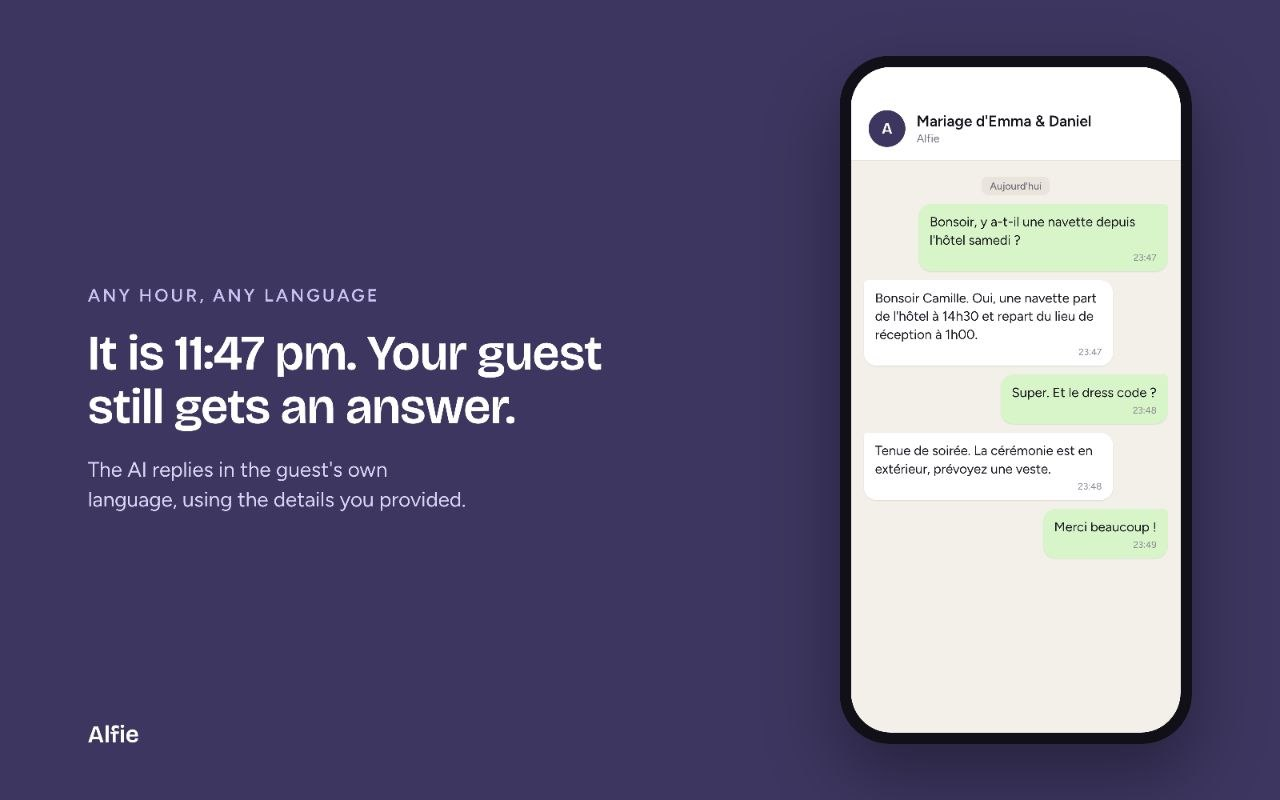
One caution belongs here. Alfie’s site describes its language support in broad terms, and only French, English, Spanish and Portuguese appear in its published examples. This review therefore says only that Alfie replies in the guest’s own language, and a planner whose guest list speaks a language outside those four should test it with a real question before the event goes live. The test costs nothing, and it is the only way to be sure.
The unanswered-question handoff
The last thing that impressed me is what Alfie does when it cannot answer, because that is where most automated tools fail quietly. Alfie does not guess. The question appears in the dashboard and pings the organizer’s WhatsApp, and the organizer decides the response. The organizer can take over any thread directly, and the full history stays in the dashboard for every event. That design keeps the planner in control of the answers that matter most, which are usually the answers the Event Info did not cover. A tool that guesses at a wedding is a liability. A tool that knows when to hand over is an asset.
Alfie also publishes its own numbers, and they should be read as the company’s claims rather than independent findings. Around 300 guest questions answered per event, automatically. More than 100 events coordinated. 55 percent less time spent on guest logistics. A 99 percent message delivery rate and a 98 percent open rate on WhatsApp broadcasts. The numbers are strong, and the direction is believable for a tool that answers at midnight in the guest’s language. They are still the company’s numbers, not measurements from this review, and a planner should treat them as a reason to run the demo, not as a promise.
Where Alfie Falls Short
The honest part of this Alfie review is the limits, and they are real enough to change the buying decision for some planners. None of them is hidden by Alfie itself, which speaks well of the company, but a review that only lists strengths is an advertisement, not a review.
The first limit is the missing price. Alfie publishes no pricing anywhere on its site. No tiers, no starting figure, no trial terms. Planners must talk to the team for a quote, which means the cost cannot be compared against other tools without a conversation first. That is a genuine drawback for a planner budgeting a season, and it is the single most common question a review reader will have. This review gives no price for Alfie for the simple reason that there is none to give.
The second limit is the service area. Alfie’s terms describe the service for planners operating in Europe, the United Kingdom and Switzerland, while guests can be anywhere. A planner outside that area must confirm availability with the team before planning around the tool. That is a hard boundary, not a soft one, and it rules Alfie out entirely for some readers of this review.
The third limit is the Event Info itself. Alfie is only as good as the document it is given. A planner who loads a thin Event Info will get thin answers and a long list of unanswered questions in the dashboard, which is work, not saved work. The tool does not fix a disorganised event. It makes the organisation visible. Planners who already keep careful event documents will get the most from it. Planners who do not should expect a setup effort before the first guest message arrives.
The fourth limit is scope. Alfie handles guest communication and nothing else, so it is an addition to the stack, not a replacement for any tool in it. A planner who buys Alfie still needs planning software, and the total cost is the stack, not the single subscription. That is not a flaw in the product, but it is a flaw in any buying decision that forgets it.
The fifth limit is the one no review can remove. Alfie speaks to guests on the planner’s behalf, and the planner’s name is attached to every answer. A wrong answer from a thin Event Info is the planner’s wrong answer, not the tool’s. The handoff design protects against guessing, but it cannot protect against an Event Info that is wrong in the first place. The planner stays responsible for the facts, and should read the answers before the event goes live.

Alfie Review: Who Should Use It, and Who Should Skip It
The planners who will get the most from Alfie are the ones whose final week is eaten by repeated questions. A studio running fifteen or twenty weddings a year, with guest lists in the hundreds, will feel the difference in the first event. So will a planner whose couples come from several countries, because the multilingual answering removes a whole class of late-night translation work. Destination planners should look closely too, since their guests ask the most practical questions and live in the most time zones.
The planners who should skip it are just as clear. A planner outside Europe, the United Kingdom and Switzerland should confirm availability first, and should not build a season around a tool that may not serve their area. A planner who runs two or three weddings a year will find the setup effort hard to justify against the handful of questions those weddings generate. And a planner who wants one tool to run the whole business should not buy Alfie expecting it to plan anything. It will not. It answers guests, and that is the whole job.
Couples planning their own wedding without a planner can use Alfie too, since the service is described for planners and couples alike, but the same test applies. If the guest list is large and the questions will arrive at midnight, the tool earns its place. If the wedding is small and the guests all live nearby, a group chat and a good invitation will do the same work for nothing.
Alfie vs Answering Guests Yourself
The comparison below is the part of this Alfie review that a busy planner should read first, because it puts the choice in terms of hours rather than features. The manual column is not a weak option. Answering guests yourself is free, personal, and correct whenever you have the facts in front of you. It fails on volume and on hours, and that is the whole argument for Alfie.
| Job | Alfie | Answering guests yourself |
|---|---|---|
| Reply time | Seconds, at any hour | Whenever the planner sees the message |
| Hours covered | All day and all night | The planner’s waking hours |
| Languages | The guest’s own language | The languages the planner speaks |
| RSVP tracking | Personal links with a live funnel | A spreadsheet, updated by hand |
| Broadcasts | One send, filtered, with read counts | One message at a time, no read counts |
| Unanswered questions | Surfaced in the dashboard with a ping | Found only when a guest complains |
| Personal touch | None, the reply comes from the tool | Full, the planner writes every word |
| Cost | A quote from the team, not published | Nothing but the planner’s time |
The table makes the trade visible. Alfie wins on speed, coverage, languages, tracking and reach. The planner wins on the personal touch and on price, since answering guests yourself costs nothing but time. The honest question is what that time is worth in the final week before a wedding, and whether the planner would rather spend it on the wedding itself. For a studio running many weddings, the answer is usually Alfie. For a small wedding with a short guest list, the answer is usually the planner’s own phone.
Pricing: What We Know, and What We Do Not
This section of the Alfie review is short, because there is little to report. Alfie publishes no pricing on its site. No monthly figure, no tiers, no trial terms, no free plan. The only statement a review can honestly make is that pricing is not published and planners should talk to the team for a quote.
That absence shapes the buying decision in two ways. First, the tool cannot be compared on price against any other tool without a conversation, which slows the decision down. Second, the total cost of the stack stays unknown until the quote arrives, since Alfie sits alongside planning software rather than replacing it. A planner budgeting a season should get the quote early, add it to the planning software subscription, and judge the pair together.
Two facts about money are published, and they are worth recording. The company is Text Alfie LTD, based in London, and its terms say fees are in euros and paid through Stripe, with annual auto-renewal. Neither fact is a price, and neither should be read as one. The price is whatever the team quotes, and this review will not guess at it.
Setup Checklist Before Your First Event
Use this sequence before the first event goes live, and do not skip the test questions. The checklist is short because the setup is short, but the two testing steps are the ones that catch problems while they are still cheap to fix.
- Confirm the service area with the team if your studio sits outside Europe, the United Kingdom or Switzerland.
- Load the Event Info early, and read it before going live, because every answer Alfie gives comes from what you wrote.
- Import the guest list with tags, meal choices, language and custom columns, and check that every guest has the right language set.
- Send the event number to two colleagues as test guests, and have them ask the questions real guests will ask, in their own words.
- Ask the hard questions in the test, including the dress code in another language, parking at midnight, and the question your Event Info does not cover.
- Check that the unanswered question reaches you instead of receiving a guessed answer.
- Add anything Alfie could not answer to the Event Info, so the next guest gets the answer straight away.
- Run the interactive demo on Alfie’s site first if you have not seen the tool answer a real question, since it runs a real WhatsApp flow with no signup.
- Keep the old system read only for one full event, so no guest record is lost in the move.
Frequently Asked Questions
Does Alfie replace a wedding planner
No. Alfie handles guest communication, not wedding planning, supplier bookings or on-site coordination. That is the wording on Alfie’s own site. The planner still plans the wedding, manages the vendors, and runs the day. Alfie takes the repeated guest questions, so the planner’s time goes to the work only a planner can do.
How fast can Alfie go live for an event
Alfie says most events go live in under two days after it receives the Event Info. The organizer supplies the guest list and the event details, covering the schedule, venues, travel, dress code and RSVP arrangements, and Alfie builds the event around them. Load the Event Info early and check it before going live, because every answer Alfie gives comes from what you wrote.
Is Alfie only for weddings
Alfie is built for weddings first, and its terms and guides are written around wedding planning, but the same guest host works for other events. The service is described for planners operating in Europe, the United Kingdom and Switzerland, while guests can be anywhere in the world.
What happens when Alfie cannot answer a question
It does not guess. The question appears in the dashboard and pings the organizer’s WhatsApp, and the organizer decides the response. The organizer can take over any thread directly, and the full history stays in the dashboard. That handoff is the safety net that makes the tool safe to trust with guests.
How much does Alfie cost
Alfie publishes no pricing on its site, so this Alfie review gives no price. Talk to the team for a quote, and add it to the planning software subscription before judging the total cost. The company’s terms say fees are in euros and paid through Stripe.
Can guests use Alfie in their own language
Yes, Alfie replies in the guest’s own language, at any hour. The published examples show French, English, Spanish and Portuguese, and the French exchange in this review shows a guest asking about the shuttle and the dress code late at night and getting both answers in French. A planner whose guest list speaks another language should test it with a real question before the event goes live.
The Verdict
The verdict of this Alfie review is a recommendation with a condition attached. For a wedding planner in Europe, the United Kingdom or Switzerland who runs enough weddings for guest questions to eat the final week, Alfie is worth buying. It does one job, it does it well, and the parts of it that could go wrong are the parts the planner controls, which are the Event Info and the service area. The RSVP links are honest, the broadcasts reach everyone at once, the dashboard stays out of the way, and the unanswered-question handoff keeps the planner in charge of the answers that matter.
The condition is the price, and it is the only part of this review that ends in a question rather than an answer. Alfie publishes no pricing, so no review can say whether it is good value. Get the quote early, add it to the planning stack, and run the no-signup demo before paying anything. If the quote fits the stack and the demo answers your test questions well, buy it. If the quote does not fit, or the studio sits outside the service area, skip it and keep answering guests yourself. The tool is good. The decision is arithmetic, and only the quote completes it.
One more group should wait rather than buy. A planner whose next wedding is months away gains nothing from signing up today, since the value starts when guests start asking. Get the quote, run the demo, and sign up when the first event’s Event Info is ready. The tool does not reward early adoption. It rewards a good Event Info, and that is built close to the wedding, not months before it.