

Independent tests in 2026 put real world detector accuracy between 62 and 88 percent, far below the 99 percent claims on vendor homepages, and a Stanford study found detectors flagged more than half of essays by non native English speakers as machine written. That is the question this guide answers with the best ai content detectors, tested on price, features, and real use rather than on marketing claims.
This guide compares 8 tools that editors and publishers actually use in 2026, judged on what the work needs, not on a feature count. Prices here come from vendor pages and comparisons checked in late 2026, so check the vendor pricing page before committing, because pricing and plan limits change often. The rule that runs through the whole guide is simple. A tool that fits your real workload is worth more than a tool with a longer feature list.
The tools differ in one decisive way. Some are built for speed, some for control, and some for safety, and your choice should follow which of those jobs your work actually needs. A buyer who picks on price alone will often pay twice, once for the cheap tool and once for the tool that finally does the job. Read the at a glance table first, then the detail sections for the two or three tools that fit your job.
Why Detector Scores Are Not Verdicts
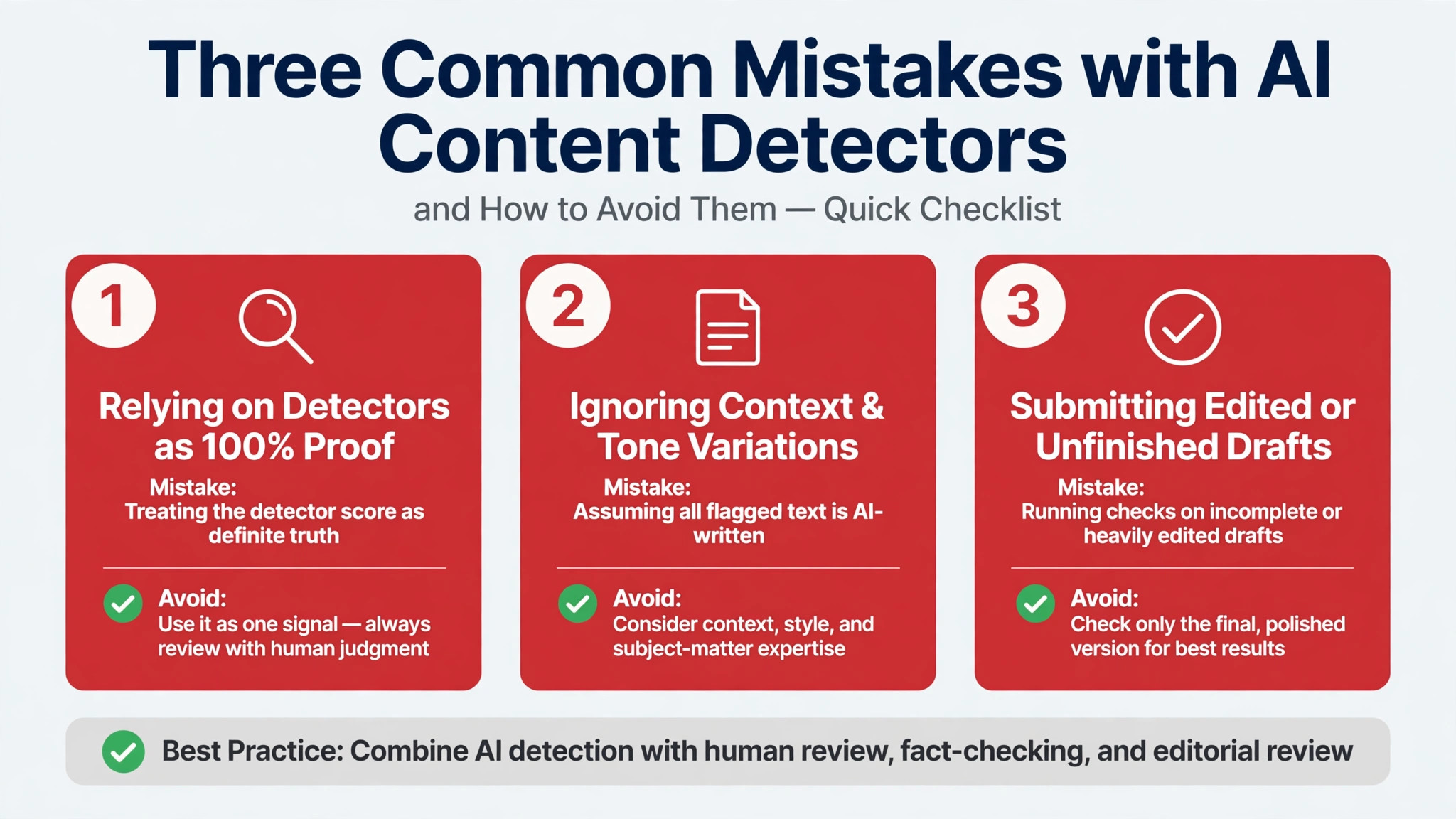
A detector reads statistical patterns in text, such as predictable word choice and even sentence rhythm, and turns those patterns into a probability score. That score says the text looks like machine output. It does not prove who wrote it, and it cannot tell you whether a human edited a machine draft or a machine polished a human draft.
That gap matters because the cost of a wrong call is high. A student can lose a grade, a freelancer can lose a client, and a publisher can reject good work on a number that was never meant to carry that weight. The honest use of a detector is triage, not judgment, and every tool in this guide should be used that way.
Editors who get value from detectors use them to start a conversation. They run a draft through two tools, compare the scores, read the flagged passages themselves, and ask the writer about the process. A tool that explains its score sentence by sentence is worth more than a tool that only returns a single percentage.
The 8 AI Content Detectors at a Glance
| Tool | Main job | Best for | Starting paid price |
|---|---|---|---|
| GPTZero | AI and plagiarism detection | Teachers and editors | Free, paid from about 15 dollars a month |
| Originality.ai | AI, plagiarism and fact checking | Publishers and content teams | Pro from about 15 dollars a month |
| Copyleaks | AI detection and plagiarism at scale | Enterprise and API screening | Personal from about 17 dollars a month |
| Turnitin | AI writing detection for institutions | Universities and schools | Institutional licence only, no public price |
| Winston AI | AI detection with OCR and image checks | Institutions and educators | From about 12 dollars a month |
| Pangram | High accuracy AI detection | Professionals who need low false positives | From about 20 dollars a month |
| Sapling | AI detection and writing assistance | Casual writers and support teams | Free checker, Pro from about 25 dollars a month |
| ZeroGPT | Free AI detection and paraphrase checks | Students and quick checks | Free, paid plans from about 7 dollars a month |
The best ai content detectors cannot be picked from this table alone, because the right answer for most buyers is a shortlist of two or three tools, not one winner. Use the table to cut the list down, then read the detail sections for the tools that survive the cut. A tool that looks cheap in this table can cost more at your real volume, and a tool that looks dear can be the cheapest once you count the hours it saves.
Free tiers help with testing. Most tools in this guide offer a free tier or a trial, enough to test the tool on your real work before paying. Paid plans grant commercial rights on most tools, but the details differ, so read the licence for the plan you buy before you use the output in work you sell or publish.
Best Pick by Job
| Job type | First pick | Second tool | Why this pair works |
|---|---|---|---|
| Everyday work | GPTZero | Copyleaks | AI and plagiarism detection plus ai detection and plagiarism at scale covers the job end to end |
| Tight budget | Originality.ai | Turnitin | AI, plagiarism and fact checking plus ai writing detection for institutions covers the job end to end |
| Heavy volume | Copyleaks | Winston AI | AI detection and plagiarism at scale plus ai detection with ocr and image checks covers the job end to end |
| Team use | Turnitin | Pangram | AI writing detection for institutions plus high accuracy ai detection covers the job end to end |
| Quality first | Winston AI | Sapling | AI detection with OCR and image checks plus ai detection and writing assistance covers the job end to end |
| Fast start | Pangram | ZeroGPT | High accuracy AI detection plus free ai detection and paraphrase checks covers the job end to end |
A buyer using the best ai content detectors needs to match the tool to the job, not to the ranking. The first pick in each row is the tool that does that job best on its own, and the second tool covers the weakness of the first. Together they cover the two jobs that decide whether the work ships on time and to a good standard.
Start with the row that matches your week. If your week is mostly one kind of job, buy the first pick in that row and test the second tool on the free tier. If your week mixes several jobs, pick the tool that appears most often across the rows, because that is the tool that fits your real workload rather than one ideal day.
How to Judge the Best AI Content Detectors
Start with your real work, not with a demo. Take three examples from your own week, run them through three tools, and judge the results on the criteria that matter for your job. A tool that wins on a demo can still fail on your work, and a tool that looks plain in a demo can be the one that holds up when the deadline is real.
When you test the best ai content detectors, score each tool on the same three examples and write the scores down. Does the output need heavy editing. Does the tool handle your hardest example, not just your easiest one. And does the price cover your real volume, not just a quiet week. A tool that passes all three on your examples is the right tool, even if it loses on a general ranking.
Then test the workflow you will actually use. Run the tool inside your normal process, from brief to finished work, and time each step. A tool that makes beautiful output in a format your team cannot use is a problem, not a solution. Check file formats, export options, and sharing before you buy, because a tool that cannot hand off cleanly will cost hours every week.
Finally, model the monthly cost at your real volume. A quiet week tells you nothing about the bill. Work out how many jobs you do in a busy month, how many credits or seats each job needs, and what the plan costs at that volume. Buy the plan that covers your busiest month with a small margin, and keep the free tier for testing new ideas.

The 8 AI Content Detectors in Detail
1. GPTZero
GPTZero is the best known detector in education, built around sentence level highlighting that shows exactly which passages look machine written. It adds a plagiarism checker, writing feedback, and a writing replay feature that shows how a document was composed in supported editors.
Pricing starts free at 10,000 words a month, with Essential at about 15 dollars a month for 150,000 words and Premium at about 24 dollars a month for 300,000 words. It fits teachers and editors who want a fast first check with a free tier that actually works. The trade off is weaker accuracy on heavily edited text, where scores fall fast.
Test it on your own human writing first, so you learn what a false positive looks like before you judge anyone else.
2. Originality.ai
Originality.ai is built for publishers and content teams checking whether contractor delivered content is truly human written. It bundles AI detection with plagiarism checking and fact checking in one scan, plus bulk site scanning for whole websites.
Pricing starts with a free Basic tier of 3 scans a day, and Pro costs about 15 dollars a month for 2,000 credits, with Enterprise at about 179 dollars a month. It fits agencies and publishers who check many writers at volume. The trade off is a higher false positive rate on formal human writing than some rivals.
Test it on a batch of known human articles first, so you can set a threshold that fits your writers instead of the default.
3. Copyleaks
Copyleaks pairs AI detection with a large plagiarism database and an API that screens submissions as they arrive. It is used by schools and businesses that need detection inside an existing workflow rather than a separate web page.
Pricing offers limited free scans, with Personal plans from about 17 dollars a month and enterprise pricing quoted per institution. It fits teams that need API access and LMS integration. The trade off is a busier interface and a free tier that runs out quickly.
Test the API on a small batch before you commit, because integration effort is the real cost here, not the subscription.
4. Turnitin
Turnitin is the detector most students actually meet, because it is sold to institutions rather than to individuals. It combines AI writing detection with plagiarism checking inside the submission workflow that universities already use.
Pricing is institutional only and is not published, so a single teacher or writer cannot buy a personal account. It fits universities that already license Turnitin for plagiarism. The trade off is that several universities disabled its AI detection in 2026 over reliability concerns.
If your school uses it, learn the exact threshold your institution applies before you treat any score as a finding.
5. Winston AI
Winston AI adds OCR for handwritten work and image detection to standard text scanning, which few rivals offer. It is aimed at institutions that need to check scanned assignments as well as typed documents.
Pricing starts at about 12 dollars a month on annual billing, with higher tiers for larger teams and more scans. It fits educators who handle paper submissions and screenshots. The trade off is that prices rise at scale and the free tier is limited.
Test it on a scanned handwritten page before you rely on it, because OCR quality decides whether the feature is useful.
6. Pangram
Pangram is built for professionals who need the lowest possible false positive rate, and independent tests have put it near the top on accuracy. It focuses on one job, detecting AI text, instead of bundling many features around a weaker core.
Pricing starts at about 20 dollars a month after a 7 day trial, with team plans quoted separately. It fits editors and professionals who cannot afford to accuse a human writer by mistake. The trade off is fewer extra features than broader platforms.
Run your own benchmark on twenty known human samples before you trust any accuracy claim, including this one.
7. Sapling
Sapling offers a free AI detector with no word cap on its basic checker, which makes it easy to try without signing up. It also sells writing assistance for support teams, so detection sits inside a wider writing product.
Pricing starts free, with Pro at about 25 dollars a month for larger queries and team features. It fits casual writers who want a quick free check. The trade off is weaker reporting than specialist detectors and fewer bulk tools.
Use it as a second opinion rather than a primary check, and compare its score against a specialist tool on the same text.
8. ZeroGPT
ZeroGPT is a simple free detector that also checks for paraphrased AI text and offers a basic grammar check. It is popular with students who want a fast answer without creating an account or paying.
Pricing starts free, with paid plans from about 7 dollars a month for higher limits and batch checks. It fits quick checks and tight budgets. The trade off is less transparent accuracy data than the larger names and simpler reporting.
Never use a free tool alone for a decision that affects a grade or a job, and always pair it with a second check.
Your One Week Test for Content Detectors
Day one is for setup. Create accounts on your top three tools, set the same test examples in each, and write down what good looks like before you see any output. A test without a written standard will drift toward whichever tool has the prettiest demo, and that is not a test at all.
Days two to four are for real work. Run your actual jobs through each tool, not sample tasks, and keep a note of the time each job takes and the editing each output needs. The tool that saves time on your real work is the tool to buy, even if another tool wins on a single example.
Day five is for the decision. Compare the notes, check the monthly cost at your real volume, and pick the tool that did best across the week rather than the tool that did best on one day. Then cancel the trials you did not pick, so you are not paying for tools you tested once and forgot.
What Detection Costs at Real Volume
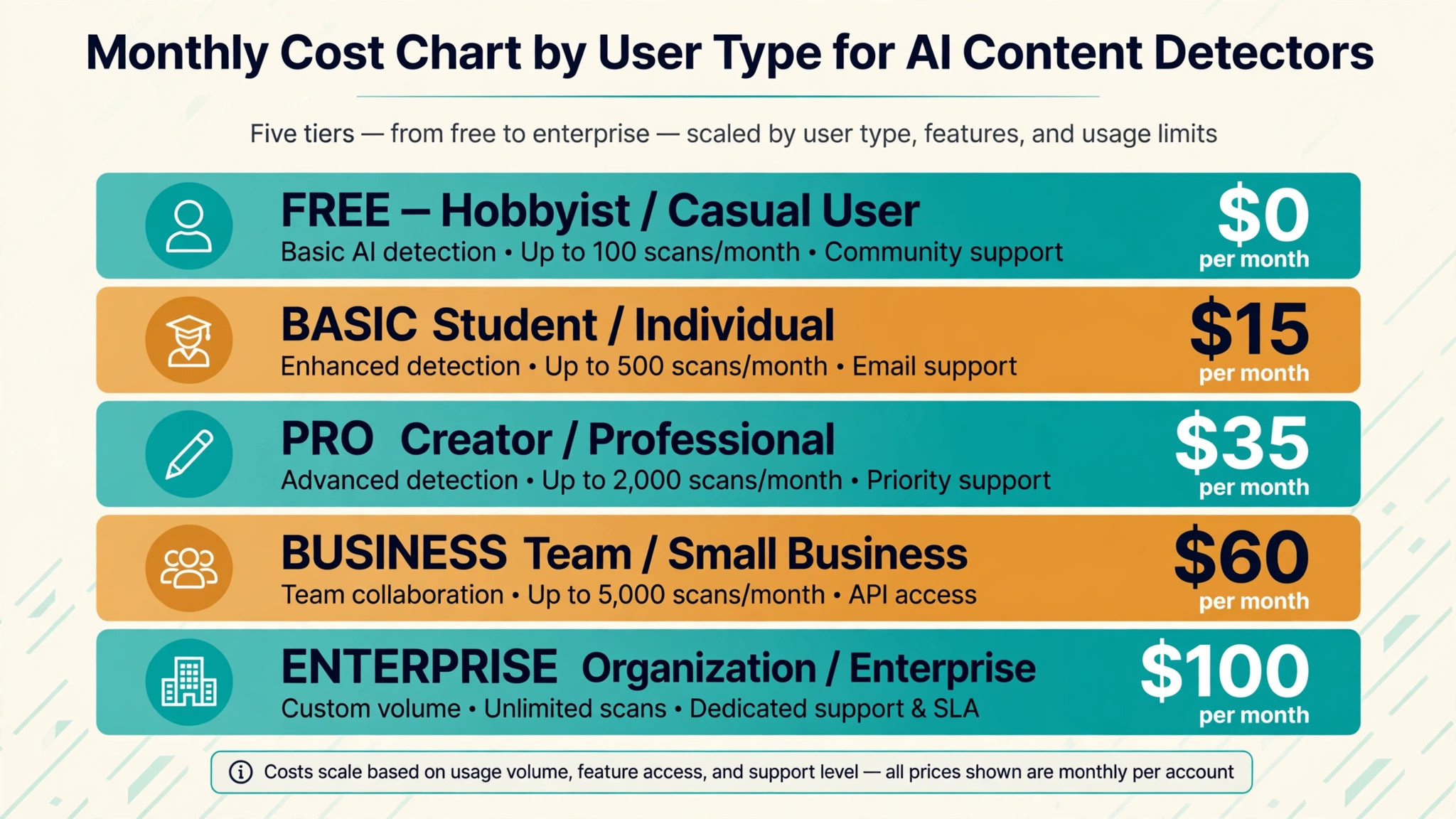
| User type | Monthly volume | Tool stack | Monthly cost |
|---|---|---|---|
| Hobbyist, testing an idea | Low | GPTZero free tier | 0 dollars |
| Solo worker, steady use | Medium | GPTZero paid plan | About 15 dollars |
| Small team, daily use | High | GPTZero plus Originality.ai | About 35 dollars |
| Growing team, heavy use | Very high | Originality.ai plus Copyleaks | About 60 dollars |
| Large team, full volume | Top volume | GPTZero plus Copyleaks team plan | About 100 dollars |
A hobbyist can test the idea for nothing, using free tiers across the tools in this guide, and that is the right way to start. The best ai content detectors are cheapest when you test free first and only pay for the tool that proves itself on your work, because a paid plan bought on a demo is often the most expensive mistake in this category.
A solo worker on a steady schedule pays about 15 dollars a month for one paid plan, which covers daily use with room to spare. A small team that uses the tools every day pays about 35 dollars for two tools that cover different jobs, and that pair is usually better value than one dear tool that does half the work well.
A growing team pays about 60 dollars for a heavier stack, and a large team pays about 100 dollars for team plans with shared seats and admin controls. The stack is what you actually pay for, not the single subscription, so work out the stack cost before you compare headline prices. Check the vendor pricing page before you commit, because prices change often.
How This Guide Ranked the Content Detectors
Every tool in this guide was judged on the same four tests. The first test was output quality on real work, not on vendor demos. The second test was ease of use, including setup time and how fast a new user can get a good result. The third test was pricing at real volume, including free tier limits and the cost of the plan a busy user actually needs.
The fourth test was trust, including commercial rights, data handling, and how the tool treats your work. A tool that scored well on output but poorly on trust was ranked below a tool that scored well on both, because a tool you cannot trust with client work is a tool you cannot use. No vendor paid for a place in this guide, and no ranking was sold.
Field Notes on the Content Detectors
A buyer who tests three tools side by side learns more in one afternoon than a buyer who reads ten reviews. Set the same task in each tool, run it the same way, and compare the results on the same sheet of paper. The differences that matter will show up fast, and the differences that do not matter will fade. Keep the sheet, because it is the evidence behind the decision you will defend to your team.
Pricing pages change often, and a price quoted in a review can be out of date within a month. Before you buy, open the vendor pricing page and check the plan limits, the renewal price, and the cancellation terms. A plan that looks cheap on a monthly price can cost more on annual billing, and a plan that looks dear can include the feature that saves you a second subscription.
The workflow around the tool matters as much as the tool itself. A tool that fits your existing process will be used every day, while a tool that needs a new process will be used for a week and then forgotten. Map the steps from brief to finished work, name the tool that does each step, and check that the handoff between steps is clean before you commit to a purchase.
What the Free Tier Covers for Content Detectors
The free tier is a test, not a plan, and it should be judged as one. Most free tiers in this guide cover a useful amount of real work, from a handful of jobs a month to a daily allowance that suits a solo worker. The limit that matters is the one you hit first, whether that is a word count, a credit balance, or a seat count, and that limit decides how long the free tier lasts.
A free tier that covers your test week is worth more than a free tier that covers a month of light use but blocks the one feature you need. Check three things before you rely on it. Does it include the feature you are testing. Does it allow commercial use of the output. And does it export in the format you need. A free tier that fails any of those three is a demo, not a trial.
When the free tier runs out, the decision is simple. If the tool proved itself on your real work, pay for the cheapest plan that covers your volume and keep the free tier of the second tool for testing new ideas. If the tool did not prove itself, cancel and move on. The worst outcome is paying for a tool you tested once, so set a reminder to cancel every trial on the day you start it.
Mistakes That Make Detector Results Worse
The first mistake is buying on price alone. The best ai content detectors vary widely in what the headline price buys, and the cheapest plan often has limits that force an upgrade in the first month. Work out the cost at your real volume before you buy, and compare the plan you will actually need, not the plan on the pricing page hero section.
The second mistake is trusting the output without checking it. AI tools make mistakes that look confident, from invented facts to garbled text, and a buyer who publishes without reading will ship errors under their own name. Read every output before you use it, and check the parts that matter most, because the tool will not tell you where it guessed.
The third mistake is buying a tool and never learning it. Most tools in this guide have features that only show after a week of real use, from templates to shortcuts to integrations, and a buyer who quits after one day judges the tool on its worst hour. Give each tool a full week on real work before you decide, and keep notes so the decision is based on evidence.
Your Detector Setup Checklist
Use this checklist when you set up your pick from the tools in this guide, and keep a copy with your project notes.
- Define the one job the tool must do for editors and publishers before you open any pricing page.
- Pick your top three tools from the at a glance table and test them on the same three real examples.
- Check the commercial licence for the plan you will buy, not the free plan.
- Set up your workflow end to end, from brief to finished work, and time it on real jobs.
- Work out the monthly cost at your busiest volume and buy the plan that covers it.
- Train the tool on your own examples and templates before you use it on client work.
- Check every output before you publish or send it, and fix the errors the tool missed.
- Review the results after one month, and switch tools if the notes show a better fit.
Related Guides
Keep exploring with these guides on Stratilyze:
- Top 10 AI Content Detectors for Teachers (10 Tools)
- Best AI Keyword Research Tools for Content Creators (8 Tools)
- Best AI Content Planning Tools for Content Creators (12 Tools)
Frequently Asked Questions
Which AI content detector is most accurate for publishers checking freelance work?
Originality.ai is the strongest pick for publishers because it pairs AI detection with plagiarism and fact checking in one scan and handles bulk uploads well. GPTZero is the better pick for a single editor who wants sentence level highlighting and a free tier that covers 10,000 words a month. That is how the best ai content detectors should be judged for your team, on your real work rather than on a ranking.
Can a detector prove a student used AI on an essay?
No detector can prove authorship on its own. Scores are probabilities, and independent studies show meaningful false positive rates, especially on formal writing and text by non native English speakers. Use a score as a reason to talk with the student and look at drafts and revision history.
Why do two detectors disagree on the same text?
Detectors are trained on different data and weigh different signals, so the same passage can score 20 percent on one tool and 80 percent on another. That disagreement is normal. Running two tools and reading the flagged sentences yourself gives a fairer picture than trusting either number alone.
Is GPTZero or Originality.ai better for a small content team?
GPTZero is better for a small team that wants a free start and clear sentence highlighting. Originality.ai is better when the team also needs plagiarism checks, bulk site scanning, and a shared dashboard for many writers. The best ai content detectors differ most on this point, so test it on your own workload before you commit.
Do detectors work on text that was edited after AI wrote it?
Accuracy drops sharply once text is edited, paraphrased, or rewritten by a human. Independent tests show detection of heavily edited AI text falling to single digits on several tools. A detector is most useful on raw, unedited output and least useful on polished hybrid drafts.
What should I do when a detector flags my own human writing?
First, check the flagged sentences for the patterns detectors dislike, such as very even sentence length and formal phrasing. Then run the same text through a second detector, keep your drafts and notes as evidence of your process, and raise the result with the person who asked for the check.
The Detector to Buy This Week
The pick is GPTZero. If you want the best ai content detectors to pay off, start there, test it on your real work for a week, and only then decide whether you need a second tool. GPTZero wins because it does the core job well, it is easy to start, and its price fits a solo worker as well as a team.
Whichever tool you choose, test it on your own examples, check every output before you use it, and model the cost at your busiest month. A tool earns its fee in work that ships on time, to a good standard, and at a price you can defend. Choose the tool that does those three jobs on your busiest week, and the rest of the feature list will take care of itself.